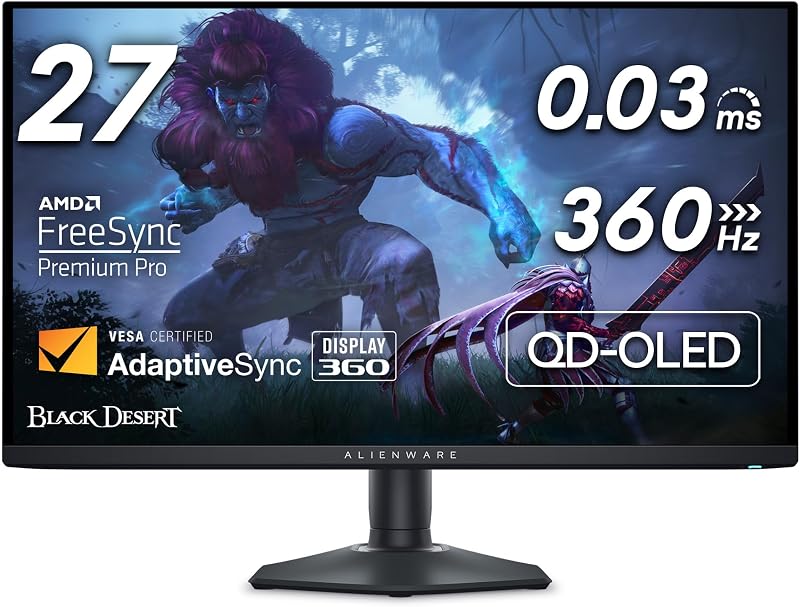
The single deciding factor between the Dell S2725QS and the Samsung Odyssey Neo G7 32 comes down to display engineering: a compact, flat 27-inch IPS panel tailored for daily productivity and clean desk aesthetics versus an aggressively curved 32-inch Mini-LED powerhouse built for high-contrast HDR gaming. While both monitors deliver razor-sharp 4K resolution across a 16:9 aspect ratio, their backlighting methods, form factors, and intended workflows target completely different setups.
Choose the Dell S2725QS if you want a reliable everyday workspace monitor featuring wide viewing angles, built-in sound, and hardware eye comfort for office tasks and smooth casual gaming. Choose the Samsung Odyssey Neo G7 32 if you want an elite gaming display capable of true black levels, blinding HDR highlights, and a deep peripheral wrap that puts you directly inside your favorite virtual worlds.


Dell S2725QS vs Samsung Odyssey Neo G7 32 at a Glance
| Feature | Dell S2725QS | Samsung Odyssey Neo G7 32 |
|---|---|---|
| Screen Size and Curvature | 27 inches, Flat | 32 inches, 1000R Curved |
| Panel and Backlight Technology | IPS, Standard LED | LCD, Quantum Mini LED |
| Native Resolution | 3840 x 2160 (4K UHD) | 3840 x 2160 (4K UHD) |
| Refresh Rate | 120Hz | 165Hz |
| Response Time | 0.03ms (listing spec) / 5ms (listing title) | 1ms (GTG) |
| Peak Brightness and Contrast | 350 nits, 1500:1 contrast ratio | 2,000 nits, 1,000,000:1 contrast ratio |
| Local Dimming Zones | Not listed | 1,196 Mini LED zones |
| Variable Refresh Rate | AMD FreeSync Premium | Nvidia G-Sync Compatible, AMD FreeSync Premium Pro |
| Audio Hardware | Integrated re-engineered speakers | Not listed |
| Stand Adjustments | Not listed | Height, tilt, swivel, pivot |
| Physical Depth and Weight | 7.89 inches, 14.3 pounds | 12.2 inches, 19 pounds |
| Best For | Daytime productivity, clean desktop setups, and mixed casual media | High-end HDR PC gaming, simulation titles, and dark-room entertainment |
Display Technology and HDR Performance
The contrast between backlighting technologies is where the Dell S2725QS IPS vs Neo G7 Mini LED debate truly begins. Dell utilizes an In-Plane Switching panel backed by standard LED illumination. It reaches a baseline brightness of 350 nits and delivers a static contrast ratio of 1500:1, which is notably higher than older 1000:1 IPS screens. It covers 99% of the sRGB color gamut and features HDR readiness. In well-lit rooms, the Dell produces natural colors, excellent color consistency across its 178-degree viewing angles, and sharp rendering without any backlight blooming around bright elements. However, in a pitch-black room, its backlighting cannot turn off behind dark sections, causing deep blacks to look dark gray.
The Samsung Odyssey Neo G7 32 operates in an entirely different performance class due to Quantum Matrix Technology. Utilizing Quantum Mini LEDs, Samsung packs Odyssey Neo G7 local dimming with 1,196 separate dimming zones paired with 12-bit black level processing. This enables Quantum HDR 2000, capable of hitting a staggering 2,000 nits of peak brightness and a dynamic contrast ratio of 1,000,000:1. When you compare this hardware to enthusiast screens like the asus rog swift pg32uqx vs samsung odyssey neo g7 32, the advantage of dense local dimming becomes obvious. Dark night scenes retain ink-like blackness while torchlight, explosions, and reflections pierce through the screen without washing out adjacent pixels.
For everyday web browsing and desktop work, the Dell offers uniform illumination without the subtle halo artifacts that can sometimes accompany zone transitions on high-contrast text. But when it comes to true high dynamic range content, the Dell simply lacks the hardware illumination required to drive impactful highlights. The Neo G7 delivers breathtaking depth and shadow detail that completely transforms modern HDR-mastered games and cinematic video.
Edge: Samsung Odyssey Neo G7 32 because its 1,196 Mini-LED local dimming zones and 2,000-nit peak output provide authentic, high-impact HDR imagery that standard edge backlights cannot match.
Gaming Speed and Motion Clarity
Choosing between the Dell S2725QS or Samsung Odyssey Neo G7 32 for gaming involves balancing your target frame rates against the capabilities of your graphics card. The Dell S2725QS refresh rate reaches 120Hz, which represents a major upgrade over traditional 60Hz 4K office monitors. It supports AMD FreeSync Premium to eliminate screen tearing during frame rate dips. The product listing notes an ultra-low 0.03ms response time in its feature highlights alongside a 5ms rating in its listing title. In practice, 120Hz provides exceptionally fluid motion for current-generation gaming consoles like the PlayStation 5 and Xbox Series X, as well as mainstream PC gaming, keeping visual clarity stable during rapid camera pans.
Samsung engineers the Odyssey Neo G7 specifically for uncompromising PC gaming performance. It pushes the refresh rate ceiling to 165Hz with a native 1ms gray-to-gray response time. To prevent tearing, stuttering, and input lag, Samsung incorporates both AMD FreeSync Premium Pro and official Nvidia G-Sync Compatible certification. Those weighing gaming displays such as the samsung odyssey neo g7 32 vs lg 27up850 will find that the Neo G7 is purpose-built to track fast-moving targets in competitive first-person shooters without ghosting, smearing, or tearing.
Driving 3840 x 2160 pixels at 165 frames per second requires an exceptionally capable graphics card. However, the Neo G7 provides the headroom for high-end setups while still scaling gracefully down to lower frame rates via variable refresh rate synchronization. While the Dell handles casual exploration games and 120Hz console titles with ease, the Samsung holds an undeniable advantage in input response, raw frame delivery, and dual-ecosystem GPU compatibility.
Edge: Samsung Odyssey Neo G7 32 because its 165Hz panel, certified G-Sync compatibility, and 1ms GTG response time yield superior motion sharpness and lower latency for fast-paced gaming.
Screen Size, Curvature, and Visual Immersion
The physical canvas creates a totally different visual experience between these two displays. The Dell S2725QS features a traditional flat 27-inch screen. Packing 3840 x 2160 pixels into this diagonal results in a tight pixel pitch of 163 pixels per inch. This high pixel density makes text appear razor-sharp and eliminates visible jagged edges on icons and UI elements. The flat profile ensures that horizontal lines, architectural blueprints, and spreadsheet borders stay perfectly straight across your entire field of view, making it a familiar and predictable tool for standard desktop tasks.
The Samsung Odyssey Neo G7 32 expands your viewport to a 32-inch screen shaped with an intense 1000R curvature. A 1000R curve matches the natural peripheral curvature of the human eye, wrapping the display edges forward to pull your peripheral vision into the center of the action. Samsung also integrates an Ultrawide Game View setting that lets you switch the display to a 21:9 aspect ratio to uncover hidden environment details or flank enemies. Exploring format shifts like those seen in 1440p vs 4k monitor evaluations shows that 32 inches is widely regarded as the sweet spot for 4K immersion, providing large visual scale without sacrificing detail.
However, the aggressive 1000R curve carries functional consequences outside of gaming. Straight horizontal lines appear slightly bowed, which can disorient users who spend their days reviewing CAD drawings, financial tables, or layout designs. For gamers seeking total immersion in driving simulators, flight cockpits, and open-world landscapes, the wrap-around 32-inch curve creates an unmatched sense of depth, but the Dell remains far easier to use for general non-gaming software.
Edge: Samsung Odyssey Neo G7 32 for gaming immersion, thanks to its wrap-around 1000R curvature and expansive 32-inch screen real estate.
Desktop Ergonomics and Everyday Productivity
When assessing the Dell S2725QS or Samsung Odyssey Neo G7 32 for productivity, daily comfort and office ergonomics come to the forefront. A thorough Dell S2725QS review highlights the display’s office-first design philosophy. It incorporates improved ComfortView Plus hardware, which actively reduces harmful blue light emissions to 35% or less without shifting color balance toward a sickly yellow cast. Backed by certified eye comfort ratings and a matte anti-glare finish, the Dell allows you to analyze documents, write code, and process spreadsheets all day with minimal ocular fatigue. Its flat IPS panel ensures that shifting your seating position does not degrade color accuracy or wash out contrast.
The Samsung Odyssey Neo G7 32 offers extensive physical stand adjustments, enabling you to tilt, swivel, pivot, and adjust the monitor’s height to align with your posture. While its listing specifications mention a glossy finish, the product description emphasizes a distraction-free matte display engineered to absorb ambient light rather than reflect it. Readers exploring curved alternatives such as the dell s2725dsm vs samsung odyssey g7 27 know that a deep 1000R bend requires precise head positioning directly in the focal center. Sitting off to the side causes the curved edges to reflect ambient room lighting unevenly and distorts window geometry across large desktop layouts.
Sound is another clear differentiator. The Dell features integrated re-engineered sound quality, packing greater output power, deeper frequency response, and broader dynamic decibel range than prior generations. This eliminates the need for external desktop speakers or cluttering wires for video conference calls and background music. The Samsung listing does not specify internal speakers, meaning you must route audio through a dedicated gaming headset or standalone desktop monitors. For clean, stress-free office productivity, the Dell provides a far more practical, integrated package.
Edge: Dell S2725QS because its flat IPS screen, hardware ComfortView Plus blue light filtering, and integrated audio create an effortless workspace for productivity.
Physical Footprint, Design, and Setup Integration
Desk management and physical dimensions can quickly make or break your setup. The Dell S2725QS is built around a modern, minimalist aesthetic featuring ultra-thin bezels and an elegant ash white rear chassis. Its total dimensions measure 7.89 inches deep, 24.08 inches wide, and 15.3 inches high, weighing in at a manageable 14.3 pounds. The slim stand base sits unobtrusively on standard home office desks, leaving abundant space for keyboards, notebooks, and writing materials. It blends naturally into contemporary home decor without looking like an aggressive gaming accessory.
In contrast, any detailed Samsung Odyssey Neo G7 32 review must account for the display’s massive physical footprint. Spanning 28.1 inches wide, 23.9 inches high, and an imposing 12.2 inches deep, this 19-pound monitor demands a deep desk to position the curved panel at an ergonomic distance. To enhance gaming atmospheres, Samsung adds rear CoreSync lighting that syncs ambient RGB illumination with the dominant colors on your screen, casting game hues onto surrounding walls. Its hardware connectivity includes DisplayPort, HDMI, and USB connections, with the listing citing both wired and wireless connectivity technologies along with 240V AC operation.
When considering setups like those explored in the dell u3423we vs samsung odyssey g9 49 guide, desk space allocation is critical. If your desk is shallow, the Neo G7 will sit uncomfortably close to your face, making its 1000R curve overwhelming. The Dell S2725QS installs cleanly into tight spaces, mounts easily, and avoids dominating your entire work environment, whereas the Samsung requires substantial desk depth and planning to integrate successfully.
Edge: Dell S2725QS for its space-efficient 7.89-inch footprint, lightweight frame, and clean minimalist styling that easily integrates into any room.
Pros and Cons
Dell S2725QS
Pros
- Color-accurate 4K IPS panel
- Hardware low blue light ComfortView Plus
- Built-in upgraded stereo speakers
- Compact footprint fits smaller desks
Cons
- Standard 350-nit peak brightness
- Lower 120Hz maximum refresh rate
- Lacks Mini-LED local dimming
Samsung Odyssey Neo G7 32
Pros
- Quantum Mini-LED with 1196 dimming zones
- Massive 2000-nit peak HDR brightness
- Faster 165Hz refresh with G-Sync support
- Immersive 32-inch 1000R curved display
Cons
- Aggressive 1000R curve warps straight lines
- Bulky 12.2-inch stand footprint
- Heavier 19-pound chassis
View Samsung Odyssey Neo G7 32 on Amazon
Who Should Buy Each One
Choose the Dell S2725QS If

- You spend your workday managing spreadsheets, text documents, or digital assets where flat panel geometry and wide IPS viewing angles are essential.
- You have a standard or shallow desk and need a monitor that occupies less than 8 inches of total depth.
- You want built-in re-engineered audio and certified hardware low-blue-light technology without buying extra desk accessories.
- You plan to play console games at 4K 120Hz or casual PC games while prioritizing ultra-sharp 163 PPI text rendering.
Choose the Samsung Odyssey Neo G7 32 If

- You demand class-leading HDR gaming enabled by 1,196 Mini-LED dimming zones and an explosive 2,000-nit peak brightness rating.
- You want a deeply immersive 1000R curved 32-inch screen that fills your field of view during flight simulators, racers, and action games.
- You run a high-performance PC graphics card capable of driving 4K visuals up to 165Hz with certified Nvidia G-Sync or FreeSync Premium Pro.
- You enjoy ambient RGB backlighting via CoreSync technology and require extensive mechanical adjustments including height, tilt, swivel, and pivot.
Final Verdict
When evaluating the Samsung Odyssey Neo G7 32 vs Dell S2725QS, the Samsung emerges as the definitive choice for enthusiasts chasing visual spectacle and peak gaming capabilities. Its 1,196 Mini-LED dimming zones, 2,000-nit Quantum HDR capability, 165Hz refresh rate, and 1ms GTG response time produce a breathtaking gaming picture that standard edge-lit displays cannot duplicate. If you play graphically rich titles in dark rooms and have the desk depth to support an aggressive 1000R curve, the Neo G7 delivers an extraordinary tier of entertainment immersion that proves why it is widely celebrated among high-end gamers.
However, for the vast majority of professionals, students, and mixed-use desktop users, the Dell S2725QS is the smarter and far more practical display. Its flat 27-inch IPS panel eliminates line distortion, its 120Hz refresh rate keeps casual gaming and scrolling perfectly smooth, and its hardware ComfortView Plus system safeguards your eyes during extended work sessions. Factor in its integrated speakers and compact 7.89-inch desk footprint, and the Dell stands out as a versatile 4K daily workhorse that comfortably handles business hours by day and gaming by night.
FAQ
Does the Dell S2725QS support true local dimming?
The product listing for the Dell S2725QS does not specify local dimming zones. It relies on standard LED backlighting with a 1500:1 static contrast ratio and HDR readiness, which provides reliable uniformity across wide viewing angles but does not offer the localized backlight control found on Mini-LED monitors.
Can the Samsung Odyssey Neo G7 32 run in an ultrawide aspect ratio?
Yes, the Odyssey Neo G7 features Ultrawide Game View, which allows you to toggle the screen into a 21:9 aspect ratio. This mode expands horizontal visibility to reveal wider environmental details during supported games, framed within the monitor’s 32-inch curved panel.
What is the difference in refresh rate between these two displays?
The Dell S2725QS provides a maximum refresh rate of 120Hz supported by AMD FreeSync Premium, making it well-matched for modern gaming consoles and smooth desktop navigation. The Samsung Odyssey Neo G7 32 achieves a faster 165Hz refresh rate supported by both Nvidia G-Sync Compatible and AMD FreeSync Premium Pro certifications for competitive PC gaming.
Will the curved screen on the Samsung Neo G7 distort office work?
The Samsung features an aggressive 1000R curvature that matches the natural human field of vision. While this creates exceptional immersion during gaming, it introduces a noticeable optical bend to straight horizontal lines, meaning spreadsheets, architectural blueprints, and digital layout grids will appear curved rather than completely straight.
Does either monitor include built-in speakers?
The Dell S2725QS includes integrated audio featuring re-engineered sound quality, greater output power, deeper frequency response, and broader decibel output. The Samsung Odyssey Neo G7 32 listing does not specify integrated speakers, requiring you to use a gaming headset or external desktop speakers for sound.
Which monitor is better suited for a compact computer desk?
The Dell S2725QS is significantly better suited for compact workstations. It measures just 7.89 inches deep and weighs 14.3 pounds, whereas the Samsung Odyssey Neo G7 32 requires 12.2 inches of depth to accommodate its deep curved stand and weighs 19 pounds, requiring a deeper desk to avoid sitting too close to the screen.