Choosing between these two curved QD-OLED ultrawide monitors comes down to whether your graphics hardware benefits more from a dedicated NVIDIA G-Sync Ultimate processor running at 175Hz or an open-standard AMD FreeSync Premium Pro implementation delivering 165Hz with significantly lower power consumption.
Gamers running dedicated GeForce rigs who demand hardware-level variable refresh modules should choose the Alienware AW3423DW, while players seeking broader variable refresh compatibility, documented burn-in warranty protection, and efficient power draw should opt for the Alienware AW3423DWF.


Alienware AW3423DWF vs AW3423DW at a Glance
| Feature | Alienware AW3423DWF | Alienware AW3423DW |
|---|---|---|
| Panel Technology | Quantum Dot OLED (QD-OLED) | Quantum Dot OLED (QD-OLED) |
| Screen Size & Curvature | 34 inches, 1800R | 34.18 inches, 1800R |
| Native Resolution | 3440 x 1440 (21:9 WQHD) | 3440 x 1440 (21:9 WQHD) |
| Maximum Refresh Rate | 165Hz (DisplayPort), 100Hz (HDMI) | 175Hz |
| Adaptive Sync Technology | AMD FreeSync Premium Pro, VESA AdaptiveSync | NVIDIA G-SYNC ULTIMATE |
| Pixel Response Time | 0.1ms Gray-to-Gray | 0.1ms Gray-to-Gray |
| Peak & Typical Brightness | 1000 nits peak, 250 cd/m2 typical | 1000 cd/m2 peak, 250 cd/m2 typical |
| Power Consumption | 34 watts | 200 watts maximum |
| Warranty & Burn-In Coverage | 3-year premium warranty with burn-in protection | Not listed |
| Best For | Multi-GPU setups and energy-conscious setups | High-end NVIDIA GeForce systems |
Variable Refresh Rate and GPU Compatibility
Variable refresh rate technology forms the fundamental technical divide when weighing the Alienware AW3423DW vs AW3423DWF. The DW integrates a proprietary NVIDIA G-SYNC ULTIMATE module, which manages frame timing directly via dedicated internal hardware. This architecture guarantees tear-free rendering, ultra-low latency, and full variable refresh support from 1Hz up to its ceiling. For gamers who prioritize hardware-level synchronization on GeForce cards, this dedicated processor removes communication overhead and delivers rock-solid variable overdrive tracking across the entire frequency range.
In contrast, the DWF takes a more modern, open-standards approach by employing AMD FreeSync Premium Pro alongside VESA AdaptiveSync Display certification. This design avoids the proprietary Nvidia coprocessor, allowing the display to communicate seamlessly with AMD Radeon graphics cards, modern game consoles, and GeForce cards using standard adaptive sync protocols. For shoppers evaluating an alienware aw3423dwf vs aw2725df setup, this open synchronization approach ensures broader cross-platform versatility without tying your monitor investment exclusively to one GPU manufacturer.
The practical result in any AW3423DWF vs AW3423DW G-Sync comparison is a trade-off between proprietary hardware tuning and cross-vendor flexibility. While the G-Sync Ultimate module in the DW excels inside pure Nvidia environments, the FreeSync Premium Pro certification on the DWF delivers HDR tone mapping coordinates directly to the display pipeline without introducing vendor lock-in. Both displays eliminate frame tearing and stutter with equal competence during fast-paced play, but the hardware foundation driving that smoothness is entirely distinct.
Edge: Alienware AW3423DW for dedicated GeForce setups requiring a hardware G-Sync Ultimate module, while the DWF takes the advantage for mixed-hardware flexibility.
Refresh Rate and Motion Performance
Fluid motion and low input lag represent the core promise of QD-OLED panels, and understanding the AW3423DWF vs AW3423DW refresh rate differences is critical before making a buying decision. The DW provides a maximum native refresh rate of 175Hz, providing an extra 10 frames per second over the 165Hz ceiling of the DWF. When tracking targets in high-velocity shooters or sweeping across racing simulations, that extra headroom offers a modest improvement in motion resolution and temporal fluidity.
Pixel responsiveness is identical across both units, with each display boasting an industry-leading 0.1ms Gray-to-Gray response time. Because QD-OLED panels change pixel states almost instantaneously without the liquid crystal sluggishness found in traditional IPS or VA screens, fast motion exhibits zero noticeable ghosting or trailing on either screen. When evaluating the alienware aw3423dw vs aw2725df or looking at standard ultrawide panels, both 34-inch displays offer near-instantaneous transitions that elevate high-framerate clarity.
Port limitations introduce an important operational distinction between the two. The DWF specifications state that while its DisplayPort connection reaches the full 165Hz, its HDMI inputs are limited to 100Hz at the native 3440 x 1440 resolution. The DW drives its complete 175Hz capability through DisplayPort for uncompromised PC performance. For players deciding between the Alienware AW3423DWF or AW3423DW for gaming, that 10Hz differential is subtle in real-world matches, but the DW holds the numerical high ground on maximum throughput.
Edge: Alienware AW3423DW for delivering a higher 175Hz ceiling over DisplayPort.
HDR Capabilities and Peak Luminance
High dynamic range visual impact is a central selling point for Quantum Dot OLED technology, making the AW3423DWF vs AW3423DW HDR battle especially important. Both displays feature a standard typical brightness of 250 cd/m2 and reach an intense peak brightness of 1000 nits (cd/m2). Because both monitors leverage self-emissive pixels with a 1,000,000:1 contrast ratio, they produce absolute true blacks with zero blooming or backlight haloing, allowing small specular highlights to stand out with pristine clarity.
Where the listings separate is in formal third-party dynamic range validation. Any comprehensive Alienware AW3423DWF review will highlight its official VESA DisplayHDR TrueBlack 400 certification. This testing standard confirms that the panel meets strict black level thresholds and sustained luminance targets. Furthermore, the DWF incorporates TUV-certified ComfortView Plus hardware, an integrated low-blue-light technology that reduces eye strain during marathon gaming sessions without degrading color fidelity or altering white point balance.
The DW listing emphasizes its 1000 cd/m2 peak luminance, 1M:1 contrast ratio, and deep black reproduction, but it lacks the specific VESA DisplayHDR TrueBlack 400 designation outlined on the DWF spec sheet. In side-by-side comparisons such as the alienware aw3423dwf vs lg 32gs95ue, both Alienware displays provide breathtaking contrast and vibrancy compared to conventional backlit screens, yet the DWF offers clearer documented compliance with standardized HDR industry benchmarks.
Edge: Alienware AW3423DWF for its verified VESA DisplayHDR TrueBlack 400 certification and built-in ComfortView Plus filtering.
Color Accuracy and Creator Functionality
Both monitors utilize a Quantum Dot layer over organic light-emitting diodes to generate rich, saturated primaries that surpass standard WOLED panels. In an in-depth Alienware AW3423DW review, color rendering stands out as a high-water mark, with the listing recording a 1.07-billion color palette and a color gamut spec of 149. The DWF matches this cinematic fidelity with documented coverage of 99.3% of the cinema-grade DCI-P3 color space, paired with factory calibration achieving a Delta E under 2 right out of the box.
Content creators and digital artists will appreciate that both models include a dedicated Creator Mode accessible through the on-screen display. This feature allows users to clamp the wide native QD-OLED gamut down to the standard sRGB color space, eliminating oversaturation when editing web graphics, photos, or YouTube videos. On the DW, the Creator Mode also provides manual gamma adjustments alongside the DCI-P3 and sRGB color space selection, giving editors fine-grained control over midtone luminance curves directly in hardware.
The DWF provides quick switching via its 5-axis OSD joystick, ensuring that users can toggle between color-critical work and expansive gaming palettes in seconds. When examining alternative matchups like the alienware aw3423dw vs lg 32gs95ue, Alienware sets a high standard for color management on curved ultrawide panels. Because both screens offer comprehensive Creator Mode tools, precise factory tuning, and wide gamut reproduction, creative professionals will find exceptional rendering performance on either display.
Edge: Tie, as both monitors provide specialized Creator Mode color clamps and wide Quantum Dot color gamuts.
Power Consumption, Acoustics, and Chassis Design
The mechanical build and thermal management systems highlight significant engineering contrasts between these two displays. The Alienware AW3423DW vs DWF comparison reveals a massive difference in energy consumption: the DWF is rated at an ultra-efficient 34 watts of power draw, whereas the DW listing specifies a maximum power consumption of 200 watts. This substantial difference is largely tied to the dedicated G-Sync hardware module inside the DW, which requires active processing power and supplemental cooling.
To keep internal components cool, both screens employ 360-degree ventilation channels integrated into Alienware’s Legend 2.0 design framework. However, the higher wattage of the DW demands more aggressive thermal management, which can introduce noticeable cooling fan activity during heavy gaming workloads. The 34W rating of the DWF allows it to run substantially cooler, making it an attractive choice for users who value a quieter, low-heat desktop environment, a factor often considered when reviewing monitors like the alienware aw2725df vs lg 32gs95ue.
Aesthetic preferences also split the two displays. The DW is styled in Alienware’s signature Lunar Light colorway, featuring a two-tone white and black housing accented by customizable stadium loop OLED AlienFX backlighting, weighing 21.8 pounds. The DWF is finished in a stealthy, unified dark Black finish, weighing 20.5 pounds with slightly slimmer packaging dimensions. Both feature height, tilt, and swivel articulation, alongside a centralized 5-axis joystick, but the DWF is noticeably lighter and more energy efficient.
Edge: Alienware AW3423DWF for drawing only 34 watts compared to the 200-watt maximum of the DW.
Warranty Protection and OLED Reliability
Operating an OLED display comes with the perpetual concern of permanent image retention, making factory warranty terms an essential buying factor. The product listing for the DWF explicitly addresses this customer concern by including a 3-year premium warranty that directly covers OLED burn-in. This documented coverage gives buyers peace of mind when leaving desktop elements, browser tabs, or game interface HUDs static on the screen for long stretches.
The manufacturer documentation highlights improved OLED reliability on the DWF, explicitly targeting the longevity of the subpixel structure. For gamers who work from home and use a single panel for productivity by day and immersive gaming by night, having written burn-in coverage integrated into the purchase agreement removes substantial risk. It ensures that any premature subpixel degradation within the three-year window will be serviced by the manufacturer.
On the other hand, the official Amazon listing for the DW details environmental operating parameters-such as a minimum operating temperature of 0 degrees Celsius-but it does not specify a warranty duration or mention burn-in protection in its specifications table. While third-party policies may vary, based strictly on the provided manufacturer listing data, the DWF provides explicit consumer safeguards that the DW product listing does not state.
Edge: Alienware AW3423DWF for offering a documented 3-year warranty covering OLED burn-in.
Pros and Cons
Alienware AW3423DWF
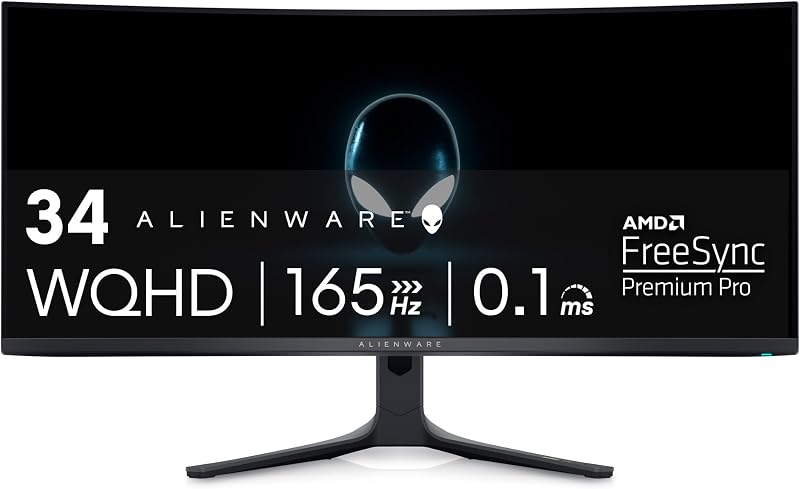
Pros
- Documented 3-year burn-in warranty
- Low 34-watt power consumption
- VESA DisplayHDR TrueBlack 400 certified
- Factory calibrated Delta E under 2
Cons
- HDMI restricted to 100Hz
- Lower 165Hz peak refresh rate
View Alienware AW3423DWF on Amazon
Alienware AW3423DW

Pros
- Native NVIDIA G-Sync Ultimate hardware
- Higher 175Hz refresh rate
- 07 billion displayable colors
- Iconic Lunar Light exterior finish
Cons
- High 200W peak power consumption
- Listing does not specify burn-in coverage
View Alienware AW3423DW on Amazon
Who Should Buy Each One
Choose the Alienware AW3423DWF If
- You want documented 3-year warranty protection that explicitly includes OLED burn-in coverage.
- You prioritize low energy usage and cooler operation with its rated 34-watt power consumption.
- You use an AMD Radeon graphics card or plan to connect game consoles using open VESA AdaptiveSync standards.
- You prefer an all-black Legend 2.0 chassis over a two-tone white and black aesthetic.
Choose the Alienware AW3423DW If
- You run a dedicated high-end NVIDIA GeForce graphics card and want hardware-based G-Sync Ultimate processing.
- You want the absolute highest refresh rate available in this form factor at 175Hz.
- You want the iconic Lunar Light white exterior styling with stadium loop AlienFX ambient lighting.
- You want integrated physical gamma adjustments alongside color gamut clamps inside the hardware Creator Mode.
Final Verdict
For the vast majority of PC gamers and creators, the Alienware AW3423DWF is the smarter overall choice. It delivers the same stunning 34-inch 1800R QD-OLED visual experience, 0.1ms response times, and 1000-nit peak luminance as its sibling, but pairs it with verified VESA DisplayHDR TrueBlack 400 certification, an ultra-low 34-watt power rating, and open adaptive sync compatibility. Crucially, its documented 3-year warranty with explicit burn-in protection shields your investment from long-term image retention concerns.
The Alienware AW3423DW remains an exceptional piece of gaming hardware that justifies selection under specific conditions. If you operate an uncompromising NVIDIA GeForce battle station, want native hardware G-Sync Ultimate performance across the entire frequency range, and desire the extra 10Hz motion fluidity delivered by its 175Hz ceiling, the DW delivers premium execution. However, unless your setup explicitly demands Nvidia’s proprietary synchronization module, the refined efficiency and warranty backing of the DWF make it the superior package.
FAQ
Can the Alienware AW3423DWF run G-Sync with an NVIDIA graphics card?
Yes. Although the DWF relies on AMD FreeSync Premium Pro and VESA AdaptiveSync certification rather than a physical Nvidia module, modern GeForce graphics cards support variable refresh rate over DisplayPort on VESA-compliant displays to eliminate screen tearing.
Is the AW3423DW worth it over the DWF for the extra 10Hz refresh rate?
For most players, the jump from 165Hz on the DWF to 175Hz on the DW produces only a subtle difference in motion perception. Unless you are an ultra-competitive player with an Nvidia graphics card capable of sustaining 175 frames per second at 3440 x 1440, the 10Hz difference alone rarely justifies choosing the DW.
Does the Alienware AW3423DWF have HDMI 2.1 ports?
The listing specifications do not state the specific HDMI revision for the DWF, but they explicitly specify that its HDMI resolution operates at a maximum refresh rate of 100Hz at 3440 x 1440, while full 165Hz output requires the DisplayPort connection.
Which monitor has better burn-in warranty protection?
The Alienware AW3423DWF product listing explicitly details a 3-year premium warranty that includes coverage for OLED burn-in. The listing for the DW does not specify warranty length or burn-in coverage terms in its product data.
Why is the power consumption so much higher on the AW3423DW?
The DW lists a maximum power consumption of 200 watts, compared to just 34 watts for the DWF. This elevated power draw is primarily due to the dedicated internal NVIDIA G-Sync Ultimate hardware processor and its associated cooling system inside the DW chassis.
Can both monitors be calibrated for professional photo and video editing?
Yes. Both models feature an integrated Creator Mode in their on-screen menus, allowing users to clamp the wide native QD-OLED color space down to sRGB or DCI-P3. The DWF arrives with a factory calibration of Delta E under 2, while the DW listing adds manual gamma controls within its Creator Mode settings.


