Choosing between the Alienware AW3423DWF and the Alienware AW2725DF comes down to a direct trade-off between cinematic ultrawide immersion and blistering esports refresh rates. While both displays leverage Quantum Dot OLED panels to deliver true black levels and exceptional color volume, the physical form factor and motion delivery of each monitor target fundamentally different playstyles.
Gamers seeking panoramic peripheral vision, extra screen real estate for multitasking, and a gentle curve should choose the Alienware AW3423DWF. Competitive players who demand maximum motion clarity, instantaneous input response, and tournament-standard framing should invest in the Alienware AW2725DF.


Alienware AW3423DWF vs AW2725DF at a Glance
| Feature | Alienware AW3423DWF | Alienware AW2725DF |
|---|---|---|
| Screen Size | 34 inches | 27 inches (26.7-inch panel) |
| Panel Technology | Quantum Dot OLED (QD-OLED) | Quantum Dot OLED (QD-OLED) |
| Native Resolution | 3440 x 1440 (WQHD) | 2560 x 1440 (QHD Wide) |
| Aspect Ratio | 21:9 | 16:10 |
| Refresh Rate | 165Hz (native DisplayPort) | 360Hz |
| Gray-to-Gray Response Time | 0.1 ms | 0.03 ms |
| Panel Curvature | 1800R curved | Not listed |
| Contrast Ratio | 1,000,000:1 | 1,500,000:1 |
| Stand Adjustability | Not listed | Height, tilt, swivel, pivot |
| Best For | Cinematic adventures and immersive simulators | High-speed competitive esports and shooters |
Refresh Rate and Motion Clarity
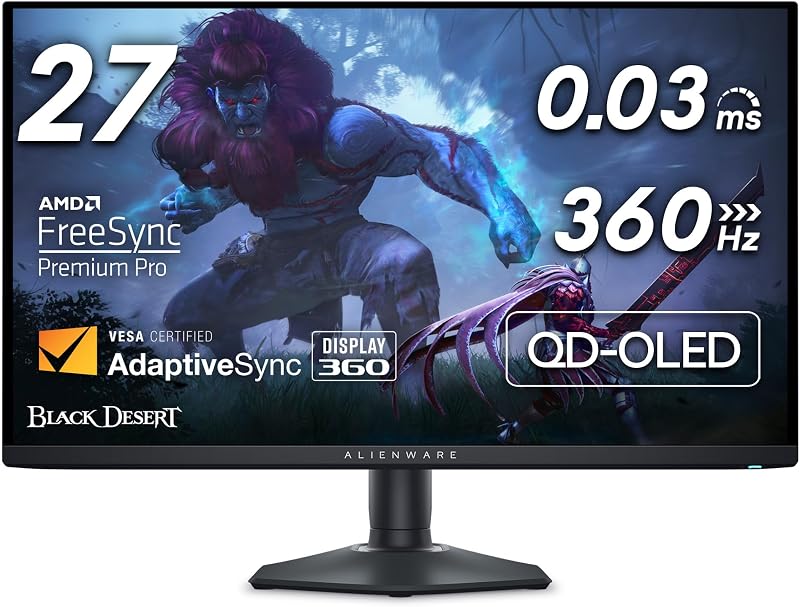
The operational divide between these two gaming monitors centers on speed. In an head-to-head evaluation of AW3423DWF 165Hz vs AW2725DF 360Hz, the AW2725DF delivers more than double the frame refresh frequency. Operating at 360Hz means the display renders a new visual frame every 2.77 milliseconds, compared to 6.06 milliseconds on a 165Hz panel. When tracking fast-moving targets across the screen, this reduction in frame interval translates to unbroken motion fluidity, reduced input lag, and immediate visual tracking.
Pixel response times further elevate this performance gap. The AW3423DWF lists an industry-grade 0.1ms gray-to-gray response time, which already eliminates ghosting and motion smearing compared to traditional LCD panels. However, the AW2725DF drops response time down to an unprecedented 0.03ms minimum. This near-instantaneous pixel transition ensures that even during violent camera turns in tactical shooters, micro-details remain sharp and free of overshoot artifacts.
Both monitors incorporate AMD FreeSync Premium Pro and VESA AdaptiveSync Display certifications to prevent screen tearing and frame pacing stutters. When deciding between the AW3423DWF or AW2725DF for competitive gaming, the speed advantage of the 27-inch panel is absolute. While 165Hz remains remarkably fluid for adventure games and casual lobbies, competitive ranked players will notice the precision edge provided by 360Hz and 0.03ms transitions.
Edge: Alienware AW2725DF provides superior competitive motion clarity thanks to its 360Hz refresh rate and 0.03ms response time.
Screen Size, Aspect Ratio, and Immersion
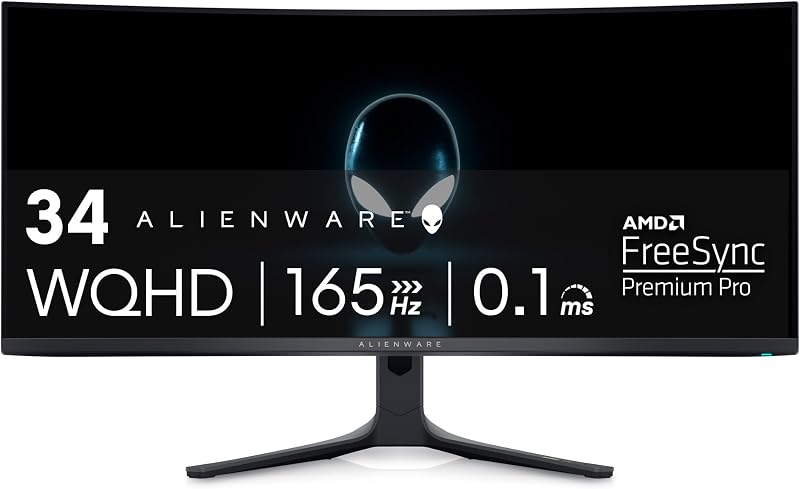
Physical presentation dictates how games feel on each display. The AW3423DWF features an expansive 34-inch diagonal screen wrapped in an 1800R curve. Its 21:9 ultrawide aspect ratio extends peripheral vision substantially, pulling you into game worlds by filling your natural field of view. When evaluating the alienware aw3423dwf vs aw3423dw ecosystem, this physical curvature remains a major highlight, gently wrapping the edges of the display inward to maintain consistent viewing distances across the entire width of the panel.
In contrast, the AW2725DF offers a 27-inch display footprint (specified with a 26.7-inch viewable area and a 16:10 aspect ratio in the listing data). While this screen area provides plenty of room for tactical play, it presents a traditional flat field where the entire image remains within central focus without requiring head movement. In fast-paced esports, having the entire battlefield visible at a single glance avoids missed cues on the outer perimeter.
For players considering the Alienware AW3423DWF or AW2725DF for immersion, the 34-inch ultrawide format is unmatched. Simulators, open-world role-playing games, and cinematic narratives gain depth and visual grandeur from the horizontal span of the curved 21:9 layout, making the AW3423DWF feel like a dedicated viewport into digital environments.
Edge: Alienware AW3423DWF delivers vastly deeper immersion with its 34-inch curved 1800R ultrawide form factor.
Resolution, Detail, and Driving Hardware Demands
Rendering resolution impacts both visual fidelity and the processing demands placed on your graphics card. The AW3423DWF utilizes a WQHD resolution of 3440 x 1440, outputting roughly 4.95 million pixels per frame. This wide horizontal density renders intricate landscapes, fine cockpit instruments, and sweeping vistas with crisp separation, while simultaneously offering a generous desktop canvas for productivity.
The AW2725DF operates at a QHD Wide native resolution of 2560 x 1440, producing approximately 3.68 million pixels. By rendering roughly 25 percent fewer pixels per frame than the ultrawide panel, the AW2725DF reduces graphics processing overhead. This allows your graphics card to dedicate its horsepower toward hitting the high frame rates necessary to saturate the 360Hz ceiling. Comparing pixel pitch, the AW3423DWF specifies 0.23 mm, while the AW2725DF listing notes a pixel pitch metric of 111.
Connecting display interfaces also brings operational differences. The AW3423DWF reaches its full 165Hz refresh rate over DisplayPort, but the listing specifies that its HDMI connection is capped at 100Hz. Readers browsing an alienware aw3423dwf vs lg 32gs95ue breakdown often observe how interface bandwidth affects refresh limits. If you plan to switch between PC and gaming consoles, this HDMI restriction matters, whereas the AW2725DF includes high-speed HDMI and DisplayPort inputs alongside USB 3.2 Gen 1 connectivity without listed HDMI frequency throttling.
Edge: Alienware AW3423DWF offers greater visual real estate with 3440 x 1440 resolution, though the AW2725DF is easier to drive at maximum frame rates.
Panel Technology and Visual Performance
Both displays utilize Quantum Dot OLED technology, blending self-emissive organic diodes with quantum dot nanocrystals. This engineering bypasses traditional backlights, allowing every single pixel to turn off completely. As detailed in any comprehensive Alienware AW3423DWF review, this architecture delivers infinite contrast and eliminates light bleed around bright objects set against deep shadows.
On paper, both models provide exceptional visual performance. The AW3423DWF features a 1,000,000:1 contrast ratio, 1000 nits peak brightness, and VESA DisplayHDR TrueBlack 400 certification. The AW2725DF lists an even higher contrast ratio of 1.5 million:1 across SDR and HDR modes, alongside matching VESA DisplayHDR True Black 400 compliance and a 1000 brightness rating. Both panels feature a matte screen finish and wide 178-degree viewing angles, maintaining image clarity from off-center positions without luminance degradation.
Color rendition is nearly identical across both screens. Each unit covers 99.3% of the cinema-grade DCI-P3 color gamut and arrives with factory calibration rated at Delta E<2. When comparing the alienware aw2725df vs samsung odyssey oled g8, this high color accuracy ensures that HDR games and master-grade films render with lifelike saturation and precise tonal gradation right out of the box.
Edge: Tie, as both monitors share premium QD-OLED panels with 99.3% DCI-P3 coverage and DisplayHDR True Black 400 certification.
Ergonomics, Physical Footprint, and Setup Flexibility
Desk space requirements and mechanical adjustability represent practical concerns when comparing the Alienware AW2725DF vs AW3423DWF. The AW2725DF is engineered with a minimal hexagonal base designed specifically to preserve surface area for mouse movement. Its fully adjustable stand supports height adjustment, tilt, swivel, and pivot rotation, allowing users to switch the screen into vertical orientation for specialized workflows or secondary monitoring.
The AW3423DWF demands a much larger physical commitment. Its curved 34-inch chassis measures 32.1 inches deep, 12 inches wide, and 20.7 inches tall with its integrated stand, tipping the scales at 20.5 pounds compared to the nimble 13.9 pounds of the 27-inch model. The 1800R curved frame prevents pivot adjustments, and its broader stance requires a deeper desk surface to ensure comfortable viewing distances.
Physical footprint directly impacts daily usability. In our alienware aw2725df vs lg 32gs95ue coverage, the advantages of compact hexagonal bases for competitive mouse positioning are clear. Low-sensitivity gamers who execute broad arm swipes will appreciate the unobstructed space provided by the AW2725DF base, while the substantial bulk of the AW3423DWF requires careful desktop planning.
Edge: Alienware AW2725DF wins comfortably with its compact hexagonal base, lighter weight, and full pivot adjustability.
Productivity, Software Overlays, and Protection
Beyond baseline gaming, each monitor integrates dedicated features tailored to its intended user base. The AW3423DWF includes an advanced Creator Mode within its centralized 5-axis joystick OSD menu. This feature allows digital artists and content creators to manually toggle between the native DCI-P3 color gamut and the sRGB color space, matching output standards for web publishing. It also incorporates TUV-certified ComfortView Plus hardware low-blue-light technology, reducing ocular strain during extended sessions without distorting color temperature.
The AW2725DF counters with gaming-centric enhancements. It features AlienVision hardware overlays, which project real-time visual assists onto the screen to aid player performance in low-visibility game scenes. Its OSD controls and 3-zone AlienFX customizable lighting integrate seamlessly into high-performance setups, while its power consumption remains lean at 27.6 watts compared to the 34 watts consumed by the larger 34-inch ultrawide.
Long-term panel reliability is supported on both units. The AW3423DWF includes 360-degree ventilation and a 3-year premium warranty that explicitly covers OLED burn-in. The AW2725DF matches this protection with a 3-year Advanced Exchange Service Warranty. Shoppers reading an alienware aw3423dw vs aw2725df evaluation can rest assured that both models carry comprehensive manufacturer backing against image retention.
Edge: Alienware AW3423DWF takes the advantage for general productivity due to its native sRGB Creator Mode and ComfortView Plus hardware.
Pros and Cons
Alienware AW3423DWF
Pros
- 34-inch 1800R curved ultrawide panel
- Expansive 3440 x 1440 WQHD resolution
- Creator Mode with sRGB toggle
- 3-year warranty covering OLED burn-in
Cons
- Limited to 100Hz over HDMI
- Lower 165Hz maximum refresh rate
- Deep 32.1-inch desk footprint
View Alienware AW3423DWF on Amazon
Alienware AW2725DF
Pros
- Blistering 360Hz refresh rate
- Rapid 0.03 ms response time
- Full stand ergonomics including pivot
- Compact space-saving hexagonal base
Cons
- Smaller 27-inch viewing area
- Lacks ultrawide peripheral immersion
- Higher frame rates demand powerful hardware
View Alienware AW2725DF on Amazon
Who Should Buy Each One
Choose the Alienware AW3423DWF If
- You primarily play immersive RPGs, flight simulators, or racing games that benefit from an ultrawide 21:9 field of view.
- You want a curved 1800R display that fills your peripheral vision without causing distortion at the edges.
- You do color-critical digital design work and require a hardware Creator Mode to clamp color spaces to sRGB.
- You value expansive desktop real estate for side-by-side window multitasking on a single 3440 x 1440 screen.
Choose the Alienware AW2725DF If
- You compete in fast-paced first-person shooters where a 360Hz refresh rate and 0.03ms response time provide a reaction advantage.
- You prefer a compact 27-inch monitor head that keeps the entire gaming interface within your central sightlines.
- You need full stand ergonomics, including pivot rotation and a space-saving hexagonal base for aggressive keyboard angles.
- You want high-speed gaming visuals without demanding the excessive GPU overhead of rendering ultrawide resolutions.
Final Verdict
When considering whether the Alienware AW2725DF review scores justify a purchase, the answer depends entirely on your gaming priorities. The AW2725DF is an esports triumph, pairing the perfect contrast and color saturation of Quantum Dot OLED with an unprecedented 360Hz refresh rate and 0.03ms pixel response. For competitive shooters, fighting games, and fast-paced tracking, it stands as the faster, more responsive gaming monitor with superior desk ergonomics.
Conversely, answering whether is Alienware AW3423DWF worth it comes down to visual scale and atmospheric presence. The AW3423DWF remains the superior pick for the majority of everyday PC gamers who prioritize breathtaking visual immersion over extreme competitive frame rates. Its curved 34-inch ultrawide canvas, 3440 x 1440 resolution, and versatile Creator Mode provide an unmatched cinematic experience that transforms story-driven titles into unforgettable adventures.
FAQ
Does the Alienware AW3423DWF support 165Hz over HDMI?
No. According to the manufacturer listing specifications, the AW3423DWF delivers its full 165Hz refresh rate exclusively through its DisplayPort connection. Connecting via HDMI limits the native 3440 x 1440 resolution to a maximum refresh rate of 100Hz.
Is the AW2725DF worth it for casual single-player gaming?
While the AW2725DF features stunning QD-OLED contrast and 99.3% DCI-P3 color reproduction, casual adventure games rarely push frame rates to 360Hz. If you do not play competitive multiplayer shooters, the AW3423DWF offers a more dramatic visual upgrade through its curved ultrawide form factor.
Do both Alienware QD-OLED monitors include burn-in warranty coverage?
Yes. The AW3423DWF includes a 3-year premium warranty that explicitly lists coverage for OLED burn-in. The AW2725DF is backed by Alienware’s 3-year Advanced Exchange Service Warranty, providing equal coverage duration for display peace of mind.
Can the Alienware AW2725DF rotate into portrait orientation?
Yes. The stand included with the AW2725DF features full ergonomic adjustments, specifically supporting height, tilt, swivel, and pivot rotation. The curved 34-inch AW3423DWF does not support portrait pivot rotation due to its ultrawide curved design.
Which monitor demands more graphics card performance?
The AW3423DWF requires more GPU power per individual frame because its 3440 x 1440 resolution contains nearly five million pixels, compared to 3.68 million on the 2560 x 1440 AW2725DF. However, fully driving the AW2725DF to its 360Hz refresh cap requires an exceptionally fast graphics card and processor combination.
Does the AW3423DWF include dedicated sRGB color controls?
Yes. The AW3423DWF features a specialized Creator Mode within its OSD menu. This feature allows content creators to switch the panel’s color output between the native wide DCI-P3 color gamut and the standard sRGB color space to ensure accurate color grading.


