Choosing between a 60% keyboard and a tenkeyless (TKL) board comes down to a direct physical trade-off: reclaiming massive mouse sweeping area by eliminating non-essential keys versus preserving dedicated arrow and function clusters for instant navigation. While both form factors ditch the traditional right-hand number pad to bring your hands closer together, the 60% layout cuts deeper by removing the arrow cluster, navigation island, and top function row entirely.
Gamers who favor low-sensitivity mouse tracking and need maximum desk clearance for wide flicks should choose the 60% keyboard. Multitaskers, coders, and everyday typists who rely on frequent cursor movements and direct shortcut keys without memorizing secondary layers should choose the TKL keyboard.



60% vs TKL Keyboards at a Glance
| Attribute | 60% Keyboard | TKL Keyboard |
|---|---|---|
| Key Count Range | 61 to 68 keys | 87 to 90 keys |
| Dedicated Arrow Cluster | Absent on standard 61-key; present on 68-key variants | Dedicated standard cluster on all models |
| Dedicated Function Row (F1-F12) | Absent (accessed via Fn layer combinations) | Dedicated physical row above number row |
| Typical Chassis Width | 12.1 to 12.2 inches | 14.0 to 15.0 inches |
| Switch Replacement | Hot-swappable 3-pin/5-pin sockets available | Soldered mechanical or membrane switches on standard models |
| Dedicated Multimedia Hardware | Absent (handled via Fn combinations) | Available on select models (e.g. clickable volume roller) |
| Environmental Resistance | Not listed on baseline options | Available up to IP32 water and dust resistance |
| Connectivity Port | Detachable USB-C | Detachable Micro USB or fixed wired cable |
| Best For | Competitive FPS gaming and portable setups | Productivity, coding, and general gaming balance |
Desk Space and Mouse Clearance
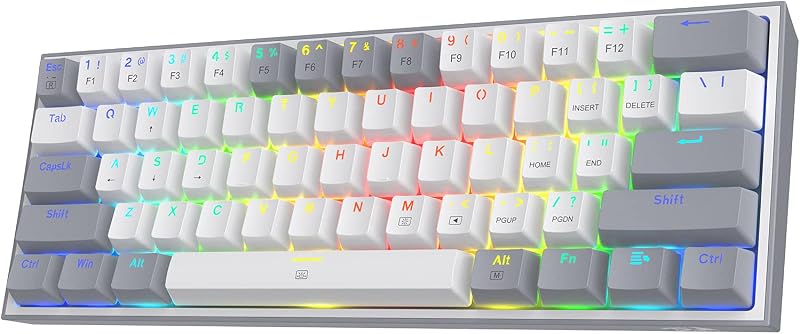
The primary appeal of ultra-compact peripherals is liberating physical desk territory. When comparing 60 percent vs TKL desk space, the physical dimensions tell an immediate story. A standard 60% layout, such as the Redragon K617, measures 12.2 inches long and 5.31 inches wide. Similarly, the MageGee MK-Box measures 12.13 inches long and 3.98 inches wide. In contrast, standard tenkeyless boards require noticeably more horizontal space. The Logitech G PRO spans 14.96 inches in length and 6.3 inches in width. That difference gives the 60% form factor an advantage of roughly 2.8 inches of horizontal desk space.
In practice, those extra inches dramatically change mouse mobility. Competitive gamers operating at low mouse DPI settings need wide, sweeping hand gestures to make complete 180-degree or 360-degree turns. On narrower desks or compact mouse pads, a tenkeyless frame can collide with your mouse during sudden flick shots. Reclaiming that space allows you to center the keyboard directly in front of your body while keeping your mouse hand at a natural, shoulder-width position. If you want to see how tenkeyless frames contrast against full-sized office peripherals, exploring our tkl vs full size keyboard guide provides additional perspective on broader desk footprints.
However, the shrunken footprint of the 60% design forces structural concessions. Compressing 61 keys into a single continuous block removes all breathing room between keyboard sections. For typists with broader shoulders or those who prefer keeping their arms wide, the tight cluster can feel cramped during extended typing sessions. Tenkeyless frames maintain standard key spacing across distinct navigation zones, making them feel more natural if you are unconcerned about maximizing every square centimeter of mouse space.
Edge: 60% keyboard because its shorter width frees up vital physical space for low-sensitivity mouse travel.
Navigation, Arrow Keys, and Daily Productivity
The operational gap between these two layouts becomes obvious the moment you edit a document, write code, or manipulate a spreadsheet. A traditional 60 percent vs tenkeyless layout differs fundamentally in how it handles navigation commands. Standard tenkeyless keyboards supply separate, dedicated islands for inverted-T arrow keys, along with navigation commands including Insert, Delete, Home, End, Page Up, and Page Down. They also keep a full row of F1 through F12 function keys intact at the top of the chassis.
A pure 60% keyboard like the Redragon K617 eliminates these physical zones entirely. To navigate through text or access functional shortcuts, you must press and hold a secondary Fn key in combination with keys like WASD or IJKL. While compact variations like the MageGee MK-Box expand the layout slightly to 68 keys to retain separate physical arrow keys across two sections, they still omit the dedicated top function row. When analyzing a 60% or TKL keyboard for coding, relying on key combinations to jump between lines of syntax, highlight blocks of code, or trigger developer tools creates constant mental friction.
A tenkeyless board retains immediate, muscle-memory navigation. For writers, editors, and programmers who constantly move cursors and highlight text strings, hitting physical arrow keys with one hand without toggling an Fn modifier is far more efficient. Comparing compact work layouts in comparisons like the logitech g915 tkl vs mx keys s highlights how dedicated keys benefit daily workflow. While a 60% keyboard can handle these tasks, the learning curve and finger gymnastics slow down rapid editing.
Edge: TKL keyboard because dedicated navigation clusters and function rows eliminate the friction of secondary key layers.
Gaming Performance and Competitive Esports
In high-stakes competitive gaming, physical ergonomic freedom often outweighs convenience features. Evaluating a 60% or TKL keyboard for gaming reveals why professional esports competitors frequently gravitate toward smaller profiles. The Redragon K617 is designed specifically to eliminate the numpad and navigation cluster to free up sweeping space for low-sensitivity flick aiming. Furthermore, both the Redragon and MageGee options utilize linear red mechanical switches, which offer smooth actuation without a tactile bump or audible click, allowing rapid, repeated keystrokes in intense encounters.
On the tenkeyless side, the Logitech G PRO was co-developed with competitive players, utilizing clicky GX Blue switches that provide an audible click and tactile resistance on every keystroke. While tactile feedback helps confirm key activation, clicky switches are louder in team communication channels. The Logitech board balances this by integrating onboard memory via LIGHTSYNC, allowing users to store custom lighting patterns directly to the hardware for tournament systems that restrict background software installations. Meanwhile, the SteelSeries Apex 3 TKL implements whisper-quiet gaming switches rated for over 20 million keypresses, giving players a silent alternative to loud mechanical switches.
Key registration integrity remains strong across both formats. The MageGee MK-Box features full anti-ghosting across all 68 keys to prevent input conflicts, matched by gaming-grade anti-ghosting on the SteelSeries tenkeyless. Players seeking rapid input response can also read our wooting tenz takeover 75% vs steelseries apex pro tkl breakdown to see how competitive actuation compares across mid-sized frames. Ultimately, because pure in-game mechanics rarely require F-keys or arrow buttons, the 60% form factor offers the cleaner competitive gaming setup by leaving more physical runway for the mouse.
Edge: 60% keyboard because maximizing mouse swipe clearance provides an immediate ergonomic advantage in competitive first-person shooters.
Hardware Features, Media Controls, and Durability
Chassis size dictates what hardware extras a manufacturer can fit on the frame. The SteelSeries Apex 3 TKL takes full advantage of its larger tenkeyless footprint by incorporating dedicated multimedia controls. It features a clickable volume roller and media buttons that let you adjust volume, skip tracks, and pause playback without tabbing out of an active application. In addition, the Apex 3 TKL offers IP32 water and dust resistance, adding physical protection against minor spills and debris.
In contrast, 60% boards conserve space by eliminating secondary hardware toggles entirely. You will not find volume wheels or physical media rockers on the Redragon K617 or MageGee MK-Box; audio and brightness adjustments run through Fn key shortcuts. However, 60% boards frequently offer hardware advantages in modularity and connectivity. The Redragon K617 includes a hot-swappable switch socket compatible with almost any 3-pin or 5-pin mechanical switch, allowing you to swap out damaged switches or alter typing characteristics without soldering.
Cable management and incline ergonomics also differ across these boards. Both 60% models feature detachable USB-C cables, making them easy to pack into a backpack or swap for custom coiled cables. The Logitech G PRO uses a detachable Micro USB cable with a three-pronged support bracket and provides 3-step angle adjustment paired with rubber feet. The MageGee MK-Box features double kickstand feet for angle adjustments and ABS double-shot injection keycaps, weighing 570 grams (1.26 pounds). For an in-depth look at gaming hardware construction across brands, see our analysis of the logitech g413 vs g715. If you want spill resistance and physical volume wheels, TKL wins; if you want switch hot-swapping and modern USB-C detachment, the 60% options pull ahead.
Edge: TKL keyboard because the larger chassis incorporates dedicated volume rollers and expanded environmental protection.
Customization, Backlighting, and Software Flexibility
Personalizing lighting profiles and key remaps is critical when adjusting to smaller layouts. A detailed 60% keyboard review shows that software support is essential to overcome missing physical keys. The Redragon K617 supports dedicated software that lets users program advanced macros, adjust keybindings, and configure up to 20 preset RGB backlighting modes with speed and brightness controls. This macro depth helps offset the loss of dedicated physical keys by letting you map complex strings to single keystrokes.
Tenkeyless boards provide equally robust software ecosystems. The Logitech G PRO links with Logitech G HUB to program F-key macros (F1 through F12) and configure LIGHTSYNC RGB effects. Logitech notes that while keyboard macros are generally restricted in tournament environments, the software allows full customization for home play. The SteelSeries Apex 3 TKL features 8-zone PrismSync RGB illumination, which supports interactive light shows and reactive lighting effects across eight distinct lighting zones. Comparing mid-sized customization options in our keychron q3 vs v3 article demonstrates how key mapping alters daily usability.
For users who prefer avoiding background software entirely, hardware-level lighting controls are available on both sides. The MageGee MK-Box features 16 single-color blue LED backlight modes that can be adjusted directly on the board using Fn combinations for speed and brightness, operating plug-and-play across Windows, Mac, and Linux without drivers. Because both the 60% vs TKL form factor categories deliver capable lighting customization, macro engines, and onboard memory profiles, neither side holds a clear functional advantage in customization.
Edge: Tie because both form factors support extensive onboard lighting profiles and software macro configuration.
Pros and Cons
60% Keyboard
Pros
- Maximum desk clearance for low-sensitivity mouse sweeps
- Compact footprint under 12.5 inches wide
- Hot-swappable switch sockets on select models
- Lightweight builds with detachable USB-C cables
Cons
- Lacks dedicated arrow keys on standard 61-key layouts
- Requires secondary function layers for F1 through F12
View Redragon K617 Wired 60% Compact Hot-Swap on Amazon
TKL Keyboard

Pros
- Dedicated arrow cluster and navigation block
- Direct access to physical F1 through F12 keys
- Hardware volume roller on select models
- Available IP32 water and dust protection
Cons
- Consumes nearly three inches more desk width
- Bulkier frame reduces travel portability
View Logitech G PRO Mechanical TKL Tenkeyless on Amazon
Who Should Buy Each One
Choose the 60% Keyboard If
- You play fast-paced competitive shooters and need unobstructed desk space for low-sensitivity mouse sweeps.
- You travel frequently and want a lightweight keyboard under 1.3 pounds with a detachable USB-C cable.
- You want hot-swappable switch sockets to test different 3-pin or 5-pin mechanical switches without soldering.
- You have a compact desk and prioritize an uncluttered, minimalist gaming setup.
Choose the TKL Keyboard If
- You spend significant time writing, coding, or navigating spreadsheets that require dedicated arrow and navigation keys.
- You frequently use F1 through F12 shortcuts in operating systems, creative apps, or complex simulation games.
- You want physical multimedia hardware like a clickable volume roller without toggling modifier layers.
- You desire extra environmental safeguards, such as IP32 water and dust protection against desk spills.
Final Verdict
For competitive gamers focused purely on mechanics and aiming precision, the 60% keyboard is the superior choice. Trimming the chassis down to roughly 12 inches frees up vital horizontal desk clearance, eliminating physical collisions between your mouse and keyboard during intense flick shots. Models like the Redragon K617 and MageGee MK-Box prove that you can achieve smooth linear switch performance, vibrant backlighting, and detachable cable portability while cutting unnecessary bulk.
However, for general everyday use, programming, and mixed-genre gaming, the tenkeyless format remains the most practical overall design. An honest TKL keyboard review must acknowledge that losing physical arrow keys, the navigation block, and the F-row introduces real workflow friction. Models like the Logitech G PRO and SteelSeries Apex 3 TKL provide the ideal compromise: they eliminate the redundant number pad to improve mouse ergonomics while keeping your standard navigation habits completely intact.
FAQ
Is a 60% or TKL keyboard better for gaming?
A 60% keyboard is generally better for competitive first-person shooters because its narrow width creates maximum space for wide, low-DPI mouse movements. However, a TKL keyboard is better for strategy games, flight simulators, or MMOs that require direct keybindings across the dedicated F1 through F12 function row.
How do you use arrow keys on a standard 60% keyboard?
On standard 61-key layouts like the Redragon K617, arrow navigation is mapped to secondary layers, requiring you to hold the Fn key while pressing designated letters like WASD or IJKL. Certain compact variants, like the 68-key MageGee MK-Box, incorporate dedicated physical arrow keys into the bottom-right corner of the chassis.
Is a TKL keyboard worth it for programming and coding?
Yes, a tenkeyless keyboard is worth it for coding because it preserves the full inverted-T arrow cluster and dedicated navigation keys like Home, End, Page Up, and Page Down. These keys allow developers to jump through code lines and highlight text without holding down secondary modifier keys.
Can you replace switches on 60% and TKL keyboards?
Switch replacement depends entirely on whether the keyboard includes hot-swappable sockets. The 60% Redragon K617 explicitly features hot-swappable sockets compatible with 3-pin and 5-pin switches, allowing solder-free replacement. Many baseline TKL models, such as the Logitech G PRO and SteelSeries Apex 3 TKL, use fixed or non-swappable switch architectures.
What is the main difference between 60 percent and tenkeyless layouts?
A tenkeyless layout removes only the 10-key numeric keypad from the right side, retaining around 87 to 90 keys including the top function row, arrow cluster, and navigation island. A 60% layout removes the numeric keypad, the navigation island, the dedicated arrow cluster, and the top function row, leaving 61 to 68 keys.
Do 60% and TKL keyboards work with gaming consoles?
Compatibility depends on the specific hardware controller. The SteelSeries Apex 3 TKL listing explicitly confirms support for Xbox Series S, Xbox Series X, PS4, and PS5 consoles. Most 60% keyboards, such as the Redragon K617, list compatibility primarily for PC and Windows environments.



