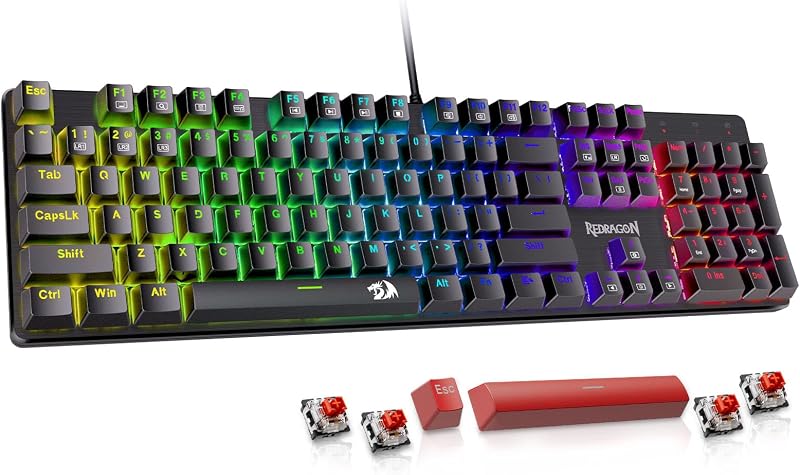
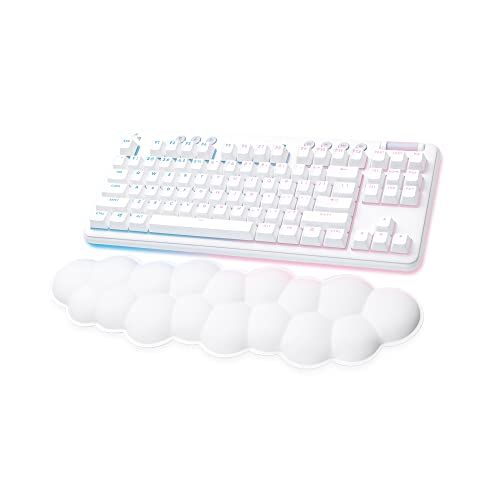
The decisive difference between the Logitech G915 TKL and the Logitech G715 comes down to deck height and switch geometry: the G915 TKL utilizes an ultra-thin 0.88-inch aluminum chassis with short-travel low-profile switches for rapid keystrokes, whereas the G715 uses full-height mechanical switches paired with a plush cloud-shaped palm rest for elevated wrist support.
Gamers demanding maximum keystroke velocity, extensive key-binding layers, and long battery endurance should select the Logitech G915 TKL. Players who want a soft, cushioned typing angle, tactile feedback out of the box, and customizable pastel hardware accents should choose the Logitech G715.

Logitech G915 TKL vs G715 at a Glance
| Attribute | Logitech G915 TKL | Logitech G715 |
|---|---|---|
| Profile & Chassis Height | Ultra-thin low-profile (0.88 inches high) | Standard-profile mechanical (height adjustable) |
| Mechanical Switch Type | GL Linear switches (low-profile) | GX Tactile switches (standard Brown) |
| Actuation Point & Travel | 1.3 mm actuation, 3.2 mm total travel | Not listed |
| Chassis & Keycap Materials | Brushed aluminum top plate, double-shot PBT keycaps | White Mist plastic enclosure, swappable top plate |
| Wireless Connectivity | LIGHTSPEED 2.4 GHz, Bluetooth, USB-C wired | LIGHTSPEED 2.4 GHz, Bluetooth, USB wired |
| Battery Life (Full RGB) | Up to 42 hours at 100% brightness | 25 to 30 gaming hours |
| Battery Life (RGB Off) | Up to 1,000 hours | Not listed |
| Macro Customization | KEYCONTROL (up to 15 functions per key) | Standard G HUB customization |
| Included Wrist Support | None (low chassis sits flat on desk) | Cloud-shaped keyboard palm rest included |
| Multi-Device Pairing | Multi-host switching via dedicated buttons | Dual sync with G705 mouse on single receiver |
| Best For | Competitive, low-profile speed and battery longevity | Plush ergonomic comfort and expressive desktop styling |
Switch Architecture and Actuation Speed
Switch mechanics dictate how quickly a command registers during high-intensity play and how much finger exertion you experience during long sessions. In a direct matchup of g915 tkl vs g715 switches, the hardware takes fundamentally divergent approaches. The G915 TKL features proprietary low-profile GL Linear switches engineered with a shallow 1.3 mm actuation distance and a total travel depth of 3.2 mm. Because the overall throw distance is reduced compared to traditional keyboard switches, your fingers bottom out and rebound noticeably faster, elevating your potential actions per minute (APM) during competitive multiplayer titles.
The G715 takes the traditional route by incorporating standard-height GX Tactile mechanical switches (GX Brown). While the manufacturer listing does not specify the exact actuation depth or overall travel of these GX modules, tactile switches inherently provide a discernible physical bump at the registration point. This bump gives clear feedback before bottoming out, which many players find reassuring for rhythm and keypress verification. For readers researching a logitech g pro x tkl vs g915 tkl matchup, the switch debate usually hinges on this exact preference: raw linear speed versus deliberate physical feedback.
When deciding between the logitech g915 tkl or g715 for gaming, input speed heavily favors the low-profile architecture. Shorter travel mechanics translate directly into quicker recovery between consecutive inputs on the same key. The GL Linear mechanism on the G915 TKL glides straight down without tactile resistance, making rapid double-taps frictionless. The G715’s tactile bump provides greater confirmation against accidental presses, but the physical travel distance is visibly longer, requiring slightly more movement per actuation.
Edge: Logitech G915 TKL provides a concrete competitive advantage thanks to its documented 1.3 mm actuation point and short 3.2 mm travel distance.
Form Factor, Ergonomics, and Wrist Comfort
Ergonomics influence fatigue over multi-hour gaming and typing marathons. When comparing g915 tkl low profile vs g715, physical deck geometry determines your hand positioning. The G915 TKL measures just 0.88 inches from desk to top plate, sitting practically flat against your work surface. Because of this slender stance, your wrists remain in a natural, neutral alignment without needing upward flexion, eliminating the necessity for a wrist rest entirely during play.
By contrast, the G715 features a conventional, tall mechanical housing. Standard-height mechanical keyboards inherently place keycaps elevated off the desktop surface, which can force your wrists to bend backward if unsupported. Logitech mitigates this directly by including a distinctive cloud-shaped palm rest in the box. The cushioned, contoured cloud rest matches the keyboard’s White Mist casing and provides elevated support that elevates your palms directly to the level of the home row, allowing your hands to float comfortably over the taller keycaps.
Choosing between these two form factors comes down to your setup preference. The G915 TKL’s slim 15.2-inch by 5.91-inch profile easily slips into laptop sleeves for LAN tournaments or mobile productivity, making it the more portable option. The G715 requires dedicated desk depth to accommodate both its full-height deck and the cloud palm rest, creating an integrated, cozy battlestation rather than a compact travel rig. Those weighing standard-height boards against low-profile setups, such as in our logitech g915 tkl vs mx mechanical guide, will notice this contrast immediately.
Edge: Logitech G715 wins for out-of-the-box ergonomic comfort due to its dedicated, cloud-shaped cushioned palm rest.
Battery Life and Power Management
Wireless peripherals require dependable power delivery so you never suffer mid-match disconnects. Evaluating the logitech g715 vs g915 tkl battery life reveals a stark disparity in operational efficiency. The G915 TKL features an ultra-efficient power management system that delivers up to 42 hours of continuous run time with its RGB lighting dialed to 100% brightness. When dropped to 50% brightness, longevity expands to 100 hours, and disabling backlighting entirely unleashes an immense 1,000 hours of wireless uptime on a single charge.
The G715 delivers between 25 and 30 gaming hours of battery life with full lighting active, according to its specifications. Because the G715 illuminates both per-key lighting and a prominent 16-LED perimeter underglow ring, its light diffusion array draws substantially more current from its internal rechargeable cell. The listing does not specify an extended runtime figure for non-backlit use on the G715, meaning users who keep backlighting engaged will find themselves reaching for the charging cable far more frequently than G915 TKL owners.
Both models support pass-through play while charging via USB, meaning a low battery warning never forces you to halt your session. However, the G915 TKL utilizes a modern USB-C port directly for power and wired data mode, while the G715 utilizes an included USB-C to USB-A cable for its recharging needs. The vast headroom of 42 hours versus 25 to 30 hours under identical full-RGB workloads gives the G915 TKL a substantial operational lead for wireless stability.
Edge: Logitech G915 TKL dominates power delivery with up to 42 hours at full RGB brightness and up to 1,000 hours with lighting deactivated.
Key Programming, Controls, and Software Ecosystem
Deep software integration and hardware controls turn a simple keyboard into an interactive mission control deck. The G915 TKL introduces KEYCONTROL technology, allowing enthusiasts to map up to 15 distinct functions per individual key. This feature enables multi-layered macros, application-specific commands, and situational shortcuts across the entire 100-key surface. Complementing KEYCONTROL are dedicated soft-touch media keys and an integrated cast iron volume roller that lets you adjust audio levels instantly without interrupting gameplay.
The G715 features standard mechanical gaming controls through Logitech G HUB, including dedicated media buttons and an integrated volume roller. While it lacks the dense 15-functions-per-key architecture found on the G915, it introduces hardware-level customization that the metallic competitor cannot match. Users can customize the G715’s visual presentation with swappable top plates and accent keycaps in colorways like Pink Dawn and Green Flash (sold separately). If you are wondering is logitech g715 worth it, this modular aesthetic freedom forms a central part of its design appeal.
Connectivity management also differs across software ecosystems. The G915 TKL offers tri-mode versatility (LIGHTSPEED 2.4 GHz wireless, Bluetooth, and USB-C wired data mode) with dedicated top-mounted buttons to toggle between connections instantly. The G715 also provides LIGHTSPEED wireless, Bluetooth, and wired play, but adds a unique ecosystem benefit: dual-sync capability. Through G HUB, you can pair both the G715 keyboard and an Aurora Collection G705 wireless mouse to a single LIGHTSPEED USB dongle, saving an essential USB port on compact laptop and desktop setups. Similar ecosystem trade-offs appear when comparing other modern keyboards in our logitech g pro x tkl vs g715 breakdown.
Edge: Logitech G915 TKL takes this category for pure gaming utility thanks to its 15-function KEYCONTROL mapping and robust cast iron volume roller.
Materials, Build Quality, and Typing Feel
Tactile feedback and build construction govern daily typing satisfaction. In any comprehensive logitech g915 tkl review, the deck’s premium materials take center stage. The chassis is built around a brushed aluminum top plate paired with double-shot PBT keycaps. PBT plastic resists the slick finger oils that degrade cheaper caps over time, while the rigid aluminum plate eliminates body flex during vigorous typing. When considering the logitech g915 tkl or g715 for typing, the flat, snappy GL Linear switches feel much like an ultra-responsive high-end laptop keyboard, enabling swift gliding across keys with minimal finger lift.
Conversely, reading any logitech g715 review highlights a very different sensory profile. Built as part of the whimsical Aurora Collection, the G715 features a soft White Mist casing with smooth, rounded edges. The GX Tactile switches offer a conventional 4 mm mechanical stroke with a mild tactile bump at actuation. This traditional key travel produces a rhythmic, satisfying typing cadence that typists accustomed to classic office mechanical boards will find instantly familiar. Those exploring comparisons like logitech g413 vs g715 often seek that exact full-travel mechanical feedback.
Where the G915 TKL feels cool, industrial, and razor-sharp under your palms, the G715 feels cushioned and friendly. The G715’s keycaps are framed by an under-chassis diffuser that emits soft, atmospheric lighting across your desk via four preloaded Play Mood animations. However, the G915 TKL’s double-shot PBT keycap standard and rigid brushed aluminum plate offer superior material resilience against long-term wear and surface shine compared to the G715’s molded casing, as we also noted in our logitech g915 tkl vs g413 coverage.
Edge: Logitech G915 TKL edges out ahead on materials with its brushed aluminum top plate and durable double-shot PBT keycaps.
Pros and Cons
Logitech G915 TKL

Pros
- Fast 1.3mm actuation GL linear switches
- Up to 1,000 hours battery with lighting off
- Ultra-thin 0.88-inch brushed aluminum chassis
- KEYCONTROL supports 15 functions per key
- Durable double-shot PBT keycaps
Cons
- No wrist rest included in package
- Low-profile keys lack traditional deep travel
View Logitech G915 TKL on Amazon
Logitech G715

Pros
- Includes plush cloud-shaped palm rest
- Customizable top plates and keycap colors
- Dual syncs with mouse on single receiver
- Perimeter and per-key LIGHTSYNC RGB
- Familiar full-travel tactile mechanical switches
Cons
- Shorter 25 to 30 hour battery life
- Thicker chassis requires dedicated wrist support
Who Should Buy Each One
Choose the Logitech G915 TKL If
- You play fast-paced competitive esports and need shallow 1.3 mm actuation for rapid input response.
- You prefer a slender, low-profile desktop footprint that keeps wrists neutral without requiring a bulky wrist rest.
- You demand extreme wireless endurance, wanting up to 42 hours of battery life with full RGB or up to 1,000 hours with lighting off.
- You need intricate control layouts with up to 15 programmable macro functions per key using KEYCONTROL.
Choose the Logitech G715 If
- You love playful desk aesthetics and want a keyboard with swappable colored top plates, perimeter lighting, and an included cloud palm rest.
- You prefer standard-height mechanical switches with a reassuring tactile bump for everyday typing and gaming.
- You use a compatible Aurora Collection mouse like the G705 and want to pair both devices to a single LIGHTSPEED USB receiver.
- You game from multiple platforms, as the listing specifies official compatibility with Windows, ChromeOS, and gaming consoles.
Final Verdict
For most competitive PC gamers and efficiency-focused typists, the Logitech G915 TKL is the superior overall investment. Its razor-thin 0.88-inch aluminum build, high-grade double-shot PBT keycaps, and responsive GL Linear switches create an uncompromising competitive tool. Backed by up to 42 hours of full-RGB battery life and the powerful KEYCONTROL macro system, it delivers tournament-grade performance while occupying minimal space on your desktop.
However, the Logitech G715 remains a standout peripheral for players who find low-profile keycaps too flat and industrial. With its plush cloud-shaped wrist rest, comforting tactile GX Brown switches, pastel customization options, and ambient perimeter glow, the G715 transforms your desk into a cozy, ergonomic sanctuary. Choose the G715 if your priorities center on wrist comfort, expressive design, and classic mechanical key travel.
FAQ
Can I use the Logitech G915 TKL while it is charging?
Yes, the Logitech G915 TKL supports continuous operation while plugged in. Connecting the keyboard via its USB-C cable charges the internal battery while simultaneously transmitting input signals via wired data mode, ensuring zero interruption to your gaming.
Does the Logitech G715 come with a wrist rest in the box?
Yes, the Logitech G715 includes a specialized cloud-shaped keyboard palm rest directly in the packaging. This padded rest is designed to match the keyboard’s White Mist aesthetic and align your hands with its standard-profile keys.
Which keyboard has longer battery life between the G715 and G915 TKL?
The Logitech G915 TKL offers significantly longer battery life. It provides up to 42 hours with RGB lighting set to 100% and up to 1,000 hours with RGB turned completely off. The Logitech G715 delivers between 25 and 30 gaming hours under full lighting conditions.
Can I pair both the G715 keyboard and a gaming mouse to one USB receiver?
Yes, the Logitech G715 features dual-sync capability through its LIGHTSPEED wireless receiver. You can connect both the G715 keyboard and a compatible Aurora Collection mouse, such as the G705, to a single USB receiver to conserve ports on your computer.
Are the switches swappable on the Logitech G915 TKL?
The product specifications for the Logitech G915 TKL do not list hot-swappable switch sockets. The board comes pre-configured with low-profile GL Linear mechanical switches soldered to the internal circuitry beneath its brushed aluminum top plate.
Can I customize the physical appearance of the Logitech G715?
Yes, the Logitech G715 is engineered for physical customization. While it comes standard in White Mist, users can purchase separate swappable top plates and accent keycap sets in colorways such as Pink Dawn and Green Flash to change the deck’s look.
Does the G915 TKL support Mac operating systems?
Yes, the Logitech G915 TKL listing explicitly specifies compatibility with MacOS, requiring Mac OS 14 Sonoma or later to support its full feature set alongside standard PC connectivity.