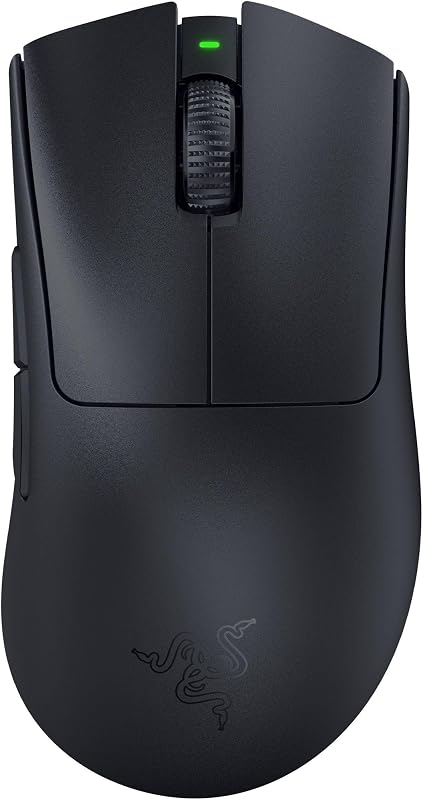
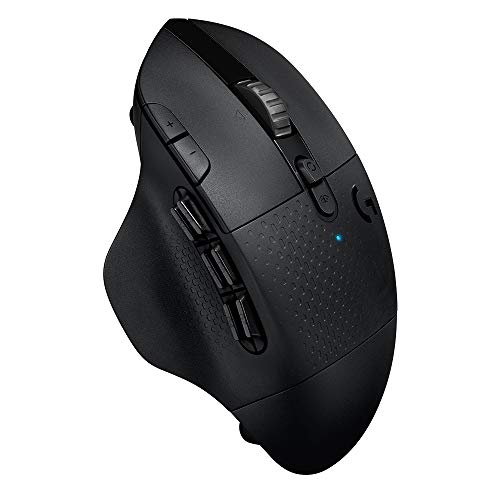
The defining difference between these two wireless mice comes down to workplace quietude versus gaming-grade response: the Logitech MX Master 3S is built specifically for silent, multi-device office workflows with its acoustic-dampened switches and glass-friendly tracking, whereas the Logitech G604 is engineered for input-heavy gaming and high-speed execution using an ultra-low-latency wireless receiver and a dense array of thumb buttons.
Choose the Logitech MX Master 3S if your daily work centers on multi-computer desktop management, detailed spreadsheets, and noise-sensitive office spaces. Choose the Logitech G604 if you need immediate switch response, intense macro execution, and the high-speed precision necessary for fast-paced gaming sessions.

Logitech MX Master 3S vs Logitech G604 at a Glance
| Feature | Logitech MX Master 3S | Logitech G604 |
|---|---|---|
| Sensor Technology | Darkfield Optical (8,000 DPI) | HERO 16K / HERO 25K (Up to 25,600 DPI) |
| Tracking on Glass | Yes (4 mm minimum thickness) | Not listed |
| Wireless Connection | Bluetooth, Radio Frequency, USB | 1 ms LIGHTSPEED Wireless and Bluetooth |
| Programmable Controls | 7 buttons | 15 programmable controls (6 thumb buttons) |
| Scroll Wheel Mechanism | MagSpeed electromagnetic scrolling | Dual-mode hyper-fast metal wheel |
| Switch Acoustics | Quiet Clicks (90% noise reduction) | Not listed |
| Power Source & Battery Life | Rechargeable battery (up to 70 days) | 1 AA battery (up to 240 hours LIGHTSPEED / 5.5 months Bluetooth) |
| Customization Software | Logi Options+ with Flow multi-device support | Logitech G HUB |
| Best For | Silent office productivity and cross-computer workflows | Gaming, complex macros, and high-speed tracking |
Sensor Performance and Tracking Surfaces
Sensor capability dictates where and how effectively a mouse translates physical movement into cursor precision. The Darkfield sensor inside the Master 3S delivers an adjustable sensitivity range reaching 8,000 DPI. Its primary technical advantage is surface versatility: it is specifically engineered to track on virtually any surface, including high-gloss surfaces and clear glass with a minimum thickness of 4 mm. For hybrid professionals who move between desks, glass conference tables, or makeshift workstations, this tracking resilience eliminates the necessity of carrying a mouse pad.
The G604 takes an entirely different approach to sensor engineering, prioritizing competitive precision and swift tracking velocity over odd-surface adaptability. Powered by Logitech’s HERO sensor architecture, it delivers a massive sensitivity ceiling of 25,600 DPI following a software update through Logitech G HUB. It boasts tracking speeds exceeding 400 inches per second (IPS) with true 1:1 tracking fidelity and zero smoothing, filtering, or acceleration. While any comprehensive Logitech MX Master 3S review praises the Darkfield sensor for daily office stability, the HERO sensor on the G604 is built to register rapid physical swipes without losing tracking accuracy.
The practical trade-off is clear: the Master 3S sacrifices maximum tracking velocity and hyper-high DPI scaling to guarantee tracking on transparent office furniture, whereas the G604 sacrifices transparent surface capability to achieve raw tracking accuracy and responsiveness. Desktop users on standard mouse surfaces will rarely need 25,600 DPI, but gamers requiring sub-millimeter reaction times will quickly overwhelm the office-tuned Darkfield sensor.
Edge: Logitech G604 for raw tracking speed and competitive sensitivity, though the MX Master 3S holds a distinct advantage on glass desks.
Programmable Buttons and Macro Layout
Input complexity separates specialized productivity gear from multipurpose peripherals. The Master 3S features a total of 7 buttons alongside an integrated thumb wheel and an ergonomic gesture button. Through the Logi Options+ application, users can assign application-specific profiles that automatically adapt button commands when switching between web browsers, video editing suites, and spreadsheets. While functional for general office shortcuts, the physical input layout focuses primarily on smooth navigation rather than rapid sequential inputs.
The G604 is a powerhouse of physical customization, sporting 15 programmable controls that include a prominent six-button thumb grid. Programmed through Logitech G HUB, these inputs can store intricate multi-key macro strings, system shortcuts, and in-game abilities. Comparing the logitech g502 x vs mx master 3s highlights how gaming layouts prioritize button density, and the G604 takes this concept even further with its dedicated side array. For creators and gamers analyzing the Logitech MX Master 3S vs G604 programmable buttons, the G604 provides more than double the distinct physical actuation points.
Having six distinct thumb buttons allows users to execute complex commands entirely with one hand. For MMO and MOBA gamers, this enables immediate spellcasting; for productivity power users, it means placing cut, paste, undo, redo, enter, and backspace under a single thumb. The Master 3S offers a cleaner, less crowded grip, but it cannot match the sheer input density that the G604 brings to complex digital workflows.
Edge: Logitech G604 for offering more than double the inputs and a dedicated six-button thumb cluster.
Scroll Wheel Mechanics and Navigation Speed
The scrolling hardware on both peripherals represents the pinnacle of free-spinning wheel design, yet each utilizes a contrasting mechanical implementation. The Master 3S incorporates the proprietary MagSpeed electromagnetic scroll wheel, constructed from machined steel. It offers dual-mode scrolling that automatically shifts from precise, tactile line-by-line ratcheting to frictionless free-spinning based on how vigorously you flick the wheel. Logitech rates this electromagnetic mechanism as 90% faster and 87% more precise than standard scroll mechanisms, capable of whipping through 1,000 lines of code or data per second in total silence.
The G604 features a durable metal dual-mode hyper-fast scroll wheel that relies on a physical mechanical toggle button directly behind the wheel. Pressing the mechanical switch disengages the internal ratchet to let the wheel spin freely for rapid page traversal, or locks it back into place for distinct, stepped feedback. Furthermore, the G604 wheel supports programmable tilt clicks and key binds, allowing users to nudge the wheel left or right to trigger custom commands. Those who read our guide on the logitech mx master 3s vs mx anywhere 3s know how vital frictionless scrolling is for document handling, and both of these models excel at swift traversal.
Between the two, the automated electromagnetic shifting of the Master 3S provides a substantially more refined experience. While the G604 requires a physical button press to swap scrolling modes, the Master 3S detects the velocity of your finger and transitions dynamically. The complete absence of mechanical noise in the MagSpeed assembly also makes it vastly superior for quiet work settings where repetitive metallic ratcheting would prove disruptive.
Edge: Logitech MX Master 3S for its seamless, ultra-quiet electromagnetic mechanism and automated mode shifting.
Wireless Latency and Multi-Device Connectivity
Signal transmission speed determines whether a mouse can keep up with high-pressure digital environments. The G604 features Logitech’s proprietary 1 ms LIGHTSPEED wireless technology alongside standard Bluetooth connectivity. In LIGHTSPEED mode, the connection delivers the near-instantaneous polling required for competitive esports, matching the speed of wired connections. In Bluetooth mode, the report rate shifts to 88-133 Hz (7.5-11.25 ms), extending battery conservation when high-speed polling is unnecessary. Gamers weighing the logitech g703 vs mx master 3s often prioritize this exact low-latency connection.
The Master 3S prioritizes multi-system flexibility rather than sub-millisecond response rates. Supporting Bluetooth Low Energy and radio frequency connections, it pairs with up to three distinct devices across Windows, macOS, Chrome OS, Linux, iPadOS, and Android. Its defining software feature is Logitech Flow, which allows users to seamlessly move their cursor across multiple physical screens and computers on the same local network, dragging text, images, and files directly from a Windows desktop to a Mac laptop without external storage drives. The product listing specifies that the Logi Bolt USB receiver is not included in the package.
For high-refresh-rate gaming displays and twitch-reaction gameplay, the Logitech MX Master 3S or G604 for gaming debate is settled immediately by the 1 ms LIGHTSPEED receiver on the G604. However, for administrative and multi-workstation professionals debating the Logitech MX Master 3S or G604 for productivity, the seamless multi-system file transferring enabled by the Flow ecosystem on the Master 3S delivers immense practical utility that the G604 cannot replicate.
Edge: Tie. Logitech G604 wins for lightning-fast gaming latency, while the MX Master 3S leads in cross-system multi-device workflows.
Battery Systems and Operating Endurance
Power management determines operational downtime and maintenance frequency. The Master 3S integrates an internal rechargeable battery system that delivers up to 70 days of continuous operation on a full charge. When depleted, its fast-charging circuitry provides three full hours of use from a single one-minute charge. However, prospective buyers should note that the product listing specifically clarifies that a charging cable is not included, requiring users to supply their own compatible USB cable to replenish the cell.
The G604 bypasses internal lithium cells in favor of a single disposable or rechargeable AA battery, which is included in the box. Operating on the high-performance 1 ms LIGHTSPEED connection, the G604 achieves up to 240 hours of continuous high-intensity gaming. When toggled over to standard Bluetooth connectivity, the power efficiency of the HERO sensor extends runtime up to 5.5 months of standard usage. Readers reviewing the logitech mx anywhere 3s vs g604 will recognize this classic split between internal rechargeable cells and swappable alkaline batteries.
In the head-to-head comparison of Logitech MX Master 3S vs G604 battery life, user preference hinges on maintenance philosophy. The Master 3S removes the ongoing need to purchase or swap batteries, but it eventually requires being tethered for a recharge. The G604 allows an instantaneous return to full power by swapping in a fresh AA cell, and its 5.5-month Bluetooth runtime outlasts the Master 3S’s 70-day window by a significant margin.
Edge: Logitech G604 for its extended months-long endurance on a single AA without needing a recharge pause.
Acoustic Profile and Ergonomic Comfort
Physical interaction with a mouse over an eight-to-ten-hour workday impacts both wrist comfort and office harmony. The Master 3S is built around an ergonomic right-handed silhouette engineered specifically to encourage a natural wrist posture. Its primary feature upgrade over preceding generations is the integration of Quiet Click switches, which reduce left and right click noise by 90% compared to the original MX Master 3. The tactile sensation remains crisp and deliberate, but the acoustic signature is virtually undetectable from one meter away, making it an exceptional peripheral for quiet libraries and open-plan corporate desks.
The G604 also employs a right-handed ergonomic contour, complete with an integrated thumb rest to keep fingers elevated off the mouse mat during sweeping motions. Examining comparisons like the logitech g703 vs g604 demonstrates Logitech’s mastery of comfortable gaming contours. However, the G604 uses traditional mechanical gaming switches that produce audible, clicky actuation feedback. In addition, its thumb area is occupied by six separate angled button edges, which provides tactile differentiation for macros but offers a busier surface texture than the smooth grip of the Master 3S.
Material construction also plays a role in the feel and design of each peripheral. The Master 3S incorporates certified post-consumer recycled plastic (27% in the Graphite and Black editions), pairing sustainability with a soft-touch matte finish. The G604 listing highlights durable metal elements, notably in its heavy-duty mechanical scroll wheel. For pure comfort during stationary office tasks and unobtrusive operation in shared spaces, the acoustic isolation and sculpted palm support of the Master 3S provide a clear advantage.
Edge: Logitech MX Master 3S for whisper-quiet clicks and an ergonomic shape engineered specifically for daily wrist posture.
Pros and Cons
Logitech MX Master 3S

Pros
- Quiet Clicks cut noise by 90 percent
- MagSpeed wheel scrolls 1000 lines per second
- Darkfield sensor tracks on 4mm glass
- Flow software enables seamless multi-computer file transfer
Cons
- Only seven total programmable buttons
- Charging cable not included in package
- Logi Bolt USB receiver not included
View Logitech MX Master 3S on Amazon
Logitech G604

Pros
- Fifteen programmable controls with six thumb buttons
- Lag-free 1ms Lightspeed wireless connection
- HERO sensor tracks up to 25600 DPI
- Up to 5.5 months battery on Bluetooth
Cons
- Relies on replaceable AA battery
- Glass surface tracking not listed
- Lacks acoustic sound dampening switches
Who Should Buy Each One
Choose the Logitech MX Master 3S If
- You work in shared offices, open workspaces, or quiet home environments where the 90% quieter click switches prevent acoustic distraction.
- You manage multiple computers simultaneously and need Logitech Flow to transfer text, images, and files between Windows and macOS systems.
- You work on varied or transparent surfaces like glass desks where the 8,000 DPI Darkfield sensor can track without a mouse pad.
- You navigate long documents or complex financial spreadsheets that benefit from the automated 1,000-line-per-second MagSpeed scroll wheel.
Choose the Logitech G604 If
- You play competitive or fast-paced video games requiring the lag-free responsiveness of a 1 ms LIGHTSPEED wireless connection.
- You rely heavily on macro shortcuts, complex key bindings, or MMO/MOBA skill rotations mapped across 15 programmable controls.
- You want a high-ceiling 25,600 DPI HERO sensor capable of tracking violent mouse flicks exceeding 400 IPS without smoothing.
- You prefer swapping in a single AA battery for up to 5.5 months of Bluetooth battery life instead of managing rechargeable cycles.
Final Verdict
When asking whether the Logitech MX Master 3S is worth it, the answer depends on your professional environment. For creative professionals, software engineers, and office workers, the Master 3S stands as the definitive productivity pointer. Its whisper-quiet switches, automatic electromagnetic wheel, glass tracking, and multi-system Flow integration remove friction from daily computing. It is purposefully sculpted to reduce fatigue during extensive workdays, providing a serene and highly polished desktop experience for anyone whose primary focus is knowledge work.
Conversely, those evaluating if the Logitech G604 is worth it will find unmatched versatility if their computing life spans both intense productivity and serious gaming. The Master 3S cannot compete with the G604’s 1 ms LIGHTSPEED wireless latency or its 25,600 DPI tracking speed in competitive gaming arenas. Furthermore, the 15 programmable inputs and dedicated six-button thumb panel grant extensive automation capabilities that satisfy power users and gamers alike. In the broad contest of Logitech G604 vs MX Master 3S, choose the Master 3S for quiet, multi-screen office comfort, and grab the G604 when input speed and macro control take priority.
FAQ
Can the Logitech MX Master 3S be used for fast-paced gaming?
While the Master 3S can handle casual strategy or turn-based gaming, it is not built for fast-paced, competitive titles. Its Darkfield sensor is capped at 8,000 DPI and lacks the high-speed acceleration tracking of gaming sensors, while its wireless connectivity does not feature the specialized 1 ms LIGHTSPEED protocol found on dedicated gaming models like the G604.
How do the thumb controls differ between the Logitech MX Master 3S and G604?
The Master 3S features an integrated horizontal thumb scroll wheel, two navigation buttons, and an ergonomic gesture control button. The G604 features a dense grid of six individual programmable thumb buttons designed for keybinds and macros, but it does not have a secondary horizontal scroll wheel.
Does the Logitech G604 support Logitech Flow cross-computer control?
No, Logitech Flow is part of the Logi Options+ software suite designed for productivity peripherals like the Master 3S. The G604 is managed through Logitech G HUB software, which allows profile customization, DPI adjustments, and macro mapping, but does not provide seamless cross-computer file transfer across multiple active screens.
How do the batteries in these two mice compare?
The Master 3S houses an internal rechargeable battery that lasts up to 70 days per charge and yields three hours of use from a one-minute quick charge, though a charging cable is not included. The G604 operates on a single disposable or rechargeable AA battery, providing up to 240 hours of continuous use in LIGHTSPEED mode and up to 5.5 months on Bluetooth.
Which mouse is quieter for an office setting?
The Master 3S is substantially quieter. It incorporates specialized Quiet Click buttons that reduce switch actuation sound by 90% compared to previous generations, alongside a silent electromagnetic MagSpeed scroll wheel. The G604 utilizes traditional audible gaming switches and a mechanical ratchet toggle that produces distinct acoustic feedback.
Can the Logitech G604 track on glass desks?
The product listing for the G604 does not specify glass tracking capability for its HERO optical sensor. In contrast, the Master 3S explicitly features an 8,000 DPI Darkfield sensor engineered to track on any surface, including clear glass with a minimum thickness of 4 mm.