The core deciding difference between these two webcams comes down to video resolution and intelligent presentation features: the Logitech MX Brio captures ultra-sharp 4K footage backed by AI facial tracking and an interactive Show Mode, whereas the veteran Logitech C920 delivers dependable Full HD 1080p video with onboard hardware compression for everyday desktop utility.
Choose the Logitech C920 if you need an unpretentious, reliable webcam for routine office meetings and legacy operating systems without taxing your computer hardware. Choose the Logitech MX Brio if you lead executive presentations, collaborate over physical documents, and want top-tier 4K clarity housed in a premium aluminum frame.


Logitech C920 vs Logitech MX Brio at a Glance
| Feature | Logitech C920 | Logitech MX Brio |
|---|---|---|
| Maximum Video Resolution | Full HD 1080p | 4K Ultra HD |
| Sensor Technology | BSI CMOS | Manufacturer largest image sensor |
| Lens and Optics | Five-element glass lens | Custom-designed zoom lens |
| Maximum Aperture | f/2.0 | f/4.0 |
| Microphone Configuration | Dual stereo microphones | Dual beamforming microphones |
| Hardware Privacy Cover | Not listed | Integrated lens ring dial shutter |
| Housing Material | Black plastic | Low-carbon aluminum and 82% PCR plastic |
| Video Compression and Formats | H.264 encoding | MP4 video capture |
| Product Weight | 113 g | 6.1 ounces |
| Best For | Standard daily calling and legacy computers | Executive video meetings and desk-down presentations |
Video Resolution and Visual Fidelity
Resolution defines how sharply your facial features, background details, and presentation materials render across video conferencing platforms. When examining the Logitech MX Brio 4K vs C920 1080p specifications, the difference in sheer pixel output is immediate. The older C920 captures video at Full HD 1080p resolution, which remains the default standard across most streaming services and enterprise collaboration tools. Its BSI CMOS sensor delivers clean outlines under steady office lighting, reproducing facial expressions clearly without overwhelming your internet bandwidth.
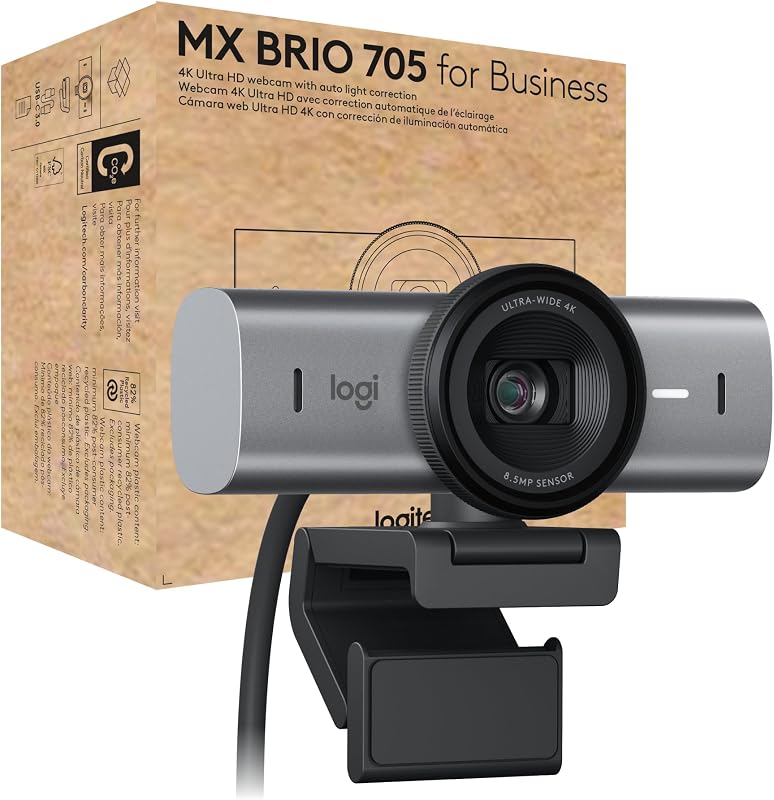
By contrast, the MX Brio jumps to 4K Ultra HD output driven by what the manufacturer describes as its largest and most advanced image sensor yet. In any head-to-head Logitech MX Brio vs C920 image quality comparison, the MX Brio extracts finer details such as clothing textures, hair contours, and fine print held up to the camera. The MX Brio also integrates AI-powered face-based image enhancement, which analyzes your skin tones and tracks facial features in real time. This ensures that you do not appear washed out or unnaturally tinted when room illumination shifts during a long meeting, addressing a common critique noted in a classic Logitech C920 review.
For individuals researching webcam upgrades across broader lineups, such as comparing the logitech c920 vs brio 4k, the visual step up provided by the MX Brio represents a generational leap in image processing. The C920 relies on standard auto low-light correction to brighten dark rooms, which can introduce digital grain if environmental light drops drastically. The MX Brio uses its larger sensor area and custom-designed lens elements to preserve clean, natural image balance even in unevenly lit home offices.
Edge: Logitech MX Brio delivers significantly sharper imagery thanks to its native 4K sensor, custom optics, and AI-driven facial image tuning.
Interactive Collaboration and Presentation Tools
Modern video calls frequently demand more than just a static view of the speaker’s face. Dynamic workplace interaction often involves sharing physical documents, physical product prototypes, or handwritten notes during team discussions. This functional area highlights the most innovative aspect of the Logitech MX Brio show mode vs C920 comparison. The MX Brio incorporates Show Mode, a dedicated mechanism that allows the user to tilt the camera downward to present items on the desk surface. The camera automatically flips and levels the desk orientation so meeting participants see the document right-side up without manual display reconfiguration.
The C920 features a fixed-mount design aimed squarely at conventional face-to-face communication. While it mounts stably on monitors and laptop screens, sharing a document on your desk requires manually contorting the mount or lifting the document in front of your face. Furthermore, the C920 relies strictly on basic autofocus and digital image stabilization to keep you clear, whereas the MX Brio layers in RightSight auto-framing. This automated framing feature tracks the speaker and keeps you centered within the 16:9 video frame as you shift posture or lean back in your chair.
Shoppers exploring creative and professional setups often weigh modern smart cameras, similar to discussions around the logitech mx brio vs elgato facecam, to see if advanced tracking tools genuinely streamline workflow. For executives, educators, and designers who regularly sketch or review printed drafts on camera, the MX Brio transforms the webcam from a simple viewing lens into an interactive collaboration device. The C920 simply lacks the mechanical articulation and automated tracking software to compete in dynamic presentation environments.
Edge: Logitech MX Brio wins clearly with its downward-tilting Show Mode and RightSight auto-framing technology.
Optical Design and Aperture Performance
The optical glass sitting in front of a camera sensor dictates how effectively light enters the hardware and reaches the recording plane. On paper, the Logitech C920 vs MX Brio specs present an intriguing divergence in aperture ratings. The C920 features a five-element Full HD glass lens with a maximum aperture of f/2.0 and a minimum aperture of 2 millimeters. An f/2.0 aperture is physically wide for a compact webcam, allowing a generous amount of light to strike the BSI CMOS sensor without requiring extreme digital gain adjustments.
The MX Brio lists a custom-designed zoom lens with a maximum and minimum aperture of f/4.0. While an f/4.0 aperture allows less light through the physical opening than an f/2.0 lens, the MX Brio offsets this optical variance by utilizing a substantially larger image sensor surface. In practical terms, while the C920 relies on optical throughput and automatic low-light correction algorithms, the MX Brio pairs its custom optics with AI tone mapping and automatic white balance to render authentic colors across challenging lighting environments.
When assessing lens responsiveness, autofocus performance plays an equally vital role. The C920 employs precisely tuned autofocus that adjusts cleanly between foreground objects and the speaker, though it can exhibit minor pulsing when lighting conditions fluctuate rapidly. The MX Brio employs a faster autofocus system engineered to maintain continuous sharpness even when moving swiftly or toggling back and forth between face view and Show Mode on your desktop surface.
Edge: Tie, as the C920 offers a physically wider f/2.0 optical aperture, while the MX Brio counterbalances its f/4.0 lens with a significantly larger sensor footprint and modern auto-exposure algorithms.
Microphone Engineering and Voice Clarity
Audio quality determines whether meeting attendees can understand your voice clearly without acoustic strain or intrusive ambient distractions. The C920 integrates dual omnidirectional microphones configured to capture natural stereo sound. Logitech built auto noise reduction into this model to dampen standard room hums, such as gentle computer fan noise or distant heating vents. For standard Skype or video calling sessions, the C920 produces intelligible, full-bodied stereo audio that eliminates the absolute need for a separate headset during short conversations.
The MX Brio steps forward with an advanced dual beamforming microphone array. Beamforming technology focuses the microphone pickup pattern directly on the user’s vocal tract while suppressing off-axis acoustic interference, such as mechanical keyboard clicking, paper shuffling, or background office chatter. In an in-depth Logitech MX Brio review, this directional isolation proves invaluable for busy hybrid workspaces or open-plan offices where uncontrolled background sounds routinely infiltrate calls.
The beamforming setup on the MX Brio is also engineered to enhance voice pickup even as the speaker moves around in front of the camera. Where the C920 expects the speaker to remain relatively centered between its dual stereo ports to maintain balanced audio channels, the MX Brio tracks vocal projection more dynamically. For anyone asking whether the Logitech C920 or MX Brio for Zoom calls provides a more polished standalone audio experience, the directional noise suppression of beamforming hardware offers an audible advantage.
Edge: Logitech MX Brio delivers superior background noise suppression and consistent vocal pickup through dual beamforming microphones.
Build Quality, Physical Privacy, and Enterprise Management
Physical construction and device security are major considerations for enterprise deployments and sleek desktop workstations. The C920 features an all-black plastic chassis measuring 3.7 inches deep, 1.7 inches wide, and 2.8 inches high, weighing in at 113 grams. The listing does not specify an integrated physical privacy cover for the C920, meaning security-minded users must either unplug the camera, pivot it toward a wall, or purchase a third-party snap-on plastic flap.
The MX Brio showcases a distinctly premium approach to industrial design. Its body is constructed from solid milled, low-carbon aluminum in a graphite finish, incorporating at least 82% post-consumer recycled plastic in its plastic components. At 6.1 ounces, the camera feels substantial and stable on display bezels. More importantly, it features an integrated privacy shutter built directly into the lens assembly; users simply rotate a dial on the lens ring to physically block the optics with an easily visible mechanical barrier.
Enterprise and administrative management also clearly separates these two units. The MX Brio is built with a secure boot design to stop unauthorized firmware actions and integrates with Logitech Sync, allowing corporate IT departments to deploy, monitor, and update webcams remotely across an entire company network. When comparing professional desktop hardware, as seen in evaluations like the logitech mx brio vs elgato facecam mk.2, these enterprise-grade security protocols make the MX Brio uniquely suited for corporate compliance that the consumer-focused C920 never intended to address.
Edge: Logitech MX Brio dominates with its solid milled aluminum body, built-in lens ring privacy shutter, and Logitech Sync enterprise management support.
Platform Compatibility and Hardware Video Processing
System compatibility determines how smoothly a webcam interfaces with your computer operating system and third-party communications software. The C920 has earned widespread renown for its universal plug-and-play behavior. It explicitly lists driver and system support across Windows 7, Windows 8, Windows 10, macOS 10.10 or later, Chrome OS, and Android 5.0 or above. Crucially, the C920 incorporates internal H.264 video compression hardware. By handling compression directly on the camera hardware, the C920 relieves processing strain from the host computer CPU, facilitating fluid 1080p calling on Skype and 720p on FaceTime even on older, resource-constrained laptops.
The MX Brio targets modern operating environments, offering certified compatibility with Microsoft Teams, Zoom, and Google Meet, while functioning across Windows, macOS, ChromeOS, and Chromebook platforms. Its video capture format outputs in MP4 with JPEG still framing over standard USB connectivity. Because the MX Brio processes 4K Ultra HD video alongside real-time AI image optimization and RightSight auto-framing, it relies on modern computer processing pipelines to handle high-bandwidth data transfers.
For creators deciding whether to use the Logitech C920 or MX Brio for streaming, this processing divergence is substantial. Broadcasters who manage intensive game rendering on a single machine often look into comparisons like the logitech brio 4k vs mx brio to determine how resolution demands impact system overhead. If you are operating vintage computer hardware or enterprise workstations running legacy operating versions, the C920 provides unmatched backward compatibility and CPU relief. However, for users running modern operating systems with certified platforms like Microsoft Teams and Zoom, the MX Brio provides complete, certified integration.
Edge: Logitech C920 takes the edge for legacy compatibility and lightweight system overhead due to its built-in H.264 hardware encoding and extensive support for older platforms.
Pros and Cons
Logitech C920

Pros
- Full HD 1080p video resolution
- Onboard H.264 hardware compression
- Wide f/2.0 maximum lens aperture
- Lightweight 113 g chassis
- Extensive legacy operating system support
Cons
- No integrated physical privacy shutter
- Lacks automated AI auto-framing
- No physical desk presentation mode
Logitech MX Brio
Pros
- Ultra HD 4K video resolution
- Innovative desk-sharing Show Mode
- RightSight AI auto-framing tracking
- Dual noise-reducing beamforming microphones
- Integrated lens dial privacy shutter
Cons
- Narrower f/4.0 lens aperture
- Heavier 6.1-ounce milled aluminum body
- Lacks legacy Windows 7 support
View Logitech MX Brio on Amazon
Who Should Buy Each One
Choose the Logitech C920 If
- You need a dependable 1080p Full HD webcam for routine work calls, basic webinars, and family video chats.
- You work on legacy operating systems such as Windows 7, Windows 8, macOS 10.10, or Android 5.0.
- You want hardware-based H.264 compression to minimize processing loads on an older or low-spec computer.
- You prefer a lightweight, compact 113-gram webcam with a wide f/2.0 optical aperture glass lens.
Choose the Logitech MX Brio If
- You want native 4K Ultra HD video resolution paired with AI facial tracking for professional executive presence.
- You frequently present sketches, blueprints, documents, or physical items on your desktop using Show Mode.
- You require certified compatibility with Microsoft Teams, Zoom, and Google Meet along with remote Logitech Sync management.
- You prioritize premium hardware security, including an integrated physical privacy dial and secure boot architecture.
Final Verdict
When asking is Logitech MX Brio worth it, the answer depends entirely on your professional requirements and visual expectations. The Logitech MX Brio stands as the superior overall webcam for modern workspaces, delivering crisp 4K Ultra HD video, advanced AI-powered skin tone tracking, and the unique utility of desk-tilting Show Mode. Its milled low-carbon aluminum chassis, integrated privacy dial, and beamforming microphones address every demand of executive video conferencing and high-profile remote collaboration.
Nevertheless, the Logitech C920 remains an exceptional, enduring workhorse for everyday video calls. If your daily routine consists of standard team check-ins where 1080p resolution is more than adequate, or if you must connect through an older computer that benefits from onboard H.264 video compression, the C920 delivers reliable clarity without unnecessary complexity. For standard desktop utility, the C920 still satisfies, but for elevated visual excellence and modern presentation tools, the MX Brio is the definitive winner.
FAQ
Does the Logitech C920 support 4K video recording?
No. The Logitech C920 is limited to Full HD 1080p video calling and recording, whereas the Logitech MX Brio supports native 4K Ultra HD video output.
How does Show Mode work on the Logitech MX Brio?
Show Mode allows you to physically tilt the MX Brio downward to display documents, notes, or objects on your desk. The webcam software automatically flips the image orientation so viewers see your items right-side up.
Which camera is better for Zoom and Microsoft Teams meetings?
The Logitech MX Brio is explicitly certified for Microsoft Teams, Zoom, and Google Meet, offering beamforming microphones and AI auto-framing. The C920 works reliably with Zoom and Teams, but lacks formal platform certification and advanced framing tools.
Does the Logitech C920 include an integrated privacy shutter?
The product listing for the Logitech C920 does not specify a built-in privacy shutter. In contrast, the Logitech MX Brio features an integrated manual privacy cover operated by turning a dial on the lens ring.
Can I use these webcams on ChromeOS or Chromebook devices?
Yes. Both cameras support ChromeOS. The C920 lists Chrome OS among its supported operating platforms, while the MX Brio is certified to work with Chromebook devices.
What is the benefit of H.264 compression on the Logitech C920?
The C920 features hardware-level H.264 encoding, which compresses video directly onboard the webcam. This offloads video processing from your computer CPU, facilitating smoother video streams on older or less powerful machines.
What microphone technology does the Logitech MX Brio use?
The Logitech MX Brio utilizes dual beamforming microphones designed to focus on the speaker voice while filtering out unwanted ambient background noise across your work area.


