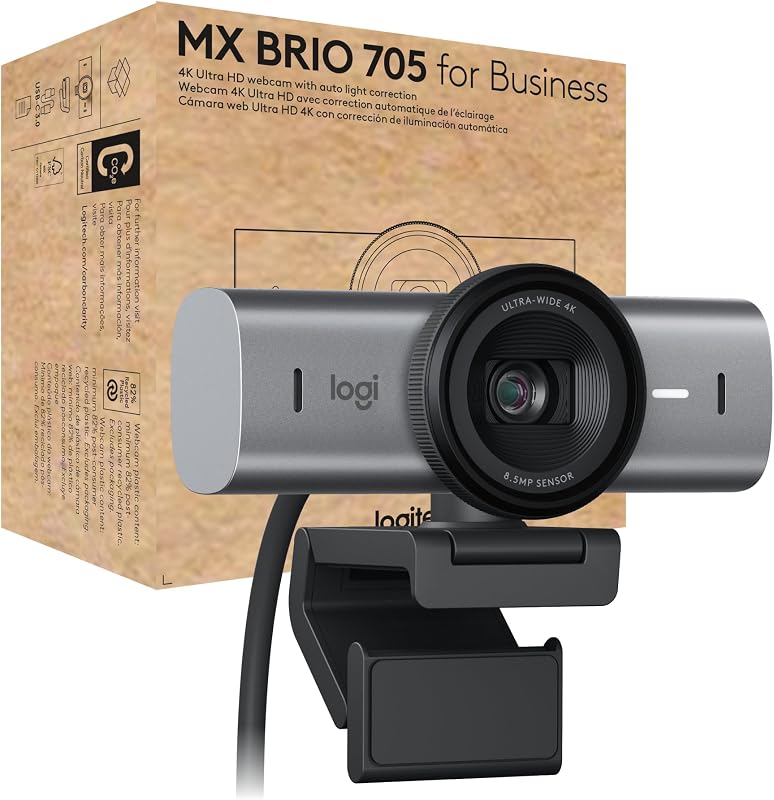
When deciding between high-end webcams, the primary trade-off comes down to whether you need an all-in-one corporate communications hub or a dedicated broadcast camera built for fine manual tuning. The Logitech MX Brio prioritizes ultra-high resolution and complete boardroom convenience, pairing a 4K Ultra HD sensor with dual beamforming microphones, automated framing, and enterprise platform certifications. In contrast, the Elgato Facecam MK.2 bypasses built-in audio entirely to focus purely on video stream fidelity, utilizing uncompressed 1080p60 output over USB 3.0, a wide-aperture lens, and deep DSLR-style manual exposure controls.
Choose the Logitech MX Brio if you need a plug-and-play video solution with clear integrated voice pickup, desk-sharing features, and turnkey compatibility across business conferencing apps. Choose the Elgato Facecam MK.2 if you already own dedicated audio equipment and want an uncompressed, low-latency video feed that gives you total control over shutter speed, ISO, and high-contrast lighting.


Logitech MX Brio vs Elgato Facecam MK.2 at a Glance
| Feature | Logitech MX Brio | Elgato Facecam MK.2 |
|---|---|---|
| Maximum Video Resolution | 4K Ultra HD | 1080p Full HD |
| Video Compression Options | MP4 capture format | Uncompressed (USB 3.0) / Compressed (USB 2.0) |
| Sensor Type | Logitech advanced image sensor (Other) | CMOS (2.1 MP effective still resolution) |
| Aperture Range | f/4.0 | f/1.5 to f/2.8 |
| Focus Mechanism | Autofocus | Autofocus and manual focus |
| Integrated Microphones | Dual beamforming noise-reducing mics | Not listed |
| High Dynamic Range (HDR) | AI face-based lighting enhancement | HDR-enabled (1080p30) |
| Privacy Cover | Integrated lens ring dial shutter | Built-in easy-slide physical shutter |
| Chassis Material & Weight | Low-carbon aluminum & 82% PCR plastic (6.1 oz) | Compact black housing (0.09 kg) |
| Software Ecosystem | Logitech Sync / RightSight / Show Mode | Camera Hub (DSLR-style controls) |
| Best For | Executive conferencing and desk presentations | Content creators and live video streamers |
Resolution and Video Feed Compression
The headline technical difference between these two cameras lies in how they package visual data. The MX Brio captures video at up to 4K Ultra HD resolution, delivering exceptional pixel density across modern high-resolution displays. For professionals sharing detailed documents, demonstrating physical samples, or presenting on large corporate video monitors, the raw clarity of a 4K canvas ensures crisp line definition and minimal digital artifacting. The internal image processing centers on an AI-powered engine designed to balance skin tones and track human faces without requiring constant manual intervention from the operator.
The Facecam MK.2 takes a divergent engineering path by prioritizing video pipeline throughput over pixel multiplication. While capped at 1080p Full HD resolution, it features uncompressed video transfer when connected via USB 3.0. Standard consumer webcams compress video before transmitting it through the USB bus, which can introduce compression artifacts, color banding, and micro-latency during high-motion activity. By pushing an uncompressed 1080p60 stream directly into your computer, the MK.2 maintains true-to-life color grading, lower latency, and pristine edges that hold up exceptionally well when ingested by broadcast encoders. As analyzed in our logitech mx brio vs elgato facecam comparison, uncompressed data provides content creators with cleaner chroma-keying and sharper overlays than typical compressed feeds.
When comparing Logitech MX Brio 4K vs Elgato Facecam MK.2 1080p, the ideal choice depends on your broadcast output format. If your workflow involves recording local tutorials, hosting high-resolution client conferences, or projecting onto large 4K displays, the extra resolution of the MX Brio is immediately apparent. If your primary destination is a live streaming platform where camera feeds occupy a smaller corner box or where encoding efficiency takes precedence, Elgato Facecam MK.2 uncompressed video provides a cleaner, motion-stable feed without compression smearing.
Edge: Logitech MX Brio for sheer pixel resolution and enterprise detail, though Elgato Facecam MK.2 wins on uncompressed frame throughput.
Software Controls and Customization
A camera is only as versatile as the software backing it, and these two models target opposite philosophies when managing video settings. Elgato equips the Facecam MK.2 with its dedicated Camera Hub software, engineered specifically to mirror the control interface of a professional DSLR camera. Users gain granular manual control over critical photographic variables, including fine shutter speeds, manual ISO sensitivity, color temperature balance, and manual lens focusing. This layout allows live video streamers to lock their exposure completely, ensuring that studio lights, shifting computer monitors, or room illumination changes do not trigger distracting auto-exposure hunting mid-broadcast.
Logitech approaches configuration through a productivity and IT deployment lens. The MX Brio integrates with Logitech Sync, allowing enterprise IT administrators to deploy firmware updates, monitor device health, and push configurations remotely across corporate fleets. For end users, the camera provides automatic exposure and AI-powered image enhancements that continuously tune lighting conditions and skin tones. It also incorporates RightSight auto-framing, which automatically crops and recenters the video frame to keep the speaker centered as they shift in their seat. As noted in our logitech brio 4k vs elgato facecam mk.2 technical review, this automated approach minimizes setup overhead for busy workers who do not want to spend minutes dialing in shutter angles before every call.
For any user assembling an advanced production studio, the manual precision of Camera Hub is indispensable. It removes guesswork, allowing you to match the webcam image precisely with existing mirrorless feeds or specific studio lighting profiles. For collaborative office environments, however, the automated facial tracking and enterprise-grade Logitech Sync management remove operational friction, ensuring professional presentation quality without manual tweaking.
Edge: Elgato Facecam MK.2 for deep, DSLR-grade manual adjustments and profile locking.
Audio Pickup and Microphone Performance
Audio hardware marks the sharpest functional boundary between these two devices. The Logitech MX Brio comes equipped with an integrated dual beamforming microphone array specifically tuned to capture speech while dampening distracting ambient room noise. These beamforming mics allow the user to speak naturally and move around their desk while maintaining vocal clarity. In any practical Logitech MX Brio review, this built-in audio solution stands out as an enormous convenience for business travelers, remote workers, and minimalist desk setups that do not have space for dedicated boom arms or USB condenser microphones.
Conversely, the listing for the Elgato Facecam MK.2 does not specify an integrated microphone. This design decision is deliberate within the streaming category: high-end content creators almost universally rely on external XLR or USB broadcast microphones to achieve studio-grade sound. Omitting an internal microphone array eliminates unnecessary internal audio circuits and avoids encouraging users to rely on sub-optimal camera-mounted audio pickup. However, for a buyer looking for an all-in-one peripheral, this omission means you must supply your own audio input device to participate in video calls.
Assessing Logitech MX Brio microphone quality highlights its suitability for day-to-day meetings, collaborative team sessions, and executive calls where vocal intelligibility is essential and simplicity is preferred. As observed when examining the logitech brio 4k vs elgato facecam product landscape, buyers seeking an unencumbered single-cable desktop setup will find the MX Brio far more accommodating, while dedicated broadcasters will not mind the audio-free architecture of the MK.2.
Edge: Logitech MX Brio because it includes functional, noise-reducing beamforming microphones out of the box.
Optics, Aperture, and Low-Light Dynamic Range
Optics and sensor architecture dictate how cleanly a webcam handles uneven or poor room lighting. The Elgato Facecam MK.2 features a fast optical assembly with a maximum aperture of f/2.8 and a minimum aperture down to f/1.5, supported by a 2.1-megapixel CMOS sensor. A wide aperture allows substantially more physical light to reach the sensor surface, reducing the need for aggressive digital gain that generates sensor noise in low-light environments. Furthermore, the MK.2 incorporates a dedicated High Dynamic Range (HDR) mode operating at 1080p30, designed specifically to retain highlight and shadow detail when users sit in front of bright windows or high-contrast backlighting.
The Logitech MX Brio relies on a custom-designed lens paired with an advanced image sensor, running at a fixed f/4.0 aperture. Because an f/4.0 lens lets in less physical light than an f/2.8 or f/1.5 optic, the camera leans heavily on its AI-powered image enhancement and facial tracking algorithms to balance challenging lighting. In bright corporate offices or rooms with dedicated desktop keylights, the MX Brio produces clean, detailed imagery with accurate skin tones. However, in dimly lit spaces without supplementary illumination, the smaller aperture demands stronger computational processing to keep the frame bright.
Similar to dedicated capture setups explored in our logitech mx brio vs elgato cam link 4k coverage, optical glass performance directly influences post-processing overhead. The wider aperture and dedicated 1080p30 HDR hardware on the Facecam MK.2 give it a decisive optical advantage when managing dramatic contrast, backlighting, and dark background environments.
Edge: Elgato Facecam MK.2 for its faster aperture range and dedicated HDR high-contrast processing.
Physical Hardware and Workspace Integration
The mechanical designs of these webcams reflect their differing target environments. The Logitech MX Brio is encased in solid milled, low-carbon aluminum and built with plastic components containing 82% post-consumer recycled plastic. Weighing 6.1 ounces, it features an integrated privacy shutter operated via a tactile dial built directly into the outer lens ring. One of its standout collaborative features is Show Mode, which allows users to physically tilt the webcam downward to share physical sketches, documents, or objects on their desk, automatically inverting the image orientation so viewers see it right-side up.
The Elgato Facecam MK.2 takes a more featherweight approach, weighing just 0.09 kilograms with compact exterior dimensions of 0.63 inches deep, 0.36 inches wide, and 0.39 inches high. It features a sleek black finish and an easy-slide physical privacy shutter integrated cleanly into the top of the chassis. While it lacks motorized or tilt-activated presentation modes like Show Mode, its compact footprint and low center of gravity make it exceptionally stable when mounted atop slim gaming monitors, articulated multi-mount arms, or desktop tripod rigs.
For users upgrading from older desktop gear detailed in our logitech c920 vs elgato facecam overview, both devices provide dependable mounting clamps and physical privacy controls. However, the premium aluminum finish, sustainable construction materials, and dynamic desk-sharing Show Mode of the MX Brio deliver greater everyday utility across modern professional workstations.
Edge: Logitech MX Brio for premium materials, desk-sharing Show Mode, and thoughtful sustainability design.
Pros and Cons
Logitech MX Brio
Pros
- Ultra HD 4K video resolution
- Dual beamforming noise-reducing microphones
- Show Mode for physical desk presentations
- Certified for Teams, Zoom, and Meet
- Low-carbon aluminum housing
Cons
- Fixed f/4.0 lens aperture
- Heavier 6.1-ounce desktop footprint
- Lacks uncompressed video output modes
View Logitech MX Brio on Amazon
Elgato Facecam MK.2

Pros
- Uncompressed 1080p60 over USB 3.0
- Fast f/1.5 to f/2.8 lens aperture
- DSLR-like manual control in Camera Hub
- HDR support in 1080p30 mode
- Lightweight 0.09-kilogram compact design
Cons
- No built-in microphone included
- Resolution capped at 1080p
- No downward desk-tilt presentation mode
View Elgato Facecam MK.2 on Amazon
Who Should Buy Each One
Choose the Logitech MX Brio If
- You need an all-in-one 4K communications device with built-in noise-reducing beamforming microphones.
- Your workday revolves around video conferences in Microsoft Teams, Zoom, or Google Meet where automated face framing and AI skin tone balancing save time.
- You regularly demonstrate physical paperwork, notes, or design mockups on your desk using Show Mode.
- You manage fleet hardware across an organization and require centralized administration through Logitech Sync.
Choose the Elgato Facecam MK.2 If
- You stream live gameplay or broadcasts on platforms where low-latency, uncompressed 1080p60 video is essential.
- You already own a dedicated microphone setup and do not want extraneous audio hardware on your camera.
- You want complete DSLR-style manual control over your shutter speed, ISO, color balance, and focus points via Camera Hub.
- You stream in rooms with harsh lighting or high-contrast backgrounds that benefit from hardware-driven HDR processing.
Final Verdict
The choice between the Logitech MX Brio and the Elgato Facecam MK.2 hinges directly on your operational environment. For executive desks, enterprise teams, and daily collaborative meetings, the MX Brio is the superior complete package. Its sharp 4K resolution, integrated dual beamforming microphones, Show Mode desk demonstration capability, and official business certifications make it an effortless productivity tool that elevates business calls without requiring technical troubleshooting.
On the other hand, the Elgato Facecam MK.2 wins decisively in production and live streaming setups. By stripping away built-in microphones and enterprise overhead, Elgato concentrated purely on visual throughput. Its uncompressed 1080p60 video delivery over USB 3.0, fast f/1.5 to f/2.8 lens assembly, HDR capabilities, and comprehensive Camera Hub software provide content creators with the manual control and color accuracy needed to produce broadcast-caliber content.
FAQ
Is Elgato Facecam MK.2 worth it for live streaming?
Yes. The Elgato Facecam MK.2 is specifically built for live broadcasting, offering uncompressed 1080p60 video over USB 3.0 alongside Camera Hub software that lets you lock exposure, shutter speed, and white balance so your video does not shift during stream sessions.
Is Logitech MX Brio worth it if I do not stream on Twitch?
Yes. The Logitech MX Brio is tailored for professionals, executives, and remote workers who want crystal-clear 4K video, integrated dual beamforming microphones, and intelligent desk-sharing features without dealing with complex camera menus.
Which model is better: Logitech MX Brio or Elgato Facecam MK.2 for Zoom?
The Logitech MX Brio is better suited for Zoom because it carries official platform certifications, features built-in beamforming microphones, and includes RightSight auto-framing and Show Mode to simplify virtual meetings.
Which model is better: Logitech MX Brio or Elgato Facecam MK.2 for streaming?
The Elgato Facecam MK.2 is generally preferred for content streaming because it outputs uncompressed 1080p60 footage with minimal latency and integrates smoothly with streaming suites through its DSLR-style Camera Hub settings.
Does the Elgato Facecam MK.2 have a built-in microphone?
No, the listing does not specify an integrated microphone for the Elgato Facecam MK.2, as it is engineered to be paired with dedicated external USB or XLR microphones standard in streaming environments.
How does the Logitech MX Brio handle desk presentations?
The Logitech MX Brio features Show Mode, which allows you to tilt the camera housing downward toward your desk to display physical documents or objects, automatically flipping the orientation so meeting attendees view the content right-side up.
Do both webcams feature physical privacy shutters?
Yes, both cameras incorporate hardware privacy mechanisms. The Logitech MX Brio uses a rotating dial on the lens ring to open and close the shutter, while the Elgato Facecam MK.2 features a built-in slide shutter on the camera body.


