Deciding between the Logitech MX Brio and the Elgato Cam Link 4K comes down to whether you want an all-in-one plug-and-play desktop webcam or a dedicated HDMI capture device that harnesses the sensor and optical depth of an external camera. The MX Brio provides a self-contained video setup complete with dual beamforming microphones, auto-framing, and an integrated privacy shutter, whereas the Cam Link 4K functions purely as an ultra-low-latency bridge to pipe unencrypted video from a DSLR, mirrorless body, camcorder, or action camera straight into your computer.
Choose the Logitech MX Brio if you want an executive-grade 4K camera that mounts cleanly to your display, manages tabletop demonstrations with Show Mode, and requires no auxiliary gear to start your workday. Choose the Elgato Cam Link 4K if you demand true cinema-grade visuals, interchangeable lenses, and 60 frames per second capture from a dedicated camera body you already own or intend to build into a permanent broadcast studio.


Logitech MX Brio vs Elgato Cam Link 4K at a Glance
| Attribute | Logitech MX Brio | Elgato Cam Link 4K |
|---|---|---|
| Device Type | Integrated 4K USB webcam | HDMI to USB 3.0 video capture card |
| Max Video Resolution | 4K Ultra HD | 4K at 60 fps (MJPG only), 4K at 30 fps |
| Video Input | Integrated sensor and custom lens | Unencrypted HDMI |
| Aperture Rating | Fixed f/4 maximum and minimum aperture | Dependent on attached camera lens |
| Integrated Audio | Dual beamforming noise-reducing microphones | None (relies on camera HDMI audio or external mic) |
| Physical Controls | Lens ring privacy shutter dial | None |
| Operating System Support | Windows, macOS, ChromeOS | Windows 10 (64-bit)+, macOS 13+, iPadOS 17+ |
| Platform Certifications | Microsoft Teams, Zoom, Google Meet | Compatible with OBS Studio, Zoom, Discord |
| Physical Weight | 6.1 ounces | 20.14 g (0.044 lb) |
| Best For | Turnkey office collaboration and executive calls | Professional streaming rigs and studio video creation |
Video Quality and Optical Performance
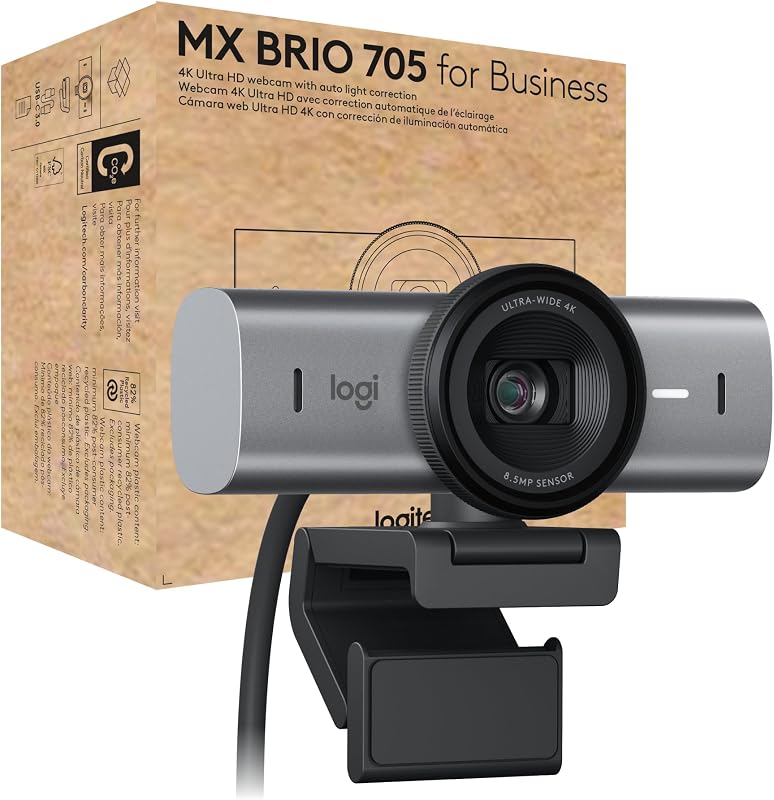
When evaluating the Logitech MX Brio picture quality, the experience centers around an integrated package powered by Logitech’s largest image sensor to date and a custom-designed glass lens. Because it operates with a fixed f/4 aperture, the MX Brio relies on onboard AI-powered image enhancement and facial tracking to handle difficult exposure shifts, high-contrast office windows, and dim indoor lighting. It captures native 4K video formatted as MP4 with automatic white balance and rapid autofocus, ensuring your face stays sharp as you lean forward or shift in your chair during a presentation.
In contrast, analyzing a logitech brio 4k vs elgato cam link 4k comparison reveals that the Elgato capture card does not generate an image on its own. Instead, it takes an unencrypted HDMI signal from a DSLR, mirrorless camera, or camcorder and transmits it over USB 3.0. When paired with a mirrorless camera sporting a wide aperture prime lens, the visual difference in a Logitech MX Brio 4K vs DSLR comparison is profound. The standalone camera brings optical depth of field with creamy natural background blur, vastly superior dynamic range, and exceptional low-light clarity that no fixed webcam lens can match.
The trade-off is one of simplicity versus ultimate optical headroom. The MX Brio caps its performance at what a compact desktop webcam housing can fit, avoiding digital artifacts while maintaining clean 4K visuals for business communications. The Cam Link 4K has a much higher quality ceiling, but that visual output remains entirely contingent on the optics, sensor size, and clean HDMI capabilities of whatever external camera hardware you supply.
Edge: Elgato Cam Link 4K delivers far superior optical quality and shallow depth of field when paired with an external mirrorless camera or DSLR.
Hardware Setup and Desk Integration
Desk management and physical installation highlight a major divergence between an integrated webcam vs Cam Link 4K configuration. The MX Brio weighs 6.1 ounces and is constructed from solid milled, low-carbon aluminum combined with post-consumer recycled plastic. It rests securely on top of your computer monitor or laptop lid using its built-in mount, requiring nothing more than a single USB connection into your computer. There are no additional brackets, extra power cables, or heavy desk clamps cluttering your workspace.
Executing a Cam Link 4K setup vs 4K webcam installation requires considerably more physical planning. The Cam Link 4K unit itself is extraordinarily compact, measuring just 3.19 x 1.22 x 0.47 inches and weighing 20.14 grams, and it even includes an 11.8-inch USB 3.0 extension cable to prevent port crowding. However, placing a full-sized mirrorless body or DSLR behind your desk requires a heavy-duty desk mount or tripod, an HDMI-to-Micro-HDMI or Mini-HDMI cable, and usually a continuous AC power adapter or dummy battery to prevent the camera from powering down midway through a workday.
For individuals who value clean lines and minimal cabling, the MX Brio maintains an uncluttered environment. Choosing the Cam Link 4K means committing valuable desk surface or wall space to support photography gear. If you already consider options like the logitech mx brio vs elgato facecam mk.2 for their single-cord desktop simplicity, the physical footprint of an external camera rig on the Cam Link 4K requires thoughtful spatial planning.
Edge: Logitech MX Brio wins for its clean, all-in-one monitor mounting that eliminates external tripods and messy cabling.
Meeting and Collaboration Features
Evaluating the Logitech MX Brio or Elgato Cam Link 4K for Zoom meetings reveals fundamentally different design philosophies. The MX Brio is tailored specifically for business professionals, executives, and remote workers. It is officially certified for Microsoft Teams, Zoom, and Google Meet, and holds a Works With Chromebook certification. It includes Show Mode, an intuitive mechanical feature that allows users to tilt the camera downward to show sketches, physical notes, or product prototypes on their desk without losing alignment, along with RightSight auto-framing that tracks your posture.
On the audio side, the MX Brio integrates dual beamforming microphones equipped with background noise reduction. These microphones are tuned to pick up spoken voice clearly even if you step back from your screen or pace around your office. To ensure absolute visual privacy, it features a physical privacy shutter built directly into the lens bezel, which you can open or close with a quick twist of the outer ring. These integrated conveniences mean an executive can jump between calls all day without configuring external audio routing or physical camera shields.
The Cam Link 4K functions flawlessly as a video source inside Zoom, Microsoft Teams, Discord, and OBS Studio, but it provides none of these enterprise conveniences out of the box. It does not contain an integrated microphone array, meaning your audio must come through your camera’s microphone or an external dedicated USB microphone. There is no automated desk-downward Show Mode, and physically hiding your feed requires snapping a lens cap onto your camera or engaging an electronic mute. For readers who examine comparisons like the logitech mx brio vs elgato facecam to find business-ready software touches, the Cam Link 4K remains purely a capture pathway rather than a collaboration suite.
Edge: Logitech MX Brio is superior for daily video conferencing thanks to its certified meeting integrations, built-in noise-reducing microphones, and Show Mode.
Framerate Flexibility and Streaming Workflow
When deciding on the Logitech MX Brio or Elgato Cam Link 4K for streaming, framerate flexibility and production protocols take center stage. The Cam Link 4K is built specifically for creators who need ultra-low-latency throughput without audio or video sync drift. It supports a diverse range of resolutions and framerates, including 4K at 60 fps (via MJPG), 4K at 30 fps, 1080p at 60 fps, 1080p at 30 fps, and standard 720p broadcast formats. It also supports direct hard drive recording, allowing content creators to capture uncompressed live feeds straight onto their storage arrays while streaming.
The MX Brio handles video capture in 4K using the MP4 format, maintaining an authentic, sharp picture. However, its shooting modes are locked to automatic exposure controls and it lacks the high-framerate 4K60 pipeline found on the Cam Link 4K hardware. For standard workplace streaming, product overviews, and executive town halls, the MX Brio produces a remarkably stable output. But for gaming broadcasters, high-motion creative work, or studio production where 60 fps motion smoothness is mandatory, the capture card demonstrates its technical advantage.
Furthermore, the Cam Link 4K offers unique workflow expandability, including the ability to transform an iPad equipped with USB-C running iPadOS 17 or later into a portable field monitor. Content creators can hook up an action cam, an iPhone, or a professional cinema camera to preview composition in real time. If you have weighed a logitech brio 4k vs mx brio upgrade primarily for video production, the Cam Link 4K takes streaming production into an entirely different league.
Edge: Elgato Cam Link 4K takes the lead with its versatile 4K60 video ingestion, ultra-low-latency architecture, and direct hard drive recording capabilities.
Enterprise Management and Device Security
Device administration and system security are critical considerations for corporate IT teams deploying equipment across remote workforces. The MX Brio is engineered with enterprise governance in mind. It integrates directly with Logitech Sync, allowing IT administrators to monitor devices, push firmware updates, and manage room or desk settings remotely. To safeguard corporate privacy, it employs a secure boot design that prevents end users or bad actors from executing unauthorized software modifications on the camera firmware.
The Cam Link 4K, on the other hand, operates as a standard class-compliant USB 3.0 capture device. It interfaces seamlessly with Windows 10 (64-bit) or later, macOS 13 or later, and supported Apple, Intel, and AMD processors without requiring enterprise management suites. It contains no onboard network-facing management portal, no centralized fleet firmware system, and no administrative lockdown mechanisms because it is intended as a creative workstation peripheral rather than an enterprise office asset.
For organizations deploying hundreds of video endpoints across a distributed corporate fleet, the remote management tools built into the MX Brio make it painless to keep gear patched and compliant. The Cam Link 4K is an individual enthusiast or creator tool that thrives in custom studio setups, but it lacks the administrative infrastructure required by institutional IT departments. Those examining the logitech brio 4k vs elgato facecam mk.2 market for managed enterprise solutions will find the MX Brio specifically tailored to corporate requirements.
Edge: Logitech MX Brio wins handily due to Logitech Sync fleet management and its secure boot security framework.
Pros and Cons
Logitech MX Brio
Pros
- Native 4K Ultra HD video resolution
- Dual beamforming microphones with noise reduction
- Built-in physical privacy shutter dial
- Certified for Zoom, Teams, and Meet
- Desk-sharing Show Mode and auto-framing
Cons
- Fixed f/4 aperture limits depth of field
- Heavier monitor mount at 6.1 ounces
- Lacks 60 fps recording at 4K resolution
View Logitech MX Brio on Amazon
Elgato Cam Link 4K

Pros
- Supports up to 4K60 capture resolution
- Ultra-low-latency real-time video pipeline
- Works with DSLRs, mirrorless cameras, and action cams
- Enables direct hard drive recording
- Ultra-lightweight 20-gram compact form factor
Cons
- Requires separate camera and HDMI cabling
- No built-in microphone hardware
- No integrated mounting or privacy shutter
View Elgato Cam Link 4K on Amazon
Who Should Buy Each One
Choose the Logitech MX Brio If
- You need a fast, plug-and-play desktop webcam that requires zero auxiliary mounts, capture boxes, or power cables.
- You conduct daily business calls on Microsoft Teams, Zoom, or Google Meet and want native platform certifications.
- You frequently showcase physical documents, design sketches, or products on your desk using Show Mode.
- You rely on integrated dual beamforming microphones and want an instant physical privacy shutter dial on your monitor.
Choose the Elgato Cam Link 4K If
- You already own a compatible DSLR, mirrorless camera, or camcorder with clean HDMI output and want cinema-quality video.
- You need up to 4K resolution at 60 fps for smooth, high-motion live streaming or direct hard drive recording.
- You want natural optical background blur and low-light performance using interchangeable prime lenses.
- You want a compact capture dongle that can also transform an iPad with USB-C into a live production field monitor.
Final Verdict
For the vast majority of professionals, executives, and remote knowledge workers, the Logitech MX Brio is the superior purchase. It solves every functional requirement of modern desktop communication in a single milled aluminum package. With native 4K resolution, dual beamforming microphones, AI-assisted exposure tracking, an integrated privacy dial, and unique tools like Show Mode and RightSight auto-framing, it delivers exceptional video clarity without turning your workspace into a complicated production studio. It mounts cleanly to any screen and functions instantly with zero calibration hurdles.
However, if you are asking is Elgato Cam Link 4K worth it for high-end streaming and content creation, the answer is a resounding yes for anyone demanding true broadcast-grade optics. If you already possess an external camera with clean HDMI out, the Cam Link 4K unlocks a tier of visual sharpness, low-light fidelity, and depth of field that no integrated webcam can replicate. For serious creators broadcasting on OBS Studio, YouTube, or Twitch where 4K60 support and optical perfection define your brand, the Cam Link 4K is the undisputed path forward.
FAQ
Does the Logitech MX Brio require an external microphone?
No, the Logitech MX Brio features integrated dual beamforming microphones with background noise reduction, allowing you to be heard clearly during calls without needing a separate standalone microphone.
Can the Elgato Cam Link 4K capture video at 60 frames per second in 4K?
Yes, the Elgato Cam Link 4K supports 4K capture at 60 frames per second using the MJPG format, provided you connect a compatible camera that outputs clean 4K60 video over HDMI.
Does the Elgato Cam Link 4K include a camera in the box?
No, the listing specifies that the package contains the Cam Link 4K capture card, an 11.8-inch USB 3.0 extension cable, and a quick start guide. You must supply your own compatible DSLR, mirrorless camera, camcorder, or action camera.
How does Show Mode work on the Logitech MX Brio?
Show Mode allows you to tilt the webcam downward to share physical sketches, notes, or items on your desk. The software automatically reorients the video so your meeting participants view your tabletop documents right side up.
Can I use the Elgato Cam Link 4K with an iPad?
Yes, the Elgato Cam Link 4K supports iPadOS 17 or later, allowing you to connect the device to an iPad equipped with USB-C to preview incoming camera shots in real time as a portable field monitor.
Which video conferencing platforms are certified for the Logitech MX Brio?
The Logitech MX Brio 705 for Business is officially certified for Microsoft Teams, Zoom, and Google Meet, and holds a Works With Chromebook certification while supporting Windows and macOS systems.
What physical privacy controls are built into the Logitech MX Brio?
The Logitech MX Brio features an integrated physical privacy shutter that is easily operated by rotating the simple dial ring located directly on the lens housing.


