Choosing between the Logitech Brio 4K and the Logitech MX Brio comes down to whether you need a modern, presentation-ready webcam with an integrated desk-sharing mechanism or a straightforward ultra-high-definition desktop camera. While both models provide 4K capture capabilities for video calls and content production, the newer hardware architecture of the MX Brio introduces distinct physical controls, specialized image processing, and collaborative tools that set it apart for modern workflows.
Shoppers wanting an ultra HD webcam for standard streaming and routine calls without extra collaboration hardware should pick the Logitech Brio 4K. Professionals who regularly present physical documents, sketch on their desks during calls, or need centralized corporate device management should choose the Logitech MX Brio.


Logitech Brio 4K vs MX Brio at a Glance
| Feature | Logitech Brio 4K | Logitech MX Brio |
|---|---|---|
| Video Resolution | 4K Ultra HD | 4K Ultra HD |
| Item Weight | 6.2 ounces | 6.1 ounces |
| Product Dimensions | 2.04 x 3.86 x 2.44 inches | Not listed |
| Lens Aperture | Not listed | f/4 |
| Housing Materials | Not listed | Milled low-carbon aluminum, 82% recycled plastic |
| Microphone Array | Not listed | Dual beamforming with noise reduction |
| Privacy Shutter | Not listed | Integrated manual dial on lens ring |
| Presentation Tools | Not listed | Show Mode and RightSight auto-framing |
| IT Management | Not listed | Logitech Sync and secure boot design |
| Best For | General ultra HD streaming | Interactive presentations and business meetings |
Image Sensor Architecture and Video Processing
Optical clarity in desktop video depends entirely on how the sensor collects light and how onboard processors handle changing ambient conditions. When examining the MX Brio image sensor vs Brio 4K, the MX Brio documentation emphasizes Logitech’s largest image sensor yet, paired with a custom-designed lens featuring an f/4 aperture. This setup utilizes AI-powered, face-based image enhancement designed to track facial movement and preserve natural skin tones under erratic office lighting. When users transition between bright window light and dim room conditions, the MX Brio relies on automatic white balance and rapid autofocus to maintain crisp detail across the 16:9 frame.
The standard Brio 4K specification sheet confirms 4K ultra-high-definition capture, but the listing does not specify its exact sensor dimensions, lens construction, or f-stop rating. For creators stepping up from older hardware, as explored in our logitech c920 vs brio 4k comparison, having raw 4K throughput is a major upgrade over 1080p. However, the MX Brio adds deeper algorithmic processing specifically targeted at exposure balancing and facial tracking that elevates it beyond raw pixel output.
In daily video recording, the MX Brio provides more predictable exposure when the user moves around or shifts position in front of bright monitors. The inclusion of MP4 video capture formatting and fast autofocus response ensures fewer hunting artifacts when subjects introduce objects to the frame. The Brio 4K delivers the essential sharpness expected from a 4K stream, but the detailed optics on the newer model offer greater consistency under adverse desk lighting.
Edge: Logitech MX Brio, due to its larger sensor design, f/4 custom lens, and AI-driven facial exposure tracking.
Show Mode and Desk Presentation Capabilities
Remote collaboration frequently requires sharing physical items, whether annotating blueprints, demonstrating hardware components, or sketching diagrams on a notepad. The Logitech MX Brio Show Mode provides a physical tilt mechanism that inverts and re-orients the video feed when the camera is angled downward toward the desk surface. This allows colleagues on a video call to view documents right-side up without requiring the presenter to hold paper up to the lens awkwardly.
The Logitech Brio 4K listing does not specify any downward desk-presentation mode or orientation-flipping firmware. While an external mount can tilt any webcam downward, standard webcams display the desk upside down to remote participants unless specialized virtual camera software is configured to flip the image manually. Those evaluating alternative desktop cameras in our logitech brio 4k vs elgato facecam analysis will note that manual orientation handling remains a common friction point across legacy hardware.
Beyond Show Mode, the MX Brio includes RightSight auto-framing to keep the user centered within the frame during active presentations. If you move from side to side while speaking, the framing adjusts automatically to maintain professional composition. Because the Brio 4K listing does not specify integrated auto-framing capabilities, presenters seeking a dynamic, hands-off framing experience gain a decisive functional tool with the MX Brio.
Edge: Logitech MX Brio, because its integrated Show Mode and RightSight auto-framing make physical desktop demonstrations effortless.
Build Quality, Materials, and Privacy Hardware
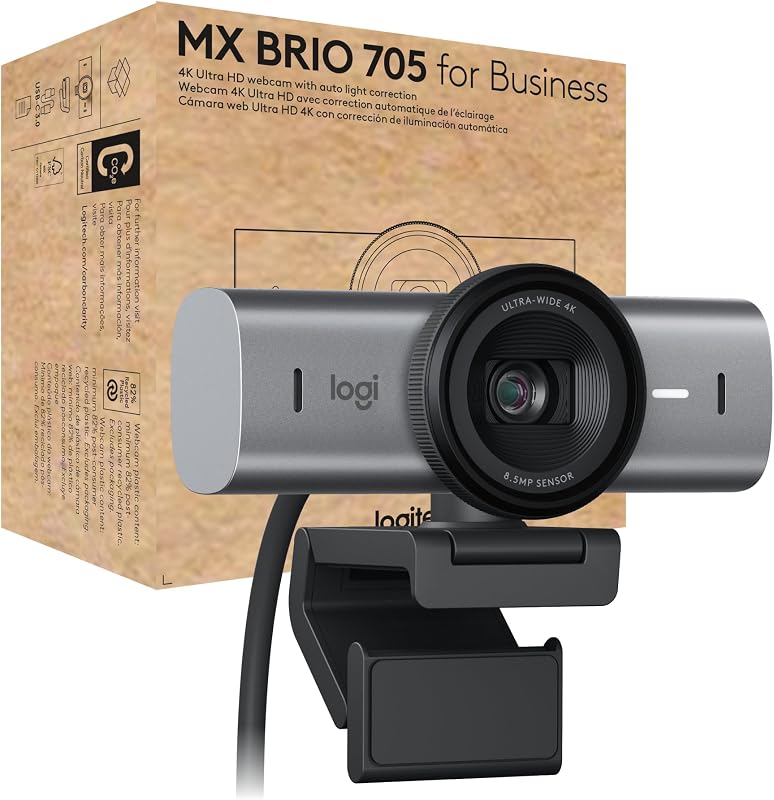
A webcam’s physical housing affects both desktop aesthetics and long-term durability. The MX Brio is constructed using solid milled, low-carbon aluminum for the primary camera housing, accompanied by plastic components containing a minimum of 82% post-consumer recycled plastic. Weighing 6.1 ounces, it balances sturdy premium materials with an eco-conscious design. The Brio 4K comes in at 6.2 ounces with external dimensions of 2.04 x 3.86 x 2.44 inches, but the listing does not specify whether its exterior incorporates metal components or recycled plastics.
Privacy controls also differ markedly between the two devices. The MX Brio features an integrated privacy shutter operated by rotating an aluminum dial on the outer lens ring. Turning this mechanical dial physically blocks the optical sensor with an unmistakable visual indicator. For shoppers reading any comprehensive Logitech MX Brio review, this tactile, built-in mechanism eliminates the risk of misplacing loose plastic snap-on caps.
The product data for the Brio 4K does not specify an integrated mechanical shutter ring. Users who prioritize guaranteed physical privacy without relying on software toggles or clip-on plastic flaps will appreciate the MX Brio’s integrated rotary mechanism. For readers weighing build differences against streaming-specific hardware in our logitech brio 4k vs elgato facecam mk.2 overview, integrated mechanical shutters provide peace of mind that software toggles cannot match.
Edge: Logitech MX Brio, thanks to its milled aluminum housing and tactile, integrated rotary privacy shutter.
Microphone Hardware and Audio Isolation
Voice clarity is just as vital as video quality during high-stakes video conferences. The MX Brio features dual beamforming microphones engineered to isolate the speaker’s voice while suppressing ambient room noise, including air conditioning rumble and desk vibrations. The dual-mic array is optimized to maintain consistent vocal pickup even as the speaker shifts posture or turns their head toward secondary monitors during an active meeting.
By comparison, the provided Brio 4K product listing does not specify microphone technical details, array count, or background suppression features. While dedicated streamers often deploy standalone XLR or USB condenser microphones, business users who participate in calls without headsets depend heavily on onboard webcam microphones. When choosing the Logitech Brio 4K or MX Brio for meetings, having clear documentation on dual beamforming capabilities gives the MX Brio an undeniable advantage for standalone communication.
In open workspaces or busy home offices, ambient noise reduction prevents constant audio distractions on conference calls. The MX Brio’s documented noise-filtering microphones allow users to attend meetings without worrying about minor background commotion. If you do not plan to invest in a separate broadcast microphone, the built-in beamforming setup provides a solid out-of-the-box communication system.
Edge: Logitech MX Brio, due to documented dual beamforming microphones with built-in background noise reduction.
Software Support, Enterprise Management, and Platform Certification
Deploying webcams across corporate environments introduces IT considerations regarding firmware updates, software management, and meeting client certifications. The MX Brio 705 for Business is formally certified for Microsoft Teams, Zoom, and Google Meet, while also carrying official compatibility for Chromebook, Windows, macOS, and ChromeOS. It integrates directly with Logitech Sync, allowing IT administrators to monitor devices, push firmware updates remotely, and maintain consistency across large hardware deployments. Furthermore, a secure boot design prevents unauthorized modifications to device firmware.
The product data for the Brio 4K does not list Logitech Sync remote management features, secure boot hardware protection, or formal certifications for major conference platforms. When comparing software flexibility across platforms in our logitech mx brio vs elgato facecam comparison, enterprise-level management tools make a tangible difference for IT departments outfitting hundreds of remote employees.
For an individual home user, enterprise remote management might seem secondary, but certified platform compatibility guarantees that mute syncing, call controls, and camera parameters work reliably inside Teams or Zoom without driver conflicts. The MX Brio provides fully verified software stability, while the Brio 4K listing leaves enterprise deployment credentials unstated.
Edge: Logitech MX Brio, driven by formal platform certifications, Logitech Sync management, and secure boot architecture.
Pros and Cons
Logitech Brio 4K

Pros
- Captures crisp 4K Ultra HD video
- Compact form factor for desktop monitors
- Lightweight 6.2-ounce profile
- Standard USB connectivity
Cons
- Listing omits lens aperture and sensor details
- No documented Show Mode or auto-framing
- Lacks enterprise management specifications
View Logitech Brio 4K on Amazon
Logitech MX Brio
Pros
- Large sensor with custom f/4 lens
- Show Mode for easy desk presentations
- Integrated rotary privacy shutter
- Milled aluminum housing with recycled plastic
- Certified for Teams, Zoom, and Google Meet
Cons
- Not water resistant for outdoor use
- Dimensions not listed in specifications
View Logitech MX Brio on Amazon
Who Should Buy Each One
Choose the Logitech Brio 4K If
- You need a dependable 4K camera strictly for head-on streaming or straightforward video calls.
- You already own a dedicated microphone and do not require onboard beamforming audio.
- You work from a fixed desk setup where downward document sharing is never required.
- You do not manage hardware across corporate fleets and have no need for Logitech Sync remote tools.
Choose the Logitech MX Brio If
- You regularly demonstrate physical sketches, product samples, or notes using Show Mode.
- You need certified compatibility for Microsoft Teams, Zoom, Google Meet, and ChromeOS.
- You demand premium hardware materials, including a milled aluminum body and an integrated rotary privacy dial.
- You want AI-assisted face-based exposure correction and RightSight auto-framing to keep you centered.
Final Verdict
When assessing MX Brio vs Logitech Brio 4K, the MX Brio clearly represents a modern evolution in webcam engineering. By combining a larger image sensor with an f/4 aperture, AI-assisted face enhancement, dual beamforming microphones, and a milled aluminum body, it solves common everyday conferencing frustrations. The addition of Show Mode and RightSight auto-framing turns the camera into an interactive collaboration tool rather than a static visual capture device, making it easy to determine whether is Logitech MX Brio worth it for serious professionals.
The Logitech Brio 4K remains an option for those who simply require baseline 4K video resolution for everyday web broadcasting. However, its listing leaves key details regarding microphone arrays, lens aperture, housing materials, and enterprise software management unlisted. For anyone whose daily schedule relies on interactive client calls, dynamic presentations, or hybrid team meetings, the Logitech MX Brio is the far more capable and versatile investment.
FAQ
Does the Logitech MX Brio include a physical privacy cover?
Yes, the Logitech MX Brio features an integrated manual privacy shutter built into the lens ring. You can quickly open or close the optical cover by rotating the dial, providing a clear visual confirmation of privacy without needing external clip-on caps.
Can the Logitech Brio 4K tilt downward for desk demonstrations?
The product listing for the Logitech Brio 4K does not specify a downward desk-sharing mechanism or Show Mode. While any camera can be manually angled down using adjustable mounts, the Brio 4K does not include the automated image-flipping features found on the MX Brio.
What platforms are officially certified to work with the Logitech MX Brio?
The Logitech MX Brio is officially certified for Microsoft Teams, Zoom, and Google Meet. It is also compatible with Chromebook, Windows, macOS, ChromeOS, and most mainstream video conferencing platforms.
What video capture format does the Logitech MX Brio use?
The MX Brio captures video in 4K resolution using the MP4 video capture format, with white balance and shooting modes handled automatically by the onboard processor.
Which webcam is better for corporate IT management?
The Logitech MX Brio is designed for enterprise deployment, featuring remote device management through Logitech Sync and a secure boot design to prevent unauthorized firmware modifications. The Brio 4K listing does not specify remote fleet management tools.
How do the weights of the Logitech Brio 4K and MX Brio compare?
The two webcams are nearly identical in physical weight. The Logitech Brio 4K weighs 6.2 ounces, while the Logitech MX Brio weighs 6.1 ounces despite incorporating milled aluminum into its housing construction.
Is the Logitech MX Brio waterproof?
No, the specifications for the Logitech MX Brio explicitly confirm that it has a Not Water Resistant rating. It is designed solely for indoor office and studio environments.