The decisive difference between the Logitech G703 and the Logitech MX Master 3S centers on the split between esports-grade responsiveness and dedicated workflow engineering. The G703 focuses purely on instantaneous input transmission, high report rates, and twitch-movement precision, whereas the MX Master 3S directs its hardware toward thumb-driven navigation, multi-computer switching, and frictionless document scrolling.
Choose the G703 if your primary computing demands fast cursor tracking, mechanical button feedback, and low-latency gaming control. Choose the MX Master 3S if your daily routine revolves around large spreadsheets, switching across multiple operating systems, and silent office productivity.


Logitech G703 vs Logitech MX Master 3S at a Glance
| Feature | Logitech G703 | Logitech MX Master 3S |
|---|---|---|
| Sensor Model | PMW3366 Optical | Darkfield Optical |
| Sensitivity Range | 200 to 12,000 DPI | 200 to 8,000 DPI |
| USB Report Rate | 1000 Hz (1 ms) | Not listed |
| Tracking Surface Support | Standard gaming surfaces | Any surface, including glass (4 mm minimum) |
| Scroll Wheel Style | Standard stepped mechanical wheel | MagSpeed electromagnetic + Thumb wheel |
| Button Click Type | Metal spring tensioned | Quiet Clicks (90% noise reduction) |
| Total Programmable Buttons | 6 | 7 |
| Wireless Connectivity | LIGHTSPEED Wireless (2.4 GHz) | Bluetooth, Radio Frequency |
| Continuous Power Options | POWERPLAY compatible, 1.80 m cable | Up to 70 days battery, quick charge |
| Weight | 107 g | Not listed |
| Best For | Esports and fast-paced gaming | Productivity, spreadsheets, and multi-PC setups |
Sensor Tracking and Latency Performance
Sensor engineering reveals the distinct operational priorities of these two mice. The G703 incorporates the PMW3366 optical sensor, a tracking engine praised throughout competitive gaming for delivering raw, unadulterated cursor movement. Operating across a range of 200 to 12,000 DPI, the PMW3366 executes motion tracking with zero smoothing, filtering, or acceleration throughout its entire sensitivity curve. Paired with Logitech G LIGHTSPEED wireless protocol, it maintains a 1000 Hz report rate, translating to an exact 1 ms response time. When evaluating logitech g502 x plus vs g703, the G703 stands out because its data transmission matches or exceeds that of standard wired peripherals, ensuring that fast hand swipes convert to screen movement without dropped packets or perceptible lag.
The MX Master 3S approaches tracking from an entirely different angle by deploying Logitech Darkfield sensor technology. This sensor peaks at 8,000 DPI and focuses on operational flexibility rather than competitive twitch aiming. Darkfield allows the mouse to track on virtually any desktop material, including high-gloss varnishes and clear glass with a minimum thickness of 4 millimeters. In office environments, this capability eliminates the requirement for a mousepad. However, looking at g703 vs mx master 3s latency, the MX Master 3S operates on standard Bluetooth and office-grade wireless connections. The listing does not specify a 1000 Hz report rate for the MX Master 3S, and typical desktop Bluetooth connections transmit at significantly lower frequencies than dedicated 1 ms gaming dongles. When analyzing the logitech mx master 3s polling rate in fast gaming scenarios, rapid physical adjustments can feel floaty or slightly delayed compared to the instantaneous lock-on accuracy of the G703.
For high-precision design work, document editing, and casual computer use, the 8,000 DPI Darkfield sensor offers smooth, highly dependable navigation across difficult physical surfaces. But when deciding between the logitech g703 or mx master 3s for gaming, the PMW3366 sensor and LIGHTSPEED wireless pipeline make the G703 the far superior tool for maintaining spatial accuracy and raw speed under pressure.
Edge: Logitech G703 because its PMW3366 sensor delivers zero smoothing, an esports-ready 1 ms report rate, and a higher maximum sensitivity ceiling.
Scrolling Mechanics and Primary Button Actuation
Scrolling behavior and click mechanics represent another fundamental difference in hardware design. The MX Master 3S incorporates the proprietary MagSpeed electromagnetic scroll wheel, which can alternate between precise, line-by-line ratcheting and free-spinning acceleration capable of clearing 1,000 lines of text in a single second. According to official performance metrics, MagSpeed scrolling is 90% faster and 87% more precise than standard scroll mechanisms. In addition to the primary wheel, the MX Master 3S features an integrated thumb wheel dedicated to horizontal navigation. Anyone working extensively with multi-column financial models, vast coding repositories, or video editing timelines will find this dual-wheel architecture exceptionally functional.
The G703 retains a traditional gaming scroll wheel optimized for tactile switching. The stepped rotation ensures distinct feedback, preventing accidental over-scrolling when cycling through weapon wheels, selecting inventory items, or binding specific gaming functions to scroll inputs. The mechanical resistance is firmer, providing tactical assurance at the expense of long-document transit speed. Those reading a detailed logitech g703 review will note that while its scroll wheel is sturdy and reliable, it lacks any hyper-fast free-wheeling mode or secondary thumb-scrolling barrel.
Primary button construction also shows diverging goals. The G703 relies on an advanced button tensioning system that uses physical metal springs to keep the left and right switches primed for immediate actuation. This pre-tensioning minimizes pre-travel, reduces the actuation force needed to register a click, and produces a crisp, distinct mechanical snap that esports competitors depend on for rapid clicking. Conversely, the MX Master 3S features Quiet Clicks technology, which dampens acoustic output to deliver 90% less click noise compared to its predecessor. The tactile bump remains noticeable, but the auditory feedback is muffled to avoid disrupting quiet office settings. While perfect for shared workplaces, these softened switches lack the hair-trigger feedback and rapid rebound required for competitive shooting titles.
Edge: Logitech MX Master 3S due to its MagSpeed electromagnetic wheel, secondary horizontal thumb barrel, and whisper-quiet switch dampening.
Ergonomics, Grip Materials, and Physical Chassis
Comfort and physical handling depend heavily on hand orientation and user posture. In any comparison of logitech g703 vs mx master 3s ergonomics, the structural architecture of the frames dictates how the user interacts with the desk. The G703 features an ergonomic, gently contoured body weighing 107 grams. Designed to mold naturally to the hand during extended gaming sessions, it provides a neutral, low-profile grip that supports claw, palm, and hybrid hand placements. Double-injected rubber grips flank the left and right sides of the chassis, giving users high tactile traction during fast mouse lifts and sudden directional shifts. For users exploring lightweight gaming alternatives, reading about the logitech g pro x superlight 2 vs g703 highlights how the G703 balances palm ergonomics with an agile 107-gram frame.
The MX Master 3S is sculpted explicitly for full-palm support and an upright, ergonomic hand posture. Its sweeping, high-arch silhouette tilts the wrist slightly outward to reduce forearm pronation, supporting the natural resting position of the arm during grueling work shifts. An integrated thumb rest extends from the base of the left side, serving as a stabilizing shelf for the thumb and housing the gesture controls and horizontal wheel. While the listing does not specify the exact total weight of the MX Master 3S, its dense productivity frame and multi-motor scrolling assembly make it noticeably heavier and more planted than the G703. Furthermore, the MX Master 3S chassis incorporates 27% post-consumer recycled plastic in its Graphite and Black variants, prioritizing sustainable manufacturing alongside ergonomic engineering.
The choice between these two forms hinges on whether your priority is physical stability or physical agility. The MX Master 3S excels at keeping the hand comfortable and stationary over eight-hour desk days, preventing fatigue during repetitive office tasks. The G703 allows for rapid repositioning, quick wrist adjustments, and aggressive gaming grips that would feel awkward or restricted on the contoured shelf of the MX Master 3S. For a look at how smaller ergonomic travel options compare to gaming shapes, consider the logitech g703 vs mx anywhere 3s breakdown.
Edge: Tie because the MX Master 3S provides superior stationary wrist ergonomics, while the G703 offers a lighter, more agile frame with dedicated rubber side grips.
Battery Architecture and Continuous Power Options
Power management represents another stark contrast in design ideology. The MX Master 3S is built for long-term endurance without frequent tethering. Powered by an internal rechargeable battery, it delivers up to 70 days of continuous operation on a single complete charge cycle. If the battery drains unexpectedly during a critical workday, its rapid-charging circuitry delivers three full hours of working capacity from a single one-minute charge. This extended runtime frees productivity users from keeping cables on their desks for months at a time, though the listing notes that a charging cable is not included in the packaging.
The G703 operates with a smaller internal Lithium Polymer cell configured around low latency rather than multi-month longevity. Because high-polling wireless radios and onboard RGB illumination draw higher continuous current, the G703 cannot match the multi-week stamina of an office peripheral. However, the G703 counters this limitation through the proprietary Logitech G POWERPLAY wireless charging ecosystem. When paired with a POWERPLAY base, the mouse charges continuously through magnetic resonance while at play and at rest, effectively creating an infinite battery system that never needs to be plugged in.
When operating away from a POWERPLAY surface, the G703 utilizes an included 1.80 m charging and data cable. Plugging in the cable instantly transitions the mouse between wireless and wired modes without interrupting software applications or active gaming sessions. The package also provides a dedicated USB adapter that positions the LIGHTSPEED transceiver directly adjacent to the mousepad, minimizing physical transmission obstacles. When weighing logitech g703 vs g604, power delivery methods often dictate desk setup preferences, and the G703 offers complete wireless freedom through POWERPLAY alongside hardwired fallback options.
Edge: Logitech MX Master 3S for general users due to its massive 70-day standalone battery life and emergency three-hour quick charge feature.
Multi-Device Connectivity and Software Customization
Software ecosystems and peripheral connectivity define how smoothly these mice integrate into your daily workflow. The MX Master 3S uses the Logi Options+ software suite, designed to streamline complex business workflows. Its hallmark productivity tool is Logitech Flow, a cross-computer control feature that allows users to move the cursor across up to three independent Windows and macOS computers simultaneously. Flow does not just transfer cursor location; it allows you to copy and paste text, images, and full files directly between separate operating systems over a local network. With Bluetooth connectivity paired alongside standard radio frequency wireless, the MX Master 3S connects to up to three devices at once, switching host machines via hardware controls.
In contrast, the G703 utilizes Logitech Gaming Software to configure performance profiles and hardware customization. Through this platform, users can reassign all 6 programmable buttons to execute macro sequences, keystrokes, and complex in-game commands. The software also controls the mouse’s brilliant RGB lighting system, allowing users to customize illumination across a spectrum of 16.8 million colors to synchronize with gaming rigs, team colors, or desktop ambient themes. The G703 stores these settings directly to its onboard memory, ensuring that your custom DPI steps, lighting configurations, and button binds remain active even when plugging into gaming consoles or tournament PCs without software installed.
When considering the logitech g703 or mx master 3s for work, the multi-device features of Logi Options+ give the MX Master 3S an insurmountable advantage. The G703 lacks multi-device Bluetooth pairing and multi-computer file-sharing utilities, focusing its software solely on gaming optimization. Users evaluating productivity setups often compare modern gaming alternatives like the logitech g502 x vs mx master 3s, but within this specific comparison, the MX Master 3S remains the unchallenged king of multi-device coordination.
Edge: Logitech MX Master 3S because of its multi-computer Flow control, three-device Bluetooth pairing, and app-specific workflow customizations.
Pros and Cons
Logitech G703
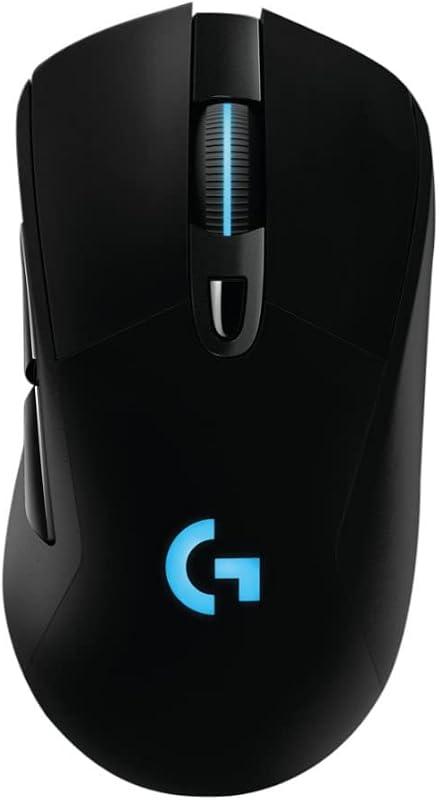
Pros
- PMW3366 sensor with zero smoothing
- 1 ms LIGHTSPEED wireless reporting
- POWERPLAY continuous wireless charging
- Crisp metal spring button tensioning
- Textured rubber side grips
Cons
- Lacks multi-device Bluetooth pairing
- Cannot track on glass surfaces
- No horizontal thumb scroll wheel
Logitech MX Master 3S

Pros
- MagSpeed 1,000-line-per-second scrolling
- 70-day extended battery life
- Logitech Flow multi-computer control
- Darkfield tracking on glass surfaces
- Quiet Click acoustic dampening
Cons
- Higher latency than gaming mice
- Listing excludes charging cable
- Not shaped for fast competitive gaming
View Logitech MX Master 3S on Amazon
Who Should Buy Each One
Choose the Logitech G703 If
- You play competitive first-person shooters or fast-action games that require a 1000 Hz report rate and zero-smoothing tracking.
- You want a lightweight 107-gram chassis with textured rubber side grips for rapid lifting and resetting.
- You own or plan to invest in the POWERPLAY charging pad system for continuous, cable-free power delivery.
- You prefer tactile, mechanical spring-tensioned button actuation and customizable 16.8-million-color RGB lighting.
Choose the Logitech MX Master 3S If
- You work across multiple Windows and macOS machines and want to seamlessly transfer files using Logitech Flow.
- You navigate extensive spreadsheets or long documents that benefit from 1,000-line-per-second MagSpeed scrolling and a horizontal thumb wheel.
- You share an office or workspace and require Quiet Click switches that reduce click sound power levels by 90%.
- You need a long-lasting wireless mouse that runs for up to 70 days on a charge and tracks on glass tabletops.
Final Verdict
Evaluating the logitech mx master 3s vs g703 comes down to identifying whether your computer setup serves primarily as a competitive gaming battle station or a high-output professional workspace. The Logitech G703 remains an exceptional option for gamers who demand pristine mechanical actuation, esports-grade LIGHTSPEED wireless throughput, and the flexibility of continuous POWERPLAY charging. Its PMW3366 optical sensor eliminates software-based filtering and smoothing, ensuring that physical hand movements translate to the screen with absolute fidelity. If twitch targeting, responsive flick shots, and mechanical switch crispness represent your core requirements, the G703 is worth it without question.
On the other hand, a thorough logitech mx master 3s review reveals that it stands apart as the premier peripheral for multi-tasking professionals, software developers, and content creators. The combination of MagSpeed electromagnetic scrolling, dual-axis wheel navigation, 70-day battery longevity, and seamless cross-OS Flow functionality solves workflow bottlenecks that gaming mice simply cannot address. While users who prioritize multi-button gaming might look at comparisons like the logitech g502 x plus vs mx master 3s, for pure desk efficiency and ergonomic support, the MX Master 3S is worth it for anyone spending long hours mastering desktop productivity.
FAQ
Can the Logitech MX Master 3S be used for gaming?
The MX Master 3S can handle casual, slow-paced titles like strategy games, simulation builders, and turn-based role-playing games without issue. However, because it relies on standard Bluetooth and office-grade wireless connections rather than a 1 ms gaming report rate, fast-paced shooters and esports games will expose latency limitations and cursor smoothing.
Can the Logitech G703 work on clear glass desks?
No, the G703 features the PMW3366 optical gaming sensor, which requires an opaque tracking surface or a dedicated mousepad to function correctly. If you require a mouse that tracks reliably on clear glass surfaces of at least 4 mm thickness, the Darkfield sensor on the MX Master 3S is built specifically for that purpose.
Does the Logitech G703 include Bluetooth connectivity?
No, the G703 connects exclusively through Logitech LIGHTSPEED 2.4 GHz wireless technology using its included USB receiver, or via the included 1.80 m data cable in wired mode. It does not support native Bluetooth connections to tablets, phones, or computers lacking standard USB-A ports.
How do the clicks on the MX Master 3S differ from the G703?
The MX Master 3S features Quiet Clicks technology, which absorbs 90% of acoustic click noise to deliver a soft, dampened tap that keeps office spaces quiet. The G703 uses advanced metal spring button tensioning to produce a crisp, tactile, and audible click engineered for rapid actuation and immediate mechanical feedback.
How does the Logitech Flow feature work on the MX Master 3S?
Logitech Flow works through the Logi Options+ software installed on computers connected to the same local network. By moving your mouse cursor to the edge of one display, the mouse automatically shifts control to a secondary computer, allowing you to transfer text snippets, image files, and documents seamlessly between Windows and macOS systems.
Can you charge the Logitech G703 while using it?
Yes, the G703 can be charged while in active use by connecting the provided 1.80 m USB cable, which seamlessly switches the device into a wired data mode. Alternatively, if you use the optional Logitech POWERPLAY charging mouse pad, the G703 charges wirelessly while playing or resting on the surface.


