The single deciding difference between these two mechanical keyboards comes down to form factor and mobility: the G915 TKL is a slim, wireless tenkeyless board designed for cord-free flexibility and wide mouse sweeps, while the G413 is a full-sized, corded workhorse with integrated USB passthrough designed to stay anchored to your desk.
Gamers who demand desk space, dual-device switching, and a low-profile typing posture should choose the Logitech G915 TKL. Players who rely on a dedicated number pad, zero-battery maintenance, and an accessible peripheral port will be better served by the Logitech G413.
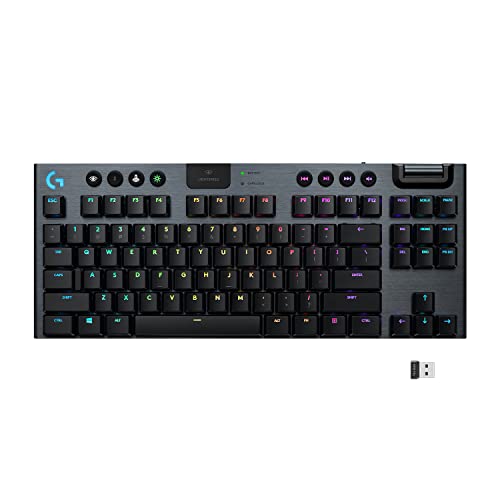

Logitech G915 TKL vs Logitech G413 at a Glance
| Feature | Logitech G915 TKL | Logitech G413 |
|---|---|---|
| Form Factor | Tenkeyless (90 keys) | Full-Size (104 keys) |
| Connectivity | LIGHTSPEED Wireless (1 ms), Bluetooth | Wired USB |
| Switch Mechanism | Low-profile GL switches (Tactile, Linear, Clicky) | Standard-height Romer-G switches (Tactile) |
| Battery Life | 40 hours gaming; 3-hour recharge | Continuous wired operation (no battery) |
| USB Ports | 1 Micro-USB port for charging | 1 USB 2.0 passthrough relay port |
| Dedicated Media Controls | Yes (dedicated buttons and edgeless volume roller) | No (Function hotkeys and media keys) |
| Chassis Material | Aircraft-grade aluminum alloy | 5052 aluminum alloy top case |
| Extra Accessories | Onboard USB receiver storage cavity | 12 faceted gaming keycaps included |
| Water Resistance | Not listed | Water resistant |
| Best For | Mobile, low-profile, clean-desk gaming | Fixed workstations and wired peripheral setups |
Form Factor and Desk Ergonomics
Footprint changes how you arrange your gaming station. The G915 TKL cuts away the tenkey number pad to establish a compact ninety-key layout. This narrower chassis shortens the distance between your keyboard hand and your mouse, leaving open space for sweeping mouse movements during low-sensitivity gaming sessions. The low-profile build sits flat against the surface, eliminating the need for an elevated wrist rest during extended typing sessions.
By contrast, the G413 adheres to an unapologetic, standard-height 104-key configuration. It houses a complete number pad, navigation cluster, and standard row spacing inside a brushed aluminum frame. While this expansive layout requires substantial desk room, it ensures that data entry, balance sheet calculations, and productivity key binds require no layer shifting. If you have explored our logitech g pro x tkl vs g915 tkl comparison, you know how much a tenkeyless footprint reshapes arm posture compared to wide decks.
Your choice depends on how much movement your gaming mouse demands versus how much you lean on the right-hand numeric block. The G915 TKL prioritizes natural shoulder alignment and uninhibited mouse flicks, whereas the G413 anchors itself as an all-purpose input station that supports both gaming and data entry right out of the box.
Edge: Logitech G915 TKL for its ergonomic space-saving footprint and natural low-profile wrist posture.
Switch Architecture and Actuation Feel
Mechanical switches govern keystroke feel, travel distance, and typing fatigue. In any direct G915 TKL vs G413 switches assessment, the underlying engineering differs dramatically. The G915 TKL employs Logitech GL low-profile mechanical switches, engineered to deliver full mechanical tactile feedback at half the standard switch height. Available in GL Tactile, GL Linear, and GL Clicky variations, these short-travel switches engage rapidly, requiring minimal downward motion to register actions.
The G413 features proprietary Romer-G mechanical switches with tactile feedback. Romer-G switches were engineered specifically for gaming responsiveness and long-term durability. Unlike the shallow throw of the GL line, Romer-G switches provide a traditional travel feel with a discernible actuation bump situated near the top of the press. For gamers debating key feel across low-profile and tall stems, reading our logitech g915 tkl vs mx mechanical breakdown shows how low-profile switches reduce travel fatigue over multi-hour gaming sessions.
Typing feel splits along these design lines. Fast-paced action titles and rapid double-taps benefit from the minimal travel distance on the G915 TKL low-profile stems. Conversely, the G413 gives a firmer, traditional stroke that prevents accidental presses while resting fingers on the keycaps. The G413 also ships with twelve faceted gaming keycaps, allowing you to swap out core keys for textured surfaces that guide finger placement during intense firefights.
Edge: Logitech G915 TKL for offering versatile switch choices (Tactile, Linear, Clicky) alongside low-profile actuation speed.
Connectivity, Battery Life, and Portability
Cable management and wireless freedom shape modern gaming stations. The G915 TKL operates via pro-grade LIGHTSPEED wireless, providing a 1-millisecond report rate that eliminates cord drag across your mousepad. It pairs that connection with onboard Bluetooth, allowing you to toggle between your primary gaming rig and a secondary laptop with a single button press. When packed for travel, the wireless USB receiver docks securely inside a storage cavity on the underside of the keyboard.
Cordless performance requires power management, and the Logitech G915 TKL battery life is rated for 40 hours of continuous gaming on a single charge. The keyboard alerts you when capacity dips to 15 percent via an onboard battery LED and software notifications, recharging fully in three hours. On the other side of the aisle, the G413 bypasses battery management completely by using a thick, hardwired USB cable that guarantees uninterrupted power throughout day-long sessions.
Deciding between them comes down to whether you prioritize untethered movement or zero-maintenance uptime. The G915 TKL lets you move the deck freely or slide it away to clear desk space, but it demands periodic charging. The G413 remains permanently bound to your tower, trading wireless flexibility for absolute power reliability that never runs dry in the middle of a competitive match.
Edge: Logitech G915 TKL for pristine LIGHTSPEED wireless performance, Bluetooth dual-pairing, and integrated dongle storage.
Cable Management and USB Passthrough Convenience
Wired peripherals present unique cable challenges, and this is where the G413 demonstrates thoughtful utility. The thick braided cable on the G413 splits into two USB connectors at the computer end. One handles keyboard inputs, while the second powers an onboard USB passthrough relay port positioned along the rear edge of the aluminum chassis. This feature lets you plug a wireless mouse receiver, flash drive, or headset directly into the keyboard without reaching behind your desktop chassis.
In addition to the passthrough port, the underside of the G413 chassis includes molded cable management channels for routing mouse and headset cords under the deck. Our logitech g pro x tkl vs g413 coverage highlights how desktop-bound gamers leverage this integrated routing to keep messy cables under control. The G915 TKL includes a single port reserved exclusively for charging its internal battery, lacking any secondary peripheral relay functionality.
If you rely on quick access to flash drives or want your gaming mouse receiver placed within inches of your mousepad, the Logitech G413 USB passthrough solves that problem at hardware level. The G915 TKL eliminates its own cable clutter through wireless operation, but it cannot serve as an extension hub for other wired accessories on your desk.
Edge: Logitech G413 for its dedicated USB passthrough port and molded under-chassis cable routing channels.
Media Controls and Lighting Customization
Controlling background audio and personalizing illumination alters daily workflow. The G915 TKL incorporates a dedicated media suite directly above the function row. It features soft-touch playback keys alongside an edgeless volume roller that allows instantaneous, granular audio adjustments without alt-tabbing out of your game. Its LIGHTSYNC RGB system supports 16.8 million colors per key, enabling reactive lighting synchronized to on-screen audio and gameplay events via Logitech G HUB software.
The G413 takes a more austere approach to media and illumination. Rather than providing separate buttons, it assigns media playback and volume adjustments to secondary functions on the standard F-keys, requiring two-handed key combinations to execute changes. Key lighting focuses on precision backlighting through the switch center, keeping light focused through the key legends rather than spilling across the top plate. For broader context on modern board layouts, see our logitech g915 tkl vs g715 comparison.
When measuring day-to-day usability, dedicated physical dials outshine secondary key combinations. The G915 TKL allows you to mute audio or adjust tracks during high-stakes gaming without breaking concentration. The G413 covers essential controls, but the reliance on function-layer shortcuts slows down simple volume tweaks.
Edge: Logitech G915 TKL for its dedicated tactile media keys, smooth volume roller, and dynamic per-key LIGHTSYNC RGB engine.
Build Materials and Everyday Durability
Chassis materials define the rigidity and aesthetic profile of your battlestation. Both boards employ aluminum alloys to secure their structural integrity, but they fashion them into distinct forms. The G915 TKL utilizes aircraft-grade aluminum alloy to achieve an ultra-thin, rigid profile. The metal top plate resists deck flex while keeping the board slim and light enough to pack into a backpack or shift around a desk with one hand.
The G413 utilizes a brushed 5052 aluminum alloy top shell finished in a dark, minimalist blade-like shape. This alloy plate provides exceptional torsional rigidity, anchoring the board securely to the desk. The underside features height-adjustable tilt legs outfitted with rubber stabilizers to stop the keyboard from sliding during forceful keystrokes. Furthermore, the G413 listing specifies water resistance, offering peace of mind against accidental liquid splashes during long gaming marathons. A look at our logitech g413 vs mx keys s breakdown confirms how durable this traditional metal housing feels under heavy daily typing.
The G915 TKL represents the pinnacle of modern, thin-profile metal design, delivering high rigidity in a miniature form factor. However, the G413 counters with a heavy-duty industrial chassis, reinforced rubber stabilizers, and listed water resistance that make it an extraordinarily tough desk fixture.
Edge: Logitech G413 for its heavy 5052 aluminum frame, rubber-stabilized footing, and listed water resistance.
Pros and Cons
Logitech G915 TKL

Pros
- Pro-grade 1 ms LIGHTSPEED wireless
- Low-profile switches at half standard height
- Dedicated volume wheel and media controls
- Compact tenkeyless layout saves desk space
- Bluetooth and LIGHTSPEED multi-device switching
Cons
- Requires periodic recharging after 40 hours
- Lacks integrated USB passthrough port
- Lacks dedicated number pad
View Logitech G915 TKL on Amazon
Logitech G413

Pros
- Full-size 104-key layout with number pad
- Integrated USB passthrough relay port
- Durable 5052 aluminum top case
- Includes 12 faceted gaming keycaps
- Wired connection requires no battery charging
Cons
- Large footprint limits mouse movement space
- Lacks wireless or Bluetooth connectivity
- Media controls bound to function shortcuts
Who Should Buy Each One
Choose the Logitech G915 TKL If
- You want a wire-free desk setup powered by low-latency 1 ms LIGHTSPEED wireless and Bluetooth.
- You prefer a tenkeyless layout that frees up maximum desk space for sweeping mouse movements.
- You enjoy the shallow travel and relaxed wrist posture of low-profile mechanical switches.
- You want immediate physical audio control through a dedicated volume roller and playback buttons.
Choose the Logitech G413 If
- You require a full-sized keyboard with an integrated numeric keypad for work and gaming tasks.
- You want a convenient USB passthrough relay port to plug your mouse or peripherals directly into the keyboard.
- You prefer standard-height mechanical switches with tactile feedback and swappable faceted gaming keycaps.
- You want continuous wired power without ever needing to monitor battery percentages or plug in a charging cable.
Final Verdict
When examining the Logitech G413 vs G915 TKL, the G915 TKL proves to be the superior choice for modern, clutter-free battlestations. Its combination of ultra-fast LIGHTSPEED wireless, Bluetooth device pairing, dedicated media controls, and compact tenkeyless footprint directly benefits gamers who want ergonomic posture and maximum mouse mobility. While you must recharge it periodically, the 40-hour battery life and thin aircraft-grade aluminum body deliver an exceptional low-profile gaming experience.
The G413 remains the smarter investment for players who need an immovable, all-in-one desktop workstation. If you rely on a dedicated numeric keypad for daily tasks, value the physical convenience of an onboard USB passthrough port, and refuse to deal with battery management, the full-size G413 provides exceptional structural rigidity and reliable tactile performance without wireless complications.
FAQ
Is the Logitech G915 TKL or G413 for gaming better suited for competitive esports?
The G915 TKL is better suited for fast-paced competitive esports because its tenkeyless layout provides generous clearance for low-DPI mouse swipes. Furthermore, its pro-grade 1 ms LIGHTSPEED wireless eliminates cable resistance, while the low-profile GL switches allow rapid actuation during quick mechanical resets.
What is the Logitech G915 TKL battery life during regular play?
The G915 TKL delivers up to 40 hours of continuous game time on a single charge. The keyboard features an onboard battery indicator LED that warns you when power drops to 15 percent, alongside software pop-up notifications, and it achieves a complete recharge in three hours.
How does the Logitech G413 USB passthrough work?
The G413 features an integrated USB passthrough relay port positioned on the back edge of its chassis. The keyboard cable terminates in two separate USB plugs; when both are connected to your computer, the keyboard port provides dedicated data transmission and power throughput for a mouse, headset, or flash drive.
What switch options exist in the G915 TKL vs G413 switches comparison?
The G915 TKL supports three distinct low-profile GL switch variations: GL Tactile, GL Linear, and GL Clicky, each operating at half the height of traditional switches. The G413 is outfitted with standard-height Romer-G mechanical switches featuring tactile actuation tuned for durability and speed.
Can the Logitech G915 TKL connect to multiple devices simultaneously?
Yes. The G915 TKL includes both LIGHTSPEED wireless and Bluetooth connectivity. You can leave the high-performance LIGHTSPEED USB receiver plugged into your gaming PC and pair the keyboard to a laptop or tablet via Bluetooth, switching between them with dedicated selector buttons.
Is Logitech G413 worth it if you need a standard full-size keyboard?
Yes, the G413 is an excellent option if you require a traditional 104-key layout with an integrated number pad, durable 5052 aluminum alloy construction, listed water resistance, and the utility of an onboard USB relay port without worrying about battery degradation.


