Choosing between the Logitech G Pro X TKL and the Logitech G915 TKL comes down to a fundamental choice between competitive wired analog switch speed and low-profile wireless mobility. The G Pro X TKL equips magnetic Hall-Effect switches featuring customizable actuation and rapid trigger resets designed for fast-paced shooters, while the G915 TKL provides an ultra-slim aluminum deck with dual-mode wireless connectivity for clean, versatile desk spaces.
Pick the Logitech G Pro X TKL if you prioritize lightning-fast switch resets, deep key customization, and tournament-grade input consistency for competitive first-person shooters. Choose the Logitech G915 TKL if you want a clutter-free battlestation with low-profile mechanical keys, long wireless battery life, and easy toggling between your gaming rig and personal laptop.

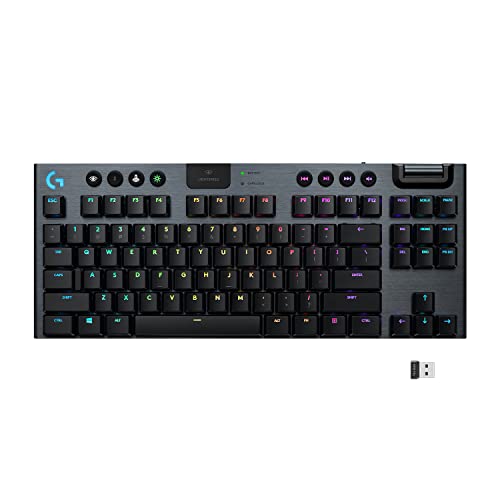
Logitech G Pro X TKL vs G915 TKL at a Glance
| Feature | Logitech G Pro X TKL | Logitech G915 TKL |
|---|---|---|
| Switch Architecture | Magnetic analog (Hall-Effect) switches | Low-profile GL mechanical switches |
| Rapid Trigger Support | Yes (hardware and software adjustable) | No |
| Actuation Force | 35g | Not listed |
| Connectivity | Detachable USB-C / USB-A wired | LIGHTSPEED wireless, Bluetooth |
| Battery Life | Wired (USB powered) | Up to 40 hours (3-hour full recharge) |
| Chassis Material | Plastic enclosure with dual-shot PBT keycaps | Aircraft-grade aluminum alloy top case |
| Dedicated Media Controls | Dedicated buttons and roller controls | Dedicated buttons with edgeless volume wheel |
| Onboard Switch Tuning | Yes (FN key modes for travel and trigger) | No |
| Operating System Support | Windows 10 or later | Windows, macOS |
| Best For | Esports competitors and tactical FPS players | Clean wireless setups and hybrid work-play battlestations |
Switch Technology and Rapid Trigger Performance
Switch mechanics dictate how quickly your keyboard registers commands and resets for the next input, making switch architecture the most critical operational difference between these two tenkeyless peripherals. The G Pro X TKL uses magnetic analog switches powered by Hall-Effect sensors rather than physical metallic contacts. Because these sensors measure magnetic flux as the stem moves downward, the keyboard recognizes dynamic movement instead of relying on a static actuation barrier. This allows for a light 35g actuation force alongside Rapid Trigger functionality, letting you reset and reactivate a key the instant your finger begins lifting upward. In fast-paced tactical titles where counter-strafing and rapid peeking determine who wins an engagement, this continuous analog tracking removes the physical latency inherent to traditional mechanical designs.
By contrast, the G915 TKL relies on low-profile GL mechanical switches, available in tactile, linear, or clicky configurations. These switches operate with conventional physical contact leaves that require the switch to travel past a fixed physical reset point before you can register another keystroke. While these low-profile switches offer half the physical travel height of standard mechanical keyboards-resulting in an exceptionally snappy and responsive typing feel-they lack the dynamic analog resetting capability of Hall-Effect hardware. Comparing the mechanical switch behavior in the Logitech G Pro X TKL vs G413 demonstrates how modern analog switches eclipse traditional fixed mechanical switches when microsecond timing is on the line.
For gamers weighing the Logitech G Pro X TKL rapid trigger vs G915, the analog design represents a tangible hardware advantage in competitive lobbies. The G915 TKL provides predictable, tactile mechanical feedback that feels crisp for daily gaming, but it cannot match the immediate key reset speeds of magnetic analog sensors. Players who demand instantaneous direction changes in tactical shooters will feel the benefit of the analog sensors immediately, while casual players may find standard mechanical actuation more than sufficient for general titles.
Edge: Logitech G Pro X TKL because its magnetic analog switches provide adjustable actuation travel and instantaneous Rapid Trigger resets that fixed mechanical switches cannot deliver.
Connectivity and Battery Endurance
The method used to connect your keyboard directly shapes your desk layout, travel convenience, and charging habits. The G915 TKL is built around wireless freedom, integrating Logitech pro-grade LIGHTSPEED wireless via a dedicated USB dongle alongside secondary Bluetooth connectivity. This dual-wireless configuration lets you maintain an ultra-low-latency 1 ms connection to your primary gaming PC while retaining the ability to toggle over to a laptop, tablet, or secondary work computer at the touch of a button. When not in use, the compact USB receiver docks directly into a molded storage slot built into the back of the keyboard chassis, making it easy to slip into a bag without misplacing the receiver.
Power management on the G915 TKL is engineered for endurance, yielding up to 40 hours of continuous game time on a single full charge with lighting active. The keyboard alerts you to dwindling reserves through a dedicated battery LED indicator that flashes at 15 percent, alongside software pop-up notifications inside Logitech G HUB. Once depleted, the internal battery recharges completely in roughly 3 hours through its wired USB connection. When looking at the Logitech G915 TKL vs MX Keys S for cordless setups, having both multi-device pairing and pro-grade low latency in a single board gives the G915 TKL unmatched versatility on a minimalist desk.
The G Pro X TKL takes an entirely wired approach, relying on a detachable USB-C to USB-A cable for continuous USB power. While a wired connection eliminates battery degradation, charging routines, and wireless interference in crowded esports venues, it keeps you tethered to your desk and requires dedicated cable management. For tournament competitors who never want to worry about an uncharged battery mid-scrim, a wired interface is a reliable operational safeguard, but it sacrifices the cable-free aesthetic and flexible repositioning that wireless battlestation enthusiasts desire.
Edge: Logitech G915 TKL due to its dual-mode LIGHTSPEED wireless and Bluetooth connectivity paired with reliable 40-hour battery life and onboard receiver storage.
Build Materials, Keycaps, and Ergonomics
Chassis construction and profile height affect long-term typing comfort, wrist fatigue, and general durability under heavy daily use. The G915 TKL showcases an ultra-thin silhouette built around an aircraft-grade aluminum alloy top plate. This brushed metal surface provides structural rigidity and strength while keeping the overall profile remarkably slender. Because the chassis rests so low against your desk surface, your wrists stay at a neutral angle during marathon gaming sessions, largely eliminating the ergonomic need for an external wrist rest.
The G Pro X TKL features a more traditional standard-height gaming profile, measuring 14.06 inches long, 5.91 inches wide, and 1.5 inches tall. Constructed with a durable plastic enclosure, it adopts a bulkier structural stance that feels robust and portable for tournament travel. Similar to evaluations of the Logitech G Pro X TKL vs G715, standard-height keycaps feel very different underhand compared to low-profile decks, requiring a steeper finger curvature and higher hand placement.
Where the G Pro X TKL pulls ahead in physical materials is its choice of keycaps. The board comes equipped with dual-shot PBT keycaps out of the box. These keycaps resist shine, oil buildup, and surface smoothing over months of intense practice, ensuring that key legends remain crisp and key surfaces maintain a grippy texture. The G915 TKL uses proprietary low-profile keycaps that keep the design slim, but they lack the heavy-duty density and textured feel of dual-shot PBT. If you prioritize an ultra-thin, premium metallic design that minimizes desk clutter, the G915 TKL shines, while the G Pro X TKL favors rugged, oil-resistant materials engineered for relentless tournament play.
Edge: Logitech G915 TKL for its rigid aircraft-grade aluminum alloy top plate and sleek, low-profile ergonomic design that keeps wrists in a neutral position.
Key Customization, KEYCONTROL, and On-the-Fly Adjustments
Deep software integration and onboard memory capabilities determine how effectively a keyboard can be adapted to complex macros, secondary layers, and rapid profile adjustments. The G Pro X TKL introduces Logitech KEYCONTROL technology, a deep customization suite that grants comprehensive command remapping on every single key. Through KEYCONTROL, you can layer multi-action combos across multiple operational states, mapping complex macros, app shortcuts, or modifier strings to individual keys. Furthermore, the G Pro X TKL allows you to adjust actuation points and fine-tune switch travel speeds directly on the fly using built-in FN key modes, letting you tweak your switch responsiveness between match rounds without ever opening desktop software.
The G915 TKL relies on traditional customization within Logitech G HUB, allowing you to configure function-row macros, manage onboard profiles, and program dynamic animations using LIGHTSYNC RGB backlighting. Its internal hardware includes dual processors and four distinct sections to keep lighting and performance responsive. However, because the GL switches rely on standard mechanical contact points, you cannot adjust actuation travel, sensitivity thresholds, or reset points. Like earlier comparisons such as the Logitech G915 TKL vs G413, traditional mechanical boards rely strictly on fixed keystroke logic without granular analog travel control.
For advanced players building custom command profiles, KEYCONTROL gives the G Pro X TKL a substantial operational edge. The ability to calibrate key sensitivity per-key inside G HUB, combined with hardware-level FN key overrides for rapid trigger behavior, ensures the board adapts precisely to your hand weight and input tempo. The G915 TKL handles everyday gaming macros and media shortcuts capably, but it does not match the granular input tuning unlocked by Hall-Effect architecture.
Edge: Logitech G Pro X TKL due to its advanced KEYCONTROL multi-layer macro remapping and hardware-level actuation tuning without software.
Media Controls and Multi-Device Versatility
Dedicated media interfaces and operating system flexibility dictate how seamlessly a keyboard transitions between competitive gaming and general desktop productivity. The G915 TKL is celebrated for its multimedia hardware, highlighted by an edgeless, precision-engineered aluminum volume wheel. Positioned at the top right of the deck, this smooth-scrolling roller lets you micro-adjust audio levels instantly during games or conference calls. Accompanying the roller are dedicated, low-profile rubberized buttons for play, pause, track skipping, and instant audio mute, alongside quick-toggle buttons for lighting brightness, game mode, and Bluetooth switching.
The G Pro X TKL also incorporates dedicated media buttons and audio adjustment controls, ensuring you do not have to rely on awkward two-key shortcuts while immersed in a match. However, it lacks the tactile feel of the G915 TKL edgeless metallic roller. Furthermore, the G Pro X TKL is targeted strictly at Windows PC environments, requiring Windows 10 or later to leverage its full suite of software features. The G915 TKL natively supports both Windows and macOS, allowing hybrid professionals to switch between an Apple workstation and a Windows gaming rig seamlessly using the onboard wireless selectors.
Comparing the Logitech G915 TKL vs G715 highlights how valuable a dedicated roller and wireless profile switching are for daily workflows. If you spend significant time managing streaming playlists, editing video timelines, or bouncing across different computer operating systems, the G915 TKL delivers a noticeably smoother desktop experience than the esports-focused G Pro X TKL.
Edge: Logitech G915 TKL for its smooth edgeless volume roller, dedicated quick-access controls, and seamless multi-device switching across Windows and macOS.
Pros and Cons
Logitech G Pro X TKL

Pros
- Magnetic Hall-Effect analog switches
- Rapid Trigger mode for instant resets
- Customizable actuation down to 35g force
- Durable dual-shot PBT keycaps
- On-the-fly FN key hardware adjustments
Cons
- Tethered wired USB-C connection only
- Plastic chassis lacks aluminum finish
View Logitech G Pro X TKL on Amazon
Logitech G915 TKL

Pros
- LIGHTSPEED wireless and Bluetooth pairing
- Up to 40-hour battery life
- Aircraft-grade aluminum alloy top plate
- Ultra-thin low-profile ergonomic posture
- Edgeless precision volume wheel
Cons
- Lacks Rapid Trigger and analog travel
- Fixed mechanical switch actuation points
View Logitech G915 TKL on Amazon
Who Should Buy Each One
Choose the Logitech G Pro X TKL If
- You play competitive tactical shooters where Rapid Trigger functionality and sub-millimeter reset precision provide an advantage.
- You want durable dual-shot PBT keycaps that resist surface wear, finger oil, and shining over years of heavy use.
- You prefer a zero-maintenance wired USB-C connection that never requires recharging or battery management during long sessions.
- You want to customize actuation points per key or fine-tune switch travel on the fly using hardware FN key combinations.
Choose the Logitech G915 TKL If
- You want a clean, wireless desk layout with the option to pair your board to multiple computers via LIGHTSPEED and Bluetooth.
- You prefer a slim, low-profile typing posture supported by a rigid aircraft-grade aluminum alloy top plate.
- You value dedicated physical hardware controls like a smooth, edgeless metallic volume roller for media management.
- You require a keyboard that transitions effortlessly between macOS productivity and Windows gaming environments.
Final Verdict
For serious competitive players evaluating the Logitech G Pro X TKL vs G915 TKL, the G Pro X TKL emerges as the superior performance platform. Its magnetic Hall-Effect analog switches represent a massive generational leap for input speed, offering 35g actuation, customizable sensitivity thresholds, and Rapid Trigger resets that fundamentally enhance movement mechanics in first-person shooters. Backed by durable dual-shot PBT keycaps and deep KEYCONTROL software layer mapping, it stands as an uncompromising tool engineered specifically to win competitive matches.
Nevertheless, the Logitech G915 TKL remains the better choice for gamers who prioritize desk aesthetics, wireless mobility, and day-to-day comfort. Its ultra-thin aluminum chassis, 40-hour battery life, effortless Bluetooth switching, and edgeless volume wheel make it one of the most versatile mechanical keyboards available for modern minimalist battlestations. Choose the G Pro X TKL if raw input latency and rapid trigger resets dictate your competitive success; choose the G915 TKL if you want cordless flexibility and low-profile comfort across work and play.
FAQ
Does the Logitech G915 TKL have Rapid Trigger functionality?
No, the Logitech G915 TKL uses standard low-profile mechanical switches with fixed physical contact leaves, meaning it does not support Rapid Trigger resets or dynamic actuation adjustments.
Can the Logitech G Pro X TKL be used wirelessly?
No, the Logitech G Pro X TKL is a wired-only keyboard that connects via a detachable USB-C to USB-A cable, drawing continuous power directly from your computer without an internal battery.
How long does the battery last on the Logitech G915 TKL?
The Logitech G915 TKL delivers up to 40 hours of continuous gaming on a single full charge with RGB lighting active, and it takes approximately 3 hours to recharge completely.
Can you adjust actuation points on the Logitech G Pro X TKL without software?
Yes, the Logitech G Pro X TKL includes onboard FN key modes that allow you to adjust switch travel and configure Rapid Trigger settings directly on the keyboard without launching Logitech G HUB.
What material is used for the keycaps on the Logitech G Pro X TKL?
The Logitech G Pro X TKL comes equipped with dual-shot PBT keycaps, which provide a textured, durable surface designed to resist finger oil and shining over prolonged use.
Can the Logitech G915 TKL connect to more than one device at a time?
Yes, the Logitech G915 TKL features dual-mode wireless connectivity, allowing you to pair with one device using the pro-grade LIGHTSPEED USB receiver and another device using Bluetooth, switching between them with dedicated top-panel buttons.


