The single defining difference that separates the Logitech G703 from the Logitech MX Anywhere 3S is hardware architecture engineered for twitch responsiveness versus mobility-focused productivity. The G703 uses a high-frequency LIGHTSPEED wireless link and an esports sensor built to eliminate tracking lag at a desk, while the MX Anywhere 3S features a high-density Darkfield sensor that tracks across transparent surfaces and a multi-device Bluetooth radio configured for quiet travel workflows.
Gamers demanding zero-latency tracking, metal spring click tensioning, and full-palm ergonomic comfort should select the Logitech G703. Traveling professionals who work across multiple operating systems, require silent clicks in public areas, and value months of battery life should invest in the Logitech MX Anywhere 3S.


Logitech G703 vs Logitech MX Anywhere 3S at a Glance
| Feature | Logitech G703 | Logitech MX Anywhere 3S |
|---|---|---|
| Sensor Model | PMW3366 Optical | Darkfield High Precision |
| Maximum Sensitivity | 12,000 DPI | 8,000 DPI |
| Report Rate / Latency | 1,000 Hz (1 ms) | Not listed |
| Wireless Connectivity | LIGHTSPEED USB Receiver | Bluetooth Low Energy (Logi Bolt compatible) |
| Multi-Device Pairing | Single PC / Console link | Up to 3 devices |
| Battery Life | Not listed (rechargeable Li-Po) | Up to 70 days (500 mAh Li-Po) |
| Continuous Charging Option | POWERPLAY Wireless Charging compatible | Not listed |
| Scroll Wheel Mechanism | Standard stepped gaming wheel | MagSpeed Electromagnetic Auto-Shift wheel |
| Weight | 107 g | 99 g |
| Glass Tracking Capability | No | Yes |
| Best For | Competitive PC Gaming | Mobile Office Productivity |
Wireless Latency and Polling Rate
Wireless responsiveness governs how instantly a physical hand movement manifests on screen, dictating whether a pointer tracks cleanly or stutters during rapid motions. The Logitech G703 relies exclusively on proprietary LIGHTSPEED wireless technology operating at a 1000 Hz report rate, delivering updates to the system every single millisecond. This 1 ms transmission speed matches high-performance wired mice, preventing cursor jitter and dropped inputs during fast twitch targeting in competitive titles.
The Logitech MX Anywhere 3S approaches connectivity through Bluetooth Low Energy, optimized to establish stable links across laptops, tablets, and desktops without demanding a dedicated port. While the listing confirms it is Engineered for Intel Evo for seamless wireless handshakes, Bluetooth by design operates at lower polling rates than dedicated gaming dongles. When analyzing MX Anywhere 3S vs G703 latency, the MX Anywhere 3S is tuned for document stability rather than fast-twitch gaming refresh rates. Gamers comparing options like the logitech g pro x superlight 2 vs g703 know that report rates of 1000 Hz are critical for micro-adjustments in fast-paced scenarios.
For office tasks, spreadsheets, and web browsing, the transmission rate of the MX Anywhere 3S is smooth and entirely adequate. However, in any comparison evaluating G703 vs MX Anywhere 3S polling rate, the G703 operates on an esports standard that provides ten times the data throughput of basic wireless protocols. Furthermore, the G703 includes a 1.80-meter charging cable and adapter to position the receiver directly adjacent to the mouse pad, eliminating interference.
Edge: Logitech G703, because its 1000 Hz LIGHTSPEED connection delivers true 1 ms latency essential for competitive tracking.
Sensor Precision and Surface Tracking
Tracking accuracy dictates how reliably a mouse translates movement into cursor positioning, especially across varying surfaces and movement speeds. The G703 is equipped with the PMW3366 gaming optical sensor, an esports-grade engine offering a sensitivity span from 200 up to 12,000 DPI. The defining characteristic of the PMW3366 is pure hardware 1:1 input: it features zero smoothing, zero filtering, and zero acceleration across the entire DPI range, ensuring consistent muscle memory during competitive play.
The Logitech MX Anywhere 3S sensor takes an entirely different engineering route, incorporating an 8,000 DPI Darkfield High Precision sensor. Instead of demanding a specialized cloth or hard mousepad, Darkfield is designed to track on virtually any flat plane, including high-gloss office desks, hotel countertops, and clear glass surfaces. This broadens the working environment dramatically for mobile professionals who move between boardrooms, coffee shops, and hot-desking stations without carrying an external pad.
While the PMW3366 sensor on the G703 delivers unmatched mechanical precision on gaming mats, it cannot track on transparent or reflective glass tops. Conversely, the 8K sensor of the MX Anywhere 3S allows fine cursor travel across massive multi-monitor office setups with minimal wrist movement, though it lacks the raw high-speed acceleration tolerances demanded by competitive shooters. Readers weighing desktop tracking against travel utility often view the logitech g703 vs mx master 3s comparison to balance similar sensor trade-offs.
Edge: Logitech MX Anywhere 3S, due to its Darkfield sensor capability to track seamlessly across any surface including glass.
Scroll Wheel Mechanics and Productivity Features
Navigating dense interfaces requires distinct hardware capabilities depending on whether the task involves selecting weapons or skimming through enterprise spreadsheets. The MX Anywhere 3S features the MagSpeed electromagnetic scroll wheel, capable of scrolling up to 1,000 lines per second. It integrates auto-shift functionality, dynamically shifting from precise line-by-line ratcheting to frictionless free-spinning when flicked, alongside horizontal scrolling achieved by holding a side button while rotating the wheel.
The G703 incorporates a conventional stepped mechanical gaming scroll wheel with a defined tactile notch per cycle. While this discrete tactile feedback prevents accidental weapon switches or misclicks inside gaming environments, it requires tedious repeated finger swipes when navigating through thousand-row databases or lengthy design documents. It lacks horizontal tilt capabilities and free-spin mechanics entirely.
Software ecosystems also dictate functional output. The MX Anywhere 3S integrates with Logi Options+ to enable application-specific profiles, cross-device workflows, and silent operation via Quiet Clicks hardware. Those examining productivity setups against the logitech mx master 3s vs mx anywhere 3s will recognize this signature silent click feel. The G703 uses Logitech Gaming Software to configure 6 programmable buttons for in-game macros and customize up to 16.8 million RGB colors across two lighting zones.
Edge: Logitech MX Anywhere 3S, as the 1000-line-per-second MagSpeed wheel and Quiet Clicks provide unmatched navigation efficiency.
Ergonomics, Dimensions, and Portability
Long sessions require a physical chassis shaped to support hand mechanics, but structural priorities diverge between static desk setups and mobile road kits. The Logitech G703 uses an asymmetric, ergonomically sculpted right-handed enclosure measuring larger in hand with integrated rubber side grips. At 107 grams, it fills the palm, providing structural support that reduces hand fatigue during extended gaming sessions or full workdays at an office desk.
The MX Anywhere 3S adopts a compact, symmetrical form factor designed for portability. Measuring 100.5 mm long, 65 mm wide, and 34.4 mm deep with a weight of 99 grams, it slips effortlessly into laptop sleeves and backpacks. Built with up to 78% post-consumer recycled plastic depending on colorway, it favors claw or fingertip grips due to its reduced height, making it less supportive for full-palm resting during eight-hour stints.
Button action also reflects these opposing ergonomic philosophies. The G703 uses advanced button tensioning with metal internal springs to keep the primary switches pre-loaded. This mechanism minimizes the physical force required to actuate a click and delivers crisp tactile feedback. The MX Anywhere 3S trades hyper-tactile mechanical snap for Quiet Clicks, dampening switch sound to prevent noise distractions in library or shared work environments.
Edge: Logitech G703, offering superior palm support, molded side rubber grips, and spring-tensioned button dynamics for static desk comfort.
Battery Life and Power Ecosystems
Keeping a wireless mouse powered determines whether a workflow remains continuous or gets interrupted by battery alerts. The MX Anywhere 3S delivers exceptional standalone longevity, operating for up to 70 days on a single full charge from its 500 mAh rechargeable lithium-polymer battery. Fast USB-C charging restores three hours of working time from just a 60-second plug-in, completely eliminating down-time anxiety while traveling.
The Logitech G703 listing does not publish a standalone hour rating for its lithium-polymer battery, but high-performance 1000 Hz optical sensors and RGB lighting naturally demand significantly more power than low-energy Bluetooth office mice. However, the G703 introduces hardware compatibility with the Logitech POWERPLAY wireless charging system. When paired with a POWERPLAY mat, the mouse charges continuously via resonance technology while playing and while at rest, removing the need for charging cables entirely.
Without the separate POWERPLAY accessory, the G703 must be recharged using its included 1.80-meter cable, switching seamlessly into wired data mode during play. Buyers comparing gaming mice like the logitech g502 x plus vs g703 frequently weigh charging convenience. For users without specialized charging pads, the 70-day endurance of the MX Anywhere 3S stands far ahead of standard gaming recharge cycles.
Edge: Logitech MX Anywhere 3S, due to its class-leading 70-day standalone battery life and rapid 1-minute USB-C quick charge.
Multi-Device Pairing and Operating System Versatility
Work environments often require juggling multiple computers, tablets, and specialized operating platforms simultaneously. The MX Anywhere 3S natively supports connection with up to three distinct devices via Bluetooth Low Energy. With a quick press of the pairing switch, users can pivot control between a Windows workstation, a MacBook laptop, and an Android or iPadOS tablet without re-pairing.
The G703 is strictly tethered to its LIGHTSPEED USB wireless transceiver or its direct USB data cable. It communicates with one host system at a time, targeted at PC and gaming console hardware. While it maintains support across Windows 7 or later, macOS 10.11 or later, and Chrome OS, switching between separate machines requires physically unplugging and relocating the USB dongle.
Operating system versatility also tips in favor of the MX Anywhere 3S, which explicitly lists compatibility across Windows, macOS, Linux, Chrome OS, iPadOS, and Android. For users considering whether the logitech g502 x plus vs mx anywhere 3s suits hybrid professional duty, multi-OS support remains a strong productivity pillar. The G703 remains centered on primary desktop gaming environments where single-machine stability takes precedence over multi-client agility.
Edge: Logitech MX Anywhere 3S, allowing seamless switching across three connected devices on multiple operating platforms.
Pros and Cons
Logitech G703
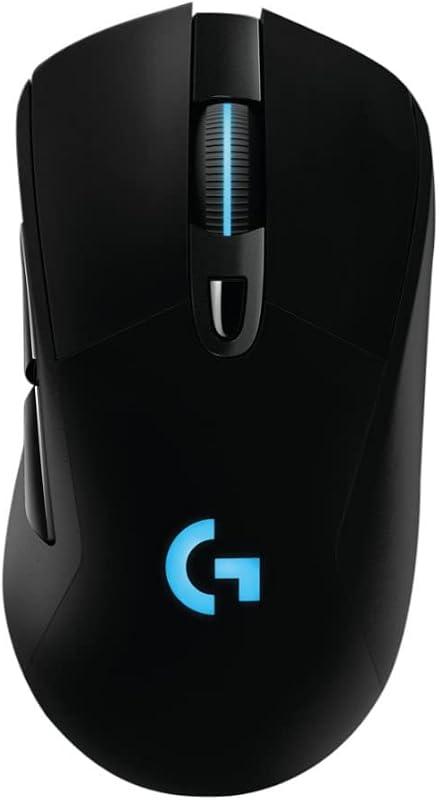
Pros
- LIGHTSPEED 1 ms 1000 Hz polling rate
- Esports-grade PMW3366 sensor with zero acceleration
- Ergonomic full-size shape with rubber grips
- POWERPLAY continuous wireless charging support
- Crisp metal spring button tensioning
Cons
- Requires USB receiver with no Bluetooth
- Shorter standalone battery life than office mice
- Heavier at 107 grams
Logitech MX Anywhere 3S

Pros
- Darkfield sensor tracks directly on glass
- MagSpeed wheel scrolls 1000 lines per second
- Pairs with three Bluetooth devices simultaneously
- Up to 70 days battery life per charge
- Compact 99 gram travel-ready footprint
Cons
- Logi Bolt USB receiver not included
- Lower polling rate unsuitable for twitch shooters
View Logitech MX Anywhere 3S on Amazon
Who Should Buy Each One
Choose the Logitech G703 If
- You play competitive multiplayer games requiring 1 ms LIGHTSPEED wireless response and zero-acceleration optical tracking.
- You prefer an ergonomically contoured, full-sized mouse chassis with molded rubber side grips for full-palm comfort.
- You plan to use a POWERPLAY wireless charging pad to keep your mouse perpetually charged without plugging in cables.
- You rely on crisp, metal-spring-tensioned button clicks and customizable 16.8-million-color RGB lighting zones.
Choose the Logitech MX Anywhere 3S If
- You travel frequently and need an ultra-compact 99g mouse that fits easily into small laptop bags.
- You work in shared spaces, coffee shops, or libraries where Quiet Clicks and silent operation prevent distractions.
- You regularly work on glass tables, hotel desks, or glossy surfaces without carrying a mousepad.
- You switch constantly between up to three computers running Windows, macOS, Linux, or mobile operating systems.
Final Verdict
When conducting a comprehensive Logitech MX Anywhere 3S vs G703 evaluation, the choice hinges directly on your primary use case. For productivity enthusiasts, business travelers, and hybrid office professionals, the Logitech MX Anywhere 3S is the superior pick. Its Darkfield 8K sensor tracks flawlessly on transparent glass, the MagSpeed wheel accelerates navigation through sprawling documents at 1,000 lines per second, and a 70-day battery life frees you from power cables. It delivers unparalleled versatility across multiple operating systems in a compact footprint.
However, the Logitech G703 wins unequivocally for users who prioritize PC gaming, twitch-reflex accuracy, and ergonomic desk comfort. With its true 1000 Hz (1 ms) LIGHTSPEED report rate, esports-caliber PMW3366 sensor, spring-tensioned switches, and POWERPLAY continuous charging capability, the G703 provides mechanical performance that the MX Anywhere 3S cannot match. If competitive gaming dominates your setup, the G703 is the definitive choice; for everything else, the MX Anywhere 3S dominates the workspace.
FAQ
Logitech G703 or MX Anywhere 3S for gaming: which one is better?
The Logitech G703 is vastly superior for gaming. It features a 1000 Hz (1 ms) LIGHTSPEED polling rate and an esports-grade PMW3366 optical sensor with zero smoothing or acceleration. The MX Anywhere 3S relies on standard Bluetooth connectivity, which introduces higher latency that can impede competitive gaming performance.
Can the Logitech MX Anywhere 3S connect using a USB dongle?
The MX Anywhere 3S does not include a USB receiver in the box and connects out of the box via Bluetooth Low Energy. While it is compatible with the Logi Bolt USB receiver, that receiver must be purchased separately if your computer does not have Bluetooth.
How does Logitech G703 battery life compare when using POWERPLAY?
When used with the optional Logitech POWERPLAY charging system, the G703 never needs to be plugged in to charge. The mat creates an energy field that charges the mouse continuously while playing and while resting at your desk.
Is the Logitech MX Anywhere 3S worth it for office use?
Yes, any thorough Logitech MX Anywhere 3S review confirms it is exceptionally well-suited for office and mobile work. Its MagSpeed wheel scrolls up to 1000 lines per second, Quiet Clicks reduce noise in shared rooms, and the Darkfield sensor tracks reliably on glass conference tables.
Can the Logitech G703 be used as a wired mouse?
Yes, the G703 includes a 1.80-meter data and charging cable. When plugged in, the mouse seamlessly transitions to wired data mode without interrupting your gameplay, allowing you to charge and play simultaneously.
Does the Logitech MX Anywhere 3S work on glass desks?
Yes, the MX Anywhere 3S is equipped with a Darkfield High Precision sensor designed specifically to track on virtually any surface, including glass tops, where traditional optical gaming mice like the G703 fail to register movement.
How many devices can the Logitech MX Anywhere 3S connect to at once?
The MX Anywhere 3S can pair with up to three distinct devices simultaneously via Bluetooth. Users can switch control between their paired laptop, desktop, or tablet using the button on the underside of the mouse.


