The single distinction that decides between the Logitech MX Anywhere 3S and the Logitech G604 is how you balance ultra-compact silent portability against sheer physical macro capacity. While one mouse is built to slip into a laptop sleeve and track silently across glass café desks, the other is a full-sized command center designed to put an entire hotbar of keyboard commands right beneath your thumb.
Choose the Logitech MX Anywhere 3S if you need a lightweight travel companion with quiet switches, rechargeable power, and flawless multi-surface tracking for mobile productivity. Choose the Logitech G604 if you want low-latency dual wireless connectivity and fifteen programmable inputs to manage intricate gaming keybinds or dense creative software shortcuts from a stationary desk.

Logitech MX Anywhere 3S vs Logitech G604 at a Glance
| Feature | Logitech MX Anywhere 3S | Logitech G604 |
|---|---|---|
| Sensor Technology | Darkfield High Precision Optical | HERO 16K (Upgradeable to HERO 25K) |
| Maximum Sensitivity | 8,000 DPI | 25,600 DPI |
| Programmable Controls | 6 Buttons | 15 Programmable Controls |
| Connectivity Options | Bluetooth Low Energy (Logi Bolt Compatible) | 1 ms LIGHTSPEED Wireless and Bluetooth |
| Glass Tracking Capability | Yes (Any-Surface Tracking) | Not listed |
| Click Noise Level | Quiet Clicks Dampened Switches | Standard Mechanical Gaming Clicks |
| Scroll Wheel Style | MagSpeed Auto-Shift Wheel | Dual Mode Hyper-Fast Metal Wheel |
| Battery Source | Rechargeable Li-Po (500 mAh) | 1 AA Battery (Included) |
| Battery Longevity | Up to 70 Days (2.33 Months) | 240 Hours (LIGHTSPEED) / 5.5 Months (Bluetooth) |
| Dimensions and Weight | 100.5 x 65 x 34.4 mm; 99 g | Not listed; Full-Sized Ergonomic |
| Best For | Mobile Work and Quiet Offices | MMO Gaming and Heavy Macro Productivity |
Programmable Controls and Button Layout
The layout of your input controls directly shapes your daily efficiency, whether executing spreadsheet macros or triggering combat skills. When evaluating logitech mx master 3s vs mx anywhere 3s, the Anywhere line has always prioritized streamlined simplicity. The MX Anywhere 3S features a clean six-button configuration: left and right click, back and forward thumb triggers, a mode-shift button behind the wheel, and the middle wheel press itself. Through the Logi Options+ application, you can assign application-specific profiles, but physical real estate remains strictly conservative.
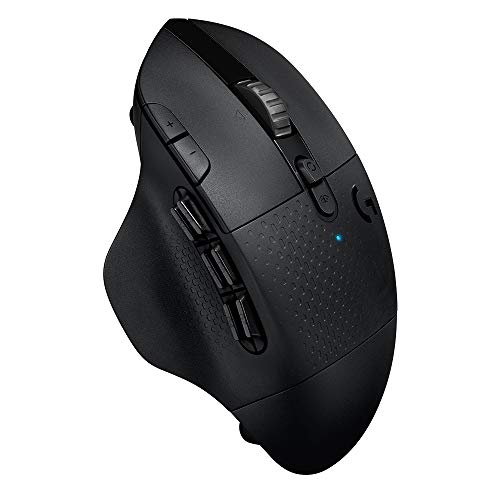
By comparison, the Logitech G604 programmable buttons present a massive leap in input density. The peripheral features 15 programmable controls, centered around a cluster of six dedicated mechanical thumb buttons. Using Logitech G HUB, every single trigger, tilt, and button can hold primary key binds, complex sequential macros, or system shortcuts. If you are debating between the MX Anywhere 3S or G604 for productivity, having fifteen physical inputs allows you to map entire toolbars in video editing suites, audio workstations, or data entry programs directly to your right hand.
The practical trade-off is ergonomic complexity. The six side buttons on the G604 require thumb dexterity and muscle memory to avoid misclicks during rapid movement. On the MX Anywhere 3S, the controls are widely spaced and impossible to mistake, but you remain tethered to your keyboard for complex command strings. For users who need deep macro execution without touching the keyboard, the G604 operates in an entirely different league.
Edge: Logitech G604 provides over twice as many inputs, including six dedicated thumb buttons for intricate macro customization.
Wireless Connectivity and Response Latency
Latency and connection stability determine how effectively a mouse translates physical movement into on-screen action. The MX Anywhere 3S is Engineered for Intel Evo standards, utilizing Bluetooth Low Energy to pair with up to three operating systems simultaneously across Windows, macOS, Linux, ChromeOS, iPadOS, and Android. It does not ship with a wireless dongle in the box, relying entirely on direct Bluetooth connections, though it is compatible with standalone Logi Bolt USB receivers.
The G604 establishes a competitive advantage through its dual-connectivity architecture. It pairs via standard Bluetooth with a report rate of 88 to 133 Hz (7.5 to 11.25 ms), but it also includes Logitech’s proprietary 2.4 GHz LIGHTSPEED wireless receiver that achieves a 1 ms report rate. In our comparative evaluations like the logitech g703 vs g604 breakdown, that 1 ms connection eliminates the micro-stutter and input lag inherent to generic Bluetooth signals.
Understanding Logitech G604 Lightspeed vs Bluetooth performance is critical for mixed-use setups. With the press of an onboard button, you can toggle the G604 between low-latency LIGHTSPEED on your primary gaming rig and Bluetooth on a secondary laptop. The MX Anywhere 3S offers broader multi-OS flexibility across three Bluetooth channels, but it cannot match the sub-millisecond response required for competitive twitch-reaction gaming.
Edge: Logitech G604 delivers lag-free 1 ms LIGHTSPEED performance alongside flexible Bluetooth toggling.
Sensor Performance and Tracking Surfaces
A mouse sensor must accurately register tracking data across unpredictable desktop materials. The MX Anywhere 3S integrates an 8,000 DPI Darkfield High Precision optical sensor engineered specifically to track anywhere, including clear glass surfaces. This MX Anywhere 3S glass tracking capability ensures that mobile professionals can work on hotel desks, polished stone counters, or glass conference tables without packing a supplemental mousepad.
Conversely, the G604 uses Logitech’s HERO optical sensor. Originally rated at 16K, a free firmware upgrade through Logitech G HUB expands this sensor to HERO 25K specifications. This hardware delivers 1:1 tracking, over 400 inches per second (IPS) tracking speed, zero smoothing, zero acceleration, and a massive sensitivity ceiling of 25,600 DPI. When deciding between the MX Anywhere 3S or G604 for gaming, the HERO sensor provides the raw tracking velocity and precision necessary for pixel-perfect targeting.
However, the HERO sensor cannot match Darkfield’s go-anywhere surface versatility. Place the G604 on a transparent glass table or highly reflective varnish, and the sensor will skip or lose tracking completely. As highlighted in comparisons like the logitech g502 x plus vs mx anywhere 3s, gaming sensors are calibrated for speed on mouse mats, whereas Darkfield sensors are calibrated for uncompromising surface tolerance.
Edge: Tie. The MX Anywhere 3S dominates mobile environments with glass tracking, while the G604 wins for pure competitive speed and pinpoint gaming precision.
Scroll Wheel Mechanics and Navigation
Document navigation and canvas scrolling rely heavily on wheel engineering. The MX Anywhere 3S is fitted with Logitech’s MagSpeed electromagnetic scroll wheel, capable of scrolling up to 1,000 lines per second. It features an auto-shift mechanism that switches dynamically from precise line-by-line ratcheting to frictionless free-spin when you flick the wheel quickly. It also supports horizontal scrolling by holding one of the side buttons while rotating the wheel.
The G604 utilizes a durable dual-mode metal hyper-fast scroll wheel. Rather than switching automatically based on finger velocity, the G604 relies on a physical mechanical toggle button positioned right behind the wheel. Pressing the button disengages the internal ratcheting cam, letting the heavy metal wheel spin freely across long web pages and documents. Pressing it again locks it back into rigid, tactile steps.
The G604 wheel offers a unique functional bonus: programmable wheel tilting. In G HUB, the wheel tilt left and right functions can act as independent programmable buttons, allowing you to bind horizontal panning, inventory swaps, or complex keystrokes directly to the scroll assembly. However, the smooth automatic transition of the MagSpeed system on the MX Anywhere 3S provides a substantially more refined, effortless browsing experience during document-heavy workdays.
Edge: Logitech MX Anywhere 3S delivers a more refined, automated transition between ratchet and free-spin scrolling without manual button toggling.
Acoustics, Ergonomics, and Portability
Acoustic profile and physical volume dictate where and how you can comfortably operate these peripherals. In any Logitech MX Anywhere 3S review, the standout physical trait is its compact form factor and Quiet Clicks implementation. The switches provide tactile feedback while absorbing the sharp acoustic snap typical of office mice. Measuring 100.5 mm long, 65 mm wide, and 34.4 mm deep with a weight of only 99 grams, it drops into small laptop bags unnoticed and can be clicked rapidly in quiet libraries without disturbing anyone.
The G604 takes the opposite approach, adopting a full-sized ergonomic design with an integrated thumb rest and contoured palm support. It is built to support a full right-handed grip during marathon sessions, reducing hand fatigue over hours of continuous use. However, its mechanical switches produce loud, crisp clicks that echo across silent work environments, making it less suitable for open-plan offices or remote coffee shops.
The trade-off is clear: the MX Anywhere 3S prioritizes travel convenience and stealth acoustics at the expense of full palm support. The G604 prioritizes hand ergonomics and physical stabilization at the expense of portability. When looking at full-sized productivity mice such as in the logitech mx master 3s vs g604 matchup, users who stay parked at one desk generally favor larger grips, whereas mobile laptop users find compact dimensions non-negotiable.
Edge: Logitech MX Anywhere 3S wins for portability and silent operation, slipping effortlessly into travel bags and quiet meeting rooms.
Power Management and Battery Life
The power architectures of these two mice reflect their underlying design philosophies. The MX Anywhere 3S runs on an internal 500 mAh rechargeable lithium-polymer battery charged via an included USB-C cable. Logitech MX Anywhere 3S battery life reaches up to 70 days on a full charge, or roughly 2.33 months of normal daily use. If the battery runs dry mid-task, a quick one-minute charge over USB-C yields three hours of working life, allowing you to top off without interrupting your workflow.
The G604 rejects internal charging entirely in favor of a single disposable or rechargeable AA battery. Power longevity depends heavily on the operational mode you select. When utilizing high-performance 1 ms LIGHTSPEED wireless, the HERO sensor and wireless transmitter consume the battery in approximately 240 hours of continuous active use. When toggled over to standard Bluetooth mode, battery endurance stretches up to 5.5 months.
Choosing between rechargeable USB-C convenience and swappable AA power comes down to personal habits. With the MX Anywhere 3S, you will never have to hunt down a spare alkaline cell; you simply plug into any standard laptop charger. With the G604, you never have to tether your mouse to a charging wire, but you must keep fresh AA batteries on hand to avoid sudden power loss during critical tasks.
Edge: Logitech MX Anywhere 3S takes the win with modern USB-C rechargeable power and three-hour emergency runtime from a one-minute charge.
Pros and Cons
Logitech MX Anywhere 3S

Pros
- Tracks reliably on glass surfaces
- Quiet Click dampening technology
- Fast MagSpeed electromagnetic scrolling
- Rechargeable USB-C fast charging
- Lightweight 99g travel design
Cons
- No USB receiver included in box
- Only six physical buttons
View Logitech MX Anywhere 3S on Amazon
Logitech G604

Pros
- 15 fully programmable control inputs
- 1 ms Lightspeed wireless connectivity
- Up to 25,600 DPI Hero sensor
- Dual-mode metal hyper-fast scroll wheel
- Up to 5.5 months Bluetooth runtime
Cons
- Relies on disposable AA battery
- Does not track on glass surfaces
Who Should Buy Each One
Choose the Logitech MX Anywhere 3S If
- You work on the go and frequently encounter clear glass conference tables or unpadded café desks.
- You need a discreet, nearly silent mouse with Quiet Click switches for meetings, libraries, or shared offices.
- You prefer an internal rechargeable battery that juices up quickly via standard USB-C cables.
- You switch constantly across up to three different devices running Windows, macOS, iPadOS, or ChromeOS.
Choose the Logitech G604 If
- You play MMO, MOBA, or shooter games that demand lag-free 1 ms LIGHTSPEED wireless response.
- You rely heavily on complex macros and want six dedicated thumb buttons to streamline your workflow.
- You prefer a full-sized ergonomic chassis with a thumb rest to support your hand over long desktop sessions.
- You want the peace of mind of instant swappable battery power providing up to 5.5 months of Bluetooth endurance.
Final Verdict
For the majority of everyday computer users and mobile professionals, the Logitech MX Anywhere 3S is the more practical, modern, and versatile investment. Its combination of Darkfield glass tracking, whisper-quiet acoustic dampening, rapid USB-C charging, and dynamic MagSpeed scrolling addresses the real friction points of daily computer work. Whether you are balancing remote work between coffee shops or running presentations in glass-walled boardrooms, the MX Anywhere 3S executes the fundamentals of portable productivity with remarkable polish.
The Logitech G604 takes the crown whenever gaming latency or dense macro automation enter the equation. If your daily routine includes competitive gaming, complex video editing timelines, or extensive keybinding chains, the G604 offers functionality the compact mouse cannot match. For readers exploring alternative wireless options like the logitech g703 vs mx anywhere 3s, the G604 stands out as a unique hybrid, offering elite gaming responsiveness alongside fifteen programmable controls that elevate stationary desktop productivity.
FAQ
Does the Logitech MX Anywhere 3S include a USB wireless receiver in the box?
No, the Logitech MX Anywhere 3S does not come with a USB receiver or dongle in the box. It connects natively via Bluetooth Low Energy and is Engineered for Intel Evo specifications. It is compatible with the Logi Bolt USB receiver, but that accessory must be acquired separately if your computer lacks Bluetooth support.
Can the Logitech G604 track properly on glass surfaces?
The listing does not specify glass tracking capabilities for the Logitech G604. Its HERO optical sensor is engineered for high-speed tracking accuracy, low latency, and zero smoothing on mousepads and opaque surfaces, meaning it will likely fail or skip on transparent glass tabletops.
Is the Logitech G604 worth it for non-gaming productivity tasks?
Yes, the Logitech G604 is an exceptional productivity tool for power users who rely heavily on application shortcuts. Its fifteen programmable inputs and six thumb buttons can be configured via Logitech G HUB to execute complex productivity macros, browser actions, and timeline controls across applications like Excel, Premiere Pro, and Photoshop.
How do you charge the Logitech MX Anywhere 3S?
The MX Anywhere 3S features an internal 500 mAh lithium-polymer rechargeable battery. It charges directly through its front-facing USB-C port using the included USB-A to USB-C charging cable, providing up to three hours of operational runtime from just a single minute of rapid charging.
Can you switch between multiple computers using both mice?
Yes, but they achieve multi-device connectivity differently. The MX Anywhere 3S can pair natively with up to three Bluetooth devices simultaneously across various operating systems. The G604 features dual-connectivity switching between its ultra-fast 1 ms LIGHTSPEED USB receiver on one machine and Bluetooth on another, allowing you to toggle between two systems with a single button press.
Which mouse has quieter click switches?
The Logitech MX Anywhere 3S is significantly quieter. It is specifically engineered with Quiet Clicks switch technology, which dampens acoustic noise to minimize distraction in shared work environments. The G604 uses standard tactile mechanical gaming switches that produce a distinct, audible click with every actuation.


