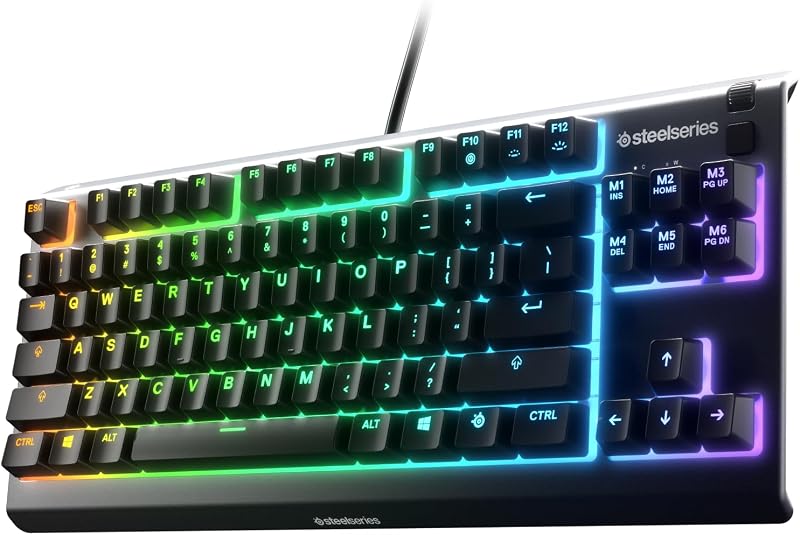
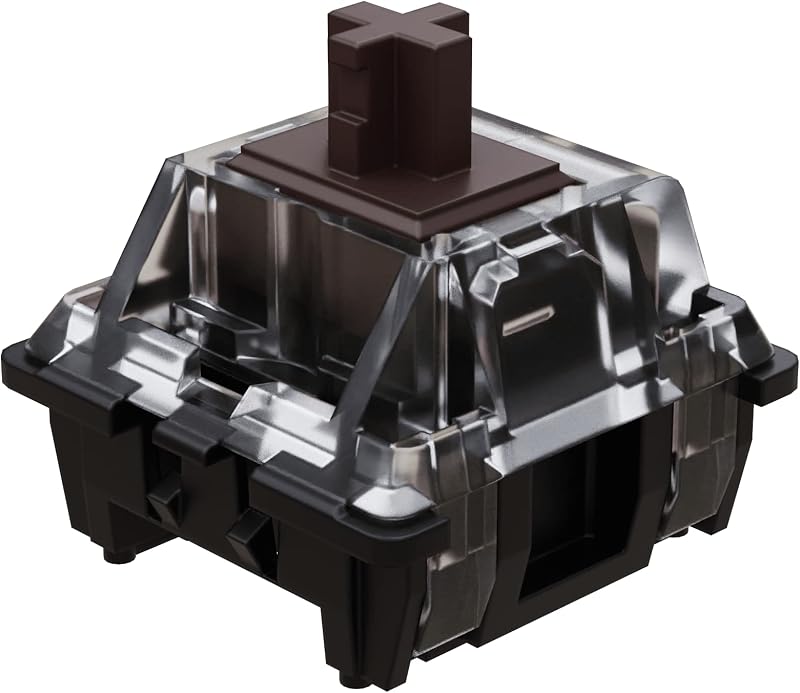
The deciding factor between tactile switches and clicky switches comes down to acoustic output: tactile switches provide a distinct physical bump at the point of actuation without creating a sharp auditory snap, whereas clicky switches deliberately generate an unmistakable, high-frequency click alongside that physical feedback.
Typists and gamers who share an office, record podcasts, or prefer a subtle keyboard presence should choose tactile switches for their balanced physical feedback. Dedicated solo typists and mechanical keyboard enthusiasts who demand immediate acoustic confirmation of every single keypress should choose clicky switches.


Tactile Switches vs Clicky Switches at a Glance
| Feature | Tactile Switches | Clicky Switches |
|---|---|---|
| Primary Feedback Type | Physical bump without click mechanism | Physical bump with acoustic click mechanism |
| Acoustic Footprint | Moderate bottom-out clack, no click snap | High-pitch click and bottom-out sound |
| Actuation Force Examples | 40 gf operating force | 45±15 gf operating force |
| Tactile Bump Position | High bump at 0.5 mm travel | Mid-travel conduction at 1.8±0.3 mm |
| Switch Durability | 60 million keystrokes | 30 million to 80 million cycles |
| Contact Materials | Alloy copper and palladium gold contacts | Alloy steel or standard pin contacts |
| Ingress Protection | Not water resistant; dustproof stem | IP40 or IP54 dust and water resistance |
| Pin Architecture | 5-pin and 4-pin formats | Standard 3-pin MX-style layouts |
| Best For | Shared offices, streaming, and quiet typing | Private offices and rhythmic typing confirmation |
Acoustic Output and Sound Profile
The operational sound profile is the primary dividing line when evaluating tactile vs clicky switch sound. Tactile switches generate sound primarily when the stem impacts the bottom of the switch housing or tops out on the return stroke. Outside of those housing collisions, the tactile bump itself is mechanically silent. Modern options like the Akko V3 Lavender Purple Pro Keyboard Switch feature factory lubrication on the rails and an 18 mm extension spring, which dampens high-frequency pinging and concentrates the acoustic footprint into a muted, lower-frequency sound. For builders seeking basic components, options like the OCRLLC 180Pcs Tactile Push Button Switch Assortment Kit demonstrate how pure tactile actuation relies strictly on internal dome snap rather than dedicated noise-making components.
Clicky switches, by contrast, feature internal mechanisms engineered specifically to produce sound. In switches such as the Kailh Box White Mechanical Keyboard Switches, a dedicated click bar or click jacket snaps against the housing wall the exact millisecond the electrical contact is bridged. This creates a crisp, metallic snap that cuts through background ambiance. While this audio feedback aids rhythm, it makes clicky switches challenging to use around other people. Open office workers, streamers, and gamers who communicate over live open microphones often find that clicky switches bleed heavy background chatter into audio streams, creating distraction.
When weighing tactile or clicky switches for office environments, acoustic etiquette is paramount. A standard tactile keyboard sounds subtle under regular typing pressure, blending into typical ambient room noise. Clicky switches broadcast every actuation clearly across a room. Unless you work in a completely isolated space, the sustained acoustic presence of click mechanisms will irritate coworkers and housemates over long work sessions.
Edge: Tactile switches, because their suppressed acoustic profile fits both quiet communal spaces and private desks without sacrificing tactile feedback.
Actuation Force and Key Feel Mechanics
Understanding tactile vs clicky actuation force requires examining how each switch delivers its tactile event. A tactile switch uses carefully curved stem legs that slide over the internal leaf contacts. As you press down on an Akko Lavender Purple Pro, resistance builds rapidly until you cross a pronounced tactile bump positioned at 0.5 mm of travel. Once past this peak resistance at 40 gf, the force drops smoothly toward bottom-out. This early bump provides an immediate physical cue that the key has registered, allowing typists to train themselves not to bottom out entirely, which reduces finger strain over thousands of words. Those comparing mechanical options often evaluate linear vs tactile switches to decide whether any bump at all is desirable.
Clicky switches produce a distinctly different tactile sensation due to the decoupled nature of the click mechanism. The Kailh Box White features an operating force of 45±15 gf and a bottom-out force of 55±10 gf, with conduction travel occurring at 1.8±0.3 mm within a 3.6±0.3 mm total travel distance. Instead of a rounded bump, the click bar provides an abrupt, crisp drop-off the exact instant the spring snaps. This drop feels sharp and precise, offering a sharper tactile drop than typical tactile stems. Meanwhile, general clicky DIY switches, such as the Brandflagship 120 Pack Clicky Keyboard Switches, present a distinct blue-style click actuation with sharp physical resistance right before release.
The difference in key feel affects muscle fatigue during heavy daily computer use. The progressive ramp-down of a tactile switch cushions the finger smoothly, making it easier on connective tissue. The sudden release of a clicky switch feels exceptionally lively and engaging, but the abrupt snap can feel jarring to typists with sensitive joints during ten-hour typing stretches. The question of are clicky switches worth it usually hinges on whether you value that sharp mechanical snap over a softer, rounded bump.
Edge: Tactile switches, because their progressive resistance curve softens finger impact and reduces typing fatigue during sustained daily use.
Typing Accuracy and Productivity
When assessing tactile or clicky switches for typing, accuracy and rhythm are the core metrics. Typists debating cherry mx blue vs cherry mx brown platforms have long argued over whether physical feel or sound produces fewer typos. Clicky switches provide dual-channel confirmation: your fingertip feels the mechanical snap, and your ears hear the click. This instantaneous secondary cue prevents second-guessing and phantom strokes. When transcribing fast speech or executing rapid code syntax, this acoustic affirmation helps maintain a steady typing rhythm.
However, when asking is tactile switch better for typing during professional workdays, tactile switches deliver distinct productivity benefits. The tactile bump on the Akko Lavender Purple Pro provides physical actuation feedback without relying on an acoustic report. In real-world office environments, typists frequently wear closed-back headphones, participate in conference calls, or listen to music while typing. When auditory cues are masked by audio playback, the auditory benefit of a clicky switch disappears entirely, leaving only the mechanical bump to guide your fingers.
Typing speed tests in controlled environments often reveal similar raw words-per-minute scores across both switch types once muscle memory settles. The true separator is focus and fatigue. Clicky switches offer unparalleled engagement for short, intense bursts of creative writing where every keystroke feels deliberate. Tactile switches deliver steady, unobtrusive accuracy for long, unbroken stretches of data entry, programming, and documentation work.
Edge: Tie, because clicky switches provide superior dual-sensory confirmation for solo typing, while tactile switches provide identical physical accuracy without acoustic dependence.
Gaming Performance and Rapid Input Consistency
Evaluating tactile or clicky switches for gaming requires looking at reset points and mechanical hysteresis. Hysteresis occurs when a switch actuates at one point in its downward travel but must travel back upward past a separate reset point before it can be triggered again. Clicky switches that use traditional click jackets or click bars often have a measurable distance between actuation and reset. In fast-paced competitive games requiring rapid double-tapping-such as stutter-stepping in first-person shooters or rapid ability casting in MOBAs-the Kailh Box White with its 1.8 mm conduction travel and 3.6 mm total travel must clear its mechanical reset before firing again. If your fingers hover near the actuation point, clicky mechanisms can cause delayed second presses.
Tactile switches minimize this hysteresis gap because the stem legs remain in continuous contact with the leaf. On switches like the Akko Lavender Purple Pro, the tactile bump is placed high at 0.5 mm, allowing swift actuation and an immediate reset right at the top of the stroke. Gamers comparing cherry mx red vs cherry mx brown or looking into responsive boards like the logitech g pro x tkl vs g413 understand that having a predictable physical bump without mechanical reset delay creates an ideal compromise between gaming control and typing feedback.
Furthermore, gaming communication gives tactile switches a major advantage over clicky alternatives. Discord channels, in-game voice chat, and team comms pick up clicky switches easily, frequently cutting through noise gates and annoying teammates during intense matches. Tactile switches keep your communication channel clean while preserving the tactile confirmation required for complex movement combinations and ability execution.
Edge: Tactile switches, due to minimal reset hysteresis for rapid key presses and clean integration with live voice communications.
Durability, Engineering, and Build Variations
The internal engineering of modern mechanical switches dictates how long they maintain consistent resistance and electrical conductivity over years of use. In a dedicated tactile switches review, the Akko V3 Lavender Purple Pro stands out for its high-grade alloy copper and palladium gold contacts. These premium metal contacts resist oxidation and maintain clean electrical conduction over an estimated lifespan of 60 million keystrokes. Akko also implements a dustproof stem shroud that shields the internal slider from particulate debris, paired with factory-applied lubrication on the rails to maintain smoothness out of the box.
Conversely, an in-depth clicky switches review shows impressive engineering focused on environmental resistance. The Kailh Box White utilizes a specialized box architecture enclosing the contact points, earning an IP54 rating for dust and water resistance alongside an operational lifespan rated up to 80 million cycles. For builders working on 3D prints, custom fidgets, or prototype keyboards, Brandflagship clicky switches provide an IP40 dust-resistant housing, 10-milliamp current rating at 12 volts, alloy steel contacts, and a 30-million-click rating. These specialized enclosures protect internal click mechanisms from lint, moisture, and dust buildup that could otherwise dampen the click bar or alter actuation feel. Those looking across premium mechanical keyboards like the logitech mx keys s vs mx mechanical recognize that ingress protection significantly extends switch life.
However, clicky switches contain more moving components responsible for switch performance. In addition to the electrical contact leaf, there is a physical click bar or click jacket that flexes with every keystroke. Over tens of millions of cycles, or under heavy industrial contamination, mechanical click components can suffer acoustic fatigue where the click sound changes pitch or becomes inconsistent across different keys. Tactile switches have fewer separate moving parts, as the tactile event is generated directly between the stem leg and contact leaf.
Edge: Clicky switches, because options like the Kailh Box White carry higher certified durability ratings up to 80 million cycles and formalized IP54 dust and water protection.
Pros and Cons
Tactile Switches

Pros
- Quiet acoustic profile for shared rooms
- High tactile bump at 0.5mm
- Alloy copper and palladium gold contacts
- Factory pre-lubed switch rails
- Minimal reset hysteresis for gaming
Cons
- Not water resistant rating
- Lower cycle rating than box clicky
View Akko V3 Lavender Purple Pro Keyboard on Amazon
Clicky Switches

Pros
- Instant acoustic keypress confirmation
- Up to 80 million operating cycles
- IP54 dust and waterproof options
- Sharp and crisp actuation feel
- Universal 3-pin PCB compatibility
Cons
- Too loud for shared offices
- Microphone bleed during voice chat
- Noticeable mechanical reset distance
View Kailh Box White Mechanical Keyboard Switches on Amazon
Who Should Buy Each One
Choose Tactile Switches If
- You work in a shared office space, cubicle layout, or home environment near family members who would be disturbed by constant clicking.
- You regularly participate in voice calls, gaming communication channels, or live streaming where background microphone bleed causes distraction.
- You play fast-paced competitive games that demand quick double-tap inputs and immediate switch reset without hysteresis delays.
- You prefer a cushioned, progressive bump that softens the impact on your fingers over prolonged daily typing sessions.
Choose Clicky Switches If
- You work exclusively in a private office or dedicated personal workspace where loud acoustic output does not disturb anyone.
- You rely on clear auditory feedback alongside physical sensation to verify keystroke actuation without looking down at the keyboard.
- You want high certified ingress protection, such as the IP54 dust and water resistance found on box-style clicky switches.
- You build maker projects, 3D printed mechanical clickers, or tactile fidget toys that require sharp, satisfying audio confirmation.
Final Verdict
For most mechanical keyboard users, tactile switches represent the superior overall choice. They deliver the defining benefit of mechanical keyboards-precise, responsive physical feedback that prevents missed keystrokes-without imposing loud acoustic noise on your environment. Switches like the Akko V3 Lavender Purple Pro demonstrate how high-precision engineering, factory lubrication, and early 0.5 mm tactile bumps create a satisfying typing experience that excels in competitive gaming, daily office work, and late-night typing sessions alike.
Clicky switches remain the champion for dedicated solo typists, retro typing enthusiasts, and maker projects where acoustic feedback is celebrated rather than hidden. If you work in an isolated environment and crave the crisp, rhythmic snap of switches like the Kailh Box White with their 80-million-cycle durability and IP54 sealed box construction, clicky switches offer an engaging typing experience that tactile switches cannot replicate. For any shared environment, however, tactile switches are the undisputed winner.
FAQ
Can you make clicky switches quiet enough for an office?
No, you cannot silence the click mechanism of a clicky switch effectively. While installing rubber O-rings on keycap stems reduces the bottom-out sound when the plastic keycap hits the housing, it does not alter the internal click bar or click jacket. That sharp metallic click is produced inside the switch housing during actuation and cannot be silenced without permanently altering or damaging the switch.
Do tactile switches feel mushy compared to clicky switches?
High-quality tactile switches do not feel mushy. Mushiness is typically associated with membrane keyboards or poorly designed rubber domes. Modern mechanical tactile switches use rigid plastic stems and metal leaf springs that provide a crisp, defined physical resistance event. However, because clicky switches feature an abrupt mechanical drop-off when the click bar releases, tactile bumps feel slightly rounder and smoother by comparison.
Are tactile or clicky switches better for gaming?
Tactile switches are generally superior for gaming. Clicky switches often exhibit a slight gap between actuation and reset points due to the mechanics of the click mechanism, which can introduce minor latency during rapid double-tapping. Tactile switches reset almost immediately after the bump, allowing for faster repetitive keystrokes while keeping open voice chat channels free from distracting clicking sounds.
Are 5-pin tactile switches compatible with 3-pin keyboards?
A 5-pin switch, such as the Akko V3 Lavender Purple Pro, can fit onto a 3-pin hot-swap keyboard PCB if you modify the switch. The two extra plastic side pins exist solely for PCB mounting stability. If your keyboard PCB only has holes for the center post and two metal electrical pins, you can clip the two extra plastic stability pins off with flush cutters without affecting the switch electrical function.
Do clicky switches last longer than tactile switches?
Durability depends on individual switch engineering rather than switch type alone. Some clicky switches, like the Kailh Box White, boast ratings of up to 80 million cycles and IP54 dust and water resistance due to enclosed box housings. However, tactile switches like the Akko V3 Pro offer 60 million keystroke ratings with palladium gold contacts. In practice, both switch categories will last for many years of daily typing before experiencing physical failure.
Why do some tactile switches actuate earlier in the keystroke than clicky switches?
Actuation timing depends on the physical profile of the stem legs and spring design. Modern tactile switches frequently place the tactile bump right at the top of the travel stroke-such as at 0.5 mm on the Akko V3 Pro-so users immediately feel resistance upon initiating a press. Many clicky switches position their click event closer to the standard mid-travel actuation depth of 1.8 mm to 2.0 mm, resulting in a short period of free travel before the click occurs.