The single difference that decides the choice between a wired mechanical keyboard and a wireless mechanical keyboard comes down to whether you prioritize uninterrupted, zero-latency desktop power or the flexible convenience of cable-free, multi-device connectivity. Wired boards provide constant electrical current directly through a USB cable without the risk of radio interference or battery wear, while wireless models give you a clean workstation and the power to toggle across multiple computers, tablets, and phones on the fly.
Choose a wired mechanical keyboard if you want a permanent, zero-maintenance desktop connection optimized for latency-critical competitive gaming and stationary data entry. Choose a wireless mechanical keyboard if you rotate across several devices during the workday and want an uncluttered desk layout without cable drag.



Wired vs Wireless Mechanical Keyboards at a Glance
| Attribute | Wired Mechanical Keyboard | Wireless Mechanical Keyboard |
|---|---|---|
| Primary Connection | Direct USB cable connection | Tri-mode: 2.4GHz wireless, Bluetooth 5.0, USB-C wired |
| Power Source | Continuous USB bus power | Rechargeable lithium-ion battery (e.g., 8000mAh) |
| Multi-Device Pairing | Single host connection per cable | Up to 5 simultaneous devices via Bluetooth and 2.4GHz |
| Signal Stability | 100% immune to wireless interference | High stability via 2.4GHz; potential interference via Bluetooth |
| Switch Sockets | Hot-swappable 3-pin and 5-pin support | Hot-swappable 3-pin and 5-pin support |
| Chassis Construction | Rigid brushed aluminum alloy or plastic casing | Gasket-mounted frames, multi-layer silicone, or aluminum |
| Software Customization | Dedicated desktop software for macros and RGB | Dedicated software for macros, key remap, and RGB |
| Form Factor Options | Full-size 104-key layouts common | Compact 96% (99-key) and full 104-key layouts |
| Best For | Competitive gaming and stationary workstations | Multi-device productivity and cable-free desk setups |
Connection Stability, Latency, and Polling Integrity
When you press a switch on a mechanical keyboard, the controller registers the physical contact, scans the matrix, and transmits the key code through a communication channel to your computer operating system. In high-speed typing and fast-paced gaming, input registration needs to happen without delay, dropped keystrokes, or packet congestion. While hardware design in modern peripherals has narrowed the performance gap, the physical transmission medium still creates a technical divide between tethered USB wiring and radio frequency broadcasts.
In a detailed wired mechanical keyboard review, the wired design provides a direct, uninterrupted path for data transfer. Heavy-duty boards like the Redragon K556 rely on a high-bandwidth USB connection with full anti-ghosting across all 104 keys, guaranteeing that every rapid combination and simultaneous key press registers at standard 1000Hz polling rates without signal attenuation. This hardline protocol completely bypasses the 2.4GHz radio frequency spectrum, meaning nearby wireless routers, smartphones, and Bluetooth peripherals cannot degrade packet integrity. Gamers evaluating a wired vs wireless gaming mouse and keyboard setup frequently select wired hardware to eliminate the micro-stutter and packet loss associated with dense radio environments.
By comparison, a modern wireless mechanical keyboard review highlights multi-channel versatility through tri-mode configurations. Keyboards like the AULA F99 combine Bluetooth 5.0, a 2.4GHz wireless receiver dongle, and a detachable USB-C wired connection. When deciding on a wired or wireless mechanical keyboard for gaming, the 2.4GHz USB receiver provides near-wired responsiveness that matches standard play, but wireless mechanical keyboard latency remains susceptible to radio interference or sleep-mode delays. While Bluetooth provides an efficient link for writing and web navigation, its polling rate is restricted and can introduce perceptible delay during fast key sequences. Wired designs avoid sleep cycles entirely, ensuring the switch actuation registers immediately even after hours of idling.
Edge: Wired Mechanical Keyboard. A hardwired USB connection guarantees zero radio interference, eliminates sleep-mode wake latency, and delivers consistent polling performance without dropouts.
Power Management and Battery Maintenance
Power delivery governs how reliably a peripheral functions over years of daily operation. A wired mechanical keyboard draws a steady stream of five-volt power directly from the host computer motherboard via USB bus power. This electrical design means the board never runs out of power during a high-stakes match, a long programming session, or an overnight rendering job. Because there are no chemical cells inside the frame, the hardware avoids battery swelling, capacity fade, or thermal wear over long-term ownership.
Conversely, wireless mechanical keyboard battery life is a central factor for anyone considering a cordless workstation. To keep the switches and backlighting running without a tether, boards integrate rechargeable lithium cells. The AULA F99, for instance, incorporates a massive 8000mAh internal battery engineered to deliver extended runtime across typing sessions. However, active lighting drastically accelerates power drain. Mechanical boards feature dynamic lighting arrays, such as the 16 RGB effects on the F99 or the 20 preset illumination modes on the Redragon K556 PRO. Operating full-brightness RGB animations on a wireless peripheral cuts battery runtime from weeks down to days, requiring you to plug the keyboard back in using a USB-C cord. Similar trade-offs appear when evaluating low-profile wireless boards against hardwired alternatives in the logitech g915 tkl vs g413 comparison.
Over several years, rechargeable batteries inevitably degrade in maximum charge retention. When the internal cell weakens, the keyboard must spend more time tethered to a charging cable, effectively turning it back into a wired peripheral with dead weight inside the chassis. Wired keyboards bypass internal power cells entirely, allowing you to maximize backlighting brightness without ever thinking about charging schedules or battery cycle counts.
Edge: Wired Mechanical Keyboard. Direct USB bus power provides continuous operation without battery degradation, charging cables, or illumination-based power anxiety.
Desk Setup and Multi-Device Flexibility
Workspace ergonomics and device ecosystems determine whether a cable is a reliable anchor or an irritating obstacle. For multi-system operators, the physical cord of a wired keyboard presents clear structural limitations. A traditional board like the Redragon K671 connects to a single host machine via its fixed USB line. If you alternate between a personal desktop, an employer-issued corporate laptop, and an iPad, using a wired keyboard requires moving cables, configuring hardware KVM switches, or plugging in cumbersome USB hubs. The cable also occupies desk space, limiting where you can position your keyboard on large desk pads.
This dynamic shifts when asking is a wireless mechanical keyboard worth it for modern multi-tasking. Wireless keyboards provide unmatched versatility through instant channel switching. The AULA F99 can connect to up to five devices simultaneously across Bluetooth 5.0, 2.4GHz wireless, and USB-C, allowing users to jump between a PC, tablet, laptop, and smartphone by pressing simple FN key combinations. Similarly, the Redragon K556 PRO offers multi-device tri-mode switching across Windows, MacOS, Linux, and Android tablets without re-pairing. Comparing versatile office peripherals in our logitech g413 vs mx keys s breakdown shows that workers who manage cross-platform hardware benefit substantially from wireless freedom.
Beyond pairing options, going cordless cleans up the physical desktop surface. Without a permanent cable trailing toward the back of the desk, you can reposition the board at an angle for gaming, shift it aside to review physical paperwork, or stow it under a monitor riser at the end of the day. For flexible workstations, the convenience of wireless operation is difficult to overlook.
Edge: Wireless Mechanical Keyboard. Tri-mode wireless technology enables effortless hotkey switching across up to five devices and keeps the workspace free of cable clutter.
Acoustic Engineering, Gasket Mounts, and Build Rigidity
The typing feel and sound profile of a mechanical keyboard depend on frame construction, switch mounting, and internal acoustic dampening. Historically, standard mechanical keyboards featured tray-mount construction where the circuit board and metal plate screw directly into a plastic or metal bottom casing. Today, the mechanical keyboard market offers fundamentally different structural approaches between heavy stationary frames and multi-layered acoustic builds.
In wired designs, structural rigidity is often prioritized. The Redragon K556 utilizes a tank-solid brushed aluminum alloy board designed to eliminate frame flex and prevent keyboard wobble during aggressive typing or gaming sessions. Inside, integrated noise-absorbing foams dampen internal resonance, delivering a firm bottom-out feel paired with tactile Brown switches. The wired Redragon K671 reinforces this approach using a full 104-key 3-section layout, water resistance, and double-shot keycaps that emphasize long-term durability. These rigid aluminum tray builds provide an unyielding foundation that stays planted on your desk, but they transmit higher levels of vibration into your fingertips when typing for long hours.
Wireless mechanical keyboards have increasingly adopted advanced internal dampening structures pioneered by the custom keyboard community. The AULA F99 features an advanced gasket structure, an extended integrated silicone pad, and PCB single-key slotting paired with five separate layers of silencing fillers. These dampening layers fill empty space between the switches, circuit board, and casing, eliminating hollow pinging noises and delivering a soft, elastic keystroke. When evaluating structural differences similar to those explored in our keychron k10 pro vs v3 analysis, gasket-mounted wireless keyboards frequently produce a deeper acoustic signature that many typists favor over traditional metal tray-mount boards.
Edge: Wireless Mechanical Keyboard. The integration of gasket-mounted structures, PCB single-key slotting, and five-layer sound dampening creates a softer keystroke and superior acoustics right out of the box.
Switch Customization, Macros, and Software Ecosystems
Both wired and wireless mechanical keyboards have largely embraced modular switch sockets, ending the era when a dead switch required replacing the entire keyboard. Today, hot-swappable printed circuit boards allow enthusiasts to pull out individual switches and install new variants without soldering. However, software programming and on-the-fly macro configuration vary depending on how the keyboard communicates with desktop configuration utilities.
Wired boards deliver steady, uninterrupted access to configuration software. The Redragon K556 and Redragon K671 feature universal hot-swap sockets compatible with almost all 3-pin and 5-pin mechanical switches, allowing you to swap out stock tactile Brown or linear Red switches at will. Because the connection to the host computer is hardwired, companion software suites can continuously write macro bindings, remap keys, and synchronize dynamic 20-mode RGB lighting profiles directly to onboard memory without risking firmware corruption from signal loss. The wired K671 package even bundles four spare mechanical switches and replacement keycaps for immediate maintenance. This level of customization easily outperforms non-modular keyboards discussed in our mechanical vs membrane keyboard guide.
Wireless keyboards match this hardware modularity while maintaining software capabilities. The AULA F99 features a hot-swappable PCB supporting 3-pin and 5-pin switches, pre-lubed linear switches, and software-based macro customization alongside 16.8 million RGB color controls. Similarly, the Redragon K556 PRO pairs quiet linear switches with hot-swappable sockets and software-driven custom keybindings. One practical constraint to note: most wireless companion software utilities require the keyboard to be plugged in via USB-C or connected through the 2.4GHz dongle to flash firmware or record complex macros, as Bluetooth channels do not support high-bandwidth configuration commands. Once programmed, however, both formats retain your settings in onboard memory.
Edge: Tie. Both wired and wireless mechanical keyboards offer identical hot-swappable switch compatibility for 3-pin and 5-pin components, full macro programmability, and extensive RGB lighting controls.
Pros and Cons
Wired Mechanical Keyboard

Pros
- Zero-latency continuous USB connection
- No battery charging or capacity degradation
- Rigid brushed aluminum frame options
- Full anti-ghosting across 104 keys
- Universal 3-pin and 5-pin hot-swap sockets
Cons
- Cable clutter across the desktop
- Tethered to a single host machine
- Less convenient for mobile setups
View Redragon K556 Wired RGB Mechanical Gaming on Amazon
Wireless Mechanical Keyboard
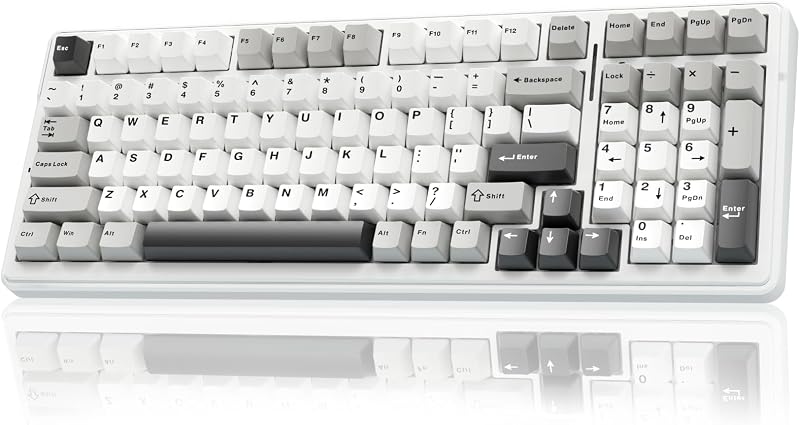
Pros
- Tri-mode 2.4GHz, Bluetooth, and USB-C connectivity
- Multi-device pairing for up to five machines
- Large 8000mAh battery on select models
- Gasket structures with five-layer silencing foams
- Clean, cable-free desktop aesthetic
Cons
- Requires periodic battery recharging
- Bluetooth introduces latency in fast games
- Potential wireless signal interference
View AULA F99 Wireless Mechanical Keyboard Tri-Mode on Amazon
Who Should Buy Each One
Choose a Wired Mechanical Keyboard If
- You play competitive esports, first-person shooters, or rhythm games where even minor radio interference or wireless packet loss can disrupt gameplay.
- You maintain a permanent desktop battlestation and prefer never having to charge an internal battery, monitor power levels, or manage sleep-mode wake delays.
- You prefer an ultra-solid brushed aluminum alloy chassis that remains firmly planted on your desk surface during aggressive keystrokes.
- You want a reliable, plug-and-play USB connection that functions immediately across Windows, MacOS, and gaming consoles without pairing menus or receiver dongles.
Choose a Wireless Mechanical Keyboard If
- You manage a multi-device workstation and need to toggle typing between a primary desktop, a corporate laptop, and mobile devices using quick hotkey commands.
- You want an uncluttered, minimalist desk aesthetic free of USB cables and routing channels.
- You value custom acoustic engineering, such as gasket mounting, PCB slotting, and multi-layer silicone noise dampening for a quieter, deeper typing sound.
- You frequently move your keyboard around your desk or transport your peripheral between home and office workspaces.
Final Verdict
For most modern typists and hybrid remote workers, the wireless mechanical keyboard is the superior choice. The flexibility to seamlessly connect to up to five devices across Bluetooth 5.0, low-latency 2.4GHz wireless, and USB-C wired mode eliminates the friction of managing separate peripherals for work and personal systems. Combined with massive 8000mAh battery capacities, pre-lubed linear switches, and gasket-mounted sound dampening that eliminates hollow casing resonance, models like the AULA F99 deliver an exceptional typing experience without tying you to a single physical port.
However, the wired mechanical keyboard remains the undisputed champion for stationary gaming rigs and users who demand absolute reliability. If your primary focus is competitive multiplayer gaming where input timing is everything, hardware like the Redragon K556 provides an unbeatable, rock-solid brushed aluminum foundation. With direct USB bus power, full anti-ghosting across 104 keys, and zero wireless interference, a wired board delivers continuous performance without charging routines, dead batteries, or pairing headaches.
FAQ
Is a wireless mechanical keyboard worth it for everyday productivity?
Yes. A wireless mechanical keyboard is worth it for everyday productivity because tri-mode connectivity allows you to switch between multiple host systems, such as a desktop PC, work laptop, and tablet, using simple key shortcuts. It also frees up desk space and allows you to reposition the board easily throughout the day.
Can a wireless mechanical keyboard match wired latency for competitive gaming?
A wireless keyboard operating over a dedicated 2.4GHz USB receiver delivers near-wired responsiveness that satisfies the needs of most gaming genres. However, a wired connection remains superior for high-stakes competitive esports because it is completely immune to radio frequency interference, packet drops, and sleep-mode wake latency.
How long does a wireless mechanical keyboard battery life typically last?
Battery runtime varies significantly depending on battery capacity and backlighting usage. Models equipped with high-capacity cells, such as the 8000mAh battery found in the AULA F99, can last for weeks of daily typing with RGB lighting disabled. Turning on high-brightness backlighting effects draws substantially more power and will require recharging every few days.
What is the difference between mechanical keyboard wired vs bluetooth modes?
Wired mode transmits key signals directly through a physical USB cable with maximum polling rates and uninterrupted power. Bluetooth mode connects wirelessly without a receiver dongle, conserving battery power and allowing pairing with tablets and phones, but operates at a lower polling rate that can introduce perceptible latency during high-speed gaming.
Do wired mechanical keyboards sound different than wireless mechanical keyboards?
Sound profiles depend on internal chassis design rather than the connectivity method itself. However, many modern wireless keyboards, such as the AULA F99, feature gasket-mount construction, slotted PCBs, and five layers of silicone dampening foam to produce a deep, quiet keystroke, whereas traditional wired boards like the Redragon K556 utilize rigid aluminum plates that produce a crisper, firmer bottom-out sound.
Can you use a wireless mechanical keyboard while it is plugged in and charging?
Yes. Wireless mechanical keyboards feature a wired USB-C mode that charges the internal battery while transmitting data directly over the cable. This allows you to continue typing or gaming without interruption even if the internal battery runs completely out of power.
Are hot-swappable switches equally compatible on wired and wireless boards?
Yes. Hot-swappable circuit boards on both wired and wireless models use universal 3-pin and 5-pin sockets. Whether you select a wired board like the Redragon K556 or a wireless model like the AULA F99, you can replace the stock switches with any standard mechanical switch from brands like Cherry, Gateron, or Outemu without soldering.


