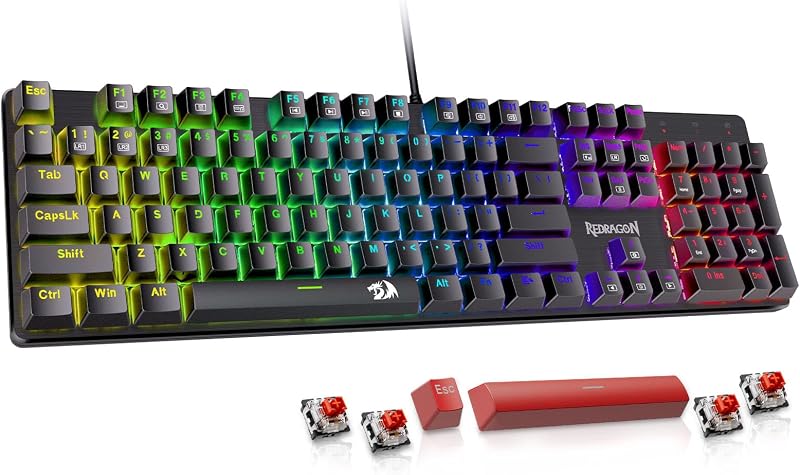
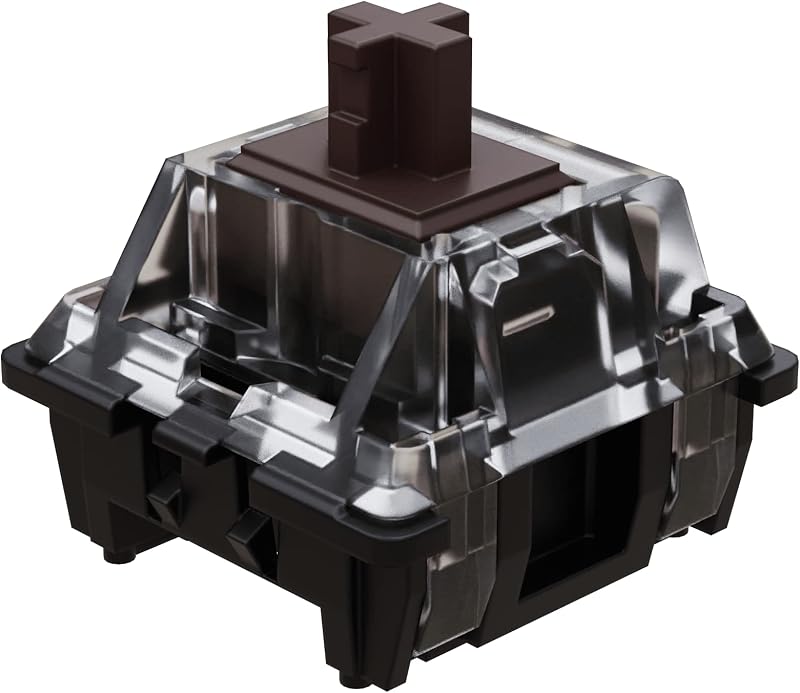
The single deciding factor between a mechanical keyboard and a membrane keyboard comes down to how each keystroke registers: mechanical keyboards use separate, individual physical switches under every key with dedicated springs and metal contacts, whereas membrane keyboards rely on a continuous flexible rubber or silicone dome layer that collapses to bridge electrical contacts on a printed circuit board. This architectural difference defines everything from tactile precision and key travel to long-term typing fatigue, maintenance, and acoustic presence.
Choose a mechanical keyboard if you want swappable linear or tactile switches, robust anti-ghosting, and rebuildable hardware tailored for fast gaming and heavy typing. Choose a membrane keyboard if you prioritize low-profile wrist positioning, soft-cushioned bottom-outs, and quiet keystrokes for shared workspaces.


Mechanical Keyboard vs Membrane Keyboard at a Glance
| Feature | Mechanical Keyboard | Membrane Keyboard |
|---|---|---|
| Actuation Mechanism | Independent physical switch modules (springs, stems, and leaf contacts) | Flexible rubber or silicone dome sheet over printed trace layers |
| Switch Customization | Hot-swappable 3-pin and 5-pin sockets on modern boards | Fixed dome array or hybrid mecha-membrane switches; non-swappable |
| Key Rollover / Anti-Ghosting | Full N-key anti-ghosting across all keys | Matrix-dependent or multi-key gaming rollover |
| Keycap Materials | PBT or ABS with double-shot or heat-sublimation legends | UV-coated keycaps, ABS, or integrated low-profile caps |
| Acoustic Damping | Multi-layer internal foam, silicone dampeners, and slotted PCBs | Inherent silicone/rubber dome bottoming dampening |
| Form Factors | Compact 75%, tenkeyless, or full 104-key layouts | 99-key compact layouts or full-size layouts with wrist rests |
| Connectivity Options | Tri-mode wireless (2.4GHz, Bluetooth 5.0) and wired USB-C | Wired USB or multi-device wireless combinations |
| Best For | Fast-paced competitive gaming, switch customization, and tactile precision | Quiet office work, cushioned typing, and ergonomic low-profile setups |
Switch Architecture and Actuation Feel
The mechanical vs membrane switch feel comes directly from the mechanical architecture under each keycap. When you press a mechanical switch, a stem travels downward against an internal metal spring until internal metal leaf contacts meet, completing the circuit mid-travel before the switch fully bottoms out. In contrast, standard membrane boards require the user to push down a rubber or silicone dome until it collapses completely, pressing a conductive pad down onto an electrical trace layer. Hybrid variations, like the mecha-membrane switches found on the Razer Ornata V3, combine the cushioned impact of a membrane dome with an audible, clicky mechanical feedback mechanism to bridge this sensory divide.
Because mechanical switches actuate partway through their travel, typists do not need to bottom out every stroke. Boards like the Redragon Mechanical Gaming Keyboard incorporate smooth linear red switches that slide cleanly with minimal resistance, allowing rapid consecutive taps without heavy finger strain. On a standard membrane setup, bottoming out against the flexible sheet is mandatory for registration. For long typing sessions, deciding between mechanical or membrane for typing depends on whether your fingers prefer the crisp, spring-assisted reset of an independent switch or the softer, cushioned landing of a silicone dome. While exploring switch dynamics, comparing a hall effect vs mechanical keyboard provides further context on non-contact switch mechanisms.
Edge: Mechanical keyboard. Independent springs and mid-travel actuation deliver clearer feedback, reduced finger fatigue, and consistent key response across every row.
Gaming Performance and Anti-Ghosting
In competitive gaming, registering multiple simultaneous key inputs without missed commands or phantom inputs is critical. When comparing a mechanical keyboard vs membrane gaming setup, switch reset points and matrix wiring determine how fast a player can strafe, execute combo inputs, or jump. The Redragon Mechanical Gaming Keyboard specifies full-key anti-ghosting across all 104 keys, meaning every individual input registers independently even if several keys are struck at the exact same fraction of a second. This level of simultaneous registration gives gamers total reliability during frantic movement sequences.
Membrane keyboards historically routed keys along simpler matrix rows that could lock up during complex multi-key presses, though modern designs mitigate this issue for gaming. The AULA 99 Key Keyboard provides extensive macro customization, enabling players to bind complex commands directly to keys or to dedicated M1, M2, and M3 shortcut buttons. Similarly, the Razer Ornata V3 offers backlit media controls and low-profile keys designed for quick navigation. However, choosing mechanical or membrane for gaming usually leans toward mechanical switches because linear stems reset faster than rubber domes, which must physically pop back into shape before accepting a clean repeat strike.
Edge: Mechanical keyboard. Full-key anti-ghosting and rapid mechanical spring return prevent dropped inputs during complex gaming macros and simultaneous presses.
Customization, Hot-Swapping, and Modularity
The ability to personalize hardware is where mechanical keyboards stand completely apart from membrane options. A modern mechanical keyboard review frequently highlights hot-swappable switch sockets as a standard requirement. The AULA F75 Pro features a hot-swap base compatible with both 3-pin and 5-pin switches, pre-lubricated stabilizers, and single-key slotted PCBs. This allows an enthusiast or beginner to swap out linear switches for tactile or clicky alternatives without touching a soldering iron, or to install alternate keycap profiles to match their desktop aesthetic.
By comparison, membrane keyboards are closed, monolithic systems. Because the silicone dome layer is molded as a continuous mat beneath the keys, individual switches cannot be extracted, lubricated, or re-weighted. Any membrane keyboard review must point out that when a membrane switch wears down or fails, replacing that single key is rarely an option. While membrane options like the AULA 99 Key Keyboard allow macro software remapping and backlighting adjustments via rotary knobs, physical hardware modularity is virtually nonexistent compared to hot-swappable mechanical platforms. For an in-depth look at layout adjustments within modular mechanical designs, check out our comparison on 65% vs 75% keyboard form factors.
Edge: Mechanical keyboard. Hot-swappable sockets support 3-pin and 5-pin switches, making maintenance, tuning, and personalization effortless without soldering.
Keystroke Durability and Keycap Longevity
When evaluating mechanical vs membrane keystroke durability, the physical materials used in the moving parts reveal clear lifespans. Mechanical switches isolate friction to durable plastic stems, copper leaf springs, and steel coils designed to withstand tens of millions of strokes per switch. Furthermore, mechanical boards often include replacement hardware right out of the box; for example, the Redragon Mechanical Gaming Keyboard bundles four spare linear switches and extra keycaps to replace damaged units immediately if a key malfunction occurs.
Membrane keyboards face different physical limitations because rubber domes can suffer material fatigue, stiffen, or lose elasticity over time due to heat, humidity, and constant mechanical deformation. To counter surface wear on key faces, manufacturers apply protective treatments; the Razer Ornata V3 incorporates UV-coated keycaps to shield legends against oils and frequent friction. In the mechanical sphere, boards like the AULA F75 Pro employ side-printed PBT keycaps constructed via double injection molding and heat sublimation, materials inherently resistant to shine and sweat. When considering is a mechanical keyboard worth it for longevity, the ability to replace individual switch units and rugged PBT keycaps gives mechanical hardware a substantial lifespan advantage.
Edge: Mechanical keyboard. Self-contained switch housings, bundled spare switches, and thick PBT keycap construction endure heavy use far longer than degrading silicone dome sheets.
Acoustic Profile and Noise Levels
Assessing mechanical vs membrane noise level requires looking beyond the raw decibels to the frequency and resonance of each key bottom-out. Traditional office membrane keyboards remain popular largely because flexible silicone domes naturally absorb keystroke shock, resulting in a muted, low-frequency sound that blends into quiet meeting rooms. However, some membrane models deliberately emulate clicky profiles; both the AULA 99 Key Keyboard and the Razer Ornata V3 feature clicky acoustic profiles that produce noticeable auditory feedback with every press.
Mechanical keyboards cover an enormous sonic range, from sharp high-pitched clicks to muted, acoustic “thocks.” Modern mechanical construction increasingly incorporates multi-layered sound deadening. The AULA F75 Pro uses five distinct layers of internal silencer fillings, an extended silicone pad, and pre-lubed Reaper linear switches to absorb hollow reverberation within its plastic case. This creates a refined, deep acoustic signature rather than the harsh clatter of unpadded keyboards. Still, for users who need guaranteed, whisper-quiet operation straight out of the box without tuning switch types, a standard membrane dome remains simpler to keep silent. If you are comparing pre-built mechanical acoustics, see our analysis of the keychron q3 vs v3.
Edge: Tie. Mechanical keyboards offer superior, foam-dampened acoustic tuning, but un-clicked membrane domes remain naturally quieter for noise-sensitive shared rooms.
Ergonomics, Profiles, and Daily Comfort
Ergonomics and wrist strain depend heavily on keyboard elevation, key travel distance, and support accessories. The Razer Ornata V3 tackles repetitive typing fatigue with an ultra-slim chassis, low-profile switches with shorter actuation travel, and an included magnetic soft-touch wrist rest. By keeping the hands flatter relative to the desk surface, low-profile membrane keyboards minimize upward wrist extension, making them comfortable for long days of documentation and data entry.
Mechanical keyboards feature a taller physical profile due to the vertical space required for independent switches, internal acoustic foams, and high-profile keycaps. The AULA F75 Pro stands 1.7 inches high, which often necessitates an aftermarket palm rest to maintain a neutral typing angle. However, mechanical keyboards provide flexibility in workspace arrangements through wireless connectivity; the AULA F75 Pro supports Bluetooth 5.0, 2.4GHz wireless, and USB-C across up to five devices. The membrane AULA 99 Key Keyboard also includes a 2-stage kickstand for tilt adjustments and tri-mode wireless flexibility. To understand the productivity impacts of full-height mechanical typing, explore our breakdown of the keychron k8 vs q3 or the slim form factors in the logitech g915 tkl vs mx mechanical guide.
Edge: Membrane keyboard. Slimmer low-profile cases, included wrist rests, and reduced key heights place less strain on wrists during flat-desk typing sessions.
Connectivity and Layout Efficiency
Both mechanical and membrane categories provide distinct arrangements of desktop footprint and cable management. For desk setups that require wireless mobility across PCs, laptops, and tablets, modern keyboards in both camps incorporate flexible radios. The AULA F75 Pro mechanical keyboard includes Bluetooth 5.0, a 2.4GHz USB receiver, and wired USB-C, operated alongside an 81-key 75% layout that preserves dedicated arrow keys while opening up mouse tracking space. You can learn more about connectivity trade-offs in our guide to wired vs wireless mechanical keyboard setups.
Membrane keyboards offer compelling space-saving configurations with dedicated number pads. The AULA 99 Key Keyboard integrates a full number pad into a 99-key footprint, supporting Bluetooth 5.0, 2.4GHz wireless, and wired modes with multi-device pairing. It also adds a dual-mode rotary control knob for volume and RGB adjustments. The Razer Ornata V3 sticks to a full-size 104-key wired USB layout with dedicated media keys for immediate playback controls. Whether you need a compact tenkeyless footprint or full numeric input, both switch architectures provide strong layout choices, though mechanical models dominate the sub-80% compact categories.
Edge: Tie. Both switch technologies provide versatile tri-mode wireless connectivity, multi-function control knobs, and efficient desktop layouts.
Pros and Cons
Mechanical Keyboard

Pros
- Hot-swappable 3-pin and 5-pin switch sockets
- Full-key anti-ghosting for simultaneous inputs
- Durable PBT double-shot and side-printed keycaps
- Multi-layer internal foam and silicone acoustic dampening
- Versatile tri-mode wireless and wired connectivity
Cons
- Taller profile requires wrist rests for optimal comfort
- Heavier desktop footprint than slim low-profile boards
View AULA F75 Pro Wireless Mechanical Keyboard on Amazon
Membrane Keyboard

Pros
- Slim low-profile key design reduces wrist strain
- Cushioned bottom-out landing softens typing impact
- Includes magnetic soft-touch wrist rest on select models
- Multi-device wireless connectivity and dedicated macro keys
- Fade-resistant UV-coated keycap protection
Cons
- Fixed dome switches cannot be individually swapped or upgraded
- Full key bottom-out required to register standard keystrokes
View AULA 99 Key Keyboard Wireless Pink on Amazon
Who Should Buy Each One
Choose the Mechanical Keyboard If
- You play fast-paced multiplayer games and need full-key anti-ghosting with quick switch resets.
- You want hot-swappable 3-pin or 5-pin sockets to easily replace, lubricate, or upgrade individual switches.
- You prefer durable PBT double-shot keycaps that resist surface wear, shine, and finger grease.
- You appreciate deep, acoustically padded typing feedback achieved via multi-layer silicone and foam sound dampening.
Choose the Membrane Keyboard If
- You prefer a low-profile case design that pairs naturally with a magnetic wrist rest for flat-wrist comfort.
- You want a soft, cushioned bottom-out that minimizes impact shock during prolonged office data entry.
- You need a dedicated full number pad and media shortcut cluster in an integrated, spill-resistant package.
- You work in shared or quiet household spaces where sharp clattering key sounds might cause distractions.
Final Verdict
For the majority of enthusiasts, typists, and competitive gamers, the mechanical keyboard remains the definitive choice. Its underlying switch architecture-featuring independent metal springs, discrete actuation contacts, and full-key anti-ghosting-delivers superior tactile consistency and responsive performance. When paired with modern hot-swappable sockets, multi-layer acoustic foam fills, and robust PBT keycaps as seen on boards like the AULA F75 Pro and the Redragon Mechanical Gaming Keyboard, mechanical boards offer years of service with complete freedom to repair or customize switches whenever your preferences shift.
However, membrane keyboards continue to serve an essential role for users who prioritize ergonomics, low profiles, and low-maintenance functionality. Hybrid designs like the Razer Ornata V3 provide a balanced solution, marrying snappy clicky feedback with low-profile keycaps and a soft magnetic wrist rest that reduces strain on the wrists. If your daily routine focuses on routine office productivity, quiet keystrokes, and comfortable cushioned landings without the need to modify or rebuild internal switches, a membrane keyboard provides a practical, reliable setup.
FAQ
Is a mechanical keyboard better for gaming than a membrane keyboard?
Yes, mechanical keyboards provide significant advantages for gaming due to full-key anti-ghosting and faster switch resets. Because mechanical switches actuate mid-travel without needing to bottom out completely, keys register more quickly and spring back into position faster, ensuring complex multi-key combinations and rapid strafing commands are registered reliably.
Can you replace individual switches on a membrane keyboard?
No, the listing details indicate that membrane keyboards rely on unified internal silicone or rubber sheets and integrated circuit traces rather than modular sockets. Mechanical keyboards equipped with hot-swappable bases, such as the AULA F75 Pro, allow users to unplug and replace individual 3-pin or 5-pin switches effortlessly without soldering.
Are all mechanical keyboards louder than membrane keyboards?
Not necessarily. While clicky mechanical switches generate prominent sound, linear mechanical switches paired with multi-layer sound deadening-such as the silicone padding and five-layer sound-absorbing materials in the AULA F75 Pro-produce a deeper, dampened sound profile. However, non-clicky rubber dome membrane keyboards remain naturally quiet due to the impact-cushioning properties of their silicone sheets.
What does a mecha-membrane switch feel like?
A mecha-membrane switch, found on keyboards like the Razer Ornata V3, combines a mechanical tactile click mechanism with a traditional rubber dome sheet. The result is a keystroke that produces the audible, tactile snap of a mechanical click while landing on a soft, cushioned membrane pad at the bottom of the stroke.
Which keyboard type lasts longer between mechanical and membrane?
Mechanical keyboards generally offer greater longevity because each switch is a self-contained module built with metal contact leaves and durable springs. Furthermore, hot-swappable mechanical boards come with spare switches and keycaps, allowing you to fix individual worn keys instead of replacing the entire keyboard when a single switch stops working.
Do membrane keyboards offer wireless connectivity?
Yes, wireless capability is not exclusive to mechanical boards. As shown by the AULA 99 Key Keyboard, membrane models can feature tri-mode connectivity supporting Bluetooth 5.0, 2.4GHz wireless, and wired USB modes to switch easily between PCs, laptops, and tablets.