Choosing between optical switches and traditional mechanical switches comes down to a fundamental architectural difference: whether you want your keypresses registered by an interrupted beam of infrared light or by physical metal leaves snapping together. Optical switches eliminate metal-on-metal friction and mechanical debounce delays, providing blistering responsiveness and an exceptionally high 100-million-keystroke lifespan. Traditional mechanical switches rely on time-tested metal contacts and solder pins, giving keyboard enthusiasts universal printed circuit board compatibility, thousands of aftermarket switch choices, and specialized acoustic profiles.
Gamers chasing rapid input execution and maximum switch longevity should select Gateron KS-15 Optical Switches for their lightning-quick reset points and wear-free optical mechanisms. Custom keyboard enthusiasts and dedicated typists should choose Kailh Box White Mechanical Keyboard Switches to enjoy widespread hot-swap PCB support, satisfying click-bar acoustics, and broad modular flexibility.


Optical Switches vs Mechanical Switches at a Glance
| Feature | Optical Switches | Mechanical Switches |
|---|---|---|
| Actuation Method | Infrared light beam interruption | Physical metal leaf electrical contact |
| Rated Lifespan | 100 million keystrokes | 80 million keystrokes |
| PCB Compatibility | Optical PCBs only (no metal solder pins) | Standard 3-pin and 5-pin mechanical PCBs |
| Actuation Travel Options | 1.0mm pre-travel (Yellow) to 2.0mm standard | 1.8mm conduction travel (Box White) |
| Total Travel Distance | 3.2mm to 4.0mm | 3.6mm |
| Actuation Force Range | 35g to 60g across variants | 45gf operation force (55gf bottom-out) |
| Debounce Delay Requirement | Zero physical debounce delay needed | Requires algorithmic debounce delay (approx. 5ms) |
| Ingress Protection | Listing does not specify IP rating | IP54 dust and water resistance |
| Hot-Swap Mechanism | Pinless optical housing push-fit | Through-hole pins in standard mechanical sockets |
| Best For | Esports gaming and rapid-trigger performance | Custom keyboard builds, typing feel, and universal mods |
Actuation Speed and Latency
Actuation speed defines how rapidly a keystroke registers on your screen after your finger starts pressing down on the keycap. In a traditional mechanical switch, the downward movement pushes an internal plastic stem past a flexible metal contact leaf. When the leaf touches the stationary contact point, an electrical circuit closes. However, metal contacts physically vibrate and chatter upon impact-a phenomenon known as switch bounce. Keyboard microcontrollers must implement a debounce algorithm, typically delaying signal transmission by several milliseconds to ensure the contact is stable before sending the keystroke. While this delay is imperceptible in standard typing, high-intensity esports titles make every fraction of a millisecond critical.
Optical switches circumvent physical switch bounce entirely by utilizing an infrared light beam emitted across the keyboard circuit board. The bottom of the switch stem features a downward-extending light blocker or plunger. In its resting state, the stem either blocks or permits light reaching a photodiode receiver on the board; when pressed down, the stem moves, allowing the optical sensor to register the state change instantly at light speed. With Ranked Gateron KS-15 Optical Key Switches, gamers gain access to an ultra-fast linear profile featuring an aggressive 1.0mm pre-travel, a light 35g actuation force, and a shortened 3.2mm total travel distance. When comparing razer huntsman v3 pro vs blackwidow v4 pro keyboards, the inherent advantage of optical switches actuation speed lies in this zero-debounce architecture, registering keypresses at the exact moment the light beam crosses the optical threshold.
Mechanical switches like the Kailh Box White offer remarkably crisp actuation using an engineered click bar, providing a 1.8mm conduction travel distance and a 45gf operating force. While 1.8mm is faster than standard 2.0mm legacy switches, the mechanical switch still relies on physical metal conduction and the board firmware’s debounce filter. For competitive players debating optical or mechanical switches for gaming, the optical switch delivers measurably lower input latency, lighter actuation profiles, and faster reset points for repetitive keystrokes.
Edge: Optical switches. Light-based signal transmission bypasses physical contact chatter and debounce delay, while options like 1.0mm pre-travel provide faster trigger response.
PCB Compatibility and Hot-Swap Flexibility
PCB compatibility determines whether a switch can physically mount onto your keyboard circuit board and register keystrokes. Standard mechanical switches rely on electrical pins that plug into hot-swap sockets or solder directly into through-hole eyelets on a universal printed circuit board. Kailh Box White switches feature a universal 3-pin design consisting of one large central plastic alignment post and two conductive copper metal pins. This configuration allows them to drop seamlessly into almost any mainstream hot-swappable keyboard on the market, as well as enthusiast custom kits designed for MX-style components.
Optical switches require a fundamentally different motherboard architecture. Because the active electrical components-the infrared light emitter and the photodiode sensor-are soldered directly onto the keyboard PCB, the switch module itself contains no electrical contacts, pins, or wiring. The Gateron KS-15 platform uses a single plastic alignment guide and a downward optical plunger. As a result, optical switch PCB compatibility is strictly restricted to keyboards engineered specifically for optical modules. You cannot plug an optical switch into a standard mechanical keyboard, nor can you place a mechanical switch into an optical keyboard.
This incompatibility severely limits customization paths for optical switch users. While optical switches can be hot-swapped without desoldering-and eliminate the frustration of bending fragile copper pins during installation-they lock you into proprietary optical ecosystems. Builders working with enthusiast platforms highlighted in comparisons like the keychron q3 vs v3 benefit from the universal mechanical format, which accommodates thousands of mechanical switch variants across hundreds of manufacturers. An optical switches review reveals that despite easy hot-swapping, you can only swap between compatible optical models.
Edge: Mechanical switches. Universal 3-pin and 5-pin mechanical layouts offer unrestricted compatibility across custom PCBs, prebuilt keyboards, and aftermarket accessories.
Durability and Switch Lifespan
A switch’s lifespan represents how many millions of actuations it can endure before suffering structural degradation, chatter, inconsistent actuation, or failure. In traditional mechanical switches, the mechanical leaf is constantly subject to physical stress. Over tens of millions of presses, the copper alloy leaf experiences metal fatigue, bending out of spec or suffering surface oxidation and corrosion that causes intermittent registration or double-clicking issues. Kailh Box switches combat this wear through an enclosed inner box architecture that isolates the moving contacts from dust and moisture, delivering an impressive durability rating of 80 million cycles alongside IP54 dust and water resistance.
Optical switches raise durability benchmarks even higher. Because actuation relies on an uninterrupted light beam passing through a channel, there are no metal leaves rubbing, bending, or striking against one another inside the housing. The only moving parts are the plastic stem, the housing guides, and the internal steel spring. With zero electrical contacts to corrode, oxidize, or deform, Gateron KS-15 optical switches boast a lifetime rating of 100 million keystrokes. When assessing optical vs mechanical lifespan, the optical switch holds a tangible 20-million-click theoretical advantage over premium mechanical alternatives.
For gamers and heavy typists wondering are optical switches worth it for endurance, the lack of electrical wear provides exceptional long-term reliability. A mechanical switch’s copper pins are also vulnerable to bending or snapping when inserting them into hot-swap sockets, whereas optical switches feature pinless bases that slide into position without electrical failure risks. Even though Kailh Box switches provide outstanding physical sealing, optical switches inherently avoid the primary cause of switch failure: electrical contact decay.
Edge: Optical switches. A rated lifespan of 100 million keystrokes and the complete absence of metal contact leaves ensure superior long-term electrical reliability.
Typing Feel, Sound, and Variety
Keyboards are not just tools for execution; the auditory feedback and tactile feel of every keypress define your daily typing experience. Mechanical switches dominate the enthusiast space because they offer an extraordinary spectrum of tactile bumps, linear weights, and auditory signatures. The Kailh Box White is renowned for its click-bar design, which replaces traditional floating click jackets with an internal spring wire struck directly by the stem. This produces a distinct, crisp click on both the downward press and the upward return, creating a tactile feedback loop favored by typists who want definitive confirmation of each character entered.
Optical switches have historically provided a more limited selection of tactile feels. However, the Gateron KS-15 lineup offers viable variants across standard sound and tactile profiles. Gateron Optical Brown tactile switches feature a subtle tactile bump with a 55g actuation force and a full 4.0mm travel distance, designed with low acoustic noise suitable for office environments. The lineup also includes Gateron Optical Red (45g linear, 4.0mm travel), Optical Silver (45g linear, 3.2mm travel), Optical Black (60g linear, 4.0mm travel), and Optical Blue (55g clicky tactile, 4.0mm travel). When analyzing razer blackwidow v4 pro vs deathstalker v2, typists often find that optical switches provide remarkably smooth downward travel due to the absence of friction between the stem and metal leaves.
Despite these options, mechanical switches retain an undisputed lead for typing enthusiasts evaluating optical or mechanical switches for typing. The mechanical market offers an endless selection of custom spring weights, progressive coils, exotic housing plastics like POM and polycarbonate, and diverse dampening solutions. While Gateron Optical switches feel smooth right out of the box, mechanical switches allow builders to fine-tune bottom-out feel and acoustics to exact personal preferences.
Edge: Mechanical switches. Kailh Box White click-bar mechanisms and an expansive ecosystem of tactile weights offer a richer, more customizable typing experience.
Environmental Resistance and Ingress Protection
Dust, dirt, hair, and spilled liquids pose significant threats to keyboard switches. When particulate matter enters a standard mechanical switch, it can settle between the electrical contacts, insulating the metal surfaces and preventing keystrokes from registering. Kailh Box switches directly address this vulnerability through their specialized box stem design and enclosed contact chamber, which earned an IP54 certification for dust and water resistance. The enclosed perimeter wall around the cross-stem deflects contaminants away from the internal mechanisms, making Kailh Box White switches an exceptional choice for challenging environments.
Optical switches interact with environmental hazards in a fundamentally different way. Because there are no internal electrical contacts, liquid spills and particulate matter cannot cause electrical short-circuits or metal oxidation inside the switch module itself. However, optical systems introduce a distinct vulnerability: the optical sensor pathway on the keyboard PCB. If dust, liquid, or debris settles over the infrared emitter or receiver lens on the circuit board, it can block the light beam, causing the keyboard to misread a key as stuck or permanently activated. While the switch housing is immune to electrical fouling, the underlying optical PCB requires clear line-of-sight operation.
As explored in office-focused comparisons like the logitech mx keys s vs mx mechanical guide, physical build sealing matters for everyday reliability. The Kailh Box White switch provides certified ingress protection built directly into the switch module itself, whereas optical switch listings do not claim specific IP ratings. While optical switches eliminate metal corrosion, mechanical box switches offer superior isolation of their critical contact surfaces against liquid penetration.
Edge: Tie. Kailh Box switches offer verified IP54 ingress protection against dust and moisture, while optical switches are immune to internal electrical leaf corrosion.
Lighting and RGB Backlight Performance
Modern gaming keyboards rely heavily on RGB lighting for aesthetics, key legend legibility in dark environments, and software-driven game integration. The internal construction of a switch directly dictates how cleanly and brightly illumination passes through to the keycap. Traditional mechanical switches have metal contact leaves and internal plastic housings that occupy substantial space inside the switch footprint, often limiting backlight integration to small surface-mount diode openings or through-hole LED pin slots that can cast uneven shadows.
Optical switches excel in RGB backlighting due to their simplified internal architecture. Because the Gateron KS-15 optical switch lacks internal metal contact assemblies, the upper housing can remain entirely transparent without structural compromise. Gateron KS-15 switches feature clear top housings specifically engineered for backlit RGB keyboards, allowing light from PCB-mounted surface LEDs to project upward through the switch housing with minimal diffusion or obstruction. This transparent top housing delivers vibrant, uniform illumination across backlit keycap legends.
Mechanical switches like the Kailh Box White are fully compatible with RGB and SMD LED lighting, utilizing transparent upper covers and dedicated light ports. However, the internal box structure and click-bar mechanism occupy physical space within the housing, slightly obstructing light transmission compared to an empty optical housing. In comparisons like the razer huntsman mini vs blackwidow v4 pro, optical switches consistently deliver a brighter, cleaner aesthetic profile for RGB enthusiasts who demand vibrant lighting effects.
Edge: Optical switches. Clear top housings and the absence of internal metal leaf assemblies allow maximum light transmission from surface-mount RGB LEDs.
Pros and Cons
Optical Switches
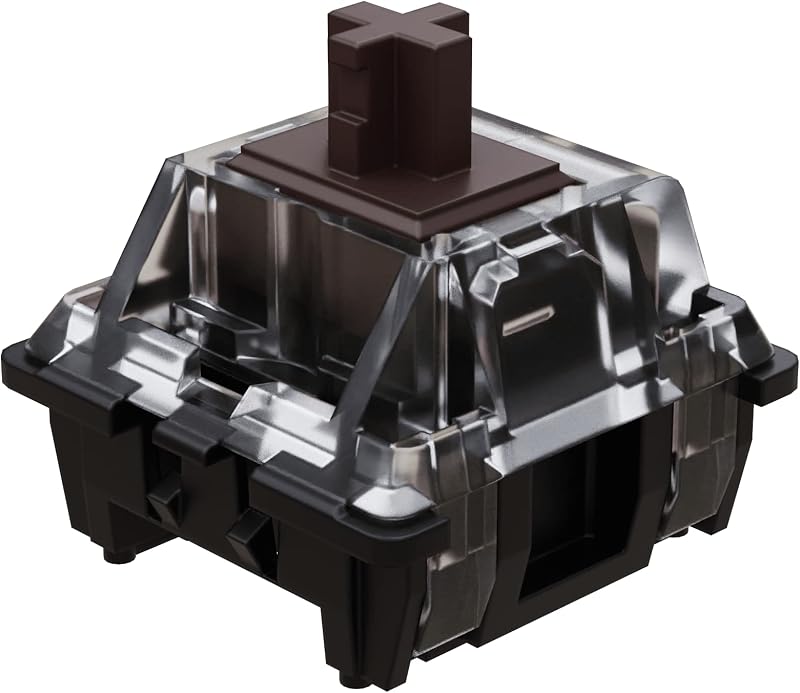
Pros
- Rated for 100 million keystrokes
- Zero mechanical debounce delay
- Fast 1mm pre-travel options
- Pinless design avoids bent contacts
- Clear top RGB light pass-through
Cons
- Incompatible with standard mechanical PCBs
- Limited variety of tactile switch profiles
View Gateron KS-15 Optical Switches MX on Amazon
Mechanical Switches

Pros
- Universal 3-pin PCB compatibility
- IP54 dust and water resistance
- Crisp click-bar acoustic feedback
- Enormous aftermarket switch ecosystem
Cons
- Lower 80 million cycle rating
- Copper pins can bend during installation
View Kailh Box White Mechanical Keyboard Switches on Amazon
Who Should Buy Each One
Choose Optical Switches If
- You play fast-paced competitive esports and require maximum actuation speed with 1.0mm pre-travel options like the Optical Yellow.
- You want exceptional component longevity with switches rated for up to 100 million keystrokes.
- You own an optical-compatible keyboard and want easy, solderless hot-swapping without the risk of bent electrical pins.
- You prefer an ultra-smooth linear keystroke that is completely free of metal leaf friction and mechanical debounce delays.
Choose Mechanical Switches If
- You are assembling or upgrading a custom keyboard build with a standard 3-pin or 5-pin mechanical PCB.
- You demand distinct, satisfying tactile feedback like the crisp click-bar mechanism found in Kailh Box White switches.
- You want access to an enormous global market of aftermarket mechanical switches, custom springs, and specialized housings.
- You need certified IP54 dust and water resistance to safeguard your keyboard against environmental hazards.
Final Verdict
For competitive gamers and users who prioritize raw input speed, optical switches are the superior technical option. By triggering inputs via infrared light interruption rather than physical metal collisions, switches like the Gateron KS-15 eliminate debounce delay, reduce actuation travel down to an ultra-fast 1.0mm in linear variants, and increase lifespan ratings to 100 million keystrokes. The absence of conductive copper pins makes hot-swapping completely stress-free, and transparent housings provide vibrant RGB illumination. However, these benefits are strictly tied to dedicated optical keyboards, meaning you sacrifice the freedom to install traditional mechanical switches.
Traditional mechanical switches remain the undisputed standard for custom keyboard enthusiasts, typists, and builders who value acoustic variety and universal compatibility. The Kailh Box White mechanical switch exemplifies why the mechanical platform thrives: it offers a crisp, satisfying click-bar actuation, reliable 80-million-cycle durability, IP54 dust and water protection, and effortless installation into standard 3-pin hot-swap boards. Unless your primary focus is competitive gaming speed on an optical-ready PCB, mechanical switches offer the versatility, tactile satisfaction, and modular freedom that most keyboard users prefer.
FAQ
Can I install optical switches into a regular mechanical keyboard?
No, optical switches cannot be installed into a standard mechanical keyboard PCB. Optical switches do not have conductive metal pins; instead, they rely on infrared sensors built directly onto optical-specific keyboard circuit boards. Standard mechanical keyboards require switches with metal pins to complete electrical circuits.
Are optical switches worth it for competitive gaming?
Yes, optical switches provide genuine performance benefits for competitive esports players. Because optical switches actuate via light beams, they do not require debounce delay algorithms, enabling instant signal registration. Additionally, options like Gateron Optical Yellow offer a short 1.0mm pre-travel distance that triggers faster than typical mechanical switches.
Do optical switches feel different from mechanical switches when typing?
Optical switches generally feel smoother during downward travel because there is no metal leaf rubbing against the stem. However, mechanical switches offer a much wider range of distinct tactile bumps, spring weights, and sound signatures, including the sharp, tactile click-bar mechanism found in Kailh Box White switches.
Why do optical switches have a longer lifespan than mechanical switches?
Optical switches achieve a higher lifespan-up to 100 million keystrokes compared to 80 million on premium mechanical switches-because they have no internal metal contact leaves to bend, fatigue, or corrode. Actuation occurs optically, leaving only the plastic stem and steel spring as moving parts.
Do Kailh Box mechanical switches offer water resistance?
Yes, Kailh Box White mechanical switches feature an internal box structure around the contact mechanism that provides an IP54 rating, shielding the internal electrical contacts from dust accumulation and water splashing.
Can you hot-swap optical switches without desoldering?
Yes, optical switches can be hot-swapped easily on optical-compatible keyboards without any desoldering. Because there are no electrical solder pins extending through the circuit board, you simply pull the switch from the plate using a switch puller and press a new optical switch into position.



