The choice between the Logitech G715 and the Logitech Pebble Keys 2 K380s comes down to whether your primary need is competitive desktop gaming performance or ultra-portable, multi-device productivity. The G715 is a dedicated tenkeyless mechanical board engineered with low-latency Lightspeed connectivity, immersive LIGHTSYNC RGB lighting, and physical tactile switches, whereas the Pebble Keys 2 K380s is an ultra-slim, silent travel keyboard built for hopping across tablets, phones, and laptops with extraordinary multi-year battery longevity.
Gamers and stationary desk workers who prioritize actuation feedback, dynamic illumination, and ergonomic wrist support should choose the Logitech G715. Mobile professionals, students, and everyday typists who demand a lightweight profile to pack into a bag and switch between several operating systems on the fly should choose the Logitech Pebble Keys 2 K380s.

Logitech G715 vs Logitech Pebble Keys 2 K380s at a Glance
| Feature | Logitech G715 | Logitech Pebble Keys 2 K380s |
|---|---|---|
| Form Factor | Tenkeyless (87 Keys) | Ultra-Slim Compact (104 Keys listed) |
| Connectivity | Lightspeed Wireless, Bluetooth | Bluetooth |
| Switch Architecture | Tactile (GX Brown) | Linear / Scooped round keys |
| Backlighting | Per-key and perimeter LIGHTSYNC RGB | Not listed |
| Power Source | Rechargeable (USB-C to USB-A cable) | 2x Batteries (Battery Powered) |
| Battery Longevity | 25 to 30 gaming hours (full lighting) | Up to 3-year battery life |
| Multi-Device Switching | Dual sync with G705 mouse via Lightspeed receiver | Easy-Switch across up to 3 wireless devices |
| Dimensions | Not listed | 10.98″L x 4.88″W x 0.63″H |
| Included Ergonomic Accessories | Cloud-shaped palm rest | None |
| Configuration Software | Logitech G HUB | Logi Options+ |
| Best For | Desktop PC gaming and RGB enthusiasts | On-the-go productivity and multi-device setups |
Gaming Performance and Wireless Latency
Input responsiveness determines whether keystrokes register instantly during fast-paced play, making wireless protocol a primary buying consideration. The Logitech G715 features proprietary Lightspeed wireless technology, an ultra-responsive protocol designed specifically to eliminate lag in high-stakes gaming environments. Because it ships with a dedicated Lightspeed USB receiver, the keyboard delivers the near-instantaneous transmission speeds required for competitive titles. Furthermore, the G715 allows users to dual-sync compatible gaming hardware, such as the G705 wireless gaming mouse, to a single USB receiver to free up ports on a desktop or gaming console rig.
In contrast, the Pebble Keys 2 K380s relies purely on standard Bluetooth connectivity. While Bluetooth is universal and eliminates the need for USB dongles when connecting to modern laptops or tablets, it does not provide the high-polling, lag-free throughput of dedicated gaming wireless. Anyone asking logitech g413 vs logitech pebble keys 2 k380s or considering the Logitech G715 or Logitech Pebble Keys 2 K380s for gaming will discover that the Pebble Keys 2 is tailored for everyday tasks rather than competitive play. Its focus centers on everyday commands, navigation, and typing rather than anti-ghosting speed or high-frequency input streams.
Choosing the G715 gives you gaming-grade tech with physical media controls and tournament-ready response times. The Pebble Keys 2 K380s is capable of handling casual or turn-based games across mobile devices, but its lack of high-speed dongle connectivity holds it back from serious gaming duties.
Edge: Logitech G715 delivers superior gaming throughput and input fidelity thanks to its low-latency Lightspeed wireless architecture.
Typing Feel and Switch Architecture
The mechanical feel of every keypress shapes typing comfort and overall speed, establishing a clear line between the Logitech G715 vs Pebble Keys 2 switch type. The G715 comes outfitted with GX tactile switches, offering a noticeable physical bump at the actuation point. This tactile feedback lets typists confirm keystrokes without bottoming out completely, providing a satisfying mechanical depth. Coupled with an 87-key tenkeyless layout, the G715 gives mechanical keyboard enthusiasts a traditional, deep-travel key feel that helps prevent accidental key triggers during intense gameplay or heavy document authoring.
The Pebble Keys 2 K380s adopts an entirely different approach by utilizing scooped round keys with low-profile travel to replicate a familiar, laptop-like typing experience. While the product specifications list a linear switch feel and Cherry MX Red switch profile, the physical implementation provides quiet, low-clearance travel that keeps noise down in shared offices, libraries, or coffee shops. Comparing the logitech mx mechanical vs logitech pebble keys 2 k380s reveals how quiet low-profile keyboards accommodate communal settings where loud clicking is unacceptable.
When evaluating the Logitech G715 or Logitech Pebble Keys 2 K380s for typing, your choice relies entirely on whether you prefer the tall, bouncy, tactile response of an authentic mechanical switch or the quiet, shallow, flat surface of circular chiclet keys. The G715 provides higher tactile engagement, while the K380s excels at unobtrusive, silent operation.
Edge: Logitech G715 takes the category for typing satisfaction thanks to its traditional tactile GX mechanical switches, though silent typists will value the K380s.
Portability and Physical Dimensions
A keyboard’s bulk and profile determine how easily it transitions between home, the office, and travel setups. The Pebble Keys 2 K380s is explicitly built to go places, featuring sleek curves, a featherweight build, and a remarkably thin frame measuring just 10.98 inches long, 4.88 inches wide, and 0.63 inches thick. Its flat design slips into backpacks, messenger bags, or tablet sleeves effortlessly. Built using a minimum of 49% certified post-consumer recycled plastic, the Pebble Keys 2 combines sustainability with extreme portability, making it a natural companion for laptops, iPads, or Amazon Fire tablets.
The G715, while technically compact due to its tenkeyless design that omits the number pad, is constructed primarily as a stationary desktop fixture. Its full-height mechanical switch housings, adjustable height feet, and included cloud-shaped palm rest create a much thicker and heavier overall footprint. Carrying the G715 along with its wrist rest in a daily commuter bag requires substantial space and adds noticeable weight compared to a travel-first board.
For readers who frequently work outside the home or need a keyboard that transitions from a living room TV to a coffee shop, the Pebble Keys 2 K380s is unmistakably the superior travel tool. The G715 saves horizontal desk space compared to a full-sized board, but it remains tied down by its desk-oriented thickness and separate accessories.
Edge: Logitech Pebble Keys 2 K380s wins decisively on portability thanks to its ultra-slim 0.63-inch thickness and lightweight build.
Battery Life and Power Management
Daily usability is heavily influenced by how often a keyboard requires power maintenance. Power longevity reveals one of the most striking contrasts between these two devices. The Logitech Pebble Keys 2 K380s battery life is rated for up to three years of operation on two standard batteries, which are included in the packaging. With an aggressive auto-sleep power-saving mode that preserves energy when idle, the K380s offers worry-free power that lets you work for months or years without checking battery percentages. For anyone questioning is Logitech Pebble Keys 2 K380s worth it for remote travel, the convenience of never carrying a charging cable is a massive practical benefit.
The G715 operates on an internal rechargeable battery designed to supply 25 to 30 gaming hours of continuous use with full RGB illumination active. While 30 hours of continuous game time provides ample longevity for several long gaming sessions, it requires consistent maintenance. Recharging is handled via an included USB-C to USB-A cable, allowing you to top up the battery while playing wired at your desk. Readers studying a logitech g715 vs mx keys s comparison will note that heavy RGB lighting always introduces frequent recharging cycles compared to non-backlit peripherals.
If you value a device that you can pack away and pick up two years later without a second thought, the Pebble Keys 2 K380s stands out. If you prefer the eco-friendly convenience of a rechargeable lithium battery and keep a USB-C cable on your desk, the G715 fits naturally into a nightly or weekly charging routine.
Edge: Logitech Pebble Keys 2 K380s wins for sheer convenience with its remarkable three-year battery longevity.
Connectivity and Multi-Device Workflow
A keyboard’s adaptability across operating systems and multiple screens defines its role in modern office workflows. The Pebble Keys 2 K380s is engineered specifically for multi-device multitasking. Using integrated Bluetooth connectivity, it can pair with up to three distinct wireless devices simultaneously across Windows, macOS, iPadOS, iOS, ChromeOS, and Android. Switching between your computer, phone, and tablet takes a single tap on the dedicated Easy-Switch buttons. In addition, its ten customizable Fn shortcut keys-configured via the Logi Options+ application-provide rapid access to search, screen capture, voice dictation, and the emoji menu.
The G715 provides two connection modes: ultra-fast Lightspeed wireless via its USB receiver, and standard Bluetooth for broader compatibility across Windows, macOS, ChromeOS, and gaming consoles. In evaluating Logitech G715 Lightspeed vs Bluetooth, having both options gives gamers the flexibility to use Lightspeed on their primary desktop and Bluetooth on a secondary device. However, switching between hardware on the G715 is not as seamless as the three-device quick-toggle mechanism featured on the Pebble Keys 2.
If your daily work involves answering messages on a tablet while typing documents on a PC and a Mac, the Pebble Keys 2 K380s offers far smoother operational transitions. The G715 is fully functional across major operating systems, but its multi-device switching is more limited in scope.
Edge: Logitech Pebble Keys 2 K380s takes the lead for productivity setups with its instant three-device Easy-Switch functionality.
Aesthetics, Lighting, and Customization
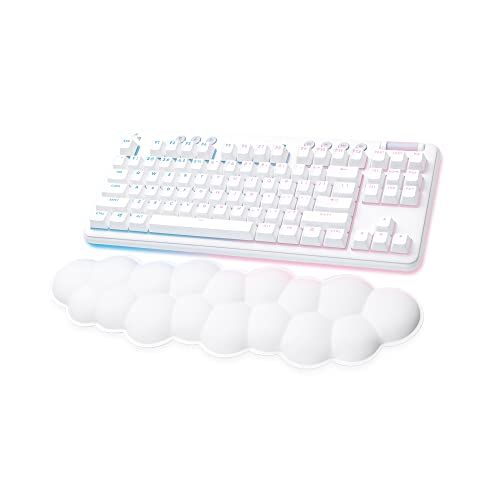
Visual presentation and ergonomic tailoring represent an essential aspect of your desk aesthetic. The G715 is a flagship member of the Logitech Aurora Collection, sporting a dreamy White Mist finish, soft rounded perimeter edges, and an iconic cloud-shaped keyboard palm rest. It features perimeter and per-key LIGHTSYNC RGB illumination with preloaded Play Mood animations that can be fully customized using Logitech G HUB software across 16.8 million colors. Furthermore, the G715 allows physical customization: users can purchase swappable top plates and keycaps in alternate colorways like Pink Dawn and Green Flash to personalize their aesthetic.
The Pebble Keys 2 K380s delivers an understated, minimalist look in Tonal Graphite. Its smooth, pebble-like silhouette and scooped keys present a clean, low-profile vibe that looks right at home in modern offices or casual work spaces. However, the Pebble Keys 2 contains no backlighting whatsoever, making it hard to navigate keys in dimly lit or dark rooms. Comparing the logitech mx keys s vs logitech pebble keys 2 k380s highlights how the lack of illumination keeps the Pebble Keys 2 simple and power-efficient, but visually straightforward.
For users who want vibrant, reactive lighting, personalized hardware plates, and plush wrist ergonomics right out of the box, the G715 provides an unmatched aesthetic experience. The Pebble Keys 2 K380s looks sleek and professional, but it lacks the dynamic visual flair and modularity of the Aurora Collection.
Edge: Logitech G715 dominates aesthetics with brilliant LIGHTSYNC RGB lighting, swappable physical plates, and an included cloud palm rest.
Pros and Cons
Logitech G715

Pros
- Ultra-responsive Lightspeed wireless and Bluetooth
- Per-key and perimeter LIGHTSYNC RGB lighting
- Includes cloud-shaped palm rest
- Tactile GX mechanical switches
- Rechargeable battery via USB-C
Cons
- Rechargeable battery lasts up to 30 gaming hours
- Heavier tenkeyless profile built for desktop use
Logitech Pebble Keys 2 K380s

Pros
- Up to 3-year battery life with included batteries
- Easy-Switch pairing for up to 3 wireless devices
- Ultra-slim 0.63-inch portable profile
- Made with minimum 49% recycled plastic
- Customizable Fn shortcut keys via Logi Options+
Cons
- No keyboard backlighting
- Relies on disposable batteries rather than USB recharging
View Logitech Pebble Keys 2 K380s on Amazon
Who Should Buy Each One
Choose the Logitech G715 If
- You need the low-latency response of Lightspeed wireless for fast-paced, competitive gaming.
- You prefer physical GX tactile mechanical switches with distinct actuation feedback over flat chiclet keys.
- You want per-key and perimeter LIGHTSYNC RGB lighting with dynamic color customization via G HUB.
- You value dedicated ergonomic accessories like the included cloud-shaped keyboard palm rest and adjustable height feet.
Choose the Logitech Pebble Keys 2 K380s If
- You frequently travel or work from different locations and need an ultra-slim 0.63-inch keyboard that slips into any bag.
- You actively juggle up to three devices across Windows, macOS, iPadOS, Android, or ChromeOS and need one-touch Easy-Switching.
- You want set-and-forget battery life that delivers up to three years of use on included batteries.
- You need a quiet, low-profile typing experience with scooped round keys that will not disrupt quiet office environments.
Final Verdict
When weighing a Logitech Pebble Keys 2 K380s vs Logitech G715 purchasing decision, your daily use case settles the argument. The G715 is the definitive winner for desktop gamers, streamers, and tactile typing enthusiasts. Between its tournament-grade Lightspeed wireless, rich GX tactile mechanical switches, included cloud wrist rest, and fully customizable LIGHTSYNC RGB ecosystem, it turns any desktop into an expressive, high-performance workstation. If you spend your hours gaming or writing at a dedicated desk, this board delivers the physical engagement and responsiveness you need.
On the other hand, the Pebble Keys 2 K380s takes the crown whenever mobility, silence, and multi-device productivity come first. Delivering up to three years of battery life, effortless three-device Easy-Switch pairing, and an ultra-thin silhouette built from recycled materials, it outperforms the G715 as a flexible everyday tool for laptops and tablets. If you want a zero-maintenance typing solution to throw in your backpack for remote work, the Pebble Keys 2 K380s is the smarter, more practical investment.
FAQ
Can you game on the Logitech Pebble Keys 2 K380s?
Yes, you can use the Pebble Keys 2 K380s for casual gaming, strategy games, and turn-based titles across PCs, laptops, and tablets. However, because it connects exclusively over standard Bluetooth and lacks a dedicated high-speed gaming wireless dongle, it is not optimized for fast-paced, competitive gaming where every millisecond of input latency counts.
How do you recharge the Logitech G715?
The G715 features an internal rechargeable battery that connects via an included USB-C to USB-A cable. You can plug the keyboard directly into your computer or a compatible USB port to recharge the device while continuing to use it in wired mode.
Does the Logitech Pebble Keys 2 K380s have backlighting?
No, the Pebble Keys 2 K380s does not feature key backlighting. The lack of lighting is a primary reason the keyboard can achieve its impressive battery longevity of up to three years on two pre-installed batteries.
Can the Logitech G715 connect to multiple devices via Bluetooth?
The G715 provides both Lightspeed wireless and Bluetooth connectivity options. You can use the high-performance Lightspeed USB receiver on your primary desktop or gaming console, and switch over to Bluetooth when you need to connect to a compatible laptop, tablet, or secondary system.
Which keyboard is better for typing in quiet office environments?
The Pebble Keys 2 K380s is significantly better suited for quiet spaces. Its scooped round keys and low-profile layout produce minimal typing noise compared to the full-travel tactile mechanical GX switches on the G715, which produce a distinct physical clatter when typed on rapidly.
Is the cloud palm rest included with the Logitech G715?
Yes, the G715 includes the signature cloud-shaped keyboard palm rest in the box. Designed as part of the Aurora Collection, it sits flush against the bottom edge of the tenkeyless keyboard to provide wrist support during long gaming and typing sessions.
Can you customize the shortcut keys on the Pebble Keys 2 K380s?
Yes, the Pebble Keys 2 K380s allows you to personalize its 10 Fn shortcut keys using the Logi Options+ software. You can reassign these keys to open specific applications, execute copy and paste commands, trigger screen capture, or activate voice dictation according to your workflow needs.


