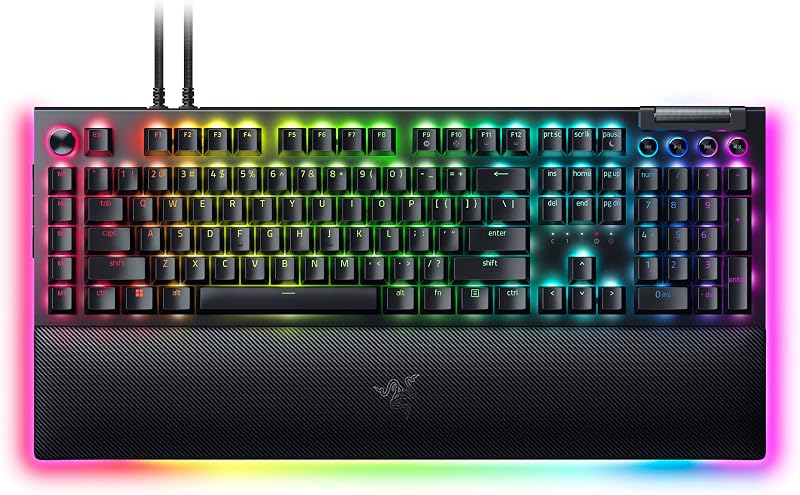
Choosing between the Razer BlackWidow V4 Pro and the Corsair K70 PRO TKL comes down to a fundamental trade-off between complete battlestation command and hyper-tuned competitive agility. The BlackWidow V4 Pro is an expansive, full-size command station equipped with an analog rotary dial, eight dedicated macro keys, and sound-dampened mechanical switches designed for immersive desktop mastery. In stark contrast, the K70 PRO TKL cuts away the number pad and relies on advanced Hall Effect magnetic switches featuring Rapid Trigger reset technology and hyper-polling for esports speed.
Shoppers who want extensive hardware macro execution, dedicated media management, full numeric input, and rich wrist rest lighting should choose the Razer BlackWidow V4 Pro. Competitive gamers who prioritize lightning-fast counter-strafing, customizable per-key actuation, maximum mouse sweep clearance, and console support should pick the Corsair K70 PRO TKL.


Razer BlackWidow V4 Pro vs Corsair K70 PRO TKL at a Glance
| Feature | Razer BlackWidow V4 Pro | Corsair K70 PRO TKL |
|---|---|---|
| Switch Architecture | Razer Yellow Mechanical Switches (Linear & Silent) | CORSAIR MGX Hyperdrive Magnetic Switches (Hall Effect) |
| Actuation Customization | Fixed mechanical actuation with internal sound dampeners | Customizable per-key (0.4mm to 3.6mm in 0.1mm steps) |
| Rapid Trigger Capability | Not supported | Dynamic Rapid Trigger & Simultaneous SOCD |
| Form Factor & Key Layout | Full-Size (104 keys, 7 sections) | Tenkeyless (84 keys, 1 section) |
| Physical Dimensions | 18.36″L x 6.01″W x 1.73″H | 14.41″L x 5.31″W x 1.57″H |
| Report Rate & Latency | The listing does not specify polling rate | 8,000Hz hyper-polling via AXON (0.125ms registration) |
| Dedicated Hardware Controls | Programmable Command Dial & 8 dedicated macro keys | Tactile volume roller, hotkeys, and media keys |
| Ergonomic Wrist Rest | Magnetic plush leatherette with 3-side Chroma RGB underglow | Detachable wrist rest included |
| Materials & Construction | Doubleshot ABS keycaps with extra-thick walls | Aluminum top plate, ABS double-shot, silicone dampening |
| Device Compatibility | PC, Android 14.0, Linux, Windows, AAUB P30 tablet | PC, Laptop, Gaming Console, Windows |
| Best For | Macro-heavy gaming, simulations, and workstation setups | Competitive esports, fast-paced FPS titles, and compact desks |
Switch Architecture and Actuation Performance
The core technological divide between these two gaming keyboards lies within their switch design. In any thorough razer blackwidow v4 pro vs corsair k70 rgb pro evaluation, traditional physical switches offer a very different feel than magnetic sensors. The Razer BlackWidow V4 Pro Yellow switches utilize a traditional linear mechanical design that relies on physical metal contact leaves to register each keystroke. Razer engineers these switches with integrated sound dampeners to muffle bottom-out noise while maintaining a straight-down, instant travel path. While these mechanical switches deliver a dependable, predictable typing feel for daily play, the actuation point and reset point remain completely static inside the housing.
The Corsair K70 PRO TKL Hall Effect design takes an entirely different approach by replacing physical contact leaves with magnetic sensors. Equipped with pre-lubed CORSAIR MGX Hyperdrive magnetic switches, the keyboard continuously measures the exact depth of the key stem rather than waiting for a metal leaf to touch. This continuous magnetic tracking unlocks Corsair K70 PRO TKL Rapid Trigger technology, where the switch dynamically resets the instant your finger begins an upward release motion. In fast-paced tactical shooters, this lets you counter-strafe, stutter-step, and react without waiting for the switch to travel all the way back past a fixed reset boundary. Corsair also allows per-key actuation adjustments from an ultra-sensitive 0.4mm down to a deliberate 3.6mm in 0.1mm increments, as well as dual-actuation configurations that bind two distinct actions to a single keystroke depending on press depth.
Input processing speed further magnifies this performance gap. When analyzing Razer BlackWidow V4 Pro vs Corsair K70 PRO TKL latency, Corsair incorporates its AXON hyper-processing technology to deliver an 8,000Hz polling rate. This hyper-polling architecture transmits keystrokes to the system in as little as 0.125ms, which is up to eight times faster than standard gaming keyboards. Corsair also includes Simultaneous SOCD (Simultaneous Opposite Cardinal Direction) processing to handle conflicting directional inputs cleanly during high-level movement. The Razer listing does not specify an expanded polling rate or microsecond latency measurement for the V4 Pro, leaving it within standard mechanical timing parameters. For players whose primary objective is twitch responsiveness, the magnetic mechanics provide a distinct mechanical advantage.
Edge: Corsair K70 PRO TKL because its pre-lubricated Hall Effect magnetic switches provide customizable 0.4mm to 3.6mm actuation, dynamic Rapid Trigger resets, and an 8,000Hz polling rate.
Form Factor, Desk Footprint, and Ergonomics
A keyboard’s physical footprint shapes your posture, your typing style, and how much open surface area you have for mouse navigation. The BlackWidow V4 Pro measures 18.36 inches in length, 6.01 inches in width, and 1.73 inches in height. It features a full-size 104-key layout divided across seven distinct sections, incorporating a traditional numeric keypad, arrow cluster, and dedicated function rows. For gamers who frequently balance tactical gameplay with numerical data entry, spreadsheet management, or expansive simulation keybinds, having a full-size layout ensures that every key is available without memorizing secondary function layers.
By comparison, reading any compact-focused razer huntsman mini vs corsair k70 pro tkl breakdown highlights the immediate spatial benefits of a tenkeyless form factor. The Corsair K70 PRO TKL measures 14.41 inches long, 5.31 inches wide, and 1.57 inches high across a unified single-section chassis containing 84 keys. By eliminating the numeric keypad, Corsair frees nearly four full inches of horizontal desk space. This extra room lets you center the keyboard naturally in front of your monitor while keeping your mouse arm positioned at a relaxed, ergonomic angle. For low-sensitivity first-person shooter players who execute sweeping arm swipes across massive desk pads, this reduced footprint prevents the mouse from violently colliding with the side of the board during intense firefights.
Ergonomic wrist support is another prominent area of contrast. Razer equips the BlackWidow V4 Pro with a premium magnetic plush leatherette wrist rest that snaps directly to the lower edge of the keyboard frame. In addition to generous cushioning designed to support your wrists during marathon gaming sessions, the wrist rest carries internal circuitry that extends the keyboard’s 3-sided Razer Chroma RGB underglow across the front and sides of your desk. Corsair includes a functional wrist rest with the K70 PRO TKL to support proper wrist alignment, but it lacks the magnetic underglow integration and thick plush padding found on Razer’s flagship model.
Edge: Corsair K70 PRO TKL because its streamlined tenkeyless layout saves nearly four inches of desk width, unlocking vital clearance for broad mouse movements during competitive gameplay.
Dedicated Macro Controls, Dials, and Hardware Customization
When executing complex key sequences under pressure, physical accessibility makes all the difference. An in-depth Razer BlackWidow V4 Pro review reveals that Razer designed this keyboard to serve as a complete desktop command hub. The upper-left corner of the chassis features an illuminated, programmable Razer Command Dial. This multi-function dial lets you cycle through distinct control modes such as zooming, switching application windows, scrubbing media timelines, or scrolling through game inventory menus. Surrounding this dial is an arsenal of dedicated physical macro keys: five standalone macro buttons positioned along the left edge of the main alphanumeric block, alongside three specialized secondary buttons built directly into the side edge of the keyboard housing.
These eight dedicated macro inputs allow you to trigger intricate macros, launch software commands, or map secondary weapon wheels without taking your fingers away from your primary movement keys. For complex MMOs, real-time strategy games, and content creation setups, these physical controls provide direct hardware execution that software layers struggle to match. As noted in comparisons like the razer blackwidow v4 pro vs corsair k100 rgb, having dedicated physical keys arranged outside the primary typing zone gives users instant tactical advantages in games with massive skill bars.
The Corsair K70 PRO TKL approaches hardware control with a more minimalist philosophy suited for esports. Rather than dedicating desk real estate to bulky macro columns, Corsair equips the board with a smooth metal volume roller, dedicated media buttons, and programmable function hotkeys. Through CORSAIR iCUE software, users can reprogram the standard 84 keys to execute custom macros, shortcuts, and key remappings. However, competitive FPS players who do not need complex macro strings may find the absence of dedicated physical macro buttons to be a sensible compromise that keeps the chassis slim and uncluttered.
Edge: Razer BlackWidow V4 Pro because its programmable analog Command Dial and eight dedicated macro buttons deliver unmatched hardware-level command versatility.
Build Quality, Materials, and Acoustic Dampening
The structural rigidity and interior dampening of a mechanical keyboard dictate how it feels and sounds during prolonged use. Anyone compiling a Corsair K70 PRO TKL review will notice Corsair’s extensive focus on acoustic refinement and structural stability. The K70 PRO TKL is constructed from a hybrid combination of an aluminum top plate, acrylonitrile butadiene styrene (ABS), structural plastic, and internal silicone dampening. Corsair integrates sound-absorbing silicone layers within the chassis to eliminate hollow pinging sounds and reverberations during heavy typing.
Furthermore, the MGX Hyperdrive magnetic switches in the K70 PRO TKL come pre-lubricated from the factory. Each switch utilizes a specialized double-rail internal stem structure designed to minimize key wobble, ensuring that every keypress descends smoothly and evenly regardless of whether you strike the center or the corner of the keycap. Corsair rates these Hall Effect switches for an exceptional lifespan of 150 million keystrokes, significantly surpassing standard mechanical limits. The secondary keys and function row on the K70 PRO TKL utilize CORSAIR MLX switches, ensuring a consistent acoustic profile across the entire deck. The keycaps are made of durable ABS double-shot plastic with molded legends that resist wearing off over time.
The Razer BlackWidow V4 Pro also places a strong emphasis on rugged construction, featuring thick-walled doubleshot ABS keycaps engineered to withstand years of intense typing without the lettering fading. Razer tackles mechanical acoustics by embedding sound dampening material directly within the chassis and utilizing factory-dampened Yellow linear mechanical switches. While comparing models such as the razer deathstalker v2 vs corsair k70 pro tkl demonstrates the appeal of low-profile or standard switches, Razer’s dampeners on the V4 Pro effectively reduce the harsh click and clatter often associated with full-sized mechanical keyboards. However, the listing does not specify pre-lubed switch rails, an aluminum top plate, or a 150-million keystroke durability rating for the Razer unit.
Edge: Corsair K70 PRO TKL because its aluminum top frame, silicone sound dampening, and pre-lubricated double-rail switches rated for 150 million keystrokes offer superior structural longevity and acoustic polish.
Software Ecosystem, Platform Compatibility, and Immersion
Managing lighting, macros, and input customization requires robust software and reliable cross-platform hardware support. When deciding whether to purchase the Razer BlackWidow V4 Pro or Corsair K70 PRO TKL for gaming, shoppers must consider how each keyboard integrates into their wider hardware ecosystem. The BlackWidow V4 Pro stands as a visual showcase for Razer Chroma RGB. It features vibrant per-key backlighting accompanied by an extensive 3-sided chassis underglow. When you attach the magnetic plush wrist rest, the underglow signals carry across to illuminate the wrist rest’s outer edges, casting ambient light outward across your desk mat on three sides.
On the compatibility front, the Razer BlackWidow V4 Pro offers broad system support. The manufacturer specifications confirm compatibility across PC, Windows, Linux, and Android 14.0, as well as tablet devices like the AAUB P30. It connects via a standard detachable USB-C interface and operates via corded electric power. For users running multi-boot machines, Linux workstations, or mobile docking hubs, Razer’s hardware detection ensures baseline compatibility across diverse operating systems.
The Corsair K70 PRO TKL focuses its software power on competitive performance tuning through the CORSAIR iCUE suite. iCUE gives you granular control over the MGX Hyperdrive switches, allowing you to set per-key actuation thresholds in 0.1mm increments, adjust Rapid Trigger sensitivity thresholds, configure dual-actuation key combos, and establish Simultaneous SOCD priority modes. For hardware flexibility, the Corsair listing confirms compatibility with PCs, laptops, and gaming consoles, supported by both USB-A and USB-C connectivity options. While comparisons such as the razer huntsman v3 pro vs corsair k70 rgb pro show how fierce competition is in software suites, Corsair’s inclusion of console support makes the K70 PRO TKL a versatile pick for living room competitive setups.
Edge: Razer BlackWidow V4 Pro because its wraparound 3-sided chassis and wrist rest Chroma underglow delivers unmatched visual immersion, complemented by broader multi-operating system compatibility.
Pros and Cons
Razer BlackWidow V4 Pro
Pros
- Programmable Command Dial and 8 macro keys
- Magnetic plush wrist rest with Chroma underglow
- Quiet Yellow switches with internal sound dampeners
- Full-size 104-key layout with numeric keypad
- Tough doubleshot ABS keycaps with thick walls
Cons
- Large footprint occupies over 18 inches of desk space
- Lacks dynamic Rapid Trigger and adjustable actuation
- Listing does not specify polling rate
View Razer BlackWidow V4 Pro on Amazon
Corsair K70 PRO TKL

Pros
- Hall Effect MGX Hyperdrive magnetic switches
- Dynamic Rapid Trigger and 0.4mm-3.6mm actuation tuning
- 8,000Hz hyper-polling with 0.125ms input registration
- Space-saving tenkeyless layout leaves room for mouse
- Pre-lubed switches rated for 150 million keystrokes
Cons
- Lacks a dedicated numeric keypad
- No dedicated physical macro buttons or command dial
- Not water resistant
View Corsair K70 PRO TKL on Amazon
Who Should Buy Each One
Choose the Razer BlackWidow V4 Pro If
- You need a full-sized 104-key layout with a dedicated numeric keypad for daily office tasks, productivity, or flight simulator hotkeys.
- You want maximum physical macro flexibility with an analog Command Dial and eight dedicated macro buttons positioned directly on the board.
- You want high-end desktop immersion with striking 3-side Chroma RGB underglow that extends across a plush magnetic leatherette wrist rest.
- You prefer traditional linear mechanical switches with built-in sound dampeners for smooth, quiet keystrokes right out of the box.
Choose the Corsair K70 PRO TKL If
- You play fast-paced competitive FPS games and need Hall Effect Rapid Trigger technology for instant counter-strafing and movement resets.
- You want the ability to customize per-key actuation points from 0.4mm to 3.6mm to fine-tune your typing sensitivity and gaming hair-triggers.
- You need to maximize desk real estate and mouse movement space with a sleek, compact tenkeyless footprint.
- You want ultra-low input latency powered by 8,000Hz AXON hyper-polling, Simultaneous SOCD processing, and console compatibility.
Final Verdict
When reviewing the Corsair K70 PRO TKL vs Razer BlackWidow V4 Pro, the Corsair K70 PRO TKL stands out as the ultimate performance weapon for competitive gamers. By moving away from fixed mechanical leaves in favor of Hall Effect MGX Hyperdrive magnetic switches, it delivers game-changing advantages including dynamic Rapid Trigger, per-key actuation adjustments between 0.4mm and 3.6mm, and 8,000Hz hyper-polling that registers clicks in 0.125ms. Combined with an aluminum top plate, internal silicone sound dampening, and a space-saving tenkeyless chassis that leaves ample room for wide mouse swings, it is engineered specifically to help players climb competitive leaderboards.
Nevertheless, the Razer BlackWidow V4 Pro remains an extraordinary centerpiece for players who value comprehensive control, productivity versatility, and battlestation spectacle over esports minimalism. Its full-size 104-key frame, programmable Command Dial, eight dedicated physical macro keys, and plush magnetic wrist rest with 3-sided Chroma RGB underglow make it an unrivaled workstation companion for MMOs, complex hotkey management, and everyday computing. If you want the fastest possible switch response and a compact footprint, choose Corsair; if you want complete desktop mastery with endless macro execution, choose Razer.
FAQ
Does the Razer BlackWidow V4 Pro have Rapid Trigger technology?
No, the Razer BlackWidow V4 Pro does not feature Rapid Trigger technology. It is built with traditional Razer Yellow linear mechanical switches that rely on physical contact leaves with fixed actuation and reset points, unlike the magnetic Hall Effect switches found on the Corsair keyboard.
What makes Corsair K70 PRO TKL Hall Effect switches different from traditional switches?
The Corsair K70 PRO TKL uses MGX Hyperdrive magnetic switches that utilize Hall Effect sensors to measure the precise travel depth of the key stem continuously. This magnetic mechanism eliminates physical contact wear, enables Rapid Trigger resets the moment a key begins moving upward, and allows you to adjust the actuation distance anywhere from 0.4mm to 3.6mm in 0.1mm steps.
Is Corsair K70 PRO TKL worth it for competitive first-person shooters?
Yes, the Corsair K70 PRO TKL is particularly well-suited for competitive FPS games. Features like Rapid Trigger allow you to counter-strafe and reset movement inputs much faster than standard mechanical keyboards, while the compact tenkeyless form factor provides critical clearance for broad, low-DPI mouse movements.
Is Razer BlackWidow V4 Pro worth it if you have a small computer desk?
If you have a small or narrow desk, the Razer BlackWidow V4 Pro may take up too much space. Measuring 18.36 inches wide and featuring a large magnetic wrist rest, its expansive full-size footprint can severely restrict mouse movement unless you have a wide gaming desk.
Are the Razer BlackWidow V4 Pro Yellow switches noisy?
No, the Yellow mechanical switches on the Razer BlackWidow V4 Pro are linear and silent. Razer equips them with built-in internal sound dampeners designed to cushion the stroke and minimize bottom-out clatter, making them suitable for quiet gaming and shared environments.
Can the Corsair K70 PRO TKL connect to gaming consoles?
Yes, according to the manufacturer specifications, the Corsair K70 PRO TKL lists gaming consoles among its compatible devices, alongside laptops and PCs, supported by its USB-C and USB-A connectivity.
Is the Corsair K70 PRO TKL water resistant?
No, the manufacturer specifications explicitly list the Corsair K70 PRO TKL as not water resistant. Care should be taken to keep liquids away from the keyboard and its magnetic switch components.


