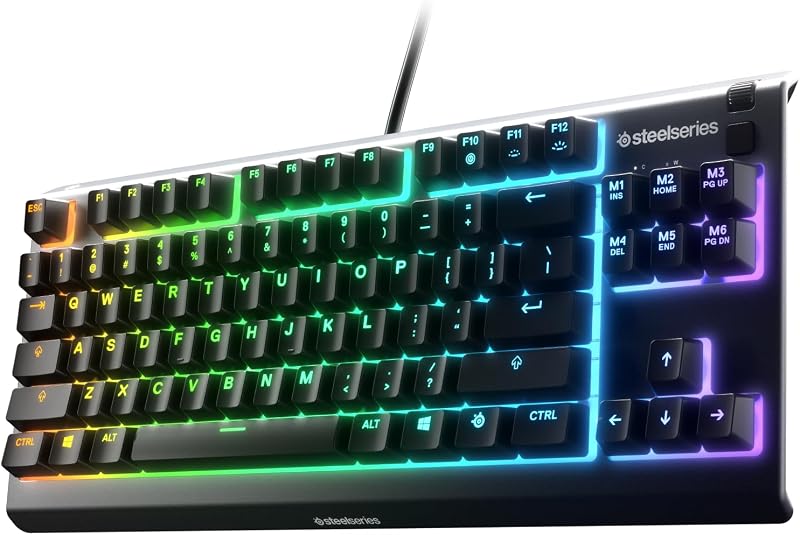
The single difference that decides the choice between these two esports keyboards is the physical layout and switch platform: the Razer Huntsman Mini strips away every auxiliary key to give competitive players an ultra-compact 60 percent analog optical chassis for unrestricted mouse sweeps, while the Corsair K70 PRO TKL delivers a tenkeyless footprint powered by Hall effect magnetic switches, dedicated media controls, and hyper-polling hardware.
Choose the Razer Huntsman Mini if your priority is low-sensitivity mouse travel and maximum desk clearance in tactical shooters. Choose the Corsair K70 PRO TKL if you require dedicated navigation keys, a tactile volume roller, and ultra-high frequency input polling for your gaming setup.


Razer Huntsman Mini vs Corsair K70 PRO TKL at a Glance
| Feature | Razer Huntsman Mini | Corsair K70 PRO TKL |
|---|---|---|
| Form Factor | Compact 60% (61 keys) | Tenkeyless / TKL (84 keys / 87 buttons) |
| Switch Technology | Analog Optical Switches Gen-2 | CORSAIR MGX Hyperdrive Magnetic (MLX on secondary) |
| Switch Durability | 100 million keystrokes | 150 million keystrokes |
| Actuation Adjustment Range | 0.1 mm to 4.0 mm | 0.4 mm to 3.6 mm (0.1 mm steps) |
| Dynamic Input Reset | Rapid Trigger | Rapid Trigger Advantage |
| Simultaneous Input Tech | Razer Snap Tap | Simultaneous SOCD |
| Polling Rate | 1000 Hz | 8000 Hz AXON Hyper-Polling |
| Keycap Material | Textured Doubleshot PBT | ABS Double-Shot |
| Hardware Controls | Dual-purpose modifier tap keys, onboard LED array | Volume roller, dedicated media buttons, hotkeys |
| Included Ergonomics | Not listed | Detachable wrist rest |
| Best For | Low-sensitivity FPS players needing desk space | Esports players wanting media controls and 8000Hz polling |
Form Factor and Desk Clearance
Desk real estate directly impacts mouse mobility, posture, and aiming consistency in competitive gaming. A 60 percent keyboard removes the dedicated arrow cluster, navigation block, and function row, concentrating exclusively on the primary alphanumeric keys. A tenkeyless (TKL) board retains the navigation and function clusters while removing only the number pad. In competitive play, desk real estate determines how freely you can position your keyboard at an angle without striking the chassis during broad, low-sensitivity mouse sweeps.
The Huntsman Mini uses a 61-key layout with a single-section footprint engineered to provide maximum clearance for sweeping mouse maneuvers. It features dual-purpose modifier keys where the bottom-right keys function as standard navigation arrows when tapped, preserving basic navigation without adding physical width. By comparison, the K70 PRO TKL measures 14.41 inches in length, 5.31 inches in width, and 1.57 inches in height, housing 84 keys alongside a dedicated volume roller and media buttons. When comparing the corsair k70 pro tkl vs k65 mini, the trade-off between physical media controls and raw desk savings becomes immediately apparent.
Choosing between these physical configurations comes down to how much surface area your mouse pad requires. The Huntsman Mini enables players who tilt their keyboards aggressively to sit closer to their monitors without bumping their mouse into the plastic casing. The K70 PRO TKL occupies significantly more horizontal room on your desk, but it eliminates the need to hold down function layers for everyday navigation and media control. For gamers who prioritize pure physical mobility and minimal weight for travel, the 60 percent silhouette provides undeniable clearance benefits.
Edge: Razer Huntsman Mini because its 61-key chassis leaves substantially more room for low-sensitivity mouse movement and tournament transport.
Switch Technology and Actuation Customization
Adjustable switches have transformed competitive gaming keyboards by replacing fixed mechanical copper leaves with contactless sensing. Instead of waiting for a metal contact point to meet at a fixed 2.0 mm depth, adjustable keyboards allow users to customize exactly when an input registers. This sensitivity adjustment dictates how quickly a character begins moving, stops walking, or triggers abilities in fast-paced lobbies.
The Huntsman Mini relies on Analog Optical Switches Gen-2, which track keypress depth by measuring how much light passes through an optical shutter. This design enables an actuation customization range spanning from 0.1 mm to 4.0 mm with a 100 million keystroke lifespan. On the other side of the matchup, the K70 PRO TKL utilizes pre-lubed CORSAIR MGX Hyperdrive magnetic Hall effect switches featuring a sturdy double-rail structure and a 150 million keystroke rating. In a detailed razer huntsman v3 pro vs huntsman mini evaluation, switch response remains a top priority; Corsair limits primary MGX switch actuation from 0.4 mm to 3.6 mm in 0.1 mm increments, while reserving standard MLX switches for non-primary keys.
In practice, the Huntsman Mini offers a noticeably wider travel spectrum. A 0.1 mm actuation ceiling allows the lightest finger touch to activate an ability instantly, while extending to 4.0 mm prevents accidental keypresses on resting fingers. While the K70 PRO TKL provides dual-action actuation-letting users bind two actions to a single keypress at separate depths-its physical actuation adjustment cannot match the razor-thin 0.1 mm sensitivity threshold offered by Razer’s optical sensor implementation.
Edge: Razer Huntsman Mini because its 0.1 mm to 4.0 mm actuation window offers broader tuning flexibility than Corsair’s 0.4 mm to 3.6 mm range.
Rapid Trigger and Input Prioritization
Rapid Trigger represents one of the most critical competitive features in modern gaming keyboards. Traditional switches require a key to travel upward past a fixed reset line before registering a new input, introducing physical lag during rapid taps. Rapid Trigger dynamically resets a key the instant it moves upward, allowing immediate re-activation anywhere along the travel stroke. Coupled with simultaneous input handling, this capability completely changes counter-strafing and movement consistency in competitive titles.
Both keyboards feature dynamic switch resets, but they implement input prioritization through distinct proprietary systems. The Huntsman Mini includes Razer Snap Tap alongside its Rapid Trigger mode, prioritizing the most recent input between two assigned movement keys without forcing the player to release the previous key. The K70 PRO TKL delivers its Rapid Trigger Advantage paired with Simultaneous SOCD (Simultaneous Opposite Cardinal Direction) processing. Readers analyzing the razer huntsman mini vs corsair k70 rgb pro will find that both manufacturers engineered these features specifically for lightning-fast direction changes, sudden peek halts, and rapid-fire input repetition.
When assessing the Razer Huntsman Mini rapid trigger alongside the Corsair K70 PRO TKL rapid trigger, both systems eliminate mechanical reset delay with extreme precision. Strafing transitions in tactical shooters occur smoothly on both boards, as the switch immediately disengages when upward travel begins. Whether evaluating the Huntsman Mini vs K70 PRO TKL actuation and reset responsiveness in practical drills, both keyboards deliver tournament-grade movement control that neutralizes finger fatigue during repetitive inputs.
Edge: Tie because both keyboards implement highly responsive dynamic reset and input prioritization algorithms that function flawlessly in tactical shooters.
Polling Rate and Input Latency
Polling rate determines how many times per second a keyboard transmits its input matrix to your computer. A standard gaming keyboard updates at 1000 Hz, sending data every 1.0 millisecond. Increasing this communication frequency to 8000 Hz reduces data packet intervals down to 0.125 milliseconds, minimizing the micro-delay between physical switch registration and operating system recognition.
The K70 PRO TKL sets the benchmark here with its AXON hyper-processing technology, which powers an 8000 Hz hyper-polling rate. This architecture pushes input latency down to 0.125 ms, representing an eightfold speed increase over conventional peripherals. In contrast, the Huntsman Mini operates on a standard 1000 Hz polling frequency. Examining the razer deathstalker v2 vs corsair k70 pro tkl demonstrates Corsair’s sustained focus on high-bandwidth communication pipelines for esports competitors.
While human reaction times average far above a single millisecond, the Corsair K70 PRO TKL polling rate ensures that keypress state changes synchronize tighter with high-refresh-rate gaming monitors. The 8000 Hz stream eliminates frame-to-input jitter, ensuring that rapid directional inputs register at the earliest possible CPU polling cycle. For players building cutting-edge competitive systems capable of delivering hundreds of frames per second, Corsair’s data throughput provides a measurable hardware advantage.
Edge: Corsair K70 PRO TKL because its 8000 Hz AXON processing delivers an eightfold transmission frequency advantage over Razer’s 1000 Hz engine.
Keycaps, Materials, and Hardware Controls
Keyboard build quality influences acoustic feedback, key wobble, surface wear, and general longevity under intensive daily gaming sessions. Keycap material dictates whether key surfaces will develop unsightly oil shine, while onboard hardware controls determine how quickly a player can make adjustments without opening desktop software.
The Huntsman Mini features textured doubleshot PBT keycaps housing secondary functions printed cleanly along the front sides of the caps. PBT plastic resists fingertip shine and wear over years of heavy use. The Huntsman Mini also incorporates an onboard LED array that visually communicates actuation height and Rapid Trigger changes directly on the board without needing software open. In comparison, the K70 PRO TKL utilizes ABS double-shot keycaps seated over an enclosure constructed with an aluminum top plate, silicone dampening, and ABS plastic. Looking into comparisons like the razer blackwidow v4 pro vs corsair k70 pro tkl highlights how Corsair emphasizes dedicated physical controls, giving the K70 PRO TKL a dedicated volume roller, media hotkeys, and an included wrist rest.
Here, the two boards present conflicting strengths. The Huntsman Mini offers superior out-of-the-box keycap durability with textured PBT that outlasts standard ABS, alongside intuitive onboard LED adjustment tools. However, the K70 PRO TKL counters with an aluminum top frame, a pre-lubed double-rail switch structure that minimizes stem wobble, dedicated media controls, and an ergonomic wrist rest. The presence of physical volume and playback controls saves valuable seconds during play, whereas Razer users must memorize function-layer combinations to tweak audio.
Edge: Corsair K70 PRO TKL because its aluminum top plate, dedicated volume roller, multimedia buttons, and included wrist rest provide superior everyday control and comfort.
Pros and Cons
Razer Huntsman Mini

Pros
- Wider 0.1 to 4.0 mm actuation range
- Ultra-compact 60 percent esports layout
- Durable textured doubleshot PBT keycaps
- Onboard LED array for quick profile adjustments
- Dual-purpose modifier tap arrow navigation
Cons
- Lacks dedicated arrow and multimedia keys
- Capped at 1000 Hz polling rate
- Wrist rest not included
View Razer Huntsman Mini on Amazon
Corsair K70 PRO TKL

Pros
- Ultra-fast 8000 Hz AXON hyper-polling
- Pre-lubed 150 million keystroke magnetic switches
- Dedicated volume roller and multimedia keys
- Detachable ergonomic wrist rest included
- Dual-action single-keypress input programming
Cons
- ABS double-shot keycaps instead of PBT
- Narrower 0.4 to 3.6 mm actuation range
- Larger footprint requires more desk space
View Corsair K70 PRO TKL on Amazon
Who Should Buy Each One
Choose the Razer Huntsman Mini If
- You play low-sensitivity tactical shooters that require maximum physical mouse pad clearance.
- You demand extreme actuation sensitivity down to a shallow 0.1 mm bottom-out threshold.
- You travel frequently to offline tournaments and need a compact, single-section keyboard that packs easily into any bag.
- You prefer textured doubleshot PBT keycaps that resist long-term finger shine and wear.
Choose the Corsair K70 PRO TKL If
- You want an 8000 Hz hyper-polling rate to eliminate micro-latency on high-refresh gaming monitors.
- You frequently adjust volume, mute audio, or control background music using a tactile hardware roller and dedicated media keys.
- You rely on dedicated arrow keys and navigation clusters for daily desktop productivity and general typing tasks.
- You prefer pre-lubricated magnetic switches built on a stabilized double-rail stem structure rated for 150 million keystrokes.
Final Verdict
In any rigorous Corsair K70 PRO TKL vs Razer Huntsman Mini evaluation, the optimal choice depends entirely on how you balance physical desk space against hardware functionality. When conducting a Razer Huntsman Mini review, its primary strengths are obvious: an ultra-compact 60 percent chassis, top-tier textured doubleshot PBT keycaps, and an analog optical switch array capable of tuning actuation depths down to a blistering 0.1 mm. For dedicated first-person shooter specialists who angle their boards to make sweeping flick shots, the Huntsman Mini remains the premier weapon for competitive mobility.
However, when evaluating whether is Corsair K70 PRO TKL worth it for a broader gaming setup, Corsair’s board takes the overall victory for most setups. In any Corsair K70 PRO TKL review, the combination of 8000 Hz AXON hyper-polling, pre-lubed MGX magnetic switches rated for 150 million keystrokes, dedicated media hardware, and an included wrist rest delivers a more versatile competitive platform. If you want high-speed dynamic inputs without sacrificing dedicated navigation keys or hardware volume adjustment, the K70 PRO TKL offers the superior complete feature set.
FAQ
Does the Razer Huntsman Mini have dedicated arrow keys?
No, the Huntsman Mini uses an ultra-compact 61-key layout that removes dedicated physical arrow keys. Instead, it features dual-purpose modifier keys where the bottom-right cluster operates as arrow keys when tapped, or acts as standard modifier keys when held down.
What is the difference between Corsair MGX magnetic switches and Razer analog optical switches?
Razer Analog Optical Switches Gen-2 measure light intensity passing through a shutter to calculate travel distance and actuation depth. Corsair MGX Hyperdrive switches use Hall effect magnetic sensors that measure electromagnetic flux changes as the magnet inside the stem moves downward.
Can you adjust actuation settings on the Razer Huntsman Mini without software?
Yes, the Huntsman Mini features an onboard LED array that provides visual feedback as you calibrate actuation heights and Rapid Trigger sensitivity directly from the keyboard, saving your profiles to the device without opening desktop configuration utilities.
Which keyboard offers a wider actuation adjustment range?
The Razer Huntsman Mini provides a wider range, allowing actuation adjustments between 0.1 mm and 4.0 mm. The Corsair K70 PRO TKL allows adjustments between 0.4 mm and 3.6 mm in 0.1 mm increments.
Does the Corsair K70 PRO TKL include a wrist rest?
Yes, according to the official product specifications, the Corsair K70 PRO TKL includes a detachable wrist rest in the box to support ergonomic wrist positioning during long gaming sessions.
How does the polling rate compare between these two keyboards?
The Corsair K70 PRO TKL features an 8000 Hz AXON hyper-polling rate capable of registering inputs every 0.125 milliseconds. The Razer Huntsman Mini runs at a standard 1000 Hz polling rate, registering inputs every 1.0 millisecond.
Are both keyboards compatible with operating systems other than Windows?
The Razer Huntsman Mini lists compatibility with Android, Linux, Windows, and Mac OS 10.12 Sierra or later. The Corsair K70 PRO TKL listing specifically highlights compatibility with Windows operating systems, alongside PC, Laptop, and Gaming Console hardware.