The core difference between a 1000Hz and an 8000Hz polling rate comes down to reporting intervals: a 1000Hz peripheral updates its position and input state every 1.0 millisecond, whereas an 8000Hz device reports every 0.125 milliseconds to slash frame-to-input delays on high-refresh-rate PC monitors.
Choose 1000Hz hardware if you need broad compatibility across multiple platforms, stable wireless battery life, and proven input speeds without burdening your computer processor. Opt for 8000Hz peripherals if you play competitive esports exclusively on a high-performance Windows PC and want to squeeze every microsecond of responsiveness out of your controls.


1000Hz vs 8000Hz at a Glance
| Attribute | 1000Hz Peripherals | 8000Hz Peripherals |
|---|---|---|
| Report Interval | 1.0 millisecond | 0.125 milliseconds |
| Input Latency Window | Under 1.0ms over 2.4GHz and wired | Down to 0.3ms registered latency |
| Platform Compatibility | Windows, macOS, Android, iOS, Nintendo Switch | Exclusively Windows 10/11 for full hyper-polling |
| Analog Sensor Technology | Standard Hall Effect and TMR joysticks | Upgraded Mag-Res TMR and Hall magnetic switches |
| Switch Mechanisms | Conductive gel, tactile bumpers, Hall triggers | Optical ABXY, mechanical micro-switches, rapid trigger magnetic switches |
| Macro and Software Capabilities | Onboard turbo, app-based profiles (Ultimate Software V2) | 32-step hardware macros, driverless web configurators |
| Connection Types | USB-C wired, 2.4GHz wireless, Bluetooth | High-speed USB-C wired, hyper-polling 2.4GHz |
| CPU Resource Consumption | Negligible processor overhead | Moderate to high CPU interrupt overhead |
| Best For | Multi-platform gaming and casual-to-competitive play | Competitive PC esports and maximum input precision |
Input Latency and Reporting Frequency
Input latency defines the delay between your physical action on a peripheral and the registered command inside your game engine. A standard 1000Hz polling rate delivers data packet updates at a constant 1.0-millisecond frequency. For years, this benchmark served as the esports standard because it matches or exceeds the frame delivery of traditional 60Hz and 144Hz monitors. Contemporary controllers such as the 8BitDo Ultimate 2 maintain this standard with proprietary 8Speed 2.4GHz wireless communication, keeping overall transmission latency reliably under 1 millisecond. For standard competitive gaming, this delivers fluid cursor tracking, immediate button recognition, and predictable responsiveness.
Stepping up to 8000Hz slashes the internal polling interval to 0.125 milliseconds, which is an eightfold jump in the data flow sent to your operating system. Devices designed around hyper-polling, such as the GameSir G7 Pro 8K, register every stick deflection, trigger pull, and button tap almost instantly over both wired and 2.4GHz wireless protocols. Peripherals like the AULA WIN68 HE combine this 8000Hz polling rate with Hall Effect magnetic switches to lower total key latency to 0.3ms. When tracking fine movements in fast-paced shooters, this tiny latency difference eliminates the microscopic delays that can occur when an input falls between standard 1-millisecond polling cycles. Similar responsiveness jumps are observed in hyper-polling gaming mice, as outlined in our analysis of the razer viper v2 pro vs v3 pro.
While an eightfold speed increase sounds revolutionary on paper, the human visual system and game rendering pipelines face diminishing returns. Shaving 0.875 milliseconds off an input transmission makes a noticeable difference to seasoned players operating high-refresh monitors at 240Hz, 360Hz, or higher, where frame rendering occurs every few milliseconds. On standard 60Hz or 120Hz displays, however, the frame intervals are significantly wider than the polling intervals, causing the visual difference between 1000Hz and 8000Hz to blur. For high-tier competitive play, every fraction of a millisecond counts, but casual players will struggle to discern the difference in pure button responsiveness.
Edge: 8000Hz. It provides an eightfold increase in reporting frequency and lowers input latency down to 0.3 milliseconds for maximum frame-sync precision.
Platform Compatibility and Ecosystem Support
Platform flexibility is one of the most critical considerations when deciding between 1000Hz and 8000Hz peripherals. Hardware configured for 1000Hz operation thrives across a vast array of operating systems and gaming consoles. The ECHTPower Wireless PC Gaming Controller highlights this versatility by pairing its 1000Hz 2.4GHz and wired communication with Bluetooth support for PC, Nintendo Switch, iOS, and Android. Similarly, 1000Hz controllers seamlessly navigate different communication protocols without demanding specialized driver hooks, making them plug-and-play across desktop and mobile setups.
In contrast, 8000Hz hardware is engineered almost exclusively for the Windows PC environment. Pushing 8,000 reports every second requires strict operating system support and dedicated USB bus bandwidth that traditional gaming consoles and mobile systems cannot accommodate. The GameSir G7 Pro 8K is engineered specifically for Windows 10 and 11, with the manufacturer explicitly noting that it lacks compatibility with Xbox Series X/S and Xbox One consoles. While its specs list legacy controller emulation for select hardware, its high-speed polling functionality is strictly locked to desktop environments. If you switch between consoles and personal computers, hyper-polling peripherals will leave you tethered to Windows.
Software ecosystems also differ fundamentally between these performance tiers. A 1000Hz device typically relies on standardized drivers or straightforward configuration apps that store profiles across multiple platforms. High-polling 8000Hz hardware requires low-overhead system interfaces to prevent communication bottlenecks. For example, the AULA WIN68 HE utilizes a driverless web configurator for dynamic features like rapid triggers, but that configuration utility is explicitly incompatible with macOS. When evaluating modern input gear against customizable mechanical boards like the keychron q1 vs v3, system flexibility remains a decisive advantage for standardized peripherals.
Edge: 1000Hz. Devices operating at standard polling rates offer true multi-platform support across Windows, macOS, Nintendo Switch, Android, and iOS.
Processor Demands and System Stability
The performance cost on your host computer represents the hidden trade-off of ultra-high polling rates. At 1000Hz, your peripheral issues 1,000 hardware interrupts per second to the Windows operating system. Modern multi-core processors process this volume of data effortlessly, consuming a fraction of a percent of a single CPU core. This ensures that game rendering threads, background audio applications, and streaming utilities run without interruption, regardless of your hardware specifications.
Pumping your peripheral communication up to 8000Hz increases the interrupt stream to 8,000 packets per second. This data stream requires the Windows kernel to frequently switch processing contexts to update peripheral positions. In CPU-bound competitive games running at high frame rates, this flood of input reports can create micro-stutters, sudden frame rate dips, or uneven frame pacing on mid-range processors. Managing an 8000Hz stream requires substantial single-core CPU throughput to maintain stability, a factor commonly noted across high-speed gaming mice like those in the razer deathadder v3 pro vs viper v3 pro comparison.
For gamers running top-tier multi-threaded processors, the overhead of 8000Hz is easily absorbed, translating to smooth, ultra-responsive tracking. However, if your system features an older quad-core or entry-level six-core CPU, the system resources swallowed by 8000Hz can degrade overall performance, counteracting the input lag advantage. A 1000Hz peripheral ensures that your system resources remain focused entirely on maximizing frame rates and maintaining stable frame times.
Edge: 1000Hz. It produces minimal CPU overhead and prevents the frame pacing drops or micro-stutters associated with intense 8000Hz interrupt demands.
Actuation Precision and Internal Component Hardware
A high polling rate requires advanced internal sensors to translate physical motion into rapid digital signals. At 1000Hz, modern controllers have largely moved beyond traditional potentiometers. The 8BitDo Ultimate 2 incorporates Tunneling Magnetoresistive (TMR) joysticks, which provide higher sensitivity, greater durability, and enhanced precision compared to older analog designs. It also introduces physical toggle switches allowing players to jump between smooth Hall Effect linear triggers and tactile micro-switch clicks, while the ECHTPower controller pairs its 1000Hz rate with Hall Effect anti-drift sticks and conductive gel buttons rated for 1 million actuations.
Peripherals designed for 8000Hz operation deploy even more advanced internal components to keep pace with their hyper-fast reporting cycles. The GameSir G7 Pro 8K features Gen-2 Mag-Res TMR sticks that eliminate physical friction contacts, preventing stick drift while lowering internal component power consumption. It enhances input speed with optical micro-switches under the ABXY face buttons and mechanical micro-switches on the directional pad. These optical triggers actuate via light beams rather than physical metallic contacts, eliminating debounce delays so the 8000Hz engine can broadcast the actuation without hardware-level lag.
Keyboard technology mirrors this evolution when scaling up to 8000Hz. The AULA WIN68 HE uses Hall Effect magnetic switches to offer rapid trigger dynamics and user-adjustable actuation points spanning 0.02mm to 3.44mm, customizable in minute 0.1mm increments. Similar to the build variations analyzed in traditional setups like the keychron k8 vs v3, pairing continuous magnetic tracking with an 8000Hz controller gives competitive players instant key resets and immediate direction changes in movement-intensive shooters.
Edge: 8000Hz. Peripherals built for hyper-polling utilize ultra-fast optical switches and magnetic Hall Effect sensors with adjustable actuation points down to 0.02mm.
Power Management and Battery Efficiency
Processing and transmitting thousands of data packets every second places heavy demands on peripheral power systems. In 1000Hz wireless controllers, energy efficiency is well-optimized. The ECHTPower Wireless Controller houses an 800mAh rechargeable battery that delivers up to 15 hours of continuous gameplay, even while powering dual vibration motors and dynamic 9-color RGB lighting. The 8BitDo Ultimate 2 supplements its wireless battery with an included multifunctional charging dock, allowing the controller to seat cleanly and recharge automatically between sessions.
At 8000Hz, energy consumption increases significantly. Broadcasting 8,000 wireless packets every second demands continuous high-output RF transmission, which can drain battery reserves quickly. While the GameSir G7 Pro 8K achieves 8000Hz performance across both wired USB-C and 2.4GHz wireless modes, maintaining hyper-polling wirelessly requires frequent recharging. As a result, many 8000Hz peripherals prioritize tethered connections. The AULA WIN68 HE runs as a corded electric device via a detachable USB-C cable, completely bypassing battery drain to ensure continuous power delivery for its internal magnetic sensors, 68-key PCB, and 16.8-million-color south-facing LEDs.
For gamers who prioritize wire-free desk setups, high-drain wireless peripherals present logistical challenges. Standard gaming controllers and wireless office designs, such as those examined in our logitech g703 vs mx master 3s breakdown, balance wireless power draw against input speed. A 1000Hz setup provides that balance, allowing for long gaming sessions without tethering you to a charging cable.
Edge: 1000Hz. Standard polling rates draw significantly less power, enabling 15-hour wireless sessions and convenient dock charging without constant battery depletion.
Pros and Cons
Polling Rate 1000Hz

Pros
- Universal multi-platform support across consoles and mobile
- Up to 15 hours of wireless battery playtime
- Negligible impact on computer processor resources
- Reliable sub-1ms response over 2.4G wireless
- Includes convenient charging dock solutions
Cons
- Slower 1.0ms update interval than hyper-polling gear
- Lacks 0.02mm ultra-fine magnetic switch actuation
View 8Bitdo Ultimate 2 Wireless Controller on Amazon
8000Hz
Pros
- Ultra-fast 0.125ms reporting interval
- Input registration latency as low as 0.3ms
- Equipped with optical and magnetic Hall switches
- Hardware support for 32-step complex macros
- Adjustable rapid trigger actuation down to 0.02mm
Cons
- Strictly limited to Windows PC environments
- Noticeable CPU interrupt overhead during gameplay
- High wireless power draw requires frequent tethering
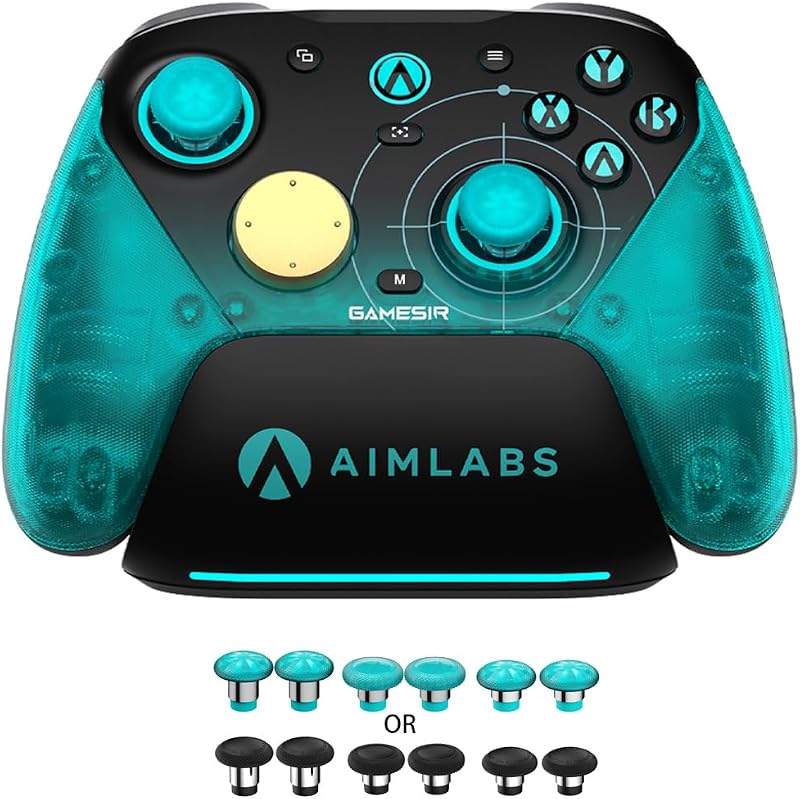
View GameSir G7 Pro 8K PC Wireless on Amazon
Who Should Buy Each One
Choose the 1000Hz Polling Rate If
- You play across multiple platforms and need seamless compatibility with Nintendo Switch, Android, iOS, macOS, and PC.
- You want wire-free gameplay with up to 15 hours of continuous battery life and charging dock convenience.
- You use a mid-range or older gaming PC that could suffer from CPU frame pacing stutters when processing high-interrupt inputs.
- You want reliable Hall Effect or TMR anti-drift stick performance without paying for hyper-polling esports hardware.
Choose the 8000Hz Polling Rate If
- You play fast-paced competitive esports titles on Windows 10 or 11 with a high-refresh monitor running at 240Hz or higher.
- You want the lowest possible latency, utilizing 0.3ms key actuation windows and 0.125ms peripheral reporting intervals.
- You want advanced input controls like 0.02mm rapid-trigger magnetic keyboard switches or optical micro-switch gamepad buttons.
- You do all your gaming at a dedicated desktop PC where wired connections or frequent charging cycles are not an inconvenience.
Final Verdict
For the vast majority of players, a 1000Hz polling rate remains the practical sweet spot for gaming peripherals. Devices operating at 1000Hz report inputs every single millisecond, offering instantaneous response times that outpace casual human reflexes and standard display refresh cycles. By sticking with 1000Hz options like the 8BitDo Ultimate 2 or ECHTPower Wireless Controller, you gain broad multi-platform support across mobile devices, consoles, and computers, accompanied by generous battery endurance and rock-solid system stability that leaves your CPU free to render frames.
However, if you are a competitive PC gamer striving for maximum input precision, 8000Hz hardware delivers a tangible technical edge. Peripherals like the GameSir G7 Pro 8K and AULA WIN68 HE cut reporting latency down to 0.125 milliseconds and pair hyper-polling engines with magnetic Hall Effect sensors and optical micro-switches. Provided you game exclusively on a powerful Windows PC connected to an ultra-fast gaming monitor, upgrading to an 8000Hz peripheral ensures your inputs register as fast as modern hardware allows.
FAQ
Does an 8000Hz polling rate improve aim in competitive games?
An 8000Hz polling rate delivers smoother, more continuous data tracking to your PC by reducing the update window to 0.125ms. While it will not correct poor crosshair placement, competitive players using high-refresh monitors will experience more consistent micro-adjustments and reduced input lag during fast flicks.
Can a 1000Hz controller compete against 8000Hz controllers in online play?
Yes. A 1000Hz controller reports inputs every 1.0 millisecond, which represents only a sub-millisecond physical transmission difference compared to an 8000Hz model. Game sense, positioning, and mechanical skill matter far more than the 0.875-millisecond theoretical timing delta.
Why does an 8000Hz polling rate increase CPU usage?
At 8000Hz, your peripheral sends 8,000 data packets every second via the USB controller. The operating system must process each packet as an active hardware interrupt, requiring more processing cycles from the CPU to track inputs alongside running game threads.
Do 8000Hz controllers and keyboards work on gaming consoles?
Most 8000Hz peripherals are engineered strictly for Windows 10 and 11 computers. Home consoles like the Xbox Series X/S, PlayStation 5, and Nintendo Switch cannot process 8000Hz peripheral reporting, making standard 1000Hz devices the better choice for console gaming.
Does 8000Hz polling drain wireless controller batteries faster?
Yes. Pushing 8,000 packets per second over a 2.4GHz wireless connection requires substantially more power than standard 1,000-packet transmission. This higher draw causes wireless batteries to drain faster, which is why many 8000Hz devices rely on wired USB connections.
What is the difference between Hall Effect and TMR joysticks on these controllers?
Both Hall Effect and Tunneling Magnetoresistive (TMR) sensors use magnetic fields instead of physical friction brushes to track stick movement, preventing stick drift. TMR sensors offer higher magnetic sensitivity and lower power consumption compared to standard Hall Effect designs.


