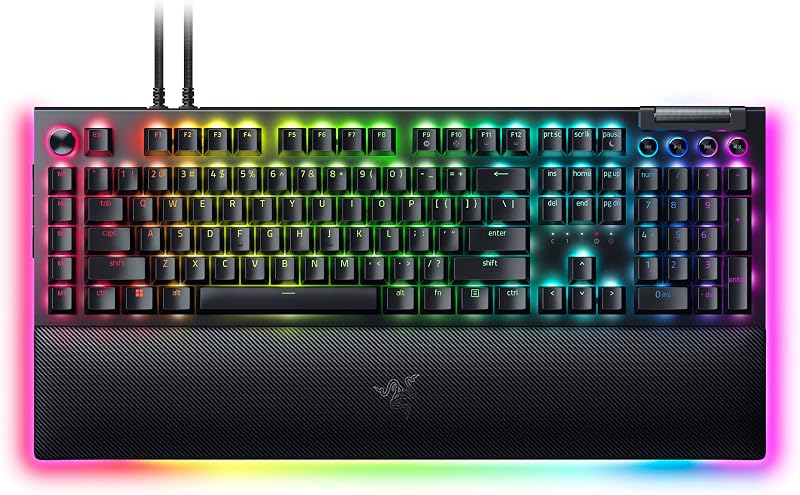
The choice between the Corsair K70 PRO TKL and the Corsair K100 RGB comes down to whether your setup prioritizes competitive motion precision through magnetic Hall Effect switches or expansive command execution through dedicated macro hardware. The K70 PRO TKL focuses entirely on input responsiveness, pairing pre-lubricated MGX Hyperdrive switches and dynamic Rapid Trigger resets with an 8,000Hz polling rate in a stripped-down, tenkeyless frame. The K100 RGB, on the other hand, acts as an all-in-one command station that anchors your desk with a 110-key layout, fixed 1.0mm optical-mechanical OPX switches, an iCUE multi-function dial, and six dedicated streaming keys.
Esports players and tactical shooter enthusiasts who demand swift counter-strafing, minimal latency, and broad mouse sweep area should choose the Corsair K70 PRO TKL. Content creators, live streamers, and MMO gamers who require instant macro switching, broadcast integration, and full numpad utility should select the Corsair K100 RGB.


Corsair K70 PRO TKL vs Corsair K100 RGB at a Glance
| Feature | Corsair K70 PRO TKL | Corsair K100 RGB |
|---|---|---|
| Switch Technology | Corsair MGX Hyperdrive Magnetic (MLX on secondary keys) | Corsair OPX Optical-Mechanical |
| Actuation Distance | Per-key adjustable (0.4mm to 3.6mm in 0.1mm steps) | Fixed 1.0mm |
| Rapid Trigger & SOCD | Yes (Dynamic Rapid Trigger and Simultaneous SOCD) | Not listed |
| Hyper-Polling Rate | Up to 8,000Hz (0.125ms latency via AXON) | Up to 4,000Hz (via AXON) |
| Switch Durability | 150 million keystrokes | 150 million keystrokes |
| Layout & Key Count | Tenkeyless (84 keys / 87 button quantity) | Full-Size (110 keys / 110 button quantity) |
| Keycap Material | ABS Double-Shot | PBT Double-Shot |
| Dedicated Macro Hardware | None (Programmable via iCUE) | 6 Dedicated G-Keys (Elgato Stream Deck compatible) |
| Hardware Controls | Volume roller and hotkeys | Multi-function iCUE control wheel and media keys |
| Dimensions | 14.41″L x 5.31″W x 1.57″H | 19.3″L x 9.4″W x 3.2″H |
| Operating System Support | Windows | Windows, macOS |
| Best For | Competitive FPS and fast-action esports | Broadcasting, simulation, and macro-heavy desktop workflows |
Switch Technology and Rapid Trigger Mechanics
The primary mechanical dividing line between these two decks is how their switches register physical movement and reset for the next stroke. In a technical razer huntsman v3 pro vs corsair k70 rgb pro context, adjustable magnetic sensors represent the modern vanguard of gaming switch architecture. The K70 PRO TKL incorporates pre-lubed Corsair MGX Hyperdrive magnetic switches that operate via Hall Effect sensors rather than physical metallic contacts or optical light beams. This magnetic mechanism allows the board to monitor continuous key position, unlocking customizable per-key actuation points anywhere from a hyper-sensitive 0.4mm down to an intentional 3.6mm in granular 0.1mm increments. It also introduces dynamic Rapid Trigger, which resets key registration the precise millisecond the key starts moving upward rather than waiting for it to cross a static mechanical reset threshold.
By contrast, the K100 RGB uses proprietary Corsair OPX optical-mechanical switches. These switches use an infrared light beam to register keypresses at a fixed 1.0mm actuation distance with 3.2mm of total travel. Because registration happens via light interruption, the switch avoids debounce delays inherent to traditional physical leaf switches, yet it remains bound to fixed geometric physical points. You cannot adjust the actuation depth on the K100 RGB, nor can you enable Rapid Trigger to reset keystrokes mid-travel. In fast-paced games where rapid-fire inputs determine character movement, such as counter-strafing in first-person shooters, the Corsair MGX vs OPX switches showdown reveals a tangible operational divide. While OPX switches actuate reliably quickly at 1.0mm, the MGX switches allow you to execute direction changes instantly without letting the key return all the way to a set mechanical reset height.
The K70 PRO TKL also introduces dual actuation functionality, enabling you to assign two distinct actions to a single keystroke based on how deep you press the key down, such as walking on a shallow press and sprinting on a bottomed-out stroke. It further includes simultaneous SOCD (Simultaneous Opposing Cardinal Directions) processing directly on the hardware. Note that the listing specifies the K70 PRO TKL equips its primary keys with MGX switches, while non-primary and function keys utilize Corsair MLX switches. Both the MGX switches on the K70 PRO TKL and the OPX switches on the K100 RGB share a massive durability rating of 150 million keystrokes, but their operational dynamics serve radically different movement styles.
Edge: Corsair K70 PRO TKL because its MGX magnetic switches offer per-key adjustable actuation and dynamic Rapid Trigger resets that optical switches cannot replicate.
Form Factor, Dimensions, and Desk Ergonomics
A keyboard’s exterior dimensions dictate posture, desk organization, and how freely you can swing your mouse hand during aggressive matches. The K70 PRO TKL measures 14.41 inches long, 5.31 inches wide, and 1.57 inches high. By eliminating the traditional numeric keypad and condensing the frame into a tenkeyless footprint, it pulls your hands into a closer, more natural alignment. For tactical gamers who keep mouse sensitivity low, this layout creates wide open clearance on your mouse pad, preventing your mouse from clipping the plastic casing during swift 180-degree turns. Similar ergonomics are explored when evaluating smaller form factors like the razer huntsman mini vs corsair k70 pro tkl.
On the other side of the spectrum, the K100 RGB is a sprawling full-sized command center measuring 19.3 inches long, 9.4 inches wide, and 3.2 inches high. It carries 110 keys, featuring a standard number pad, an extra column of six macro keys along the extreme left perimeter, dedicated media controls, and a multi-function wheel resting above the top-left row. This significant width forces your arms into a wider stance and consumes considerable desk space. If your desktop workstation is compact or crowded with audio interfaces, streaming boom arms, and massive mouse pads, the footprint of the K100 RGB demands dedicated planning.
Both models include a wrist rest out of the box to support hand alignment, but they address entirely different physical workflows. The compact tenkeyless build of the K70 PRO TKL fits into minimalist gaming desks and transports cleanly in a backpack. The K100 RGB stays grounded as a heavy desktop centerpiece meant to anchor expansive multi-monitor setups where high-volume data entry and streaming commands are prioritized over mouse clearance.
Edge: Corsair K70 PRO TKL because its compact tenkeyless footprint leaves crucial open space for sweeping mouse movements in competitive setups.
Macro Hardware and Workflow Versatility
Workflow capability is where the Corsair K100 RGB review calculations swing aggressively in its favor. Built for power users, the K100 RGB features six dedicated macro keys (labeled G1 through G6) positioned in a vertical strip on the far left edge of the chassis. These keys do not merely record standard in-game keystroke macros through Corsair iCUE software; they integrate directly with Elgato Stream Deck software. Broadcasters can program these keys to switch live camera scenes, mute microphones, trigger audio stingers, activate overlays, or push automated messages into a live streaming chat without purchasing a standalone streaming controller deck.
Adding to its hardware control advantage, the K100 RGB integrates a programmable iCUE control wheel bordered by tactile buttons. This wheel allows you to jog through media timelines, cycle through RGB backlighting presets, zoom into documents, scroll through open browser windows, or handle custom application commands on the fly. Paired with its dedicated media playback buttons and an integrated volume roller, the K100 RGB functions as an expansive control board. Shoppers weighing streaming decks often analyze options like the razer blackwidow v4 pro vs corsair k70 pro tkl for similar physical macro capabilities.
The K70 PRO TKL strips away this macro-heavy infrastructure to keep its chassis streamlined. While it maintains a tactile volume roller and supports full key remapping and macros via Corsair iCUE, it possesses no dedicated macro keys and lacks an integrated multi-function dial. Any custom key binding or streaming shortcut you configure on the K70 PRO TKL must take over a standard functional key, such as a function button or navigation switch. For daily desktop navigation, professional content production, and productivity suites, the K100 RGB offers an extensive physical control suite that the competitive-focused TKL board intentionally discards.
Edge: Corsair K100 RGB because of its six dedicated G-keys with Elgato Stream Deck software integration and its multi-function iCUE control dial.
Hyper-Processing Technology and Polling Latency
Both keyboards rely on Corsair AXON Hyper-Processing Technology to orchestrate input scanning and communication with your PC, but they operate at different upper performance limits. The K70 PRO TKL drives its AXON engine up to a maximum 8,000Hz hyper-polling rate. At 8,000Hz, the keyboard transmits data packets to the host system every 0.125 milliseconds. This eightfold reduction in reporting intervals compared to typical 1,000Hz boards minimizes system-side input lag, ensuring that inputs from the MGX magnetic switches reach the operating system with near-zero latency.
The K100 RGB delivers a 4,000Hz hyper-polling rate combined with 4,000Hz native key scanning. Operating at 4,000Hz allows the K100 RGB to communicate its keystroke state every 0.25 milliseconds. When comparing the corsair k70 rgb pro vs k100 rgb, both 4,000Hz and 8,000Hz far exceed the input speed of standard mechanical keyboards. The K100 RGB uses AXON to drive complex processing pipelines, such as up to 20 simultaneous layers of lighting effects, alongside its ultra-fast optical key scanning.
In competitive esports arenas where single-millisecond advantages factor into tracking and movement timing, the 8,000Hz pipeline on the K70 PRO TKL provides the higher raw processing ceiling. Running an 8,000Hz polling rate does consume additional host CPU cycles, which requires a capable PC processor, but for high-refresh-rate competitive monitors, the 0.125ms reporting interval provides the lowest possible input delay between finger motion and game engine registration.
Edge: Corsair K70 PRO TKL because its 8,000Hz AXON hyper-polling achieves a 0.125ms response time compared to the 4,000Hz ceiling on the K100 RGB.
Build Materials, Keycaps, and Aesthetics
Long-term physical durability and chassis presentation reveal distinct material choices between these decks. The K100 RGB is engineered around a brushed aluminum frame, accented by a 44-zone three-sided LightEdge that casts RGB illumination across the top and sides of the desk. Crucially, the listing notes the K100 RGB includes double-shot PBT keycaps out of the box. Polybutylene terephthalate (PBT) plastic provides high resistance against friction wear, resisting the smooth, shiny surface degradation and grease build-up that commonly affects keyboards over months of intense typing.
The K70 PRO TKL incorporates an enclosure constructed from an aluminum top plate combined with plastic, silicone sound dampening, and acrylonitrile butadiene styrene. However, its listing specifies that it comes fitted with ABS double-shot keycaps. While double-shot molding ensures the legends will never rub off or fade over time, ABS plastic is inherently softer than PBT. With prolonged daily gaming, ABS keycaps will develop visible surface shine much faster than the PBT keycaps supplied with the K100 RGB. Buyers exploring alternative premium deck materials often compare these builds against decks examined in our razer deathstalker v2 vs corsair k70 rgb pro breakdown.
Aesthetically, the K70 PRO TKL adopts a sleek, contemporary tournament look with standard per-key RGB backlighting designed to keep visual distractions minimal. The K100 RGB presents a bold, decorative desk centerpiece with its ambient LightEdge zones and brushed metal detailing. Furthermore, the K100 RGB listing specifies full compatibility across both Windows and macOS operating system families, whereas the K70 PRO TKL listing indicates Windows-only operating system support with Windows 1 as the listed minimum requirement.
Edge: Corsair K100 RGB because of its premium double-shot PBT keycap set, three-sided 44-zone LightEdge illumination, and broader macOS compatibility.
Pros and Cons
Corsair K70 PRO TKL

Pros
- Hall Effect MGX switches with Rapid Trigger
- Adjustable actuation from 0.4mm to 3.6mm
- Hyper-polling up to 8000Hz via AXON
- Compact space-saving tenkeyless layout
- Dual-action keypress combos supported
Cons
- Double-shot ABS keycaps instead of PBT
- No dedicated macro keys
- Windows-only operating system compatibility
View Corsair K70 PRO TKL on Amazon
Corsair K100 RGB

Pros
- Six dedicated macro keys with Stream Deck integration
- Multi-function iCUE control wheel
- Durable double-shot PBT keycaps
- 44-zone three-sided LightEdge RGB
- Windows and macOS operating system support
Cons
- Fixed 1.0mm optical actuation without Rapid Trigger
- Large desk footprint requiring significant space
- Capped at 4000Hz hyper-polling
View Corsair K100 RGB on Amazon
Who Should Buy Each One
Choose the Corsair K70 PRO TKL If
- You primarily play competitive first-person shooters and tactical esports where rapid counter-strafing demands Rapid Trigger and low 0.4mm actuation.
- You want an 8,000Hz hyper-polling rate with 0.125ms transmission speed for maximum input latency reduction.
- You maintain a low mouse sensitivity and need a compact tenkeyless board to free up desk space for broad mouse swipes.
- You want dual-action keypress combos that trigger different commands based on physical key travel depth.
Choose the Corsair K100 RGB If
- You stream live gameplay and need six dedicated G-keys with direct Elgato Stream Deck integration for camera and scene controls.
- You rely on a full-size layout complete with a 10-key numeric pad for productivity tasks, simulation controls, or MMO bindings.
- You want durable double-shot PBT keycaps that resist surface shine and finger oil buildup over years of heavy usage.
- You run a mixed setup or Mac ecosystem that requires official macOS compatibility alongside Windows.
Final Verdict
When weighing the Corsair K70 PRO TKL vs K100 RGB for esports and general gaming, the Corsair K70 PRO TKL emerges as the superior gaming tool for pure competitive performance. Its implementation of Corsair MGX Hyperdrive magnetic switches brings vital modern mechanics to the table: per-key actuation depth tuning from 0.4mm to 3.6mm, simultaneous SOCD handling, and dynamic Rapid Trigger resets. Paired with a native 8,000Hz AXON polling rate and a compact tenkeyless form factor that clears valuable mouse pad area, it solves the mechanical constraints that competitive players face during high-stress matches.
The Corsair K100 RGB claims the victory whenever a setup demands workstation control, broadcasting utility, and maximum physical hardware features. If your daily routine balances gaming with content production, streaming management, and spreadsheet calculations, the K100 RGB justifies its expansive desk presence. Its six dedicated macro keys with Elgato Stream Deck software support, multi-function iCUE control dial, durable double-shot PBT keycaps, and full numpad make it an unmatched desktop anchor for power users who refuse to sacrifice everyday utility for a compact footprint.
FAQ
Can you adjust the actuation point on the Corsair K100 RGB?
No. The Corsair K100 RGB uses Corsair OPX optical-mechanical switches that have a fixed actuation distance of 1.0mm. If you require customizable per-key actuation points or dynamic Rapid Trigger, you must choose the Corsair K70 PRO TKL, which allows actuation adjustments from 0.4mm to 3.6mm.
What is the Corsair K70 PRO TKL rapid trigger feature?
Rapid Trigger is an advanced switch feature on the K70 PRO TKL enabled by its Hall Effect MGX magnetic switches. Rather than waiting for a key to travel back upward across a fixed mechanical reset point, Rapid Trigger dynamically resets the key the exact instant you begin releasing it. This allows players to repeat keystrokes and execute direction changes much faster than traditional switches permit.
Are all the switches on the Corsair K70 PRO TKL magnetic?
The primary keys on the Corsair K70 PRO TKL feature Corsair MGX Hyperdrive magnetic switches, while the function keys and non-primary keys are equipped with Corsair MLX switches according to the product listing specifications.
Can the Corsair K100 RGB macro keys control streaming software?
Yes. The six dedicated G-keys on the Corsair K100 RGB feature direct integration with Elgato Stream Deck software. This allows you to bind streaming commands, switch scenes, change audio inputs, or toggle overlays directly from the keyboard without needing a separate standalone controller.
Does the Corsair K70 PRO TKL work on Mac computers?
The product data specifies Windows as the compatible operating system family for the Corsair K70 PRO TKL. In contrast, the Corsair K100 RGB listing explicitly includes compatibility for both macOS and Windows operating systems.
What is the difference between 4000Hz and 8000Hz hyper-polling?
Hyper-polling refers to how frequently the keyboard updates and sends input data to your PC. The Corsair K100 RGB polls at 4,000Hz, translating to a 0.25ms reporting interval. The Corsair K70 PRO TKL polls at up to 8,000Hz via AXON, delivering reports every 0.125ms to reduce theoretical input delay to an absolute minimum.
Is Corsair K100 RGB worth it over a compact gaming keyboard?
The Corsair K100 RGB is worth it if you need an expansive desktop command center with dedicated macro keys, full Elgato Stream Deck utility, a physical iCUE multi-function wheel, and durable PBT double-shot keycaps. However, if your focus is pure competitive gaming speed, reduced input latency, and mouse clearance, the K70 PRO TKL is the more focused choice.