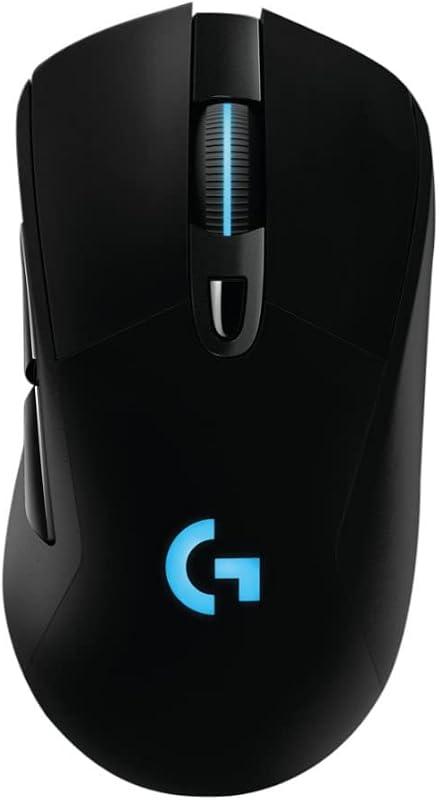
The central mechanical division in the lightweight vs heavy gaming mouse debate comes down to physical inertia: ultralight mice cut moving mass to maximize acceleration and instant stopping power, while heavy mice utilize their own weight to dampen micro-jitters and smooth out erratic hand motions. Choosing between them depends on whether your competitive edge relies on rapid target flicking or anchored, steady tracking.
Pick a lightweight gaming mouse if you primarily play fast-paced shooters that demand low-inertia crosshair snaps, extended sessions without physical fatigue, and instantaneous switch activation. Opt for a heavy gaming mouse if your playstyle favors deliberate crosshair placement, heavy physical feedback, and mechanical resistance that prevents accidental overshooting.


Lightweight Gaming Mouse vs Heavy Gaming Mouse at a Glance
| Feature | Lightweight Gaming Mouse | Heavy Gaming Mouse |
|---|---|---|
| Mass Profile | Approximately 75g or lower via thin-wall or honeycomb builds | Typically 100g or more with dense framing |
| Target Acquisition Dynamics | Minimal inertia for rapid flicking and sharp directional shifts | Higher inertia requiring firm muscular effort to redirect |
| Micro-Jitter Suppression | Relies strictly on user hand discipline and smooth pad friction | Mechanically filtered by mass and surface friction |
| Glide Hardware | Large UHMWPE feet and drag-free paracord cables | Not listed |
| Sensor Performance Range | Up to 44,000 DPI, 888 IPS, and 88 g-force tracking | Not listed |
| Maximum Polling Rate | Up to 8 kHz wired and wireless response | Not listed |
| Switch Customization | Up to 10-level actuation and rapid trigger resets | Not listed |
| Fatigue Profile | Significantly lower forearm and wrist strain over long sessions | Noticeable wrist and tendon exertion during wide arm sweeps |
| Best For | Competitive FPS, high-velocity flick shots, and long ranked matches | Tactical shooters, sniper tracking, and general desktop stability |
Flick Speed, Inertia, and Target Acquisition
In fast-paced competitive shooters, target acquisition hinges on Newton’s first law: an object at rest stays at rest until acted upon by an external force. When evaluating a heavy vs lightweight gaming mouse, the mass you hold dictates how much muscular force you must expend to start a swipe and, just as importantly, how much counter-force is required to bring the crosshair to a dead halt. Ultralight engineering minimizes this kinetic resistance, allowing players to execute rapid 180-degree turns and sharp micro-flicks with virtually zero physical lag.
A high-performance lightweight pointer like the Logitech G PRO X2 SUPERSTRIKE demonstrates this principle by utilizing extra-large gliding UHMWPE feet, a HERO 2 sensor capable of handling over 888 inches per second (IPS) and 88 g-force acceleration, and responsive 8 kHz polling. Similarly, the TMKB Falcon M1SE employs an ultra-light 75g chassis combined with a drag-free paracord and buttery smooth skates to create a near-frictionless gliding experience. In contrast, heavy mice require distinct muscular exertion to overcome baseline resting inertia. When you flick rapidly with a heavy chassis, the excess momentum can easily cause you to overshoot small player hitboxes unless you engage antagonist wrist muscles to brake the mouse manually. Evaluating a logitech g pro x superlight 2 vs g502 x highlights how dramatic the physical difference feels when snapping between sudden angles.
For titles where instant reflexes determine round outcomes, deciding on a lightweight or heavy gaming mouse for fps competition usually tilts toward low mass. While heavy designs provide physical resistance that some players use to register their physical hand position, that resistance actively impedes high-velocity snap adjustments. The reduced inertia of ultralight hardware enables cleaner, faster resets across the mousepad during chaotic engagements.
Edge: Lightweight gaming mouse because minimal kinetic inertia allows for instantaneous crosshair acceleration and pinpoint stopping power.
Tracking Smoothness and Natural Jitter Dampening
While rapid acceleration benefits snap targeting, continuous target tracking introduces different mechanical demands. In games that feature extended time-to-kill or require tracking moving targets across open distances, natural hand stability becomes paramount. Hand tremors, irregular pulse spikes, and minor nervous twitches translate directly to the mouse sensor if the mouse body offers zero physical dampening.
This mechanical filtering is one of the primary heavy gaming mouse benefits. The substantial mass of a heavy mouse acts as a physical stabilizer against micro-jitters, smoothing out the natural tremors of the human hand without requiring artificial software filtering or angle snapping. In any balanced heavy gaming mouse review, players note that tracking sweeping targets along horizontal planes feels grounded and deliberate. The mouse grips the pad with authoritative downward pressure, preventing inadvertent lift-off or tiny vertical wavers during sustained automatic fire.
Conversely, executing smooth tracking with an agile model like the Falcon M1SE or PRO X2 SUPERSTRIKE demands rigid motor control. Because the lightweight shell glides with minimal resistance, every minute muscle contraction or uneven texture on the pad surface can cause crosshair instability. Readers comparing modern options through a glorious model o 2 vs pulsar x2 analysis frequently discover that keeping a featherweight pointer steady requires lowering overall sensor sensitivity. For players who struggle with nervous jitter or hand instability, the extra ballast of a heavy chassis delivers an inherently smoother tracking baseline.
Edge: Heavy gaming mouse because added physical mass acts as a natural mechanical stabilizer against hand tremors and micro-jitters.
Wrist Fatigue and Extended Session Ergonomics
Ergonomics extends beyond shell curves to encompass the cumulative energy expended across hundreds of swipes, lifts, and re-centering motions. When performing low-sensitivity aiming, players move their mice across tens of feet of mousepad surface during a single competitive match. The question of lightweight gaming mouse wrist fatigue becomes critical for anyone who logs long hours at a desk.
Operating a heavy mouse under low-DPI conditions forces the tendons of the wrist, forearm, and shoulder to continuously accelerate and decelerate substantial weight. Over multi-hour sessions, this continuous strain can lead to muscle tightness, reduced fine-motor responsiveness, and joint fatigue. In contrast, ultralight mice drastically reduce this physical toll. Modern engineering achieves featherweight shells through strategic material reduction; for instance, the Falcon M1SE utilizes a ventilated honeycomb shell to hit an ultra-light 75g weight, while the PRO X2 SUPERSTRIKE achieves structural integrity using an ultra-thin 0.7 mm wall case.
When examining whether a lightweight or heavy gaming mouse for valorant is better suited for marathon ranked grinds, the stamina advantage of the lighter shell is undeniable. Removing physical mass minimizes repetitive strain injury risks and keeps hand reflexes sharp during late-game rounds. Detailed comparisons like the steelseries aerox 3 vs glorious model o 2 demonstrate how ventilated shells maintain airflow to reduce palm sweat while keeping mass at an absolute minimum. For sheer physical endurance across endless gaming sessions, lighter frames impose substantially less bodily wear.
Edge: Lightweight gaming mouse because lower total mass reduces muscular exertion and prevents wrist strain during long sessions.
Sensor Precision, Polling Rates, and Switch Latency
Raw physical movement must be captured accurately by internal sensor and switch hardware. Modern lightweight engineering has pushed electronic responsiveness to extreme benchmarks to complement low-inertia chassis designs. When reading an in-depth lightweight gaming mouse review, hardware enthusiasts look closely at internal polling frequencies and custom switch mechanics.
The technological ceiling of modern ultralight pointers is showcased in the PRO X2 SUPERSTRIKE, which incorporates the advanced HERO 2 optical sensor supporting up to 44,000 DPI (with listing specifications also noting a standard 26,000 DPI operating range), 888 IPS tracking speed, and 88 g-force acceleration. Even more notable is its Haptic Inductive Trigger System (HITS), which delivers real-time haptic feedback, 30 ms faster click registration, 10-level customizable actuation points, and a 5-level rapid trigger reset. Meanwhile, entry-level designs like the Falcon M1SE offer an adjustable optical range from 200 to 12,800 DPI with polling rates between 125 Hz and 1,000 Hz, backed by 6 programmable buttons and 4 configuration layers for rapid-fire execution.
For heavy gaming mice, the listing does not specify equivalent proprietary switch actuation settings, rapid trigger mechanisms, or haptic inductive feedback modules. Heavy designs can accommodate standard optical or mechanical sensors, but specialized rapid-trigger switch customization remains a distinct hallmark of flagship ultralight competitive mice. In deciding whether is a lightweight gaming mouse better for high-precision competitive inputs, the presence of sub-millisecond click actuation points and ultra-high polling up to 8 kHz gives low-mass models a definitive edge.
Edge: Lightweight gaming mouse because flagship implementations integrate ultra-high polling, sub-millisecond actuation adjustments, and industry-leading sensor velocity ratings.
Chassis Rigidity, Weight Customization, and Button Layout
A thorough gaming mouse weight comparison must also address structural durability and utility. Ultralight mice achieve low mass by stripping away internal plastic, thinning outer walls, or perforating the housing. While this delivers blistering speed, it inherently compromises structural density and limits the number of onboard hardware features.
The Falcon M1SE illustrates this trade-off with its open honeycomb exterior. While the hexagonal cutouts shed unnecessary mass and promote ventilation, they expose the internal circuit board to dust, liquid spills, and skin oils over time. The PRO X2 SUPERSTRIKE circumvents this by engineering a solid 0.7 mm thin-wall enclosure, but it remains restricted to a streamlined 5-button layout to preserve its weight targets. Neither of these models allows users to adjust physical mass or balance points to suit different grip styles.
This trade-off is where evaluating is a heavy gaming mouse worth it becomes compelling. Heavy chassis designs do not have to compromise on shell thickness, allowing for exceptionally rigid, creak-free plastic bodies that withstand heavy grip pressure. Furthermore, heavy mice routinely incorporate internal weight tuning systems, multi-button side grids, dual-mode free-spinning scroll wheels, and dedicated thumb rests. For gamers who juggle productivity, complex macros, or MMO toolbars, as explored in the logitech mx master 3s vs g604 comparison, the dense frame and expansive button layout of a heavy mouse provide utility that minimalist ultralight designs cannot match.
Edge: Heavy gaming mouse because solid, non-perforated shells provide unyielding structural rigidity and accommodate complex multi-button layouts.
Connectivity Flexibility and Desk Setup Dynamics
How a mouse connects to your PC and moves across your desk surface interacts heavily with its mass profile. A heavy mouse exerts enough downward force that minor cable resistance is barely noticed, whereas an ultralight mouse can have its path deflected by a stiff, braided cord. As a result, lightweight mice must incorporate specialized flexible materials or high-end wireless protocols to maintain seamless glide.
The market reflects these divergent engineering paths clearly. The Falcon M1SE utilizes a specialized drag-free paracord and ultra-smooth glide skates to mimic a wireless experience over a standard USB corded connection. On the wireless front, the PRO X2 SUPERSTRIKE relies on LIGHTSPEED wireless with an included USB-A to USB-C charging cable, delivering between 60 and 90 hours of battery life on a single charge and compatibility with POWERPLAY 2 wireless charging mats for perpetual play. Readers weighing their setup options in our wired vs wireless gaming mouse breakdown will note that cutting weight while maintaining solid wireless battery life requires sophisticated power-saving sensor architecture.
Heavy mice, by contrast, possess the interior physical space to house larger standard battery cells without worrying about weight penalties. However, because their higher base mass generates significant surface friction on standard cloth pads, cable drag or uneven skate wear can make movement feel sluggish and taxing. While lightweight designs require careful matching with low-friction cables or low-latency wireless transceivers, their resulting freedom of movement across the mousepad remains unmatched.
Edge: Tie because lightweight mice offer superior surface glide dynamics, while heavy mice easily house massive battery arrays without compromising their design goals.
Pros and Cons
Lightweight Gaming Mouse

Pros
- Minimal physical inertia for rapid flicks
- Significantly reduced wrist and arm fatigue
- Advanced sensors up to 44000 DPI
- Customizable rapid trigger switch actuation
Cons
- Demands strict muscular control to steady
- Honeycomb models expose internals to debris
View TMKB Falcon M1SE White Gaming Mouse on Amazon
Heavy Gaming Mouse
Pros
- Inherent mechanical dampening against tremors
- Stable and grounded horizontal tracking
- Rigid non-flexing solid chassis construction
Cons
- Higher kinetic fatigue across marathon sessions
- Sluggish initial acceleration and stopping response
Who Should Buy Each One
Choose the Lightweight Gaming Mouse If
- You play fast-paced competitive shooters like Valorant, Apex Legends, or Overwatch that demand rapid flick shots and quick resets.
- You suffer from wrist strain or forearm fatigue during extended multi-hour gaming and productivity sessions.
- You prioritize cutting-edge hardware features like 8 kHz polling rates, rapid trigger switch actuation, and sub-millisecond response times.
- You utilize low in-game sensitivity and need to sweep and lift your mouse repeatedly across large desk surfaces.
Choose the Heavy Gaming Mouse If
- You play tactical shooters, vehicle simulations, or strategy titles where smooth horizontal tracking and crosshair stability take priority over flick speed.
- You experience natural hand tremors or jittery micro-aim and want the mouse’s physical mass to act as a stabilizing mechanical filter.
- You prefer a dense, unyielding shell without cutouts or thin walls that might flex under a tight, firm palm grip.
- You require extensive onboard controls, complex macro grids, or physical weight tuning compartments to balance your desktop workflow.
Final Verdict
For the vast majority of modern PC gamers, particularly those immersed in competitive first-person shooters, the lightweight gaming mouse is the superior choice. Minimizing physical inertia fundamentally transforms aiming mechanics, granting faster crosshair acceleration, immediate stopping power, and effortless micro-corrections without straining the wrist. Advanced implementations like the PRO X2 SUPERSTRIKE and accessible options like the Falcon M1SE prove that shed mass does not mean sacrificing sensor fidelity, high polling rates, or programmable functionality.
However, a heavy gaming mouse remains the undisputed champion for players who prioritize anchored physical control and tactile resistance over raw speed. If your playstyle centers on deliberate, horizontal tracking, long-range sniper stabilization, or general office productivity where hand tremors cause cursor drift, the natural inertia of a heavier shell provides invaluable physical stabilization. Choose the ultralight path for maximum agility and competitive speed, but stick with a heavy chassis if you demand a grounded, substantial feel with complete structural rigidity.
FAQ
Does a lightweight gaming mouse improve aim in FPS games?
A lightweight gaming mouse improves aim primarily by reducing physical inertia, which allows your hand to start and stop crosshair movements much faster. In competitive shooters where micro-adjustments and target flicking decide gunfights, having less moving mass translates to quicker target acquisition and less muscular resistance when correcting your aim.
Is a heavy gaming mouse better for high DPI settings?
Yes, heavy mice often pair effectively with high DPI settings because their inherent physical weight dampens small, inadvertent twitches from your hand. When using high sensitivity, every tiny muscular spasm can throw off your crosshair; the downward friction and inertia of a heavy mouse act as a natural mechanical stabilizer to keep your cursor steady.
Do honeycomb shells in lightweight mice let in dust and dirt?
Honeycomb shells, such as the one featured on the Falcon M1SE, reduce weight effectively but do leave internal circuit boards partially exposed to external debris, dust, and palm sweat over time. Players who want the speed advantages of an ultralight build without open perforations often choose thin-wall enclosed designs like the PRO X2 SUPERSTRIKE.
How does mouse weight affect wrist fatigue during long sessions?
Mouse weight directly correlates with wrist fatigue because a heavier chassis forces the muscles and tendons of your wrist and forearm to expend more energy during every swipe, lift, and stop. Switching to an ultralight model significantly lowers the kinetic load on your joints, helping prevent repetitive strain and fatigue during long gaming sessions.
Can you add weight to a lightweight gaming mouse?
Standard lightweight gaming mice do not include internal ballast slots or modular weight compartments because their entire structure is engineered strictly for mass reduction. If you prefer the flexibility of modifying your mouse’s heft depending on the game genre, a dedicated heavy gaming mouse with an integrated weight-tuning system is necessary.
Why do esports pros prefer lightweight gaming mice for Valorant?
Esports professionals in tactical shooters like Valorant predominantly use lightweight mice because lower inertia enables near-instantaneous crosshair placement on holding angles and fast counter-flicks. Combined with low in-game sensitivity, a lighter mouse allows players to sweep across broad mousepad areas repeatedly without forearm exhaustion.