The decisive contrast between the Logitech G Pro X Superlight 2 and the Logitech G703 lies in chassis mass and ergonomic purpose: the Superlight 2 delivers an ultra-lean 60-gram symmetrical profile engineered for fast flick shots, whereas the G703 utilizes a 107-gram sculpted right-handed frame with built-in rubber side grips built to cushion the palm during long play sessions.
Esports competitors prioritizing low physical resistance, rapid tracking speeds, and extreme sensor precision should choose the Superlight 2, while players wanting palm support, extra tactile traction, and customizable lighting should select the G703.


Logitech G Pro X Superlight 2 vs G703 at a Glance
| Feature | Logitech G Pro X Superlight 2 | Logitech G703 |
|---|---|---|
| Weight | 60 g | 107 g |
| Optical Sensor | HERO 2 (up to 44,000 DPI, 888+ IPS) | PMW3366 (200-12,000 DPI) |
| Maximum Polling Rate | 8 kHz (8,000 Hz) | 1,000 Hz (1 ms) |
| Switch Mechanism | LIGHTFORCE hybrid optical-mechanical | Advanced metal spring tensioning |
| Battery Life | 95 hours | Not listed |
| Charging and Connectivity | USB-C, RF Wireless, POWERPLAY | 1.80 m cable, LIGHTSPEED Wireless, POWERPLAY |
| Button Count | 5 | 6 programmable buttons |
| Chassis Construction | Plastic with zero-additive PTFE feet | Metal and rubber with integrated side grips |
| RGB Lighting | None | Customizable 16.8-million-color RGB |
| Platform Compatibility | PC, Windows 10, macOS | PC, Gaming Console, Windows 7+, macOS, Chrome OS |
| Best For | Competitive FPS and fast-twitch esports | Ergonomic palm grip and long-session comfort |
Weight, Agility, and Gliding Performance
Physical mouse weight dictates how quickly a player can start, redirect, and stop mouse movement across a desk surface. In fast-paced shooters, a lower overall mass reduces the muscular effort needed to make micro-adjustments and sweeping 180-degree turns. The Superlight 2 weighs in at an ultralight 60 grams, stripping away all unnecessary internal structure to give competitive gamers lightning-quick handling. Paired with factory-installed zero-additive PTFE mouse feet, the chassis moves across cloth and hard pads with minimal surface friction, allowing rapid hand movements to translate directly into crosshair placement without inertia holding you back.
By contrast, the G703 weighs 107 grams, making it nearly 80 percent heavier than its competitive sibling. This substantial weight reflects a different design era and usage philosophy, using heavier materials including a metal and rubber enclosure. While 107 grams creates more resistance during rapid movements, some players prefer the planted, steady glide that a heavier mouse delivers when holding static firing angles or tracing targets along horizontal planes. However, during frantic multi-directional firefights, that added weight increases wrist fatigue over multiple hours of play. Readers evaluating different weights within the brand lineup can see a similar dynamic in our logitech g pro x superlight 2 vs g502 x comparison.
When comparing the superlight 2 vs g703 weight profile, the operational advantage decisively favors the lighter mouse for competitive genres. Moving 60 grams requires far less acceleration force than maneuvering 107 grams, giving the Superlight 2 a dramatic physical edge when quick resetting and high-speed target acquisition decide match outcomes.
Edge: Logitech G Pro X Superlight 2 because its 60 g frame and zero-additive PTFE feet drastically cut movement inertia.
Sensor Precision, Tracking Speed, and Polling Rates
Sensor capability determines whether a gaming mouse faithfully mirrors physical hand velocity without skipping, spinning out, or suffering registration delays. The Superlight 2 features the HERO 2 optical sensor, which represents Logitech’s most advanced tracking technology. The HERO 2 boasts tracking speeds rated over 888+ IPS and sensitivity scaling up to 44,000 DPI. Crucially for high-end esports, the sensor operates with zero smoothing, acceleration, or filtering across its entire range, delivering 1:1 hardware translation to the display. Furthermore, the mouse supports an exceptional 8 kHz (8,000 Hz) polling rate, reducing the reporting interval between the mouse and PC down to fractions of a millisecond for ultra-fluid cursor paths on high-refresh monitors.
The G703 is powered by the PMW3366 optical sensor, which established itself as an esports benchmark during its release. It provides a sensitivity spectrum between 200 and 12,000 DPI and shares the zero smoothing, filtering, and acceleration design that competitive gaming demands. However, the hardware ceiling is noticeably lower than the HERO 2. The G703 transmits data at a standard 1,000 Hz (1 ms) USB report rate over its LIGHTSPEED wireless link. While a 1,000 Hz connection remains reliable for general gaming and competitive matchmaking, it cannot match the extreme data reporting frequency of an 8 kHz setup. Players examining advanced wireless gear can learn more about tournament-grade peripherals in our logitech g pro x superlight 2 vs g502 x plus breakdown.
When analyzing the superlight 2 vs g703 specs for competitive tracking, the Superlight 2 occupies an entirely higher technological bracket. With more than triple the maximum DPI ceiling, an 888+ IPS tracking speed threshold, and an 8 kHz polling pattern, the Superlight 2 provides measurable performance gains for gamers with high-refresh tournament monitors seeking the absolute lowest input latency.
Edge: Logitech G Pro X Superlight 2 due to its modern HERO 2 sensor and ultra-fast 8 kHz polling rate support.
Ergonomics, Grip Compatibility, and Shell Design
Hand comfort and grip compatibility depend directly on the exterior geometry and texturing of the mouse chassis. The G703 features a distinct ergonomic body molded to match the natural arch of the human hand. It incorporates dedicated rubber grips on the left and right sides, giving fingers immediate traction without requiring aftermarket grip tape. The raised top hump fills the palm, providing continuous contact and structural support. This sculpted design makes the G703 an exceptional option for full palm grip users who rest their entire hand weight on the mouse during gameplay or desktop navigation.
The Superlight 2 uses a neutral, streamlined shape that caters to a wider array of grip techniques. Its smooth plastic enclosure lacks built-in rubber side panels, which reduces overall weight and keeps the sides feeling uniform. The symmetrical, low-profile contour works naturally with claw grip and fingertip grip styles, allowing players to adjust their hand position freely during vertical aim adjustments. While right-handed palm grip users can still handle the mouse, it does not provide the pronounced arch or palm-filling support found on the G703 shell. Balancing specialized ergonomics against lightweight speed is a common theme when comparing premium hardware, as explored in our guide on the steelseries arctis nova pro wireless vs logitech g pro x 2.
Choosing between the logitech g pro x superlight 2 or g703 for palm grip comes down to how much physical contouring you require. Gamers seeking pure ergonomic comfort, dedicated rubber side contact, and full palm cradling will find the G703 significantly more natural to hold over long hours.
Edge: Logitech G703 because its sculpted shell and integrated rubber side grips deliver superior ergonomic support for palm-grip players.
Switches, Click Mechanics, and Button Configuration
Click consistency and input speed influence both weapon handling in games and everyday desktop efficiency. The Superlight 2 is outfitted with LIGHTFORCE hybrid switches, which combine the reliability and rapid actuation of optical triggers with the tactile response of mechanical switches. This hybrid design minimizes debounce delay and prevents mechanical wear issues over extended competitive play. In terms of layout, the Superlight 2 features 5 buttons, including customizable side buttons on the left flank, keeping the exterior minimalist and free of accidental actuations.
The G703 takes a different approach by implementing mechanical switches backed by an advanced button tensioning system. This mechanism uses internal metal springs to keep the primary left and right mouse buttons pre-loaded and primed to click. As a result, the G703 requires less finger actuation force to register an input, producing a crisp, responsive, and consistent mechanical click feel. Furthermore, the G703 provides 6 programmable buttons configured through the Logitech Gaming Software suite, giving users an extra dedicated input-such as the top DPI selector button-that can be bound to complex in-game actions or macro sequences.
While the G703 offers one additional programmable input and an exceptionally crisp spring-tensioned click, the Superlight 2 incorporates optical-mechanical hybrid switch technology that delivers faster response times and improved long-term reliability for competitive esports. For players purely focused on button actuation speed and lifespan, the Superlight 2 takes the lead.
Edge: Logitech G Pro X Superlight 2 because its LIGHTFORCE hybrid switches provide optical actuation speed and long-term durability.
Battery Endurance, Charging Ecosystem, and Aesthetics
A wireless peripheral must balance weight, power consumption, and recharging convenience to remain practical. The Superlight 2 delivers an impressive 95 hours of continuous battery life on a single charge of its internal lithium-polymer battery. Recharging is handled through a modern USB-C port, allowing players to use standard cables found across modern PC setups. For a completely cable-free desktop, the Superlight 2 is fully compatible with the Logitech POWERPLAY wireless charging mouse pad, which continuously charges the mouse during both active play and idle periods.
The G703 listing does not specify its exact single-charge battery runtime in hours, reflecting its older platform architecture and power draw from internal components. Unlike the unlit Superlight 2, the G703 integrates customizable brilliant RGB lighting capable of displaying 16.8 million colors across the wheel and logo zones, matching personal desktop aesthetics or esports team colors. To keep the G703 charged, users can plug in the included 1.80 m data and charging cable to switch seamlessly into a wired mode, or dock the mouse onto the POWERPLAY wireless charging mat. Complementing your desktop setup with dependable hardware is critical, much like selecting proper audio gear in our review of the logitech g pro x 2 vs hyperx cloud iii.
When considering whether the mouse can run for days without interruption, the Superlight 2 holds a distinct advantage. Its rated 95-hour battery lifespan, modern USB-C interface, and lightweight power efficiency surpass the G703, which trades battery optimization for dynamic RGB backlighting.
Edge: Logitech G Pro X Superlight 2 because of its rated 95-hour battery life and universal USB-C recharging interface.
Pros and Cons
Logitech G Pro X Superlight 2

Pros
- Featherweight 60 g chassis
- Advanced HERO 2 sensor
- Up to 8 kHz polling rate
- 95-hour battery life
- Zero-additive PTFE feet
Cons
- No RGB lighting
- Only five buttons
View Logitech G Pro X Superlight 2 on Amazon
Logitech G703
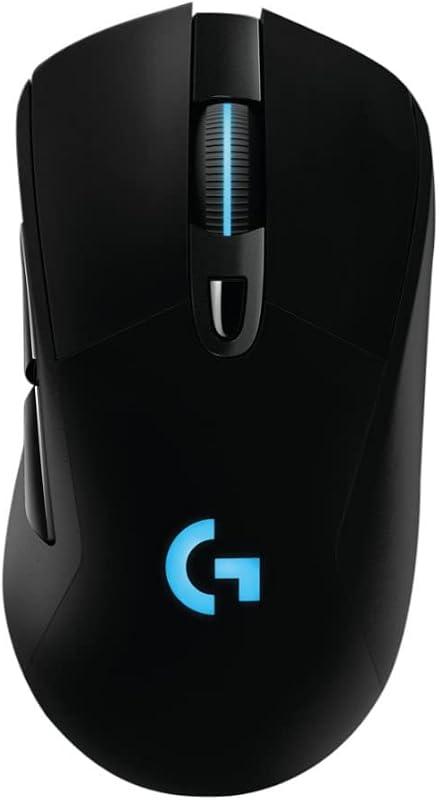
Pros
- Ergonomic palm-grip shell
- Built-in rubber side grips
- Six programmable buttons
- Customizable RGB lighting
- Spring-tensioned mechanical clicks
Cons
- Heavy 107 g frame
- Lower 12,000 DPI ceiling
Who Should Buy Each One
Choose the Logitech G Pro X Superlight 2 If
- You play twitch-focused competitive shooters where a 60-gram featherweight mouse accelerates target flicking and reduces wrist fatigue.
- You want tournament-grade tracking with an 8 kHz polling rate, 888+ IPS speed, and up to 44,000 DPI via the HERO 2 sensor.
- You demand long wireless endurance with up to 95 hours of runtime paired with universal USB-C charging.
- You prefer LIGHTFORCE hybrid optical-mechanical switches for low-latency click actuation.
Choose the Logitech G703 If
- You use a dedicated palm grip and want an ergonomically sculpted shell that fills your hand naturally.
- You prefer the added control, traction, and physical stability provided by built-in rubber side grips and a 107-gram body.
- You want brilliant 16.8-million-color RGB lighting to sync with your gaming battlestation.
- You need 6 programmable buttons configured through software to manage extra macros and commands.
Final Verdict
For most competitive PC gamers, the Logitech G Pro X Superlight 2 emerges as the superior choice. Its 60-gram lightweight design, cutting-edge HERO 2 sensor, 8 kHz polling rate capability, and 95-hour battery life create a peripheral fine-tuned for high-level competitive performance. In fast-paced first-person shooters, the elimination of drag and inertia makes micro-adjustments and quick flick shots feel instantaneous. Anyone seeking a high-performance tournament tool will find that the Superlight 2 sets the standard for modern wireless gaming peripherals.
However, the Logitech G703 remains an excellent option for gamers who find ultralight symmetrical mice uncomfortable or unstable. With its sculpted right-handed profile, integrated rubber side panels, spring-tensioned mechanical clicks, and 6 programmable buttons, the G703 excels at keeping your palm supported through prolonged work and play sessions. If your priority is ergonomic comfort, physical stability, and vibrant RGB aesthetics over ultra-low weight, the G703 delivers a proven, comfortable experience.
FAQ
Is the Logitech G Pro X Superlight 2 worth it for competitive FPS games?
Yes, the Superlight 2 is designed specifically for competitive FPS titles. Its 60-gram chassis, 888+ IPS tracking speed, 8 kHz polling capability, and zero-additive PTFE feet give tournament players the speed and precision required for twitch aiming.
Is the Logitech G703 worth it for palm grip users?
The G703 is exceptionally well-suited for palm grip players. Its tall arch, ergonomic contouring, and integrated rubber side grips provide full palm support and firm finger traction that flatter, symmetrical mice cannot replicate.
What is the difference in weight between the Superlight 2 and G703?
The Superlight 2 weighs 60 grams, while the G703 weighs 107 grams. This 47-gram difference makes the Superlight 2 significantly lighter, reducing physical resistance during swift arm and wrist sweeps.
Do both mice support the Logitech POWERPLAY wireless charging system?
Yes, both the Superlight 2 and the G703 are compatible with the Logitech POWERPLAY wireless charging system, allowing either mouse to charge continuously while playing on a compatible mouse pad.
How do the switches differ between the Superlight 2 and the G703?
The Superlight 2 uses LIGHTFORCE hybrid optical-mechanical switches designed for rapid optical actuation and long-term durability, whereas the G703 uses mechanical switches enhanced with an internal metal spring button tensioning system.
Can the Logitech G703 be used as a wired mouse?
Yes, the G703 includes a 1.80 m charging and data cable that allows users to seamlessly switch between LIGHTSPEED wireless mode and a fully wired connection during gameplay.
Does the Superlight 2 have customizable RGB lighting?
No, the Superlight 2 does not feature RGB illumination in order to conserve battery life and maintain its ultra-low 60-gram weight. In contrast, the G703 includes customizable RGB backlighting with up to 16.8 million colors.


