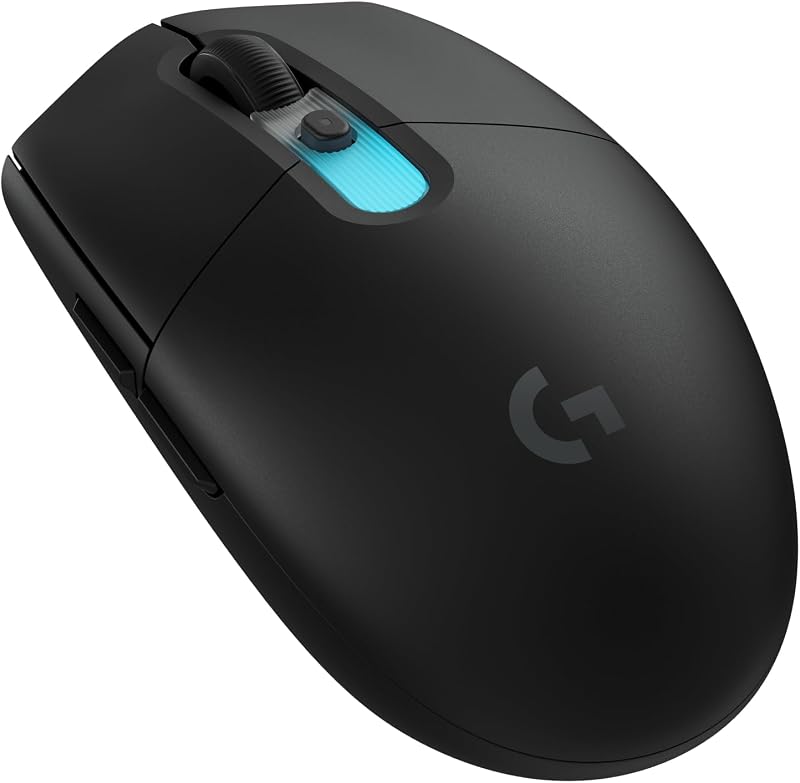
Choosing between the Logitech G502 X and the Logitech MX Master 3S comes down to a single fundamental divide: pure input velocity versus multi-computer workflow efficiency. One mouse is built from the ground up for high-precision tracking, sub-micron accuracy, and instantaneous mechanical response during fast-paced computing, while the other is tailored for prolonged desktop comfort, quiet multi-system navigation, and glass-surface tracking.
Pick the G502 X if your primary goal is latency-free gaming, extensive button remapping, and swift flick aiming. Choose the MX Master 3S if your daily work involves toggling between multiple operating systems, silently navigating large spreadsheets, and prioritizing neutral wrist ergonomics.


Logitech G502 X vs Logitech MX Master 3S at a Glance
| Attribute | Logitech G502 X | Logitech MX Master 3S |
|---|---|---|
| Sensor Technology | HERO 25K optical | Darkfield optical |
| Sensitivity Range | 100 – 25,600 DPI | 200 – 8,000 DPI |
| Primary Switch Mechanism | LIGHTFORCE hybrid optical-mechanical | Quiet Clicks (90% noise reduction) |
| Programmable Controls | 13 buttons | 7 buttons |
| Wireless Connectivity | LIGHTSPEED wireless, USB | Bluetooth, Radio Frequency, USB |
| Multi-Device Workflow | Not listed | FLOW cross-computer control (up to 3 devices) |
| Battery Endurance | Up to 140 hours | Up to 70 days |
| Tracking on Glass | The listing does not specify | Yes (minimum 4 mm thickness) |
| Weight | 3.59 oz (102 g) | The listing does not specify |
| Best For | Fast-paced gaming and complex macros | Multi-screen productivity and silent offices |
Sensor Precision and DPI Performance
Sensor capability determines how faithfully a mouse translates physical hand movement into on-screen cursor motion. In gaming and detailed precision tasks, sensor smoothing, acceleration, and polling limitations create an artificial buffer between your intent and the display. When considering a logitech g502 x vs g502 x plus or standard office mouse, the underlying tracking architecture dictates whether you experience pixel-perfect tracking or slight positional variance under rapid motion.
The G502 X features Logitech’s proprietary HERO 25K sensor, delivering a range from 100 to 25,600 DPI with zero smoothing, filtering, or acceleration. The manufacturer specifies sub-micron precision, meaning the sensor reads micro-adjustments instantly without software corrections that can degrade fast reflex inputs. In contrast, any comprehensive logitech mx master 3s review must highlight its Darkfield sensor, which maxes out at 8,000 DPI. While an 8K ceiling is plenty for high-resolution monitors, the true hallmark of the Darkfield unit is surface versatility: it tracks reliably across virtually any material, including transparent glass that has a minimum thickness of 4 mm.
Comparing logitech g502 x dpi vs mx master 3s metrics reveals two completely different design philosophies. The G502 X gives competitive players the headroom to execute broad, rapid sweeping strokes across low sensitivities or snap instantaneously across multiple monitors with high-DPI profiles. The MX Master 3S sacrifices extreme twitch-accuracy to provide functional convenience, letting business professionals work effortlessly on polished conference room tables, hotel desks, and glass workstations without needing an external mouse pad.
Edge: Logitech G502 X for dramatically higher sensitivity limits and pure zero-filtering gaming accuracy.
Ergonomics, Weight, and Physical Handling
How a mouse feels in the hand over six to eight consecutive hours dictates physical fatigue and wrist health. Weight distribution, chassis contouring, and finger shelf designs determine whether an input device promotes a locked, upright posture or facilitates agile claw and palm grips. When examining logitech g502 x vs mx master 3s weight differences, handling dynamics vary noticeably between high-speed desktop movements and relaxed, static office support.
The G502 X is engineered with thin-wall molding and an optimized exterior shell that weighs 3.59 oz (102 g), measuring 5.17 inches long by 3.12 inches wide and 1.62 inches high. It features low-friction PTFE feet on the base that let the unit glide swiftly across textile pads with minimal surface drag. The body retains the aggressive silhouette of the legacy G502 series, complete with a distinct thumb rest, though the listing classifies its overall hand orientation as ambidextrous despite the obvious left-side thumb shelf layout. Those comparing lightweight options against standard mice like in our logitech g pro x superlight 2 vs g502 x plus breakdown will appreciate how Logitech reduced mass here while maintaining structural rigidity.
On the other side of the aisle, the MX Master 3S is sculpted explicitly for right-handed ergonomic palm support. Its high-arched profile supports the palm naturally, aligning the wrist into a less pronated posture to relieve forearm strain. While the listing does not specify the exact weight or outer dimensions of the MX Master 3S, its body is substantially bulkier and features an extended thumb wing housing integrated secondary controls. The G502 X is built for swift, sudden directional changes, whereas the MX Master 3S favors a grounded, steady hand position that keeps your wrist relaxed during prolonged editing sessions.
Edge: Logitech MX Master 3S for specialized ergonomic palm support that promotes a comfortable, natural wrist posture.
Connectivity, Multi-Device Pairing, and Cross-Platform Workflow
Wireless stability and device management dictate how cleanly a mouse integrates into your technical workspace. For fast-paced digital environments, signal latency must remain imperceptible, while multi-machine office environments demand instant switching across disparate operating systems. The software suites backing these wireless protocols determine how effectively each peripheral handles demanding production workflows.
The G502 X runs on Logitech’s pro-grade LIGHTSPEED wireless protocol, updated to achieve a 68 percent faster response rate than the prior generation. It connects to a single personal computer via its included wireless USB receiver or through a standard wired USB connection. While this dedicated connection eliminates input dropouts and signal interference, it lacks native multi-host pairing. It is configured for Windows 10 environments, storing custom setups directly on five onboard memory profiles so users can carry macros between tournament PCs without software installation.
The MX Master 3S approaches connectivity from a productivity angle, supporting Bluetooth, radio frequency, and USB modes across Windows 10, Windows 11, macOS, iPadOS, Android, Chrome OS, and Linux. It pairs with up to three devices simultaneously, switching between them via an easy-switch toggle. More impressively, the Logi Options+ application powers Logitech FLOW, enabling cross-computer control where users can glide the cursor between separate Windows and Mac systems to copy and paste text, images, and files directly. However, the listing notes that the Logi Bolt USB receiver is not included in this package, making Bluetooth the primary out-of-the-box wireless connection. Evaluating logitech g502 x vs mx master 3s productivity shows that if your setup spans a laptop and a desktop, the MX Master 3S removes hardware barriers completely.
Edge: Logitech MX Master 3S for seamless multi-device Bluetooth connectivity and FLOW cross-computer data transfers.
Switch Mechanics, Click Acoustics, and Scroll Wheel Versatility
The mechanical interfaces of a mouse-its primary click switches and scroll mechanisms-define the tactile satisfaction and environmental suitability of the hardware. The volume of a click can disrupt an open-concept office, while a soft, mushy actuation point can cause missed actions or double-clicks during high-stakes gaming sequences.
In our logitech g502 x review analysis, the standout hardware innovation is the LIGHTFORCE hybrid optical-mechanical switch architecture on the primary left and right buttons. By merging the speed and zero-debounce reliability of an optical beam with the tactile feedback of a mechanical spring, the G502 X delivers instantaneous actuation with a crisp, loud snap. Furthermore, the G502 X features 13 programmable controls, including a reversible and removable DPI-shift thumb button and a dual-mode scroll wheel that toggles between hyper-fast free spin and precise ratcheting. The scroll assembly also tilts left and right to provide two extra customizable input channels.
Conversely, the MX Master 3S is built around Quiet Click buttons that reduce click sound power by 90 percent compared to the older MX Master 3. The tactile bump remains distinct, but the acoustic signature is virtually silent, making it an exceptional tool for shared offices, libraries, or late-night desk work. Its MagSpeed electromagnetic scrolling wheel can scroll up to 1,000 lines per second in free-spin mode while remaining 87 percent more precise in ratchet mode. Complementing the main wheel is an integrated thumb scroll for horizontal timelines and side navigation, bringing total button count to 7 customizable inputs via Logi Options+. While it has fewer total switches than the G502 X, each input on the MX Master 3S is tuned for document manipulation.
Edge: Tie. The G502 X dominates in raw switch actuation speed and button density, while the MX Master 3S excels with whisper-quiet clicks and electromagnetic MagSpeed scrolling.
Battery Longevity and Charging Solutions
Battery maintenance can either be an afterthought or an ongoing nuisance, depending on recharge frequency and backup power options. Power draw is heavily influenced by polling frequency and optical sensor throughput, creating a substantial divide in runtime between high-frequency gaming peripherals and optimized productivity tools. A look at logitech g703 vs mx master 3s comparisons shows how deeply gaming sensors cut into battery endurance.
Assessing logitech g502 x vs mx master 3s battery life reveals vastly different performance cycles. The G502 X is rated for up to 140 hours of continuous motion gaming via its included rechargeable lithium polymer battery. It recharges over a modern USB-C port. Additionally, the G502 X is fully compatible with Logitech’s POWERPLAY wireless charging mat (sold separately), allowing the mouse to charge continuously during use and rest so you never have to plug in a cable. For a high-polling gaming device, 140 hours of active tracking represents stellar longevity that easily covers several weeks of regular evening gameplay.
The MX Master 3S, operating on standard Bluetooth low-energy communication and office-oriented sensor intervals, lasts up to 70 days on a single full charge. When the battery does run flat, a one-minute quick charge yields three full hours of operational uptime. Note that the listing indicates a charging cable is not included with the MX Master 3S, meaning users must supply their own USB-C cord. While the G502 X offers convenient continuous wireless pad charging, the MX Master 3S delivers unmatched calendar-month endurance on a single plug-in cycle.
Edge: Logitech MX Master 3S for massive 70-day operational battery endurance and three-hour emergency charging in one minute.
Pros and Cons
Logitech G502 X

Pros
- HERO 25K sensor with 25,600 DPI
- LIGHTFORCE hybrid optical-mechanical switches
- 13 programmable controls with tilt wheel
- 140 hours constant motion battery life
- POWERPLAY wireless charging compatible
Cons
- Lacks multi-device Bluetooth pairing
- Audible click mechanism without sound dampening
View Logitech G502 X on Amazon
Logitech MX Master 3S

Pros
- Darkfield sensor tracks on glass surfaces
- Quiet Clicks reduce noise by 90 percent
- MagSpeed wheel scrolls 1,000 lines per second
- Connects to 3 devices across multiple operating systems
- Up to 70 days battery life on full charge
Cons
- Logi Bolt USB receiver not included
- Sensor capped at 8,000 DPI
- Charging cable not included in package
View Logitech MX Master 3S on Amazon
Who Should Buy Each One
Choose the Logitech G502 X If
- You play competitive shooters, action titles, or MMOs requiring zero-delay LIGHTSPEED wireless input and sub-micron HERO 25K tracking.
- You demand extensive control layout customization, utilizing up to 13 programmable buttons alongside a reversible DPI-shift clutch.
- You want tactile, ultra-responsive LIGHTFORCE hybrid optical-mechanical switches that eliminate actuation lag.
- You already own or plan to purchase a POWERPLAY wireless charging system for continuous desktop power without cables.
Choose the Logitech MX Master 3S If
- You operate in an open corporate office or shared home workspace where Quiet Clicks and near-silent MagSpeed scrolling prevent acoustic disruption.
- You regularly manage multiple computers across Windows and macOS and need Logitech FLOW to drag-and-drop assets between screens.
- You frequently work on smooth, reflective surfaces or transparent glass tables that traditional optical sensors cannot track on.
- You prioritize ergonomic wrist elevation and need a battery that only requires a recharge once every couple of months.
Final Verdict
For most dedicated desk professionals, the logitech g502 x plus vs mx master 3s debate settles firmly in favor of the MX Master 3S when work is the primary priority. Its ergonomic hand support, electromagnetic scrolling speed of 1,000 lines per second, 70-day battery reserve, and multi-device FLOW software make it unmatched for business computing. If you spend your day cutting audio, navigating massive spreadsheets, or jumping between Mac and PC hardware, the MX Master 3S provides workflow tools that a gaming mouse simply cannot replicate.
However, when the workday ends and gaming begins, the G502 X is clearly the superior performer. The MX Master 3S is held back in gaming by its heavier office-oriented frame, 8,000 DPI tracking cap, and lower polling architecture. The G502 X completely outclasses it in interactive entertainment thanks to its 25,600 DPI HERO sensor, instantaneous LIGHTFORCE hybrid switches, 13 programmable controls, and lightweight glide. If you need a versatile, battle-ready peripheral that transitions from casual daytime tasks to intense competitive play, the G502 X is the definitive choice.
FAQ
Is the Logitech MX Master 3S good for gaming?
The MX Master 3S can handle casual strategy or turn-based games, but it is not recommended for competitive or fast-paced gaming. Its Darkfield sensor is capped at 8,000 DPI, its chassis is heavier than dedicated gaming mice, and its Bluetooth connection has higher latency than specialized gaming wireless protocols. For gaming responsiveness, the G502 X with its LIGHTSPEED protocol and HERO 25K sensor is vastly superior.
Can the Logitech G502 X be used efficiently for office work?
Yes, the G502 X functions exceptionally well as a general office mouse. Its 13 programmable inputs can be configured for productivity shortcuts like copy, paste, and undo, and its dual-mode scroll wheel offers a hyper-fast free-spin mode for breezing through long web pages. However, it lacks the multi-computer FLOW capabilities and acoustic sound dampening found on the MX Master 3S.
How do the scroll wheels compare between the G502 X and MX Master 3S?
Both mice offer dual-mode scrolling with ratchet and free-spin capabilities, but they use different underlying hardware. The G502 X features a mechanical dual-mode wheel that can physically tilt left and right for two additional button assignments. The MX Master 3S features an electromagnetic MagSpeed wheel that is ultra-quiet and capable of scrolling 1,000 lines per second, accompanied by a dedicated thumb wheel for horizontal scrolling.
Does the MX Master 3S include a wireless USB receiver?
According to the official product listing specifications, the Logi Bolt USB receiver is not included in the box with this model of the MX Master 3S. It connects wirelessly out of the box via Bluetooth to compatible computers and mobile devices.
Can the G502 X connect to multiple computers at the same time?
No, the G502 X is designed to pair with a single computer via its dedicated LIGHTSPEED USB receiver or a wired USB connection. It does not support multi-host Bluetooth pairing or cross-computer cursor transitions like the MX Master 3S.
Is the MX Master 3S worth it for users working on glass desks?
Yes, the MX Master 3S is particularly valuable for glass desks because its Darkfield optical sensor is engineered to track reliably on virtually any flat surface, including glass with a minimum thickness of 4 mm. Standard optical sensors, such as those found on typical desktop mice, struggle to register movement on transparent surfaces.