The core distinction between these two high-performance gaming mice centers on competitive agility versus macro-driven versatility. Choosing between the featherweight speed of a tournament-grade pointer and the expansive utility of an ergonomic command station determines how your setup handles intense flick shots, complex control hotkeys, and daily desktop navigation.
Gamers focused on pure competitive speed, low-drag handling, and clean wireless mobility should select the Razer DeathAdder V3 Pro. Players who prioritize thumb support, deep macro mapping, smooth document navigation, and vibrant RGB underglow will find the Razer Basilisk V3 better suited to their gaming and workstation routines.


Razer DeathAdder V3 Pro vs Razer Basilisk V3 at a Glance
| Feature | Razer DeathAdder V3 Pro | Razer Basilisk V3 |
|---|---|---|
| Connectivity | HyperSpeed Wireless, Bluetooth, USB (Type C) | Corded Electric (USB) |
| Weight | 63 grams | Not listed |
| Sensor Model & DPI | Focus Pro 30K Optical (30,000 DPI) | Optical (26,000 DPI) |
| Switch Type & Durability | Optical Mouse Switches Gen-3 (90M clicks) | Optical Mouse Switches Gen-2 (70M clicks) |
| Programmable Buttons | 6 | 11 (10+1 with multi-function trigger) |
| Scroll Wheel | Standard tactile scroll wheel | HyperScroll Tilt Wheel (free-spin & tactile) |
| Lighting | Logo embellishment (no multi-zone RGB) | 11 Chroma RGB Zones with full underglow |
| Battery Life | Up to 90 hours continuous play | Corded continuous power |
| Ergonomic Form Factor | Pro-refined esports shape (listed ambidextrous) | Right-handed ergonomic with dedicated thumb rest |
| Best For | Competitive FPS and ultra-light esports performance | Multi-genre gaming, macro hotkeys, and productivity |
Weight, Ergonomics, and Physical Handling
Physical handling defines the physical connection between your hand and your gaming display. The weight and silhouette of a mouse dictate how quickly you can initiate rapid swipes, how effortlessly you can halt momentum during tracking, and how relaxed your wrist remains during extended play sessions. A lighter body reduces muscular fatigue over hours of tournament play, while a sculpted ergonomic frame with dedicated finger ledges distributes palm pressure across a broader surface area.
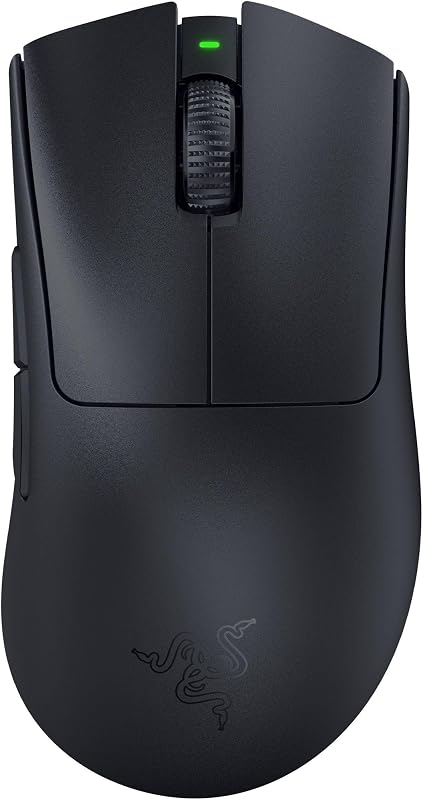
Analyzing the DeathAdder V3 Pro vs Basilisk V3 weight highlights two divergent engineering philosophies. The DeathAdder V3 Pro weighs just 63 grams, making it over 25 percent lighter than previous iterations in the lineage. Developed in partnership with professional esports athletes, its refined shape eliminates extraneous mass while providing an ergonomic shell designed to accommodate high-velocity arm aiming. In contrast, while the listing does not specify the exact gram weight for the Basilisk V3, it incorporates an expansive right-handed ergonomic platform featuring an integrated thumb rest. To explore how wired builds compare against each other, take a look at our razer deathadder v3 vs basilisk v3 comparison for additional ergonomic insights.
In real-world use, the DeathAdder gliding platform allows for instantaneous acceleration and effortless micro-adjustments in fast-paced scenarios. The Basilisk trades that rapid flick agility for sustained resting comfort, allowing your thumb to rest naturally on the contoured shelf rather than dragging against the mousepad. If you favor aggressive claw or fingertip grips for rapid target acquisition, the stripped-down chassis of the DeathAdder feels distinctly unencumbered, whereas palm-grip users who appreciate hand stabilization will enjoy the planted foundation of the Basilisk.
Edge: Razer DeathAdder V3 Pro for its featherweight 63-gram esports build that dramatically reduces hand fatigue during high-speed gaming.
Button Layout, Scroll Wheel, and Productivity Features
The interface between your fingers and in-game commands dictates your mechanical execution speed in complex titles. Gamers who juggle tactical communications, inventories, character skills, and building mechanics require distinct inputs within immediate reach of their thumb and index finger. Outside of gaming, versatile hardware navigation tools such as horizontal scrolling and resistance-free wheel spins fundamentally alter how smoothly you navigate dense software suites.
When evaluating Razer Basilisk V3 programmable buttons vs DeathAdder V3 Pro, the mechanical gap is substantial. The Basilisk V3 features 10+1 programmable buttons, including a prominent multi-function trigger along the thumb flank, allowing you to configure elaborate macros, tactical pings, or push-to-talk commands. It also introduces the Razer HyperScroll Tilt Wheel, which toggles between tactile notched cycling for accurate weapon selection and smooth free-spinning for rapid navigation. The DeathAdder V3 Pro adheres strictly to an esports-oriented configuration, supplying 6 streamlined programmable buttons and a traditional tactile scroll wheel stripped of tilt or free-spin mechanisms to preserve structural rigidity and keep overall mass minimal.
For players questioning whether the Razer DeathAdder V3 Pro or Basilisk V3 for productivity is the better investment, the Basilisk emerges as a clear multi-tasking powerhouse. The ability to tilt the scroll wheel horizontally and disengage wheel friction speeds through sprawling spreadsheets, video timelines, and dense coding environments. The multi-function thumb paddle also functions exceptionally well for momentary sensitivity shifting or instant workspace switching. For users evaluating advanced wireless multi-button options, our breakdown of the razer deathadder v3 pro vs basilisk v3 pro highlights how these premium feature sets evolve across wireless tiers.
Edge: Razer Basilisk V3 for its 11 programmable buttons, multi-function trigger, and versatile HyperScroll Tilt Wheel.
Sensor Precision and Surface Tracking Capabilities
A high-end optical sensor translates physical hand movements into digital crosshair positioning with flawless fidelity. For competitive gamers, sensor performance is judged by tracking consistency across diverse mousepad textures, minimal lift-off disruption, and high sensitivity ceilings that prevent cursor spin-outs during frantic mouse repositioning.
The DeathAdder V3 Pro carries the Razer Focus Pro 30K Optical Sensor, delivering a class-leading maximum sensitivity of 30,000 DPI. This optical tracking engine is engineered to maintain complete accuracy across a diverse range of surfaces, including transparent glass desktop mats. The Basilisk V3 houses an advanced optical sensor delivering up to 26,000 DPI. Both sensors offer exceptional tracking fidelity that comfortably surpasses human perception limits, ensuring that every flick and tracking motion is rendered cleanly without digital smoothing or artificial acceleration. Readers comparing alternative flagship sensors will find relevant benchmarks in our razer deathadder v3 pro vs viper v2 pro guide.
While the 4,000 DPI variance between 30,000 and 26,000 DPI is rarely utilized in practical gaming scenarios, the intelligent tracking capabilities and glass compatibility of the Focus Pro sensor give the DeathAdder an advantage for players utilizing specialty hard pads or glass surfaces. In this DeathAdder V3 Pro vs Basilisk V3 gaming mouse sensor matchup, both units register swift swipes with surgical precision, yet the DeathAdder V3 Pro offers the higher technical ceiling for competitive setups.
Edge: Razer DeathAdder V3 Pro for its higher 30,000 DPI ceiling and reliable tracking on glass surfaces.
Connectivity, Portability, and Battery Life
Cord management and wireless reliability directly influence your desktop aesthetics and physical range of motion. Eliminating the mouse cable prevents cord drag and snagging against monitor stands, but it introduces the need for consistent battery recharging and stable signal transmission through congested wireless environments.
Connectivity highlights a fundamental divide between these devices. The DeathAdder V3 Pro utilizes Razer HyperSpeed Wireless, a low-latency connection engineered to remain smooth and stable even in crowded wireless environments, alongside Bluetooth and a wired USB Type-C charging connection. It delivers up to 90 hours of continuous play on a single charge of its lightweight internal battery. The Basilisk V3 relies on a dedicated corded electric USB connection over a 5.0-meter range. Those considering tethered versus cordless builds can also review our analysis of the razer deathadder v3 vs v3 pro to weigh wired performance against untethered mobility.
Evaluating Razer DeathAdder V3 Pro battery life reveals an exceptionally efficient power system that easily sustains weeks of standard gaming before needing a top-up via its flexible USB Type-C cable. While the Basilisk V3 never requires recharging due to its constant corded electric power, its physical cable introduces inevitable desk friction unless managed by an elevated bungee. For clean desktop setups and completely unrestricted broad arm sweeps on low sensitivity, the wireless freedom of the DeathAdder V3 Pro provides a superior competitive experience.
Edge: Razer DeathAdder V3 Pro for its high-performance HyperSpeed wireless freedom and generous 90-hour battery endurance.
Switches, Actuation Speed, and Build Durability
Mechanical switches in traditional mice can degrade over time, leading to copper fatigue, debounce delays, and frustrating unintended double-clicks. Optical switches solve this degradation by utilizing an infrared light beam to register inputs, delivering lightning-fast actuation speeds and vastly superior mechanical longevity.
The hardware implementations on these two mice reflect different generations of Razer optical switch technology. The DeathAdder V3 Pro is outfitted with Razer Optical Mouse Switches Gen-3, which provide an improved 90-million click lifecycle, blistering 0.2ms actuation, zero debounce delay, and total immunity to double-clicking issues. The Basilisk V3 incorporates Razer Optical Mouse Switches Gen-2, which also actuate at a blazing 0.2ms speed with zero misclicks, but are rated for 70 million clicks. Readers curious about how Razer modern optical switches hold up against other esports hardware can explore our razer deathadder v3 vs viper v3 pro comparison.
Both mice eliminate the debounce delay inherent in legacy mechanical leaves, ensuring that your inputs register the exact instant the switch breaks the optical beam. However, the Gen-3 switches in the DeathAdder feature a 20-million click longevity advantage over the Gen-2 switches found in the Basilisk. The tactile feedback on the DeathAdder V3 Pro is distinctly crisp and responsive, reinforcing its identity as a durable tool built to endure high-volume competitive training regimes.
Edge: Razer DeathAdder V3 Pro for its upgraded Gen-3 optical switches rated for an industry-leading 90 million clicks.
Customization and Aesthetic Lighting
Visual styling and RGB integration allow gamers to synchronize their peripherals with system lighting, game reactions, and room aesthetics. While pure competitive hardware often strips lighting elements to save critical grams, multi-genre battlestations frequently prioritize dynamic ambient illumination.
Aesthetic design sharply separates this pair. The Basilisk V3 is a flagship showcase for Razer Chroma RGB, boasting 11 individually addressable lighting zones. This includes a brilliant full underglow that casts light across your desk mat, dynamic reactivity with over 150 Chroma-integrated game titles, and a palette of over 16.8 million colors managed through the Razer Synapse software. The DeathAdder V3 Pro, by contrast, removes dynamic lighting in its pursuit of strict weight reduction, featuring a sleek matte black shell with a subtle printed logo embellishment and no multi-zone illumination.
If you value a visually striking battlestation that pulses in sync with in-game health bars or environmental effects, the Basilisk V3 stands in a class of its own. The DeathAdder V3 Pro prioritizes competitive utility over spectacle; any added LED lighting would inevitably consume battery reserves and add unwanted grams to its 63-gram chassis. For lovers of desktop aesthetics and immersive illumination, the Basilisk V3 offers an undeniably superior visual presentation.
Edge: Razer Basilisk V3 for its stunning 11-zone Chroma RGB underglow and expansive profile integration.
Pros and Cons
Razer DeathAdder V3 Pro
Pros
- 63g ultra-lightweight esports chassis
- Focus Pro 30K sensor tracks on glass
- Gen-3 optical switches rated for 90M clicks
- Up to 90 hours wireless battery life
- Low-latency Razer HyperSpeed wireless connectivity
Cons
- Only 6 programmable buttons
- Lacks free-spin scroll wheel functionality
View Razer DeathAdder V3 Pro on Amazon
Razer Basilisk V3

Pros
- 11 programmable buttons with multi-function trigger
- HyperScroll tilt wheel with free-spin mode
- 11 Razer Chroma RGB lighting zones
- Ergonomic thumb rest for long-term comfort
- Gen-2 optical switches rated for 70M clicks
Cons
- Tethered corded electric connection
- Heavier shell lacks ultra-light speed
View Razer Basilisk V3 on Amazon
Who Should Buy Each One
Choose the Razer DeathAdder V3 Pro If
- You play fast-paced competitive tactical shooters like Counter-Strike 2, Valorant, or Apex Legends where ultra-low mouse weight improves flick accuracy.
- You want high-speed wireless connectivity with up to 90 hours of battery life and zero cord drag across your mousepad.
- You use a specialty gaming surface, such as a glass pad, that requires the advanced tracking of the Focus Pro 30K Optical Sensor.
- You prefer a clean, distraction-free peripheral that prioritizes 90-million click Gen-3 switches over heavy RGB lighting zones.
Choose the Razer Basilisk V3 If
- You play MMOs, MOBAs, battle royales, or complex action titles that benefit from 11 programmable buttons and dedicated macro triggers.
- You spend extensive hours working in creative applications, spreadsheets, or web browsers and want the free-spinning utility of the HyperScroll Tilt Wheel.
- You favor a full palm grip with an integrated thumb rest for continuous hand support during marathon sessions.
- You want dynamic 11-zone Razer Chroma RGB lighting with full underglow to illuminate your gaming setup.
Final Verdict
For most competitive PC gamers, the Razer DeathAdder V3 Pro represents the pinnacle of modern esports engineering. By combining a 63-gram ultra-lightweight form factor, low-latency Razer HyperSpeed Wireless, a flawless Focus Pro 30K optical sensor, and durable Gen-3 switches rated for 90 million clicks, it provides a measurable advantage in reaction-based titles. If your primary objective is sharpening your crosshair aim and eliminating physical drag, the DeathAdder stands as the superior pure performance tool.
Conversely, the Razer Basilisk V3 wins convincingly when your priority shifts from lightweight twitch aiming to versatile control and everyday utility. Its 11 programmable buttons, versatile HyperScroll tilt wheel, plush thumb rest, and 11-zone Chroma RGB underglow turn it into an exceptional multi-genre peripheral. If you want an ergonomic command hub that effortlessly transitions from intensive gaming sessions to demanding desktop productivity without ever needing a recharge, the Basilisk V3 is well worth every square inch of your desk.
Frequently Asked Questions
Is the Razer DeathAdder V3 Pro or Basilisk V3 better for FPS gaming?
The Razer DeathAdder V3 Pro is significantly better for competitive first-person shooter games. Its featherweight 63-gram design allows for rapid flick shots, quick micro-adjustments, and effortless stopping power. Furthermore, its wireless HyperSpeed connection completely eliminates cable drag, while the Focus Pro 30K sensor provides pinpoint tracking across competitive cloth and glass surfaces.
Is the Razer DeathAdder V3 Pro or Basilisk V3 better for productivity?
The Razer Basilisk V3 is far superior for productivity, office tasks, and creative software workflows. It features the innovative Razer HyperScroll Tilt Wheel, which can switch into a frictionless free-spin mode to fly through long documents, as well as tilt left and right for horizontal navigation. Additionally, its 11 programmable buttons and dedicated thumb trigger allow you to assign custom application shortcuts and macro strings.
Is the Razer Basilisk V3 worth it despite being corded?
Yes, the Razer Basilisk V3 is completely worth it for gamers who prioritize rich functionality over wireless portability. Its corded electric design guarantees an uninterrupted power supply without battery degradation or recharging pauses, while unlocking premium hardware features like 11-zone RGB lighting, a dual-mode tilt wheel, and comprehensive thumb support.
How does the DeathAdder V3 Pro vs Basilisk V3 weight compare?
The DeathAdder V3 Pro is an ultra-lightweight mouse engineered specifically for competitive esports, weighing in at an agile 63 grams. The Basilisk V3 does not have its exact gram weight listed in the official Amazon specifications, but it is built around a much larger ergonomic structure featuring a reinforced thumb rest, internal tilt-wheel motors, and 11 illumination zones.
Does the Razer DeathAdder V3 Pro have RGB lighting?
No, the Razer DeathAdder V3 Pro does not have multi-zone Chroma RGB lighting. To achieve its ultra-light 63-gram weight and maximize its 90-hour battery life, Razer removed all internal lighting hardware, retaining only a subtle printed logo on the shell. If you desire dynamic lighting effects, the Basilisk V3 features 11 addressable Chroma RGB zones with full underglow.
What is the battery life on the Razer DeathAdder V3 Pro?
The Razer DeathAdder V3 Pro delivers up to 90 hours of continuous wireless gameplay on a single charge. It is powered by an internal rechargeable battery that connects via a standard USB Type-C cable, allowing you to quickly top off the power while continuing to play.
What are the differences between Gen-2 and Gen-3 optical switches?
Both generations offer instantaneous 0.2ms actuation without debounce delay or unintended double-clicking. However, the Optical Mouse Switches Gen-3 found in the DeathAdder V3 Pro feature an upgraded structural lifespan rated for up to 90 million clicks, compared to the 70-million click rating of the Optical Mouse Switches Gen-2 found in the Basilisk V3.



