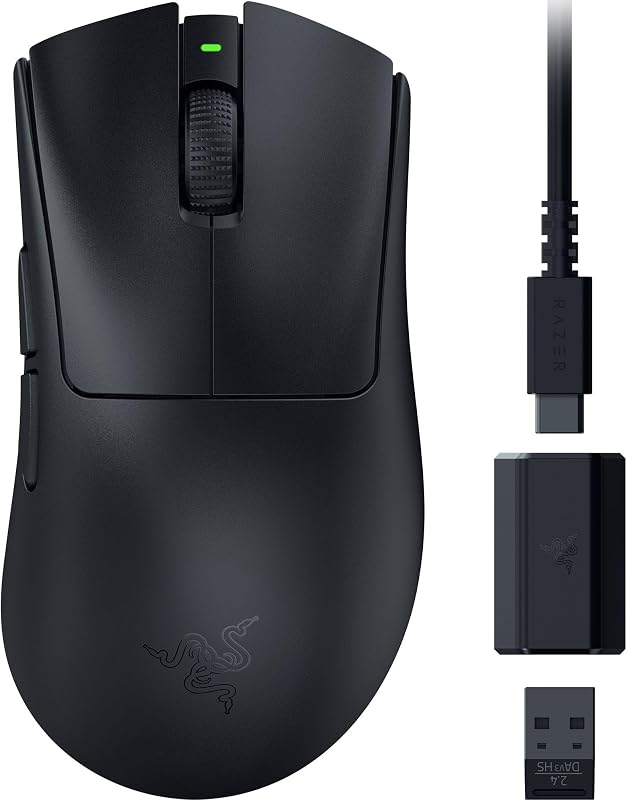
The deciding difference between the Razer Basilisk V3 and the Razer Basilisk V3 Pro comes down to tethered reliability versus wireless versatility. While both gaming mice feature the same sculpted ergonomic form factor, 11 programmable buttons, and dual-mode tilt wheel, the V3 Pro cuts the cord with multi-device wireless connectivity and upgraded optical hardware.
Choose the Basilisk V3 if you want a zero-maintenance wired mouse with continuous power and crisp Gen-2 switches. Choose the Basilisk V3 Pro if you demand a clean, cable-free desk setup, multi-device Bluetooth switching, and the tracking precision of a 30K sensor.


Razer Basilisk V3 vs Razer Basilisk V3 Pro at a Glance
| Attribute | Razer Basilisk V3 | Razer Basilisk V3 Pro |
|---|---|---|
| Connectivity | Wired USB | HyperSpeed Wireless (2.4GHz), Bluetooth, USB |
| Optical Sensor | Optical Sensor (26,000 DPI) | Focus Pro 30K Optical Sensor (30,000 DPI) |
| Switch Type | Razer Optical Mouse Switches Gen-2 | Razer Optical Mouse Switches Gen-3 |
| Switch Durability | Up to 70 million clicks | Up to 90 million clicks |
| RGB Lighting Zones | 11 Razer Chroma Zones | 13 Razer Chroma Zones |
| Programmable Buttons | 11 (10+1 configuration) | 11 (10+1 configuration) |
| Scroll Wheel | Razer HyperScroll Tilt Wheel | Razer HyperScroll Tilt Wheel |
| Battery Life | Unlimited (Corded electric) | Up to 150 hours (Bluetooth) / 110 hours (HyperSpeed) |
| Operating Range | 5.0 meters | 10.0 meters |
| Best For | Dedicated desktop gaming | Cord-free multi-device battlestations |
Connectivity and Desk Setup Flexibility
Physical connectivity fundamentally shapes how each mouse behaves on your desk. The Basilisk V3 relies on a permanent corded electric USB connection. For desktop gamers who prefer a fixed gaming station, a wired connection provides total peace of mind by eliminating battery life anxiety, signal interference, and recharging routines. However, the presence of a cable can create desk clutter and drag during fast-paced swipes unless managed with an external mouse bungee.
The Basilisk V3 Pro transforms the workspace by delivering three distinct connection methods: low-latency 2.4GHz Razer HyperSpeed Wireless, Bluetooth, and standard wired USB. Razer HyperSpeed Wireless operates 25% faster than competing wireless technologies, matching wired input speed while eliminating physical cable friction entirely. Bluetooth mode allows gamers to switch effortlessly between a desktop rig and a work laptop via a toggle switch, while its 10.0-meter operating range provides twice the distance of the wired version’s 5.0-meter listing. Players exploring ergonomic wireless options across different mouse shapes, as seen in our razer viper v3 pro vs basilisk v3 pro comparison, will appreciate how wireless flexibility enhances movement freedom.
The choice between Razer Basilisk V3 wired vs wireless comes down to your tolerance for desk cables versus your willingness to manage battery top-ups. The wired model offers plug-and-play simplicity, but the V3 Pro delivers superior setup clean-up and cross-device utility.
Edge: Razer Basilisk V3 Pro provides greater flexibility through Bluetooth pairing, low-latency 2.4GHz wireless freedom, and extended operating range.
Sensor Tracking Precision and Surface Compatibility
Sensor precision determines how accurately your hand motions translate to crosshair placement. The Basilisk V3 is outfitted with an optical sensor reaching up to 26,000 DPI maximum sensitivity. For competitive gaming on cloth pads or composite mats, 26,000 DPI provides an immense tracking ceiling that easily tracks rapid micro-adjustments, fast flick shots, and broad tracking sweeps without cursor jitter or spin-outs.
The Basilisk V3 Pro introduces Razer’s Focus Pro 30K Optical Sensor, boosting sensitivity up to 30,000 DPI. While high DPI ceilings exceed what most players utilize daily, the Focus Pro sensor incorporates intelligent tracking architecture engineered to maintain accuracy on diverse surfaces. Most notably, the listing specifies that the Focus Pro 30K sensor tracks flawlessly on glass surfaces, making it compatible with glass mouse pads or bare polished desktops without requiring a conventional fabric mouse mat. Similar precision upgrades can be observed when comparing advanced flagships in our razer viper v2 pro vs basilisk v3 pro analysis.
When weighing the Basilisk V3 vs Basilisk V3 Pro sensor for everyday play, standard desk pad users will find both devices track exceptionally well. However, if you play on glass or want intelligent aim-assist functions supported by the Razer Synapse app, the Focus Pro 30K sensor provides a measurable technological leap.
Edge: Razer Basilisk V3 Pro takes the lead with its 30,000 DPI ceiling and specialized surface compatibility that tracks on glass.
Optical Switch Durability and Actuation Speed
Click latency and switch longevity directly impact performance in high-stakes matches. The wired Basilisk V3 features Razer Optical Mouse Switches Gen-2. By using infrared light beams instead of mechanical contacts to register clicks, these switches actuate at a blistering 0.2ms speed with zero debounce delay. Because there are no physical contacts to corrode, the Gen-2 switches eliminate unintended double-clicks and offer a rated lifecycle of up to 70 million clicks. In our razer basilisk v3 vs naga v2 pro breakdown, these switches prove reliable across thousands of hours of intense clicking.
The Basilisk V3 Pro upgrades to Razer Optical Mouse Switches Gen-3. Retaining the lightning-fast 0.2ms actuation speed and debounce-free execution, the Gen-3 switches push durability further to an improved 90-million click lifecycle. This 28% increase in operational lifespan guarantees dependable performance through years of click-intensive gaming. The Razer Basilisk V3 Pro switches also refine tactile feedback, providing a satisfying, crisp break on every depression.
In any rigorous Razer Basilisk V3 review, the Gen-2 switches stand out as durable, reliable components. Nevertheless, the Gen-3 switches in the Pro model deliver greater mechanical endurance and peace of mind for gamers who put heavy daily mileage on their primary buttons.
Edge: Razer Basilisk V3 Pro wins with Gen-3 optical switches rated for 90 million clicks compared to 70 million on Gen-2.
Power Management and Battery Runtime
Power architecture forms the sharpest operational difference between these two peripherals. As a corded electric mouse, the Basilisk V3 requires zero power management. You never need to monitor battery levels, configure sleep timers, or plug in charging cords mid-game. For users who value continuous uptime without keeping track of battery percentages, the wired mouse provides constant dependability.
Examining Basilisk V3 vs V3 Pro battery life reveals exceptional engineering within the wireless flagship. Powered by an included rechargeable lithium-ion battery, the V3 Pro delivers up to 150 hours of use on Bluetooth and up to 110 hours on Razer HyperSpeed Wireless at standard 1,000 Hz polling under constant motion. The listing also notes an average battery life of 90 hours for mixed usage. Furthermore, the V3 Pro supports true 8,000 Hz polling when paired with the Razer Mouse Dock Pro or HyperPolling Wireless Dongle (sold separately), which provides ultra-high polling rates with up to 32 hours of continuous motion runtime.
When asking is Razer Basilisk V3 Pro worth it, battery convenience is a primary factor. While a compact wireless mouse like that featured in our razer basilisk v3 pro vs orochi v2 evaluation relies on replaceable batteries, the V3 Pro provides deep internal rechargeable longevity alongside an optional ultra-polling upgrade.
Edge: Razer Basilisk V3 wins for zero-maintenance continuous power, while the V3 Pro offers strong 110 to 150-hour wireless endurance.
Chroma RGB Lighting Zones and Visual Immersion
Aesthetic customization is central to the Basilisk identity, but the two models execute their illumination differently. The Basilisk V3 features 11 Razer Chroma RGB lighting zones, including an underglow strip, scroll wheel accents, and the rear palm logo. Each zone supports 16.8 million colors and synchronizes dynamically with over 150 Chroma-integrated game titles. Because power flows steadily through the USB cord, you can operate full dynamic lighting effects at maximum brightness indefinitely without affecting mouse performance.
The Basilisk V3 Pro expands this visual design to 13 Razer Chroma lighting zones with full underglow. The two additional lighting zones provide smoother color transitions and richer light diffusion across mousepad surfaces. However, wireless lighting requires compromise: vibrant lighting effects consume battery power, meaning high brightness will shorten the 110-hour HyperSpeed runtime. In our razer basilisk v3 pro vs naga v2 pro comparison, customizable multi-zone lighting remains an aesthetic favorite among RGB enthusiasts.
Every comprehensive Razer Basilisk V3 Pro review highlights the striking look of its 13-zone underglow array. While the V3 Pro offers slightly richer lighting gradients, the wired V3 allows users to display full-blast illumination 24/7 without worrying about battery drain.
Edge: Razer Basilisk V3 Pro has more lighting zones (13 vs 11), though the wired V3 runs maximum illumination with zero battery impact.
Ergonomic Form Factor and Button Layout
Hand comfort and button layouts are identical between both mice. Each unit features Razer’s iconic right-handed ergonomic form factor complete with an integrated thumb rest. This design supports palm and claw grip styles, reducing hand fatigue during long gaming sessions. Both mice measure for right-handed orientation and feature an exterior matte black plastic enclosure designed for tactile grip stability.
Both models provide 11 programmable buttons in a 10+1 configuration. This includes the signature multi-function thumb trigger, ideal for quick macros, push-to-talk binds, or temporary DPI drops. Both mice also feature the Razer HyperScroll Tilt Wheel, which toggles between a tactile cycling mode with distinct feedback for weapon swapping and a free-spin mode that scrolls through web pages and documents effortlessly. Comparing this setup to lightweight alternatives in our razer viper v3 pro vs basilisk v3 guide emphasizes how well-suited the Basilisk chassis is for complex keybinding setups.
Because the physical contours, button counts, and dual-mode scroll wheel mechanisms are functionally identical, choosing between the Razer Basilisk V3 Pro vs V3 does not force you to compromise on ergonomic comfort or keybinding versatility.
Edge: Tie. Both models share the identical 11-button ergonomic shell, comfortable thumb rest, and dual-mode HyperScroll tilt wheel.
Pros and Cons
Razer Basilisk V3

Pros
- Continuous corded power eliminates recharging
- HyperScroll tilt wheel with free-spin mode
- 11 customizable Chroma RGB lighting zones
- Fast 0.2ms Gen-2 optical switches
- Ergonomic thumb rest with 11 programmable buttons
Cons
- Cable drag limits swift hand sweeps
- Lacks Bluetooth multi-device pairing
- Sensor not specified for glass surfaces
View Razer Basilisk V3 on Amazon
Razer Basilisk V3 Pro

Pros
- Fast 2.4GHz HyperSpeed and Bluetooth wireless
- Focus Pro 30K sensor tracks on glass
- Upgraded 90-million-click Gen-3 optical switches
- Up to 150 hours of battery life
- 13 customizable Chroma RGB lighting zones
Cons
- Requires periodic battery recharging
- 8KHz polling requires separately sold accessories
View Razer Basilisk V3 Pro on Amazon
Who Should Buy Each One
Choose the Razer Basilisk V3 If
- You want continuous, uninterrupted corded electric power without monitoring battery levels or recharging.
- You prefer keeping your mouse at a single desktop battle station without needing wireless pairing.
- You want to run vibrant 11-zone Chroma RGB underglow at full brightness 24/7 without runtime compromises.
- You are satisfied with 70-million-click Gen-2 optical switches and a 26,000 DPI sensor for gaming.
Choose the Razer Basilisk V3 Pro If
- You want a clean desk setup free from cable drag using low-latency 2.4GHz HyperSpeed wireless.
- You switch frequently between a gaming PC and a work laptop using convenient Bluetooth pairing.
- You use a glass mousepad or polished surface that requires the Focus Pro 30K Optical Sensor.
- You want upgraded Gen-3 optical switches with a 90-million click lifespan and an 8KHz polling upgrade path.
Final Verdict
For most desktop gamers deciding between the Razer Basilisk V3 or V3 Pro for gaming, the standard wired Basilisk V3 remains the most sensible choice. It provides the exact same comfortable ergonomic contour, thumb rest, 11 programmable buttons, and dual-mode HyperScroll tilt wheel as the wireless model. Because it runs on continuous USB power, it eliminates battery maintenance while delivering rock-solid 26,000 DPI tracking and ultra-fast 0.2ms Gen-2 optical switches.
However, the Basilisk V3 Pro wins decisively if you demand wireless freedom and top-tier internal specifications. Its combination of low-latency HyperSpeed wireless, Bluetooth multi-device support, 90-million-click Gen-3 optical switches, and glass-tracking Focus Pro 30K sensor establishes it as a true wireless flagship. If eliminating cord drag and gaining multi-device productivity justifies managing battery recharges, the V3 Pro is well worth the upgrade.
FAQ
Can the Razer Basilisk V3 Pro be used while charging?
Yes. The Basilisk V3 Pro supports wired USB connectivity in addition to 2.4GHz HyperSpeed wireless and Bluetooth. When connected via the included USB cable, the mouse charges its internal lithium-ion battery while remaining fully functional for gaming.
Can the wired Razer Basilisk V3 track on glass surfaces?
The standard Basilisk V3 features a 26,000 DPI optical sensor designed for cloth, textured, and hard mouse mats, but the listing does not specify glass tracking. In contrast, the Basilisk V3 Pro explicitly features the Focus Pro 30K sensor engineered for flawless tracking on glass surfaces.
How long does the battery last on the Razer Basilisk V3 Pro?
According to official specifications, the Basilisk V3 Pro delivers up to 150 hours of battery life over Bluetooth and up to 110 hours on Razer HyperSpeed Wireless with constant motion at 1,000 Hz. If upgraded to 8,000 Hz polling with separately sold accessories, battery life is up to 32 hours under constant motion.
What is the difference between Razer Optical Switches Gen-2 and Gen-3?
Both generations utilize light-beam actuation with 0.2ms actuation speed and zero debounce delay to eliminate double-clicking issues. The primary difference is longevity: Gen-2 switches on the Basilisk V3 are rated for up to 70 million clicks, whereas Gen-3 switches on the V3 Pro are rated for up to 90 million clicks.
Does either mouse support 8,000 Hz polling out of the box?
Neither mouse includes 8,000 Hz polling out of the box. The wired Basilisk V3 operates at standard USB polling rates. The Basilisk V3 Pro can be upgraded to true 8,000 Hz polling, but doing so requires the Razer Mouse Dock Pro or HyperPolling Wireless Dongle, both of which are sold separately.
How many programmable buttons do both mice feature?
Both the Basilisk V3 and Basilisk V3 Pro feature 11 programmable buttons in a 10+1 configuration. This layout includes standard primary buttons, side thumb buttons, a multi-function thumb trigger, and a tilt-capable HyperScroll wheel with horizontal click inputs.