The choice between the SteelSeries Arctis Nova 5 and the HyperX Cloud II hinges entirely on whether you want the wire-free mobility and app-driven equalization of modern dual-wireless audio or the physical durability and zero-battery dependability of a classic wired aluminum headset.
Players who constantly move between PC, consoles, and mobile devices will appreciate the SteelSeries Arctis Nova 5 for its wireless freedom and deep library of platform presets. Gamers who prioritize a rugged metal build, instant plug-and-play operation, and hardware-driven surround sound without software overhead should lean toward the HyperX Cloud II.


SteelSeries Arctis Nova 5 vs HyperX Cloud II at a Glance
| Attribute | SteelSeries Arctis Nova 5 | HyperX Cloud II |
|---|---|---|
| Connectivity | 2.4GHz Wireless, Bluetooth 5.3 | Wired (USB, 3.5mm compatible) |
| Acoustic Drivers | Neodymium Magnetic Drivers | 53mm Drivers (15-25,000 Hz) |
| Audio Customization | Arctis Nova 5 Mobile App (100+ Presets) | Hardware 7.1 Virtual Surround Sound Card |
| Microphone | ClearCast 2.X (Retractable, 32KHz/16Bit) | Noise-Cancelling (Detachable) |
| Battery Life | 60 Hours (Fast Charge: 15 min = 6 hr) | Unlimited (Wired, No Battery) |
| Chassis Build | Lightweight polymer (0.28 kg) | Solid Aluminum Frame (11.29 oz) |
| On-Device Controls | Power, Mute, Volume, Quick-Switch | In-Line USB Sound Card Audio Box |
| Warranty | 1 Year | 2 Years |
| Included Accessories | USB-C Dongle, USB-A Extension, Charging Cable | USB Audio Box, Velour Cushions, Mesh Bag, Airplane Adapter |
| Best For | Multi-platform gamers wanting wireless agility and tuning | Desktop setups seeking rugged build and plug-and-play audio |
Connectivity and Multi-Platform Freedom
The difference between modern wireless convenience and traditional wired stability defines everyday use with these two headsets. In an Arctis Nova 5 wireless vs HyperX Cloud II wired comparison, connection flexibility determines how easily you move between gaming spaces. The Arctis Nova 5 uses a compact multi-platform USB-C dongle that interfaces directly with PC, PlayStation 5, PlayStation 4, Nintendo Switch, Meta Quest, and mobile phones or tablets. SteelSeries also provides a 5-foot USB-C to USB-A extension cable for older systems. Furthermore, its Quick-Switch feature allows you to toggle instantly between ultra-low-latency 2.4GHz gaming and Bluetooth 5.3 with a tap of an ear-cup button, letting you answer incoming phone calls seamlessly without interrupting your gaming session.
The HyperX Cloud II sticks entirely to a physical tether. It relies on a modular cable design centered around a hardware-driven USB audio control box sound card, which manages audio amplification, volume, and virtual 7.1 surround sound. This USB box delivers surround processing on PC and Mac, and supports PlayStation 4, while the 3.5mm terminal connects natively in stereo mode to Xbox One consoles, mobile devices, and the Nintendo Switch. While this wired architecture guarantees you never experience signal dropout, pairing problems, or wireless interference, it confines you to sitting within arm’s reach of your device. Those tracking the broader market across generations, such as in our steelseries arctis nova 7 vs hyperx cloud ii breakdown, know that tethering remains the central operational trade-off of the classic Cloud chassis.
Ultimately, the Arctis Nova 5 liberates players who hate cable tangles and prefer switching audio feeds between a gaming desktop and a mobile device on the fly. The Cloud II eliminates wireless setup hurdles entirely, but leaves you managing physical cables on your desk.
Edge: SteelSeries Arctis Nova 5 because its dual-band 2.4GHz and Bluetooth 5.3 configuration unlocks seamless multi-device flexibility that a tethered cable cannot match.
Audio Tuning and Driver Architecture
Sound delivery separates these models based on whether you want raw hardware muscle or real-time digital sound sculpting. The HyperX Cloud II sound quality relies on massive 53mm dynamic drivers featuring a wide frequency response range of 15 to 25,000 Hz. These large acoustic chambers deliver punchy bass, clear midrange tones, and strong positional cues right out of the box without requiring external software. Its dedicated USB sound card audio control box introduces hardware-driven virtual 7.1 surround sound with the press of a physical button, adding simulated acoustic space and distance to gunshots or footsteps in desktop environments.
The SteelSeries Arctis Nova 5 approaches sound reproduction through refined Neodymium Magnetic Drivers paired with the Arctis Nova 5 Companion App. Rather than leaving you with a single sound curve, the companion mobile application provides over 100 game-specific audio profiles engineered for titles like Fortnite, Apex Legends, Call of Duty, Minecraft, and GTA V. Players can adjust equalization on the 2.4GHz channel in real time from their smartphone without alt-tabbing or exiting a match. Bluetooth media equalization remains completely isolated, meaning your custom music tuning will not alter your tactical shooter profiles. Readers examining our steelseries arctis nova 5 vs hyperx cloud iii head-to-head will recognize this mobile app ecosystem as a primary differentiator for SteelSeries.
The Cloud II delivers an immediate, full-bodied sound signature without software fuss, but it cannot match the meticulous customization of the Nova 5. If you want to highlight precise footstep frequencies across diverse multiplayer titles, the Nova 5 companion library gives you unprecedented control.
Edge: SteelSeries Arctis Nova 5 thanks to its companion app containing over 100 tailored game presets that can be adjusted in real time without pausing gameplay.
Battery Performance and Power Maintenance
Power management is entirely one-sided in this matchup due to the fundamental differences in power delivery. The SteelSeries Arctis Nova 5 battery life is rated for up to 60 hours of continuous runtime on a full charge. For gamers playing roughly eight hours a day, this translates to an entire week of play before needing a recharge. SteelSeries also implements USB-C Fast Charge technology, providing up to six hours of wireless listening time from a brief 15-minute top-up, which effectively eliminates downtime when you forget to plug the headset in overnight. Readers comparing extended runtimes against the class leader in our steelseries arctis nova 5 vs hyperx cloud alpha wireless comparison will find 60 hours more than generous for standard routines.
The HyperX Cloud II eliminates power anxiety completely by drawing all of its power through its physical wired connection. There are no internal lithium-ion cells to degrade over years of continuous charging cycles, no power buttons to press, and zero risk of the headset shutting down during an intense competitive gaming moment. The trade-off is the physical cord itself, which can catch on armrests or twist over long sessions.
While the Nova 5 features swift quick-charging capabilities and exceptional endurance for a wireless headset, the Cloud II offers the ultimate peace of mind: zero battery maintenance forever.
Edge: HyperX Cloud II because its wired interface completely bypasses battery monitoring, recharging interruptions, and long-term cell degradation.
Microphone Clarity and Voice Capture
Clear communication is paramount during team callouts, and these headsets achieve it using very different hardware form factors. An evaluation of any SteelSeries Arctis Nova 5 mic test highlights the brand’s upgraded ClearCast 2.X microphone system. This microphone uses a high-bandwidth chipset supporting 32KHz/16Bit audio, which captures double the clarity of previous iterations. Functionally, the boom arm is fully retractable, sliding completely flush into the left ear cup when not in use. This makes the Nova 5 far more portable and natural to wear in public when connected to mobile devices over Bluetooth.
The HyperX Cloud II employs a detachable, noise-cancelling microphone that holds official voice certifications from TeamSpeak and Discord. Its microphone arm is flexible and can be bent into optimal position near the mouth, while the internal capsule effectively minimizes background chatter and keystrokes. When you want to listen to music without a microphone in your field of view, you must physically unplug the boom arm and store it elsewhere. If you misplace it, voice chat is lost until you locate or replace the module.
Both headsets deliver clear voice reproduction for voice chat, but the retractable mechanism and higher bandwidth processing of the ClearCast 2.X give the Nova 5 a practical advantage in versatility and everyday convenience.
Edge: SteelSeries Arctis Nova 5 because the high-bandwidth ClearCast 2.X microphone delivers crisp 32KHz/16Bit voice transfer and retracts neatly into the ear cup.
Chassis Durability, Comfort, and Construction
Physical construction separates these two designs in both feel and longevity. The HyperX Cloud II has built a lasting reputation based largely on its solid, durable aluminum frame. The anodized metal yoke provides structural rigidity that easily absorbs daily twists, drops, and backpack transit. HyperX pairs this aluminum skeleton with dense, pliable memory foam ear cushions wrapped in leatherette, along with a heavily padded leatherette headband. The listing package even includes an alternative set of ear cushions and a mesh travel bag, backed by a generous two-year manufacturer warranty. At 11.29 ounces (roughly 320 grams), the Cloud II has a reassuring heft without creating severe crown hotspots.
The SteelSeries Arctis Nova 5 prioritizes lightweight ergonomics over metal components. Constructed primarily from specialized plastics, the Nova 5 weighs in at just 0.28 kg (approximately 280 grams), making it lighter on the head during marathon gaming sessions. The ear-cup geometry is rounded to contour cleanly around the ear, and all vital controls-power, volume dial, mic mute, and Quick-Switch-are housed directly on the ear-cup rim. However, the Nova 5 comes with a standard one-year warranty, reflecting a build focused on weight reduction and electronic integration rather than metal armor. Those interested in premium materials in the SteelSeries lineup can evaluate our steelseries arctis nova pro wireless vs hyperx cloud ii article for metal-reinforced alternatives.
While the Nova 5 is pleasantly light on the head, the Cloud II remains the benchmark for physical endurance. Its solid aluminum frame, extra ear cushions, and extended warranty make it noticeably sturdier over years of demanding use.
Edge: HyperX Cloud II for its rigid aluminum construction, plush memory foam padding, bundled accessory cushions, and comprehensive two-year warranty.
Competitive Gaming and Spatial Awareness
Evaluating the SteelSeries Arctis Nova 5 or HyperX Cloud II for competitive gaming requires looking closely at how each headset delivers positional cues. The HyperX Cloud II provides an intuitive hardware approach. Pressing the large 7.1 button on the in-line USB control box instantly activates virtual surround sound on PC and Mac, expanding the perceived sound field to help you track movement across a horizontal axis. For stereo play on PlayStation or Xbox, its 53mm drivers offer sharp audio separation that preserves the sound of weapon reloads and distant footsteps cleanly.
The Arctis Nova 5 takes competitive sound tuning several steps further by leaning on custom game profiles. Using the companion app, competitive players can instantly activate bespoke EQs tailored to reveal specific audio bands in games like Apex Legends or Fortnite. Rather than depending entirely on generalized virtual surround algorithms, the Neodymium Magnetic Drivers highlight critical high-frequency footsteps and reload animations while dialing back bass explosions that would otherwise mask subtle acoustic cues. Players who want to explore other model tiers can check our steelseries arctis nova 7 vs arctis nova 5 guide to see how SteelSeries structures its competitive feature sets across the Nova family.
While the Cloud II offers an excellent baseline stereo profile and accessible surround sound, the Nova 5 provides the targeted sound isolation that modern esports players rely on to gain an in-game advantage.
Edge: SteelSeries Arctis Nova 5 because its 100+ tailored competitive presets allow players to pinpoint enemy cues far more accurately than generic hardware surround.
Pros and Cons
SteelSeries Arctis Nova 5
Pros
- Dual wireless with 2.4GHz and Bluetooth 5.3
- Up to 60-hour battery life with fast charging
- Over 100 game audio presets via companion app
- Fully retractable ClearCast microphone
Cons
- Shorter 1-year warranty coverage
- Requires routine battery charging
View SteelSeries Arctis Nova 5 on Amazon
HyperX Cloud II
Pros
- Durable solid aluminum frame
- Large 53mm audio drivers
- Plug-and-play wired design with no charging required
- Longer 2-year manufacturer warranty
Cons
- Tethered wired connection limits mobility
- Hardware 7.1 surround limited to PC and Mac
View HyperX Cloud II on Amazon
Who Should Buy Each One
Choose the SteelSeries Arctis Nova 5 If

- You want complete wireless freedom with 60 hours of battery life and rapid 15-minute USB-C charging.
- You regularly game across multiple platforms, including PC, PlayStation 5, Nintendo Switch, and mobile devices.
- You demand precise audio tuning with over 100 game-specific presets controlled directly from a mobile companion app.
- You want a fully retractable microphone that slides away cleanly when using Bluetooth audio on the go.
Choose the HyperX Cloud II If
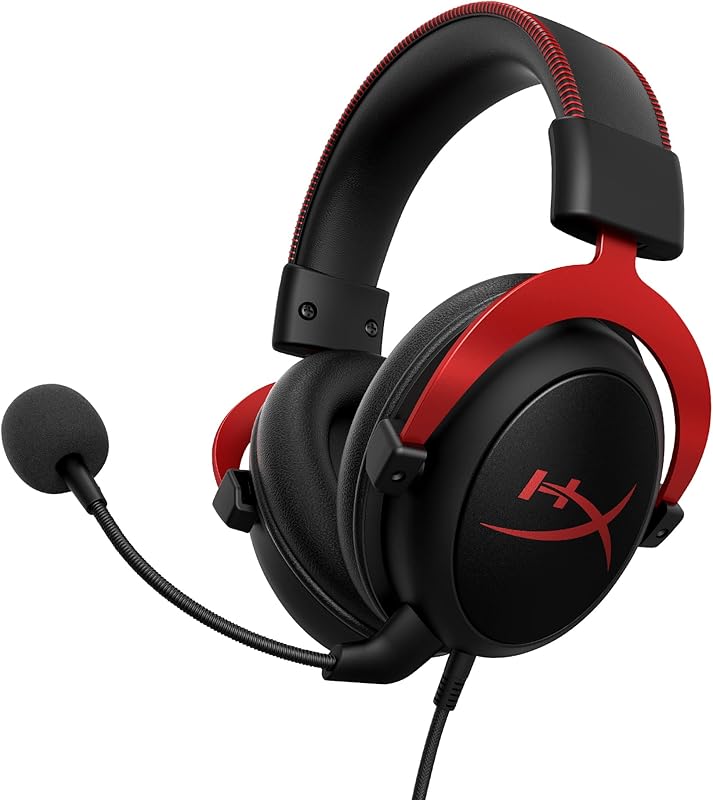
- You prefer a zero-fuss wired connection with a hardware USB sound card and no battery recharging routines.
- You value rugged chassis durability built around a solid aluminum frame and backed by a two-year warranty.
- You want plush memory foam ear cushions and an extra set of bundled ear pads straight out of the box.
- You want hardware-toggled virtual 7.1 surround sound on PC without installing background software.
Final Verdict
When weighing this HyperX Cloud II vs SteelSeries Arctis Nova 5 matchup, the SteelSeries Arctis Nova 5 emerges as the overall winner for the modern gamer. By incorporating low-latency 2.4GHz wireless alongside Bluetooth 5.3, SteelSeries eliminates cable clutter while maintaining effortless multi-device connectivity. Its 60-hour battery life removes power anxiety, while the retractable ClearCast 2.X microphone and companion app with 100+ sound presets offer an audio experience tailored specifically to contemporary competitive play.
Even so, the HyperX Cloud II remains an exceptional option for desktop-bound players who prioritize physical longevity and simplicity above all else. With its indestructible aluminum frame, plush memory foam ear pads, plug-and-play USB audio control box, and two-year warranty, it delivers dependable, high-impact audio without ever needing a charging cable. If your setup never leaves your desk and you dislike charging batteries, the Cloud II is still completely capable of anchoring your gaming station.
FAQ
Is HyperX Cloud II worth it for desktop gaming today?
The HyperX Cloud II remains a very capable choice for players who want a durable, plug-and-play wired headset. Its solid aluminum frame, comfortable memory foam cushions, and hardware-driven USB 7.1 surround sound card provide reliable audio performance without the need to manage software or charging cables.
How does the SteelSeries Arctis Nova 5 battery life perform during long sessions?
The SteelSeries Arctis Nova 5 provides up to 60 hours of continuous runtime on a full charge, which easily covers a full week of heavy eight-hour daily gaming. In addition, its USB-C fast charging feature provides up to six hours of wireless playback after just 15 minutes of charging.
Can I use the SteelSeries Arctis Nova 5 on my smartphone?
Yes. The SteelSeries Arctis Nova 5 connects to mobile devices either through Bluetooth 5.3 or via its compact USB-C multi-platform dongle. Its Quick-Switch wireless feature lets you easily take phone calls while gaming on your console or PC.
Does the HyperX Cloud II virtual 7.1 surround sound work on all consoles?
No. According to the manufacturer specifications, the USB sound card control box that enables hardware virtual 7.1 surround sound functions on PC, Mac, and PS4. Other platforms, such as the Xbox One and Nintendo Switch, utilize standard stereo audio via the 3.5mm connection.
How does the Arctis Nova 5 vs Cloud II microphone design differ?
The SteelSeries Arctis Nova 5 features a fully retractable ClearCast 2.X microphone supporting high-bandwidth 32KHz/16Bit audio that stores inside the ear cup. In contrast, the HyperX Cloud II utilizes a flexible, noise-cancelling microphone that must be physically detached from the headset when not in use.
Can I adjust EQ settings on the HyperX Cloud II using mobile software?
No. The HyperX Cloud II does not feature companion mobile software or digital EQ presets. Audio equalization and 7.1 surround sound are handled directly through the physical buttons on the included in-line USB audio control box.