The choice between the HyperX Cloud Alpha Wireless and the Razer BlackShark V2 Pro comes down to whether you prioritize unprecedented battery stamina for uninterrupted solo gaming or broadcast-grade microphone clarity paired with versatile dual-wireless connectivity.
Choose the HyperX Cloud Alpha Wireless if you want a reliable headset that frees you from charging cables for weeks of play, or select the Razer BlackShark V2 Pro if you play competitive team shooters where clear vocal callouts and mobile Bluetooth pairing take precedence.


HyperX Cloud Alpha Wireless vs Razer BlackShark V2 Pro at a Glance
| Feature | HyperX Cloud Alpha Wireless | Razer BlackShark V2 Pro |
|---|---|---|
| Battery Life | Up to 300 hours (tested at 50% volume) | The listing does not specify |
| Wireless Connectivity | 2.4GHz wireless USB adapter | 2.4GHz HyperSpeed USB-C dongle and Bluetooth 5.2 |
| Microphone | Detachable noise-cancelling mic with pop filter | Detachable HyperClear Super Wideband mic |
| Driver Design | HyperX Dual Chamber Drivers | TriForce Titanium 50mm Drivers |
| Frequency Response | 15 Hz – 21 kHz | The listing does not specify |
| Spatial Audio / Tuning | DTS Headphone:X Spatial Audio | Pro-Tuned FPS Audio Profiles |
| Ear Cushion Material | Memory foam with breathable leatherette | Ultra-soft memory foam with breathable fabric |
| Frame Construction | Durable aluminum frame | The listing does not specify |
| Audio Jack (3.5mm) | The listing does not specify | No jack |
| Best For | Marathon solo gaming and endurance | Competitive esports and multi-device gaming |
Battery Life and Power Management
Battery longevity dictates how often your gaming sessions are interrupted by charging cables. The HyperX Cloud Alpha Wireless battery life is the standout benchmark in the wireless headset space, offering up to 300 hours of runtime on a single charge when tested at 50 percent volume. This allows users to complete multiple full game campaigns over weeks or months without reaching for a USB-C charge cable. Users can monitor this massive battery reserve and adjust equalizers using the HyperX NGENUITY software suite.
In contrast, the product listing for the BlackShark V2 Pro does not specify a maximum battery runtime figure. While wireless headsets designed for competitive esports generally supply sufficient charge for several daily sessions, the lack of an official runtime claim in the product data leaves a question mark for endurance-focused buyers. If you regularly evaluate high-end wireless gear such as in our logitech g pro x 2 vs hyperx cloud alpha wireless match-up, having predictable, triple-digit battery stamina completely changes your charging habits.
When asking is HyperX Cloud Alpha Wireless worth it solely for battery independence, the answer is clear. Going from charging a headset every few nights to charging it two or three times a year creates unmatched peace of mind.
Edge: HyperX Cloud Alpha Wireless, delivering an industry-leading 300 hours of verified runtime on a single charge.
Microphone Performance and Voice Clarity
Vocal clarity is essential when coordinating tactical movements in fast-paced competitive titles. The Razer BlackShark V2 Pro features the HyperClear Super Wideband microphone. This next-generation detachable boom mic captures a wider frequency range of sound, retaining more natural warmth and detail in your voice so that shotcalls cut cleanly through game audio. For players who frequently participate in team-based matchmaking, a Razer BlackShark V2 Pro mic test reveals vocal depth that sounds closer to a dedicated standalone microphone than a typical wireless headset mic.
The Cloud Alpha Wireless includes a detachable noise-cancelling microphone accompanied by a physical pop filter to reduce vocal plosives. It effectively filters out ambient room sounds and keyboard clatter, making it dependable for Discord chats and cooperative party play. However, standard wireless bandwidth constraints mean it does not capture the expanded acoustic frequency range provided by Razer’s wideband capsule. Similar acoustic limits are discussed in our breakdown of the hyperx cloud iii vs razer blackshark v2 pro.
If clear vocal communication represents your highest priority in squad-based games, the BlackShark V2 Pro provides a substantial upgrade in natural voice capture, ensuring teammates hear every callout without distortion or nasal compression.
Edge: Razer BlackShark V2 Pro, thanks to its HyperClear Super Wideband microphone that captures superior vocal detail.
Wireless Connectivity and Platform Flexibility
Connectivity options determine how seamlessly a headset integrates into your broader hardware setup. The BlackShark V2 Pro includes both a low-latency 2.4GHz Razer HyperSpeed wireless connection via a USB Type-C dongle and integrated Bluetooth 5.2 with a 10-meter operating range. This dual-wireless configuration lets players transition from a console or PC match to taking calls or streaming audio on a mobile device without swapping physical transmitters. Note that the BlackShark V2 Pro listing specifies it has no 3.5mm headphone jack, cementing it as a wireless-only system.
The Cloud Alpha Wireless uses a dedicated 2.4GHz wireless USB adapter engineered for low-latency transmission, ensuring immediate audio synchronization without lag. However, the listing does not include Bluetooth support or an analog audio jack. This means the headset must remain tethered via its wireless USB dongle, restricting quick connection to smartphones or tablets on the go. Gamers comparing options like the hyperx cloud alpha wireless vs corsair virtuoso pro will notice that single-mode wireless setups prioritize signal consistency over pairing variety.
When deciding on the HyperX Cloud Alpha Wireless or Razer BlackShark V2 Pro for PC and multi-platform use, Razer offers greater flexibility by combining 2.4GHz gaming audio with Bluetooth 5.2 convenience.
Edge: Razer BlackShark V2 Pro, providing both high-speed 2.4GHz wireless and Bluetooth 5.2 multi-device support.
Audio Drivers and Soundstage Processing
Driver architecture shapes how distinctly a headset renders quiet directional cues alongside explosive game effects. The HyperX Dual Chamber Drivers inside the Cloud Alpha Wireless physically separate lower bass frequencies from the mids and highs. This dual-chamber tuning helps prevent heavy low-end rumbles from muddying critical midrange audio, such as enemy footsteps or reloading sounds. Paired with DTS Headphone:X Spatial Audio, the headset provides virtual 3D audio placement with a broad frequency response rated between 15 Hz and 21 kHz, creating rich spatial immersion for sprawling open-world games.
Razer counters with its TriForce Titanium 50mm Drivers, which divide the acoustic driver into three separate zones for custom tuning of highs, mids, and lows. The titanium-coated diaphragms increase rigidity to produce brighter highs and crisper clarity. Additionally, this version of the BlackShark V2 Pro features on-headset Pro-Tuned FPS Audio Profiles developed alongside professional esports athletes. These profiles accentuate tactical sound cues directly from the headset hardware without requiring software adjustments during competitive tournaments.
Evaluating the HyperX Cloud Alpha Wireless or Razer BlackShark V2 Pro for FPS depends on whether you value broad cinematic immersion or tuned competitive clarity. While DTS Headphone:X delivers a spacious soundstage for atmospheric campaigns, Razer’s titanium-coated drivers and dedicated FPS profiles offer a sharper tactical presentation for competitive shooters.
Edge: Razer BlackShark V2 Pro, for its esports-focused TriForce Titanium drivers and onboard FPS audio profiles.
Build Quality, Ergonomics, and Noise Isolation
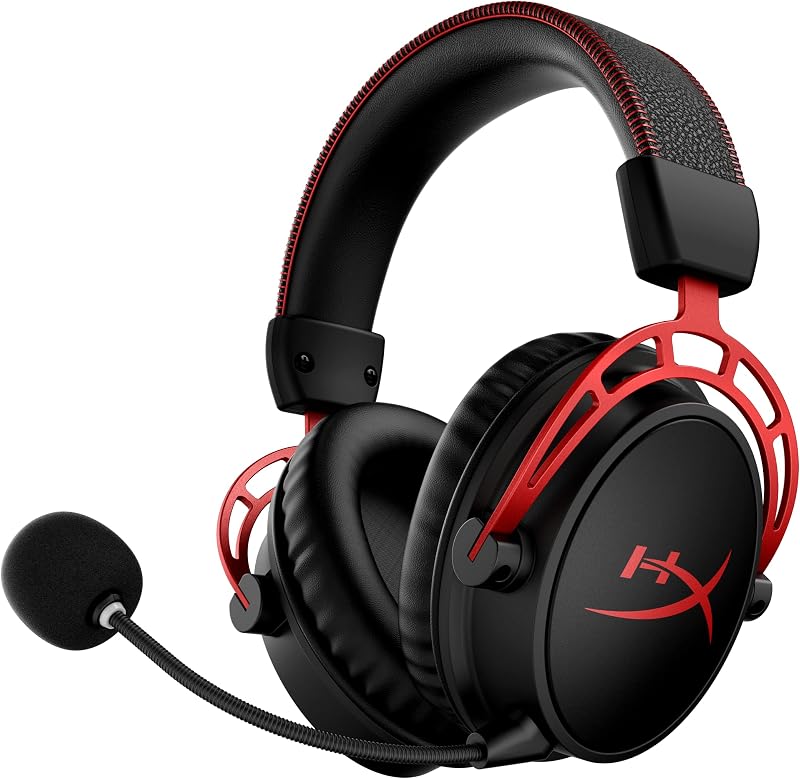
Comfort and physical durability dictate whether a headset remains wearable over five-hour gaming sessions. The Cloud Alpha Wireless relies on signature HyperX memory foam covered in breathable leatherette. The structural backbone is a durable aluminum frame built to withstand daily flexing and extended wear. Aluminum construction ensures that the headband retains its clamping force over years of use without becoming brittle. The acoustic properties of the Cloud Alpha line have been thoroughly vetted across generations, as noted in our analysis of the hyperx cloud iii vs cloud alpha wireless.
The Razer BlackShark V2 Pro takes an ergonomics-first approach tailored toward noise isolation in noisy competitive environments. Its closed earcups conform closely to the head to create a physical seal against external distractions. Rather than leatherette, the BlackShark V2 Pro utilizes ultra-soft memory foam wrapped in breathable fabric. This breathable fabric reduces heat buildup during intense gaming, making it ideal for players whose ears run hot during extended play sessions. However, the listing does not detail metal frame reinforcement for this specific model.
Shoppers weighing the BlackShark V2 Pro vs Cloud Alpha Wireless must choose between the long-term structural durability of an aluminum frame and the cooler, passive noise-isolating comfort of breathable fabric ear cushions. For robust physical longevity, HyperX holds the advantage, while Razer wins on thermal dissipation during pressure-packed matches.
Edge: HyperX Cloud Alpha Wireless, due to its proven aluminum frame construction and plush signature memory foam.
Pros and Cons
HyperX Cloud Alpha Wireless
Pros
- Up to 300-hour battery life
- Durable aluminum frame construction
- Dual Chamber Drivers separate bass and mids
- DTS Headphone:X Spatial Audio support
Cons
- Listing does not specify Bluetooth connectivity
- Lacks onboard FPS audio tuning profiles
View HyperX Cloud Alpha Wireless on Amazon
Razer BlackShark V2 Pro

Pros
- HyperClear Super Wideband detachable microphone
- Dual 2.4GHz HyperSpeed and Bluetooth 5.2 wireless
- TriForce Titanium 50mm three-part drivers
- Pro-tuned on-headset FPS audio profiles
Cons
- Battery runtime not specified in listing
- No 3.5mm analog audio jack
View Razer BlackShark V2 Pro on Amazon
Who Should Buy Each One
Choose the HyperX Cloud Alpha Wireless If
- You want weeks or months of gaming without ever plugging in a charging cable, courtesy of its 300-hour battery capacity.
- You prefer a durable headset built around a tough aluminum frame that resists structural wear over time.
- You play single-player adventure games and atmospheric titles that benefit from DTS Headphone:X Spatial Audio and deep dual-chamber driver separation.
- You want a dependable PC gaming headset managed through HyperX NGENUITY software without needing mobile Bluetooth pairing.
Choose the Razer BlackShark V2 Pro If
- You play competitive multiplayer titles where crisp callouts require a broadcast-grade HyperClear Super Wideband microphone.
- You want the versatility of 2.4GHz low-latency gaming alongside Bluetooth 5.2 for taking mobile calls and connecting across platforms.
- You rely on competitive audio tuning and want on-headset Pro-Tuned FPS profiles designed with professional esports athletes.
- Your ears overheat easily and you prefer breathable fabric earcups with closed noise isolation over leatherette cushions.
Final Verdict
When completing a comprehensive Razer BlackShark V2 Pro vs HyperX Cloud Alpha Wireless comparison, the two headsets target distinct gaming priorities. The HyperX Cloud Alpha Wireless stands out as the ultimate endurance device. By pairing an unprecedented 300-hour battery life with a sturdy aluminum frame, dual-chamber drivers, and DTS Headphone:X surround sound, it provides a hassle-free wireless experience for players who never want their immersion broken by low-battery beeps.
The Razer BlackShark V2 Pro claims the upper hand for dedicated competitive multiplayer and multi-device convenience. Its HyperClear Super Wideband microphone delivers noticeable clarity over traditional noise-cancelling mics, while TriForce Titanium 50mm drivers and onboard FPS profiles give competitive players immediate tactical feedback. If your gaming routine revolves around competitive matchmaking and you value Bluetooth 5.2 connectivity alongside tournament-grade voice communication, the BlackShark V2 Pro justifies the investment.
FAQ
How long does the HyperX Cloud Alpha Wireless battery last on a single charge?
The HyperX Cloud Alpha Wireless is rated for up to 300 hours of continuous wireless gaming on a single charge when tested at 50 percent headphone volume. Actual battery longevity can vary based on volume levels and usage conditions.
Does the Razer BlackShark V2 Pro support Bluetooth audio?
Yes, the Razer BlackShark V2 Pro features integrated Bluetooth 5.2 with a range of up to 10 meters, allowing you to connect to compatible mobile devices in addition to using its 2.4GHz HyperSpeed wireless USB-C dongle.
Can you use a 3.5mm wired cable with the Razer BlackShark V2 Pro?
No, the specifications for this Razer BlackShark V2 Pro model state that it has no 3.5mm headphone jack, functioning strictly as a wireless headset via 2.4GHz HyperSpeed and Bluetooth 5.2.
What audio customization is available on the HyperX Cloud Alpha Wireless?
You can adjust equalizers, check exact remaining battery levels, and toggle DTS Headphone:X Spatial Audio features using the official HyperX NGENUITY software on your PC.
What makes the Razer BlackShark V2 Pro microphone different from standard headset mics?
The BlackShark V2 Pro utilizes Razer’s HyperClear Super Wideband microphone capsule, which captures a wider frequency range of human speech than traditional headset microphones to deliver richer, more detailed voice clarity.
Is the HyperX Cloud Alpha Wireless compatible with multiple platforms?
The listing states multi-platform compatibility via its fast 2.4GHz USB wireless adapter, making it straightforward to connect to supported devices that accept standard USB wireless dongles.