The decisive difference between the Logitech MX Brio vs Elgato Facecam MK.2
Choosing between the Logitech MX Brio and the Elgato 4K S comes down to a fundamental distinction in hardware function: the MX Brio is a self-contained 4K webcam engineered to capture your face and desk space directly, while the Elgato 4K S is a dedicated video capture card built to digitize and pass through HDMI video feeds from external sources like game consoles and professional cameras.
Select the Logitech MX Brio if you need an all-in-one desktop video and microphone solution for business conferencing, remote management, and quick workspace presentations. Choose the Elgato 4K S if your priority is ingesting high-framerate gameplay from a console or routing a mirrorless camera feed into your production setup with lag-free passthrough.


Logitech MX Brio vs Elgato 4K S at a Glance
| Feature | Logitech MX Brio | Elgato 4K S |
|---|---|---|
| Device Category | Integrated 4K USB Webcam | External HDMI Capture Card |
| Primary Video Capture | 4K Ultra HD at 16:9 aspect ratio | Up to 2160p at 60 fps (4K60) |
| Video Passthrough | Not applicable (No video passthrough) | Up to 2160p60, 1440p120, 1080p240 |
| High Frame Rate Support | The listing does not specify HFR rates | 1440p120 and 1080p240 passthrough and capture |
| HDR and VRR Capabilities | The listing does not specify HDR or VRR | HDR10 capture (Windows), HDR10 passthrough, VRR support |
| Optical Sensor and Lens | Custom lens with f/4 aperture and autofocus | None (Requires external HDMI video source) |
| Audio Hardware | Dual beamforming noise-reducing microphones | 3.5 mm analog audio input jack |
| Host Connectivity | USB | USB 3.0 Type-C |
| Physical Dimensions and Weight | 6.1 ounces | 4.4 x 2.8 x 0.7 inches, 3.2 ounces (90 grams) |
| Enterprise Management | Logitech Sync, Secure Boot, Unified Certifications | Not listed |
| Best For | Executive video calls, meetings, desk demonstrations | Console gaming capture, high-refresh streaming setups |
Core Functionality and Hardware Architecture
Understanding the architectural distinction between these two devices is necessary before evaluating performance. The MX Brio operates as an independent optical recording unit. It houses an integrated image sensor, custom glass optics, an autofocus mechanism, and onboard digital signal processing. When you plug its USB connection into a computer, it serves as the direct video and audio origin point. In any typical Logitech MX Brio vs Elgato Facecam evaluation, this device functions strictly as an end-to-end optical camera that handles image capture and scene illumination without requiring secondary peripherals.
In contrast, the Elgato 4K S possesses no optical sensor, lens, or camera hardware. It is an intermediary bridge built around an HDMI 2.0 input, an HDMI 2.0 lag-free passthrough output, and a USB 3.0 Type-C data interface. To generate any picture at all, the 4K S must receive an unencrypted HDMI feed from an external device such as a PlayStation 5, Xbox Series X/S, Nintendo Switch 2, gaming PC, or standalone mirrorless camera. Buyers assessing an Logitech MX Brio vs Elgato Cam Link 4K setup will recognize that the 4K S processes video signals generated elsewhere rather than filming your physical environment on its own.
This architectural divide defines how you organize your physical workspace. Deploying the MX Brio requires only mounting the unit on a monitor or tripod and attaching a single cable to your system. Deploying the Elgato capture device requires cabling from your media or console source into the capture unit, a secondary HDMI cable running out to a zero-latency gaming display, and a USB-C link feeding your recording computer. The MX Brio replaces an entire visual workstation pipeline, while the 4K S serves as an ingestion utility within a broader multi-device hardware chain.
Edge: Tie. Each device executes a completely different hardware role, with the MX Brio providing an all-in-one optical camera and the Elgato 4K S delivering a dedicated video signal bridge.
Video Capture Resolutions, Framerates, and Passthrough
Visual fidelity across these devices addresses two unrelated technical workflows. In a standard Logitech MX Brio review, the optical pipeline centers on high-definition workspace clarity. The camera records 4K Ultra HD video natively using an MP4 capture format and automatic shooting modes at an f/4 aperture. Logitech combines its largest image sensor yet with AI-powered face-based image enhancement to retain skin tones and facial definition in dim or uneven office lighting. It stabilizes visual presentations for corporate conferencing, but the specifications do not provide high-refresh recording options beyond standard operational frequencies.
The Elgato 4K S capture card review metrics focus instead on raw throughput, low latency, and rapid frame refresh. The Elgato 4K S passthrough specs allow gamers to play in full 2160p60 (4K at 60 frames per second), 1440p120, or 1080p240 on their primary monitor without lag. Concurrently, the card can ingest gameplay over USB 3.0 Type-C at 2160p60, 1440p60, 1080p120, 1080p60, 720p60, 567p, or 480p. In addition, the device supports Variable Refresh Rate (VRR) passthrough and HDR10 passthrough up to 2160p60, alongside onboard HDR10 capture up to 1080p60 with tone mapping on Windows 11 systems.
If you compare Logitech MX Brio vs capture card options to determine which device produces better visual results, the answer depends entirely on your video source. The MX Brio captures a live human speaker with custom autofocus optics and wide-spectrum dynamic balance. However, if your goal is recording fast-paced console action or importing a pristine 60 fps HDMI feed from a digital cinema camera, the MX Brio cannot accept external video feeds. The 4K S excels at preserving high frame rates and HDR metadata from external hardware, but provides zero native recording capabilities if an external video source is absent.
Edge: Elgato 4K S. It provides immense signal processing bandwidth with support for 4K60, 1440p120, 1080p240, VRR, and HDR10.
Audio Ingestion and Processing Capabilities
Audio management reflects the contrasting environments these units occupy. The Logitech MX Brio integrates dual beamforming microphones right inside its aluminum chassis. These microphones are paired with background noise reduction algorithms designed to isolate spoken dialogue. The dual-element pickup pattern tracks vocal projection even when a presenter shifts postures or paces slightly around the desk. This self-contained audio hardware eliminates the need to attach an external desk mic or wear a headset during routine business communications.
The Elgato 4K S approaches audio from an ingestion perspective rather than acoustic capture. It does not feature built-in ambient microphones. Instead, the unit includes an integrated 3.5 mm analog audio input jack alongside its digital HDMI audio channel. This analog port allows content creators to capture in-game party chat, mixer feeds, or external line-in audio alongside the digital game audio stream. For content creators managing voice commentary, external microphones must be connected through the host computer or through an auxiliary audio mixer linked to the 3.5 mm input.
For office workers and corporate presenters, the MX Brio provides immediate voice functionality out of the box without additional equipment. For livestream broadcasters, the analog input on the 4K S provides essential utility by solving console party chat routing issues that often plague capture setups. While the MX Brio gives you a self-sufficient voice capture platform, the 4K S affords higher flexibility for routing mixed audio channels into a broadcast environment.
Edge: Logitech MX Brio. The integrated dual beamforming microphones with noise reduction provide immediate standalone voice capture without external gear.
Physical Design, Privacy, and Workspace Mounting
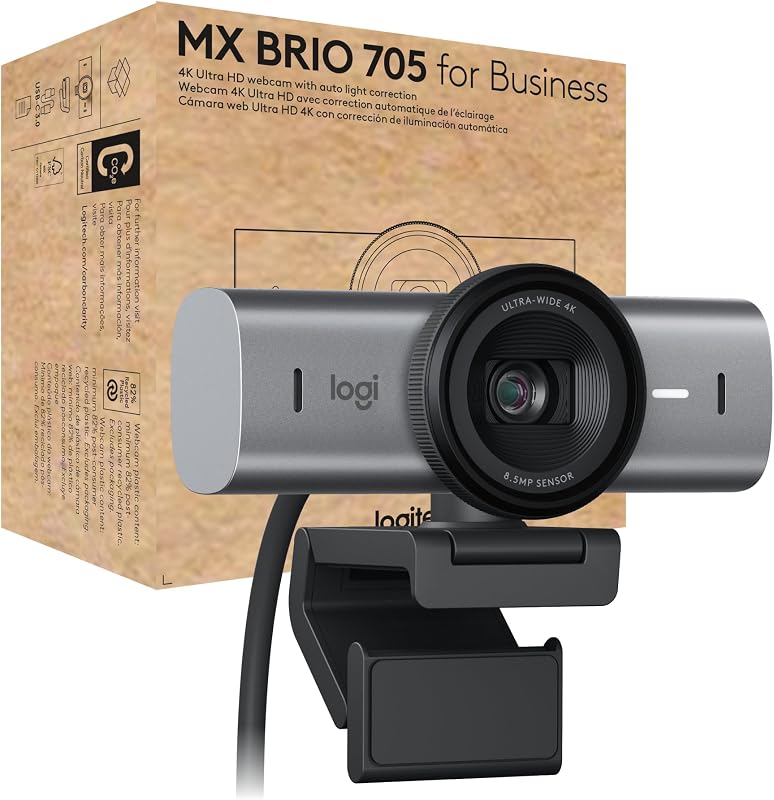
The physical construction of the Logitech MX Brio targets modern professional desktop environments. Built with solid milled low-carbon aluminum and 82% post-consumer recycled plastic components, the 6.1-ounce camera balances environmental design with executive desk styling. It mounts securely to external displays or laptop screens and features specialized physical functionality like Show Mode, which allows you to tilt the lens downward to display sketches, physical documents, or objects on your desk. Furthermore, it incorporates an integrated mechanical privacy shutter operated by rotating a dial on the lens ring to physically obstruct the sensor.
The Elgato 4K S is designed as an ultra-compact inline capture utility. Measuring 4.4 x 2.8 x 0.7 inches and weighing just 3.2 ounces (90 grams), it is housed in a low-profile enclosure intended to sit flat on a desk, rest inside an entertainment center, or travel in a gear bag. Because it is an external processing interface rather than an optical camera, it features no privacy shutters, lens glass, or monitor mounting clips. Its exterior layout is dedicated to cable routing, with HDMI input, HDMI output, a 3.5 mm analog port, and a USB-C port positioned across its edges.
When selecting hardware for personal space management, the MX Brio excels at ergonomic desktop integration. Its physical privacy dial provides instant visual confirmation that optical capture is blocked, and Show Mode makes it uniquely functional for collaborative visual work. The Elgato 4K S focuses strictly on keeping cable runs tidy and minimizing its desktop footprint beside gaming consoles or mobile production rigs.
Edge: Logitech MX Brio. The milled aluminum housing, physical privacy dial, and desk-facing Show Mode tilt mechanism provide practical ergonomic advantages for desktop users.
Software Ecosystem, Platform Certification, and Enterprise Deployment
System compatibility and enterprise device management form a central pillar of the Logitech MX Brio 4K specs. Designed as the MX Brio 705 for Business, this webcam is certified for Microsoft Teams, Zoom, and Google Meet, while carrying official “Works With Chromebook” validation. It supports Windows, macOS, and ChromeOS natively. For IT administrators deploying hardware at scale, the MX Brio supports Logitech Sync, allowing technical teams to monitor health, deploy firmware updates, and configure device profiles remotely. It also incorporates a secure boot design to block unauthorized hardware modifications.
The Elgato 4K S caters to creative broadcast software suites and personal operating systems. It runs on Windows 11 (64-bit), macOS 13 Ventura or later, and iPadOS devices equipped with USB-C ports. While the MX Brio relies on standard unified communication protocols, the 4K S depends on host system hardware horsepower to process raw high-bandwidth video streams. Corsair lists specific baseline requirements for the 4K S, including an Intel Core i5 8th-generation or AMD Ryzen processor, Apple M1 silicon or better, and dedicated graphics such as an NVIDIA GeForce GTX 10-series GPU.
Deciding between Logitech Brio 4K vs Elgato Facecam or capture alternatives highlights the difference between business certification and streaming toolsets. The MX Brio automates user framing with RightSight auto-framing and integrates seamlessly into enterprise video conferencing clients. The 4K S targets Open Broadcaster Software (OBS), Elgato utility tools, and console broadcast ecosystems, requiring substantial system compute resources to process its 4K60 and high-refresh feeds.
Edge: Logitech MX Brio. Full enterprise certifications for Teams, Zoom, and Google Meet, combined with Logitech Sync remote fleet management, make it vastly simpler to deploy and manage.
Console Compatibility and Broadcast Flexibility
When evaluating Logitech MX Brio or Elgato 4K S for streaming, the discussion hinges on your broadcast input sources. The MX Brio is bound strictly to computing platforms via USB. It cannot connect directly to a gaming console to capture game output, nor can it accept video feeds from external media players. Its streaming role is strictly limited to being the facecam window within your broadcast canvas, where its autofocus and automatic exposure keep your reaction shot sharp.
The Elgato 4K S is engineered specifically for cross-platform console broadcasting. It natively interfaces with the PlayStation 5, Xbox Series X, Xbox Series S, Nintendo Switch 2, and gaming PCs. Because the device handles high-throughput video bridging, content creators can play on a high-refresh 1440p120 or 4K60 television while feeding the captured footage straight into a streaming laptop or iPad over USB-C. Near-zero latency preview ensures that game commentary lines up tightly with on-screen action.
Furthermore, streamers exploring Logitech Brio 4K vs Elgato Cam Link 4K setups often use the 4K S as a high-end camera capture bridge. By attaching a mirrorless camera with clean HDMI output to the Elgato 4K S, creators gain access to large interchangeable lenses, physical depth of field, and cinema-grade image sensors that far exceed the visual limits of any standalone webcam. The 4K S acts as an open canvas for any HDMI source, while the MX Brio remains fixed to its own internal optical hardware.
Edge: Elgato 4K S. Dedicated support for PS5, Xbox Series X/S, and Switch 2, coupled with mirrorless camera ingestion, offers unmatched broadcast versatility.
Pros and Cons
Logitech MX Brio
Pros
- Integrated 4K custom lens with autofocus
- Dual beamforming noise-reducing microphones
- Certified for Teams Zoom and Google Meet
- Integrated physical dial privacy shutter
- Unique desk-tilting Show Mode functionality
Cons
- Cannot ingest external HDMI video signals
- No high-framerate passthrough capabilities
View Logitech MX Brio on Amazon
Elgato 4K S

Pros
- Crisp 4K60 video recording capability
- High-framerate 1440p120 and 1080p240 passthrough
- Near-zero latency with VRR support
- Analog 3.5 mm audio input jack
- Cross-platform support including PS5 and Switch 2
Cons
- No built-in camera lens or optical sensor
- No integrated microphone for direct voice pickup
- Requires external HDMI source to function
Who Should Buy Each One
Choose the Logitech MX Brio If
- You need an all-in-one 4K webcam with custom autofocus optics for business meetings and executive communications.
- You want integrated dual beamforming microphones with background noise reduction to eliminate extra desk clutter.
- Your role requires physical desk demonstrations, sketches, or document sharing using an integrated downward-tilting Show Mode.
- You work in an enterprise setting that demands verified certifications for Microsoft Teams, Zoom, and Google Meet alongside Logitech Sync fleet management.
- You prefer a built-in mechanical privacy shutter dial on the lens housing for instant visual privacy confirmation.
Choose the Elgato 4K S If
- You need to capture or stream high-resolution gameplay from a PlayStation 5, Xbox Series X/S, or Nintendo Switch 2.
- You demand high-framerate gameplay passthrough up to 1440p120 or 1080p240 alongside 4K60 video ingestion.
- You plan to use a professional mirrorless camera or DSLR as a streaming camera by converting its clean HDMI feed into USB-C.
- You require HDR10 tone mapping on Windows or Variable Refresh Rate (VRR) passthrough for smooth competitive gaming.
- You broadcast console party chat or auxiliary mixer audio via a dedicated 3.5 mm analog audio input.
Final Verdict
For everyday productivity, remote executive duties, and corporate meetings, the Logitech MX Brio is the definitive winner. It packages an advanced 4K optical sensor, auto-framing, AI-assisted exposure, dual noise-reducing microphones, and an integrated privacy shutter into a sturdy milled aluminum body. With direct certification across Microsoft Teams, Zoom, and Google Meet, it allows knowledge workers and business teams to plug into a USB port and immediately project a clean, professional image without troubleshooting auxiliary video chains or investing in secondary audio gear.
When the workflow shifts to console gaming, high-framerate broadcast capture, or cinema-camera streaming, the Elgato 4K S is the clear choice. It is not an optical webcam and cannot film your face independently, but it delivers the signal processing necessary to bridge 4K60, 1440p120, and 1080p240 HDMI video feeds directly to a host computer with near-zero latency. If you need a camera to sit atop your monitor, buy the MX Brio; if you need to ingest external console or camera video into your production rig, the 4K S is the exact tool for the job.
FAQ
Can I use the Logitech MX Brio to capture video from a PS5 or Xbox Series X?
No. The Logitech MX Brio is a self-contained USB webcam with an optical lens, not a video capture card. It lacks an HDMI input port and cannot ingest or digitize video signals output by home gaming consoles.
Does the Elgato 4K S come with a built-in camera lens or microphone?
No. The Elgato 4K S is an external capture card that bridges HDMI video and audio signals into a computer. It has no optical sensor, no camera lens, and no integrated microphone. It requires an external video source, such as a gaming console or an HDMI-equipped mirrorless camera, to produce video.
Can the Elgato 4K S work with a DSLR or mirrorless camera instead of a webcam?
Yes. If your mirrorless or DSLR camera outputs an unencrypted clean HDMI feed, you can connect the camera’s HDMI output into the Elgato 4K S. The 4K S will convert that high-end camera feed over USB 3.0 Type-C into your computer, allowing you to use your standalone camera as an ultra-high-quality video source in streaming and meeting software.
Does the Logitech MX Brio require an external microphone for video calls?
No. The MX Brio includes built-in dual beamforming microphones with integrated noise-reduction technology. These microphones capture clear voice audio and isolate ambient background sounds, providing a complete audio-visual solution without requiring an external desktop mic or headset.
Is Elgato 4K S worth it if I only stream PC games from a single computer?
If you are playing and streaming your games from the exact same PC, a capture card is generally unnecessary because broadcast applications like OBS can capture your desktop display or game window internally. The Elgato 4K S is primarily valuable when capturing footage from an external console, a secondary gaming PC in a dual-PC streaming setup, or a dedicated HDMI camera.
What operating systems do the Logitech MX Brio and Elgato 4K S support?
The Logitech MX Brio supports Windows, macOS, and ChromeOS, and is certified for Chromebooks as well as major conferencing platforms. The Elgato 4K S requires Windows 11 (64-bit), macOS 13 Ventura or later, or iPadOS with USB-C, alongside capable hardware such as an Intel Core i5 8th-generation processor or Apple M1 chip.