Choosing between the HyperX QuadCast S and the Audio-Technica AT2020 comes down to a fundamental hardware divide: an all-in-one USB microphone with integrated monitoring, internal conversion, and selectable pickup patterns versus an analog studio condenser microphone that requires an external audio interface and phantom power.
Streamers, casual podcasters, and gamers who want an instant desktop setup with built-in gain adjustment and vibrant visual feedback should choose the QuadCast S, while musicians, voiceover artists, and home studio recordists who already own or plan to invest in dedicated XLR outboard gear should choose the AT2020.

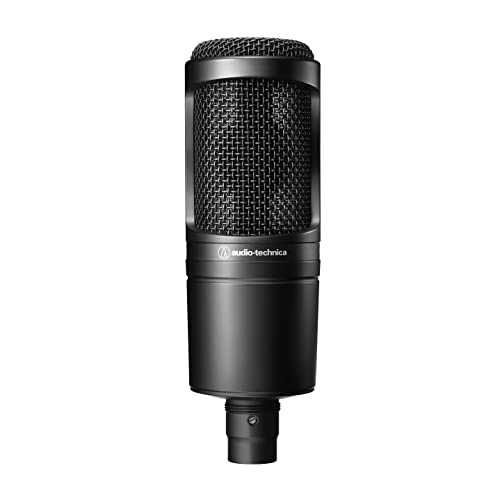
HyperX QuadCast S vs Audio-Technica AT2020 at a Glance
| Feature | HyperX QuadCast S | Audio-Technica AT2020 |
|---|---|---|
| Connector Type | USB Type-C | Integral 3-pin XLRM |
| Power Source | USB Bus Power | External Phantom Power |
| Polar Patterns | Cardioid, Omnidirectional, Bidirectional, Stereo | Cardioid (Unidirectional) |
| Audio Resolution | Up to 32-bit / 192 kHz | Determined by audio interface |
| Signal-to-Noise Ratio | 90 dB | 74 dB |
| Onboard Controls | Tap-to-mute, multifunction knob, LED VU meter | None (microphone only) |
| Included Mount / Stand | Detachable shock mount and desktop stand | Not listed |
| Lighting and Customization | 100+ aRGB LEDs with NGENUITY software | None |
| Enclosure Material | Metal | Metal |
| Best For | Streaming, gaming, and multi-pattern podcasting | Project studios, vocal tracking, and XLR workflows |
Connectivity and Setup Requirements
The primary operational contrast between these two microphones lies in how they transmit sound into your computer. The QuadCast S operates over a modern USB Type-C interface, allowing you to plug directly into personal computers, laptops, or gaming consoles without any intermediary hardware. The analog-to-digital converter is housed inside the microphone body itself, drawing bus power directly from the host machine. This plug-and-play architecture eliminates technical barriers, letting you launch streaming software or voice chats immediately upon plugging in the cable.
By comparison, the AT2020 utilizes an industry-standard integral 3-pin XLRM output connector. It is strictly an analog transducer that carries a balanced mic-level signal. Because of these distinct AT2020 audio interface requirements, you cannot plug this microphone directly into a computer USB port. Operating the microphone requires an external audio interface or mixing console capable of delivering 48V phantom power. While this demands additional hardware on your desk, it creates a modular signal chain where you can pair the microphone with professional preamps and hardware processors, a dynamic we also explored when breaking down the elgato wave 3 vs audio-technica at2020.
Evaluating AT2020 XLR vs QuadCast S USB shows that the best path depends entirely on your workspace complexity. The QuadCast S prioritizes rapid deployment, mobile convenience, and direct system compatibility. The AT2020 trades that immediacy for long-term studio modularity, allowing you to upgrade your interface, cabling, and preamplification independently over time.
Edge: HyperX QuadCast S because its direct USB-C connection delivers instant setup across PCs, laptops, and gaming consoles without purchasing external hardware.
Polar Patterns and Recording Versatility
A microphone’s polar pattern dictates how it captures sound from different directions, directly shaping how versatile the unit will be across varying recording scenarios. The QuadCast S features four distinct polar patterns switchable right on the hardware: cardioid, omnidirectional, bidirectional, and stereo. Cardioid isolates voice directly in front of the capsule; omnidirectional records 360-degree sound for group discussions; bidirectional captures sound equally from the front and back for face-to-face interviews; and stereo delivers a wide left-to-right acoustic image ideal for instruments or ambient room tracking.
The AT2020 takes a dedicated studio approach by featuring a single, fixed cardioid polar pattern. Audio-Technica engineered this unidirectional capsule to reduce the pickup of ambient sound from the sides and rear, improving sound source isolation in untreated project rooms. While this fixed focus excels at solo voiceovers, vocal tracking, and podcasting with a single speaker, it cannot be adapted to capture two speakers sitting across a table or a circle of guests around a conference setup. Creators weighing the rode podmic vs audio-technica at2020 will find a similar dedicated directional focus on voice isolation.
When deciding between the HyperX QuadCast S or Audio-Technica AT2020 for podcasting, the HyperX QuadCast S polar patterns grant unmatched single-mic flexibility. If your workflow involves multi-person interviews, round-table discussions, or experimental acoustic layouts, the QuadCast S handles those situations without needing a second microphone. The AT2020 remains locked to solo frontal capture.
Edge: HyperX QuadCast S because its four switchable polar patterns allow solo streaming, two-person interviews, group panels, and stereo recording on a single device.
Acoustic Architecture and Sound Quality
Sound quality in studio microphones is driven by capsule engineering, transient response, and noise performance. The AT2020 is widely regarded as a benchmark in side-address condenser technology due to its custom-engineered low-mass diaphragm. This diaphragm is specifically designed to provide extended frequency response, superior transient response, and a wide dynamic range with high SPL handling. The microphone registers an audible noise specification of 20 dB and a signal-to-noise ratio of 74 dB, capturing crisp vocal dynamics and high-pressure sound sources without distortion.
The QuadCast S approaches audio fidelity through high-resolution internal digital conversion. Its specifications highlight 32-bit/192kHz recording capability, delivering exceptional digital precision, a 90 dB signal-to-noise ratio, and a frequency response spanning 20 Hz to 20 kHz. However, its listing notes an audible noise figure of 80 dB, reflecting its consumer desktop architecture where internal electronic components share the housing with the acoustic capsule. Those researching an in-depth HyperX QuadCast S review will appreciate its high digital headroom, though analog purists may note differences in capsule response compared to standalone studio condensers.
In analyzing QuadCast S vs AT2020 sound quality, the two microphones serve different sonic expectations. The QuadCast S provides massive digital resolution and clean reproduction for broadcast and gaming commentary. The AT2020 produces a refined, natural acoustic capture with delicate transient detail that responds exceptionally well to external analog equalizers, compressors, and studio preamps. For creators reading an Audio-Technica AT2020 review to determine is Audio-Technica AT2020 worth it for vocal tracking, its analog diaphragm design holds a tangible advantage for critical audio reproduction.
Edge: Audio-Technica AT2020 because its custom low-mass diaphragm delivers superior transient handling and natural acoustic dynamics tailored for studio vocal production.
Onboard Controls and Real-Time Monitoring
Physical control over your audio signal during live production can make the difference between a smooth broadcast and clipped, distorted audio. The QuadCast S integrates an extensive suite of tactile controls directly onto its metal chassis. It features a top-mounted tap-to-mute sensor with an LED VU meter and status indicators that visibly show mute state, active polar pattern, and volume levels. Additionally, a versatile multifunction knob lets you adjust microphone gain, headphone output volume, and monitor mix without clicking through software menus.
The AT2020 offers zero onboard physical controls. As a traditional studio condenser, its metal body contains no gain dials, no headphone jack, no mute buttons, and no indicator lights. Adjusting your input gain, setting your headphone monitor mix, or muting your audio channel must be handled externally through your connected audio interface or software mixer. While this minimalist construction reduces the risk of accidental adjustments or electrical interference near the capsule, it forces you to rely entirely on external gear for adjustments during live sessions.
For fast-paced live environments, having tactile controls on the microphone body is invaluable. The QuadCast S allows you to silence your stream instantly with a light tap, lower input gain when excitement levels rise, and balance your game-to-voice monitor mix on the fly. Gamers and streamers comparing desktop USB solutions like the elgato wave 3 vs hyperx quadcast s often prioritize this exact hands-on immediacy.
Edge: HyperX QuadCast S because it features an intuitive tap-to-mute sensor, multifunction control knob, onboard headphone monitoring, and clear LED visual indicators.
Mounting, Build Quality, and Aesthetics
Physical mounting and workspace aesthetics play a major role in day-to-day usability. The QuadCast S ships fully assembled with a vibration-dampening shock mount that is pre-attached to a sturdy desktop stand. The shock mount has been redesigned with spring-loaded pins for quick detachment, and the mount joint features threading compatible with both 3/8-inch and 5/8-inch boom arm adapters. Visually, the microphone stands out with over 100 individually customizable aRGB LEDs supporting more than 16 million colors, fully manageable via the HyperX NGENUITY software to match stream overlays and gaming setups.
The AT2020 features a rugged, all-metal construction engineered for long-term durability in project and home studio applications. Its understated matte black finish blends into professional environments without drawing unnecessary visual attention on camera. However, the listing designates its form factor as microphone only, meaning it does not include an integrated desktop stand or a specialized vibration shock mount in the box. To place it on your desk, you must acquire a compatible microphone stand, boom arm, and XLR cable separately, similar to the gear requirements examined in our rode podmic usb vs audio-technica at2020 analysis.
Deciding between the HyperX QuadCast S or Audio-Technica AT2020 for streaming often hinges on these out-of-the-box physical inclusions. The QuadCast S provides shock isolation, desktop stability, and camera-ready dynamic lighting from the moment you open the box. The AT2020 offers robust industrial metal construction, but demands an ecosystem of external mounting accessories before you can position it on your desk.
Edge: HyperX QuadCast S because it includes a detachable vibration-dampening shock mount, desktop stand, and dynamic customizable aRGB lighting right in the package.
Software Integration and Customization
Digital customization allows content creators to tailor microphone behavior to their specific workflow. The QuadCast S connects directly with the HyperX NGENUITY software suite. Through this software, users can fine-tune sound settings, adjust internal recording parameters, and program dynamic visual lighting effects across the 100+ addressable aRGB LEDs. The LED array acts not only as aesthetic flair but also as a functional visual VU meter, providing real-time visual feedback on signal levels and mute status directly in your peripheral vision.
The AT2020 has no proprietary software, USB firmware, or digital lighting to configure. It delivers a pure, uncolored analog signal directly to your recording hardware. To process, filter, or equalize the AT2020, you must use your digital audio workstation (DAW), digital signal processors (DSP) within your interface, or third-party audio software like OBS Studio. While this provides maximum software freedom without background utility bloat, it also means there is no companion app tailored to the microphone itself, a contrast creators will also observe when comparing USB alternatives like the rode nt-usb+ vs hyperx quadcast s.
For creators who love deep software integration, automated profile switching, and synchronized lighting across their peripherals, the QuadCast S offers an expansive digital ecosystem. If you prefer keeping your computer clean of manufacturer-specific peripheral software and handling all processing through universal audio standards, the AT2020 fits that philosophy cleanly.
Edge: HyperX QuadCast S because its companion NGENUITY software unlocks deep lighting customization, signal fine-tuning, and visual level monitoring.
Pros and Cons
HyperX QuadCast S

Pros
- Plug-and-play USB Type-C connectivity
- Four selectable polar pickup patterns
- 32-bit/192kHz high-resolution audio recording
- Detachable shock mount and stand included
- Multifunction control knob and tap-to-mute
Cons
- Lacks analog XLR connection options
- Higher audible noise rating at 80 dB
View HyperX QuadCast S on Amazon
Audio-Technica AT2020

Pros
- Rugged metal studio condenser construction
- Custom low-mass diaphragm with superior transient response
- High SPL handling and wide dynamic range
- Industry-standard 3-pin XLRM connection
- Low audible noise floor at 20 dB
Cons
- Requires external audio interface and phantom power
- No included shock mount or desktop stand
- Single fixed cardioid pattern only
View Audio-Technica AT2020 on Amazon
Who Should Buy Each One
Choose the HyperX QuadCast S If
- You want a plug-and-play USB Type-C microphone that works immediately with PCs, laptops, and gaming consoles without an external interface.
- You need the versatility of four selectable polar patterns to record multi-guest podcasts, conference tables, or stereo acoustics.
- You value rapid physical controls like an instant tap-to-mute sensor, multifunction gain dial, and real-time LED volume metering.
- You stream on camera and want over 100 addressable aRGB LEDs to match your gaming room lighting aesthetic.
Choose the Audio-Technica AT2020 If
- You already own or intend to build a dedicated audio setup using an XLR audio interface with 48V phantom power.
- Your primary work consists of solo vocal tracking, voiceover, or singing where a custom low-mass diaphragm provides optimal transient clarity.
- You prefer a clean, professional studio aesthetic with rugged metal housing and zero distracting RGB lighting.
- You want a modular audio chain that lets you upgrade preamps, inline processors, and audio interfaces independently.
Final Verdict
For the vast majority of modern content creators, streamers, and casual podcasters, the QuadCast S is the more complete and convenient purchase. By combining high-resolution 32-bit/192kHz recording, four switchable polar patterns, an integrated shock mount, tap-to-mute functionality, and customizable aRGB lighting into a single USB Type-C package, it solves almost every desktop audio challenge out of the box. You avoid the cost and complexity of outboard gear while gaining tactile control and visual feedback directly on your desk.
The AT2020 wins decisively when studio-grade vocal reproduction and analog modularity are your main priorities. If you are building a project recording studio, tracking musical vocals, or establishing an expandable multi-mic XLR setup, the AT2020 remains an industry standard for a reason. Its low-mass diaphragm, wide dynamic range, and high SPL handling deliver pristine, uncompressed sound that integrates seamlessly into professional recording workflows, provided you have the interface and mounting hardware to support it.
FAQ
Does the Audio-Technica AT2020 require an external audio interface?
Yes. The AT2020 features a 3-pin XLRM output and relies on external phantom power to operate. You cannot connect it directly to a computer USB port without an audio interface, mixer, or external phantom power supply.
Can you turn off the RGB lighting on the HyperX QuadCast S?
Yes. The QuadCast S features over 100 customizable aRGB LEDs that can be customized, dimmed, or completely turned off using the HyperX NGENUITY companion software on your computer.
Which microphone is better for streaming on Twitch or YouTube?
The QuadCast S is generally better suited for streaming because of its convenient USB plug-and-play design, pre-attached shock mount, quick tap-to-mute sensor, and on-air lighting feedback. However, streamers seeking an analog broadcast sound chain often use the AT2020 paired with an XLR interface.
Does the HyperX QuadCast S work on gaming consoles?
Yes. According to the manufacturer listing specifications, the QuadCast S is compatible with gaming consoles, laptops, and personal computers via its direct USB connection.
How do the polar patterns compare between the QuadCast S and the AT2020?
The AT2020 features a single, fixed cardioid polar pattern designed to reject rear and side room noise during solo recording. In contrast, the QuadCast S offers four selectable polar patterns: cardioid, omnidirectional, bidirectional, and stereo, giving it far greater recording versatility for multiple speakers or room acoustics.
Does the AT2020 come with a desktop stand and shock mount?
The AT2020 listing designates its form factor as microphone only and does not include a pre-attached shock mount or desktop base. You will need to purchase a compatible stand, boom arm, and mounting clip separately, whereas the QuadCast S includes both a detachable shock mount and desktop stand in the box.


