The decisive difference between the Lenovo Yoga 9i and the Lenovo Legion 5i comes down to form factor specialization: dual-screen mobile multitasking versus dedicated 3D gaming horsepower. The Yoga Book 9i merges two stacked 2.8K OLED touch displays into an ultra-thin convertible body powered by integrated Intel Arc graphics, while the Legion 5i delivers an Intel HX-series processor paired with an NVIDIA GeForce RTX 5070 dedicated graphics card for high-framerate rendering.
Choose the Lenovo Yoga 9i if you are an executive, mobile multitasker, or creative professional who relies on simultaneous screen space, digital pen input, and featherlight portability. Choose the Lenovo Legion 5i if you are a gamer, engineering student, or 3D creator who demands desktop-class graphics performance, high refresh rates, and advanced thermal cooling.


Lenovo Yoga 9i vs Legion 5i at a Glance
| Feature | Lenovo Yoga 9i | Lenovo Legion 5i |
|---|---|---|
| Form Factor | Dual-screen convertible | Standard clamshell gaming laptop |
| Processor | Intel Core Ultra 7 255H (up to 5.10 GHz) | Intel Core i7-14700HX |
| Graphics Coprocessor | Integrated Intel Arc 140T GPU | NVIDIA GeForce RTX 5070 (8 GB GDDR7) |
| Memory | 32 GB LPDDR5X-8400MT/s (soldered) | 16 GB |
| Storage | 1 TB PCIe Gen4 SSD | 1 TB SSD |
| Display Configuration | Dual 14-inch 2.8K (2880 x 1800) OLED, 120Hz, Touch | Single 15-inch 2.5K WQXGA PureSight OLED, 165Hz |
| Weight | 2.69 lbs (approx. 3 lbs) | 4.4 lbs |
| Dimensions | 12.41 x 8.25 x 0.61 inches | 13.58 x 10.05 x 0.85 inches |
| Video Output / Primary Ports | 3x Thunderbolt 4 (DisplayPort 2.1) | HDMI, USB Type-C |
| Best For | Mobile multi-window productivity and stylus work | High-framerate AAA gaming and GPU acceleration |
Lenovo Yoga 9i vs Legion 5i Graphics and Gaming Performance
Graphics rendering capability separates these two machines completely. When analyzing Lenovo Yoga 9i vs Legion 5i graphics, your intended software workloads determine the winner immediately. The Legion 5i is engineered from the ground up as a dedicated gaming powerhouse. It carries an NVIDIA GeForce RTX 5070 laptop GPU loaded with 8 GB of high-speed GDDR7 video memory. This architecture leverages dedicated hardware ray tracing and AI horsepower, managed dynamically by the Lenovo AI Engine+ to maximize frames per second in modern AAA titles. Lenovo also includes three months of PC Game Pass with EA Play in the box, reinforcing the machine’s focus on serious gaming right out of packaging.
In contrast, the Yoga 9i operates on integrated Intel Arc 140T graphics, which share the machine’s system memory rather than utilizing a discrete graphics chip with dedicated VRAM. While the Intel Core Ultra 7 platform handles media playback, multi-monitor productivity, and lightweight photo adjustments with ease, it lacks the raw rasterization and compute power required for high-fidelity 3D gameplay. If you explore a lenovo legion 5i vs legion slim 5 evaluation, you will see how dedicated RTX hardware dominates GPU-dependent rendering tasks that integrated silicon simply cannot sustain.
Gamers debating Lenovo Yoga 9i or Legion 5i for gaming will find no contest here. The Legion 5i supports intensive graphics presets and complex rendering pipelines without thermal throttling thanks to its Legion Coldfront: Hyper cooling architecture, which uses copper heat pipes, aluminum heatsinks, and stealth fans. The Yoga 9i is designed for quiet, ultra-thin daily operations, meaning complex gaming loads will force frame drops and lower resolution targets.
Edge: Lenovo Legion 5i. The dedicated NVIDIA GeForce RTX 5070 GPU with 8 GB of GDDR7 memory provides exponentially superior graphics horsepower for modern games and 3D workloads.
Display Real Estate and Visual Technology
Screen real estate is the signature talking point of any Lenovo Yoga 9i review. Instead of a conventional laptop lid, the Yoga Book 9i provides dual 14-inch PureSight plastic OLED panels that combine to deliver massive vertical or side-by-side workspace. Both screens feature a 2.8K native resolution of 2880 x 1800, 100% DCI-P3 color accuracy, HDR 600 True Black, 500 nits of peak brightness, and an adaptive 120Hz refresh rate. With a 94% Active Area Ratio and edge-to-edge touch functionality, the Yoga 9i enables users to flick windows across screens with a finger, launch application groups instantly, or sketch across the canvas using the bundled Lenovo Yoga Pen.
The Legion 5i counters with a single 15-inch 2.5K WQXGA PureSight OLED display featuring an esports-ready 165Hz refresh rate. While it lacks touch capabilities and dual-panel workspace, it offers ultra-fast response times and flexible refresh rate switching that eliminates screen tearing during fast-motion gameplay. For users reading a lenovo yoga 9i vs legion slim 5 comparison, the Legion display prioritizes visual fluidity and motion fidelity rather than touch-driven multi-window logistics.
Choosing between these panels hinges on whether your daily routine benefits more from concurrent visual workspaces or ultra-high refresh gaming motion. Working across spreadsheets, research PDFs, and video communication tools simultaneously on the Yoga 9i completely eliminates the need to travel with a portable external monitor. For pure gaming immersion, however, the 165Hz refresh rate on the Legion 5i OLED delivers butter-smooth visuals that high-speed competitive titles demand.
Edge: Lenovo Yoga 9i. Dual 14-inch 2.8K OLED touchscreens with stylus support deliver unprecedented multi-window productivity in an ultraportable form factor.
Processing Power and Memory Architecture
Under the hood, both machines utilize Intel silicon, but they implement different processor tiers targeted at distinct performance goals. Analyzing the Yoga 9i vs Legion 5i specs reveals the Yoga 9i running an Intel Core Ultra 7 255H processor with Performance cores boosting up to 5.10 GHz and Efficient cores reaching 4.40 GHz. This processor integrates dedicated AI acceleration through its NPU to manage background tasks efficiently. Paired with this chip is 32 GB of lightning-fast LPDDR5X memory clocked at 8400MT/s. While this memory is soldered directly to the motherboard, the massive 32 GB capacity ensures that memory-heavy multitasking across dual screens remains responsive.
The Legion 5i steps up raw processing capability with the Intel Core i7-14700HX. The HX designation indicates an enthusiast-tier processor derived from desktop silicon architectures, built specifically for sustained high-wattage computing. This chip processes physics calculations, code compilation, and video encoding significantly faster under continuous load than ultraportable silicon. The trade-off is system memory: this specific Legion 5i listing includes 16 GB of system RAM, half the total capacity supplied by the Yoga 9i.
Shoppers assessing a lenovo yoga 9i vs legion pro 7i balance understand that raw CPU wattage must match daily usage. The Legion 5i delivers raw computation speed for heavy batch processing, while the Yoga 9i offers a far larger memory buffer for running numerous active browser tabs, enterprise software suites, and simultaneous application groups.
Edge: Tie. The Legion 5i features a higher-wattage HX processor for intensive computational loads, while the Yoga 9i provides double the memory with 32 GB of ultra-fast LPDDR5X RAM.
Portability, Dimensions, and Battery Specifications
Mobility highlights the physical divide between these machines. The Yoga 9i weighs just 2.69 pounds according to its listing highlights (and approximately 3 pounds in standard configuration) with ultra-slim dimensions measuring 12.41 inches long, 8.25 inches wide, and a mere 0.61 inches thick. Its Tidal Teal aluminum body slips effortlessly into standard briefcases and backpacks. Lenovo outfits the Yoga 9i with an integrated 88Wh battery, which represents a massive power cell for an ultraportable convertible, supported by USB Power Delivery between 45W and 65W.
The Legion 5i is an entirely different machine to carry. Finished in Eclipse Black, it weighs 4.4 pounds and measures 13.58 inches long, 10.05 inches wide, and 0.85 inches thick. While the listing notes it is 13% thinner and lighter than previous chassis iterations, it remains a full-sized gaming laptop that demands substantial desk space. Students contemplating Lenovo Yoga 9i or Legion 5i for college must account for this physical reality when commuting between lecture halls and dorm rooms.
When comparing Yoga 9i vs Legion 5i battery life conveniences, both systems address mobile power differently. The Yoga 9i relies on its large 88Wh battery paired with an energy-conscious Core Ultra processor to stretch runtime during mobile productivity sessions. The Legion 5i counters power consumption with rapid-charge technology via USB Type-C, capable of boosting the battery from 0 to 70% in under 30 minutes. However, the dedicated RTX GPU and high-wattage HX processor inevitably consume power much faster during active workloads. Readers reviewing a lenovo thinkpad x1 carbon gen 12 vs yoga 9i match will recognize the Yoga 9i’s clear commitment to all-day mobile use.
Edge: Lenovo Yoga 9i. At roughly 3 pounds and 0.61 inches thick with an 88Wh battery, the Yoga 9i is significantly lighter, slimmer, and easier to transport.
Input Devices, Ports, and Ergonomic Versatility
Input systems on these two laptops cater to fundamentally different usage habits. The Yoga 9i redefines laptop interaction by giving you multiple input options. You can type on a virtual onscreen keyboard and touchpad with haptic feedback, use one-handed typing in Book Mode, or set up the included physical Bluetooth backlit keyboard featuring 1.5mm key travel. Lenovo also bundles a matching Tidal Teal Bluetooth mouse and the pressure-sensitive Lenovo Yoga Pen in the retail packaging. For video conferencing, the Yoga 9i includes a 5MP IR webcam with dual microphones, an electronic privacy shutter, and Computer Vision presence detection, alongside four Dolby Atmos speakers.
The Legion 5i provides a permanent, high-performance physical typing deck designed for competitive gaming. It features the Legion TrueStrike keyboard equipped with Lenovo Spectrum 24-zone RGB lighting, engineered for fast actuations and tactile precision during high-pressure gaming moments. Its audio system features four speakers tuned by Nahimic by SteelSeries with AI-driven 3D audio modeling, though the listing does not detail an advanced 5MP camera array comparable to the Yoga 9i.
Connectivity also reflects these divergent philosophies. The Yoga 9i exclusively embraces modern high-bandwidth serial buses, packing three Thunderbolt 4 ports that support DisplayPort 2.1 video output and Always-On charging. The Legion 5i prioritizes legacy and gaming connectivity, including dedicated HDMI video output alongside standard USB Type-C ports for direct connection to monitors, external keyboards, and mice. Buyers exploring the lenovo yoga 9i vs ideapad slim 5 landscape will note that while Thunderbolt 4 hubs provide unmatched single-cable docking, native HDMI avoids the need for display adapters.
Edge: Lenovo Yoga 9i. The bundled physical Bluetooth keyboard, Bluetooth mouse, Yoga Pen, 5MP IR camera, and three versatile Thunderbolt 4 ports provide unmatched operational flexibility.
Pros and Cons
Lenovo Yoga 9i
Pros
- Dual 14-inch 2.8K OLED touchscreens
- Lightweight convertible build under 3 pounds
- Generous 32GB high-speed system memory
- Cutting-edge Wi-Fi 7 connectivity
Cons
- Integrated graphics lack high-end gaming power
- Soldered non-upgradable memory
- Port selection limited strictly to Thunderbolt
Lenovo Legion 5i
Pros
- Dedicated NVIDIA GeForce RTX 5070 graphics
- Faster 165Hz display refresh rate
- High-performance Intel Core i7-14700HX processor
- Advanced Coldfront Hyper cooling architecture
Cons
- Heavier and bulkier 4.4-pound chassis
- Lower 16GB memory configuration
- Lacks touchscreen and convertible versatility
View Lenovo Legion 5i on Amazon
Who Should Buy Each One
Choose the Lenovo Yoga 9i If

- You need to reference documents, code, or video feeds across two dedicated screens without packing an external monitor.
- You prioritize extreme portability, traveling frequently with a machine weighing around 3 pounds and measuring 0.61 inches thick.
- You regularly sketch, take handwritten notes, or sign documents using the included active Lenovo Yoga Pen.
- You run memory-intensive productivity suites and browser stacks that benefit from 32 GB of high-speed LPDDR5X RAM.
Choose the Lenovo Legion 5i If
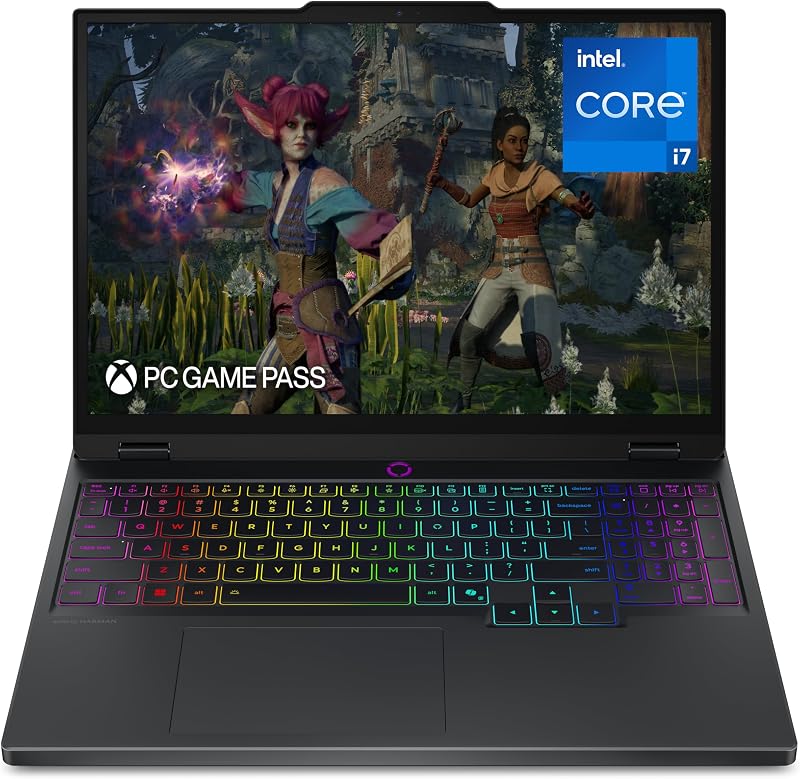
- You plan to play modern AAA games, take advantage of PC Game Pass, and demand high frame rates driven by an NVIDIA GeForce RTX 5070 GPU.
- You need dedicated GDDR7 VRAM and desktop-derived Intel HX processing power for 3D modeling, engineering software, and GPU rendering.
- You prefer a traditional gaming keyboard deck with 24-zone RGB lighting, native HDMI output, and rapid charging from 0 to 70% in under 30 minutes.
- You want a fast 165Hz OLED refresh rate that eliminates motion blur in fast-paced competitive esports titles.
Final Verdict
When weighing the Lenovo Legion 5i vs Yoga 9i, the proper choice depends on whether your priority is multi-window productivity or raw graphics execution. The Lenovo Yoga 9i is the superior laptop for most business professionals, writers, and digital multitaskers. Its dual 2.8K OLED touch displays, generous 32 GB of system memory, bundled Yoga Pen, and ultraportable 2.69-pound chassis deliver a flexible working environment that traditional clamshell laptops cannot match. If your workflow revolves around research, cross-referencing materials, and mobile computing, the Yoga 9i represents an exceptionally capable mobile workstation.
However, if high-end gaming or hardware-accelerated creative applications sit at the center of your computing needs, the Lenovo Legion 5i is the undisputed champion. With its dedicated NVIDIA GeForce RTX 5070 graphics card, Intel Core i7-14700HX processor, 165Hz PureSight OLED panel, and Legion Coldfront: Hyper cooling system, the Legion 5i delivers serious gaming power that the Yoga’s integrated Intel Arc graphics cannot touch. If you need a desktop replacement capable of dominating modern game libraries, the Legion 5i is easily the right investment.
FAQ
Can the Lenovo Yoga 9i run modern AAA games?
The Lenovo Yoga 9i utilizes integrated Intel Arc 140T graphics, which are designed for standard computing, video streaming, and light photo editing rather than demanding 3D games. While it can run casual or older titles at reduced resolutions, it lacks the dedicated video memory and cooling capacity required to run modern AAA releases smoothly. Gamers looking for high frame rates and ray tracing should choose the Lenovo Legion 5i instead.
Is the Lenovo Yoga 9i or Legion 5i for college a better choice?
Choosing between the Lenovo Yoga 9i or Legion 5i for college depends on your field of study and lifestyle. The Yoga 9i is significantly lighter at roughly 3 pounds, fits easily into any backpack, features an 88Wh battery, and includes the Lenovo Yoga Pen for taking handwritten lecture notes directly on its dual touchscreens. The Legion 5i weighs 4.4 pounds and is bulkier, but it is the necessary choice if your coursework requires dedicated GPU acceleration for engineering, animation, or heavy video rendering-or if you want to game in your dorm room.
Is Lenovo Legion 5i worth it for non-gamers?
When considering is Lenovo Legion 5i worth it if you do not play games, the answer depends entirely on your software requirements. If your daily work includes 3D modeling, video production, or intensive computing that leverages the NVIDIA GeForce RTX 5070 GPU and Intel Core i7-14700HX processor, the Legion 5i offers outstanding computational value. However, if your work consists mainly of office documents, web browsing, and meetings, the machine’s 4.4-pound weight and gaming-focused chassis will be less convenient than a lightweight convertible.
Does the Lenovo Legion 5i screen support touch or stylus input?
No, the Lenovo Legion 5i features a conventional 15-inch 2.5K WQXGA PureSight OLED display with a 165Hz refresh rate that does not support touch or digital pens. If you require interactive touch controls, gesture navigation, or digital handwriting, the Lenovo Yoga 9i includes dual 2.8K OLED touchscreens along with a bundled active Yoga Pen.
What ports are available for external monitors on both laptops?
The Lenovo Yoga 9i features three Thunderbolt 4 ports that support DisplayPort 2.1 protocol, allowing you to connect high-resolution external monitors using USB-C cables or appropriate adapters. The Lenovo Legion 5i features a dedicated native HDMI video output port alongside its USB Type-C connectivity, making it easy to plug directly into standard gaming monitors and televisions without extra dongles.
How does the RAM compare between the Yoga 9i and Legion 5i?
The Lenovo Yoga 9i comes equipped with 32 GB of ultra-fast LPDDR5X memory running at 8400MT/s, which is soldered directly to the motherboard. The Lenovo Legion 5i listing specifies 16 GB of memory. The Yoga 9i gives you double the total memory capacity, making it exceptionally well-equipped for keeping dozens of browser tabs, documents, and dual-screen productivity apps active at the same time.