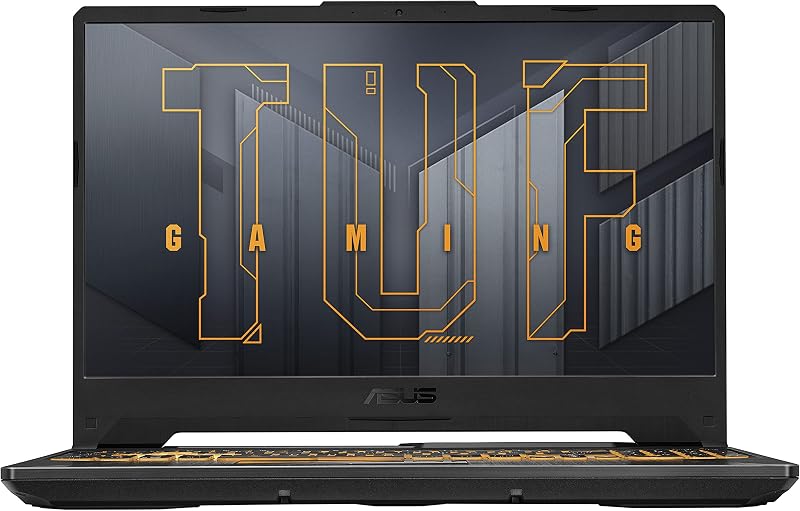
The single difference that decides the choice between these two laptops comes down to display workspace versus graphics processing: the Asus Zenbook 14 OLED delivers a dual-screen OLED mobile workstation for advanced productivity, while the Acer Nitro V 15 provides a dedicated gaming GPU designed to run modern 3D titles and visual simulations.
Professionals and mobile multitaskers who need expansive vertical screen real estate, elite color accuracy, and all-day battery efficiency should choose the Zenbook 14 OLED, whereas dedicated gamers and 3D rendering enthusiasts who demand hardware ray tracing and high gaming frame rates should select the Nitro V 15.


Asus Zenbook 14 OLED vs Acer Nitro V 15 at a Glance
| Feature | Asus Zenbook 14 OLED | Acer Nitro V 15 |
|---|---|---|
| Display Configuration | Dual 14-inch Lumina OLED Touchscreens (expands to 19.8 inches) | Single 15.6-inch IPS Screen |
| Resolution & Refresh Rate | 2880 x 1800 (3K), 120Hz, 16:10 | 1920 x 1080 (FHD), 144Hz, 16:9 |
| Processor | Intel Core Ultra 9 285H with Intel AI Boost NPU | 13th Gen Intel Core i5-13420H |
| Graphics Hardware | Integrated Intel Arc Graphics | Dedicated NVIDIA GeForce RTX 4050 (6GB GDDR6, 194 AI TOPS) |
| System Memory (RAM) | 32GB LPDDR5x | 8GB DDR5 |
| Internal Storage | 1TB PCIe 4.0 SSD | 512GB Gen 4 PCIe x4 SSD |
| Battery Capacity | 75Wh (Up to 16h laptop mode, 9h dual-screen mode) | Not listed |
| Weight & Thickness | 3.64 lbs, 0.57″ to 0.78″ thin | 4.7 lbs, thickness not listed |
| Wireless Connectivity | Wi-Fi 7 and Bluetooth 5.4 | Wi-Fi 6 and Bluetooth |
| Included Accessories | ASUS Sleeve, ASUS Pen 2.0 SA203H, 65W USB-C Charger | Power Adapter only |
| Best For | Multitasking professionals, mobile executives, and dual-screen productivity | Entry-to-midrange gaming, esports, and GPU-accelerated computing |
Graphics and Gaming Performance
Graphics hardware dictates how well a laptop handles 3D game engines, video rendering pipelines, and visual compute workloads. In the showdown of Zenbook 14 OLED Intel Arc vs Nitro V 15 RTX 4050, the underlying silicon represents two fundamentally divergent categories of graphics architecture. The Zenbook relies on integrated Intel Arc graphics embedded within the Intel Core Ultra 9 platform, drawing from system memory to drive its ultra-sharp dual displays and casual graphical tasks. In contrast, the Nitro V 15 features a discrete NVIDIA GeForce RTX 4050 GPU equipped with 6GB of high-speed GDDR6 VRAM and 194 AI TOPS of dedicated processing capability.
When evaluating the Asus Zenbook 14 OLED or Acer Nitro V 15 for gaming, the dedicated GPU on the Acer transforms the experience. NVIDIA’s Ada Lovelace architecture provides hardware ray tracing cores alongside DLSS 3 frame generation technology. These dedicated rendering blocks allow the Nitro V 15 to power through modern demanding titles at native 1080p resolution while holding smooth frame rates on its 144Hz panel. Those interested in creative workstation comparisons can review our breakdown of the asus proart p16 vs acer nitro v 15 to see how discrete GPUs manage production rendering.
The Zenbook 14 OLED handles light esports, retro titles, and casual indie games competently via its modern integrated Arc architecture, but its GPU silicon shares power and bandwidth with the CPU cores. Running modern triple-A releases at the Zenbook panel’s native 2880 x 1800 resolution will stress integrated graphics past playable thresholds, requiring heavy resolution downscaling. Gamers who prioritize maximum fidelity and stable frames will find the hardware on the Nitro V 15 built explicitly for that purpose.
Edge: Acer Nitro V 15 due to its dedicated NVIDIA GeForce RTX 4050 GPU with 6GB of GDDR6 memory and DLSS 3 support.
Display Quality and Dual-Screen Multitasking
The screen is your direct window into every workflow, and these two machines approach visual interaction from opposite philosophies. Comparing Zenbook 14 OLED dual screen vs Nitro V 15 hardware highlights an extraordinary divide in screen technology. The Asus features twin 14-inch Lumina OLED touchscreens running at 3K resolution (2880 x 1800) with a 16:10 aspect ratio. These panels achieve 500-nit HDR peak brightness, support 100% DCI-P3 color coverage with Pantone validation, and run at a fluid 120Hz refresh rate. By utilizing the integrated kickstand and detachable Bluetooth keyboard, the workspace expands to a massive 19.8 inches across Dual Screen, Desktop, and Sharing modes.
The Nitro V 15 sticks to a traditional gaming configuration with a single 15.6-inch Full HD (1920 x 1080) IPS display. It features a wide 16:9 aspect ratio, an 82.64% screen-to-body ratio, and a fast 144Hz refresh rate engineered to eliminate ghosting and screen tearing in competitive multiplayer games. While the 144Hz panel delivers responsive tracking for first-person shooters, the listing does not specify high color gamut coverage or HDR peak brightness tiers, indicating a standard sRGB-focused gaming panel. Readers curious about single-panel ultraportable screens can reference our asus zenbook 14 oled vs acer swift go 14 article.
The difference in everyday use is dramatic. The Zenbook lets you keep a code editor, timeline, or full browser window on the top panel while taking notes, referencing documents, or managing communication apps on the bottom screen. The deep ink-like black levels, infinite contrast ratio, and stylus input support turn the Zenbook into an unrivaled creative canvas. The Nitro V 15 delivers a straightforward, responsive viewing field suited for gaming, but it cannot match the visual clarity, resolution density, color depth, or multi-panel utility of the dual Lumina OLED setup.
Edge: Asus Zenbook 14 OLED thanks to dual 3K 120Hz OLED touchscreens, 500-nit HDR brightness, 100% DCI-P3 accuracy, and versatile multi-mode productivity.
Processing Muscle, Memory, and System Speed
CPU throughput and memory capacity govern how smoothly a system handles background multitasking, heavy compute loads, and data processing. In this Acer Nitro V 15 vs Asus Zenbook 14 OLED comparison, the internal specifications show a wide gap in silicon tiers and available system headroom. The Zenbook 14 OLED is powered by Intel’s flagship Core Ultra 9 285H processor, which integrates a dedicated Intel AI Boost NPU to accelerate localized artificial intelligence tasks without loading the CPU cores. It is paired with 32GB of blazing-fast LPDDR5x RAM and a spacious 1TB PCIe 4.0 solid-state drive.
The Nitro V 15 is powered by a 13th Gen Intel Core i5-13420H processor paired with 8GB of DDR5 memory and a 512GB Gen 4 PCIe x4 SSD. While the Core i5-13420H provides solid hybrid-core execution speeds for gaming loops and day-to-day computing tasks, its raw multi-threaded headroom sits below Intel’s top-tier Core Ultra 9 platform. Gamers looking to explore higher-end processing tiers can read our analysis of the asus zenbook 14 oled vs acer predator helios neo 16 to see larger cooling configurations in action.
The memory and storage allocation creates an even steeper divide. With 32GB of LPDDR5x RAM, the Zenbook juggles dozens of heavy browser tabs, creative software, virtual environments, and dual-display window managers without hitting memory paging limits. The 8GB DDR5 memory on the Nitro V 15 meets the baseline requirements for modern operating systems and games, but running memory-intensive background utilities alongside modern titles will quickly consume available memory pools. Furthermore, the 1TB SSD on the Zenbook doubles the out-of-the-box storage capacity of the Nitro’s 512GB drive, offering vastly more room for large project files and media libraries.
Edge: Asus Zenbook 14 OLED due to its Intel Core Ultra 9 285H CPU, dedicated NPU, 32GB LPDDR5x RAM, and 1TB storage drive.
Battery Life, Portability, and Build Quality
Mobile capability is defined by how effortlessly a machine travels and how long it operates away from an AC wall outlet. When examining Zenbook 14 OLED vs Nitro V 15 battery life and physical form factors, the designs cater to entirely different use cases. The Zenbook is engineered as an ultra-dense mobile machine, packing its dual screens, kickstand, and detachable magnetic Bluetooth keyboard into a chassis that measures between 0.57 and 0.78 inches thick and weighs 3.64 pounds (listed at 3.6 pounds in specs). It houses an expansive 75Wh battery that delivers up to 16 hours of video playback in single-screen Laptop mode and up to 9 hours when powering both displays simultaneously.
The Nitro V 15 is built inside a conventional 15.6-inch gaming chassis that tips the scale at 4.7 pounds. The listing does not specify the exact battery watt-hour capacity or rated runtime figures for the Nitro V 15, but gaming laptops running dedicated GPUs and standard thermal solutions historically require wall power for intensive sessions and provide limited unplugged runtime. Those curious about how portable gaming designs balance battery and weight can review our breakdown of the asus rog zephyrus g14 vs zenbook 14 oled.
Durability standards further accentuate the Zenbook’s travel credentials. The Asus chassis meets US MIL-STD 810H military reliability standards, certifying resistance to harsh physical conditions, vibration, and thermal shifts encountered during frequent commuting. Its 65W USB-C charger is compact and supports fast charging over standard Power Delivery protocols. The Nitro V 15 features a durable plastic gaming enclosure with a backlit keyboard, but its extra pound of weight and bulkier footprint make it far more burdensome to carry across a campus or on business travel.
Edge: Asus Zenbook 14 OLED for its 3.64-pound chassis, MIL-STD 810H ruggedness, 75Wh battery, and up to 16-hour runtime.
Connectivity, Cooling, and Everyday Usability
I/O options and thermal management determine how seamlessly a laptop fits into your desk environment. The Zenbook 14 OLED provides a comprehensive suite of modern ports despite its ultra-thin chassis. It offers two Thunderbolt 4 USB-C ports, one USB 3.2 Gen 1 Type-A port, an HDMI 2.1 TMDS port, and a combo audio jack. Wireless networking is state-of-the-art with Wi-Fi 7 and Bluetooth 5.4. For video calls, the Zenbook includes a Full HD IR camera with facial recognition support. It also comes bundled with a custom protective sleeve and the active ASUS Pen 2.0 (SA203H) supporting MPP 2.0 pressure protocols.
The Nitro V 15 prioritizes gaming peripherals and thermal exhaust. Its chassis incorporates dual cooling fans and a multi-vent exhaust system managed via the proprietary NitroSense utility, which lets users monitor component temperatures and customize fan curves in real time. For external connections, the Nitro V 15 includes a Thunderbolt 4 port capable of power charging, data transfer, and video display output, alongside HDMI, traditional USB ports, and an audio jack. Networking runs on reliable Wi-Fi 6, and the system features a built-in front-facing webcam and a backlit keyboard. Readers evaluating high-performance desktop-replacement hardware can inspect the asus rog strix scar 16 vs zenbook 14 oled.
Both laptops provide Thunderbolt 4 flexibility, but the Zenbook incorporates two of these high-bandwidth ports alongside next-generation Wi-Fi 7 connectivity. The inclusion of an active stylus and travel sleeve directly in the box adds immense immediate utility for digital artists, note-takers, and business travelers. The Nitro V 15 counters with an aggressive dual-fan cooling system designed specifically to sustain sustained GPU thermal loads during marathon gaming sessions.
Edge: Asus Zenbook 14 OLED due to dual Thunderbolt 4 ports, Wi-Fi 7, included MPP 2.0 stylus, and bundled protective sleeve.
Pros and Cons
Asus Zenbook 14 OLED

Pros
- Dual 14-inch 3K 120Hz Lumina OLED touchscreens
- Top-tier Intel Core Ultra 9 285H processor
- Generous 32GB LPDDR5x RAM and 1TB SSD
- Long 75Wh battery with up to 16-hour runtime
- Includes ASUS Pen 2.0 stylus and sleeve
Cons
- Integrated Intel Arc graphics limits heavy 3D gaming
- Heavier than standard single-screen 14-inch laptops
View Asus Zenbook 14 OLED on Amazon
Acer Nitro V 15

Pros
- Dedicated NVIDIA GeForce RTX 4050 GPU
- Smooth 144Hz Full HD IPS display
- Dual-fan cooling system with NitroSense controls
- High-speed Thunderbolt 4 port included
Cons
- Only 8GB of system RAM out of the box
- Heavier 4.7-pound chassis with larger footprint
- Smaller 512GB solid-state storage capacity
View Acer Nitro V 15 on Amazon
Who Should Buy Each One
Choose the Asus Zenbook 14 OLED If
- You need the productivity advantage of dual 14-inch 3K OLED touch displays for multi-window workflows without carrying an external monitor.
- You demand all-day battery endurance, offering up to 16 hours of single-screen playback or 9 hours across both panels from a 75Wh battery.
- You work with color-sensitive media requiring Pantone-validated 100% DCI-P3 color accuracy and active pen input support.
- You travel frequently and value a compact 3.64-pound profile built to US MIL-STD 810H military durability standards.
Choose the Acer Nitro V 15 If
- Your primary leisure activity is playing modern 3D titles that require a dedicated NVIDIA GeForce RTX 4050 GPU with DLSS 3 support.
- You play fast-paced multiplayer esports that benefit directly from a high-refresh 144Hz display panel.
- You want a traditional 15.6-inch laptop form factor with dedicated dual-fan exhaust cooling and NitroSense thermal controls.
- You need a dedicated gaming machine that handles day-to-day student tasks, homework, and media streaming on a Full HD screen.
Final Verdict
Choosing between these two machines depends entirely on whether your daily routine centers on mobile productivity or dedicated PC gaming. The Asus Zenbook 14 OLED stands out as an exceptional dual-screen engineering achievement. By packing two gorgeous 3K 120Hz Lumina OLED touchscreens, an Intel Core Ultra 9 285H processor, 32GB of RAM, and a 75Wh battery into a 3.64-pound military-grade chassis, it redefines on-the-go efficiency. For professionals, developers, writers, and power multitaskers, it eliminates the compromise of working away from a multi-monitor desk.
Conversely, the Acer Nitro V 15 is the definitive victor for anyone whose computing life revolves around 3D gaming. Its dedicated NVIDIA GeForce RTX 4050 graphics card and 144Hz display deliver frame rates, ray tracing capabilities, and DLSS 3 visual features that integrated Arc graphics cannot replicate. If entry-level gaming is your non-negotiable priority, the Nitro V 15 provides the dedicated GPU horsepower you need; for every other productivity, creative, and travel use case, the Zenbook 14 OLED is the superior laptop.
FAQ
Can the Asus Zenbook 14 OLED play modern games?
The Zenbook 14 OLED features integrated Intel Arc graphics, which can smoothly run lighter esports games, older releases, and casual titles. However, demanding modern 3D games will require lowered settings and reduced render resolutions to achieve playable frame rates, as it lacks a dedicated graphics chip.
Is the Acer Nitro V 15 worth it for college students?
Yes, when deciding on the Asus Zenbook 14 OLED or Acer Nitro V 15 for college, the Nitro V 15 serves as a capable hybrid machine for students who want to complete coursework during the day and play modern games in the evening, provided they do not mind carrying a 4.7-pound chassis.
Can the Zenbook 14 OLED be used like a traditional laptop?
Yes. The Zenbook 14 OLED includes a full-size detachable Bluetooth keyboard that magnetically snaps directly over the lower OLED screen. In this configuration, it operates and looks just like a standard 14-inch clamshell notebook while preserving battery life.
How do the screens compare between the Zenbook 14 OLED and Nitro V 15?
The Zenbook features two 14-inch 3K (2880 x 1800) Lumina OLED touch displays with a 120Hz refresh rate, 500-nit HDR peak brightness, and 100% DCI-P3 color accuracy. The Nitro V 15 features a single 15.6-inch Full HD (1920 x 1080) IPS display with a 144Hz refresh rate designed for fast gaming visuals.
Does the Acer Nitro V 15 support Thunderbolt connectivity?
Yes, the Nitro V 15 includes a Thunderbolt 4 port that supports power charging, high-speed data transfer, and external video output through a single interface.
What accessories come included with the Asus Zenbook 14 OLED?
The Zenbook 14 OLED listing includes an ASUS protective sleeve, an ASUS Pen 2.0 SA203H with MPP 2.0 active stylus support, a detachable magnetic Bluetooth keyboard, and a 65W USB-C power adapter.
Can I upgrade the RAM on the Zenbook 14 OLED?
The Asus Zenbook 14 OLED comes pre-configured with 32GB of high-speed LPDDR5x RAM. LPDDR memory is soldered directly to the motherboard for maximum bandwidth and power efficiency, meaning it cannot be upgraded later, though 32GB is plenty of headroom for heavy multitasking.