The single deciding factor between these two machines comes down to a clash of design philosophies: the Asus ROG Zephyrus G14 delivers bleeding-edge computing power with a 3K OLED display and flagship hardware, whereas the Asus TUF Gaming A15 prioritizes rugged, everyday physical durability with military-grade testing and essential gaming components.
Choose the Zephyrus G14 if you demand maximum graphical power, cutting-edge AI acceleration, and color-accurate visual fidelity in an ultra-portable CNC aluminum chassis. Choose the TUF Gaming A15 if you need a durable, spill-resistant workstation that can withstand rigorous physical environments while running competitive multiplayer games at smooth refresh rates.
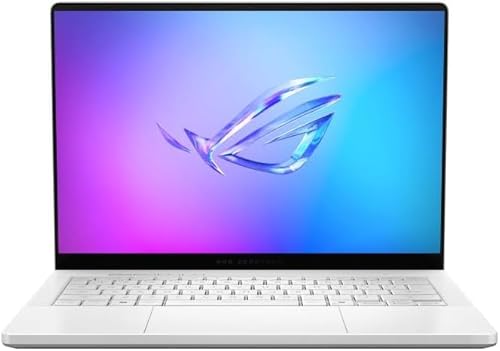

Asus ROG Zephyrus G14 vs Asus TUF Gaming A15 at a Glance
| Feature | Asus ROG Zephyrus G14 | Asus TUF Gaming A15 |
|---|---|---|
| Display Panel | 14-inch 3K OLED ROG Nebula Display (2880 x 1800) | 15.6-inch Full HD (FHD) Anti-Glare Display |
| Refresh Rate & Response | 120Hz, 0.2ms response time | 144Hz, Adaptive-Sync |
| Processor (CPU) | AMD Ryzen AI 9 HX 370 (12 cores, 24 threads, 50 TOPS) | AMD Ryzen 5 7535HS |
| Graphics (GPU) | NVIDIA GeForce RTX 5080 (8GB GDDR7) | NVIDIA GeForce RTX 3050 (4GB DDR5 SDRAM, up to 70W TGP) |
| System Memory (RAM) | 32GB LPDDR5X (up to 8000MHz) | 8GB DDR5 (5600MHz) |
| Internal Storage | 2TB PCIe 4.0 SSD | 512GB PCIe 4.0 NVMe SSD |
| Chassis & Durability | Premium Aluminum CNC Chassis | MIL-STD-810H Military-Grade Toughness |
| Cooling Hardware | Not listed | Dual 84-blade Arc Flow Fans |
| Special Features | Windows Copilot+ AI PC, NVIDIA G-SYNC, 500 nits | Spill Resistant, TrackPoint, HD Audio |
| Best For | Elite performance, creative work, and enthusiast gaming | Budget-conscious everyday gaming and harsh conditions |
Processing Power and AI Acceleration
Modern gaming and workstation loads demand heavy multi-threaded compute alongside dedicated neural acceleration. The processor defines how cleanly your laptop manages background processes, computational rendering, physics engines, and productivity suites. When comparing raw computational throughput, the architectural gap between these machines represents two completely distinct tiers of performance and platform design.
The Zephyrus G14 arrives equipped with the high-end AMD Ryzen AI 9 HX 370 processor, an elite piece of silicon featuring 12 physical cores and 24 threads. Beyond its core density, this chip is tailored for modern computing with up to 50 TOPS of dedicated neural processing power. As an official Windows Copilot+ PC, the G14 leverages integrated AI accelerators to drive real-time productivity tasks, image creation, and intensive system optimization. Readers tracking the broader ecosystem in our asus rog zephyrus g14 vs g16 breakdown will recognize this silicon as a major leap forward for compact machines.
By comparison, an examination of the Asus TUF Gaming A15 review profile shows it relies on the AMD Ryzen 5 7535HS. This processor handles mainstream gaming loads, operating system background duties, and standard productivity tasks capably. However, the listing does not specify advanced neural processing hardware or core configurations that match the 12-core architecture of the Ryzen AI series. For users wondering about Zephyrus G14 vs TUF A15 performance during complex compiling, multi-layer rendering, or local AI model execution, the G14 operates in an entirely different class of computing speed.
Edge: Asus ROG Zephyrus G14 because its 12-core, 24-thread AMD Ryzen AI 9 HX 370 processor provides vast multi-threaded headroom and 50 TOPS of dedicated AI processing.
Graphics and Gaming Performance
Dedicated graphics processors govern frame rates, geometric complexity, lighting precision, and visual fidelity in modern gaming. A GPU must possess enough memory bandwidth, compute units, and dedicated video RAM (VRAM) to buffer high-resolution textures without hitching. The graphical disparity between these two systems shapes whether a user will play modern titles at maximum fidelity or stick to modest settings at standard definition.
The Zephyrus G14 houses the cutting-edge NVIDIA GeForce RTX 5080 Laptop GPU backed by 8GB of next-generation GDDR7 memory. This GPU integrates modern architectural technologies like DLSS 4 and advanced ray tracing to realistically simulate complex environmental lighting, reflections, and shadow geometry. For demanding AAA titles running at high pixel densities, the RTX 5080 provides the graphics horsepower needed to sustain high frame rates without choking the pipeline. Those weighing high-end portability against desktop-replacement form factors often explore our asus rog zephyrus g14 vs rog strix scar 16 comparison for similar context.
The TUF Gaming A15 incorporates an entry-level NVIDIA GeForce RTX 3050 Laptop GPU with 4GB of DDR5 SDRAM VRAM, capable of reaching up to 70W TGP via Dynamic Boost. While the RTX 3050 remains capable of driving popular competitive esports titles at standard 1080p settings, its 4GB VRAM buffer poses strict limitations when attempting to load high-resolution texture packs or heavy ray-traced workloads. When deciding between the Asus ROG Zephyrus G14 or TUF Gaming A15 for gaming, enthusiasts pursuing ultra-preset graphics and next-gen rendering techniques will find the RTX 5080 dramatically superior.
Edge: Asus ROG Zephyrus G14 due to its top-tier NVIDIA GeForce RTX 5080 GPU with 8GB GDDR7 memory and DLSS 4 support.
Display Quality and Visual Fidelity
A laptop display serves as the direct window to all your games, media, and creative projects. Panel type, pixel density, response timing, and refresh rate dictate how fluid motion appears and how accurately colors are represented on screen. Evaluating the ROG Zephyrus G14 vs TUF A15 display specifications highlights a complete contrast between studio-grade visual luxury and pragmatic, motion-oriented gaming utility.
The Zephyrus G14 is fitted with a 14-inch 3K (2880 x 1800) OLED display certified to ROG Nebula standards. This panel delivers remarkable contrast, an ultra-fast 0.2ms response time, a smooth 120Hz refresh rate, and up to 500 nits of peak brightness. Furthermore, the inclusion of NVIDIA G-SYNC eliminates screen tearing by synchronizing the panel refresh rate directly with GPU frame delivery. For design work and cinematic immersion, this OLED panel delivers absolute blacks and vivid highlights, competing directly with dedicated lifestyle machines as shown in our asus rog zephyrus g14 vs zenbook 14 oled analysis.
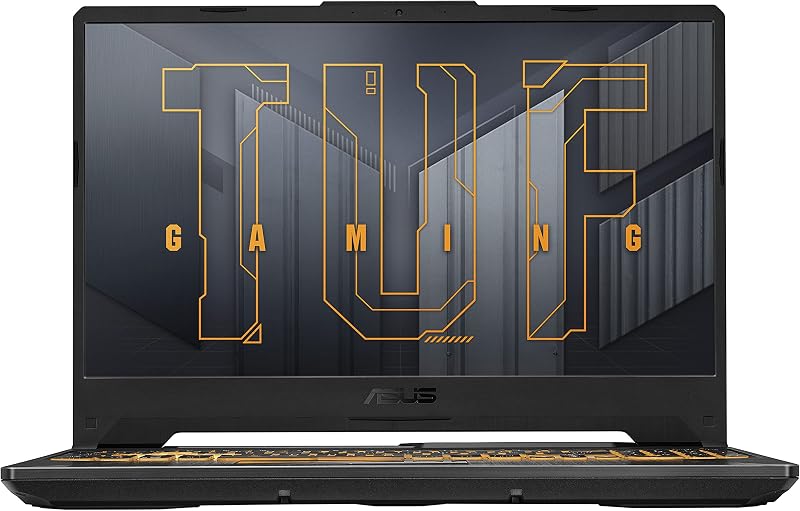
The TUF Gaming A15 relies on a larger 15.6-inch Full HD display featuring a fast 144Hz refresh rate paired with Adaptive-Sync technology. To mitigate harsh lighting and reflections in bright environments, the TUF screen incorporates a functional anti-glare coating. While the 144Hz panel keeps competitive motion fluid and prevents screen tearing during fast-paced firefights, its standard resolution and panel technology cannot reproduce the rich contrast levels, pixel density, or 0.2ms pixel response speeds found on the G14 OLED surface.
Edge: Asus ROG Zephyrus G14 thanks to its vibrant 3K OLED ROG Nebula display featuring 500 nits brightness and an ultra-low 0.2ms response time.
Memory and Storage Capacity
Memory bandwidth and drive capacity determine how effectively a gaming laptop juggles multiple background tasks, assets, and storage-heavy modern game installations. Insufficient RAM introduces severe bottlenecks during multitasking, while constrained storage drives force users to constantly delete titles to clear space. The out-of-the-box hardware allocations on these models diverge considerably.
Under the hood of the Zephyrus G14 lies a massive 32GB pool of high-speed LPDDR5X RAM clocked at up to 8000MHz. This substantial memory allocation makes the machine an effortless powerhouse for running virtualized environments, handling heavy creative suites, and streaming simultaneously. Complementing this memory is an expansive 2TB PCIe 4.0 SSD, giving users ample room to store major game installs, system backups, and massive raw media files without running into capacity warnings.
Conversely, the TUF Gaming A15 comes configured with 8GB of DDR5-5600MHz memory alongside a 512GB PCIe 4.0 NVMe SSD. For modern gaming, 8GB represents the functional minimum for booting modern operating systems and running contemporary titles without hitting the page file. While its PCIe 4.0 SSD offers snappy system boot and loading times, modern game sizes mean a 512GB drive will fill up after just a handful of major installations. When evaluating the Asus ROG Zephyrus G14 or TUF Gaming A15 for creators, the G14 provides four times the system memory and four times the internal storage space out of the box.
Edge: Asus ROG Zephyrus G14 because of its 32GB LPDDR5X 8000MHz RAM and expansive 2TB PCIe 4.0 SSD.
Chassis Build, Durability, and Cooling
A gaming laptop must balance physical construction, structural durability, and thermal management. Premium materials offer structural rigidity and sleek aesthetics, while ruggedized chassis engineering protects internal components against real-world environmental accidents, impacts, and temperature spikes. When looking at the physical makeup of the TUF Gaming A15 vs Asus ROG Zephyrus G14, the two chassis target completely different working environments.
The TUF Gaming A15 is constructed specifically around physical survivability. It has successfully undergone rigorous MIL-STD-810H military-grade endurance tests, proving its ability to withstand drops, vibration, extreme humidity, and intense operating temperatures. Furthermore, the A15 features a spill-resistant keyboard and an integrated TrackPoint, minimizing the risk of liquid accidents ruining your hardware. To handle continuous gaming loads, the TUF utilizes a specialized cooling configuration consisting of two 84-blade Arc Flow Fans designed to maximize internal airflow without excessive operational noise. Many users cross-shop this rugged utility against higher tier models in our asus rog strix scar 16 vs tuf gaming a15 evaluation.
The Zephyrus G14 emphasizes premium manufacturing, boasting a precision-milled aluminum CNC chassis in an eye-catching Platinum White finish. With dimensions measuring 12.26 inches long by 0.63 inches thick and 8.66 inches deep, it adopts an ultra-portable profile engineered for executive bags and sleek desks. However, the listing does not cite MIL-STD-810H certifications or spill-resistant ingress protection, making it more vulnerable to rough handling or beverage spills than its rugged sibling. Those investigating whether the TUF Gaming A15 is worth it for demanding physical workspaces will appreciate its heavy-duty construction.
Edge: Asus TUF Gaming A15 due to its certified MIL-STD-810H military-grade drop resistance, spill-resistant keyboard, and dual 84-blade Arc Flow cooling fans.
Pros and Cons
Asus ROG Zephyrus G14

Pros
- 14-inch 3K OLED 120Hz ROG Nebula Display
- NVIDIA GeForce RTX 5080 with GDDR7 memory
- AMD Ryzen AI 9 HX 370 processor
- 32GB LPDDR5X RAM at 8000MHz
- Massive 2TB PCIe 4.0 SSD
Cons
- Heavier 9-pound listed total weight
- Lacks military-grade drop test certification
View Asus ROG Zephyrus G14 on Amazon
Asus TUF Gaming A15
Pros
- MIL-STD-810H military-grade toughness
- Smooth 144Hz Adaptive-Sync display
- Dual 84-blade Arc Flow cooling fans
- Spill-resistant keyboard design
Cons
- Limited 8GB DDR5 system memory
- Modest 4GB RTX 3050 graphics memory
- Smaller 512GB PCIe 4.0 storage
View Asus TUF Gaming A15 on Amazon
Who Should Buy Each One
Choose the Asus ROG Zephyrus G14 If
- You want a top-tier OLED display with 3K resolution, 500 nits of brightness, and true 0.2ms response times.
- You require bleeding-edge graphical rendering via an NVIDIA GeForce RTX 5080 with GDDR7 memory.
- You need 32GB of ultra-fast 8000MHz RAM and a 2TB SSD ready for massive workloads and modern game libraries.
- You prioritize an ultra-portable, precision-crafted CNC aluminum chassis for work and travel.
Choose the Asus TUF Gaming A15 If
- You need certified MIL-STD-810H military-grade protection against drops, vibrations, and harsh environments.
- You want the peace of mind offered by a spill-resistant keyboard for desk setups prone to accidents.
- You play primarily competitive esports titles that benefit from a 15.6-inch 144Hz Adaptive-Sync display.
- You prefer a functional, heavy-duty clamshell design with dual 84-blade Arc Flow cooling fans.
Final Verdict
For gamers and professionals who want uncompromised performance, the Zephyrus G14 is the clear overall winner in this comparison. With its cutting-edge AMD Ryzen AI 9 HX 370 processor, revolutionary NVIDIA GeForce RTX 5080 graphics, 32GB of high-speed LPDDR5X RAM, and brilliant 3K OLED ROG Nebula panel, it operates at a standard that outclasses entry-level hardware across every technical metric. Anyone asking is ROG Zephyrus G14 worth it will find that its overwhelming processing lead and visual presentation justify its place at the top of the compact gaming category.
However, the TUF Gaming A15 secures a definitive victory for users who prioritize physical endurance, workshop resilience, and baseline gaming utility. If your laptop routinely encounters dusty job sites, travel bags without padding, or crowded desks where spills might happen, the MIL-STD-810H build and spill-resistant design make the TUF A15 an exceptionally dependable companion. While it carries modest computing specifications, its 144Hz display and reliable cooling system deliver exactly what practical, no-nonsense gamers require. For broader perspective on this lineup, you can also explore our asus rog zephyrus g16 vs tuf gaming a15 head-to-head breakdown.
FAQ
What is the main display difference in the ROG Zephyrus G14 vs TUF A15 display matchup?
The Zephyrus G14 features a 14-inch 3K (2880 x 1800) OLED ROG Nebula display with a 120Hz refresh rate, 500 nits brightness, and a rapid 0.2ms response time. The TUF Gaming A15 features a larger 15.6-inch Full HD display with a 144Hz refresh rate, Adaptive-Sync, and an anti-glare coating.
How does the Zephyrus G14 vs TUF A15 performance compare for high-end rendering?
The Zephyrus G14 substantially outperforms the TUF Gaming A15 due to its 12-core, 24-thread AMD Ryzen AI 9 HX 370 processor and NVIDIA GeForce RTX 5080 GPU with 8GB of GDDR7 memory, compared to the TUF A15’s AMD Ryzen 5 7535HS and RTX 3050 with 4GB of VRAM.
Is TUF Gaming A15 worth it for everyday travel and rough handling?
Yes, the TUF Gaming A15 is specifically built to survive rigorous environments. It features MIL-STD-810H military-grade testing against drops, vibration, humidity, and extreme temperatures, along with a spill-resistant keyboard design that protects against desktop accidents.
Is ROG Zephyrus G14 worth it for professional creative workflows?
The Zephyrus G14 is exceptionally well-suited for creative tasks thanks to its high-resolution 3K OLED panel, 32GB of LPDDR5X system memory clocked at 8000MHz, 2TB PCIe 4.0 SSD, and 50 TOPS of dedicated NPU compute for Windows Copilot+ AI acceleration.
Which laptop offers more onboard memory and storage out of the box?
The Zephyrus G14 comes with 32GB of LPDDR5X RAM and a 2TB PCIe 4.0 SSD. The TUF Gaming A15 is equipped with 8GB of DDR5 RAM and a 512GB PCIe 4.0 NVMe SSD.
Does the TUF Gaming A15 include specialized thermal cooling?
Yes, the TUF Gaming A15 is outfitted with a pair of 84-blade Arc Flow Fans designed to improve cooling performance and maintain airflow without creating extra noise.


