Choosing between these two desktop network-attached storage appliances comes down to a fundamental hardware decision: bay capacity and network bandwidth. The core difference between the Synology DS923+ and the Synology DS1522+ is whether your workflow functions best with a 4-bay chassis carrying dual 1GbE ports and pre-bundled memory and storage, or a 5-bay chassis equipped with quad 1GbE ports, dual expansion chassis support, and optional 10GbE network expansion.
Select the DS923+ if you want an all-in-one bundle containing 16TB of hard drive storage, solid-state cache, and 32GB of memory for compact virtualization or office backups. Select the DS1522+ if you manage multi-client environments that require four physical network interfaces and room to scale up to fifteen drives across expansion units.

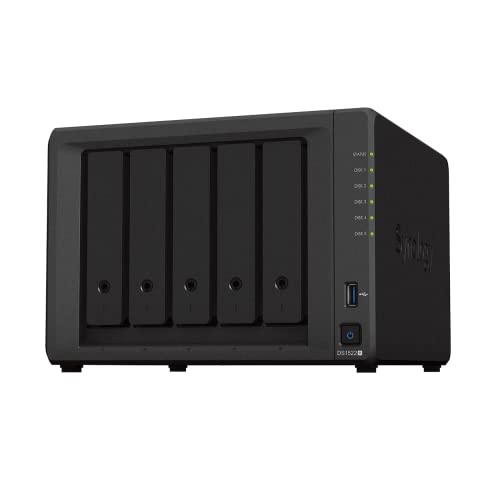
Synology DS923+ vs DS1522+ at a Glance
| Attribute | Synology DS923+ | Synology DS1522+ |
|---|---|---|
| Primary Drive Bays | 4 bays (16TB included via 4 x 4TB HDDs) | 5 bays (Diskless) |
| Maximum Drive Capacity with Expansion | 1 x eSATA port (Listing does not specify expansion drive total) | Up to 15 drives (via 2 x DX517 units) |
| Processor | AMD Ryzen R1600 2-Core (2.6 GHz, up to 3.1 GHz Turbo) | Not listed |
| System Memory | 32GB DDR4 ECC | Not listed |
| Included Solid-State Storage | 1TB NVMe SSD (2 x 500GB M.2 2280) | Not listed |
| Network Ports | 2 x RJ-45 1GbE (Link Aggregation / Failover) | 4 x RJ-45 1GbE (Optional 10GbE connectivity) |
| Sequential Read/Write Speeds | Not listed | Up to 736 MB/s read / 796 MB/s write |
| File Systems Supported | EXT4, Btrfs | Not listed |
| Warranty | Manufacturer warranty | 3 Years |
| Best For | Prosumers wanting complete bundled storage and memory | Teams needing five bays, quad LAN, and expansion scaling |
Drive Bays and Storage Expansion Potential
Drive bay capacity dictates how you configure your data protection, volume structure, and storage pools. In a 4-bay chassis, choosing a fault-tolerant configuration like RAID 5 or RAID 6 requires committing one or two disks entirely to parity data. Adding a fifth drive bay fundamentally alters storage efficiency by providing higher usable storage per drive when establishing dual-drive redundancy, or giving you a dedicated hot spare without sacrificing normal storage pools.
Examining this DS923+ vs DS1522+ drive bays comparison reveals a clear divide in scalability. The DS923+ arrives configured with four 4TB SATA drives for a combined 16TB capacity, plus two 500GB M.2 NVMe SSDs for caching. It includes an eSATA port for external storage attachments. The DS1522+, by contrast, starts with five internal bays in a diskless configuration and supports two optional DX517 expansion units, allowing an administrator to scale the appliance up to a maximum of fifteen storage drives. For buyers who evaluate platforms like the synology ds423+ vs ds1522+, stepping into a 5-bay desktop architecture provides immediate operational headroom.
The operational cost of choosing fewer drive bays is reaching a capacity wall much sooner. If your data archives expand faster than anticipated, a 4-bay server requires replacing smaller disks with larger ones individually and rebuilding the RAID array each time. The 5-bay layout on the DS1522+ allows you to drop in an additional drive to expand an active storage volume immediately, and its dual DX517 expansion support provides room for multi-terabyte expansion down the line.
Edge: Synology DS1522+ because of its five primary bays and support for two DX517 expansion units scaling to fifteen drives.
Ethernet Ports and Network Bandwidth
Network port density determines how many client devices can simultaneously read and write data without congesting the local network. A network-attached storage system acting as a central backup target, surveillance hub, or file server requires sufficient physical bandwidth to prevent data transfers from choking local workstations. When multiple departments or client devices access the server at once, multiple physical gigabit ports allow traffic segregation and link aggregation.
Looking closely at the DS923+ vs DS1522+ ethernet ports specification highlights one of the most practical operational differences between these units. The DS923+ listing outlines two RJ-45 1GbE LAN ports equipped with Link Aggregation and failover support. The DS1522+ doubles this layout, providing four 1GbE ports right out of the box. Furthermore, the DS1522+ listing specifically advertises optional 10GbE connectivity to handle specialized, bandwidth-heavy workflows. When comparing multi-port storage enclosures like the synology ds1522+ vs qnap ts-464, physical network interfaces remain a critical sorting criterion.
Having four Gigabit ports on the DS1522+ gives system administrators the flexibility to assign separate physical interfaces to distinct services. One port can service regular office file sharing, a second can handle surveillance camera data, and the remaining two can be bonded for aggregated server backups. The optional 10GbE network module on the DS1522+ also gives offices an upgrade path when upgrading their local switch hardware, whereas the DS923+ listing remains capped at two 1GbE physical ports.
Edge: Synology DS1522+ due to its four native 1GbE LAN ports and optional 10GbE expansion capability.
Virtualization and System Memory Capacity
Virtualization workflows require robust processing power and ample system memory to keep virtual machines and application containers running smoothly. When deploying Synology DiskStation Manager (DSM) virtualization packages, container management tools, or advanced LUN iSCSI storage targets, having error-correcting memory and fast solid-state storage prevents data corruption and eliminates processing bottlenecks.
Evaluating the Synology DS923+ or DS1522+ for virtualization reveals a notable difference in what comes in the box. The DS923+ hardware bundle includes an AMD Ryzen R1600 dual-core processor operating at 2.6 GHz with boost speeds up to 3.1 GHz, paired with 32GB of DDR4 ECC memory. It also includes two 500GB M.2 2280 NVMe SSDs totaling 1TB of high-speed cache. The listing specifically cites this model for virtual machine and container storage using Btrfs and iSCSI targets. While the DS1522+ listing confirms built-in virtualization solutions, it does not specify its processor model or included RAM capacity, arriving as a diskless unit that requires separate configuration. Those analyzing smaller hardware alternatives such as the synology ds224+ vs ds1522+ often note that ECC memory support provides essential data integrity protection.
Because the DS923+ bundle supplies 32GB of ECC RAM and 1TB of NVMe SSD caching from day one, administrators can deploy containers, allocate memory to virtual machines, and run database workloads immediately without sourcing third-party memory modules. The DS1522+ provides the chassis room to run those workloads, but the listing leaves processor and memory specs unlisted, requiring the buyer to configure those components.
Edge: Synology DS923+ for including an AMD Ryzen R1600 processor, 32GB of ECC DDR4 memory, and dual NVMe SSD caching drives.
Media Streaming and Plex Server Capabilities
Centralized media management requires a storage unit capable of handling large file transfers, managing multi-terabyte video directories, and maintaining high continuous throughput. When deciding on the Synology DS923+ or DS1522+ for plex libraries and multimedia streaming, local throughput and file system stability serve as the foundational criteria.
The DS923+ listing notes that the system is engineered to centralize multimedia collections under rigorous workloads, highlighting support for editing high-quality video alongside photo and file synchronization tools. The Ryzen R1600 processor provides dependable multi-thread computation for direct-stream media delivery, and the unit supports Btrfs and EXT4 internal file systems. The DS1522+ listing emphasizes integrated file and photo management, as well as data protection for personal and professional media assets. Users who evaluate alternatives like the synology ds923+ vs qnap ts-464 frequently review file system capabilities when building media archives.
Neither product listing claims dedicated integrated graphics transcoding hardware, meaning both systems are best matched with direct-play streaming setups or media environments where client endpoints manage decoding. The real divergence here is physical capacity: the DS1522+ gives media curators a fifth internal bay to store expansive 4K video directories, while the DS923+ delivers a pre-packaged 16TB baseline immediately.
Edge: Tie because both units deliver reliable multimedia streaming and file management, with the choice coming down to storage capacity preferences.
File Transfer Throughput and Storage Management
Throughput figures determine how rapidly a network storage server completes scheduled backups, ingests raw footage, and handles bulk file movements across a network. In any head-to-head assessment of DS1522+ vs DS923+ performance, published transfer metrics and file management tools define day-to-day productivity.
In this Synology DS1522+ review data, the manufacturer specifies sequential throughput reaching up to 736 MB/s read and 796 MB/s write. These numbers demonstrate that the DS1522+ chassis can fully saturate multiple bonded Gigabit lines or feed high-speed connections when equipped with optional 10GbE hardware. The Synology DS923+ review data highlights robust storage management using EXT4 and Btrfs file systems, advanced LUN iSCSI support, and software built for lightning-fast file sharing and surveillance operations. Buyers who look at entry-level units like the synology ds923+ vs qnap ts-233 will find that both 923+ and 1522+ models operate in an entirely different performance class.
When comparing Synology DS923+ vs DS1522+ specs, the DS1522+ holds the documented transfer advantage. Achieving up to 796 MB/s write throughput ensures that large disk writes, surveillance camera streams, and multi-user archive operations transfer without bottlenecking the system. The DS923+ provides capable file-sharing software, but its listing does not state maximum sequential read or write figures.
Edge: Synology DS1522+ because of its documented sequential throughput rates of up to 736 MB/s read and 796 MB/s write.
Deployment Convenience and Out-of-the-Box Setup
The time and effort required to get a network server up and running can dramatically affect your overall deployment experience. Some administrators prefer a diskless enclosure that they can customize with specialized enterprise drives, while other users need an all-inclusive hardware bundle that arrives ready for assembly and initialization.
Understanding whether is DS1522+ worth it depends heavily on your deployment timeline and preferences. The DS1522+ arrives as a diskless enclosure. It includes the chassis, power adapter, AC cord, accessory pack, quick installation guide, and two RJ-45 LAN cables, leaving all drive selection, purchasing, and memory sizing to the buyer. The DS923+ offering reviewed here is a comprehensive bundle. It arrives with the DS923+ chassis, 32GB of DDR4 ECC memory, four 4TB SATA hard disk drives giving you 16TB of storage, and two 500GB M.2 2280 NVMe solid-state drives. The listing notes that drives and memory come uninstalled in a sealed box, requiring user installation before setup.
For buyers who want to avoid sourcing compatible drives and memory modules individually, the DS923+ bundle provides an immediate complete solution. For organizations that already own hard drives or intend to use specific high-capacity enterprise-class models from the start, the diskless DS1522+ avoids paying for bundled storage you might replace.
Edge: Synology DS923+ for bundling 16TB of HDD storage, dual NVMe caching SSDs, and 32GB of ECC memory in the box.
Pros and Cons
Synology DS923+

Pros
- Pre-packaged 32GB DDR4 ECC memory
- Includes 16TB storage across four drives
- Dual 500GB NVMe SSD cache modules
- AMD Ryzen R1600 dual-core processor
Cons
- Limited to two 1GbE LAN ports
- Drives and memory require user installation
View Synology DS923+ on Amazon
Synology DS1522+

Pros
- Five primary internal drive bays
- Four 1GbE network ports with link aggregation
- Scales up to 15 drives with expansions
- Up to 796 MB/s sequential write throughput
- Three-year manufacturer warranty
Cons
- Diskless chassis requires purchasing storage separately
- Processor and base memory not listed
View Synology DS1522+ on Amazon
Who Should Buy Each One
Choose the Synology DS923+ If
- You want an all-in-one hardware bundle that includes 16TB of SATA storage and 1TB of NVMe caching SSDs.
- Your workloads demand 32GB of pre-packaged DDR4 ECC memory for virtual machines, container hosting, and local databases.
- Your network infrastructure relies on two 1GbE connections with Link Aggregation and failover support.
- You want a desktop server specifically outfitted for Btrfs snapshots, LUN iSCSI services, and compact surveillance tasks.
Choose the Synology DS1522+ If
- You need five primary drive bays to implement RAID 6 arrays or expand active storage pools without rebuilding.
- Your office network requires four 1GbE LAN ports for traffic segmentation, load balancing, or multi-department access.
- You plan to scale capacity substantially by adding up to two DX517 expansion units for fifteen total drives.
- You want high documented throughput up to 796 MB/s and an optional 10GbE network upgrade path.
Final Verdict
For growing office environments, creative teams, and users anticipating aggressive data expansion, the Synology DS1522+ is the superior long-term platform. Its five internal bays provide the flexibility needed for safer multi-disk redundancy, and its four Gigabit network ports enable sophisticated traffic management across busy local networks. With documented read/write speeds reaching up to 736/796 MB/s, an optional 10GbE networking upgrade, and the ability to scale up to fifteen drives via two DX517 units, the DS1522+ delivers the headroom necessary for scaling operations.
On the other hand, the Synology DS923+ package evaluated here is the clear winner for prosumers, home labs, and virtualization enthusiasts who want an all-inclusive system immediately. By delivering an AMD Ryzen R1600 processor, 32GB of ECC DDR4 memory, 16TB of HDD storage, and dual M.2 NVMe SSDs in a single package, it completely eliminates the hassle of purchasing compatible components separately. If your deployment does not demand four Ethernet interfaces or a fifth drive bay, the DS923+ provides exceptional capability right out of the box.
FAQ
How many total drive bays do the DS923+ and DS1522+ support?
The DS923+ features four internal SATA drive bays, while the DS1522+ provides five internal drive bays. For external expansion, the DS1522+ listing confirms support for up to ten extra bays using two DX517 expansion units, reaching a maximum of fifteen storage drives. The DS923+ listing includes one eSATA port, but does not specify total expanded bay counts.
What network ports are available on the DS923+ vs DS1522+?
The DS923+ features two RJ-45 1GbE LAN ports that support Link Aggregation and failover protection. The DS1522+ features four RJ-45 1GbE LAN ports and supports an optional 10GbE connectivity module for higher bandwidth requirements.
Does the Synology DS923+ come with drives pre-installed?
No. While the DS923+ package includes four 4TB SATA hard drives (16TB total) and two 500GB M.2 NVMe SSDs, the listing states that hard drives and memory upgrades are included separately in the sealed box and require physical installation before use.
What transfer speeds can the Synology DS1522+ achieve?
According to the product specifications, the Synology DS1522+ delivers sequential read speeds of up to 736 MB/s and sequential write speeds of up to 796 MB/s.
Which file systems does the Synology DS923+ support?
The DS923+ listing specifies support for internal Btrfs and EXT4 file system formats, providing advanced LUN iSCSI services, storage management, and data protection.
What devices are compatible with the Synology DS1522+?
The DS1522+ listing outlines compatibility across Android, Desktop, Laptop, Server, and iPhone hardware, facilitating multi-platform file sharing, backup synchronization, and photo management.
What warranty is included with the DS1522+?
The Synology DS1522+ listing states that it comes with a 3-year manufacturer warranty, whereas the DS923+ listing states standard manufacturer warranty coverage without a specific multi-year duration specified.


