The choice between the Synology DS224+ and the synology ds923+ vs ds1522+ to see how five-bay solutions compare against four-bay chassis designs.
If you are wondering is DS1522+ worth it purely for disk flexibility, the numbers confirm its long-term viability. Operating a five-bay enclosure lets you distribute data across more spindles, improving continuous array operation and minimizing downtime during routine expansions. The DS224+ fulfills standard home backup requirements well, but it provides no mechanical path forward once those two internal bays reach their capacity limit.

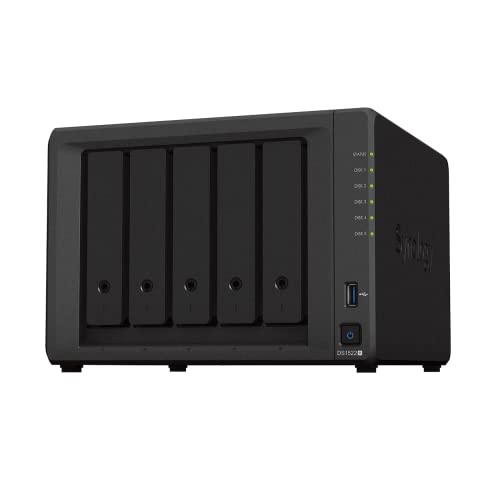
Edge: Synology DS1522+ due to its native five-bay footprint and seamless scaling up to fifteen drives using dual DX517 units.
Network Throughput and Interface Options
Network bandwidth defines how rapidly multiple client machines can read and write files to your network-attached server. The DS224+ includes two 1GbE RJ-45 LAN ports equipped with link aggregation and failover support. This configuration lets users combine both ports to handle simultaneous household tasks or sustain a uninterrupted connection if a single ethernet cable fails, but absolute point-to-point transfer speeds remain bounded by the single-gigabit ceiling for isolated clients.
The DS1522+ vastly upgrades this infrastructure by supplying four independent 1GbE network ports alongside an expansion slot for a Synology DS1522+ 10GbE upgrade module. With all interfaces engaged and upgraded networking hardware in place, the DS1522+ achieves rated sequential performance figures of up to 736 MB/s read and 796 MB/s write. These speeds remove local bottlenecks when transferring large video archives, performing full-system images, or hosting concurrent shared folders across a corporate department.
For office teams working directly off network shares, standard dual-gigabit ports quickly become congested. Buyers weighing network limitations against four-bay alternatives should inspect the synology ds224+ vs ds423+ breakdown for additional interface comparisons. The DS1522+ provides room for growth through optional high-speed PCI-style modular connectivity that the DS224+ simply cannot match.
Edge: Synology DS1522+ thanks to four standard 1GbE interfaces and support for an optional 10GbE expansion card.
Virtualization and System Workloads
Evaluating the DS224+ or DS1522+ for virtualization requires assessing processing architecture and resource management. The DS224+ listing specifies an Intel Celeron J4125 4-core processor operating at a 2.0GHz base frequency with burst speeds reaching 2.7GHz, paired with 6GB of DDR4 non-ECC SODIMM system memory. This silicon profile makes the DS224+ exceptionally agile at indexing items in Synology Photos and Synology Drive, running background containerized microservices, and serving as a 4K multimedia streaming server.
While the DS1522+ product listing does not specify its exact processor model or pre-installed memory capacity, the manufacturer explicitly positions this unit for dedicated virtualization solutions, multi-platform data protection, and heavy surveillance environments. The sequential read speeds exceeding 700 MB/s indicate that the storage bus and processing engine are built to sustain concurrent input/output operations from multiple virtual machine disks without stalling system services.
For a basic home server or local test bench, the DS224+ handles routine Docker deployments and lightweight virtualization with ease. However, when selecting a machine to act as a resilient hypervisor host managing corporate endpoints or intensive database containers, the DS1522+ holds the technical architecture designed for enterprise virtualization tasks. Shoppers looking at mixed virtualization environments can read our synology ds224+ vs qnap ts-464 analysis to see how multi-core platforms stack up under virtualized loads.
Edge: Synology DS1522+ because of its dedicated multi-user virtualization platform capabilities and superior data pipeline.
Power Consumption and Physical Footprint
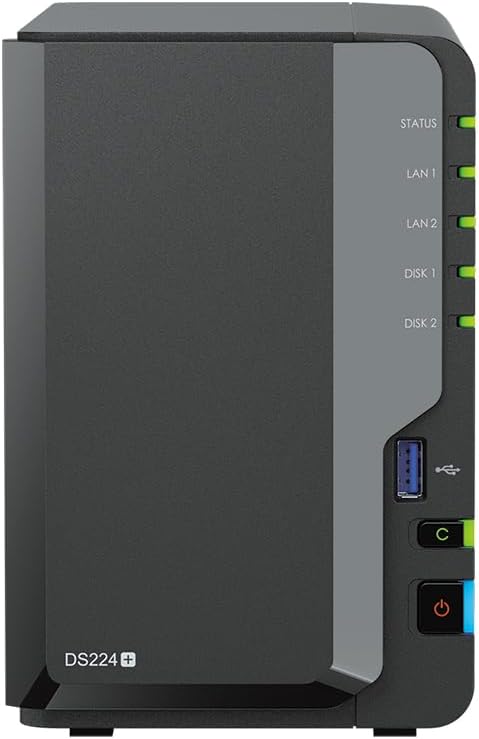
Continuous electricity usage is a major consideration for hardware that runs twenty-four hours a day, seven days a week. In this category, the Synology DS224+ power consumption metrics are exceptionally frugal. The listing indicates that operational power usage drops as low as 15 watts, minimizing long-term utility overhead while quietly executing background file management, desktop backups, and security monitoring tasks from a compact tower format.
The DS1522+, by virtue of housing five internal drive sleds and heavier enterprise-grade networking components, presents a distinctly larger desktop presence. The product measures 9.17 inches deep, 9.06 inches wide, and 6.54 inches high, carrying a dry weight of 4,190 grams without any hard drives installed. When loaded with five mechanical hard drives spinning continuously, its physical volume and power draw are naturally higher than an ultra-compact two-bay enclosure.
For home offices, bedrooms, or compact entertainment centers where thermal generation, acoustics, and power efficiency take precedence, the DS224+ is distinctly less intrusive. The DS1522+ requires appropriate shelf clearance, adequate ventilation, and acceptance of the increased electrical demands associated with a multi-bay server. Users interested in footprint comparisons across alternate brands can consult our guide on the synology ds1522+ vs qnap ts-233 to weigh multi-bay chassis sizes.
Edge: Synology DS224+ due to its minimal 15-watt operating draw and space-saving two-bay footprint.
Out-of-the-Box Usability and Included Hardware
Hardware packaging dictates how quickly your storage environment can be deployed after unboxing. The DS224+ package analyzed here is a fully equipped storage solution that arrives with 8TB of total capacity, distributed across two 4TB 6Gb/s SATA hard drives, alongside 6GB of installed DDR4 non-ECC memory. Users simply unpack the sealed chassis, connect the power supply and dual LAN cables, and proceed directly through the Synology DSM operating system setup wizard without purchasing supplementary media.
Conversely, the DS1522+ is sold diskless. The package includes the main NAS chassis, an AC power adapter, an AC power cord, two RJ-45 LAN cables, and an accessory pack, but no hard drives or solid-state storage. Buyers must purchase compatible storage media separately and budget time for drive mounting and initial volume provisioning before any data management, surveillance, or virtualization roles can be assigned.
For home users and solo practitioners seeking immediate deployment, the DS224+ eliminates hardware sourcing friction. However, business administrators frequently prefer diskless units like the DS1522+ because it lets them select specific enterprise-grade drive models matched to their specific performance and warranty requirements. For another perspective on multi-bay expansion vs all-in-one setups, see our synology ds1522+ vs qnap ts-464 comparison.
Edge: Synology DS224+ for providing an immediate, fully functional 8TB storage array straight out of the box.
Pros and Cons
Synology DS224+
Pros
- Pre-installed 8TB total storage capacity
- Operational power usage as low as 15 watts
- Dedicated 4K multimedia server functionality
- Configured with 6GB DDR4 memory
Cons
- Fixed two-bay capacity limit
- No optional 10GbE network expansion
View Synology DS224+ on Amazon
Synology DS1522+

Pros
- Five native hot-swappable drive bays
- Scales up to 15 drives via dual DX517
- High sequential write speeds up to 796 MB/s
- Four 1GbE ports with optional 10GbE support
Cons
- Ships diskless without pre-installed storage
- Listing does not specify processor model
View Synology DS1522+ on Amazon
Who Should Buy Each One
Choose the Synology DS224+ If
- You want a complete storage solution with 8TB of hard drives and 6GB of RAM pre-installed in the box.
- You need an energy-conscious system that consumes as little as 15 watts during continuous operation.
- Your primary tasks involve automated photo backups, centralized desktop file sync, and 4K multimedia streaming.
- You have limited desktop workspace and prefer a quiet, compact tower server.
Choose the Synology DS1522+ If
- You require five native bays to configure fault-tolerant multi-drive arrays for critical workplace data.
- You plan to scale your capacity up to 15 drives over time using external DX517 expansion units.
- Your network demands high-throughput file transfers and requires optional 10GbE network card support.
- You intend to host virtualized workloads and multi-user environments supported by sequential speeds up to 796 MB/s.
Final Verdict
For home users, remote professionals, and multimedia enthusiasts choosing between the DS224+ or DS1522+ for home server duties, the Synology DS224+ is the most practical choice. It delivers a comprehensive turnkey package with 8TB of raw storage, an Intel Celeron quad-core processor capable of burst speeds up to 2.7GHz, 6GB of system memory, and a low 15-watt operating draw. It handles Synology Photos indexing, automated local backups, and media delivery efficiently without requiring separate disk procurement or complex network infrastructure.
The Synology DS1522+ wins decisively when raw scalability, network throughput, and data resilience take priority. With five native drive bays, expandability to fifteen total drives via DX517 units, four 1GbE network ports, optional 10GbE expansion, and sequential write speeds hitting 796 MB/s, it represents a dedicated workhorse for business collaboration and virtualization. If your storage requirements will outgrow two bays or your workflows demand multi-gigabit speeds, the DS1522+ is the superior long-term hardware investment.
FAQ
Can the DS224+ connect to external expansion units to add more drive bays?
The DS224+ listing does not specify support for multi-bay expansion enclosures like the DX517. It is designed as a standalone two-bay tower server, meaning capacity upgrades require replacing the internal 4TB drives with higher-capacity hard drives.
Does the DS1522+ include hard drives in the box?
No, the DS1522+ is sold as a diskless unit. The package contains the NAS chassis, AC power adapter, power cord, two RJ-45 LAN cables, and accessory hardware, but storage drives must be purchased separately.
What network upgrade options are available for the DS1522+?
The DS1522+ features four onboard 1GbE ports and includes an expansion port designed for an optional 10GbE network upgrade module, allowing the unit to achieve sequential read speeds up to 736 MB/s and write speeds up to 796 MB/s.
What file systems are supported on the DS224+?
According to the product specifications, the internal file system format of the DS224+ supports both Btrfs and EXT4, allowing users to take advantage of advanced snapshot protection and data integrity features.
How much memory is installed in the DS224+?
The DS224+ model in this comparison comes pre-configured with 6GB of DDR4 non-ECC SODIMM memory, providing sufficient overhead for file management, desktop backups, and web applications.
Can both models handle surveillance camera recordings?
Yes, both units run Synology DSM and support surveillance management features. The DS224+ listing explicitly includes Surveillance station roles alongside its security tools, while the DS1522+ listing highlights integrated surveillance solutions for multi-camera business deployments.