The core divergence between the eero Max 7 and the TP-Link Deco BE85 comes down to physical connection versatility versus integrated smart home control. While both systems deliver tri-band Wi-Fi 7 speeds, the Deco BE85 provides specialized wired expandability through an optical SFP+ combo port alongside standard multi-gigabit Ethernet, whereas the Max 7 incorporates built-in radios for Zigbee, Thread, and Matter directly into the mesh node.
Homeowners seeking a streamlined living space with automated lighting and integrated smart device management should pick the eero Max 7, while network enthusiasts who need direct fiber connectivity, local storage sharing, or router-level VPN tools should select the TP-Link Deco BE85.


Eero Max 7 vs TP-Link Deco BE85 at a Glance
| Feature | Eero Max 7 | TP-Link Deco BE85 |
|---|---|---|
| Wi-Fi Rating | BE20800 | BE22000 |
| Bands & Radios | Tri-band (2.4 GHz, 5 GHz, 6 GHz; 3 radios) | Tri-band (2.4 GHz, 5 GHz, 6 GHz) |
| Ethernet & Multi-Gig Ports | 2x 10 Gbps Ethernet ports | 2x 10 Gbps (1 RJ45, 1 SFP+/RJ45 combo) + 2x 2.5 Gbps RJ45 |
| USB Connectivity | Not listed | 1x USB 3.0 Type-A port |
| Smart Home Hub Integration | Thread, Matter, Zigbee (controller only), BLE 5.0 | Voice control via Alexa and Google Assistant |
| VPN Support | Not listed | Built-in VPN Client and Server |
| Antennas & Hardware Cooling | 10 spatial streams, internal venting | 8 internal antennas, 2 internal cooling fans |
| Backhaul Support | Multi-gigabit dynamic backhaul (TrueMesh) | Simultaneous wireless plus wired backhaul |
| Manufacturer Warranty | 3-year limited warranty | Not listed |
| Best For | Integrated smart homes & automated Wi-Fi 7 mesh | Pro-grade wired expansion, fiber drops & network tweaking |
Physical Ports and Wired Flexibility
Multi-gigabit internet connections demand physical router ports that can handle intense throughput without bottlenecking local network clients. When evaluating netgear orbi 970 vs tp-link deco be85 options or general multi-gigabit setups, the layout of high-bandwidth interfaces dictates whether you need to add dedicated network switches to your workspace.
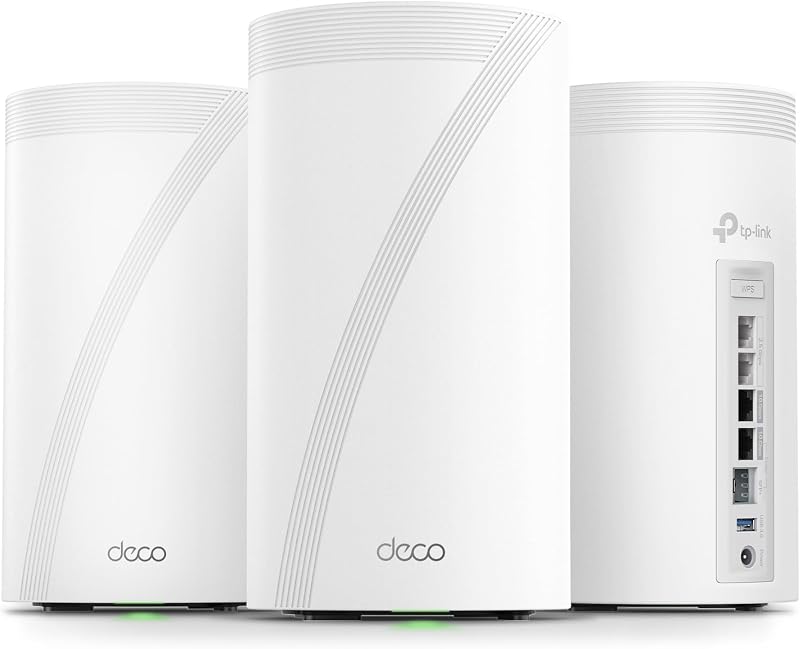
The Deco BE85 establishes a distinct lead in physical hardware capability by providing four total multi-gigabit ports alongside a USB 3.0 connection. The system includes two 10 Gbps ports-one dedicated RJ45 Ethernet jack and one innovative SFP+ Fiber/RJ45 Ethernet combo port-supplemented by two additional 2.5 Gbps Ethernet ports. The inclusion of the deco be85 sfp port allows power users to interface directly with fiber optical terminal equipment or run high-speed optical uplinks to a managed core switch. Furthermore, the USB 3.0 port enables local network-attached storage or media sharing straight from the node.
In contrast, examining the eero max 7 vs tp-link deco be85 ports reveals a much leaner configuration on the eero side. The Max 7 is equipped with two 10 Gigabit Ethernet ports that support wired speeds up to 9.4 Gbps. While these dual 10G interfaces eliminate data bottlenecks between an incoming 10G fiber modem and a primary downstream link, the presence of only two physical ports per unit means one port must serve as your WAN input, leaving just a single 10G port for your local wired clients. To connect a high-speed NAS, desktop workstation, and secondary backhaul lines simultaneously, Max 7 owners must invest in an external multi-gigabit switch.
Edge: TP-Link Deco BE85 delivers superior physical expandability with four multi-gigabit Ethernet ports, an optical SFP+ combo option, and USB storage support compared to just two Ethernet ports on the eero.
Wireless Throughput and Wi-Fi 7 Architecture
Wi-Fi 7 introduces ultra-wide 320 MHz channels, 4K-QAM modulation, and advanced multi-link channel coordination to significantly expand wireless throughput. In any realistic deco be85 vs eero max 7 speed test, how these protocols handle simultaneous frequency bands determines whole-home performance under heavy multi-user loads.
The Deco BE85 operates with an aggregate BE22000 tri-band wireless architecture. According to its specifications, this configuration splits throughput across three bands: up to 11520 Mbps on the 6 GHz band, 8640 Mbps on the 5 GHz band, and 1376 Mbps on the 2.4 GHz band. The system pairs these frequencies with TP-Link’s simultaneous wireless plus wired backhaul technology, allowing satellite nodes to aggregate wired Ethernet and wireless spectrum simultaneously to reinforce backhaul stability and improve overall coverage. For homeowners comparing generation upgrades such as the tp-link deco xe75 vs be85, this hybrid backhaul capability ensures minimal packet drop across thick walls.
The Max 7 counters with a BE20800 rating, featuring 10 spatial streams configured in a 2×2 MIMO layout on 2.4 GHz, 4×4 on 5 GHz, and 4×4 on 6 GHz. The listing specifies wireless speeds up to 4.3 Gbps, supported by channel widths ranging from 20 MHz up to 320 MHz. Eero relies on its proprietary TrueMesh intelligence to dynamically steer clients and select data paths across bands to eliminate local RF interference. However, its overall cumulative wireless rating sits slightly lower than the Deco BE85, and its spatial distribution is locked into a fixed stream allocation.
Edge: TP-Link Deco BE85 provides higher total wireless rating figures (BE22000 vs BE20800) and simultaneous hybrid backhaul aggregation for demanding wireless setups.
Smart Home Hub Capabilities and Protocol Support
Modern homes frequently deploy dozens of low-power connected peripherals, including sensors, motorized blinds, smart locks, and connected lighting. Deciding on the eero max 7 vs deco be85 smart home choice hinges on whether you want your Wi-Fi mesh nodes to replace individual third-party hardware bridges or simply pass standard local network traffic.
This category highlights the primary strength of the Max 7. Inside each node, eero integrates native smart home hub radios supporting Thread, Matter, and Zigbee (functioning as a controller). The unit also includes Bluetooth Low Energy 5.0 for effortless device pairing. This integrated hardware allows you to pair smart home peripherals directly to your mesh router without plugging proprietary hubs or bridge adapters into your wall outlets. When reviewing devices like in our tp-link deco be85 vs google nest wifi pro comparison, integrated Thread and Matter border routing represents a massive convenience factor for modern home automation.
The Deco BE85 takes an entirely different path regarding automation. It does not contain internal Zigbee or Thread radios. Instead, smart home functionality is limited to software-level features: compatibility with Amazon Alexa and Google Assistant for hands-free voice management (such as toggling guest networks), and HomeShield IoT device identification for basic network visibility. If you manage a large collection of Zigbee light bulbs or Thread accessories, the Deco BE85 requires you to maintain external physical bridges plugged into its Ethernet jacks.
Edge: Eero Max 7 wins decisively with onboard Thread, Zigbee, and Matter controller hardware that eliminates the need for separate smart home bridge devices.
Advanced Network Management, Security, and VPN Features
Network operating systems dictate how much control a user maintains over household data routing, security policies, and encrypted tunnels. Conducting a thorough tp-link deco be85 review alongside an eero max 7 review demonstrates two starkly opposed software philosophies: open local control versus cloud-managed simplicity.
The Deco BE85 operates on RouterOS and includes comprehensive advanced networking features straight out of the box. Most notably, it supports both VPN Client and VPN Server configurations directly on the router. This setup lets you route specific smart TVs or streaming hardware through remote VPN tunnels while allowing other household devices to browse the standard internet connection at the same time. For device defense, TP-Link HomeShield provides free baseline tools, including a security scan, IoT device identification, Quality of Service (QoS) bandwidth shaping, and basic parental controls without requiring an ongoing paid service plan. Users analyzing network transitions like eero max 7 vs tp-link deco xe75 will notice TP-Link’s emphasis on native local utility.
The Max 7 relies on a streamlined cloud platform managed entirely through the eero mobile application. The interface provides essential features such as device profile pausing, network health tracking, automatic channel selection, band steering, and simple guest password sharing. However, advanced network security, historical metrics, and content filtering are locked behind an optional subscription called eero Plus. Furthermore, the official specification sheet lists no native VPN server functionality inside the base firmware, limiting options for users who want to host encrypted access into their local home network while traveling.
Edge: TP-Link Deco BE85 takes the lead by including onboard VPN server and client tools alongside free built-in HomeShield security capabilities.
Gaming Latency and Traffic Optimization
Competitive multiplayer gaming, virtual reality environments, and real-time cloud computing applications demand consistent latency, jitter minimization, and low packet loss. Choosing between the eero max 7 or deco be85 for gaming requires looking closely at wired port responsiveness, traffic prioritization, and hardware thermal management.
Under continuous heavy network stress, heat buildup can cause router microprocessors to throttle, creating latency spikes during online play. The Deco BE85 incorporates active hardware cooling featuring two internal fans alongside eight internal high-performance antennas. This internal cooling infrastructure prevents thermal throttling during extended competitive sessions. Furthermore, TP-Link’s integrated Quality of Service (QoS) allows users to prioritize gaming packets over lower-priority network activities, while the two 10 Gbps and two 2.5 Gbps ports provide dedicated low-latency wired drops directly to multiple gaming rigs.
The Max 7 is equally capable in raw gaming throughput, leveraging Wi-Fi 7 features alongside TrueMesh network routing to minimize hops and avoid radio frequency interference. With wired speeds up to 9.4 Gbps and dedicated gaming optimization highlighted in its design, the Max 7 ensures VR and cloud streaming platforms receive high throughput and minimal buffering. Upgrading from older Wi-Fi systems like those highlighted in our eero pro 6e vs tp-link deco xe75 analysis demonstrates the vast latency leap offered by the Max 7’s 10G wired backhaul. However, because the Max 7 relies on passive cooling and omits granular manual QoS prioritization tables in its standard software, it relies entirely on automated network intelligence to handle latency.
Edge: Tie. Both mesh units deliver enterprise-grade 10 Gbps wired throughput, reduced Wi-Fi 7 latency, and optimized traffic paths for competitive online play.
Pros and Cons
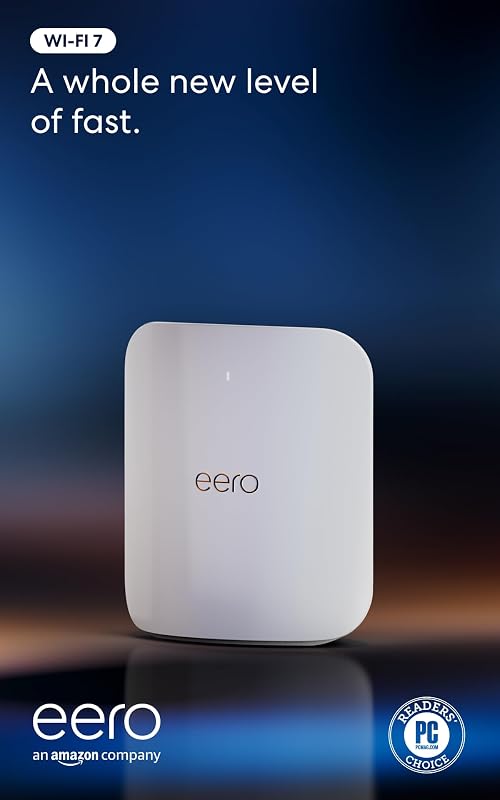
Eero Max 7
Pros
- Built-in Thread Zigbee and Matter hub
- Two 10 Gbps multi-gigabit Ethernet ports
- Three-year manufacturer limited warranty
- Ten spatial streams with TrueMesh
Cons
- Only two total Ethernet ports
- Advanced security requires optional subscription
TP-Link Deco BE85
Pros
- Dual 10G ports with SFP+ combo option
- Two additional 2.5 Gbps Ethernet ports
- Built-in VPN client and server support
- Onboard USB 3.0 file sharing port
- Simultaneous wireless and wired backhaul
Cons
- Lacks onboard Zigbee or Thread hub
- Active fans introduce moving mechanical parts
View TP-Link Deco BE85 on Amazon
Who Should Buy Each One
Choose the Eero Max 7 If
- You want a unified smart home hub with built-in Thread, Matter, and Zigbee radios without cluttering rooms with extra hardware bridges.
- You prefer a self-optimizing, set-and-forget mesh network powered by automated TrueMesh path selection and dynamic frequency steering.
- You value long-term hardware reliability backed by an industry-leading three-year manufacturer limited warranty.
- You need expansive mesh coverage up to 2,500 square feet per node supporting 250+ connected wireless clients.
Choose the TP-Link Deco BE85 If
- You need an optical SFP+ combo port for a direct fiber internet feed or high-speed fiber switch uplinks.
- You plan to wire multiple multi-gigabit workstations, consoles, or access points using four physical 2.5G and 10G Ethernet ports.
- You want integrated VPN client and server functionality running at the router gateway level without recurring fees.
- You plan to attach local storage drives via an onboard USB 3.0 interface to share network files across your home.
Final Verdict
Deciding between the eero Max 7 and TP-Link Deco BE85 hinges on whether your home network prioritizes connected device protocols or raw physical networking hardware. If you are questioning is eero max 7 worth it for an IoT-heavy household, the answer is clear: the integration of Zigbee, Thread, Matter, and Bluetooth LE 5.0 makes the Max 7 the cleanest, most capable smart home mesh center on the market. Backed by a generous three-year warranty and polished TrueMesh automated band steering, the Max 7 delivers a seamless wireless experience for users who want premium performance without managing complex networking menus.
However, when asking is deco be85 worth it for power users and modern fiber-equipped residences, the TP-Link Deco BE85 claims the overall hardware crown. Its combination of four high-speed ports-specifically the SFP+ fiber combo jack and two 2.5G ports-along with USB 3.0 storage support, native VPN server capabilities, and higher BE22000 tri-band throughput offers unmatched flexibility. Unless you specifically require the Max 7’s onboard smart home controller radios, the TP-Link Deco BE85 is the more versatile, future-proof Wi-Fi 7 mesh system for demanding wired and wireless networks.
FAQ
Can the TP-Link Deco BE85 connect directly to fiber internet using the SFP+ port?
Yes. The TP-Link Deco BE85 includes a versatile 10G WAN/LAN port that functions as an SFP+ Fiber/RJ45 Ethernet combo port. This design enables users with direct optical fiber drops or compatible SFP+ transceiver modules to connect their fiber internet directly into the primary mesh router without requiring an intermediary RJ45 copper media converter.
Does the Eero Max 7 require a separate hub for Zigbee or Thread smart devices?
No. The eero Max 7 includes built-in smart home hub radios capable of functioning as a controller for Thread, Matter, and Zigbee peripherals. This onboard integration allows you to pair smart sensors, lights, and automated accessories directly to your eero mesh system via the mobile application, eliminating the need to attach standalone hardware hubs to your router.
How many wired multi-gigabit ports are available on each system?
The eero Max 7 provides two 10 Gigabit Ethernet ports per unit, offering wired throughput up to 9.4 Gbps. The TP-Link Deco BE85 provides four multi-gigabit ports per unit: two 10 Gbps ports (one standard RJ45 Ethernet port and one SFP+ fiber/Ethernet combo port) plus two additional 2.5 Gbps Ethernet ports, giving the Deco BE85 double the wired capacity of the Max 7.
How do the cooling systems compare on the Eero Max 7 and TP-Link Deco BE85?
The TP-Link Deco BE85 features two internal cooling fans integrated into its chassis to actively pull heat away from the internal processing components and eight internal antennas during sustained multi-gigabit data transfers. The eero Max 7 relies on passive thermal management and ventilation, keeping the unit completely silent without mechanical moving parts.
Can the TP-Link Deco BE85 and Eero Max 7 mesh together on the same network?
No. While both routers utilize standardized Wi-Fi 7 protocols, their mesh backhaul algorithms are proprietary. The eero Max 7 communicates with other nodes using eero’s TrueMesh technology, while the Deco BE85 relies on TP-Link’s Deco Mesh platform and AI-driven roaming. You can connect one behind the other in Access Point mode, but they cannot form a unified, single-network mesh system together.
Do either of these Wi-Fi 7 mesh systems require a monthly subscription to work?
Neither router requires a monthly subscription for baseline functionality, Wi-Fi 7 mesh routing, or basic configuration. The Deco BE85 provides free basic network security, parental controls, QoS, and VPN hosting via TP-Link HomeShield and RouterOS. The eero Max 7 operates all core mesh and smart hub features for free, but reserves advanced historical threat analysis and premium digital security tools for its optional eero Plus subscription.