The fundamental dividing line in the Synology DS224+ vs QNAP TS-464 decision comes down to hardware bandwidth versus operating system efficiency. The QNAP TS-464 provides a high-performance four-bay chassis outfitted with dual 2.5GbE ports, dedicated M.2 NVMe SSD slots, and up to 16GB of expandable memory for demanding environments. Conversely, the Synology DS224+ delivers a compact two-bay desktop server equipped with pre-installed 8TB storage, low 15-watt power consumption, and the refined Synology DSM software platform.
Choose the Synology DS224+ if you want a reliable, turnkey storage appliance with ready-to-run hard drives and low operational complexity for everyday data protection. Choose the QNAP TS-464 if your network requires multi-gigabit file transfers, four-drive volume expansion, and dedicated solid-state caching.


Synology DS224+ vs QNAP TS-464 at a Glance
| Feature | Synology DS224+ | QNAP TS-464 |
|---|---|---|
| Drive Bays | 2 bays (includes 8TB via 2 x 4TB drives) | 4 bays (drives not included) |
| Processor | Intel Celeron J4125 4-core (up to 2.7GHz) | Intel Celeron N5105/N5095 4-core (up to 2.9GHz) |
| Memory | 6GB DDR4 non-ECC SODIMM | 8GB DDR4 (expandable up to 16GB) |
| Network Ports | 2 x 1GbE RJ-45 (Link Aggregation / Failover) | 2 x 2.5GbE RJ-45 (2.5G/1G/100M) |
| M.2 NVMe SSD Slots | Not listed | 2 x M.2 PCIe Gen3x2 NVMe slots |
| USB Connectivity | 2 x USB 3.2 ports | Multiple USB 3.2 Gen 2 Type-A (10Gb/s) |
| Supported File Systems | Btrfs, EXT4 | The listing does not specify |
| Operational Power Usage | As low as 15 watts | The listing does not specify |
| Hardware Encryption | Integrated security features | Intel AES-NI encryption engine |
| Best For | Plug-and-play home backup and low-power DSM tasks | Multi-gigabit workflows, virtualization, and 4-bay expansion |
Drive Capacity and Bay Expandability
Storage architecture determines how your network-attached storage pool will scale over years of file growth. The Synology DS224+ arrives configured as a two-bay desktop unit containing an 8TB storage pool formed by two pre-installed 4TB SATA drives. With only two mechanical bays available, your redundancy options are fundamentally restricted to mirroring configurations or simple spanning. If you fill those two drive slots, increasing capacity requires replacing each individual drive with a larger drive and rebuilding the volume step by step.
The QNAP TS-464 provides a significant advantage by offering four 3.5-inch SATA 6Gb/s drive bays with hot-swappable trays. Having four bays allows you to establish multi-drive parity protection, which preserves data integrity while retaining a much higher percentage of usable storage compared to two-bay mirroring. Furthermore, the TS-464 listing confirms dual M.2 PCIe Gen3x2 NVMe SSD slots directly on the board. These NVMe slots can be deployed for SSD cache acceleration or configured as independent SSD storage pools without occupying any of the four primary 3.5-inch SATA drive bays. Readers exploring multi-drive deployments often evaluate the synology ds423+ vs qnap ts-464 to weigh similar capacity considerations.
By pairing four mechanical drive bays with two dedicated internal NVMe slots, the TS-464 provides vastly superior physical headroom and caching flexibility compared to the fixed dual-drive limit of the DS224+ chassis.
Edge: QNAP TS-464 provides double the drive bay count alongside dual M.2 NVMe SSD expansion slots.
Networking Speed and Multi-Gigabit Bandwidth
Network interface capabilities define how quickly data transfers between client computers and your central storage pool. A standard Gigabit Ethernet connection caps sequential throughput at roughly 110 to 115 megabytes per second. The Synology DS224+ incorporates two RJ-45 1GbE ports that support Link Aggregation and failover mode. While Link Aggregation allows multiple simultaneous client connections to share the available bandwidth or provides uninterrupted access if one cable fails, a single file transfer to a single workstation remains capped by the physical 1GbE threshold.
The QNAP TS-464 addresses modern multi-gigabit switches by providing dual 2.5GbE Ethernet ports out of the box. In a direct DS224+ vs TS-464 2.5GbE comparison, the TS-464 delivers more than double the theoretical single-lane transfer speed, reaching data transfer rates of 2.5 gigabits per second per port. For creative professionals transferring massive media archives or teams executing multi-machine workstation backups, multi-gigabit throughput removes the classic gigabit bottleneck. Users examining higher-tier office networks often inspect the synology ds1522+ vs qnap ts-464 for similar throughput benchmarks.
The networking gulf between standard 1GbE and multi-gigabit 2.5GbE is immediately noticeable in daily productivity tasks. The DS224+ requires paired network links to increase aggregate volume, whereas the TS-464 provides accelerated data speeds natively across every compatible client.
Edge: QNAP TS-464 offers integrated dual 2.5GbE networking compared to the dual 1GbE interface on the DS224+.
Processing Hardware and System Memory
Processor throughput and installed system RAM dictate how efficiently a storage appliance handles background indexing, on-the-fly encryption, and concurrent application packages. The Synology DS224+ is powered by an Intel Celeron J4125 quad-core processor running at a base clock of 2.0GHz with burst speeds up to 2.7GHz. The system arrives equipped with 6GB of DDR4 non-ECC SODIMM memory. This hardware pairing delivers responsive performance for core NAS workloads, web services, and Synology Drive file synchronization.
Under the hood of the QNAP TS-464 sits an updated Intel Celeron quad-core chip (listed as the N5105/N5095) capable of burst frequencies up to 2.9GHz across its four cores and four threads. It also integrates an Intel AES-NI encryption engine to accelerate encrypted transfers without stalling system resources. On the memory side, the TS-464 includes 8GB of DDR4 RAM standard and officially supports system memory upgrades up to 16GB DDR4. This hardware package makes the TS-464 well suited for intensive tasks and business environments. When buyers evaluate larger configurations, such as in the synology ds923+ vs qnap ts-464 comparison, memory ceiling is often a primary factor.
The newer silicon architecture, higher boost clock speeds, 8GB base memory, and 16GB maximum memory ceiling give the TS-464 a clear performance advantage over the 6GB J4125 configuration found in the DS224+.
Edge: QNAP TS-464 has a faster 2.9GHz burst processor, larger base memory, and support for up to 16GB RAM.
Software Platform, Data Integrity, and Media Handling
Raw computing specifications only tell half the story; the underlying operating system shapes your daily administration experience. The Synology DS224+ runs Synology DSM, widely recognized for its clean interface, simple application deployment, and bulletproof user permissions. In any Synology DS224+ review, DSM stands out for integrated tools like Synology Photos, Synology Drive, and Security Advisor. The DS224+ specifically supports the Btrfs file system, enabling point-in-time snapshots and automated data integrity self-healing to prevent silent file corruption.
When evaluating the Synology DS224+ or QNAP TS-464 for Plex and multimedia server roles, both units bring dedicated hardware decoding features via their Intel Celeron processors. Synology lists a dedicated 4K Multimedia Server role alongside file management and surveillance capabilities. The TS-464 listing highlights tools to centrally store and organize personal or family photos, music, and videos across desktop, laptop, smartphone, and tablet endpoints. However, QNAP systems traditionally expose more granular network settings, which requires a steeper learning curve to maintain properly. Comparing software ergonomics across ecosystems, as explored in our synology ds423+ vs qnap ts-233 overview, reveals that DSM minimizes administrative overhead.
While the TS-464 has more powerful components, Synology DSM provides a more polished, integrated data management suite. The native Btrfs support, streamlined mobile photo synchronization, and rock-solid update management give the DS224+ an undeniable edge in usability.
Edge: Synology DS224+ delivers a more cohesive operating system with turnkey DSM utilities and native Btrfs data protection.
Peripheral Connectivity and External Transfer Interfaces
Connecting external storage drives and peripheral accessories allows you to ingest field footage quickly or clone internal shared folders for offsite safekeeping. The Synology DS224+ provides two USB 3.2 ports located on its chassis. These ports allow administrators to attach external hard drives, uninterruptible power supplies, or basic expansion drives, operating within standard 5Gb/s USB 3.2 data lanes.
The QNAP TS-464 substantially raises the ceiling for peripheral transfers by integrating multiple USB 3.2 Gen 2 Type-A ports capable of transfer speeds up to 10Gb/s. In practical use, a 10Gb/s bus allows users to connect high-speed external solid-state drives and portable NVMe enclosures, moving massive directory trees at twice the speed of standard USB 3.2 Gen 1 ports. When checking the DS224+ vs TS-464 specs, external expansion capability mirrors the internal bus differences.
For operations that regularly offload files from external field drives or replicate shared directories to portable solid-state disks, the 10Gb/s USB 3.2 Gen 2 interfaces on the TS-464 prevent external drives from becoming severe transmission bottlenecks.
Edge: QNAP TS-464 features 10Gb/s USB 3.2 Gen 2 ports, doubling the external transfer bandwidth of the DS224+.
Power Consumption and Physical Footprint
Because network storage appliances run continuously all day and night, electrical efficiency and physical footprint are critical variables for home offices and small workspaces. The Synology DS224+ is built as a compact tower unit that features an operational power usage rating as low as 15 watts according to the manufacturer specifications. Its dual-bay design and lightweight metal enclosure make it exceptionally easy to tuck onto a bookshelf or small desk without generating excessive ambient heat or noise.
The QNAP TS-464 is a four-bay desktop chassis designed to accommodate four 3.5-inch 7200 rpm mechanical drives alongside internal PCIe expansion cards and M.2 SSDs. While the listing does not specify the exact operational wattage of the TS-464, powering four mechanical disks, dual 2.5GbE networking controllers, and a higher-clocked N5105/N5095 processor naturally requires a larger electrical draw than a two-bay 15-watt server. When looking at compact enclosures, such as in our synology ds224+ vs ds923+ comparison, two-bay servers consistently hold the efficiency advantage.
For private homes and quiet home offices where long-term power consumption and compact physical space are primary concerns, the DS224+ operates with an impressively minimal footprint.
Edge: Synology DS224+ operates at power levels as low as 15 watts and requires less desk space.
Pros and Cons
Synology DS224+
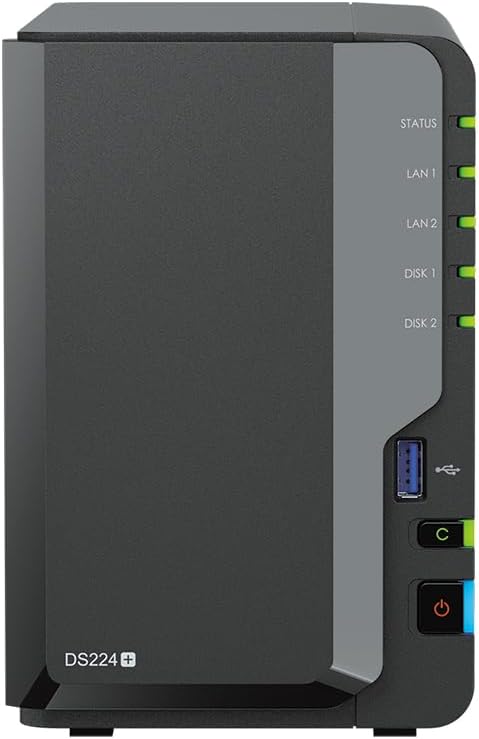
Pros
- Includes 8TB pre-installed storage
- Low 15W operational power usage
- Polished Synology DSM operating system
- Btrfs file system self-healing support
- Compact metal tower enclosure
Cons
- Limited to two drive bays
- Only 1GbE network interfaces
- No M.2 NVMe slots listed
View Synology DS224+ on Amazon
QNAP TS-464

Pros
- Four hot-swappable 3.5-inch drive bays
- Dual high-speed 2.5GbE network ports
- Dual M.2 PCIe Gen3x2 NVMe slots
- Memory expandable up to 16GB DDR4
- 10Gb/s USB 3.2 Gen 2 ports
Cons
- Hard drives not included in listing
- Higher overall power footprint
- Steeper software configuration learning curve
Who Should Buy Each One
Choose the Synology DS224+ If
- You want a complete storage solution out of the box with 8TB of storage pre-configured across two 4TB drives.
- You prefer the streamlined, maintenance-free management environment of Synology DSM for centralized file sharing and automated desktop backup.
- You need an energy-conscious server that operates at power levels as low as 15 watts.
- You rely on Btrfs file system snapshots and automated data integrity self-healing to safeguard personal photos and documents.
Choose the QNAP TS-464 If
- You have a multi-gigabit local network and want dual 2.5GbE ports to accelerate large workstation backups and file transfers.
- You need the capacity and protection of a four-bay enclosure supporting 3.5-inch SATA 7200 rpm hot-swappable drives.
- You want high-speed SSD caching or independent flash storage pools via dual onboard M.2 PCIe Gen3x2 NVMe slots.
- You plan to run heavier business workloads requiring memory upgrades up to 16GB DDR4 and 10Gb/s USB 3.2 Gen 2 connectivity.
Final Verdict
From a purely technical perspective, the QNAP TS-464 is the superior hardware platform. In this QNAP TS-464 review matchup, its four hot-swappable drive bays, dual 2.5GbE networking, dual internal M.2 NVMe slots, 10Gb/s USB interfaces, and 16GB maximum RAM provide substantially higher ceiling capacity than its rival. If your priority is maximum transfer throughput, flexible multi-drive RAID storage pools, and rapid external backups over a modern multi-gigabit network, the TS-464 is the undisputed winner.
However, the Synology DS224+ remains the smarter choice for home users and small teams seeking a frictionless, low-power storage appliance. Arriving with 8TB of storage already installed, 6GB of system memory, and the refined Synology DSM ecosystem, it eliminates initial hardware setup headaches while sipping as little as 15 watts of electricity. If you do not require multi-gigabit speeds or four-bay drive arrays, the DS224+ delivers rock-solid file protection with unmatched software simplicity.
FAQ
Synology DS224+ or QNAP TS-464 for home backup?
For standard home backup, the Synology DS224+ is generally the better fit because it arrives bundled with 8TB of storage and features Synology Drive and centralized Desktop Backup utilities within DSM. Its 15-watt power efficiency and quiet two-bay profile suit home environments perfectly. However, if your home contains multiple creative workstations generating large media files that overwhelm a 1GbE network, the TS-464 with its dual 2.5GbE ports will complete those transfers in less than half the time.
Is QNAP TS-464 worth it compared to a two-bay model?
When asking is QNAP TS-464 worth it, the answer depends on your storage longevity and network setup. The TS-464 includes four drive bays, dual 2.5GbE ports, dual M.2 NVMe SSD caching slots, and up to 10Gb/s USB connectivity. If you plan to expand your storage volume over time without discarding old drives, the four-bay chassis and high-speed hardware make the TS-464 well worth the investment.
Can you upgrade the RAM in both devices?
The Synology DS224+ arrives configured with 6GB of DDR4 non-ECC SODIMM memory. The QNAP TS-464 includes 8GB of DDR4 RAM out of the box and officially supports system memory expansion up to 16GB DDR4, offering higher total memory ceiling for virtualization and business services.
Does the Synology DS224+ have M.2 NVMe SSD slots?
The product listing for the Synology DS224+ does not list any M.2 NVMe SSD slots. If you require dedicated solid-state cache acceleration or dedicated M.2 NVMe storage pools without occupying primary mechanical drive bays, the QNAP TS-464 includes dual M.2 PCIe Gen3x2 NVMe slots specifically for that purpose.
How do the network speeds compare out of the box?
The Synology DS224+ features two 1GbE RJ-45 ports supporting Link Aggregation and failover, limiting single-connection throughput to 1 gigabit per second. The QNAP TS-464 features dual 2.5GbE ports, allowing native data transfer rates of 2.5 gigabits per second per port over standard Cat5e or Cat6 cabling connected to a multi-gigabit switch.
Which file systems are supported on the Synology DS224+?
The Synology DS224+ listing specifies support for both Btrfs and EXT4 internal file systems. Utilizing Btrfs provides advanced data management features, including integrated snapshot technology, centralized access controls, and file self-healing capabilities to defend against data corruption.



