The core difference deciding the choice between the Eero Pro 6E and the Netgear Orbi 970 comes down to wireless generation scale: the Pro 6E provides balanced Wi-Fi 6E connectivity engineered for standard multi-gigabit connections, while the Orbi 970 delivers an ultra-fast quad-band WiFi 7 system built for multi-gigabit saturation and massive property coverage.
Choose the Eero Pro 6E if you need a compact, straightforward mesh node that powers gigabit-tier internet throughout an average-sized household. Choose the Netgear Orbi 970 if you manage a sprawling estate, operate dozens of high-bandwidth workstations, and require dedicated multi-gigabit backhaul alongside 10 Gbps wired ports.


Eero Pro 6E vs Netgear Orbi 970 at a Glance
| Attribute | Eero Pro 6E | Netgear Orbi 970 |
|---|---|---|
| Wi-Fi Standard | Wi-Fi 6E (802.11ax) | WiFi 7 (802.11be) |
| Band Architecture | Tri-Band (2.4 GHz, 5 GHz, 6 GHz) | Quad-Band with Enhanced Dedicated Backhaul |
| Maximum Stated Speed | Up to 2.3 Gbps (1.6 Gbps wireless) | Up to 27 Gbps |
| Internet Plan Compatibility | Up to 2.5 Gbps | Up to 10 Gbps |
| Hardware Coverage | Up to 2,000 sq. ft. per unit | Up to 10,000 sq. ft. (3-pack system) |
| Device Capacity | 100+ connected devices | 200 connected devices |
| Wired Connectivity | 2.5 GbE port and 1 GbE port | 6 ports with 10 Gbps LAN bandwidth |
| Onboard Memory | The listing does not specify | 4 GB RAM |
| Bundled Security | Separate subscription required | 1-year NETGEAR Armor included |
| Best For | Standard gigabit homes | High-demand multi-gigabit estates |
Wireless Standards and Real-World Throughput
Evaluating wireless capacity requires understanding how spectrum access translates into usable bandwidth. The Pro 6E was engineered as eero’s first Wi-Fi 6E router, giving client devices access to the clear 6 GHz band to circumvent legacy network noise and drop latency. On paper, it supports network speeds up to 2.3 Gbps, delivering wireless speeds up to 1.6 Gbps and wired transfer rates reaching gigabit levels. For everyday streaming, remote office tasks, and casual local file movements, this operational ceiling covers common multi-gigabit residential ISP subscriptions.
The Netgear Orbi 970 transitions into the next tier of networking via the 802.11be WiFi 7 standard, boosting maximum data rates to an extraordinary 27 Gbps. This makes the system 2.4 times faster than previous WiFi 6 hardware according to manufacturer testing. When comparing eero max 7 vs netgear orbi 970 hardware classes, WiFi 7 expands channel widths and data aggregation far beyond earlier iterations. When examining orbi 970 vs eero pro 6e speed ceilings, the Orbi operates in an enterprise tier, moving large volumes of concurrent network data without choking satellite links.
For daily domestic use, the difference means the Pro 6E will saturate a standard 1 Gbps or 1.5 Gbps home broadband tier smoothly, while the Orbi 970 is constructed for extreme multi-gigabit backhaul pipes and concurrent 8K media rendering. If your incoming broadband tier does not exceed 2 Gbps, much of the Orbi platform’s theoretical bandwidth remains idle headroom.
Edge: Netgear Orbi 970 due to its advanced 802.11be WiFi 7 architecture and superior 27 Gbps overall speed capacity.
Coverage Area and Multi-Room Reliability
Physical coverage determines how effectively a mesh network banishes dead zones across complex architectural layouts. A single Eero Pro 6E covers up to 2,000 square feet, operating within an approximate 25-foot coverage radius. The hardware relies on patented TrueMesh technology, which constantly monitors communication between nodes to route traffic dynamically around physical obstructions. Expanding an eero network simply requires dropping an additional node into the floor plan, making it a flexible modular choice for apartments, single-story homes, or townhouses.
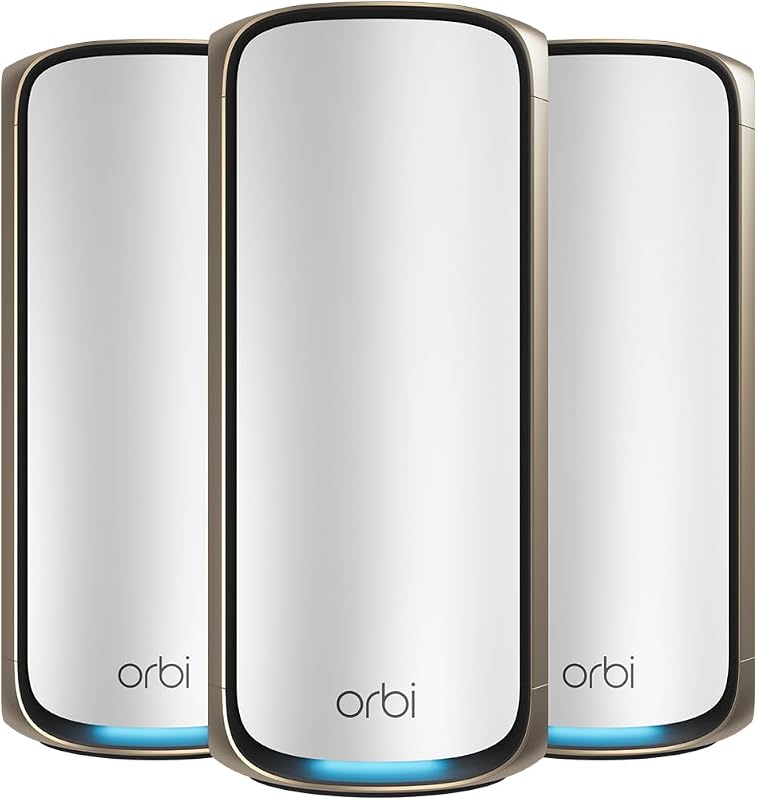
The Netgear Orbi 970 three-piece configuration-consisting of the main router plus two matching satellite extenders-is built on an entirely different physical scale. It provides complete 360-degree wireless coverage up to 10,000 square feet, explicitly engineered to blanket large properties from the front lawn to the back patio and from the basement to the roof. Evaluating an eero pro 6e or netgear orbi 970 for large home installations reveals that the Orbi 970 requires fewer individual wall outlets to blanket massive architectural footprints, whereas multiple Pro 6E units would be required to match that single three-pack footprint.
Home scale heavily influences hardware satisfaction. A modest home risks over-saturation with high-powered Orbi broadcasts, while a 6,000-square-foot multi-level home will quickly stretch a single Pro 6E beyond its designed operating margins. Readers studying older high-end hardware in our netgear orbi rbk752 vs 970 comparison know that Orbi’s large internal antennas push stable links through dense framing much farther than compact desktop pucks.
Edge: Netgear Orbi 970 because its three-node pack provides an immense 10,000 square feet of verified coverage.
Ethernet Port Selection and Multi-Gigabit Connectivity
Wired connectivity remains critical for gaming rigs, network-attached storage arrays, and high-performance smart switches. The Pro 6E router features a dedicated 2.5 Gb Ethernet port alongside a gigabit Ethernet port. This layout allows homeowners to connect a 2 Gbps or 2.5 Gbps modem handoff directly into the router, passing gigabit-plus internet down to wireless clients while retaining one wired gigabit port for an unmanaged switch or a primary workstation.
The Netgear Orbi 970 steps past entry-level multi-gigabit limits by offering six total ports across its chassis, headlined by a dedicated 10 Gig internet port and a 10 Gbps LAN port bandwidth infrastructure. When shopping between netgear orbi 970 vs tp-link deco be85 or similar flagships, having true 10 Gbps capability ensures that modern fiber services can route directly through the system without creating an artificial bottleneck. Gamers and creators deciding between the eero pro 6e or netgear orbi 970 for gaming will find the Orbi’s 10G local connections far superior for zero-lag local file transfers and ultra-low internal packet queuing.
The trade-off rests on your household’s actual physical cabling. If your home is wired with legacy Cat5e wiring or relies mostly on wireless laptops, the 10 Gbps ports on the Orbi 970 provide capabilities you cannot physically utilize. The Pro 6E offers the precise port speeds required for modern broadband without surplus physical overhead.
Edge: Netgear Orbi 970 thanks to its 10 Gig internet port, 10 Gbps LAN bandwidth, and six total physical ports.
Backhaul Architecture and Network Congestion
The internal traffic management of a mesh setup defines how it performs when dozens of devices run simultaneous tasks. The Eero Pro 6E operates as a tri-band system, distributing network requests across 2.4 GHz, 5 GHz, and 6 GHz frequencies. Because it lacks a standalone band reserved exclusively for mesh communication, backhaul traffic shares available airtime dynamically via TrueMesh logic. It handles 100+ connected devices smoothly, making it suitable for typical smart homes equipped with streaming sticks, video doorbells, and personal tablets.
The Netgear Orbi 970 integrates exclusive patented Quad-band technology backed by an Enhanced Dedicated Backhaul. By isolating network management and inter-node backhaul communication to its fourth proprietary wireless channel, the Orbi prevents node-to-node relay traffic from stealing airtime from client devices. The system supports up to 200 connected devices, running tasks like 8K video streaming, virtual reality sessions, and video conferences simultaneously across the household without degradation.
For smart homes with dense sensor footprints, high-volume camera feeds, and active network users, this backhaul division prevents throughput loss at satellite nodes. While users reviewing our older eero pro 6e vs netgear orbi rbk752 breakdown will recall the importance of backhaul stability, the Orbi 970 elevates that architecture with WiFi 7 data rates.
Edge: Netgear Orbi 970 due to its patented Quad-band design and Enhanced Dedicated Backhaul supporting 200 devices.
Hardware Setup, Software Management, and Security Services
Deploying and monitoring home networking hardware should not require an engineering certification. The Pro 6E uses the streamlined eero app, allowing users to complete guided network setup in minutes and manage guest access, port forwarding, and device profiles from anywhere. Eero provides automatic software updates to protect the router over time, backed by direct customer support reachable by phone in the United States at +1-877-659-2347 or via email. Advanced parental controls and online threat filtering require an optional separate subscription.
The Netgear Orbi 970 runs on Netgear OS and is configured via its dedicated mobile application or local interface, incorporating 4 GB of installed RAM to handle complex routing tables and high connection volumes. It includes hardware push-button WPS pairing, fixed internal antennas, and support for WPA2 or WPA3 encryption protocols. Netgear supplies a 1-year subscription of NETGEAR Armor out of the box, delivering an all-in-one internet security suite alongside Advanced Router Protection and automatic firmware updates. Note that the listing indicates this specific system is made for use in the U.S. only.
Any practical eero pro 6e review will praise the platform for clean software simplicity and responsive phone assistance, whereas a comprehensive netgear orbi 970 review highlights power-user routing control paired with bundled first-year cybersecurity. If you prefer transparent app simplicity, the Pro 6E ecosystem remains remarkably accessible.
Edge: Eero Pro 6E for its user-friendly app environment and readily accessible telephone customer support.
Pros and Cons
Eero Pro 6E

Pros
- Wi-Fi 6E with 6 GHz support
- Supports 2.5 Gbps internet plans
- Compact modular TrueMesh expansion
- Dedicated US customer phone support
Cons
- Covers only 2,000 sq ft per node
- Shares tri-band airtime for backhaul
- Security features require separate subscription
Netgear Orbi 970
Pros
- Blazing WiFi 7 speeds up to 27Gbps
- Covers up to 10,000 sq ft
- Quad-band with Enhanced Dedicated Backhaul
- Dual 10 Gbps wired connectivity
- Includes 1-year NETGEAR Armor security
Cons
- Made for use in the US only
- Substantially larger physical dimensions
- Excessive bandwidth for standard sub-gigabit connections
View Netgear Orbi 970 on Amazon
Who Should Buy Each One
Choose the Eero Pro 6E If:
- You subscribe to an internet service tier between 1 Gbps and 2.5 Gbps and want hardware that matches your incoming pipe.
- Your home layout is around 2,000 square feet, or you plan to expand coverage gradually using modular TrueMesh nodes.
- You prefer a compact, discreet desktop profile that does not demand substantial shelf space.
- You value direct customer phone support (+1-877-659-2347) and an intuitive mobile management app.
Choose the Netgear Orbi 970 If:
- You have a sprawling residence up to 10,000 square feet that requires true basement-to-backyard 360-degree wireless coverage.
- You have a multi-gigabit fiber connection up to 10 Gbps and require matching 10G wired LAN ports for switches or storage.
- Your household connects up to 200 devices with heavy 8K streaming, intensive gaming, and VR data demands.
- You want a quad-band mesh system with an Enhanced Dedicated Backhaul and an included 1-year NETGEAR Armor subscription.
Final Verdict
For the substantial majority of modern homes, the Eero Pro 6E represents the sensible, practical mesh selection. It delivers Wi-Fi 6E connectivity, low-latency access to the 6 GHz band, a functional 2.5 Gb Ethernet port, and reliable TrueMesh performance capable of handling over 100 devices. Unless your property features extreme square footage or massive internal network traffic, the Pro 6E meets every everyday streaming, gaming, and remote work demand without unnecessary hardware excess.
The Netgear Orbi 970 firmly takes the win for luxury estates, prosumer multi-gigabit networks, and high-density smart homes. By combining 27 Gbps WiFi 7 transfer rates, 10 Gbps Ethernet infrastructure, quad-band backhaul routing, and 10,000 square feet of coverage in a three-pack configuration, the Orbi 970 sets the gold standard for raw networking performance. When deciding whether the investment makes sense, large households running severe concurrent data loads will find the Orbi 970 delivers an unmatched wireless foundation.
FAQ
What is the primary difference in speed between the Eero Pro 6E and the Netgear Orbi 970?
The Pro 6E supports total network speeds up to 2.3 Gbps, delivering wireless speeds up to 1.6 Gbps and wired connections up to 1 Gbps through standard ports alongside its 2.5 Gbps interface. In contrast, the Orbi 970 operates on the WiFi 7 standard, unlocking cumulative speeds up to 27 Gbps with dedicated 10 Gbps wired Ethernet capability.
Can the Eero Pro 6E connect to older Wi-Fi equipment?
Yes, the Pro 6E is fully backward-compatible with previous-generation eero hardware as well as older Wi-Fi client devices using standard 2.4 GHz and 5 GHz bands, while enabling newer devices to access the 6 GHz frequency.
Does the Netgear Orbi 970 work outside the United States?
According to the product specifications, the Netgear Orbi 970 model RBE973S is made for use in the U.S. only and is rated for 240-volt operation.
Is the Netgear Orbi 970 worth it for a standard gigabit broadband connection?
For an entry-level or standard 1 Gbps broadband connection, the Orbi 970 offers far more bandwidth than your ISP can deliver. However, if you have a massive home up to 10,000 square feet, manage up to 200 connected devices, or transfer immense files across a local 10 Gbps wired network, its quad-band backhaul and coverage still provide tangible benefits.
How many total devices can operate on each mesh network?
The Pro 6E is rated to connect 100+ devices on its network, whereas the Netgear Orbi 970 supports up to 200 connected devices simultaneously across its router and satellite extenders.
Can an existing Eero router connect to the Eero Pro 6E?
Yes, any single Pro 6E can serve as a primary gateway to replace an older router, or you can add it directly to an existing eero network to expand your wireless coverage area using eero’s TrueMesh technology.
Does the Netgear Orbi 970 include built-in security features?
The Orbi 970 comes equipped with automatic firmware updates, Advanced Router Protection, a medium firewall security level, and a 1-year included subscription to NETGEAR Armor for comprehensive internet security protection.