The decisive architectural difference between these two network storage platforms centers on long-term drive expansion versus out-of-the-box networking performance. While Synology prioritizes multi-drive scalability and an established business application suite, UGREEN delivers multi-gigabit speeds and cutting-edge hardware right out of the box.
Storage administrators who need seamless capacity growth and enterprise-ready data protection should choose the Synology DS1522+, whereas creative professionals and media-heavy households will benefit immediately from the factory-installed 10GbE interface of the UGREEN DXP4800 Plus.

Synology DS1522+ vs UGREEN DXP4800 Plus at a Glance
| Feature | Synology DS1522+ | UGREEN DXP4800 Plus |
|---|---|---|
| Base Drive Bays | 5 bays | 4 bays |
| Drive Scalability | Up to 15 drives (with 2 DX517 units) | Not listed |
| Peak Transfer Rate | Up to 736 MB/s read, 796 MB/s write | 1250 MB/s data transfer rate |
| Standard Network Ports | 4 x 1GbE ports | 1 x 10GbE port, 1 x 2.5GbE port |
| 10GbE Networking | Optional upgrade module | Built-in natively |
| Processor Details | The listing does not specify | Intel 5-Core CPU |
| System Memory | The listing does not specify | 8GB DDR5 RAM |
| Built-In Flash Storage | The listing does not specify | 128G SSD |
| Direct Video & Card Ingest | The listing does not specify | 4K HDMI, SD 3.0 slot |
| Standard Warranty | 3 Years | 2 Years |
| Best For | Scalable office storage and data protection | High-speed content creation and modern media handling |
Networking and Data Transfer Speed
Network bandwidth dictates how efficiently team members access files, edit raw video streams, or execute large-scale workstation backups. In a direct head-to-head evaluation of DS1522+ vs DXP4800 Plus networking, the two platforms present completely different philosophies. The DS1522+ features four 1GbE Ethernet ports out of the box, allowing users to aggregate links across multiple standard gigabit switches. Through sequential operations, Synology rates this system at up to 736 MB/s read and 796 MB/s write throughput, though reaching higher bandwidth ceilings requires installing an optional 10GbE upgrade module.
By contrast, the DXP4800 Plus eliminates the need for network expansion accessories by integrating one 10GbE port and one 2.5GbE port directly into the rear panel. This configuration provides a rated data transfer speed of 1250 MB/s, allowing users to back up a 1GB file in less than a second over an appropriate network or via its 10Gbps USB ports. Evaluating the real-world impact of UGREEN DXP4800 Plus 10GbE performance reveals immediate benefits for digital artists and video editors transferring massive single files without purchasing proprietary add-in cards. Similar networking contrasts appear when examining other high-throughput hardware, such as in our qnap ts-464 vs ugreen dxp4800 plus breakdown.
For operations prioritizing raw bandwidth without secondary equipment investments, UGREEN offers an instant pipeline. Synology provides reliable gigabit aggregation, but achieving competitive multi-gigabit throughput demands supplemental hardware and network configuration.
Edge: UGREEN DXP4800 Plus. Built-in 10GbE and 2.5GbE ports yield up to 1250 MB/s transfer speeds out of the box without requiring optional network cards.
Storage Capacity and Multi-Drive Expansion
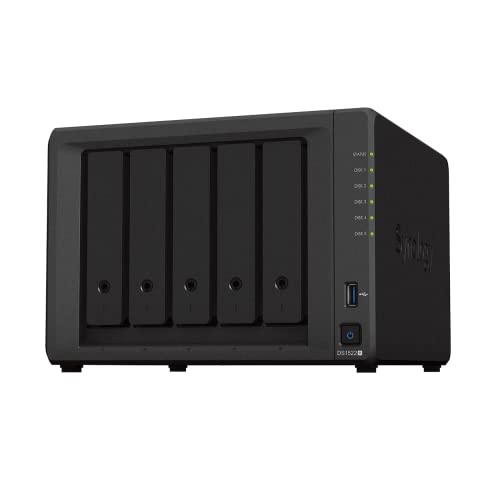
Drive bay capacity determines not only how much raw data you can archive, but also what levels of RAID protection you can implement without severely cramping usable space. The DS1522+ ships with five primary drive bays, giving it an immediate edge over standard four-bay enclosures for RAID 5 or RAID 6 arrays. Even more critical are the Synology DS1522+ expansion capabilities: the system supports adding up to 10 extra drive bays through two optional DX517 expansion units, accommodating a maximum of 15 storage drives as organizational needs multiply over years of deployment.
The DXP4800 Plus takes a fixed approach to capacity. It houses four drive bays supporting both 2.5-inch and 3.5-inch SATA hard drives and SSDs, achieving an advertised upper limit of 144TB using compatible drives in RAID 0. It works with standard drives from brands like Western Digital, Seagate, and Toshiba running at 7200 rpm. However, the listing does not specify support for modular external expansion units to scale drive bay counts past the initial four slots. Users deciding between physical chassis footprints can evaluate the wider trade-offs in our 2 bay vs 4 bay nas analysis.
If you anticipate outgrowing a single desktop chassis, the DS1522+ safeguards your investment by allowing you to attach secondary arrays over high-speed expansion lines rather than forcing you to migrate to an entirely new network server. When comparing the Synology DS1522+ vs DXP4800 Plus on storage longevity, Synology’s multi-bay ceiling stands clear.
Edge: Synology DS1522+. Five baseline drive bays and support for up to 15 total drives via two DX517 expansion units provide unmatched long-term capacity scaling.
Processing Hardware and System Architecture
Local compute power influences how effectively a network appliance runs internal services such as media indexing, database processing, local virtualization, and background file indexing. In any thorough UGREEN DXP4800 Plus review, the internal component sheet stands out as exceptionally modern. The system is driven by an x86-based Intel 5-Core CPU paired with 8GB of cutting-edge DDR5 RAM. In addition to primary drive handling, UGREEN includes an integrated 128G SSD, creating a responsive base for local caching, operating system tasks, and background processing without consuming standard drive bays.
On the Synology side, the Amazon product listing does not specify the exact processor model, core architecture, or pre-installed system RAM configuration for the DS1522+. While the listing explicitly documents performance metrics of up to 736 MB/s read and 796 MB/s write alongside virtualization readiness, buyers who scrutinize raw silicon specs will appreciate the transparency of UGREEN’s modern Intel and DDR5 platform. Buyers evaluating similar processing specs across modern appliances will note parallels discussed in our ugreen dxp4800 plus vs terramaster f4-425 assessment.
For users hosting diverse client workloads, UGREEN’s combination of a 5-core Intel chip and quick DDR5 memory delivers tangible headroom for container deployment and concurrent user tasks right from initial setup.
Edge: UGREEN DXP4800 Plus. An Intel 5-Core processor, 8GB of DDR5 memory, and a built-in 128G SSD provide a high-performance, well-specified computing platform.
Multimedia Connectivity and Direct Peripheral Ingest
External port versatility influences how an enclosure fits into creative studios, photo editing desks, and home entertainment racks. The DXP4800 Plus features direct multimedia hardware including a dedicated 4K HDMI output, an SD 3.0 card reader, and 10Gbps USB ports. The integrated SD slot enables photographers and videographers to slot in field media directly for rapid local dumping, while the 4K HDMI interface permits direct local display streaming to monitors, smart TVs, or production displays without placing loads on the local area network.
The DS1522+ is designed strictly as a networked headless server. Synology includes the DS1522+ main unit, two RJ-45 LAN cables, an AC power adapter, and an accessory pack in the box. However, the listing does not specify any direct video display outputs such as HDMI, nor does it include an integrated SD card reader on the chassis. Connecting direct display panels or offloading camera cards without a connected PC or separate card reader is not accommodated by the DS1522+ physical layout.
When asking is UGREEN DXP4800 Plus worth it for creative workstations, the inclusion of direct peripheral ingest and video passthrough offers immediate workflow convenience that headless appliances cannot match.
Edge: UGREEN DXP4800 Plus. Integrated 4K HDMI, an SD 3.0 memory slot, and 10Gbps USB interfaces deliver unmatched local ingest and direct-to-display connectivity.
Software Ecosystem and Enterprise Applications
Underlying hardware requires intelligent system software to guarantee data resilience and intuitive file management. Synology has refined its management platform over multiple generations, turning the DS1522+ into an all-in-one hub for business environments. The listing highlights comprehensive built-in file and photo management, enterprise-grade data protection, native virtualization, and professional surveillance solutions. These native tools make the DS1522+ exceptionally stable for offices that cannot afford deployment friction, a factor explored extensively in our synology ds1522+ vs qnap ts-464 comparison.
UGREEN equips the DXP4800 Plus with its modern NASync platform, focusing on home, creator, and small-team collaboration. Key features include Docker support, virtual machines, centralized automated backups, and flexible permission controls. For visual assets, UGREEN incorporates an AI-Powered Photo Album that automatically categorizes images by identifying faces, scenes, objects, and locations while actively detecting and removing duplicate files. The interface offers dedicated applications across Windows, macOS, Linux, Android, iOS, web browsers, and smart TVs.
When deciding between the Synology DS1522+ or UGREEN DXP4800 Plus for home server deployment, your choice hinges on software maturity. UGREEN excels with smart consumer-facing AI photo management, but Synology’s established virtualization, robust backup tools, and specialized surveillance infrastructure remain unmatched for demanding operational environments. Those researching Synology’s model tiers will also find helpful context in our synology ds423+ vs ds1522+ guide.
Edge: Synology DS1522+. A mature operating suite offering specialized business tools, comprehensive surveillance, and field-tested virtualization provides superior enterprise software stability.
Warranty and Long-Term Manufacturer Support
Network storage servers house mission-critical business ledgers, client archives, and irreplaceable media collections, making warranty coverage an important consideration. Synology covers the DS1522+ with a 3-year manufacturer warranty. This extended warranty timeline aligns with business hardware refresh cycles, giving IT managers peace of mind against mechanical and electrical defects across multi-year deployments.
UGREEN provides a 2-year manufacturer warranty for the DXP4800 Plus. To bolster buyer confidence, UGREEN pairs this protection with 24-hour specialist support, a 30-day return policy, and a committed 2-year spare parts availability duration in the EU market. The system also includes an extensive NAS Knowledge and Support Center accessible through the companion application or web portals.
While UGREEN’s 24-hour specialist support and clear spare parts timelines are commendable for modern hardware, Synology’s extra full year of standard factory protection delivers greater long-term assurance for enterprise storage investments.
Edge: Synology DS1522+. A standard 3-year warranty provides longer out-of-the-box factory coverage than the competitor’s 2-year protection plan.
Pros and Cons
Synology DS1522+

Pros
- 5 base bays scalable to 15 drives
- Proven surveillance and business apps
- Four 1GbE ports with link aggregation
- 3-year manufacturer warranty
Cons
- 10GbE requires optional expansion module
- Chassis lacks direct HDMI video output
View Synology DS1522+ on Amazon
UGREEN DXP4800 Plus

Pros
- Integrated 10GbE and 2.5GbE networking
- Fast 1250 MB/s data transfer rate
- Intel 5-Core CPU with 8GB DDR5
- Direct 4K HDMI and SD 3.0 slot
Cons
- Limited to 4 base drive bays
- Shorter 2-year warranty coverage
View UGREEN DXP4800 Plus on Amazon
Who Should Buy Each One
Choose the Synology DS1522+ If
- You need expansive capacity growth from 5 base bays up to 15 drives using dual DX517 expansion units.
- You depend on field-tested office software for enterprise data protection, virtualization, and surveillance camera setups.
- You prefer an enterprise appliance backed by a 3-year standard manufacturer warranty.
- You operate within standard gigabit network topologies that utilize multi-port link aggregation across four 1GbE ports.
Choose the UGREEN DXP4800 Plus If
- You demand native 10GbE and 2.5GbE network throughput without purchasing optional add-in cards.
- You edit high-resolution media and require rapid ingestion via an integrated SD 3.0 slot and 10Gbps USB connections.
- You want modern computing hardware, including an Intel 5-Core CPU, 8GB of DDR5 memory, and an onboard 128G SSD.
- You want direct TV or monitor connectivity through an integrated 4K HDMI port alongside AI-assisted photo sorting.
Final Verdict
In this UGREEN DXP4800 Plus vs Synology DS1522+ comparison, the winning choice depends entirely on whether your storage demands prioritize modular capacity growth or immediate network throughput. The DS1522+ remains the recommended choice for business offices, multi-user file management, and long-term data archiving. Its baseline five drive bays, potential expansion to 15 total drives, established software ecosystem, and 3-year warranty provide the structural reliability and operational safety that business users demand.
However, for creative studios, video editing suites, and technology enthusiasts, the DXP4800 Plus delivers vastly superior out-of-the-box hardware. With native 10GbE and 2.5GbE networking, 1250 MB/s transfer speeds, an Intel 5-Core CPU, 8GB of DDR5 memory, 4K HDMI output, and integrated SD card ingest, it offers exceptional hardware value. If massive drive bay expansion beyond four drives is not a requirement for your workflow, UGREEN provides an unmatched, speed-focused desktop platform.
FAQ
Does the Synology DS1522+ include native 10GbE networking?
No, the DS1522+ features four 1GbE ports as standard. While it supports sequential speeds up to 736 MB/s read and 796 MB/s write, upgrading to 10GbE networking requires purchasing and installing an optional network module.
Can the UGREEN DXP4800 Plus connect directly to an external monitor?
Yes, the DXP4800 Plus features a built-in 4K HDMI port on its chassis, allowing you to output video directly to a display, television, or studio monitor without relying exclusively on remote network streaming.
How many drives can the Synology DS1522+ support in total?
The DS1522+ includes five internal drive bays and supports up to 10 additional bays by connecting two separate DX517 expansion units, accommodating a maximum of 15 storage drives simultaneously.
What hard drive brands are compatible with the UGREEN DXP4800 Plus?
The DXP4800 Plus is compatible with standard 2.5-inch and 3.5-inch SATA hard drives and SSDs, specifically supporting 7200 rpm drives from major manufacturers such as Western Digital, Seagate, and Toshiba.
Does the UGREEN DXP4800 Plus support containerization and virtual machines?
Yes, the DXP4800 Plus software platform includes native support for Docker containers and virtual machine deployment, powered by its Intel 5-Core x86 processor and 8GB of DDR5 RAM.
Which model offers a longer standard warranty?
The Synology DS1522+ provides a 3-year manufacturer warranty, whereas the UGREEN DXP4800 Plus includes a 2-year warranty with 24-hour specialist support and a 2-year EU spare parts availability period.