The core distinction between the Asus ProArt P16 and the Acer Predator Helios Neo 16 comes down to professional creative fidelity versus dedicated esports performance. While the ProArt packs a flagship 24 GB RTX 5090 GPU and an ultra-detailed 4K OLED touch display into a slim, four-pound chassis, the Predator Helios Neo 16 focuses on high-refresh 240Hz gaming speeds, aggressive airflow, and desktop-class processing power.
Creative directors, 3D artists, and mobile video editors should choose the Asus ProArt P16 for its uncompromising color accuracy, vast unified memory, and portable design. Competitive gamers and performance-focused power users should choose the Acer Predator Helios Neo 16 for its lightning-fast panel responsiveness and dedicated gaming cooling setup.
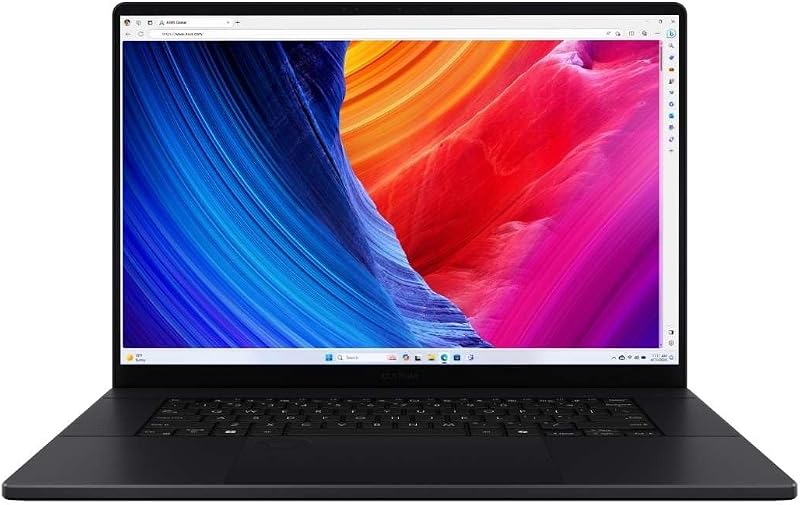
![HIDevolution [2025] ASUS ProArt P16 H7606WX Black 16" 4K 120Hz OLED Touch, 2.0 GHz Ryzen AI 9 HX 370, RTX 5090, 64 GB LPDDR5X RAM, 4 TB PCIe SSD, Windows 11 Pro](https://m.media-amazon.com/images/I/41BUZNaAIUL._SL500_.jpg "HIDevolution [2025] ASUS ProArt P16 H7606WX Black 16\" 4K 120Hz OLED Touch, 2.0 GHz Ryzen AI 9 HX 370, RTX 5090, 64 GB LPDDR5X RAM, 4 TB PCIe SSD, Windows 11 Pro")

Asus ProArt P16 vs Acer Predator Helios Neo 16 at a Glance
| Attribute | Asus ProArt P16 | Acer Predator Helios Neo 16 |
|---|---|---|
| Processor | AMD Ryzen AI 9 HX 370 (12 cores, 24 threads, up to 5.1 GHz) | Intel Core Ultra 9 275HX (up to 13 NPU TOPS) |
| Graphics Processor | NVIDIA GeForce RTX 5090 (24 GB GDDR7) | NVIDIA GeForce RTX 5070 Ti (12 GB GDDR7, 992 AI TOPS) |
| Display Panel | 16-inch 4K (3840 x 2400) 120Hz OLED Touchscreen | 16-inch WQXGA 240Hz 500-nit (100% DCI-P3, 3ms overdrive) |
| Display Sync | The listing does not specify G-SYNC support | NVIDIA G-SYNC and NVIDIA Advanced Optimus |
| System Memory | 64 GB LPDDR5X (onboard) | 16 GB DDR5 |
| Internal Storage | 4 TB (2 x 2 TB) M.2 PCIe 4.0 NVMe SSD | 1 TB PCIe Gen 4 SSD |
| Thermal Design | Thermal Grizzly Conductonaut (CPU) and Gelid GC Extreme (GPU) | 5th Gen AeroBlade 3D Fan Cooling |
| Chassis Weight | 4.1 pounds | 6.0 pounds |
| Operating System | Windows 11 Pro | Windows 11 Home |
| Best For | Studio production, 3D rendering, and traveling creatives | High-FPS competitive gaming and enthusiast desktop replacement |
GPU Graphics Computing: RTX 5090 vs RTX 5070 Ti Laptop
Graphics hardware dictates what workloads a modern performance laptop can realistically sustain. The ProArt features the flagship NVIDIA GeForce RTX 5090 Laptop GPU configured with an immense 24 GB pool of GDDR7 video memory. In contrast, the Predator Helios Neo 16 carries an NVIDIA GeForce RTX 5070 Ti Laptop GPU equipped with 12 GB of GDDR7 memory and 992 AI TOPS of computational horsepower. Comparing an asus proart p16 vs acer nitro v 15 or similar mid-tier machine highlights how quickly hardware tiers separate when handling heavy computational loads.
In practice, the graphics divide between an RTX 5090 vs RTX 5070 Ti laptop changes the ceiling of your workload. While both GPUs belong to NVIDIA’s latest generation with full ray tracing, neural rendering, and DLSS technology, the ProArt provides double the dedicated video RAM. A 24 GB buffer allows 3D artists to manipulate complex viewport geometry, render uncompressed 8K RAW video timelines, and load local artificial intelligence models directly onto the GPU without overflowing into slower system memory. The RTX 5070 Ti inside the Predator Helios Neo 16 is an exceptionally capable chip for 1440p and high-fidelity gaming, but demanding production environments will encounter hardware limits far sooner on a 12 GB card.
When deciding between the Asus ProArt P16 or Acer Predator Helios Neo 16 for video editing, the ProArt’s enormous graphics buffer delivers undeniable stability and rendering headroom. For pure gaming, the Predator Helios Neo 16 uses its DLSS multi-frame generation and high AI TOPS rating to push fluid frame rates across modern releases, but it cannot match the raw compute ceiling or heavy rendering capabilities provided by the ProArt’s flagship silicone.
Edge: Asus ProArt P16 because its 24 GB RTX 5090 offers double the video memory and superior raw compute power for intensive creative and 3D applications.
Display Technology and Visual Fidelity: 4K OLED vs 240Hz High Refresh
Screen specifications fundamentally shape how you interact with software on a day-to-day basis. The ProArt is equipped with a 16-inch 4K (3840 x 2400) OLED touch panel running at 120Hz. The Predator Helios Neo 16 steps into the ring with a 16-inch WQXGA display pushing a 240Hz refresh rate, a 3ms overdrive response time, 500 nits of brightness, 100% DCI-P3 color gamut coverage, and native NVIDIA G-SYNC alongside Advanced Optimus. Evaluating the asus zenbook 14 oled vs acer predator helios neo 16 illustrates how panel selection completely dictates a machine’s target user base.
The ProArt OLED panel provides true per-pixel illumination, meaning black pixels turn off entirely for infinite contrast ratios. Its 3840 x 2400 resolution offers exceptional pixel density, ensuring razor-sharp typography, precise vector lines, and pixel-level scrutiny during digital coloring or photo retouching. The touch interface provides direct tactical input for creative workflows. However, while 120Hz provides smooth motion for desktop navigation and creative timelines, it trails behind dedicated esports panels.
The Predator Helios Neo 16 sacrifices the infinite black levels and 4K sharpness of OLED to focus squarely on motion clarity. Operating at 240Hz with a 3ms response time and G-SYNC variable refresh rate, this panel eliminates screen tearing, minimizes ghosting, and tracks fast-moving targets effortlessly in competitive shooters. The 500-nit luminance ensures comfortable viewing under bright office or stadium lighting, and 100% DCI-P3 coverage maintains respectable color vibrancy. When deciding between the Asus ProArt P16 or Acer Predator Helios Neo 16 for gaming, the Predator’s 240Hz panel provides the clear competitive advantage.
Edge: Tie because the ProArt delivers superior 4K OLED contrast and pixel fidelity for studio grading, while the Helios Neo provides unmatched 240Hz motion fluidity for competitive play.
Processor Performance and AI Architecture: Ryzen AI 9 vs Core Ultra 9
Central processing performance establishes how quickly a machine compiles code, manages complex application hierarchies, and runs physics calculations. Inside the ProArt sits the AMD Ryzen AI 9 HX 370 processor, featuring 12 cores, 24 threads, a base frequency of 2.0 GHz, a maximum boost clock of 5.1 GHz, and 36 MB of smart cache. Inside the Predator Helios Neo 16, Acer deploys the Intel Core Ultra 9 275HX, a powerhouse gaming processor accompanied by an integrated NPU rated up to 13 TOPS. Shoppers evaluating an asus tuf gaming a15 vs acer predator helios neo 16 will recognize the distinct engineering philosophies dividing AMD’s high-efficiency silicon from Intel’s high-wattage HX architecture.
AMD’s Ryzen AI 9 HX 370 is built around efficient Zen architecture designed to output sustained multi-core performance within slim chassis dimensions. Its 12 cores and 24 threads handle background encoding, live previews, and complex timeline operations reliably. Because the ProArt configuration listed here is prepared by custom builder HIDevolution, it features upgraded Thermal Grizzly Conductonaut liquid metal on the CPU to sustain boost clocks without thermal throttling.
Intel’s Core Ultra 9 275HX is engineered around high peak wattage and aggressive clock speeds tailored for desktop-replacement gaming rigs. In demanding simulation titles and heavy gaming scenarios, the 275HX processor leverages its enthusiast-tier HX design to drive higher peak draw when plugged into wall power. It also incorporates an NPU to offload background tasks like microphone noise suppression and camera effects during live streaming. Both processors handle intensive modern workloads effortlessly, but Intel’s HX design prioritizes raw high-wattage computing while AMD’s chip emphasizes high output per watt.
Edge: Tie because the Ryzen AI 9 HX 370 maximizes performance efficiency in thin enclosures, while the Core Ultra 9 275HX delivers tremendous desktop-class throughput under sustained power.
Memory and Storage Capacity: Multitasking and Project Scale
System capacity dictates whether a laptop can handle massive datasets without stuttering or running out of local drive space. On this front, the two machines diverge dramatically straight out of the box. The ProArt arrives loaded with 64 GB of LPDDR5X onboard system memory and an expansive 4 TB PCIe 4.0 NVMe solid-state storage subsystem arranged in a dual-drive 2 x 2 TB layout. The Predator Helios Neo 16 is configured with 16 GB of DDR5 RAM and a single 1 TB Gen 4 SSD. For buyers comparing the acer predator helios neo 16 vs nitro v 15, storage and RAM allocation are critical indicators of real-world longevity.
A 64 GB memory capacity transforms the ProArt into an enterprise-ready workstation. Digital creators can keep Adobe After Effects, Premiere Pro, and Blender running simultaneously alongside dozens of browser tabs without exhausting system resources. Furthermore, having 4 TB of high-speed NVMe storage ready to go means you can store multiple uncompressed 4K video projects, vast sample libraries, and massive creative caches without relying on external drives or immediate hardware upgrades.
The 16 GB memory footprint on the Predator Helios Neo 16 is sufficient for modern PC gaming, operating system overhead, and routine multitasking. However, modern triple-A titles and heavy creative applications quickly consume 16 GB of RAM, leaving minimal overhead for background streaming software or video rendering tasks. While the 1 TB Gen 4 drive offers fast load times, modern game install footprints can fill 1 TB of capacity in just a few downloads. The ProArt provides quadrupled memory and quadrupled internal storage capacity out of the box.
Edge: Asus ProArt P16 because its 64 GB of RAM and 4 TB SSD provide immense headroom for demanding studio projects and intensive multitasking.
Chassis Portability, Build Profile, and Thermal Design
Hardware power means little if a machine cannot be comfortably transported or kept within safe operating temperatures. The ProArt is engineered for creators on the move, measuring 13.97 inches long, 9.72 inches wide, and an astonishingly slim 0.68 inches thick, with a total carry weight of just 4.1 pounds. In contrast, the Predator Helios Neo 16 is built as a traditional, hefty gaming battle station weighing a solid 6.0 pounds. A glance at the asus proart p16 vs acer swift go 14 reveals just how much engineering goes into keeping workstation-tier components inside a sub-five-pound chassis.
Carrying the ProArt in a standard backpack is effortless thanks to its four-pound weight and svelte 0.68-inch profile. To prevent thermal throttling inside such a thin form factor, the HIDevolution custom configuration integrates Thermal Grizzly Conductonaut liquid metal on the processor and Gelid GC Extreme thermal compound across the RTX 5090 GPU. The sleek, understated clamshell chassis features a backlit keyboard and professional styling that blends naturally into boardroom meetings and client presentations.
The Predator Helios Neo 16 prioritizes thermal volume over slim portability. At six pounds, it demands dedicated space in a heavy-duty gear bag. However, that larger frame houses Acer’s 5th Gen AeroBlade 3D all-metal fan technology, which draws significant airflow across the internal components to maintain stable clock speeds during hours-long gaming sessions. The aesthetic is explicitly gamer-focused, highlighted by a 4-zone RGB backlit keyboard, angular vents, and prominent Predator branding. If your laptop rarely leaves the desk, the Predator’s thermal bulk is an asset; if you travel regularly, the ProArt is significantly easier to transport.
Edge: Asus ProArt P16 because it packs flagship workstation components into a chassis that is almost two pounds lighter and dramatically thinner.
Pros and Cons
Asus ProArt P16
Pros
- Flagship RTX 5090 with 24 GB VRAM
- Vibrant 16-inch 4K OLED touchscreen
- Generous 64 GB RAM and 4 TB SSD
- Slim and lightweight 4.1-pound chassis
- Upgraded liquid metal thermal interface
Cons
- Display refresh rate capped at 120Hz
- Non-upgradable onboard system memory
View Asus ProArt P16 on Amazon
Acer Predator Helios Neo 16

Pros
- Ultra-smooth 240Hz 3ms gaming display
- Support for NVIDIA G-SYNC and Advanced Optimus
- Powerful Intel Core Ultra 9 275HX processor
- Effective 5th Gen AeroBlade 3D cooling
- Customizable 4-zone RGB backlit keyboard
Cons
- Heavier 6-pound chassis thickness
- Modest 16 GB RAM and 1 TB storage out of box
View Acer Predator Helios Neo 16 on Amazon
Who Should Buy Each One
Choose the Asus ProArt P16 If
- You edit multi-stream 4K or 8K video timelines, work with heavy 3D scene files, or train local machine learning models that require 24 GB of dedicated VRAM.
- You need a color-critical 4K OLED touchscreen for grading, visual art, digital sketching, and client presentations.
- You frequently travel between studios, offices, or remote locations and need a lightweight 4.1-pound machine that slips easily into a shoulder bag.
- You run massive creative software suites simultaneously and require 64 GB of system memory paired with 4 TB of fast internal storage.
Choose the Acer Predator Helios Neo 16 If
- You prioritize high-refresh competitive esports in titles where a 240Hz panel and 3ms response time offer a decisive visual advantage.
- You want hardware gaming enhancements like NVIDIA G-SYNC, Advanced Optimus, and customizable 4-zone RGB backlighting.
- Your laptop functions primarily as a stationary desk gaming setup where a 6.0-pound weight is not a transport obstacle.
- You want high-wattage gaming performance powered by an Intel Core Ultra 9 HX series processor and an RTX 5070 Ti GPU.
Final Verdict
Any comprehensive Acer Predator Helios Neo 16 vs Asus ProArt P16 comparison reveals two exceptional laptops built for completely divergent audiences. In any balanced Asus ProArt P16 review, the machine stands out as an engineering triumph for digital creators. Packing an RTX 5090 GPU with 24 GB of GDDR7 memory, an AMD Ryzen AI 9 HX 370 processor, 64 GB of LPDDR5X RAM, and a 4 TB SSD into a 4.1-pound chassis with a stunning 4K OLED touch display makes it one of the most capable mobile production environments ever assembled. When asking is Asus ProArt P16 worth it, the answer is an emphatic yes for creative professionals who earn their living manipulating media and need top-tier hardware that can travel anywhere.
On the other hand, an objective Acer Predator Helios Neo 16 review demonstrates that Acer built an aggressive, dedicated gaming powerhouse. When evaluating whether is Acer Predator Helios Neo 16 worth it, competitive gamers will find immense value in its 240Hz WQXGA display, NVIDIA G-SYNC synchronization, and powerful Intel Core Ultra 9 275HX processing architecture. The RTX 5070 Ti with DLSS multi-frame generation pushes blistering frame rates across demanding PC titles. If your primary objective is competitive gaming and high-refresh immersion at a dedicated desk setup, the Predator Helios Neo 16 delivers exactly what you need. But for all-around workstation capability, uncompromised memory scale, and thin-and-light luxury, the Asus ProArt P16 claims the overall victory.
FAQ
Can the Asus ProArt P16 run modern games at high settings?
Yes. The ProArt features an NVIDIA GeForce RTX 5090 with 24 GB of GDDR7 memory, which easily handles demanding modern games at maximum visual settings. While its OLED screen tops out at a 120Hz refresh rate rather than the 240Hz found on dedicated esports laptops, its sheer graphics compute power ensures smooth gameplay and exceptional visual detail.
Is the Acer Predator Helios Neo 16 screen good enough for professional color grading?
The Predator Helios Neo 16 features a sharp 16-inch WQXGA screen with 500 nits of brightness and 100% DCI-P3 color gamut coverage, making it quite capable for general content creation and video editing. However, it lacks the true per-pixel black levels, infinite contrast ratio, and 4K resolution of the ProArt OLED panel, which remains the better choice for master color grading.
How do the cooling solutions differ between these two laptops?
The ProArt in this configuration uses custom-applied Thermal Grizzly Conductonaut liquid metal on the CPU and Gelid GC Extreme thermal compound on the GPU to maximize heat transfer within its slim 0.68-inch chassis. The Predator Helios Neo 16 relies on Acer’s 5th Gen AeroBlade 3D dual-fan metal cooling architecture housed inside a thicker six-pound chassis to maximize airflow for long gaming sessions.
Which laptop is better for external monitor connectivity?
Both laptops support external displays via dedicated HDMI video outputs and fast Wi-Fi 6E wireless networking. The Predator Helios Neo 16 listing explicitly notes support for external displays, mice, keyboards, and printers, while the ProArt includes dedicated HDMI output alongside its touch-enabled primary display.
Does the Asus ProArt P16 support stylus or touch input?
Yes, the ProArt features a 16.0-inch 4K OLED touchscreen display, allowing creators to interact directly with their creative applications using intuitive touch inputs, which is not available on the Predator Helios Neo 16 non-touch panel.
What operating system comes installed on each laptop?
The Asus ProArt P16 arrives with Windows 11 Pro, offering advanced enterprise management, BitLocker encryption, and remote desktop capabilities suitable for professional studios. The Acer Predator Helios Neo 16 comes equipped with Windows 11 Home along with a three-month trial of Xbox PC Game Pass.


