The core difference between the Asus ROG Strix Scar 16 and the Asus TUF Gaming A15 comes down to extreme enthusiast hardware versus battle-tested utilitarian resilience. While the ROG machine targets maximum visual fidelity and computing throughput with its top-tier GPU and Mini LED panel, the TUF laptop focuses on everyday reliability with certified physical durability.
Choose the Asus ROG Strix Scar 16 if you demand uncompromised framerates, high-end content creation capabilities, and advanced display contrast. Opt for the Asus TUF Gaming A15 if you need a rugged, drop-tested machine for everyday gaming sessions and reliable mobile productivity.


Asus ROG Strix Scar 16 vs Asus TUF Gaming A15 at a Glance
| Feature | Asus ROG Strix Scar 16 | Asus TUF Gaming A15 |
|---|---|---|
| Processor | Intel Core Ultra 9 275HX | AMD Ryzen 5 7535HS |
| Graphics Processor | NVIDIA GeForce RTX 5090 (175W TGP) | NVIDIA GeForce RTX 3050 (up to 70W TGP) |
| Display Specifications | 2.5K (2560 x 1440), 240Hz, Mini LED, 100% DCI-P3 | FHD, 144Hz, Adaptive-Sync, Anti-Glare |
| System Memory | 32GB DDR5-5600MHz | 8GB DDR5-5600MHz |
| Internal Storage | 2TB PCIe Gen 4 SSD | 512GB PCIe Gen 4 SSD |
| Cooling Hardware | Vapor chamber, Tri-fan, Conductonaut Extreme liquid metal | Dual 84-blade Arc Flow Fans |
| Wireless Connectivity | Wi-Fi 7 | Wi-Fi 6 |
| Operating System | Windows 11 Pro | Windows 11 Home |
| Chassis Durability & Features | AniMe Vision lid, Tool-free access, 6.3 lbs | MIL-STD-810H tested, spill resistant, 7.0 lbs |
| Best For | Enthusiast gaming and heavy content production | Durable entry-level gaming and rugged portability |
Graphics and Processing Power
Evaluating tuf gaming a15 vs strix scar 16 performance starts with raw silicon capabilities. The ROG Strix Scar 16 is equipped with an Intel Core Ultra 9 275HX processor and an NVIDIA GeForce RTX 5090 Laptop GPU running at an unrestrained 175W TGP. This flagship pairing provides the processing overhead required to handle demanding simulation titles, 3D rendering workflows, and maximum graphical presets. The hardware architecture also includes a dedicated MUX Switch with Advanced Optimus, routing frames directly from the dedicated GPU to optimize frame pacing without requiring a system reboot.
In contrast, the TUF Gaming A15 incorporates an AMD Ryzen 5 7535HS processor alongside an NVIDIA GeForce RTX 3050 Laptop GPU with 4GB of dedicated VRAM, operating at up to 70W TGP with Dynamic Boost. While this configuration handles modern esports titles and standard computing duties reliably, it operates in a completely different computational tier. Those comparing modern high-tier machines might also examine the asus rog zephyrus g16 vs rog strix scar 16 to weigh varying top-tier power profiles against portable form factors.
The gap in visual rendering output between a 175W RTX 5090 and a 70W RTX 3050 dictates what graphical fidelity settings are possible. The Scar 16 delivers immense graphical bandwidth and processing power designed for boundary-pushing simulation, whereas the TUF A15 is geared specifically for modest resolution gaming with managed power draw.
Edge: Asus ROG Strix Scar 16 delivers substantially greater graphical horsepower and multi-threaded CPU throughput.
Display Quality and Visual Fidelity
The visual experience presents an immediate contrast when looking at the rog strix scar 16 vs tuf a15 specs. The Strix Scar 16 sports an 18-inch 2.5K (2560 x 1440) ROG Nebula HDR display featuring Mini LED backlighting with over 2,000 local dimming zones. With a rapid 240Hz refresh rate, a 3ms response time, 100% DCI-P3 color coverage, and dual ACR anti-reflective layers, this panel provides deep black levels and intense highlight contrast essential for HDR gaming and precision creative color grading.
The TUF Gaming A15 utilizes a 15.6-inch Full HD display with a 144Hz refresh rate, an anti-glare coating, and Adaptive-Sync technology. Adaptive-Sync synchronizes the display refresh rate with the GPU framerate to eliminate tearing, stuttering, and input lag during fast-paced play. While it ensures responsive visuals for competitive gaming, it does not offer the wide color space or granular backlighting zones found on the flagship Scar unit. For shoppers weighing varied portable screen configurations, an analysis of the asus rog strix scar 16 vs zenbook 14 oled illustrates how high-refresh Mini LED panels compare against compact OLED alternatives.
In real-world use, the Nebula HDR display provides superior immersion and pinpoint color reproduction for high-fidelity gaming and media production. The TUF screen prioritizes functional anti-glare viewing and standard high-refresh motion clarity suitable for basic gaming environments without high dynamic range capabilities.
Edge: Asus ROG Strix Scar 16 excels with a 240Hz 2.5K Mini LED panel featuring over 2,000 dimming zones and full DCI-P3 coverage.
Memory and Storage Capabilities
Multitasking capacity and local storage drive operational speed during heavy gaming or productivity workloads. The Asus ROG Strix Scar 16 features 32GB of DDR5-5600MHz RAM paired with a generous 2TB PCIe Gen 4 solid-state drive capable of raw data throughput up to 7,000MB/s. This large memory pool enables effortless multitasking between demanding gaming titles, streaming suites, and asset-heavy editing software without memory exhaustion. Furthermore, the 2TB drive accommodates massive modern game installations alongside video assets.
The Asus TUF Gaming A15 comes configured with 8GB of DDR5-5600MHz system memory and a 512GB PCIe 4.0 NVMe SSD. While DDR5-5600 ensures modern operational speed, an 8GB allocation limits complex background multitasking, modern AAA game stability, and large dataset handling. Similarly, the 512GB solid-state drive limits how many modern game files can be held concurrently without external storage management. Gamers assessing hardware capacity against creative laptop standards can consult our asus rog strix scar 16 vs proart p16 overview to understand production storage scaling.
Having four times the base system memory and quadruple the solid-state capacity right out of the box makes a tremendous day-to-day functional difference. The Scar 16 allows immediate installation of large titles and background software execution, whereas the TUF A15 requires careful disk management from day one.
Edge: Asus ROG Strix Scar 16 wins decisively with 32GB DDR5 memory and a high-speed 2TB PCIe Gen 4 SSD.
Cooling and Thermal Management
Thermal mitigation determines whether laptop components sustain their target clock speeds or throttle under sustained loads. The ROG Strix Scar 16 features ROG Intelligent Cooling, an advanced thermal assembly consisting of an end-to-end vapor chamber, a sandwiched heatsink, and a Tri-fan layout. Thermal transfer from the processor is optimized via Conductonaut Extreme liquid metal applied directly to the chipset, ensuring maximum dissipation during marathon rendering sessions or competitive matches.
The TUF Gaming A15 utilizes a specialized cooling configuration centered around a pair of 84-blade Arc Flow Fans. These fans are engineered to generate high-volume airflow across internal heat pipes without creating excessive acoustic disturbance. While the TUF cooling layout easily handles the thermal footprint of its 70W GPU and efficient AMD Ryzen processor, it is designed for a lower overall thermal design package rather than the intensive heat dissipation demanded by enthusiast components.
When running prolonged stress workloads, the vapor chamber and liquid metal on the Scar 16 maintain lower component temperatures under massive wattage loads. The TUF A15 manages its lower-wattage system quietly and effectively, but the Scar’s Tri-fan architecture represents a superior class of thermal engineering.
Edge: Asus ROG Strix Scar 16 offers more sophisticated thermal control using liquid metal and a comprehensive vapor chamber assembly.
Durability, Chassis Design, and Portability
Structural resilience and physical engineering reflect the divergent target audiences of these two computers. The Asus TUF Gaming A15 is engineered around MIL-STD-810H military-grade toughness standards. Asus subjects these systems to strict testing procedures involving physical drops, operational vibration, high humidity, and extreme temperatures. Combined with a spill-resistant keyboard and anti-glare frame, the 7-pound TUF chassis is tailor-made to survive demanding physical travel and tough environments. If you want to see how this military-tested design compares to sleeker options, review the asus rog zephyrus g16 vs tuf gaming a15 comparison.
The Strix Scar 16 features an unmistakable gaming-forward aesthetic with custom lighting features. It sports the AniMe Vision display on the lid for custom animations and text, a 360-degree full-surround RGB light bar, and a Stealth Mode to turn off lighting when needed. At 6.3 pounds with dimensions measuring 15.71 inches long by 11.73 inches wide and 0.93 inches thick, it is marginally lighter than the TUF despite housing a much larger chassis footprint. Crucially, the Scar 16 integrates tool-free chassis access, letting users slide a bottom latch to upgrade RAM, fans, and storage without needing a screwdriver.
While the Scar 16 offers convenient tool-free serviceability and gamer aesthetics, the TUF A15 provides verified structural resilience against drops, environmental exposure, and accidental spills. For users who carry their systems into volatile workspaces, the TUF chassis provides physical protection that the enthusiast chassis does not certify.
Edge: Asus TUF Gaming A15 wins for physical resilience thanks to MIL-STD-810H certification and spill resistance.
Connectivity and Operating Ecosystem
Connectivity options determine how easily peripherals, external displays, and multi-gigabit home networks integrate with each laptop. The ROG Strix Scar 16 steps into next-generation networking with onboard Wi-Fi 7, facilitating high-bandwidth wireless communication with reduced latency when paired with compatible routers. Its external interfaces support HDMI and multi-purpose USB video outputs, running Windows 11 Pro to support enterprise security protocols and advanced hypervisor management. The package also includes a 3-month PC Game Pass subscription for instant access to a large game library.
The TUF Gaming A15 relies on Wi-Fi 6 wireless connectivity, ensuring stable and fast local networking for standard competitive gaming and general streaming. It operates on Windows 11 Home and features dedicated video output, headphone ports, and an integrated front camera. For desktop builders who also monitor architectural divisions within the brand, reading the asus rog strix z790-a vs tuf gaming b860-plus analysis shows how ROG and TUF feature tiers translate to component ecosystems.
The combination of Wi-Fi 7, Windows 11 Pro, and tool-free internal maintenance gives the Scar 16 a tangible advantage in modern network integration and professional flexibility. The TUF A15 covers the basics adequately with Wi-Fi 6, but lacks the cutting-edge wireless standard and OS feature set.
Edge: Asus ROG Strix Scar 16 leads with Wi-Fi 7 wireless support and Windows 11 Pro inclusion.
Pros and Cons
Asus ROG Strix Scar 16
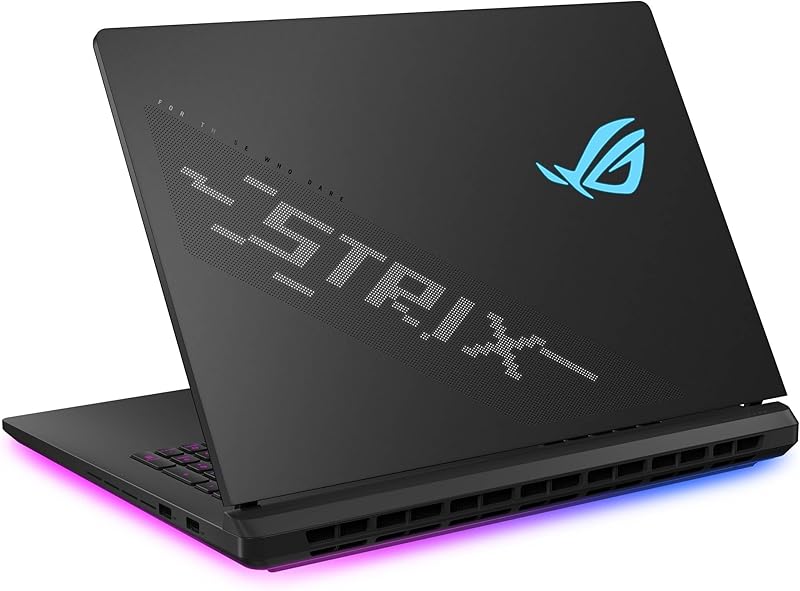
Pros
- NVIDIA RTX 5090 at 175W TGP
- 5K 240Hz Mini LED Nebula HDR display
- Generous 32GB RAM and 2TB SSD
- Tool-free internal chassis upgrade access
- Advanced vapor chamber with liquid metal
Cons
- Lacks MIL-STD-810H drop testing certification
- Large 18-inch footprint limits compact carrying
View Asus ROG Strix Scar 16 on Amazon
Asus TUF Gaming A15
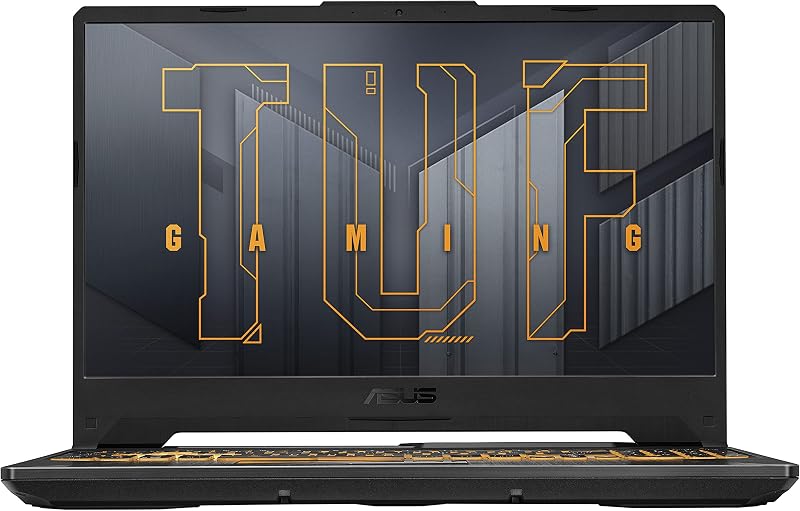
Pros
- Certified MIL-STD-810H military-grade toughness
- Protective spill-resistant keyboard build
- Quiet cooling via 84-blade Arc Flow Fans
- Adaptive-Sync prevents display tearing
Cons
- Only 8GB base DDR5 system memory
- Modest 512GB internal solid-state capacity
- Entry-tier RTX 3050 graphical output
View Asus TUF Gaming A15 on Amazon
Who Should Buy Each One
Choose the Asus ROG Strix Scar 16 If
- You want maximum graphical power via an NVIDIA RTX 5090 at a full 175W TGP for uncompromised frame rates.
- You demand Mini LED visual depth with over 2,000 dimming zones, 2.5K resolution, and 100% DCI-P3 color precision.
- You plan to upgrade hardware frequently and want tool-free sliding latch access to storage, fans, and memory.
- You require professional-level 32GB RAM and a spacious 2TB NVMe SSD straight out of the box.
Choose the Asus TUF Gaming A15 If
- You work or commute in rough conditions and need verified MIL-STD-810H drop and vibration protection.
- You want a spill-resistant keyboard design to prevent accidental fluid damage during daily sessions.
- You play standard competitive titles that run smoothly on a 144Hz Adaptive-Sync Full HD panel.
- You prefer a dedicated gaming machine focused purely on core hardware functionality without extensive RGB lighting.
Final Verdict
When assessing any asus rog strix scar 16 review alongside an asus tuf gaming a15 review, the divergence in user focus is absolute. For the vast majority of enthusiasts seeking maximum gaming fidelity, the Asus ROG Strix Scar 16 is the clear superior machine. Its combination of an Intel Core Ultra 9 275HX processor, a 175W RTX 5090, an incredible 240Hz Mini LED Nebula HDR display, and 32GB of DDR5 memory places it in the highest echelon of mobile computing performance.
On the other hand, the Asus TUF Gaming A15 remains the definitive choice when physical durability and environmental resistance take priority. If your everyday routine involves demanding commutes, shared workspaces, or harsh operating environments, the MIL-STD-810H drop resistance, spill-resistant chassis, and quiet Arc Flow cooling make the TUF A15 a sensible, rugged companion for conventional gaming.
FAQ
Which model is better: asus rog strix scar 16 or tuf gaming a15 for gaming?
The Asus ROG Strix Scar 16 is overwhelmingly more capable for gaming. It houses a top-tier NVIDIA GeForce RTX 5090 GPU at 175W TGP and a 240Hz 2.5K Mini LED panel, delivering far higher frame rates and graphical detail than the RTX 3050 and Full HD 144Hz screen on the TUF Gaming A15.
Is asus tuf gaming a15 worth it for durability?
Yes. The TUF Gaming A15 undergoes rigorous MIL-STD-810H testing, exposing the laptop to drops, vibrations, temperature swings, and humidity, while also providing a spill-resistant keyboard for added physical safety.
Is rog strix scar 16 worth it for creative professionals?
The ROG Strix Scar 16 is exceptionally well suited for creative workflows due to its 18-inch 2.5K ROG Nebula HDR display featuring 100% DCI-P3 color coverage, 2,000+ local dimming zones, 32GB of DDR5-5600 memory, and a fast 2TB PCIe Gen 4 SSD.
Should you choose the asus rog strix scar 16 or tuf a15 for esports?
Both laptops can run competitive esports titles, but the ROG Strix Scar 16 holds an edge with its 240Hz refresh rate, 3ms response time, and MUX Switch with Advanced Optimus, whereas the TUF Gaming A15 features a standard 144Hz Adaptive-Sync display.
How do the cooling systems differ on the asus tuf gaming a15 vs rog strix scar 16?
The ROG Strix Scar 16 uses ROG Intelligent Cooling with Conductonaut Extreme liquid metal, an end-to-end vapor chamber, and a Tri-fan layout. The TUF Gaming A15 relies on dual 84-blade Arc Flow Fans designed for quiet airflow across standard heat pipes.
Can you upgrade the components inside the ROG Strix Scar 16 without tools?
Yes. The ROG Strix Scar 16 includes tool-free access that allows you to customize and maintain the RAM, SSD, and cooling fans simply by sliding a latch on the bottom half of the chassis without using a screwdriver.


