Choosing between the Asus ROG Strix Scar 16 and the Asus ProArt P16 comes down to a fundamental split in design philosophy: deciding whether your daily workload demands an uncompromised, high-wattage desktop replacement built around high-refresh Mini LED gaming, or a slim, color-critical mobile studio pairing 4K OLED precision with immense memory capacity. While both high-end machines feature top-tier graphics processing and cutting-edge silicon, they deploy that power toward completely different environments, thermal envelopes, and creative goals.
Choose the Asus ROG Strix Scar 16 if you want maximum sustained graphical throughput, modular internal access, and an ultra-responsive 240Hz display tailored for competitive play and heavy thermal loads. Choose the Asus ProArt P16 if you need an ultra-dense 4K touch display, double the system memory right out of the box, and a svelte chassis that easily slips into an on-location production bag.

![HIDevolution [2025] ASUS ProArt P16 H7606WX Black 16" 4K 120Hz OLED Touch, 2.0 GHz Ryzen AI 9 HX 370, RTX 5090, 64 GB LPDDR5X RAM, 4 TB PCIe SSD, Windows 11 Pro](https://m.media-amazon.com/images/I/41BUZNaAIUL._SL500_.jpg "HIDevolution [2025] ASUS ProArt P16 H7606WX Black 16\" 4K 120Hz OLED Touch, 2.0 GHz Ryzen AI 9 HX 370, RTX 5090, 64 GB LPDDR5X RAM, 4 TB PCIe SSD, Windows 11 Pro")
Asus ROG Strix Scar 16 vs Asus ProArt P16 at a Glance
| Feature | Asus ROG Strix Scar 16 | Asus ProArt P16 |
|---|---|---|
| Processor | Intel Core Ultra 9 275HX | AMD Ryzen AI 9 HX 370 (12 cores, up to 5.1 GHz) |
| Graphics Processor | NVIDIA GeForce RTX 5090 (175W TGP) | NVIDIA GeForce RTX 5090 (24 GB GDDR7) |
| Display Type | ROG Nebula HDR Mini LED (2,000+ zones, dual ACR) | 4K OLED Touch Screen |
| Screen Size & Resolution | 18 inches, 2560 x 1440 | 16.0 inches, 3840 x 2400 |
| Refresh Rate & Response | 240Hz, 3ms | 120Hz (Response time not listed) |
| System Memory | 32GB DDR5-5600MHz | 64GB LPDDR5X (onboard) |
| Internal Storage | 2TB PCIe Gen 4 SSD (up to 7,000MB/s) | 4TB PCIe Gen 4 SSD (2 x 2TB) |
| Chassis Dimensions | 15.71″L x 0.93″W x 11.73″Th | 13.97″L x 9.72″W x 0.68″Th |
| Weight | 6.3 pounds | 4.1 pounds |
| Upgradability | Tool-free slide-latch access (RAM, SSD, fans) | Soldered memory; dual M.2 slots populated |
| Best For | Desktop replacement gaming and maximum framerates | Mobile creative production and color grading |
Display Technology and Visual Fidelity
The screen is the primary interface for your work and play, and evaluating a Mini LED vs 4K OLED laptop highlights two distinct visual experiences. The ROG Strix Scar 16 display specs focus squarely on fluid motion, blinding dynamic range, and expansive visual real estate. Its panel uses a ROG Nebula HDR Mini LED system backed by more than 2,000 individual dimming zones. With a native resolution of 2560 x 1440 running at an ultra-fast 240Hz refresh rate alongside a 3ms response time, it is engineered to eliminate ghosting and motion blur in fast-paced competitive shooters. The dual ACR anti-reflective layers work in tandem with 100% DCI-P3 color gamut coverage, ensuring that high-contrast highlights pop without washing out in well-lit rooms. In our broader look at panel variations, such as the asus rog strix scar 16 vs zenbook 14 oled comparison, this high-wattage Mini LED architecture clearly demonstrates how sustained brightness operates differently from self-emissive organic displays.
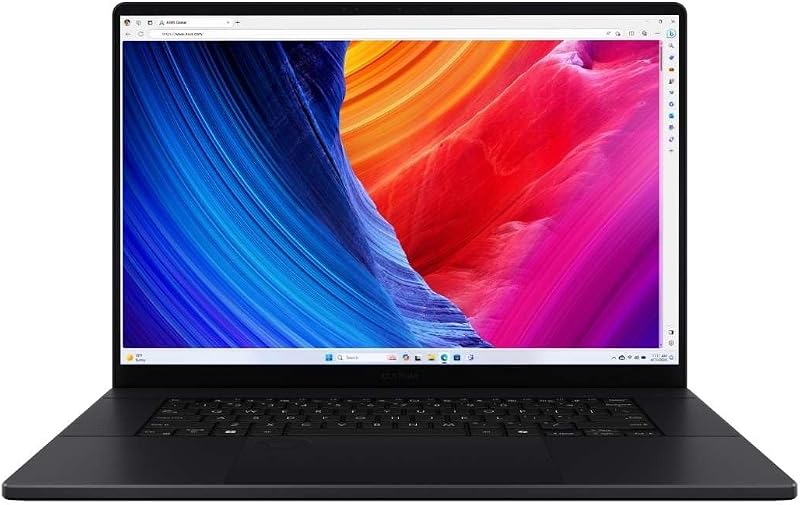
In contrast, the ProArt P16 prioritizes pixel density and tactile input for digital artists and visual editors. Its 16.0-inch 4K OLED touch panel boasts an ultra-sharp 3840 x 2400 resolution, delivering an aspect ratio optimized for vertical timeline workspace in video suites and high-resolution photo retouching. OLED pixels provide true, absolute black levels because each diode switches off entirely, resulting in infinite contrast that Mini LED dimming zones can only approximate. The ProArt screen tops out at a 120Hz refresh rate, which provides smooth scrolling and fluid desktop navigation, but it falls well short of the twitch-reflex speeds offered by the Scar. Furthermore, the inclusion of direct touchscreen capability allows creators to navigate canvases, scrub timelines, or manipulate adjustment points directly with their fingers-a utility absent from the Scar.
Choosing between these two panels depends entirely on whether your eyes value raw motion clarity or minute pixel structure. High-speed gamers will immediately spot the difference between 120Hz and 240Hz during rapid camera pans, giving the Scar a decisive advantage in competitive titles. On the other hand, photographers and finishing editors working in dark grading suites will appreciate the zero-blooming characteristics and ultra-fine 4K clarity of the ProArt panel. Mini LED avoids the long-term burn-in risks associated with static interface elements in productivity software, while OLED delivers peerless micro-contrast across every individual pixel.
Edge: Tie. The ROG Strix Scar 16 delivers unbeatable 240Hz motion clarity for competitive play, while the ProArt P16 offers pinpoint 4K OLED precision and touch control for creative work.
Graphics Performance and Thermal Architecture
Both laptops house NVIDIA’s flagship mobile silicon, but their execution reveals an enormous divide in thermal headroom and sustained throughput. Evaluating the ProArt P16 RTX 5090 performance alongside the Scar demonstrates how chassis volume dictates graphical wattage. In the Strix Scar 16, the GeForce RTX 5090 Laptop GPU is deployed at a maximum 175W Total Graphics Power (TGP). To dissipate the heat generated by this heavy wattage, Asus equips the machine with ROG Intelligent Cooling, which incorporates an end-to-end vapor chamber, a sandwiched heatsink, and a tri-fan design. The system also applies Conductonaut Extreme liquid metal to the processor package, allowing thermal energy to transfer rapidly away from the silicon. When comparing high-power platforms like the asus rog zephyrus g16 vs rog strix scar 16, thicker enclosures consistently maintain higher clock speeds over extended computing sessions.
The ProArt P16 takes that same GeForce RTX 5090 with its massive 24 GB of GDDR7 VRAM and places it inside a chassis measuring just 0.68 inches thick. While the listing does not specify the exact operating TGP wattage for this slim model, physics mandates that a sub-one-inch chassis cannot match the thermal evacuation rate of an expansive 0.93-inch, tri-fan enclosure. To maximize performance within these tighter boundaries, HIDevolution custom-builds this version of the ProArt P16 with upgraded thermal interface materials, applying Thermal Grizzly Conductonaut on the CPU and Gelid GC Extreme thermal compound on the GPU. This aftermarket thermal tuning improves heat conduction toward the heatsinks, but fans must still work vigorously to disperse heat from the thinner chassis under heavy 3D rendering loads.
For dedicated gaming, the Scar holds another critical hardware advantage: an integrated hardware MUX Switch paired with NVIDIA Advanced Optimus. This dedicated hardware switch routes visual frames directly from the dedicated GPU to the internal panel, eliminating the latency penalty and 5-10% performance bottleneck caused by passing signals through the integrated graphics processor. Advanced Optimus switches between low-power integrated graphics and the discrete RTX 5090 on the fly without requiring a system reboot. If your goal is maximizing sustained framerates in modern titles with ray tracing and frame generation fully enabled, the Strix Scar 16 converts its larger chassis volume into tangible graphical velocity.
Edge: Asus ROG Strix Scar 16. Its thick vapor chamber cooling, tri-fan design, 175W TGP headroom, and dedicated MUX switch unlock the full raw power of the RTX 5090 GPU.
Processor Architecture and Creative Workloads
Under the hood, these two powerhouses divide their computational philosophies along architectural lines, making the choice of Asus ROG Strix Scar 16 or ProArt P16 for video editing an interesting study in desktop silicon versus modern mobile efficiency. The Strix Scar 16 features the Intel Core Ultra 9 275HX processor, a desktop-class chip built to draw higher wattage for aggressive multi-threaded number crunching. When handling sustained rendering pipelines, heavy CAD simulations, or batch exporting uncompressed 4K video, this HX-series chip maintains intense compute power across extended durations. Readers exploring alternative performance baselines across our platform comparisons, such as the asus rog strix scar 16 vs tuf gaming a15 evaluation, know that high-TDP processor classes prioritize brute-force capability above battery conservancy.
The ProArt P16 approaches demanding workloads through AMD’s Ryzen AI 9 HX 370 processor, featuring 12 cores, 24 threads, a 2.0 GHz base frequency, a max turbo frequency of 5.1 GHz, and 36 MB of Smart Cache. This chip integrates dedicated neural processing architecture aimed at accelerating on-device AI tasks, such as automated rotoscoping, real-time audio isolation, and smart masking in creative suites. The Ryzen platform is engineered to deliver substantial multithreaded performance while operating within a balanced thermal profile, keeping the system responsive even when unplugged or running in noise-sensitive studio environments.
When assessing whether the machine fits a mobile studio workflow, the ProArt P16 shines for creators who execute intensive computational tasks on location. Video editors cutting footage in DaVinci Resolve or Adobe Premiere will appreciate how the Ryzen architecture handles timeline playback efficiently without generating excessive heat during casual editing. However, when it is time to compile massive codebases or render hours of complex visual effects, the raw thermal ceiling of the Intel Core Ultra 9 275HX in the Strix Scar 16 delivers faster export completions, provided you remain near an AC power outlet.
Edge: Asus ROG Strix Scar 16. The high-power Intel Core Ultra 9 275HX processor delivers higher sustained processing throughput for heavy export rendering and complex multithreaded tasks.
Chassis Portability, Dimensions, and Workspace Ergonomics
Portability represents the widest practical divide between these two machines. The ProArt P16 is engineered from the ground up as a mobile digital workstation. It measures 13.97 inches long, 9.72 inches wide, and just 0.68 inches thick, weighing in at an agile 4.1 pounds. This slim form factor allows digital creators, photographers, and audio engineers to slide the laptop effortlessly into standard commuter backpacks or messenger bags. Its understated black finish and subtle white backlit keyboard blend naturally into corporate boardrooms, client pitches, and quiet coffee shops without drawing unnecessary attention to the formidable hardware resting underneath.
By comparison, the ROG Strix Scar 16 is an unabashedly substantial machine designed to dominate a stationary desk. The listing documents dimensions of 15.71 inches long, 11.73 inches wide, and 0.93 inches thick, with a total weight of 6.3 pounds. Carrying an extra 2.2 pounds of chassis weight-plus the substantial footprint required to support an 18-inch panel specification listed in its physical dimensions-transforms daily travel into a deliberate physical chore. When evaluating high-performance portables in articles like our asus rog zephyrus g14 vs rog strix scar 16 breakdown, the physical toll of carrying a heavy desktop replacement is always a decisive trade-off.
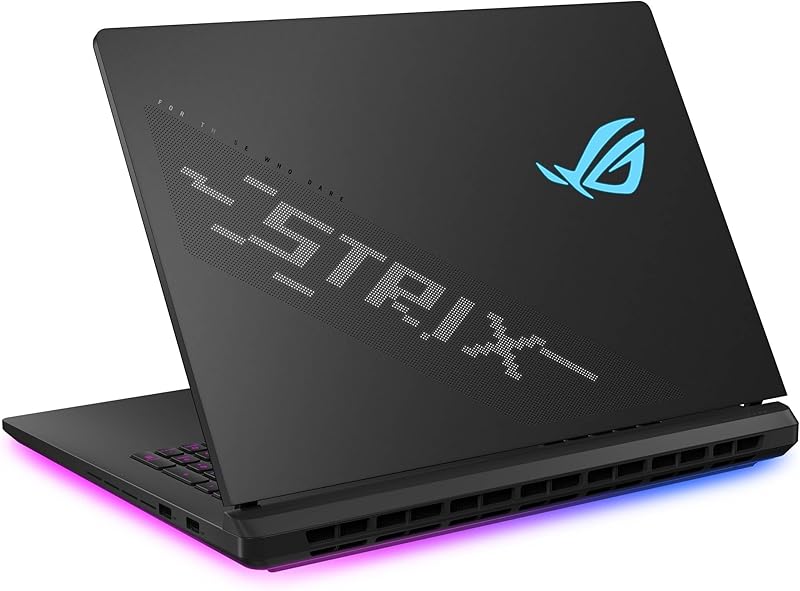
Aesthetically, the Scar embraces its gaming identity with expressive lighting and bold exterior modifications. The laptop lid features Asus’s customizable AniMe Vision array, allowing users to project custom text, pixel animations, or personal graphics across the rear cover. A full-surround 360-degree RGB light bar illuminates your desk surface in vibrant color, though Asus includes a dedicated Stealth Mode to disable all exterior illumination when a more discreet appearance is required. While the Scar makes an impression in personal gaming setups, the ProArt P16 offers superior ergonomic utility for users who travel between studio spaces and field sets.
Edge: Asus ProArt P16. At only 4.1 pounds and 0.68 inches thick, the ProArt provides far superior portability compared to the heavy, bulky 6.3-pound gaming chassis.
Memory, Storage, and Tool-Free Maintenance
Long-term usability relies heavily on system memory capacity, internal drive space, and how easily you can service the hardware over time. Out of the box, the ProArt P16 from HIDevolution offers immense workstation-grade storage and memory figures. It comes equipped with 64GB of LPDDR5X system memory, providing massive overhead for running memory-hungry applications, opening large Adobe After Effects project files, or running simultaneous virtual machines without dipping into disk paging. It also includes 4TB of high-speed PCIe 4.0 storage configured as two separate 2TB NVMe SSDs, ensuring you have enough high-speed local volume to hold raw 8K camera files, multi-gigabyte sound libraries, and project archives.
The ROG Strix Scar 16 arrives configured with 32GB of DDR5-5600MHz RAM and a single 2TB PCIe Gen 4 SSD that delivers data transfer speeds up to 7,000MB/s. While this configuration provides half the RAM and storage of the specified ProArt listing, the Scar offers an enormous maintenance advantage: tool-free internal access. Rather than searching for precision screwdrivers, owners can slide a latch on the bottom half of the device to open the chassis. A removable protective frame allows fast, direct access to the SODIMM memory slots, M.2 SSD bays, and cooling fans, making routine dust clearing and component upgrades simple for end users. The contrast between modular platforms and tightly integrated machines is a regular theme in hardware comparisons, including desktop motherboard analyses like the asus rog strix b650e-f vs proart x670e-creator guide.
The crucial trade-off here rests between immediate out-of-the-box capacity and long-term modularity. The 64GB of memory inside the ProArt P16 is soldered onboard LPDDR5X RAM, meaning whatever memory ships with the laptop is the absolute maximum capacity it will ever hold. If your workflow requires more than 64GB in future years, the system cannot be physically expanded. The Strix Scar 16 allows owners to pop out its DDR5 SODIMM modules and upgrade capacity down the road, though you must live with 32GB initially unless you replace the sticks immediately.
Edge: Tie. The ProArt P16 delivers double the memory and storage capacity out of the box, while the Scar provides tool-free slide-latch access and modular, upgradeable RAM slots.
Pros and Cons
Asus ROG Strix Scar 16
Pros
- 175W TGP RTX 5090 graphics
- 240Hz Mini LED Nebula HDR display
- Tool-free slide-latch hardware upgrades
- Tri-fan cooling with vapor chamber
Cons
- Heavy 6.3-pound chassis weight
- Thick 0.93-inch profile
View Asus ROG Strix Scar 16 on Amazon
Asus ProArt P16
Pros
- 4K 120Hz OLED touch display
- Generous 64GB onboard memory
- Massive 4TB dual SSD storage
- Lightweight 4.1-pound portable chassis
Cons
- Soldered LPDDR5X onboard memory
- Capped 120Hz display refresh rate
View Asus ProArt P16 on Amazon
Who Should Buy Each One
Choose the Asus ROG Strix Scar 16 If
- You focus primarily on competitive multiplayer gaming and need a 240Hz refresh rate with a rapid 3ms response time to eliminate motion blur.
- You demand maximum graphical performance from an unconstrained 175W TGP RTX 5090 GPU and an integrated hardware MUX switch with Advanced Optimus.
- You want simple, screwdriver-free maintenance using a tool-less bottom slide latch to access RAM, internal SSDs, and cooling fans.
- You prefer a stationary desktop replacement with customizable AniMe Vision lid animations and full-surround 360-degree RGB lighting effects.
Choose the Asus ProArt P16 If
- You are a creative professional requiring a 4K OLED touch display with 3840 x 2400 resolution for precise color grading and direct finger navigation.
- You frequently work on location or travel daily and need a slim 0.68-inch profile that weighs just 4.1 pounds.
- You run memory-intensive creative suites that immediately benefit from 64GB of system memory and 4TB of dual-drive PCIe 4.0 storage out of the box.
- You prefer an understated, dark workstation aesthetic with a simple backlit keyboard that fits naturally into client meetings and office environments.
Final Verdict
For buyers trying to decide between these two top-tier machines, the decision hinges on whether your daily routine centers on maximum gaming performance or mobile creative execution. In an objective Asus ROG Strix Scar 16 review, the Scar stands out as the superior choice for users who want an unapologetic desktop replacement. Its 175W TGP graphics profile, robust tri-fan vapor chamber cooling, tool-free modular upgrade bays, and blinding 240Hz Mini LED panel ensure that modern games run with unmatched fluid motion and zero power compromises.
However, when looking closely at an Asus ProArt P16 review, the ProArt easily captures the crown for traveling professionals, digital artists, and video editors. By packaging an RTX 5090 GPU, a 12-core Ryzen AI processor, 64GB of RAM, and a breathtaking 4K OLED touch display into a 4.1-pound chassis measuring only 0.68 inches thick, it delivers true workstation capability without forcing you to carry a massive, flashy gaming rig. If raw framerates on a desk matter most, buy the Strix Scar 16; if color-perfect editing on the move is your priority, the ProArt P16 is the ideal machine.
FAQ
Is Asus ROG Strix Scar 16 or ProArt P16 for gaming the better choice?
The ROG Strix Scar 16 is the superior choice for dedicated gaming. It features an unconstrained 175W TGP for its RTX 5090 GPU, a hardware MUX Switch with Advanced Optimus to bypass the integrated graphics bottleneck, a 240Hz refresh rate, a 3ms panel response time, and a 3-month PC Game Pass subscription included in the box.
Is Asus ROG Strix Scar 16 or ProArt P16 for video editing better?
The ProArt P16 is generally better suited for video editing workflows thanks to its 4K OLED touch display, factory 64GB memory configuration, and 4TB of high-speed PCIe storage. However, if your video editing involves long, sustained multi-threaded rendering queues at a stationary desk, the higher wattage Intel Core Ultra 9 275HX in the Scar can complete heavy batch exports more quickly.
Can you upgrade the RAM on both laptops after purchase?
No. The Strix Scar 16 features modular DDR5 SODIMM slots that can be easily accessed and upgraded using its tool-free sliding bottom latch. The ProArt P16 uses 64GB of soldered LPDDR5X onboard memory, meaning the factory memory capacity cannot be expanded down the road.
Is Asus ProArt P16 worth it for non-creators who just want a thin laptop?
When asking is Asus ProArt P16 worth it, general users should consider whether they need a 4K OLED touch panel and 64GB of RAM. If you simply want a thin, portable machine with an RTX 5090 GPU and do not require 240Hz competitive esports framerates or RGB chassis lighting, the ProArt P16 delivers tremendous productivity value in a discrete, lightweight form factor.
Is Asus ROG Strix Scar 16 worth it if you never play competitive games?
When evaluating is Asus ROG Strix Scar 16 worth it, the investment makes the most sense if you take advantage of its high thermal headroom and Mini LED HDR display. If you do not play high-refresh titles or push heavy multi-hour graphical rendering loads, carrying its 6.3-pound chassis and 0.93-inch thickness may prove unnecessarily cumbersome for casual daily use.
What are the primary differences in wireless connectivity between these models?
The ROG Strix Scar 16 features next-generation Wi-Fi 7 wireless networking alongside its HDMI and USB display outputs. The ProArt P16 listing specifies Wi-Fi 6E connectivity alongside HDMI video output and wireless peripheral support.


