The fundamental decision between the Asus Zenbook 14 OLED and the Asus ProArt P16 comes down to whether your day-to-day workflow demands mobile multi-screen productivity or heavy workstation compute power. The Zenbook DUO configuration centers entirely around two stacked 14-inch OLED panels that give mobile professionals an expansive dual-window canvas anywhere they set up, whereas the ProArt machine focuses on delivering massive computational throughput with a high-wattage dedicated graphics card and an expansive 16-inch 4K touchscreen.
Choose the Zenbook 14 OLED if you prioritize a travel-friendly dual-screen workspace with verified all-day battery life for multitasking across spreadsheets, code repositories, and research documents. Choose the ProArt P16 if your professional demands revolve around 3D rendering, heavy creative production, and massive local memory allocations that require top-tier dedicated hardware.

![HIDevolution [2025] ASUS ProArt P16 H7606WX Black 16" 4K 120Hz OLED Touch, 2.0 GHz Ryzen AI 9 HX 370, RTX 5090, 64 GB LPDDR5X RAM, 4 TB PCIe SSD, Windows 11 Pro](https://m.media-amazon.com/images/I/41BUZNaAIUL._SL500_.jpg "HIDevolution [2025] ASUS ProArt P16 H7606WX Black 16\" 4K 120Hz OLED Touch, 2.0 GHz Ryzen AI 9 HX 370, RTX 5090, 64 GB LPDDR5X RAM, 4 TB PCIe SSD, Windows 11 Pro")
Asus Zenbook 14 OLED vs ProArt P16 at a Glance
| Feature | Asus Zenbook 14 OLED | Asus ProArt P16 |
|---|---|---|
| Processor | Intel Core Ultra 9 285H (with Intel AI Boost NPU) | AMD Ryzen AI 9 HX 370 (12 cores, 24 threads, up to 5.1 GHz) |
| Graphics Architecture | Intel Arc Graphics (Integrated) | NVIDIA GeForce RTX 5090 (24 GB GDDR7 Dedicated) |
| Primary Display | 14-inch 3K (2880 x 1800) 120Hz Lumina OLED Touchscreen | 16.0-inch 4K (3840 x 2400) 120Hz OLED Touchscreen |
| Secondary Display | Matching 14-inch 3K (2880 x 1800) 120Hz Lumina OLED Touchscreen | None (Traditional single-screen clamshell) |
| System Memory | 32 GB LPDDR5x | 64 GB LPDDR5X |
| Onboard Storage | 1 TB PCIe 4.0 NVMe SSD | 4 TB (2 x 2 TB) M.2 PCIe 4.0 NVMe SSD |
| Battery and Charging | 75Wh battery, up to 16h single screen / 9h dual screen, 65W USB-C | Not listed |
| Weight and Thickness | 3.64 lbs, 0.57 to 0.78 inches thick | 4.10 lbs, 0.68 inches thick |
| Wireless Connectivity | WiFi 7 and Bluetooth 5.4 | Wi-Fi 6E (Bluetooth not listed) |
| Operating System | Windows 11 Home | Windows 11 Pro |
| Best For | Mobile multitasking, travel productivity, and dual-window research | 3D visualization, visual effects, and high-end video production |
Graphics and Compute Performance
Compute performance defines the clearest dividing line between these two machines. The Zenbook DUO relies on the Intel Core Ultra 9 285H processor, which integrates an Intel AI Boost NPU and shared Intel Arc graphics. This integrated configuration handles typical office productivity, multi-tab browsing, spreadsheet modeling, and media playback with crisp efficiency. However, because it shares its 32 GB of system memory between processing tasks and graphical rendering, it is built primarily for responsiveness during general workloads rather than raw hardware rendering pipelines.
In contrast, the ProArt P16 is equipped as a full-blown mobile workstation. HIDevolution builds this machine with the 12-core, 24-thread AMD Ryzen AI 9 HX 370 processor boosting up to 5.1 GHz, paired with an NVIDIA GeForce RTX 5090 GPU carrying 24 GB of dedicated GDDR7 memory. To sustain extreme computing sessions, HIDevolution applies Thermal Grizzly Conductonaut liquid metal on the processor and Gelid GC Extreme thermal compound on the graphics die. Shoppers researching the asus rog zephyrus g16 vs proart p16 will note that having a dedicated RTX 5090 fundamentally alters what is possible on a laptop.
When evaluating Zenbook 14 OLED vs ProArt P16 graphics capabilities, there is simply no parity between an integrated Intel Arc solution and an RTX 5090 with 24 GB of dedicated high-speed GDDR7 VRAM. If your daily tasks center on 3D scenes in Blender, hardware-accelerated color grading in DaVinci Resolve Studio, or complex generative AI workflows, the hardware acceleration on the ProArt workstation completes renders in a fraction of the time required by an integrated chip.
Edge: Asus ProArt P16, due to its flagship 24 GB GeForce RTX 5090 dedicated GPU and advanced liquid metal thermal engineering.
Display Real Estate and Screen Configuration
Display real estate impacts how you absorb information, organize active windows, and manipulate timelines. In this head-to-head comparison, each machine takes an entirely divergent approach to visual workspace design. Evaluating the Zenbook 14 OLED vs ProArt P16 display setups reveals a clash between multi-panel flexibility and single-screen resolution density.
The Zenbook 14 OLED utilizes two distinct 14-inch Lumina OLED touchscreens, each operating at a 3K resolution of 2880 x 1800 with a 120Hz refresh rate and a 16:10 aspect ratio. These panels provide 500-nit HDR peak brightness and 100% DCI-P3 color reproduction with Pantone validation. By pulling off the magnetic Bluetooth keyboard and deploying the integrated kickstand, the two screens seamlessly combine to provide up to 19.8 inches of continuous workspace. This allows you to stack two full-sized documents vertically, monitor communication channels on one panel while writing code on the other, or spread out complex applications without packing an external monitor.
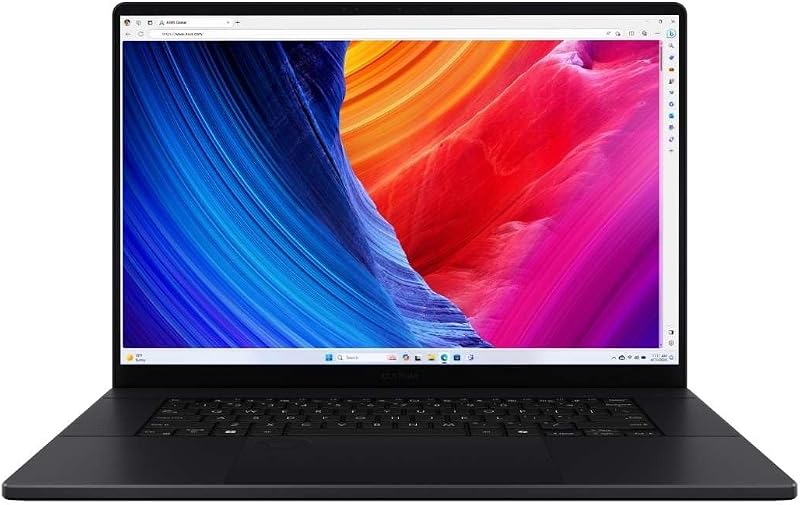
The ProArt P16 instead utilizes a single, expansive 16.0-inch 4K touchscreen operating at 3840 x 2400 with a matching 120Hz refresh rate. While it lacks a second screen, its 4K resolution provides exceptional pixel density across a larger single canvas, which ensures that ultra-fine details in high-resolution photographs and 4K footage remain impeccably sharp. In discussions like our asus proart p16 vs acer predator helios neo 16 analysis, large 16-inch creative panels are praised for seamless timeline navigation, but they cannot match the physical workflow segregation that dual independent screens provide.
Edge: Asus Zenbook 14 OLED, because its dual 14-inch 120Hz Lumina OLED panels provide nearly 20 inches of versatile screen space on the go.
Memory and System Storage Capacity
Memory allocations determine how smoothly an operating system juggles intense background processes, heavy assets, and aggressive browser tab habits. The Zenbook DUO comes standard with 32 GB of onboard LPDDR5x memory and a single 1 TB PCIe 4.0 solid-state drive. For standard office productivity, project management, and moderate creative tasks, 32 GB offers plenty of breathing room. However, because this memory pool is shared between the operating system, productivity applications, and the integrated Intel Arc graphics, heavy video workflows can quickly saturate available space.
The ProArt P16 steps far ahead in both capacity metrics. It features 64 GB of LPDDR5X onboard memory alongside an expansive 4 TB solid-state drive array configured as dual 2 TB M.2 PCIe 4.0 x4 NVMe SSDs. This massive memory headroom allows developers to host local virtual machines, compile extensive codebases, and run dense creative suites simultaneously without running into cache bottlenecks or swapping to disk.
Storage is another key differentiator. While 1 TB on the Zenbook requires you to manage projects actively or rely on external hard drives, 4 TB on the ProArt lets you store massive RAW video libraries, project archives, and local asset libraries directly on the machine. Those wondering is Asus ProArt P16 worth it will find that professionals handling high-bitrate media will appreciate not having to tether external drives for everyday projects, a limitation frequently highlighted when comparing thin laptops like in our asus proart p16 vs acer swift go 14 breakdown.
Edge: Asus ProArt P16, offering double the system memory at 64 GB and four times the internal solid-state storage at 4 TB.
Portability, Chassis Form Factor, and Durability
When choosing a mobile system, the physical dimensions, carrying weight, and chassis rigidity dictate how practical the laptop is outside an office. The Zenbook 14 OLED weighs 3.64 pounds and measures 12.34 by 8.58 inches, with a thickness ranging from 0.57 inches in laptop mode up to 0.78 inches when folded with the keyboard stored inside. It meets US MIL-STD 810H military durability standards, ensuring that its dual-screen hinge mechanism and chassis withstand travel vibrations, temperature swings, and shocks. It also includes an ASUS carrying sleeve and an ASUS Pen 2.0 stylus directly in the box.
The ProArt P16 uses a traditional clamshell form factor built around its larger 16-inch panel. It measures 13.97 by 9.72 inches with a consistent thickness of 0.68 inches, and it registers a total weight of 4.10 pounds. While 4.10 pounds is impressively light for a machine carrying an RTX 5090 class graphics chip, its wider and deeper footprint requires a noticeably larger backpack compartment than the compact 14-inch Zenbook chassis.
When asking is Asus Zenbook 14 OLED worth it for regular commuters, the included accessories and transformable kickstand make a major difference. The detachable Bluetooth magnetic keyboard snaps cleanly over the lower screen for conventional typing on a train tray, or detaches instantly when you reach a desk to expose the full dual-screen workspace. As shown in comparisons like our asus tuf gaming a15 vs proart p16 overview, full-sized workstations prioritize desk stability over modular field convenience.
Edge: Asus Zenbook 14 OLED, thanks to its lower carrying weight, MIL-STD 810H certification, and modular kickstand design.
Battery Life and Mobile Power
Power management is critical for users who spend hours away from wall outlets. The Zenbook 14 OLED features a 75Wh battery that Asus rates for up to 16 hours of continuous video playback when running in traditional single-screen Laptop mode, or up to 9 hours of playback when powering both 120Hz OLED panels simultaneously in Dual Screen mode. It charges through its Thunderbolt 4 ports using a compact 65W USB-C power adapter with fast-charge capability, making it exceptionally easy to top up using standard power banks or compact travel chargers.
The product listing for the ProArt P16 does not specify its battery watt-hour capacity or manufacturer-tested runtime figures. However, driving a high-resolution 16-inch 4K OLED display alongside an AMD Ryzen AI 9 HX 370 processor and a high-performance NVIDIA GeForce RTX 5090 graphics card inevitably pulls substantial wattage under load. Even with platform-level power optimizations, desktop-replacement workstation components demand significantly more energy than an ultra-portable integrated system.
When analyzing Zenbook 14 OLED vs ProArt P16 battery life expectations, the Zenbook is engineered from the ground up for untethered longevity. The ability to drop down to a single display to squeeze out up to 16 hours of operation gives travelers a level of autonomy that high-draw workstation hardware simply cannot reproduce away from the mains.
Edge: Asus Zenbook 14 OLED, providing manufacturer-verified runtimes of up to 16 hours and convenient 65W USB-C charging.
Connectivity, Operating System, and Everyday Usability
Input, output, and system software govern how easily these machines interface with external peripherals and local networks. The Zenbook 14 OLED comes outfitted with two high-speed Thunderbolt 4 USB-C ports, one USB 3.2 Gen 1 Type-A port, an HDMI 2.1 TMDS port, and a combo audio jack. On the wireless side, it is equipped with the latest WiFi 7 and Bluetooth 5.4 standards. It runs Windows 11 Home and incorporates an FHD IR front camera for facial login, alongside bundled creative trials and productivity tools like ScreenXpert to manage dual-display window placement.
The ProArt P16 listing specifies external display connectivity via HDMI alongside Wi-Fi 6E wireless networking. The primary operational advantage for the ProArt in this category is its inclusion of Windows 11 Pro out of the box, which grants native access to advanced operating system capabilities such as BitLocker drive encryption, Windows Information Protection, and remote desktop hosting. Shoppers weighing the asus rog strix scar 16 vs proart p16 frequently look for Windows 11 Pro to align with corporate domain environments.
For everyday typing and stylus work, the Zenbook offers greater flexibility. The Zenbook DUO includes the ASUS Pen 2.0 SA203H with MPP 2.0 stylus protocol support, letting you annotate documents or sketch ideas directly on either screen. While the ProArt offers a backlit keyboard and a pristine 4K touch interface, the Zenbook’s dual Thunderbolt 4 connections and modern WiFi 7 standard provide superior forward-looking peripheral bandwidth.
Edge: Asus Zenbook 14 OLED, due to its dual Thunderbolt 4 ports, WiFi 7 connectivity, and included ASUS Pen 2.0.
Pros and Cons
Asus Zenbook 14 OLED

Pros
- Dual 14-inch 3K 120Hz Lumina OLED touchscreens
- Up to 16 hours single-screen battery runtime
- Includes ASUS Pen 2.0 and protective sleeve
- Lightweight 3.64-pound chassis with MIL-STD 810H durability
- Cutting-edge WiFi 7 and dual Thunderbolt 4
Cons
- Integrated Intel Arc graphics limits 3D rendering
- Lower maximum storage capacity at 1 TB SSD
- Ships with Windows 11 Home instead of Pro
View Asus Zenbook 14 OLED on Amazon
Who Should Buy Each One
Choose the Asus Zenbook 14 OLED If
- You need an ultra-portable dual-screen workstation that fits into a standard 14-inch laptop sleeve without needing an external monitor.
- You spend full workdays away from power outlets and need up to 16 hours of battery life with lightweight 65W USB-C charging.
- You actively take handwritten digital notes, annotate documents, or sketch interface mockups using an included MPP 2.0 active pen.
- Your computing tasks focus on document editing, web research, communications, and spreadsheet modeling rather than heavy 3D rendering.
Choose the Asus ProArt P16 If
- You render complex 3D scenes, work with dense VFX timelines, or run generative AI models requiring a dedicated RTX 5090 with 24 GB GDDR7 VRAM.
- You work with massive local datasets, production caches, or virtual environments that demand 64 GB of system memory.
- You require massive internal high-speed storage out of the box to store multiple terabytes of project files across a 4 TB SSD setup.
- Your workflow benefits from the pixel density of a true 16-inch 4K (3840 x 2400) OLED touch panel running Windows 11 Pro.
Final Verdict
For the vast majority of professionals, executives, writers, and travelers, the Zenbook 14 OLED represents the more practical and versatile everyday tool. Its innovative dual 14-inch Lumina OLED screens effectively double your mobile workspace without introducing unmanageable bulk. Backed by verified battery endurance of up to 16 hours in single-screen mode, WiFi 7 wireless speeds, and an included active stylus, this machine solves the perpetual mobile dilemma of wanting multi-monitor productivity while sitting in a coffee shop, airport lounge, or hotel room.
However, when comparing the ProArt P16 vs Asus Zenbook 14 OLED for specialized production environments, pure compute authority takes precedence. The ProArt P16 is an uncompromising creative powerhouse built for editors, 3D animators, and data scientists whose output is measured in render minutes rather than battery hours. If your software relies heavily on CUDA cores, dedicated ray tracing, or massive video memory allocations, the ProArt P16 stands in a performance class that an integrated dual-screen ultraportable cannot touch.
FAQ
Can the Asus Zenbook 14 OLED be used as a conventional laptop?
Yes. The Zenbook DUO includes a detachable Bluetooth magnetic keyboard that snaps directly over the lower OLED touchscreen. When attached, the lower display turns off, and the device functions exactly like a standard 14-inch clamshell notebook with a physical keyboard and touchpad.
Does the Asus ProArt P16 feature two screens?
No. The ProArt P16 is built around a single 16.0-inch 4K OLED touchscreen display in a traditional clamshell chassis. Unlike the Zenbook DUO, it does not have a second integrated display below the main panel.
Which laptop is better: Asus Zenbook 14 OLED or ProArt P16 for video editing?
When deciding between the Asus Zenbook 14 OLED or ProArt P16 for video editing, the ProArt P16 is the clear winner for demanding export pipelines. Its dedicated NVIDIA GeForce RTX 5090 GPU with 24 GB GDDR7 VRAM, 64 GB of system RAM, and 4 TB NVMe SSD provide the processing power necessary to scrub and render complex multi-stream 4K or 8K timelines smoothly.
Which laptop is more practical: Asus Zenbook 14 OLED or ProArt P16 for programming?
Choosing the Asus Zenbook 14 OLED or ProArt P16 for programming depends on your compile requirements. The Zenbook 14 OLED is exceptional for general software development, web design, and scripting because you can place your code editor on the top screen and terminal output, documentation, or browser previews on the bottom screen. The ProArt P16 is preferred only if your development involves heavy local AI model training, game engine compilation, or virtual machine hosting requiring 64 GB of memory.
Does the Asus Zenbook 14 OLED include a stylus in the box?
Yes. The Zenbook 14 OLED package includes an ASUS Pen 2.0 SA203H with MPP 2.0 support, alongside an ASUS protective sleeve and a 65W USB-C power adapter.
What operating system versions come pre-installed on these laptops?
The Zenbook 14 OLED comes pre-loaded with Windows 11 Home, while the ProArt P16 configuration supplied by HIDevolution arrives with Windows 11 Pro installed.