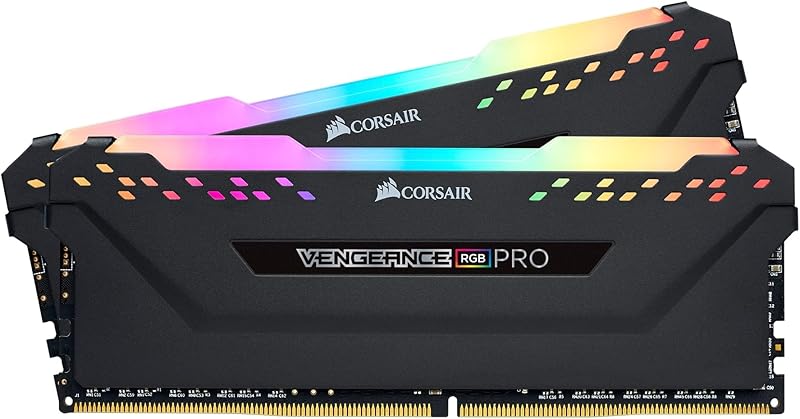
The core distinction between these two performance memory kits centers on the balance between sheer storage capacity and clock responsiveness: the Corsair Dominator Titanium DDR5 provides a massive 64GB footprint configured at 5200MHz with CL40 latency, while the G.Skill Trident Z5 RGB DDR5 6000 delivers a faster 6000MT/s data rate paired with tighter CL36 timings across a 32GB capacity.
Builders running memory-intensive video rendering suites, heavy multitasking loads, or specialized virtual workstation environments should select the Corsair Dominator Titanium DDR5 for its double-capacity headroom and comprehensive cooling system. Competitive PC builders and desktop gamers aiming for peak frame rates and broad platform compatibility across both Intel and AMD setups should opt for the G.Skill Trident Z5 RGB DDR5 6000.


Corsair Dominator Titanium DDR5 vs G.Skill Trident Z5 RGB DDR5 6000 at a Glance
| Feature | Corsair Dominator Titanium DDR5 | G.Skill Trident Z5 RGB DDR5 6000 |
|---|---|---|
| Total Capacity | 64 GB (2 x 32 GB) | 32 GB (2 x 16 GB) |
| Memory Generation | DDR5 | DDR5 |
| Transfer Speed | 5200 MHz | 6000 MT/s |
| CAS Latency | CL40 | CL36 (36-36-36-96) |
| Operating Voltage | 1.25 V | 1.35 V |
| Overclocking Profiles | Intel XMP 3.0 | Intel XMP 3.0 & AMD EXPO |
| Cooling Architecture | Patented DHX (cools ICs and PCB ground plane) | Matte Black Aluminum Heatspreader |
| RGB Lighting System | 12 CAPELLIX RGB LEDs (iCUE) | Integrated RGB Light Bar |
| Platform Support | Intel Desktop Platforms | Intel (Z890, Z790, B760, etc.) & AMD (X870, X670, B650, etc.) |
| Form Factor | DIMM (288-Pin) | UDIMM (288-Pin) |
| Best For | Heavy content creation and high-capacity workloads | High-framerate gaming and dual-platform flexibility |
Memory Frequency and Latency Timings
Memory frequency dictates how rapidly raw data cycles between the system RAM and the processor, while Column Address Strobe (CAS) latency describes the delay between a command being issued and the requested data becoming accessible. In everyday desktop use, higher clock speeds combined with tighter latency improve responsiveness in CPU-bound situations such as competitive gaming, high-framerate rendering transitions, and continuous asset streaming.
When evaluating DDR5 5200 CL40 vs DDR5 6000 CL36, the architectural difference is pronounced. The Trident Z5 RGB transfers data at 6000MT/s (6000 megabits per second) with a CL36 timing setup (specifically CL36-36-36-96). In contrast, the Dominator Titanium runs at 5200MHz with a CL40 latency profile. The 800MT/s frequency advantage and four-cycle latency reduction on the Trident Z5 deliver higher peak memory bandwidth and lower memory access latency. For readers evaluating a G.Skill Trident Z5 RGB DDR5 6000 review focused on competitive frame generation, this speed differential produces measurable gains in frame consistency and minimum 1% lows. For builders weighing similar high-speed options, the corsair vengeance ddr5 6000 cl30 vs g.skill trident z5 rgb ddr5 6000 comparison highlights how primary timings impact responsiveness.
The trade-off is that reaching 6000MT/s requires a higher operational baseline voltage of 1.35V on the G.Skill kit, whereas Corsair operates its 5200MHz modules at a cooler 1.25V baseline. However, for pure performance and low-latency instruction handling, G.Skill provides an out-of-the-box speed profile that Corsair does not match at these settings.
Edge: G.Skill Trident Z5 RGB DDR5 6000 delivers higher data transfer rates and lower CAS latency for superior responsiveness in memory-sensitive software.
Total Memory Capacity and Task Buffering
Total memory capacity sets the ceiling on how much uncompressed project data, active application code, and system cache your computer can hold simultaneously before spilling into swap files on your storage drives. When working with massive creative suites, video timelines, or multiple virtual machines, running out of RAM causes drastic system slowdowns regardless of how fast the memory operates.
This is where any Corsair Dominator Titanium DDR5 review identifies its definitive structural advantage. Corsair equips this kit with 64GB of memory arranged across two 32GB dual-rank modules. G.Skill configures this Trident Z5 RGB kit with 32GB spread across two 16GB modules. When deciding between the Corsair Dominator Titanium DDR5 or G.Skill Trident Z5 RGB DDR5 6000 for video editing, the 64GB kit holds a clear functional lead. Scrubbing 4K or 8K multi-stream video, caching complex composition layers in After Effects, and compiling expansive codebases require sheer volume over raw clock speeds. When configuring a workstation, our breakdown of corsair dominator titanium ddr5 vs g.skill ripjaws s5 ddr5 explores how kit density influences memory controller load.
Opting for 32GB on the G.Skill kit handles standard gaming titles and day-to-day computing tasks with ease, but modern workstation suites can quickly exhaust 32GB under heavy multi-app pipelines. For power users needing a stable, large-capacity footprint that prevents memory saturation, Corsair provides double the usable workspace.
Edge: Corsair Dominator Titanium DDR5 wins decisively by providing double the total memory capacity with 64GB across two modules.
Thermal Design and Heatsink Engineering
DDR5 memory modules place onboard power management directly on the memory module itself rather than relying entirely on motherboard regulation, making heat dissipation critical for sustained high-load stability. Inadequate cooling can lead to thermal throttling, instability during extended heavy compute runs, or degraded memory life over time.
Corsair employs its patented DHX (Dual-Path Heat Exchange) cooling technology on the Dominator Titanium. This bespoke design utilizes a dedicated aluminum heatspreader that directly cools both the integrated circuits (ICs) and the ground plane of the physical printed circuit board (PCB). By pulling thermal energy away from the PCB substrate alongside the memory dies, the Corsair hardware maintains uniform heat dissipation even during long rendering sequences. Furthermore, running at 1.25V naturally produces less thermal load than higher-voltage performance kits.
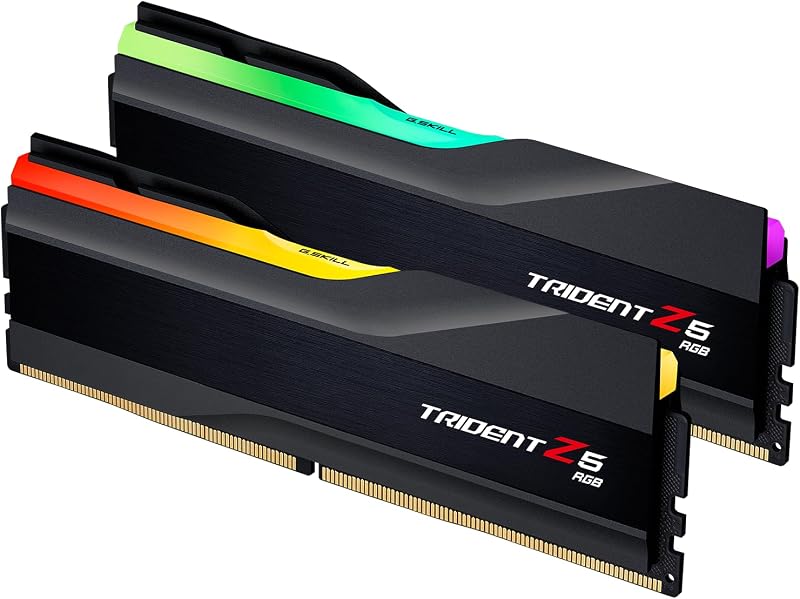
The G.Skill Trident Z5 RGB features an engineered matte black aluminum heatspreader paired with an integrated RGB light bar. It provides reliable passive dissipation for desktop PC workloads, weighing 0.17 kg for the dual-module kit. However, because it drives 1.35V to sustain its 6000MT/s transfer speed, it demands consistent chassis airflow to maintain optimal operating temperatures under sustained compute tasks. Builders seeking alternative performance modules can see our g.skill trident z5 rgb ddr5 6000 vs kingston fury renegade ddr5 analysis for additional thermal comparisons.
Edge: Corsair Dominator Titanium DDR5 features dedicated DHX ground-plane cooling and a lower operational voltage profile.
Platform Compatibility and Overclocking Profiles
One of the most essential aspects of modern DDR5 memory kits is how easily they apply their advertised clock rates on different motherboard chipsets. Memory manufacturers program pre-tested overclocking profiles into the modules to allow users to achieve rated performance with a single toggle in the system BIOS.
G.Skill built the Trident Z5 RGB with dual overclocking profile support, featuring both Intel XMP 3.0 and AMD EXPO (Extended Profiles for Overclocking). The listing confirms extensive validation across Intel desktop boards (Z890, Z790, Z690, B860, B760, B660) and AMD desktop platforms (X870, X670, B850, B840, B650, A620). This cross-platform readiness makes the G.Skill Trident Z5 RGB DDR5 6000 AMD EXPO integration simple for builders running AMD Ryzen 7000 or 9000 series processors. Those curious about alternative AMD-specific modules can consult our g.skill trident z5 rgb ddr5 6000 vs flare x5 ddr5 6000 guide.
In contrast, the Corsair Dominator Titanium listing specifies optimization for Intel platforms with Intel XMP 3.0 support. Corsair emphasizes onboard voltage regulation integrated with their proprietary software, allowing users to customize and save their own XMP profiles by application. While Corsair Dominator Titanium DDR5 overclocking iCUE tools offer deep software-based tuning on compatible Intel platforms, G.Skill provides turnkey BIOS profile support for both major CPU architectures without requiring proprietary desktop software.
Edge: G.Skill Trident Z5 RGB DDR5 6000 offers native dual profile support for both Intel XMP 3.0 and AMD EXPO across a wide range of motherboard chipsets.
Software Management and RGB Lighting Controls
Visual integration and active monitoring have become standard expectations for premium DDR5 kits. How a memory module interacts with your operating system determines how easily you can synchronize lighting themes and monitor operating conditions.
Corsair integrates the Dominator Titanium into its comprehensive iCUE software ecosystem. The modules feature 12 ultra-bright CAPELLIX RGB LEDs per stick, which can be individually addressed or synchronized across entire Corsair setups. Beyond illumination, the software directly interfaces with the module’s onboard voltage regulation, providing real-time performance feedback, thermal data, and profile customization directly from Windows. Builders who have already invested in Corsair chassis fans, liquid coolers, and peripherals benefit from unified lighting and telemetry control in a single utility.
The G.Skill Trident Z5 RGB incorporates a smooth, translucent light bar set atop its dual-texture matte black aluminum heatspreader. The lighting connects with motherboard RGB software standards across various brands, avoiding the need for dedicated background services if you prefer minimalist system loads. When analyzing G.Skill Trident Z5 RGB DDR5 6000 vs Corsair Dominator Titanium DDR5 from an aesthetics standpoint, Corsair provides deeper hardware-level control and brighter illumination arrays, while G.Skill focuses on a sleek, hardware-agnostic look.
Edge: Corsair Dominator Titanium DDR5 provides more sophisticated lighting control through 12 CAPELLIX LEDs and granular iCUE telemetry.
Pros and Cons
Corsair Dominator Titanium DDR5

Pros
- Massive 64GB total system capacity
- Patented DHX cooling for ICs and PCB
- Lower 1.25V baseline operating voltage
- 12 ultra-bright CAPELLIX RGB LEDs
- Custom XMP profile saving via iCUE
Cons
- Slower 5200MHz transfer frequency
- Looser CL40 CAS latency rating
- Lacks native AMD EXPO profile support
View Corsair Dominator Titanium DDR5 on Amazon
G.Skill Trident Z5 RGB DDR5 6000
Pros
- Fast 6000MT/s transfer speed
- Tighter CL36-36-36-96 latency timings
- Dual Intel XMP 3.0 and AMD EXPO support
- Validated across broad Intel and AMD platforms
- Sleek matte black aluminum heatspreader
Cons
- Smaller 32GB total capacity
- Higher 1.35V operational voltage
- Requires chassis airflow for 1.35V load
View G.Skill Trident Z5 RGB DDR5 6000 on Amazon
Who Should Buy Each One
Choose the Corsair Dominator Titanium DDR5 If
- You manage heavy content creation tasks such as 4K video editing, large 3D modeling scenes, or multiple active virtual machines requiring 64GB of RAM.
- You already use Corsair iCUE software and want coordinated lighting control with 12 ultra-bright CAPELLIX LEDs per stick.
- You value lower operating voltages (1.25V) and specialized DHX cooling that pulls heat away from both the memory chips and the PCB.
- You run an Intel-based desktop system and want the flexibility to build and save custom XMP 3.0 profiles through desktop software.
Choose the G.Skill Trident Z5 RGB DDR5 6000 If
- You are building a dedicated gaming PC and want higher 6000MT/s transfer speeds and lower CL36 latency for maximum frame pacing.
- You are assembling an AMD AM5 build and require native AMD EXPO profile support directly out of the box.
- Your typical workload fits comfortably within a standard 32GB memory footprint without risk of memory saturation.
- You prefer a lighter module profile with universal motherboard lighting compatibility without running dedicated brand-specific software suites.
Final Verdict
For gamers and performance-focused system builders, the G.Skill Trident Z5 RGB DDR5 6000 represents the better technical fit. Its 6000MT/s clock rate, tight CL36 timings, and dual Intel XMP 3.0 and AMD EXPO compatibility give it superior versatility across modern desktop platforms. In CPU-limited gaming workloads and applications that thrive on fast memory transactions, G.Skill delivers the responsiveness and multi-platform flexibility that most mainstream performance builders require.
On the other hand, the Corsair Dominator Titanium DDR5 remains the preferred choice for workstation professionals and heavy multitasking power users. Its 64GB capacity prevents project bottlenecks in demanding media creation software, while its patented DHX cooling and 1.25V operating profile maintain lower thermal stress during multi-hour render jobs. When workflow demands dictate capacity and thermal endurance over peak clock speeds, Corsair takes the win.
FAQ
Can the Corsair Dominator Titanium DDR5 run on AMD AM5 motherboards?
The Corsair Dominator Titanium listing specifically highlights optimization for Intel platforms and Intel XMP 3.0 profile compatibility. While DDR5 memory physically connects to standard 288-pin desktop slots, AMD AM5 motherboards may not have pre-tuned profile settings for this specific kit, potentially requiring manual speed and timing adjustments to operate beyond default JEDEC speeds.
Is G.Skill Trident Z5 RGB DDR5 6000 worth it for pure gaming rigs?
When asking is G.Skill Trident Z5 RGB DDR5 6000 worth it for a pure gaming setup, the specifications indicate yes. Modern gaming titles benefit substantially from the 6000MT/s data transfer rate and CL36 latency, which improve frame consistency in memory-sensitive game engines. Furthermore, its 32GB total capacity is well-suited for current and upcoming titles without wasting capacity on unused overhead.
What is the performance difference in DDR5 5200 CL40 vs DDR5 6000 CL36?
The primary difference lies in bandwidth and cycle response time. The DDR5 6000 CL36 kit moves data at 6000 megabits per second with a column access strobe latency of 36 clock cycles, providing higher theoretical bandwidth and faster access times than the DDR5 5200 CL40 kit, which operates at 5200MHz with a 40-cycle delay. This difference is most noticeable in gaming and latency-sensitive calculations.
Does Corsair Dominator Titanium DDR5 support custom profile saving?
Yes. The Corsair Dominator Titanium kit supports custom Intel XMP 3.0 profiles that can be tailored, tested, and saved directly through the Corsair iCUE software. This feature allows users to configure specific performance and voltage settings optimized for individual applications or tasks.
Can you combine two separate memory kits of the same model?
Both manufacturers advise against combining separate memory kits. G.Skill explicitly states that memory kits are sold in matched pairs engineered to operate together, and mixing multiple kits can result in system instability, boot failures, or lower operational speeds. If you need 64GB or more, you should buy a single factory-matched package such as the Corsair 64GB kit rather than combining two separate 32GB packages.
How does Corsair DHX cooling affect thermal stability under heavy workloads?
Corsair patented DHX cooling employs a specialized heatsink that contacts both the memory integrated circuits and the ground plane of the PCB itself. By extracting heat directly from the board substrate and operating at a lower 1.25V rating, the Dominator Titanium manages heat dissipation across extended compute sessions, preventing heat build-up under sustained processing loads.