The single deciding difference between Corsair Vengeance RGB Pro DDR4 and Kingston Fury Beast DDR4 is the trade-off between expressive lighting aesthetics and physical installation clearance. Corsair engineers its modules with prominent multi-zone RGB light bars intended to be seen through tempered glass, while Kingston relies on a low-profile aluminum heat spreader built to clear bulky CPU air coolers in space-constrained chassis layouts.
Builders assembling an illuminated gaming desktop with liquid cooling should choose Corsair Vengeance RGB Pro DDR4 for its rich visual customization. System builders who use large dual-tower air coolers or compact desktop cases should choose Kingston Fury Beast DDR4 to prevent hardware interference.
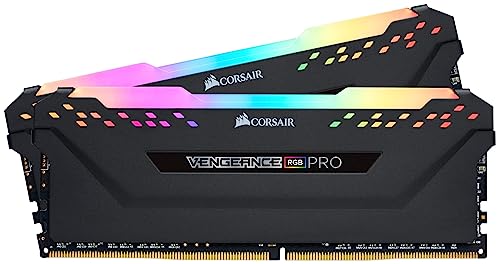

Corsair Vengeance RGB Pro DDR4 vs Kingston Fury Beast DDR4 at a Glance
| Feature | Corsair Vengeance RGB Pro DDR4 | Kingston Fury Beast DDR4 |
|---|---|---|
| Memory Generation & Form Factor | DDR4 288-Pin Desktop DIMM | DDR4 288-Pin Desktop DIMM |
| Base Rated Speed | 3200 MHz | 3200 MHz (series spans up to 3733 MHz) |
| Listed Latency | CL16 (spec list also notes CL15) | CL16 (series spans CL15-CL19) |
| Lighting System | Dynamic multi-zone RGB (10 LEDs per module) | None (non-illuminated heat spreader) |
| Physical Profile | Full height with integrated light bar | Low-profile heat spreader |
| Software Integration | Corsair iCUE with Light LINK support | Not listed |
| Overclocking Features | Tightly screened ICs, custom performance PCB | Plug N Play at 2666 MHz, Intel XMP-ready |
| Operating Voltage | 1.35V (spec list also notes 1.2V) | 1.35V |
| Tested Compatibility | Intel Z390, AMD 400, 500, X570 series | Intel XMP, AMD Ryzen ready |
| Warranty & Support | 2-year EU spare parts availability | Lifetime warranty, 1-year EU spare parts |
| Best For | Showcase desktop builds with RGB themes | Air-cooled rigs with tight cooler clearance |
Physical Clearance and Cooler Compatibility
Evaluating Corsair Vengeance RGB Pro vs Kingston Fury Beast clearance comes down to measuring the space underneath your CPU cooling solution. Air coolers featuring dual heatsink towers or low-hanging intake fans frequently extend directly over the motherboard memory slots. In these setups, module height dictates whether the front cooling fan must be unclipped and shifted upward, which can cause the fan to press against your case side panel. Choosing memory with the right height profile prevents difficult installation headaches before assembly even begins.
When looking at Corsair Vengeance RGB Pro vs Kingston Fury Beast height, the Fury Beast holds a decisive advantage for cramped builds. Kingston designed the Fury Beast with a dedicated low-profile heat spreader that hugs the printed circuit board tightly without any protruding light diffusers. This compact architecture allows the module to slip underneath virtually any consumer CPU cooler, including wide multi-heatpipe heatsinks. If you are comparing low-clearance options, our analysis of corsair vengeance lpx ddr4 3200 vs kingston fury beast ddr4 highlights how low-profile designs protect cooler clearance across various motherboard layouts.
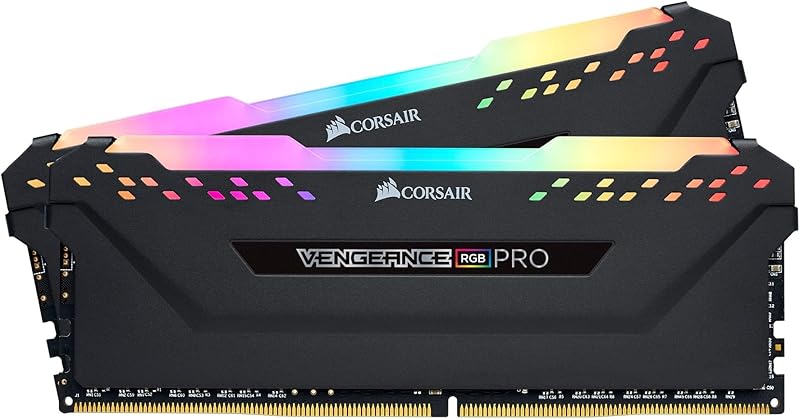
Corsair takes the opposite route with Vengeance RGB Pro, giving each module a pronounced top assembly to house ten individual light-emitting diodes. This elevated structure creates a substantial vertical footprint that easily clashes with front-mounted fans on large air heatsinks. While it fits comfortably beneath closed-loop liquid coolers where the radiator mounts at the top or front of the chassis, builders running heavy air coolers must verify that their fan clips allow sufficient vertical elevation. For builders with tight chassis boundaries, Kingston eliminates clearance worries entirely.
Edge: Kingston Fury Beast DDR4 because its slim low-profile heat spreader fits under wide air coolers without interfering with heatsink fans or side panels.
Lighting Design and Visual Customization
Visual presentation is often the primary reason shoppers evaluate a Corsair Vengeance RGB Pro DDR4 review alongside simpler alternatives. The appearance of desktop memory plays a central role inside modern cases equipped with tempered glass side panels. Unlit memory disappears into the darkness of a chassis interior, whereas addressable illuminated modules draw immediate attention and establish the aesthetic theme of the entire motherboard compartment.
Vengeance RGB Pro sets an industry benchmark for memory illumination by integrating ten individually controlled, ultra-bright RGB LEDs into every stick. Corsair links these LEDs directly to its robust iCUE software ecosystem, allowing users to orchestrate intricate lighting patterns, color gradients, and temperature-reactive alerts. Through Corsair Light LINK, the lighting sequences can harmonize across compatible keyboards, liquid CPU coolers, and chassis intake fans without demanding additional cables or motherboard headers. The wire-free design keeps the DIMM slots completely clean, delivering bright, diffusion-softened illumination across the entire top surface of each module.
In contrast, this specific Kingston Fury Beast DDR4 module provides no lighting hardware whatsoever. Its aesthetic appeal comes strictly from an angular, black aluminum heat spreader stamped with the Fury branding. While the industrial, matte styling blends neatly into blackout motherboards or stealth workstations, it cannot provide visual animation or color coordination. Builders who want their memory to serve as the visual centerpiece of their gaming PC will find the Fury Beast completely silent on the lighting front, making Vengeance RGB Pro the unquestioned victor for showcase builds.
Edge: Corsair Vengeance RGB Pro DDR4 due to its ten ultra-bright addressable LEDs per module and full synchronization through Corsair iCUE software.
Speeds, Overclocking, and Latency Tuning
Memory frequency and latency timing determine how rapidly your processor moves instructions back and forth from dynamic memory banks. When weighing Corsair Vengeance RGB Pro or Kingston Fury Beast for gaming, both models in this head-to-head match feature a standard operating frequency of 3200 MHz. This speed delivers a high data transfer rate of 12 gigabits per second, ensuring smooth frame pacing and responsive computing during intensive multitasking workloads. However, the architectural approaches toward achieving and exceeding these speeds differ fundamentally.
Fury Beast emphasizes simplicity and immediate deployment via built-in Plug N Play functionality alongside Intel XMP support. Kingston programs the module to deliver automatic overclocking up to 2666 MHz right out of the box, ensuring that even platforms without aggressive BIOS tuning will boot and operate reliably. The wider Fury Beast product line extends from 2666 MHz up to 3733 MHz with CL15 through CL19 timing profiles, operating at 1.35 volts for its 3200 MHz profile. While Kingston backs every unit with 100 percent factory testing at speed, the module focuses on automated plug-in stability rather than enthusiast board-level tweaking.
Corsair caters directly to tuning enthusiasts by outfitting Vengeance RGB Pro with a custom performance printed circuit board and tightly screened memory integrated circuits. Corsair selects these ICs specifically for extended overclocking headroom, providing cleaner signal trace lines between the memory chips and the gold contact pins. The listing documents a Column Address Strobe latency of 15 alongside operating voltage flexibility between 1.2V and 1.35V. For enthusiasts who like pushing timings past factory baselines, exploring comparisons like corsair vengeance rgb pro ddr4 vs g.skill trident z neo ddr4 reveals how premium circuit layouts benefit aggressive system tuning.
Edge: Corsair Vengeance RGB Pro DDR4 thanks to its custom performance PCB and carefully screened ICs intended to maximize overclocking stability.
Platform Compatibility and Memory Formats
Ensuring system stability across disparate CPU architectures is essential when selecting computer hardware. If you are debating Corsair Vengeance RGB Pro or Kingston Fury Beast for Ryzen, both manufacturers have calibrated their memory lines to support modern AMD and Intel desktop sockets. Modern memory controllers can be sensitive to trace impedance, module density, and profile profiles, making certified hardware support critical for effortless system setup.
Kingston provides broad readiness for AMD Ryzen processors while carrying Intel XMP certification. Because Fury Beast relies on standardized DDR4 288-pin DIMM construction and automated configuration profiles, it initializes smoothly across mainstream motherboards. Kingston explicitly notes in its technical data that certain legacy Intel chipsets prior to the 8th Generation require a BIOS update to recognize high-density 16Gbit DRAM architectures. Provided your motherboard firmware is kept modern, Fury Beast delivers hassle-free, universal recognition across typical consumer hardware.
Corsair guarantees targeted platform matching by verifying Vengeance RGB Pro across key chipset families. Its technical specifications explicitly list validation on Intel Z390 as well as AMD 400 Series, 500 Series, and X570 motherboards. This rigorous validation ensures that the module’s tight response times and maximum bandwidth ratings perform without memory training failures or boot looping. For users evaluating alternate Corsair configurations, our breakdown of corsair vengeance lpx ddr4 3200 vs vengeance rgb pro ddr4 covers how different heat spreader profiles behave on modern desktop chipsets. In terms of sheer baseline compatibility, both brands provide rock-solid support for standard DDR4 desktop platforms.
Edge: Tie, as both products feature proven compatibility across modern Intel and AMD Ryzen motherboard ecosystems.
Capacity Configurations and Value Optimization
The specific modules compared here represent very different purchasing propositions regarding capacity and system longevity. Corsair supplies this Vengeance RGB Pro package as a comprehensive 32 GB dual-channel kit comprising two 16 GB DIMMs. Kingston, conversely, supplies this specific Fury Beast model as a standalone 8 GB single-module stick. The discrepancy between an out-of-the-box 32 GB dual-channel pair and an entry-level 8 GB single DIMM completely transforms the initial building experience.
The 32 GB configuration of Vengeance RGB Pro instantly satisfies the memory demands of modern video rendering, intensive high-refresh gaming, and heavy productivity multitasking without requiring future upgrades. Supplying two identical DIMMs ensures that your desktop operates in dual-channel memory mode immediately, effectively doubling bandwidth to the memory controller. Similar memory considerations are explored in our guide on corsair vengeance rgb pro ddr4 vs crucial ballistix ddr4, demonstrating why starting with ample dual-channel capacity saves builders from sourcing matched kits down the line.
On the other hand, the single 8 GB Fury Beast module appeals directly to users executing an incremental build or seeking a direct replacement stick for a basic workstation. Kingston’s product family offers extensive flexibility, with single modules spanning from 4 GB to 32 GB and kits scaling across wider arrays. Operating a single 8 GB module leaves the system in single-channel mode, which limits overall memory throughput until a second matching module is slotted in. Kingston does, however, furnish an exceptional lifetime warranty and a 1-year EU spare parts policy, whereas Corsair lists a 2-year EU spare parts term. For users desiring an all-in-one dual-channel kit today, Corsair provides the more complete out-of-the-box capacity configuration.
Edge: Corsair Vengeance RGB Pro DDR4 because the 32 GB dual-channel package provides immediate high-capacity bandwidth without needing secondary module matching.
Pros and Cons
Corsair Vengeance RGB Pro DDR4
Pros
- 10 ultra-bright RGB LEDs per module
- Full synchronization with Corsair iCUE software
- Custom performance PCB for high signal stability
- Generous 32 GB dual-channel capacity kit
- Carefully screened ICs for extended overclocking
Cons
- Tall profile interferes with large air coolers
- Requires compatible software for full lighting control
View Corsair Vengeance RGB Pro DDR4 on Amazon
Kingston Fury Beast DDR4

Pros
- Low-profile heat spreader ensures wide cooler clearance
- Plug N Play automatic overclocking support
- Backed by a comprehensive lifetime warranty
- Certified ready for AMD Ryzen and Intel XMP
Cons
- No RGB lighting or visual customization
- Single 8 GB module requires pairing for dual-channel
View Kingston Fury Beast DDR4 on Amazon
Who Should Buy Each One
Choose the Corsair Vengeance RGB Pro DDR4 If
- You are building a custom gaming PC inside a case with a transparent tempered glass side panel.
- You already run Corsair hardware and want seamless lighting control through Corsair iCUE software.
- You utilize an all-in-one liquid cooler that leaves ample vertical clearance directly above the motherboard memory slots.
- You demand a high-capacity 32 GB dual-channel configuration right away for content creation and demanding games.
Choose the Kingston Fury Beast DDR4 If
- You are installing a substantial dual-tower air cooler that overhangs the motherboard DIMM sockets.
- You prefer a stealth, blackout computer aesthetic that avoids bright LED lights entirely.
- You want simple Plug N Play memory that boots reliably without manual BIOS adjustments.
- You are assembling an entry-level or incremental build using an 8 GB starter capacity backed by a lifetime warranty.
Final Verdict
For most desktop gamers and enthusiast PC builders, Corsair Vengeance RGB Pro DDR4 is the superior overall purchase. Its combination of a 32 GB dual-channel capacity, custom performance PCB, screened memory chips, and spectacular ten-zone RGB lighting creates an unmatched showpiece inside modern computer builds. Controlling visual effects through Corsair iCUE adds incredible aesthetic value, while the validated stability across Intel and AMD platforms guarantees peak bandwidth for gaming and content creation.
Nevertheless, Kingston Fury Beast DDR4 remains the smarter, more practical choice whenever physical dimensions dictate component selection. If your PC build incorporates an oversized air heatsink, a compact small form factor enclosure, or a discreet workstation theme, the low-profile heat spreader on the Fury Beast prevents mechanical interference that taller RGB modules cause. With reliable Plug N Play functionality and a lifetime warranty, the Fury Beast delivers worry-free installation for zero-clearance builds.
FAQ
Does Corsair Vengeance RGB Pro DDR4 fit under large dual-tower air coolers?
Because Corsair Vengeance RGB Pro features a tall heat spreader topped with a ten-LED light diffuser, it frequently conflicts with the intake fans on large dual-tower CPU air coolers. Unless your case provides ample width to shift the cooler fan upward along the heatsink fins, Vengeance RGB Pro is best paired with liquid cooler water blocks or compact single-tower heatsinks.
How does Kingston Fury Beast DDR4 handle automatic overclocking?
Kingston Fury Beast DDR4 features integrated Plug N Play functionality that automatically clocks the memory to 2666 MHz on compatible systems without manual user intervention in the motherboard BIOS. For its full 3200 MHz rating, users simply enable the Intel XMP profile in their motherboard settings to achieve advertised operational speeds.
Is Kingston Fury Beast DDR4 worth it for small form factor builds?
Yes, Kingston Fury Beast is exceptionally well-suited for small form factor and Mini-ITX chassis. Its low-profile heat spreader adds negligible vertical height above the DIMM slot, ensuring the memory will not collide with power supply brackets, chassis tubing, or low-profile top-down CPU heatsinks.
Is Corsair Vengeance RGB Pro DDR4 worth it for a closed-panel PC case?
If your computer case has opaque metal side panels with no viewing window, paying for the premium lighting hardware of Corsair Vengeance RGB Pro is generally unnecessary. In a closed chassis, non-illuminated, low-profile memory like Kingston Fury Beast delivers reliable computing performance without wasting illuminated visual features inside the dark case.
Can Corsair Vengeance RGB Pro DDR4 synchronize with other computer components?
Yes, Corsair Vengeance RGB Pro fully integrates with Corsair iCUE software. Through iCUE and Light LINK, users can synchronize lighting effects across the memory modules, Corsair liquid CPU coolers, cooling fans, and compatible gaming peripherals for unified system lighting.
Will these memory modules work properly with AMD Ryzen processors?
Both memory models feature validated compatibility for AMD Ryzen systems. Corsair Vengeance RGB Pro is specifically validated for AMD 400 Series, 500 Series, and X570 motherboards, while Kingston Fury Beast comes factory certified as Ready for AMD Ryzen.


