The core dilemma between the Corsair Vengeance RGB Pro DDR4 and the Crucial Ballistix DDR4 comes down to a direct trade-off between total memory capacity and maximum frequency speed. Corsair provides a spacious 32GB dual-channel configuration operating at a reliable 3200MHz paired with a sophisticated multi-zone lighting display, whereas Crucial pushes clock speed to an aggressive 4000MHz across a leaner 16GB dual-channel footprint designed specifically to squeeze the highest possible frame rates out of CPU-bound gaming engines.
Multitaskers, content creators, and modern gamers running background applications should pick the Corsair Vengeance RGB Pro DDR4 for its generous capacity headroom and robust lighting software ecosystem, while dedicated competitive esports players who prioritize top-tier memory bandwidth and frame-time consistency should choose the Crucial Ballistix DDR4.

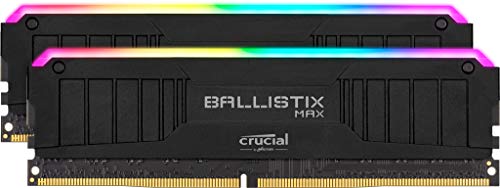
Corsair Vengeance RGB Pro DDR4 vs Crucial Ballistix DDR4 at a Glance
| Feature | Corsair Vengeance RGB Pro DDR4 | Crucial Ballistix DDR4 |
|---|---|---|
| Total Capacity | 32 GB (2x16GB) | 16 GB (2x8GB) |
| Memory Speed | 3200 MHz | 4000 MHz |
| CAS Latency | CL15 / CL16 | CL18 |
| Operating Voltage | 1.2V / 1.35V | 1.35V |
| Form Factor | 288-pin DIMM | 288-pin DIMM |
| RGB Lighting | 10 Ultra-bright LEDs per stick | Integrated RGB / LED Monitor |
| Software Control | Corsair iCUE with Light LINK | Not listed |
| Compatible Chipsets | Intel Z390, AMD 400/500/X570 | Desktop motherboards |
| Weight | Not listed | 236 g |
| Best For | Multitasking and Aesthetic Builds | High-FPS Competitive Gaming |
Memory Capacity and Multitasking Headroom
Memory capacity represents the foundational baseline of desktop usability, determining how many demanding applications your system can manage simultaneously without writing active data blocks to your primary drive. The Corsair Vengeance RGB Pro DDR4 arrives as a 32GB dual-channel configuration split into two 16GB modules. This volume gives modern desktop systems ample breathing room for massive open-world titles, dense browser tab sessions, video timeline rendering, and streaming utilities running alongside your game client.
By comparison, the Crucial Ballistix DDR4 kit contains 16GB of total system memory divided into two 8GB sticks. While 16GB remains sufficient for pure gaming workloads where only the game and essential voice chat tools operate, heavy multitasking quickly saturates this capacity. If your workstation engages in virtual machine environments, 4K rendering pipelines, or high-asset simulations, the lower capacity ceiling of the Crucial kit forces trade-offs, making our comparison of corsair vengeance rgb pro ddr4 vs kingston fury beast ddr4 equally relevant for users weighing capacity against pure throughput.
Choosing between 16GB and 32GB defines how future-proof your system remains as game developers construct titles around higher baseline memory allocations. Corsair ensures you will not encounter stutter caused by memory swapping under demanding workloads, whereas Crucial restricts your operational overhead purely to support high-frequency memory tracks.
Edge: Corsair Vengeance RGB Pro DDR4 offers double the memory capacity to effortlessly handle modern heavy multitasking and memory-intensive production software.
Clock Frequency and Raw Data Transfer Rates
Memory frequency measures how rapidly memory can cycle data to and from the CPU memory controller, directly impacting data transfer rates and memory bandwidth. The Crucial Ballistix DDR4 speed leads this comparison decisively by providing an aggressive 4000MHz operational clock. This remarkable frequency moves data substantially faster through system memory pathways, yielding measurable gains in CPU-bound competitive gaming titles where high framerates depend on rapid frame-buffer delivery.
The Corsair Vengeance kit operates at a standard 3200MHz clock with a specified data transfer rate of 12 gigabits per second. While 3200MHz represents the undisputed sweet spot for plug-and-play DDR4 setups, it lacks the sheer burst transmission potential of 4000MHz. In head-to-head evaluations such as Crucial Ballistix 4000MHz vs Corsair Vengeance 3200MHz, the 800MHz frequency delta clearly benefits systems tuned to exploit extreme throughput rates, similar to findings seen when evaluating corsair vengeance rgb pro ddr4 vs g.skill ripjaws v ddr4 3600.
Nevertheless, running memory at 4000MHz requires a robust integrated memory controller inside the processor and clean motherboard trace topologies. Crucial delivers exceptional performance for hardware configurations that can sustain it, whereas Corsair settles for mainstream clock frequencies that prioritize universal hardware cooperation over raw speed figures.
Edge: Crucial Ballistix DDR4 delivers a massive 800MHz clock frequency advantage that dramatically elevates peak memory throughput.
Latency Timings and Real-World Response
Memory latency dictates the delay between when a memory controller requests specific data blocks and when those blocks are returned for execution. In an in-depth Corsair Vengeance RGB Pro DDR4 review, the Corsair Vengeance RGB Pro DDR4 latency profile presents a standard CAS latency rating of CL16 with primary timings of 16-20-20-38 (with alternate specification table entries listing CAS latency 15). At 3200MHz, this provides a predictable response cycle that synchronizes comfortably with both Intel and AMD architectures.
The Crucial Ballistix DDR4 review reveals a rated CAS latency of CL18 operating at its blistering 4000MHz target. While higher clock speeds inherently mandate looser numerical timings, the true calculated latency in nanoseconds remains tightly matched between both kits because the elevated clock speed of Crucial offsets its higher clock delay count. The tighter cycle ratio ensures fast access while maintaining the throughput needed for high-refresh-rate displays, an architectural balance reminiscent of the differences observed in our look at corsair vengeance rgb pro ddr4 vs g.skill trident z neo ddr4.
For users questioning whether Crucial Ballistix DDR4 vs Corsair Vengeance RGB Pro DDR4 yields a perceptible responsiveness difference, Corsair provides slightly tighter standard clock-to-clock response without pushing electrical boundaries, while Crucial utilizes its fast clock ticks to compensate for looser cycle delays.
Edge: Tie, as Corsair features tighter numerical timings while Crucial balances looser timings with significantly faster clock cycles.
RGB Lighting Ecosystem and Physical Styling
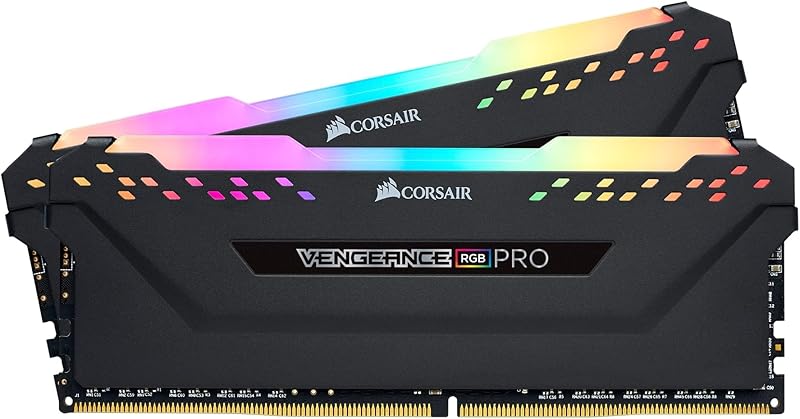
Visual presentation and case aesthetics play an enormous role in modern custom computer building. Corsair equips each Vengeance RGB Pro module with ten ultra-bright, individually addressable RGB LEDs positioned under an opaque light diffuser. Controlled entirely through Corsair iCUE software, these modules support dynamic multi-zone illumination patterns that seamlessly coordinate across compatible Corsair CPU coolers, keyboards, and chassis fans via Light LINK technology.
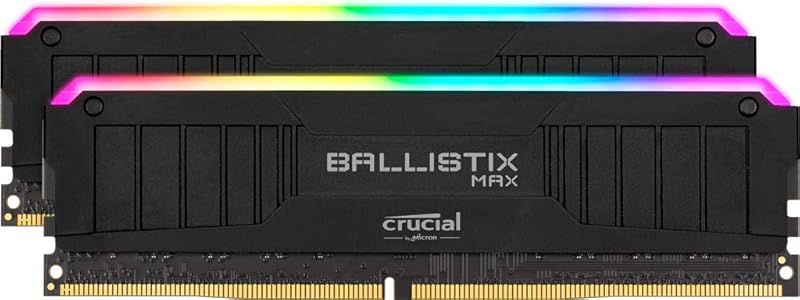
The Crucial Ballistix DDR4 kit features integrated LED lighting and lightweight construction totaling 236 grams for the kit. However, its software ecosystem is less unified than Corsair’s comprehensive platform. Corsair has spent years cultivating iCUE into a robust software hub capable of system-wide sensor monitoring, lighting scene integration, and profile management, giving Corsair Vengeance RGB Pro an unquestioned advantage for aesthetic builds, as highlighted in comparisons like corsair vengeance lpx ddr4 3200 vs vengeance rgb pro ddr4.
Furthermore, the physical heatsink of the Corsair Vengeance module is built around a custom performance PCB engineered to reduce electrical noise, though its taller heat spreader requires careful consideration if pairing with low-profile CPU air coolers. Crucial provides a sleek, lightweight module design that occupies less physical room while still displaying vivid light accents.
Edge: Corsair Vengeance RGB Pro DDR4 delivers far superior RGB customization through its ten independent LEDs per stick and cohesive iCUE software control.
Platform Compatibility and Plug-and-Play Stability
System stability depends entirely on how effectively your motherboard chipset and CPU memory controller interface with the memory modules. Corsair built the Vengeance RGB Pro DDR4 specifically for seamless interoperability, certifying the kit for Intel Z390 as well as AMD 400-series, 500-series, and X570 motherboards. Operating at 3200MHz with carefully screened integrated circuits, these modules enable straightforward profile activation without manual voltage adjustments or complex secondary timing calculations.
By contrast, operating Crucial Ballistix DDR4 at 4000MHz at 1.35 volts demands a highly capable CPU memory controller. On AMD AM4 setups, pushing memory frequencies to 4000MHz often decouples the Infinity Fabric clock from the memory controller frequency, forcing a 2:1 divider ratio that introduces performance penalties unless manually tuned. While Intel desktop systems with enthusiast-grade motherboards can leverage 4000MHz effortlessly, users exploring kits like g.skill ripjaws v ddr4 3600 vs crucial ballistix ddr4 frequently recognize the plug-and-play simplicity of lower clock speeds.
Corsair provides rock-solid, drop-in reliability that boots reliably on almost any modern DDR4 desktop platform without requiring manual memory tuning or BIOS experimentation, giving it the edge for users who value stability above overclocking adventures.
Edge: Corsair Vengeance RGB Pro DDR4 ensures stress-free plug-and-play operation across a vast range of standard motherboards without memory controller strain.
Pros and Cons
Corsair Vengeance RGB Pro DDR4
Pros
- Spacious 32GB capacity across two modules
- Ten individually addressable RGB LEDs per stick
- Deep ecosystem sync via Corsair iCUE
- Custom performance PCB for clean signaling
- Plug-and-play stability across Intel and AMD
Cons
- Lower peak frequency at 3200MHz
- Taller module profile under bulky air coolers
View Corsair Vengeance RGB Pro DDR4 on Amazon
Crucial Ballistix DDR4
Pros
- Blistering 4000MHz memory clock speed
- Lower latency penalty at ultra-high clocks
- Lightweight 236g dual-channel package
- Engineered for high-framerate competitive esports
Cons
- Restricted to 16GB total memory capacity
- 4000MHz requires capable motherboard memory topologies
View Crucial Ballistix DDR4 on Amazon
Who Should Buy Each One
Choose the Corsair Vengeance RGB Pro DDR4 If
- You run demanding workstation software, 3D suites, video editors, or multiple virtual machines that require 32GB of memory.
- You already own Corsair peripherals or cooling components and want synchronized iCUE lighting effects.
- You want guaranteed out-of-the-box system stability on AMD Ryzen or Intel Core systems without bios tuning.
- You keep numerous background applications, browser windows, and game launchers active while gaming.
Choose the Crucial Ballistix DDR4 If
- You play competitive esports titles at 1080p and need maximum memory frequency to reach high refresh rates.
- You own a high-end motherboard and processor capable of running 4000MHz memory clocks stably.
- Your system workload consists strictly of gaming without memory-intensive rendering tasks running in parallel.
- You want a lightweight, sleek memory kit with responsive CL18 high-speed operation.
Final Verdict
For the vast majority of PC builders and desktop users, the Corsair Vengeance RGB Pro DDR4 is the superior everyday choice. Doubling your memory footprint from 16GB to 32GB produces an immediate, tangible improvement in workflow fluidity, preventing background bottlenecks when gaming while streaming or managing large productivity projects. Combined with its polished iCUE lighting customization and proven compatibility across modern chipsets, Corsair offers a well-rounded package that avoids the instability headaches often associated with pushing boundary-pushing clock frequencies.
The Crucial Ballistix DDR4 claims its victory in specialized performance niches. Enthusiast gamers hunting for the absolute highest possible frame rates in competitive shooters will benefit from the massive 4000MHz bandwidth, provided their platform’s memory controller can sustain it. If you exclusively game, possess an enthusiast motherboard, and do not require heavy multitasking capacity, Crucial delivers exceptional high-speed agility that extracts the utmost power from your gaming hardware.
FAQ
Is Crucial Ballistix DDR4 worth it for gaming rigs?
Yes, is Crucial Ballistix DDR4 worth it depends on your specific gaming setup. If you run competitive first-person shooters on high-refresh-rate monitors with an unlocked processor and a capable motherboard, the 4000MHz speed provides rapid data feeds to the CPU, raising minimum framerates in memory-sensitive scenarios.
Can you use Corsair Vengeance RGB Pro DDR4 or Crucial Ballistix DDR4 on AMD Ryzen systems?
Both memory kits function on AMD Ryzen motherboards, but Corsair Vengeance RGB Pro DDR4 provides much easier configuration. Because Ryzen processors operate an Infinity Fabric interconnect that generally peaks around 1800MHz to 1900MHz in a 1:1 ratio, Corsair’s 3200MHz kit runs smoothly within that limit, whereas Crucial’s 4000MHz kit will likely force a 2:1 divider ratio unless manually tuned.
How do Corsair Vengeance RGB Pro DDR4 or Crucial Ballistix DDR4 for gaming compare in modern titles?
When selecting Corsair Vengeance RGB Pro DDR4 or Crucial Ballistix DDR4 for gaming, modern titles increasingly demand more than 16GB of system memory when background applications are open. Corsair’s 32GB capacity prevents stuttering from memory exhaustion, while Crucial’s 4000MHz speed delivers slightly higher peak framerates in titles that fit comfortably within 16GB.
What are the lighting differences between both memory kits?
Corsair Vengeance RGB Pro DDR4 features ten individually addressable RGB LEDs inside each module, managed through Corsair iCUE for multi-device synchronization. Crucial Ballistix DDR4 includes integrated lighting and lightweight heat spreaders, but lacks the expansive cross-component lighting integration found in Corsair’s software ecosystem.
Can I run Crucial Ballistix DDR4 at 4000MHz without adjusting BIOS settings?
No desktop memory runs at high frequencies automatically upon installation. You must enter your motherboard BIOS and activate the memory profile to instruct your system to apply the 4000MHz clock and 1.35V operational voltage specified by Crucial.
Does Corsair Vengeance RGB Pro DDR4 fit beneath large dual-tower air coolers?
Corsair Vengeance RGB Pro DDR4 modules feature extended heatsinks to accommodate the integrated RGB diffusers and internal lighting hardware. Builders using dual-tower CPU air coolers should check their cooler’s specified RAM clearance to ensure the modules fit beneath the cooling fans.