Deciding between the Dell Inspiron 14 Plus and the HP Envy x360 15 comes down to choosing between cutting-edge artificial intelligence silicon in a mobile frame and an expansive display footprint tailored for stationary multitasking. The Inspiron relies on a modern AMD platform equipped with dedicated neural processing and high-bandwidth DDR5 memory, whereas the Envy pairs a proven 12th Gen Intel Core processor with a wide 15-inch panel designed for multi-window viewing.
Shoppers who prioritize on-the-go mobility, modern AI application acceleration, and the latest wireless networking standards should opt for the Inspiron. Buyers who want an expansive visual canvas for spreadsheet viewing, multimedia playback, and rapid battery replenishment at a dedicated desk setup should select the Envy.

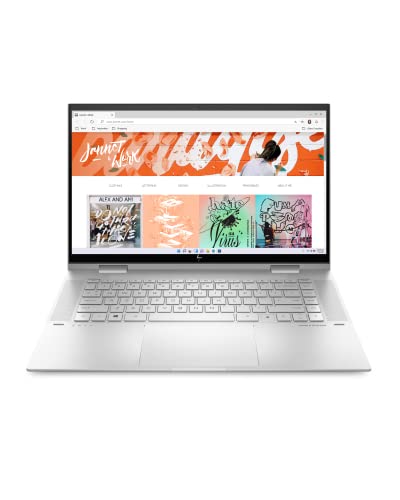
Dell Inspiron 14 Plus vs HP Envy x360 15 at a Glance
| Feature | Dell Inspiron 14 Plus | HP Envy x360 15 |
|---|---|---|
| Processor | AMD Ryzen AI 7 350 (8 cores, up to 5.0 GHz) | Intel Core i7-1260P (12th Gen) |
| AI Acceleration | Dedicated NPU (Up to 50 TOPS) | Not listed / None dedicated |
| Graphics | AMD Radeon Graphics (Integrated) | Intel Iris Xe Graphics (Integrated) |
| Memory | 16 GB DDR5 | 16 GB DDR4 SDRAM |
| Storage | 1 TB SSD (Upgraded / Resealed) | 1 TB SSD (Factory) |
| Display | 14-inch WUXGA (1920×1200) Touch, 300 nits | 15-inch FHD (1920×1080) Touch, Edge-to-Edge |
| Wireless Connectivity | Wi-Fi 7, Bluetooth | Bluetooth (Wi-Fi standard not specified) |
| Fast Charging | Not listed | HP Fast Charge (0 to 50% in ~30 min) |
| Weight and Dimensions | 12.36″L x 8.9″W x 0.65″Th (Weight not listed) | 4.0 pounds (Dimensions not listed) |
| Best For | Mobile productivity and local AI computing | Stationary multi-window work and media consumption |
Processing Architecture and AI Performance
The fundamental divide between these two convertible computers lies in their silicon generations and processing design. The Dell Inspiron 14 Plus features the advanced AMD Ryzen AI 7 350 processor, a modern chip featuring 8 cores, burst speeds up to 5.0 GHz, and a dedicated Neural Processing Unit (NPU) capable of delivering up to 50 TOPS of AI performance. This specialized engine handles background tasks like camera framing, live captions, and localized generative tools without burdening the primary compute cores. In contrast, the HP Envy x360 15 runs on a 12th Generation Intel Core i7-1260P processor, which utilizes Intel’s dynamic performance and efficient core distribution to balance system responsiveness across everyday computing tasks.
When running machine-learning-enhanced workflows, the Dell Inspiron 14 Plus Ryzen AI 7 implementation marks a major technological leap over the older architecture inside the Envy. The HP Envy x360 15 Intel i7 relies entirely on traditional x86 execution cores and its integrated Intel Iris Xe graphics to process computational workloads. While the i7-1260P provides dependable throughput for office applications, document creation, and standard browsing, it lacks the specialized local AI pipelines that define modern Windows 11 Copilot+ PC experiences. Readers curious about how Dell’s convertible platform compares to other modern convertibles can explore our dell inspiron 14 plus vs hp spectre x360 14 breakdown for further architectural insights.
System memory architecture further amplifies this performance discrepancy. The Inspiron provides 16 GB of high-speed DDR5 memory, delivering substantially higher data transfer rates to feed both the central processor and the integrated AMD Radeon Graphics engine. The Envy uses 16 GB of DDR4 SDRAM, a standard that operates at noticeably lower memory bandwidth. Because integrated graphics processors share system memory with the operating system, the DDR5 pipeline in the Inspiron yields snappier real-time rendering, smoother UI scaling, and better responsiveness when switching between demanding software suites.
Edge: Dell Inspiron 14 Plus delivers vastly superior compute efficiency, modern 50 TOPS NPU acceleration, and higher-bandwidth DDR5 system memory.
Display Workspace and Visual Ergonomics
Screen real estate dictates how comfortably you can manage spreadsheets, document layouts, and multimedia playback. The HP Envy x360 15 delivers a traditional 15-inch edge-to-edge glass display with a Full HD resolution of 1920×1080 pixels in a standard 16:9 aspect ratio. This expansive physical area makes the Envy an appealing option for split-screen document editing, as two windows can sit side by side with plenty of horizontal breathing room. The sheer physical size of the panel also benefits video streaming and media playback, where 16:9 widescreen content fills the screen without top-and-bottom letterboxing bars.
The Dell Inspiron 14 Plus counters with a modern 14-inch WUXGA display featuring a resolution of 1920×1200 pixels. This 16:10 aspect ratio introduces additional vertical pixels, allowing you to see extra rows in data tables, read longer passages of text without scrolling, and view comprehensive application toolbars cleanly. Dell includes narrow borders to maximize the active screen surface within a compact footprint, accompanied by a 300-nit brightness rating designed to maintain legibility in standard indoor lighting conditions while reducing eye strain. Buyers deciding between smaller convertibles and larger enterprise chassis can read our dell xps 16 vs hp envy x360 15 overview for a broader perspective on physical display scaling.
External display versatility also separates the two machines. The Inspiron explicitly documents support for up to three external displays using its HDMI port and USB-C display-out capabilities, transforming it into a high-productivity hub when docked at an office workstation. The Envy listing notes compatibility with external displays via HDMI and standard USB ports, but it lacks specific confirmation regarding multi-display transport thresholds. Both machines feature touch-enabled surfaces that take full advantage of their 360-degree convertible hinges for digital markup, sketching, and responsive touch gestures.
Edge: Tie. The Inspiron provides a superior 16:10 productivity ratio with multi-display docking support, while the Envy offers a larger 15-inch canvas for horizontal multitasking.
Portability, Form Factor, and Convertible Handling
A convertible laptop must balance mechanical rigidity with easy handling when rotated between laptop, tent, stand, and tablet orientations. The Dell Inspiron 14 Plus is engineered specifically around compact transit, with outer chassis measurements of 12.36 inches in length, 8.9 inches in width, and a slim thickness of just 0.65 inches. Although the product listing does not specify the exact total weight of the Inspiron, a 14-inch machine with a 0.65-inch profile fits effortlessly into standard messenger bags, backpacks, and compact briefcases without demanding specialized carrying gear.
The HP Envy x360 15 features an aluminum chassis finished in natural silver that weighs a documented 4.0 pounds. While 4.0 pounds is manageable for a full-sized 15-inch machine moved from desk to meeting room, it presents definite ergonomic challenges when rotated into tablet mode. Holding a 4-pound slate in one hand while writing notes or reading digital documents with the other causes hand and wrist fatigue within minutes. As a result, the 360-degree hinge on the Envy is best utilized in tent or stand mode on a solid table surface for presentations or video viewing rather than as a handheld digital tablet. Readers evaluating thin-profile machinery may also enjoy our dell xps 14 vs inspiron 14 plus comparison.
For shoppers reading any comprehensive HP Envy x360 15 review or Dell Inspiron 14 Plus review, handling comfort plays a massive role in daily satisfaction. The Inspiron’s reduced footprint means that when you fold the display flat against the base, the resulting slate feels far more natural in the crook of an arm. Its narrow bezels prevent accidental touch inputs along the edges while preserving enough perimeter space for stable thumb placement during mobile walkthroughs.
Edge: Dell Inspiron 14 Plus wins on portability due to its significantly more compact 0.65-inch chassis that makes convertible tablet use practical.
Power Management and Battery Delivery
Maintaining workflow continuity without being tied to a wall outlet is essential for hybrid workers and mobile professionals. The HP Envy x360 15 distinguishes itself with dedicated charging engineering, specifically featuring HP Fast Charge technology. According to HP’s technical specifications, this system can take the internal battery from 0 to 50 percent charge in approximately 30 minutes using its 45-volt power delivery setup. This quick turnaround allows users to plug in during a short break and recover enough capacity to power through several hours of meetings without prolonged downtime.
Regarding overall battery capacity, the product data presents contrasting levels of transparency. The listing for the Dell Inspiron 14 Plus does not specify its exact battery watt-hour size or estimated operational duration. While shoppers frequently research the Dell Inspiron 14 Plus battery life expecting official figures, the technical listing remains silent on these metrics. However, the underlying hardware tells an encouraging story: AMD’s Ryzen AI 300 series architecture is built on advanced manufacturing nodes designed to sip minimal wattage during idle operations, media playback, and background office tasks. For comparisons against other travel-oriented notebooks, examine our dell xps 13 vs inspiron 14 plus analysis.
Because the Envy explicitly confirms its rapid recharge capability, it gives mobile professionals a verifiable metric for field operations. If your routine involves unpredictable schedules and fleeting access to electrical outlets, having a documented 30-minute quick replenishment feature removes substantial operational anxiety. The Inspiron requires relying on USB-C power delivery standards without verified manufacturer charge-time guarantees provided in the listing.
Edge: HP Envy x360 15 holds the advantage thanks to documented HP Fast Charge capability that restores 50 percent capacity in 30 minutes.
Connectivity, Wireless Standards, and Communication
Peripheral expansion and networking hardware determine how smoothly a 2-in-1 integrates into diverse home and business environments. The Dell Inspiron 14 Plus features bleeding-edge wireless capabilities with factory-integrated Wi-Fi 7 and Bluetooth. Wi-Fi 7 provides dramatically wider channel bandwidth, multi-link operation, and lower latency compared to earlier wireless generations. This ensures that users on modern commercial or home mesh networks experience lag-free cloud synchronization, steady high-resolution video streams, and instant file transfers even in dense wireless environments.
The HP Envy x360 15 listing confirms Bluetooth integration and broad peripheral compatibility with external mice, keyboards, and storage, but it leaves the exact Wi-Fi standard unspecified. Beyond wireless networking, the physical interface layouts on both machines provide strong versatility. The Inspiron includes dedicated USB-C, standard USB-A, and full-sized HDMI video output, eliminating the immediate need for external dongles. The Envy matches this functional versatility by providing HDMI, standard USB, and multi-accessory support, giving both laptops solid options for legacy flash drives and modern external storage hardware.
Communication hardware is another area where the Inspiron pulls ahead in practical specifications. Dell incorporates a Full HD (FHD) front-facing camera paired with dual-array microphones, designed to capture sharp video feeds and isolate vocal frequencies during remote calls. The Envy listing notes a front camera and provides HP Audio Switch software, but it does not specify the sensor resolution or microphone array layout. For remote workers spending extensive hours in virtual conferences, the Dell Inspiron’s verified 1080p camera setup yields distinctly clearer video fidelity.
Edge: Dell Inspiron 14 Plus wins with state-of-the-art Wi-Fi 7 wireless connectivity and a documented FHD camera with dual-array microphones.
Productivity, Security, and Hardware Provenance
When assessing the HP Envy x360 15 vs Dell Inspiron 14 Plus for day-to-day office tasks, tactile ergonomics and data security come to the forefront. The Inspiron features a backlit keyboard for typing in dimly lit rooms, HD Audio, and an integrated fingerprint reader configured for biometric authentication through Windows 11 Home. The Envy offers a similarly robust business environment, supplying fingerprint recognition, Windows 11 Home, and a proprietary suite of utility software including HP BIOS Protection, HP Command Center, and HP Support Assistant. Those comparing general computing platforms against higher-tier productivity work can consult our dell xps 16 vs inspiron 14 plus guide.
Hardware provenance presents a key distinction that buyers must understand. The Dell Inspiron listing clearly discloses that the brand-new computer has been resealed by the merchant (ISTComputers) to perform an aftermarket solid-state drive upgrade to 1 TB, accompanied by a one-year warranty from Dell covering the remaining original components. The HP Envy x360 15, on the other hand, comes directly in its factory-original configuration (model 15-es2026nr) with an integrated 1 TB SSD, 16 GB of memory, and standard factory limited warranty coverage. For corporate purchasing departments with strict policies against third-party modified hardware, this distinction can be a decisive factor.
For buyers evaluating whether the Dell Inspiron 14 Plus or HP Envy x360 15 for productivity makes more sense, the workflow environment matters most. The Inspiron excels in modern multitasking due to its Copilot AI integration, fast DDR5 RAM, and compact convertible convenience. The Envy stands out for traditional desk productivity, offering HP BIOS protection, dedicated thermal and audio tuning tools via HP Command Center, and a spacious aluminum keyboard deck that accommodates long typing sessions.
Edge: Dell Inspiron 14 Plus for raw productivity features and modern AI acceleration; HP Envy x360 15 for pure factory-sealed provenance and enterprise software utilities.
Pros and Cons
Dell Inspiron 14 Plus
Pros
- Powerful Ryzen AI 7 chip with dedicated NPU
- Faster DDR5 system memory
- Next-generation Wi-Fi 7 connectivity
- Taller 16:10 WUXGA touchscreen display
Cons
- Resealed packaging for aftermarket SSD upgrade
- Smaller 14-inch display area
View Dell Inspiron 14 Plus on Amazon
HP Envy x360 15
Pros
- Spacious 15-inch edge-to-edge touchscreen
- HP Fast Charge reaches 50% in 30 minutes
- Durable natural silver aluminum body
Cons
- Older 12th Gen Intel processor architecture
- Slower DDR4 memory generation
- Heavier four-pound chassis
View HP Envy x360 15 on Amazon
Who Should Buy Each One
Choose the Dell Inspiron 14 Plus If

- You need localized AI acceleration with a dedicated 50 TOPS NPU to run modern Copilot+ tools, real-time background effects, and generative applications efficiently.
- You travel frequently and require a slim 0.65-inch thick convertible chassis that slides into compact bags and feels manageable when carried.
- You operate on high-speed wireless networks and want the cutting-edge throughput and ultra-low latency of integrated Wi-Fi 7.
- You prefer a 16:10 aspect ratio screen (1920×1200) that gives you more vertical room for editing documents, coding, and reading data tables.
Choose the HP Envy x360 15 If

- You want a spacious 15-inch touch display that allows two application windows to sit comfortably side by side without crowding.
- You need reliable rapid replenishment and benefit from HP Fast Charge technology that restores half the battery in roughly 30 minutes.
- You prefer an unmodified, factory-sealed laptop backed by standard original equipment manufacturer assembly rather than an aftermarket upgraded configuration.
- You intend to use the convertible primarily on a desk in tent or stand mode for media playback, group presentations, or secondary display use.
Final Verdict
For the majority of shoppers comparing these two convertibles, the Dell Inspiron 14 Plus represents the superior long-term investment. Its next-generation AMD Ryzen AI 7 350 processor, dedicated 50 TOPS NPU, high-bandwidth 16 GB DDR5 memory, and future-proof Wi-Fi 7 wireless standard place it well ahead of older hardware architectures. Combined with a productivity-friendly 16:10 WUXGA display and a travel-friendly 0.65-inch profile, the Inspiron delivers a responsive, versatile computing experience that meets the evolving demands of modern mobile software.
The HP Envy x360 15 remains a practical option for users whose computing lives remain anchored to a specific desk or workspace. If you primarily consume widescreen video, prefer a 15-inch physical display for side-by-side document views, and value the peace of mind that comes with a documented 30-minute fast charge capability, the Envy provides a dependable computing foundation. However, unless maximum screen width and rapid recharging supersede all other computing factors, the modern processing platform and superior portability of the Inspiron make it the clear overall winner.
FAQ
Does the Dell Inspiron 14 Plus offer better processing performance than the HP Envy x360 15?
Yes. The Dell Inspiron 14 Plus features an AMD Ryzen AI 7 350 processor with 8 cores running up to 5.0 GHz and a dedicated NPU delivering up to 50 TOPS of AI performance. The HP Envy x360 15 runs on an older 12th Generation Intel Core i7-1260P processor, which lacks dedicated hardware for local AI acceleration and operates on slower DDR4 memory.
Can both laptops be used in tablet mode?
Yes, both models feature 360-degree hinges and touchscreens that allow them to function in laptop, tablet, tent, and stand modes. However, the HP Envy x360 15 weighs 4.0 pounds, making it noticeably heavier and more fatiguing to hold as a handheld tablet compared to the compact 14-inch Dell Inspiron 14 Plus.
What are the primary differences in display resolution between these two laptops?
The Dell Inspiron 14 Plus features a 14-inch WUXGA screen with a resolution of 1920×1200 in a 16:10 aspect ratio, providing additional vertical screen space for documents and browsing. The HP Envy x360 15 utilizes a 15-inch Full HD display with a 1920×1080 resolution in a standard 16:9 widescreen layout, offering a wider physical canvas for video playback and side-by-side multitasking.
Why does the Dell Inspiron 14 Plus listing mention an SSD upgrade?
The product listing for the Dell Inspiron 14 Plus indicates that the computer was resealed by the seller (ISTComputers) to upgrade the storage drive to a 1 TB solid-state drive. The listing clarifies that a one-year warranty from Dell remains active on all remaining original components.
Which laptop is more practical for students carrying backpacks across campus?
The Dell Inspiron 14 Plus is considerably more practical for students. With compact exterior dimensions of 12.36 by 8.9 inches and a slim 0.65-inch profile, it fits easily into student bags and occupies less desk space in crowded lecture halls. The HP Envy x360 15 is bulkier and weighs 4.0 pounds, making it better suited for dorm-room desks.
Does either convertible support fast charging?
The HP Envy x360 15 explicitly features HP Fast Charge, which can recharge the battery from zero to approximately 50 percent capacity in about 30 minutes. The Dell Inspiron 14 Plus listing does not provide verified fast-charging metrics or specific charging durations.
What wireless networking standards are supported on these machines?
The Dell Inspiron 14 Plus includes cutting-edge Wi-Fi 7 along with Bluetooth, providing high data throughput and low latency on compatible routers. The HP Envy x360 15 documents Bluetooth connectivity, but its product listing does not state the specific generation of Wi-Fi included.